reset FORD TRANSIT CONNECT 2015 2.G Owners Manual
[x] Cancel search | Manufacturer: FORD, Model Year: 2015, Model line: TRANSIT CONNECT, Model: FORD TRANSIT CONNECT 2015 2.GPages: 428, PDF Size: 6.27 MB
Page 7 of 428
Ordering Additional Owner's
Literature......................................................172
Reporting Safety Defects (U.S. Only)..............................................................172
Reporting Safety Defects (Canada Only)..............................................................173
Fuses
Fuse Box Locations......................................174
Fuse Specification Chart............................175
Changing a Fuse
...........................................184
Maintenance
General Information
....................................185
Opening and Closing the Hood...............185
Under Hood Overview - 1.6L.....................187
Under Hood Overview - 2.5L...................188
Engine Oil Dipstick -
1.6L
EcoBoost™................................................189
Engine Oil Dipstick - 2.5L..........................189
Engine Oil Check..........................................189
Oil Change Indicator Reset.......................190
Engine Coolant Check................................190
Automatic Transmission Fluid Check............................................................192
Brake Fluid Check.........................................192
Power Steering Fluid Check......................192
Washer Fluid Check
.....................................192
Changing the 12V Battery..........................193
Checking the Wiper Blades......................194
Changing the Wiper Blades......................194
Adjusting the Headlamps.........................196
Changing a Bulb............................................197
Bulb Specification Chart...........................202
Changing the Engine Air Filter................204
Technical Specifications -
1.6L
EcoBoost™...............................................205
Technical Specifications - 2.5L..............207
Vehicle Care
Cleaning Products
.........................................211 Cleaning the Exterior....................................211
Waxing..............................................................212
Cleaning the Engine
.....................................212
Cleaning the Windows and Wiper Blades...........................................................213
Cleaning the Interior....................................213
Cleaning the Instrument Panel and Instrument Cluster Lens.........................213
Cleaning Leather Seats..............................214
Repairing Minor Paint Damage................215
Cleaning the Alloy Wheels
........................215
Vehicle Storage
..............................................215
Wheels and Tires
General Information
....................................218
Tire Care
...........................................................219
Using Winter Tires.......................................234
Using Snow Chains.....................................234
Tire Pressure Monitoring System...........235
Changing a Road Wheel...........................239
Technical Specifications...........................244
Capacities and Specific- ations
Engine Specifications -
1.6L
EcoBoost™...............................................246
Engine Specifications - 2.5L....................246
Motorcraft Parts - 1.6L EcoBoost™......247
Motorcraft Parts - 2.5L..............................248
Vehicle Identification Number................248
Vehicle Certification Label.......................249
Transmission Code Designation
............250
Audio System
General Information -
United States of
America........................................................251
Audio Unit - Vehicles With: AM/FM......252
Audio Unit - Vehicles With: Premium AM/ FM/CD.........................................................255
Audio Unit - Vehicles With: AM/FM/CD/ SYNC............................................................256
4
Transit Connect (CHC) Canada/United States of America, enUSA, First Printing Table of Contents
Page 11 of 428
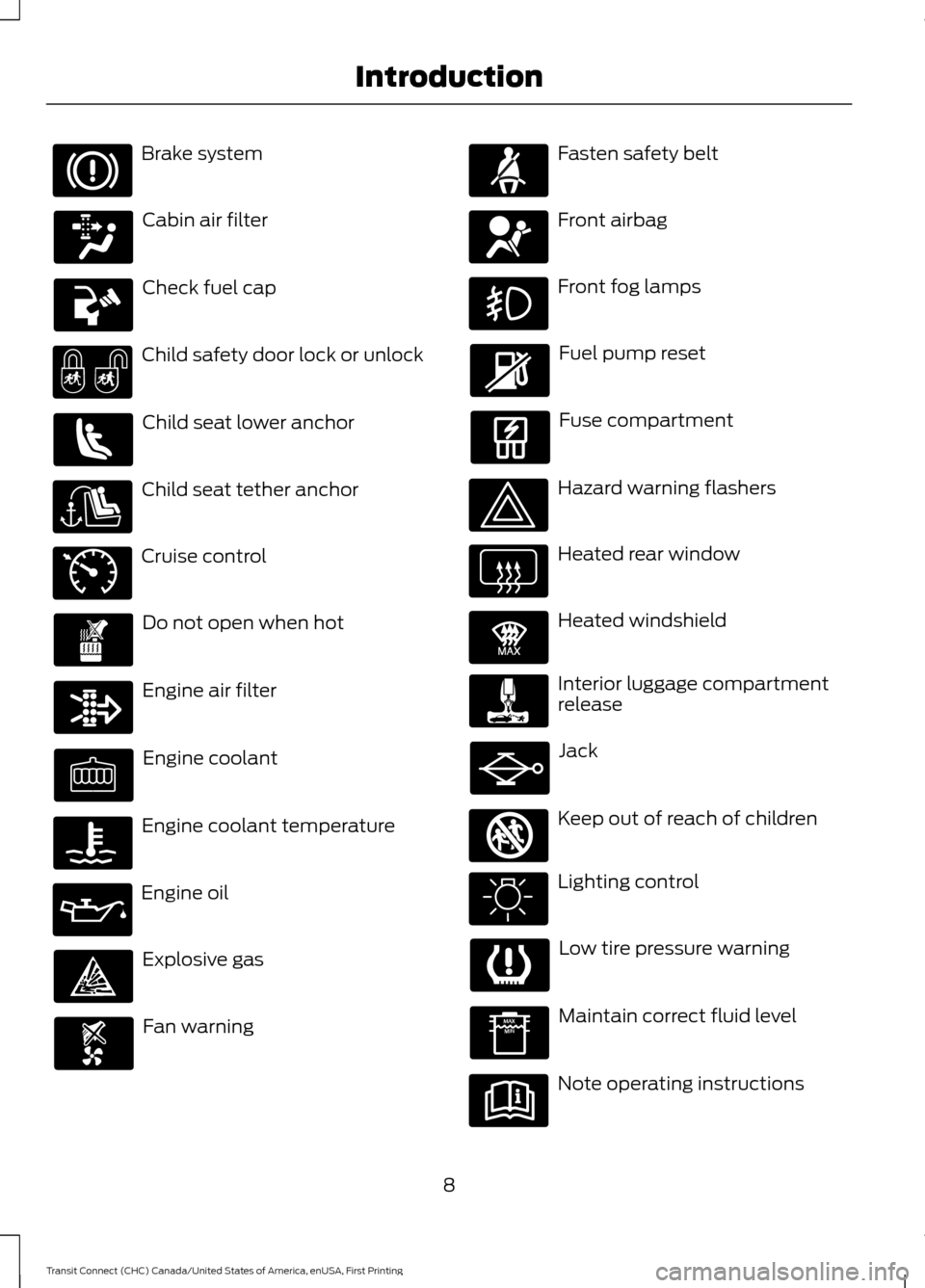
Brake system
Cabin air filter
Check fuel cap
Child safety door lock or unlock
Child seat lower anchor
Child seat tether anchor
Cruise control
Do not open when hot
Engine air filter
Engine coolant
Engine coolant temperature
Engine oil
Explosive gas
Fan warning Fasten safety belt
Front airbag
Front fog lamps
Fuel pump reset
Fuse compartment
Hazard warning flashers
Heated rear window
Heated windshield
Interior luggage compartment
release
Jack
Keep out of reach of children
Lighting control
Low tire pressure warning
Maintain correct fluid level
Note operating instructions
8
Transit Connect (CHC) Canada/United States of America, enUSA, First Printing Introduction E71340 E91392 E161353
Page 56 of 428
USING MYKEY WITH REMOTE
START SYSTEMS
MyKey is not compatible with non
Ford-approved, aftermarket remote start
systems. If you choose to install a remote
start system, see an authorized dealer for
a Ford-approved remote start system.
MYKEY TROUBLESHOOTING Potential Causes
Condition
· The key used to start your vehicle does
not have admin privileges.
I cannot program a MyKey.
·
The key used to start your vehicle is the
only admin key (there always has to be at
least one admin key).
·
SecuriLock passive anti-theft system is
disabled or in unlimited mode.
·
The key used to start your vehicle does
not have admin privileges.
I cannot program the configurable settings.
· No keys are programmed to the vehicle.
See
Creating a MyKey (page 50).
·
The key used to start your vehicle does
not have admin privileges.
I cannot clear the MyKeys.
·
No MyKeys are programmed to the
vehicle. See Creating a MyKey (page
50).
Purchase a new key from your authorized
dealer.
I lost the only admin key.
Program a spare key. See
Passive Anti-
Theft System (page 59).
I lost a key.
·
The MyKey user is not using the MyKey.
MyKey distance does not accumulate.
· An admin key holder cleared the MyKeys
and created new MyKeys.
·
The key system has been reset.
53
Transit Connect (CHC) Canada/United States of America, enUSA, First Printing MyKey
™
Page 65 of 428
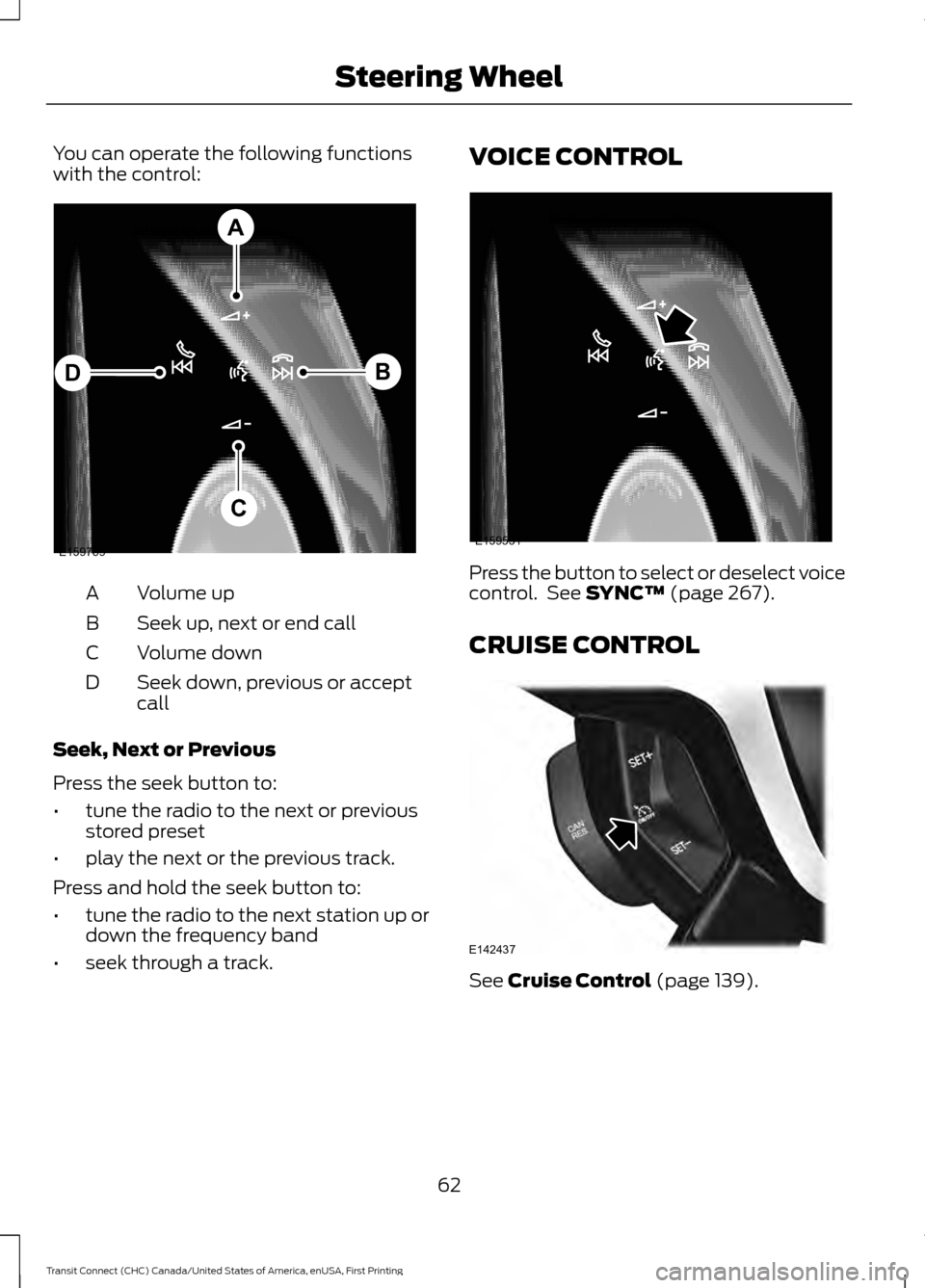
You can operate the following functions
with the control:
Volume up
A
Seek up, next or end call
B
Volume down
C
Seek down, previous or accept
call
D
Seek, Next or Previous
Press the seek button to:
• tune the radio to the next or previous
stored preset
• play the next or the previous track.
Press and hold the seek button to:
• tune the radio to the next station up or
down the frequency band
• seek through a track. VOICE CONTROL
Press the button to select or deselect voice
control. See SYNC™ (page 267).
CRUISE CONTROL See
Cruise Control (page 139).
62
Transit Connect (CHC) Canada/United States of America, enUSA, First Printing Steering WheelE159789
A
B
C
D E159531 E142437
Page 77 of 428
One-Touch Down (If Equipped)
Press the control fully and release it. Press
again or lift it to stop the window.
One-Touch Up
(If Equipped)
Lift the control fully and release it. Press
or lift it again to stop the window.
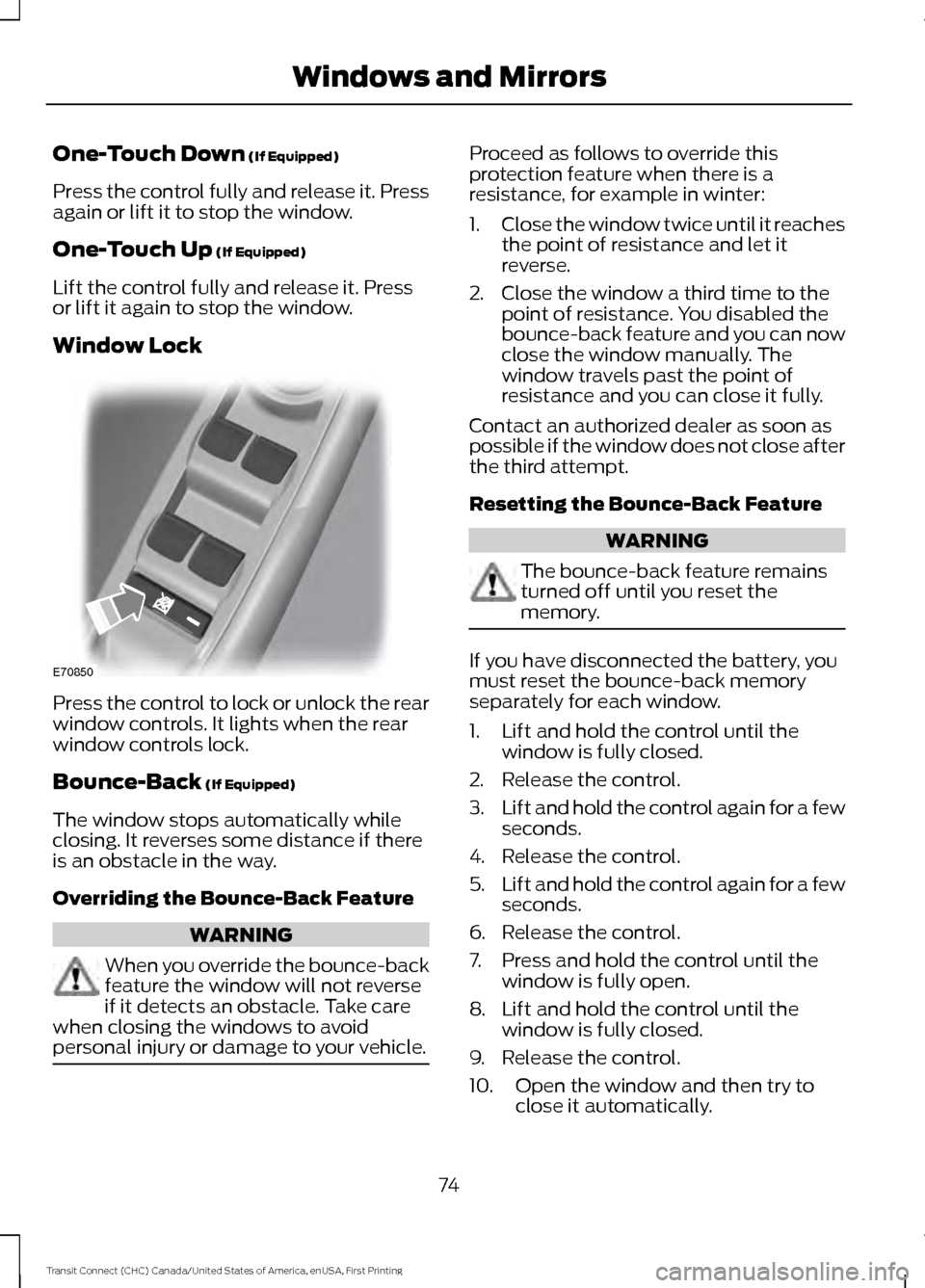
Window Lock Press the control to lock or unlock the rear
window controls. It lights when the rear
window controls lock.
Bounce-Back
(If Equipped)
The window stops automatically while
closing. It reverses some distance if there
is an obstacle in the way.
Overriding the Bounce-Back Feature WARNING
When you override the bounce-back
feature the window will not reverse
if it detects an obstacle. Take care
when closing the windows to avoid
personal injury or damage to your vehicle. Proceed as follows to override this
protection feature when there is a
resistance, for example in winter:
1.
Close the window twice until it reaches
the point of resistance and let it
reverse.
2. Close the window a third time to the point of resistance. You disabled the
bounce-back feature and you can now
close the window manually. The
window travels past the point of
resistance and you can close it fully.
Contact an authorized dealer as soon as
possible if the window does not close after
the third attempt.
Resetting the Bounce-Back Feature WARNING
The bounce-back feature remains
turned off until you reset the
memory.
If you have disconnected the battery, you
must reset the bounce-back memory
separately for each window.
1. Lift and hold the control until the
window is fully closed.
2. Release the control.
3. Lift and hold the control again for a few
seconds.
4. Release the control.
5. Lift and hold the control again for a few
seconds.
6. Release the control.
7. Press and hold the control until the window is fully open.
8. Lift and hold the control until the window is fully closed.
9. Release the control.
10. Open the window and then try to close it automatically.
74
Transit Connect (CHC) Canada/United States of America, enUSA, First Printing Windows and MirrorsE70850
Page 89 of 428
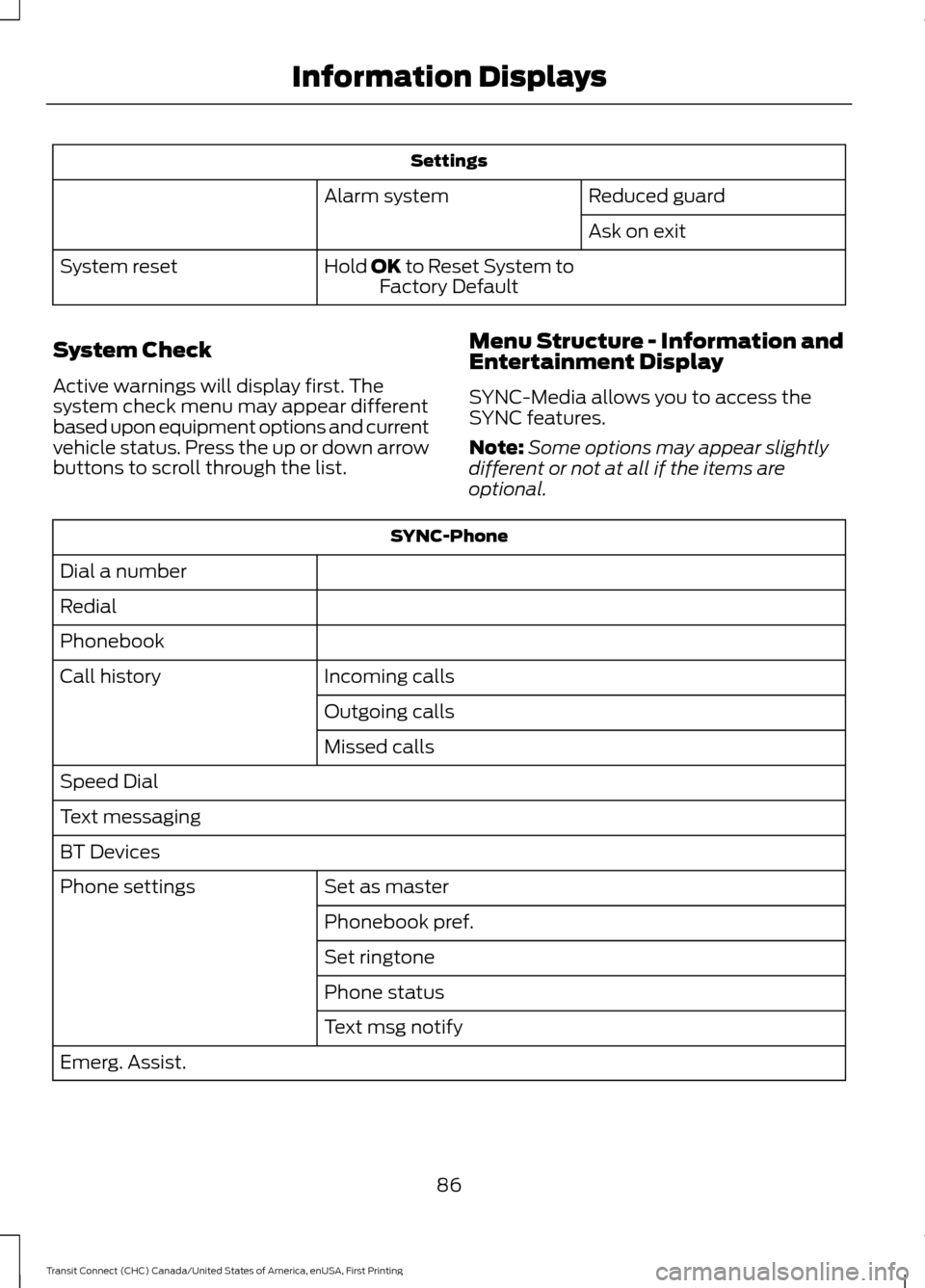
Settings
Reduced guard
Alarm system
Ask on exit
Hold OK to Reset System to Factory Default
System reset
System Check
Active warnings will display first. The
system check menu may appear different
based upon equipment options and current
vehicle status. Press the up or down arrow
buttons to scroll through the list. Menu Structure - Information and
Entertainment Display
SYNC-Media allows you to access the
SYNC features.
Note:
Some options may appear slightly
different or not at all if the items are
optional. SYNC-Phone
Dial a number
Redial
Phonebook Incoming calls
Call history
Outgoing calls
Missed calls
Speed Dial
Text messaging
BT Devices Set as master
Phone settings
Phonebook pref.
Set ringtone
Phone status
Text msg notify
Emerg. Assist.
86
Transit Connect (CHC) Canada/United States of America, enUSA, First Printing Information Displays
Page 90 of 428
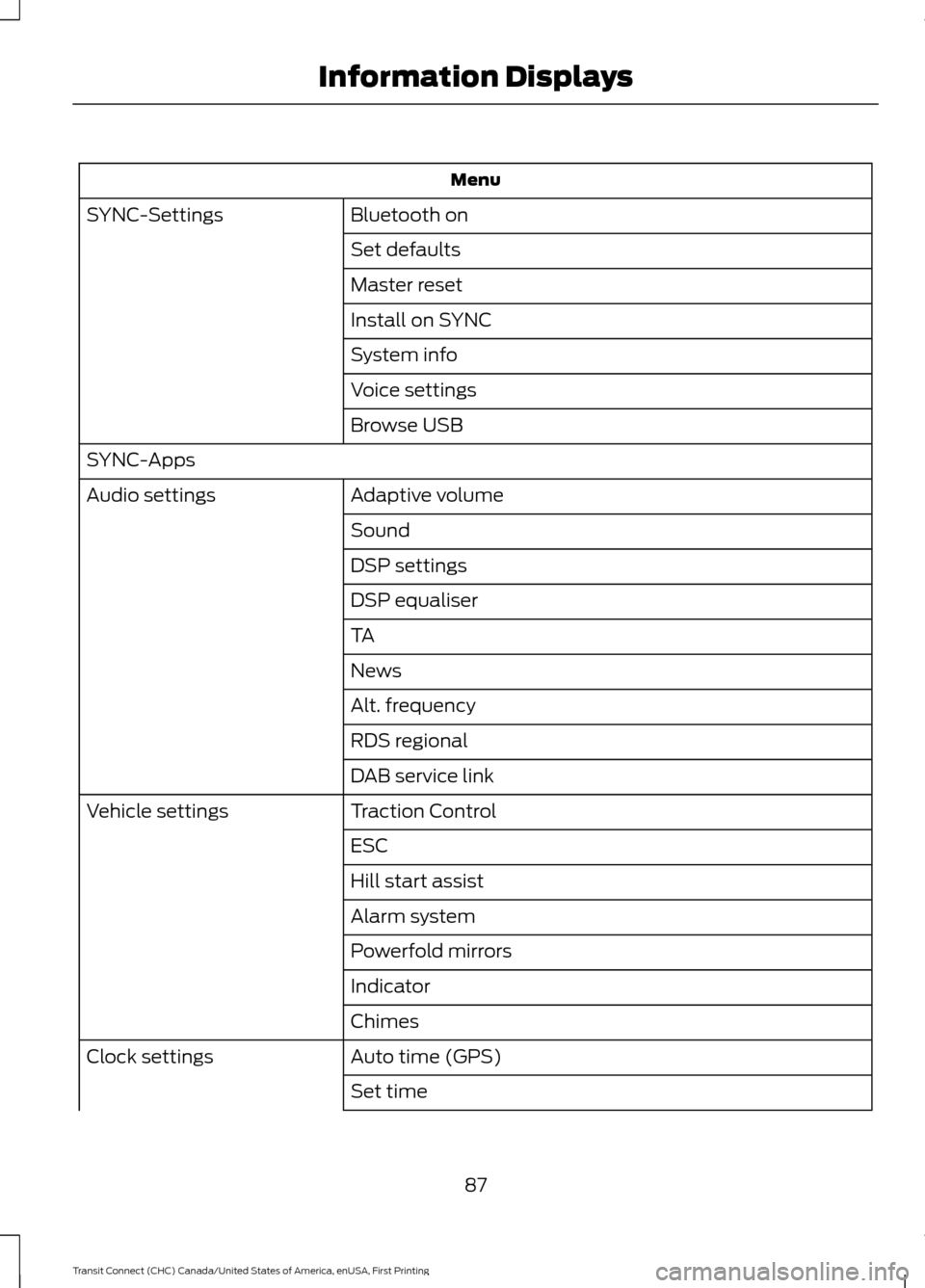
Menu
Bluetooth on
SYNC-Settings
Set defaults
Master reset
Install on SYNC
System info
Voice settings
Browse USB
SYNC-Apps Adaptive volume
Audio settings
Sound
DSP settings
DSP equaliser
TA
News
Alt. frequency
RDS regional
DAB service link
Traction Control
Vehicle settings
ESC
Hill start assist
Alarm system
Powerfold mirrors
Indicator
Chimes
Auto time (GPS)
Clock settings
Set time
87
Transit Connect (CHC) Canada/United States of America, enUSA, First Printing Information Displays
Page 91 of 428
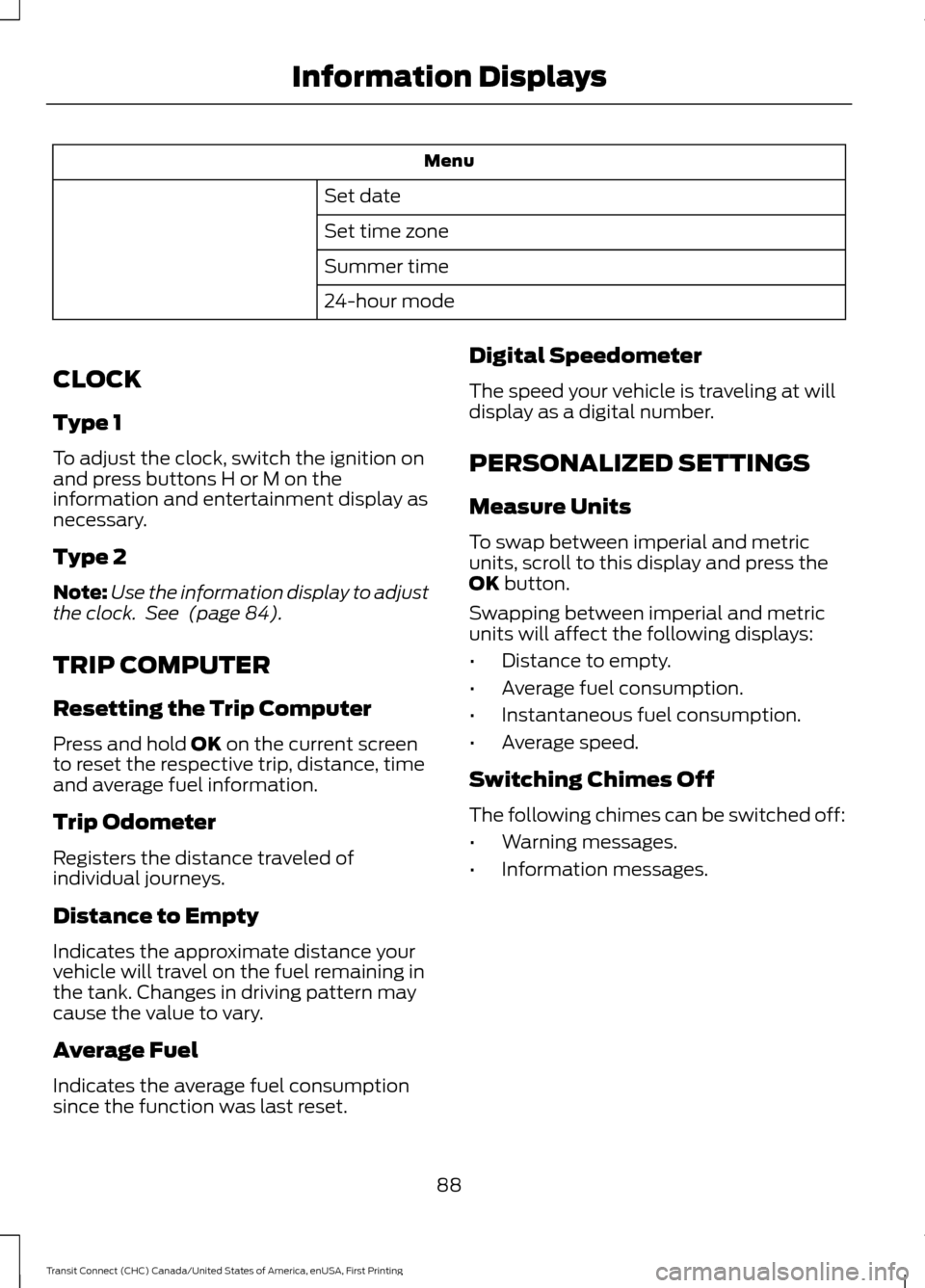
Menu
Set date
Set time zone
Summer time
24-hour mode
CLOCK
Type 1
To adjust the clock, switch the ignition on
and press buttons H or M on the
information and entertainment display as
necessary.
Type 2
Note: Use the information display to adjust
the clock. See (page 84).
TRIP COMPUTER
Resetting the Trip Computer
Press and hold
OK on the current screen
to reset the respective trip, distance, time
and average fuel information.
Trip Odometer
Registers the distance traveled of
individual journeys.
Distance to Empty
Indicates the approximate distance your
vehicle will travel on the fuel remaining in
the tank. Changes in driving pattern may
cause the value to vary.
Average Fuel
Indicates the average fuel consumption
since the function was last reset. Digital Speedometer
The speed your vehicle is traveling at will
display as a digital number.
PERSONALIZED SETTINGS
Measure Units
To swap between imperial and metric
units, scroll to this display and press the
OK
button.
Swapping between imperial and metric
units will affect the following displays:
• Distance to empty.
• Average fuel consumption.
• Instantaneous fuel consumption.
• Average speed.
Switching Chimes Off
The following chimes can be switched off:
• Warning messages.
• Information messages.
88
Transit Connect (CHC) Canada/United States of America, enUSA, First Printing Information Displays
Page 125 of 428
Easy Fuel
™ Capless Fuel System WARNING
The fuel system may be under
pressure. If you hear a hissing sound
near the fuel filler door, do not refuel
until the sound stops. Otherwise, fuel may
spray out, which could cause serious
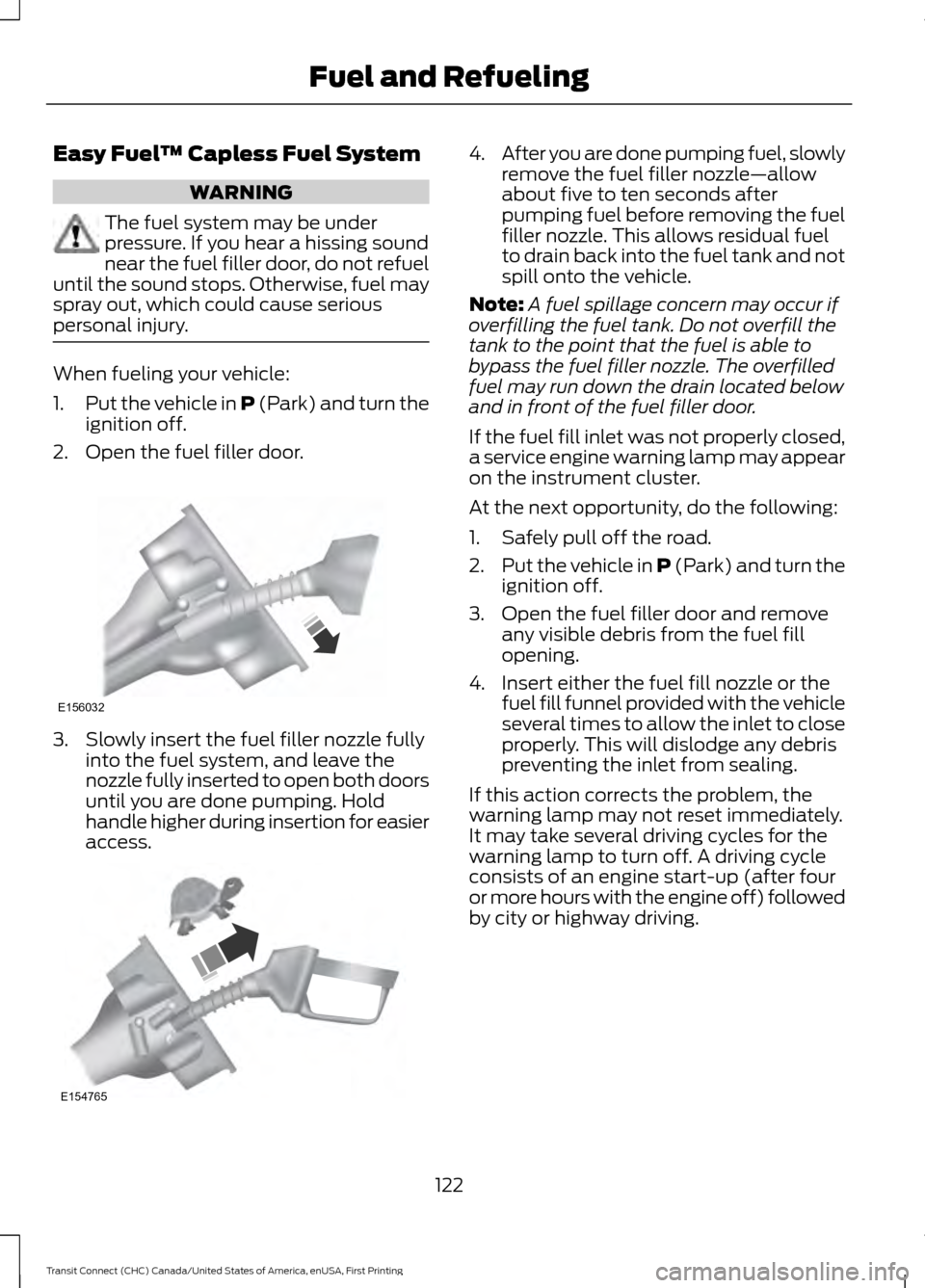
personal injury. When fueling your vehicle:
1.
Put the vehicle in P (Park) and turn the
ignition off.
2. Open the fuel filler door. 3. Slowly insert the fuel filler nozzle fully
into the fuel system, and leave the
nozzle fully inserted to open both doors
until you are done pumping. Hold
handle higher during insertion for easier
access. 4.
After you are done pumping fuel, slowly
remove the fuel filler nozzle—allow
about five to ten seconds after
pumping fuel before removing the fuel
filler nozzle. This allows residual fuel
to drain back into the fuel tank and not
spill onto the vehicle.
Note: A fuel spillage concern may occur if
overfilling the fuel tank. Do not overfill the
tank to the point that the fuel is able to
bypass the fuel filler nozzle. The overfilled
fuel may run down the drain located below
and in front of the fuel filler door.
If the fuel fill inlet was not properly closed,
a service engine warning lamp may appear
on the instrument cluster.
At the next opportunity, do the following:
1. Safely pull off the road.
2. Put the vehicle in P (Park) and turn the
ignition off.
3. Open the fuel filler door and remove any visible debris from the fuel fill
opening.
4. Insert either the fuel fill nozzle or the fuel fill funnel provided with the vehicle
several times to allow the inlet to close
properly. This will dislodge any debris
preventing the inlet from sealing.
If this action corrects the problem, the
warning lamp may not reset immediately.
It may take several driving cycles for the
warning lamp to turn off. A driving cycle
consists of an engine start-up (after four
or more hours with the engine off) followed
by city or highway driving.
122
Transit Connect (CHC) Canada/United States of America, enUSA, First Printing Fuel and RefuelingE156032 E154765
Page 193 of 428
WARNINGS
Only add oil when the engine is cold.
If the engine is hot, wait 10 minutes
for the engine to cool down.
Do not remove the filler cap when
the engine is running.
1. Remove the engine oil filler cap.
2. Add engine oil that meets Ford
specifications. See Capacities and
Specifications (page 246).
3. Wipe off any spilled oil.
4. Replace the engine oil filler cap. Turn it clockwise until you feel a strong
resistance.
Note: Do not add oil further than the
maximum mark. Oil levels above the
maximum mark may cause engine damage.
Note: Soak up any spillage with an
absorbent cloth immediately.
OIL CHANGE INDICATOR
RESET
Resetting the Oil Life Monitoring
System
Only reset the oil life monitoring system
after changing the engine oil and oil filter.
1. Switch the ignition on. Do not start the
engine. For vehicles with push-button
start, press and hold the start button
for two seconds without pressing the
brake pedal. Do not start the engine.
2. Press the accelerator and brake pedals
at the same time.
3. Keep the accelerator and brake pedals
fully pressed.
4. After three seconds, a message confirming that the reset is in progress
will be displayed. 5. After 25 seconds, a message
confirming that the reset is complete
will be displayed.
6. Release the accelerator and brake pedals.
7. The message confirming that the reset
is complete will no longer be displayed.
8. Switch the ignition off. For vehicles with
push-button start, press the start
button to switch the ignition off.
ENGINE COOLANT CHECK
Checking the Engine Coolant
When the engine is cold, check the
concentration and level of the engine
coolant at the intervals listed in the
scheduled maintenance information. See
Scheduled Maintenance
(page 399).
Note: Make sure that the level is between
the MIN and MAX marks on the coolant
reservoir.
Note: Coolant expands when it is hot. The
level may extend beyond the MAX mark.
Note: If the level is at the MIN mark, below
the MIN mark, or empty, add coolant
immediately. See
Adding Engine Coolant
in this chapter.
Maintain coolant concentration within
48% to 50%, which equates to a freeze
point between -30°F (-34°C) and -34°F
(-37°C).
Note: For best results, coolant
concentration should be tested with a
refractometer, for example Robinair®
coolant and battery refractometer 75240.
We do not recommend the use of
hydrometers or coolant test strips for
measuring coolant concentrations.
Note: Automotive fluids are not
interchangeable. Do not use engine coolant,
antifreeze or windshield washer fluid outside
of its specified function and vehicle location.
190
Transit Connect (CHC) Canada/United States of America, enUSA, First Printing Maintenance