window FORD TRANSIT CONNECT 2018 User Guide
[x] Cancel search | Manufacturer: FORD, Model Year: 2018, Model line: TRANSIT CONNECT, Model: FORD TRANSIT CONNECT 2018Pages: 449, PDF Size: 6.73 MB
Page 77 of 449
Note:
You may hear a pulsing noise when
just one of the windows is open. Lower the
opposite window slightly to reduce this
noise.
One-Touch Down (If Equipped)
Press the control fully and release it. Press
again or lift it to stop the window.
One-Touch Up
(If Equipped)
Lift the control fully and release it. Press
or lift it again to stop the window.
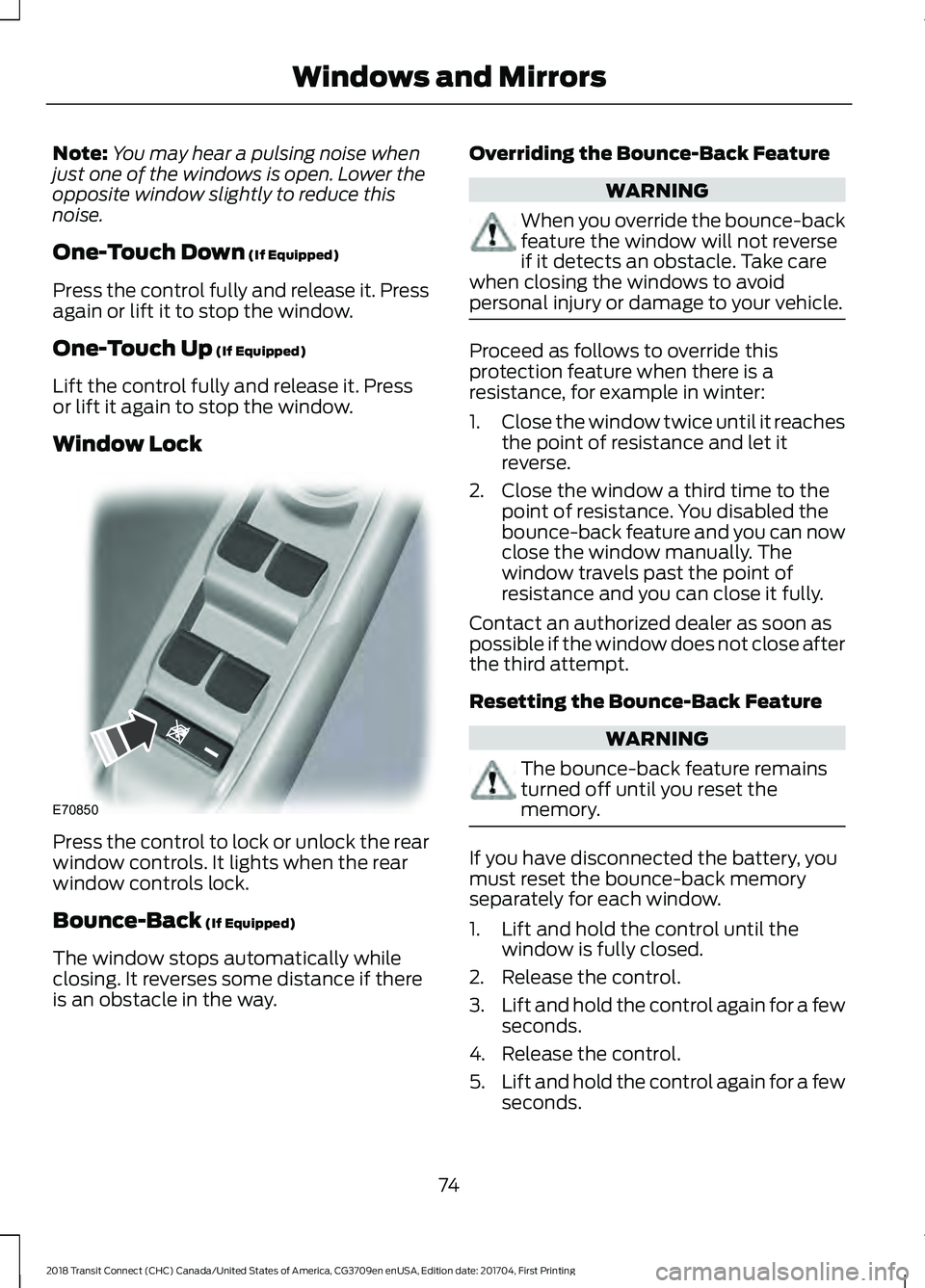
Window Lock Press the control to lock or unlock the rear
window controls. It lights when the rear
window controls lock.
Bounce-Back
(If Equipped)
The window stops automatically while
closing. It reverses some distance if there
is an obstacle in the way. Overriding the Bounce-Back Feature WARNING
When you override the bounce-back
feature the window will not reverse
if it detects an obstacle. Take care
when closing the windows to avoid
personal injury or damage to your vehicle. Proceed as follows to override this
protection feature when there is a
resistance, for example in winter:
1.
Close the window twice until it reaches
the point of resistance and let it
reverse.
2. Close the window a third time to the point of resistance. You disabled the
bounce-back feature and you can now
close the window manually. The
window travels past the point of
resistance and you can close it fully.
Contact an authorized dealer as soon as
possible if the window does not close after
the third attempt.
Resetting the Bounce-Back Feature WARNING
The bounce-back feature remains
turned off until you reset the
memory.
If you have disconnected the battery, you
must reset the bounce-back memory
separately for each window.
1. Lift and hold the control until the
window is fully closed.
2. Release the control.
3. Lift and hold the control again for a few
seconds.
4. Release the control.
5. Lift and hold the control again for a few
seconds.
74
2018 Transit Connect (CHC) Canada/United States of America, CG3709en enUSA, Edition date: 201704, First Printing Windows and MirrorsE70850
Page 78 of 449
6. Release the control.
7. Press and hold the control until the
window is fully open.
8. Lift and hold the control until the window is fully closed.
9. Release the control.
10. Open the window and then try to close it automatically.
11. Repeat the procedure if the window does not close automatically.
Accessory Delay (If Equipped)
You can use the window controls for
several minutes after switching off the
ignition or until opening either front door.
GLOBAL OPENING AND
CLOSING
You can also operate the power windows
with the ignition off using the global
opening and global closing function.
Note: Global opening will only operate for
a short period of time after you have
unlocked your vehicle using the remote
control.
Note: Global closing will only operate if you
have set the memory correctly for each
window. See
Power Windows (page 73). Global Opening
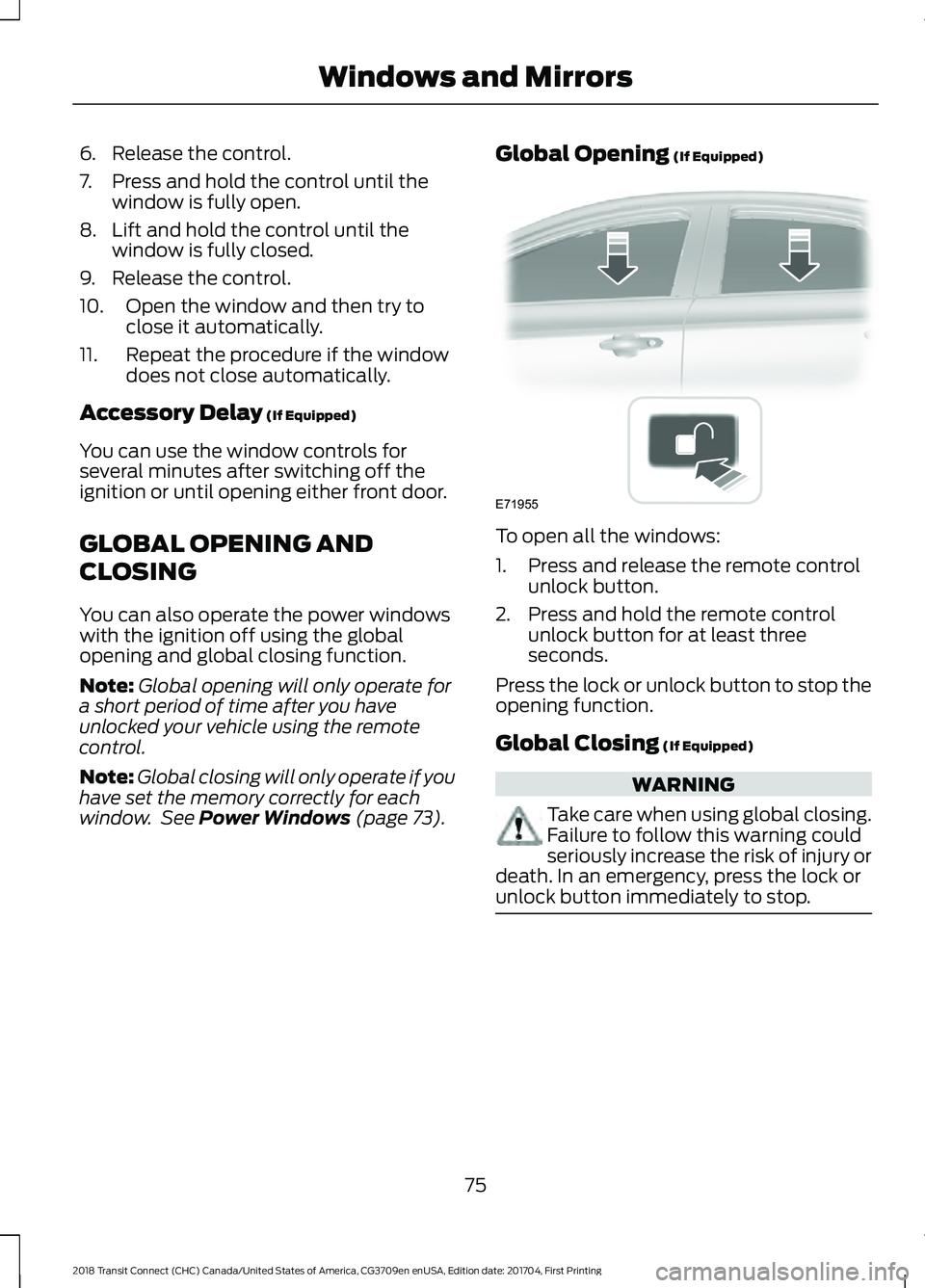
(If Equipped) To open all the windows:
1. Press and release the remote control
unlock button.
2. Press and hold the remote control unlock button for at least three
seconds.
Press the lock or unlock button to stop the
opening function.
Global Closing
(If Equipped) WARNING
Take care when using global closing.
Failure to follow this warning could
seriously increase the risk of injury or
death. In an emergency, press the lock or
unlock button immediately to stop. 75
2018 Transit Connect (CHC) Canada/United States of America, CG3709en enUSA, Edition date: 201704, First Printing Windows and MirrorsE71955
Page 79 of 449
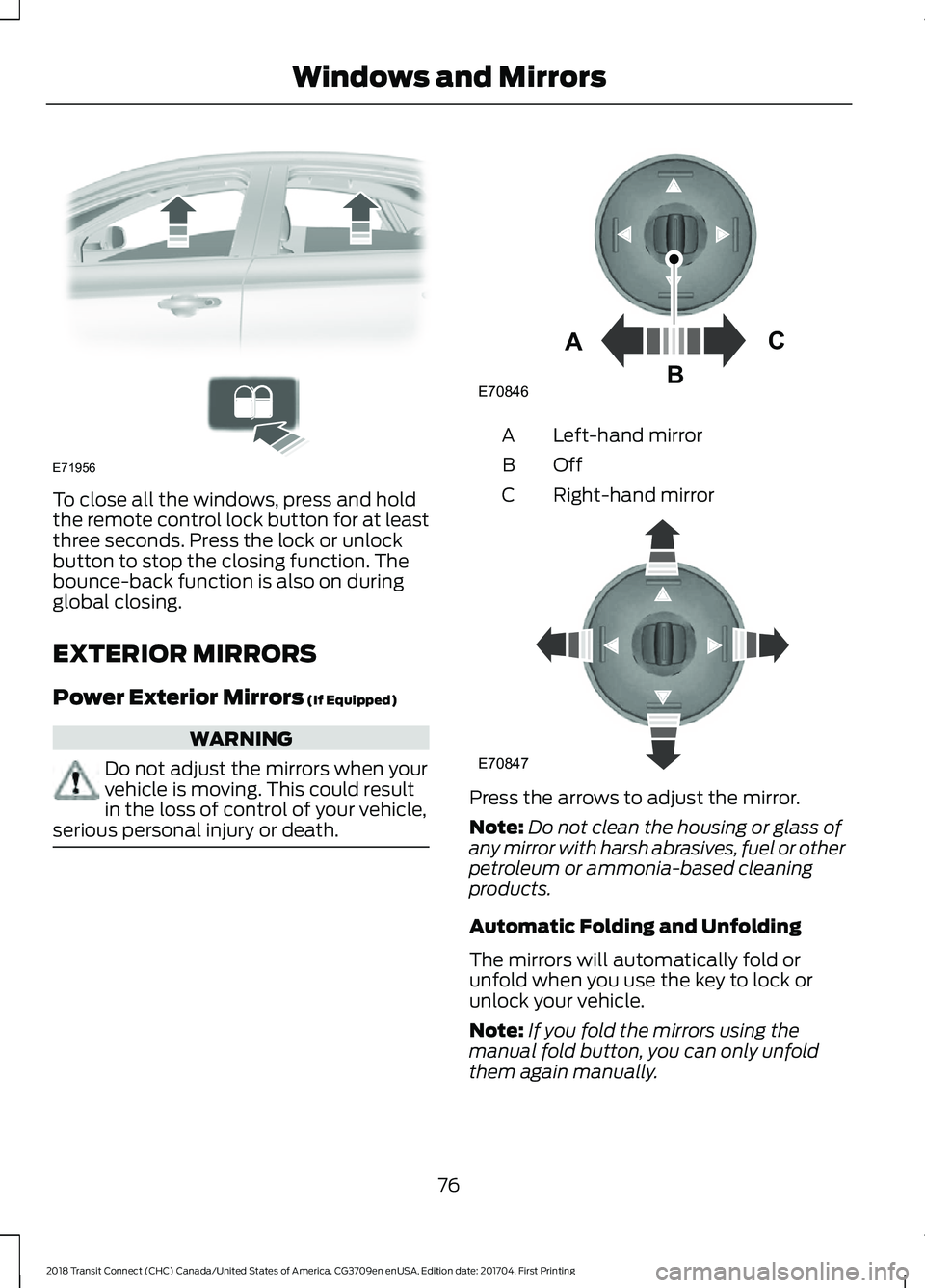
To close all the windows, press and hold
the remote control lock button for at least
three seconds. Press the lock or unlock
button to stop the closing function. The
bounce-back function is also on during
global closing.
EXTERIOR MIRRORS
Power Exterior Mirrors (If Equipped)
WARNING
Do not adjust the mirrors when your
vehicle is moving. This could result
in the loss of control of your vehicle,
serious personal injury or death. Left-hand mirror
A
OffB
Right-hand mirror
C Press the arrows to adjust the mirror.
Note:
Do not clean the housing or glass of
any mirror with harsh abrasives, fuel or other
petroleum or ammonia-based cleaning
products.
Automatic Folding and Unfolding
The mirrors will automatically fold or
unfold when you use the key to lock or
unlock your vehicle.
Note: If you fold the mirrors using the
manual fold button, you can only unfold
them again manually.
76
2018 Transit Connect (CHC) Canada/United States of America, CG3709en enUSA, Edition date: 201704, First Printing Windows and MirrorsE71956 E70846A
C
B E70847
Page 80 of 449
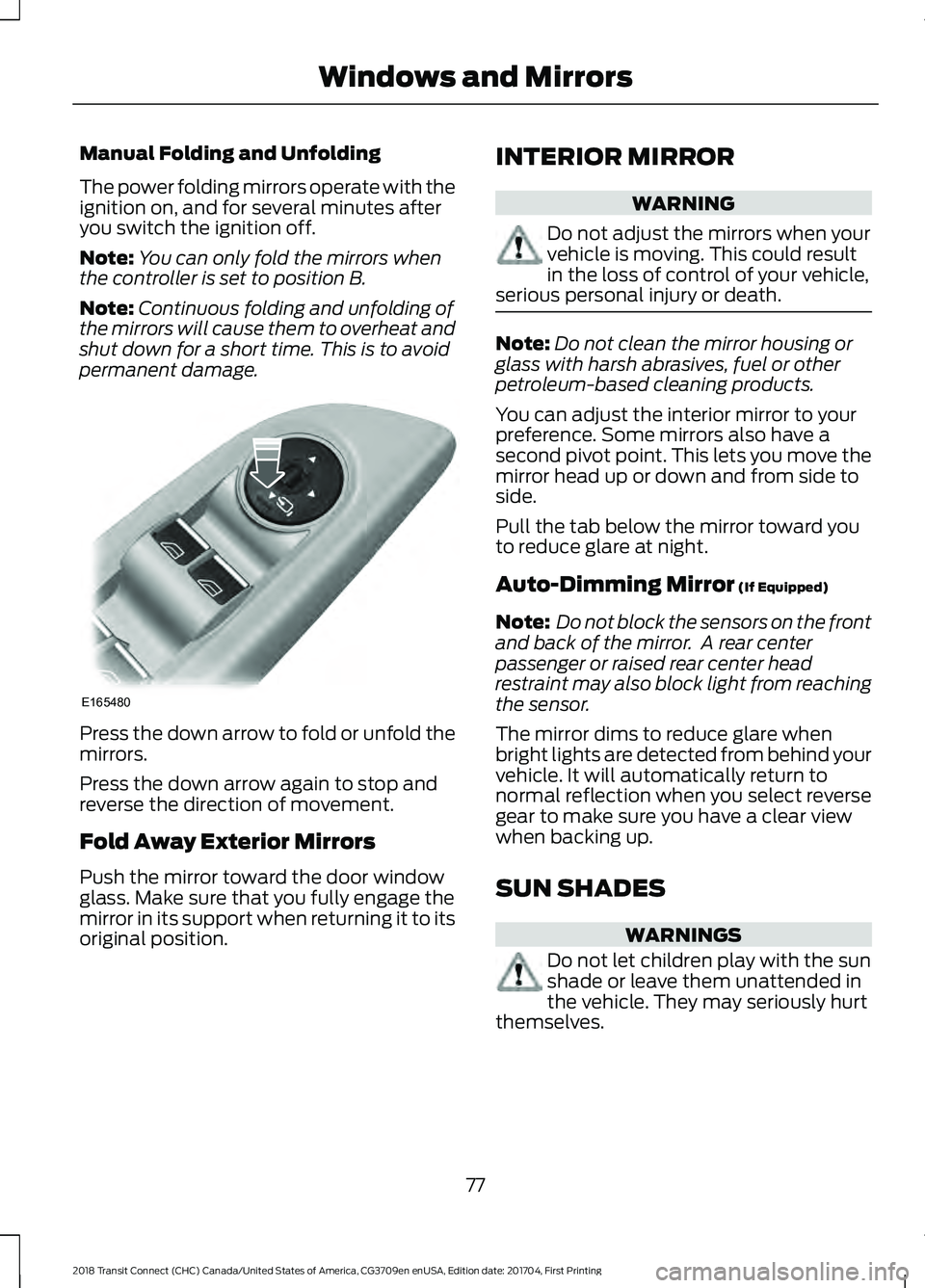
Manual Folding and Unfolding
The power folding mirrors operate with the
ignition on, and for several minutes after
you switch the ignition off.
Note:
You can only fold the mirrors when
the controller is set to position B.
Note: Continuous folding and unfolding of
the mirrors will cause them to overheat and
shut down for a short time. This is to avoid
permanent damage. Press the down arrow to fold or unfold the
mirrors.
Press the down arrow again to stop and
reverse the direction of movement.
Fold Away Exterior Mirrors
Push the mirror toward the door window
glass. Make sure that you fully engage the
mirror in its support when returning it to its
original position. INTERIOR MIRROR WARNING
Do not adjust the mirrors when your
vehicle is moving. This could result
in the loss of control of your vehicle,
serious personal injury or death. Note:
Do not clean the mirror housing or
glass with harsh abrasives, fuel or other
petroleum-based cleaning products.
You can adjust the interior mirror to your
preference. Some mirrors also have a
second pivot point. This lets you move the
mirror head up or down and from side to
side.
Pull the tab below the mirror toward you
to reduce glare at night.
Auto-Dimming Mirror (If Equipped)
Note: Do not block the sensors on the front
and back of the mirror. A rear center
passenger or raised rear center head
restraint may also block light from reaching
the sensor.
The mirror dims to reduce glare when
bright lights are detected from behind your
vehicle. It will automatically return to
normal reflection when you select reverse
gear to make sure you have a clear view
when backing up.
SUN SHADES WARNINGS
Do not let children play with the sun
shade or leave them unattended in
the vehicle. They may seriously hurt
themselves.
77
2018 Transit Connect (CHC) Canada/United States of America, CG3709en enUSA, Edition date: 201704, First Printing Windows and MirrorsE165480
Page 81 of 449
WARNINGS
When closing the sun shade, you
should verify that it is free of
obstructions and make sure that
children and pets are not in the proximity
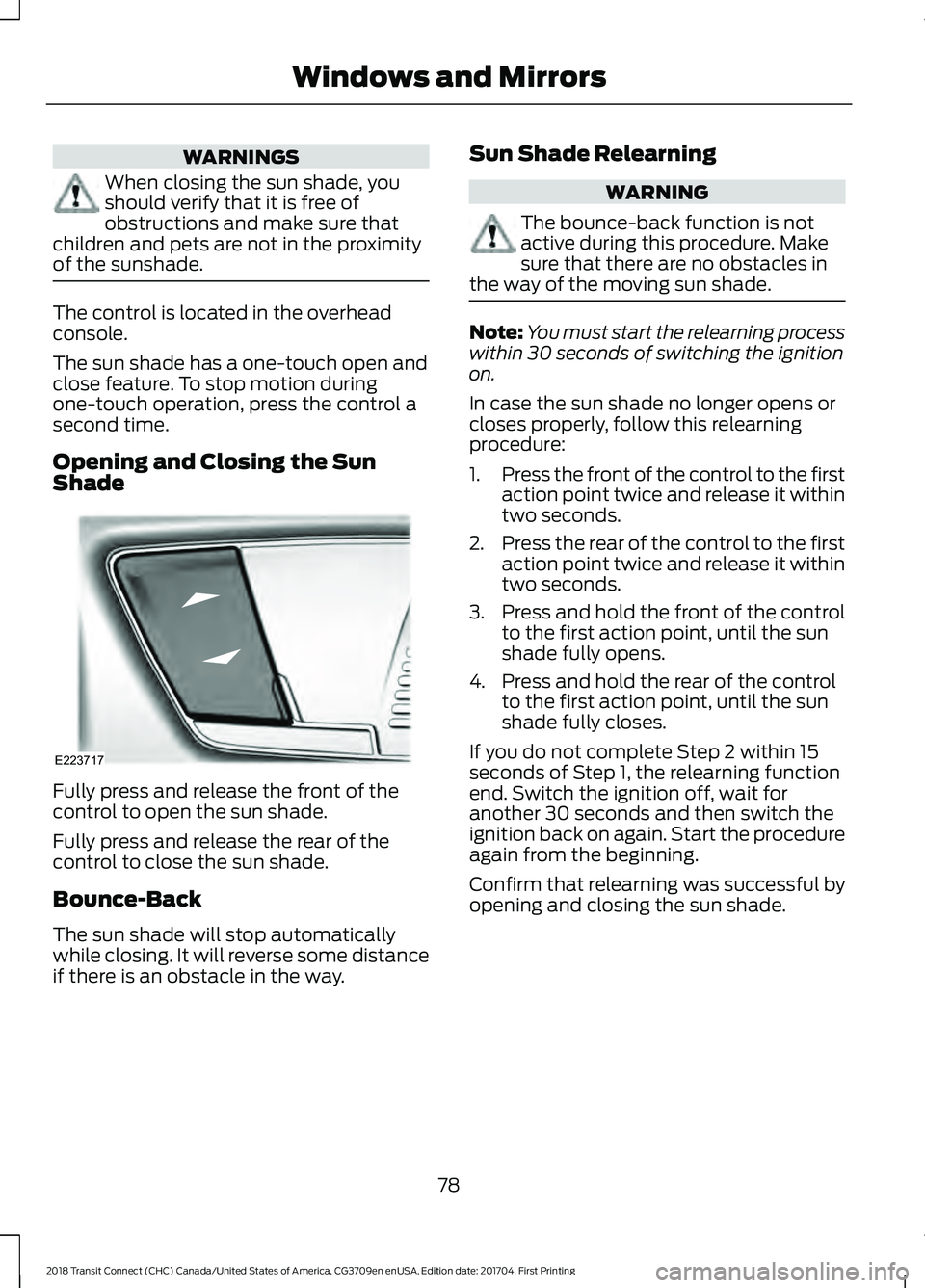
of the sunshade. The control is located in the overhead
console.
The sun shade has a one-touch open and
close feature. To stop motion during
one-touch operation, press the control a
second time.
Opening and Closing the Sun
Shade
Fully press and release the front of the
control to open the sun shade.
Fully press and release the rear of the
control to close the sun shade.
Bounce-Back
The sun shade will stop automatically
while closing. It will reverse some distance
if there is an obstacle in the way. Sun Shade Relearning WARNING
The bounce-back function is not
active during this procedure. Make
sure that there are no obstacles in
the way of the moving sun shade. Note:
You must start the relearning process
within 30 seconds of switching the ignition
on.
In case the sun shade no longer opens or
closes properly, follow this relearning
procedure:
1. Press the front of the control to the first
action point twice and release it within
two seconds.
2. Press the rear of the control to the first
action point twice and release it within
two seconds.
3. Press and hold the front of the control
to the first action point, until the sun
shade fully opens.
4. Press and hold the rear of the control to the first action point, until the sun
shade fully closes.
If you do not complete Step 2 within 15
seconds of Step 1, the relearning function
end. Switch the ignition off, wait for
another 30 seconds and then switch the
ignition back on again. Start the procedure
again from the beginning.
Confirm that relearning was successful by
opening and closing the sun shade.
78
2018 Transit Connect (CHC) Canada/United States of America, CG3709en enUSA, Edition date: 201704, First Printing Windows and MirrorsE223717
Page 99 of 449
PRINCIPLE OF OPERATION
Outside Air
Keep the air intakes in front of the
windshield free from obstruction (such as
snow or leaves) to allow the climate
control system to function effectively.
Recirculated Air
The air currently in the passenger
compartment recirculates. Outside air does
not enter your vehicle.
Note:
Prolonged use of recirculated air may
cause the windows to fog up.
Heating
Heating performance depends on the
temperature of the coolant.
General Information on Controlling
the Interior Climate
Close the windows. Warming the Interior
Direct the air toward your feet. In cold or
humid weather conditions, direct some of
the air toward the windshield and the door
windows.
Cooling the Interior
Direct the air toward your face.
Air Conditioning
The system directs condensation to the
outside of your vehicle, which could cause
a small pool of water to form under your
vehicle. This is normal.
Note:
The air conditioning operates only
when the temperature is above 39°F (4°C).
Note: When you use air conditioning, your
vehicle uses more fuel.
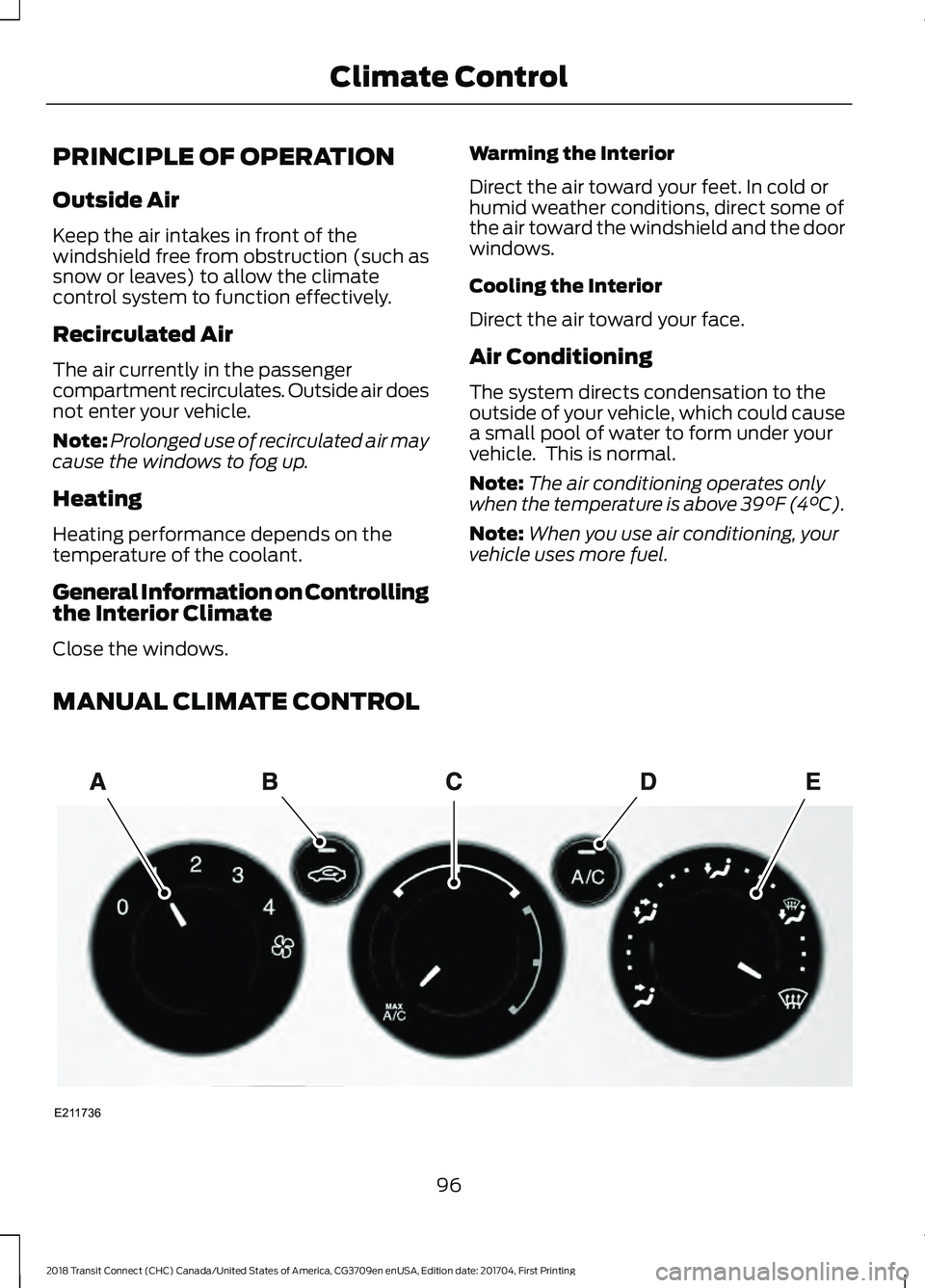
MANUAL CLIMATE CONTROL 96
2018 Transit Connect (CHC) Canada/United States of America, CG3709en enUSA, Edition date: 201704, First Printing Climate ControlE211736
Page 101 of 449
MAX Defrost: Press to switch on defrost. The driver and passenger settings
set to HI, outside air flows through the windshield vents, and fan automatically
adjusts to the highest speed. You can also use this setting to defrost and clear
the windshield of a thin covering of ice. The heated rear window also
automatically turns on when you select maximum defrost.
D
Note:
To prevent window fogging, you cannot select recirculated air when
maximum defrost is on.
MAX A/C:
Press for maximum cooling. The driver and passenger settings set
to LO, recirculated air flows through the instrument panel vents, air conditioning
automatically turns on and the fan automatically adjusts to the highest speed.
E
Recirculated air:
Press to switch between outside air and recirculated air. The
air currently in the passenger compartment recirculates. This may reduce the
time needed to cool the interior (when used with A/C) and reduce unwanted
odors from entering your vehicle.
F
Note:
Recirculated air may turn on and off automatically (or prevent you from
switching on) in all modes except MAX A/C to reduce the risk of fogging or to
improve cooling efficiency.
Air distribution control:
Press to switch airflow from the windshield,
instrument panel, or footwell vents on or off. You can distribute air through any
combination of these vents.
G
A/C:
Press to switch the air conditioning on or off. Air conditioning cools your
vehicle using outside air. Use A/C with recirculated air to improve performance
and efficiency.
H
Note: In certain conditions (for example, maximum defrost), the air conditioning
compressor may continue to operate even though the air conditioning is
switched off.
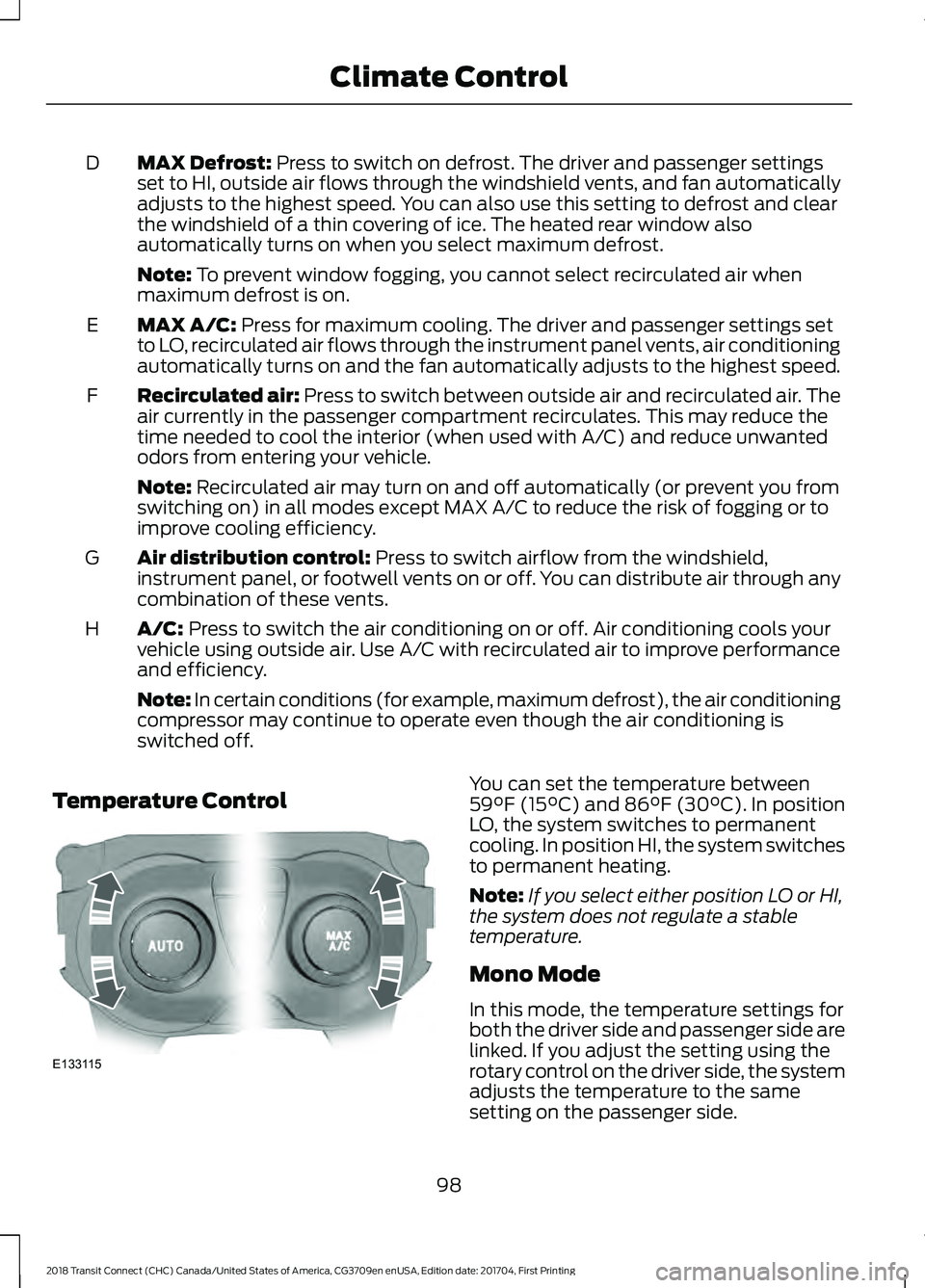
Temperature Control You can set the temperature between
59°F (15°C)
and 86°F (30°C). In position
LO, the system switches to permanent
cooling. In position HI, the system switches
to permanent heating.
Note: If you select either position LO or HI,
the system does not regulate a stable
temperature.
Mono Mode
In this mode, the temperature settings for
both the driver side and passenger side are
linked. If you adjust the setting using the
rotary control on the driver side, the system
adjusts the temperature to the same
setting on the passenger side.
98
2018 Transit Connect (CHC) Canada/United States of America, CG3709en enUSA, Edition date: 201704, First Printing Climate ControlE133115
Page 102 of 449
Switching Mono Mode Off
Select a temperature for the passenger
side using the rotary control on the
passenger side. Mono mode automatically
switches off. The temperature on the driver
side remains unchanged. You can now
adjust the driver side and passenger side
temperatures independently. The
temperature settings for each side are
shown in the display.
Switching Mono Mode Back On
Press and hold the AUTO button. The
passenger side temperature is adjusted to
the driver side temperature setting.
HINTS ON CONTROLLING THE
INTERIOR CLIMATE
General Hints
Note: Prolonged use of recirculated air may
cause the windows to fog up.
Note: A small amount of air may be felt
from the footwell air vents regardless of the
air distribution setting.
Note: To reduce humidity build-up inside
your vehicle, do not drive with the system
switched off or with recirculated air always
switched on.
Note: Do not place objects under the front
seats as this may interfere with the airflow
to the rear seats.
Note: Keep the air intakes in front of the
windshield free from obstruction (such as
snow or leaves) to allow the climate control
system to function effectively.
Note: To reduce fogging of the windshield
during humid weather, adjust the air
distribution control to the windshield air
vents position. Increase the temperature
and fan speed and press the A/C button to
improve clearing, if required. Heating the Interior Quickly
•
Adjust the fan speed to the highest
speed setting.
• Adjust the temperature control to the
highest setting.
• Adjust the air distribution control to the
footwell air vents position.
Recommended Settings for
Heating
• Adjust the fan speed to the second
speed setting.
• Adjust the temperature control to the
midway point of the hot settings.
• Adjust the air distribution control to the
footwell and windshield air vents
position.
Cooling the Interior Quickly
• Adjust the fan speed to the highest
speed setting.
• Adjust the temperature control to the
MAX A/C
position.
• Adjust the air distribution control to the
instrument panel air vents position.
Recommended Settings for
Cooling
• Adjust the fan speed to the second
speed setting.
• Adjust the temperature control to the
midway point of the cold settings.
• Adjust the air distribution control to the
instrument panel air vents position.
Vehicle Stationary for Extended
Periods During Extreme High
Ambient Temperatures
• Apply the parking brake.
• Move the transmission selector lever
to position
P or neutral.
99
2018 Transit Connect (CHC) Canada/United States of America, CG3709en enUSA, Edition date: 201704, First Printing Climate Control
Page 103 of 449
•
Adjust the temperature control to the
MAX A/C position.
• Adjust the fan speed to the lowest
speed setting.
Side Window Defogging in Cold
Weather
• Adjust the air distribution control to the
instrument panel and windshield air
vents positions.
• Press the
A/C button.
• Adjust the temperature control to the
desired setting.
• Adjust the fan speed to the highest
setting. •
Direct the instrument panel side air
vents toward the side windows.
• Close the instrument panel vents.
Maximum Cooling Performance in
Instrument Panel or Instrument
Panel and Footwell Positions
• Adjust the temperature control to the
lowest setting.
• Press the A/C and recirculated air
buttons.
• Adjust the fan speed to the highest
setting initially and then adjust it to suit
the desired comfort level.
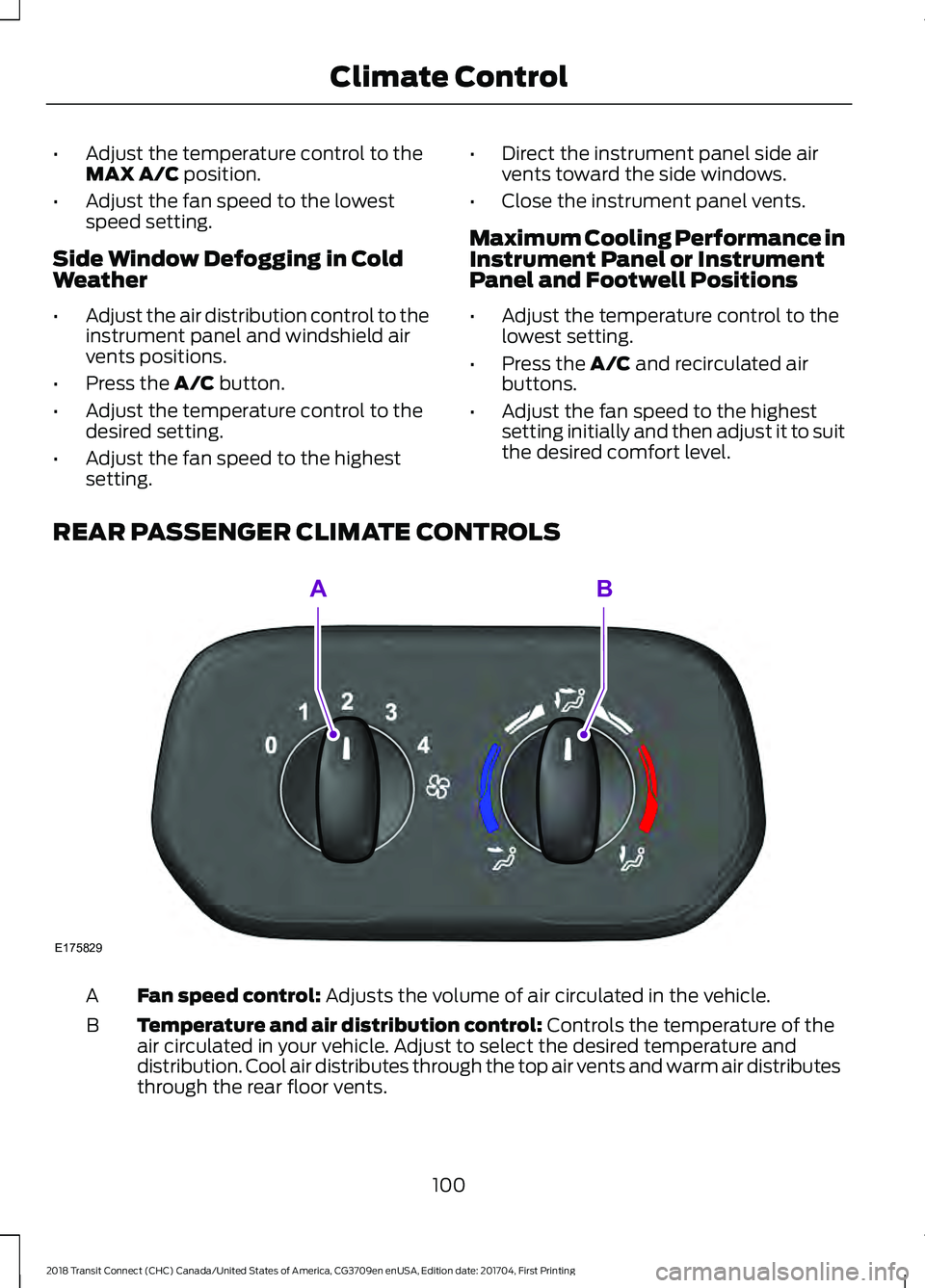
REAR PASSENGER CLIMATE CONTROLS Fan speed control:
Adjusts the volume of air circulated in the vehicle.
A
Temperature and air distribution control:
Controls the temperature of the
air circulated in your vehicle. Adjust to select the desired temperature and
distribution. Cool air distributes through the top air vents and warm air distributes
through the rear floor vents.
B
100
2018 Transit Connect (CHC) Canada/United States of America, CG3709en enUSA, Edition date: 201704, First Printing Climate ControlE175829
AB
Page 104 of 449
Note:
Switch the air conditioning on to cool
the air through the rear air vents.
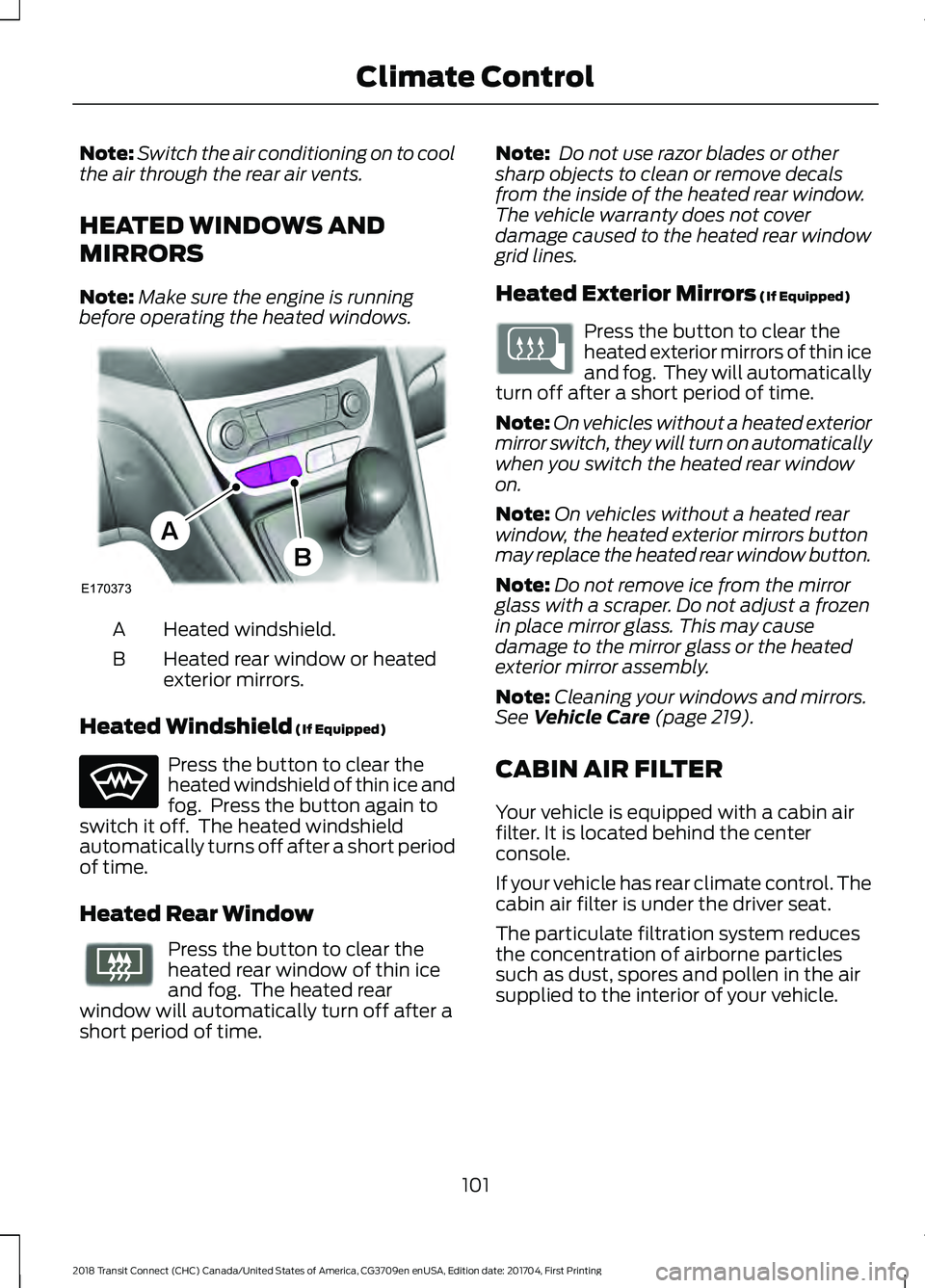
HEATED WINDOWS AND
MIRRORS
Note: Make sure the engine is running
before operating the heated windows. Heated windshield.
A
Heated rear window or heated
exterior mirrors.
B
Heated Windshield (If Equipped) Press the button to clear the
heated windshield of thin ice and
fog. Press the button again to
switch it off. The heated windshield
automatically turns off after a short period
of time.
Heated Rear Window Press the button to clear the
heated rear window of thin ice
and fog. The heated rear
window will automatically turn off after a
short period of time. Note:
Do not use razor blades or other
sharp objects to clean or remove decals
from the inside of the heated rear window.
The vehicle warranty does not cover
damage caused to the heated rear window
grid lines.
Heated Exterior Mirrors
(If Equipped) Press the button to clear the
heated exterior mirrors of thin ice
and fog. They will automatically
turn off after a short period of time.
Note: On vehicles without a heated exterior
mirror switch, they will turn on automatically
when you switch the heated rear window
on.
Note: On vehicles without a heated rear
window, the heated exterior mirrors button
may replace the heated rear window button.
Note: Do not remove ice from the mirror
glass with a scraper. Do not adjust a frozen
in place mirror glass. This may cause
damage to the mirror glass or the heated
exterior mirror assembly.
Note: Cleaning your windows and mirrors.
See
Vehicle Care (page 219).
CABIN AIR FILTER
Your vehicle is equipped with a cabin air
filter. It is located behind the center
console.
If your vehicle has rear climate control. The
cabin air filter is under the driver seat.
The particulate filtration system reduces
the concentration of airborne particles
such as dust, spores and pollen in the air
supplied to the interior of your vehicle.
101
2018 Transit Connect (CHC) Canada/United States of America, CG3709en enUSA, Edition date: 201704, First Printing Climate ControlE170373
A
B E72507