instrument FORD TRANSIT CONNECT 2018 Owners Manual
[x] Cancel search | Manufacturer: FORD, Model Year: 2018, Model line: TRANSIT CONNECT, Model: FORD TRANSIT CONNECT 2018Pages: 449, PDF Size: 6.73 MB
Page 5 of 449
Wipers and Washers
Windshield Wipers.........................................63
Autowipers.......................................................63
Windshield Washers
.....................................64
Rear Window Wiper and Washers...........65
Lighting
General Information.....................................66
Lighting Control..............................................66
Autolamps........................................................67
Instrument Lighting Dimmer.....................68
Headlamp Exit Delay....................................68
Daytime Running Lamps
............................68
Front Fog Lamps............................................69
Cornering Lamps...........................................69
Direction Indicators
.......................................70
Interior Lamps - Vehicles Without: Panoramic Roof Panel.............................70
Interior Lamps - Vehicles With: Panoramic Roof Panel
..............................71
Windows and Mirrors
Power Windows - Vehicles With: One-Touch Open Driver Window.........73
Power Windows - Vehicles With: Rear Power Windows
.........................................73
Global Opening and Closing......................75
Exterior Mirrors
................................................76
Interior Mirror....................................................77
Sun Shades.......................................................77
Instrument Cluster
Gauges................................................................79
Warning Lamps and Indicators................80
Audible Warnings and Indicators.............82
Information Displays
General Information
.....................................84
Clock...................................................................86
Trip Computer
.................................................86 Personalized Settings
...................................87
Information Messages
..................................87
Climate Control
Principle of Operation..................................96
Manual Climate Control..............................96
Automatic Climate Control
........................97
Hints on Controlling the Interior Climate
..........................................................99
Rear Passenger Climate Controls
..........100
Heated Windows and Mirrors...................101
Cabin Air Filter
................................................101
Seats
Sitting in the Correct Position..................103
Head Restraints............................................103
Manual Seats
.................................................105
Power Seats
...................................................106
Rear Seats
.......................................................107
Heated Seats....................................................111
Rear Seat Armrest.........................................112
Auxiliary Power Points
Auxiliary Power Points.................................113
Cigar Lighter
.....................................................113
Storage Compartments
Cup Holders
.....................................................115
Center Console...............................................115
Overhead Console
.........................................115
Starting and Stopping the Engine
General Information
.....................................116
Ignition Switch
................................................116
Starting a Gasoline Engine.........................117
Switching Off the Engine............................117
Engine Block Heater.....................................118
2
2018 Transit Connect (CHC) Canada/United States of America, CG3709en enUSA, Edition date: 201704, First Printing Table of Contents
Page 7 of 449
Customer Assistance
Getting the Services You Need................178
In California (U.S. Only)..............................179
The Better Business Bureau (BBB) Auto
Line Program (U.S. Only)......................180
Utilizing the Mediation/Arbitration Program (Canada Only).........................181
Getting Assistance Outside the U.S. and Canada..........................................................181
Ordering Additional Owner's Literature.....................................................182
Reporting Safety Defects (U.S. Only).............................................................183
Reporting Safety Defects (Canada Only).............................................................183
Fuses
Fuse Box Locations......................................185
Fuse Specification Chart
...........................186
Changing a Fuse...........................................195
Maintenance
General Information....................................197
Opening and Closing the Hood...............197
Under Hood Overview................................199
Engine Oil Dipstick
......................................200
Engine Oil Check
.........................................200
Oil Change Indicator Reset.......................201
Engine Cooling Fan......................................201
Engine Coolant Check...............................202
Automatic Transmission Fluid Check
...........................................................206
Brake Fluid Check
.......................................206
Washer Fluid Check
....................................206
Changing the 12V Battery.........................206
Checking the Wiper Blades
.....................208
Changing the Wiper Blades
....................208
Adjusting the Headlamps...........................211
Changing a Bulb............................................212
Bulb Specification Chart............................217
Changing the Engine Air Filter.................218 Drive Belt Routing.........................................218
Vehicle Care
Cleaning Products........................................219
Cleaning the Exterior
..................................220
Waxing..............................................................221
Cleaning the Engine
.....................................221
Cleaning the Windows and Wiper Blades...........................................................221
Cleaning the Interior....................................222
Cleaning the Instrument Panel and Instrument Cluster Lens........................222
Cleaning Leather Seats..............................223
Repairing Minor Paint Damage...............224
Cleaning the Wheels..................................224
Vehicle Storage.............................................224
Wheels and Tires
General Information
....................................227
Tire Care
..........................................................228
Using Snow Chains.....................................243
Tire Pressure Monitoring System..........244
Changing a Road Wheel...........................248
Technical Specifications...........................253
Capacities and Specific- ations
Engine Specifications
.................................255
Motorcraft Parts
...........................................255
Vehicle Identification Number................255
Vehicle Certification Label
.......................256
Transmission Code Designation.............257
Capacities and Specifications
................257
Audio System
General Information....................................261
Audio Unit - Vehicles With: AM/FM......262
Audio Unit - Vehicles With: AM/FM/CD/ SYNC............................................................265
4
2018 Transit Connect (CHC) Canada/United States of America, CG3709en enUSA, Edition date: 201704, First Printing Table of Contents
Page 43 of 449
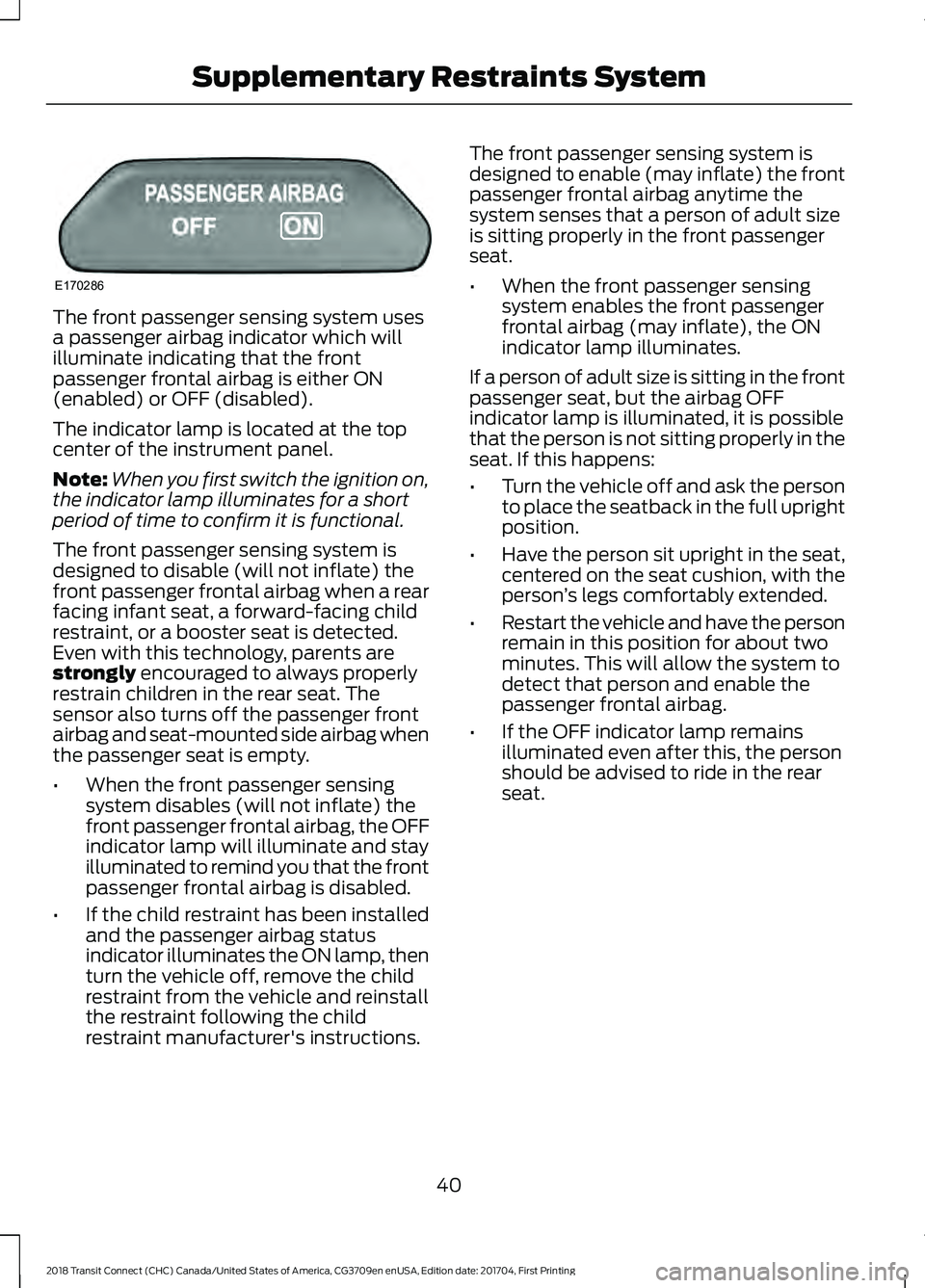
The front passenger sensing system uses
a passenger airbag indicator which will
illuminate indicating that the front
passenger frontal airbag is either ON
(enabled) or OFF (disabled).
The indicator lamp is located at the top
center of the instrument panel.
Note:
When you first switch the ignition on,
the indicator lamp illuminates for a short
period of time to confirm it is functional.
The front passenger sensing system is
designed to disable (will not inflate) the
front passenger frontal airbag when a rear
facing infant seat, a forward-facing child
restraint, or a booster seat is detected.
Even with this technology, parents are
strongly encouraged to always properly
restrain children in the rear seat. The
sensor also turns off the passenger front
airbag and seat-mounted side airbag when
the passenger seat is empty.
• When the front passenger sensing
system disables (will not inflate) the
front passenger frontal airbag, the OFF
indicator lamp will illuminate and stay
illuminated to remind you that the front
passenger frontal airbag is disabled.
• If the child restraint has been installed
and the passenger airbag status
indicator illuminates the ON lamp, then
turn the vehicle off, remove the child
restraint from the vehicle and reinstall
the restraint following the child
restraint manufacturer's instructions. The front passenger sensing system is
designed to enable (may inflate) the front
passenger frontal airbag anytime the
system senses that a person of adult size
is sitting properly in the front passenger
seat.
•
When the front passenger sensing
system enables the front passenger
frontal airbag (may inflate), the ON
indicator lamp illuminates.
If a person of adult size is sitting in the front
passenger seat, but the airbag OFF
indicator lamp is illuminated, it is possible
that the person is not sitting properly in the
seat. If this happens:
• Turn the vehicle off and ask the person
to place the seatback in the full upright
position.
• Have the person sit upright in the seat,
centered on the seat cushion, with the
person ’s legs comfortably extended.
• Restart the vehicle and have the person
remain in this position for about two
minutes. This will allow the system to
detect that person and enable the
passenger frontal airbag.
• If the OFF indicator lamp remains
illuminated even after this, the person
should be advised to ride in the rear
seat.
40
2018 Transit Connect (CHC) Canada/United States of America, CG3709en enUSA, Edition date: 201704, First Printing Supplementary Restraints SystemE170286
Page 47 of 449
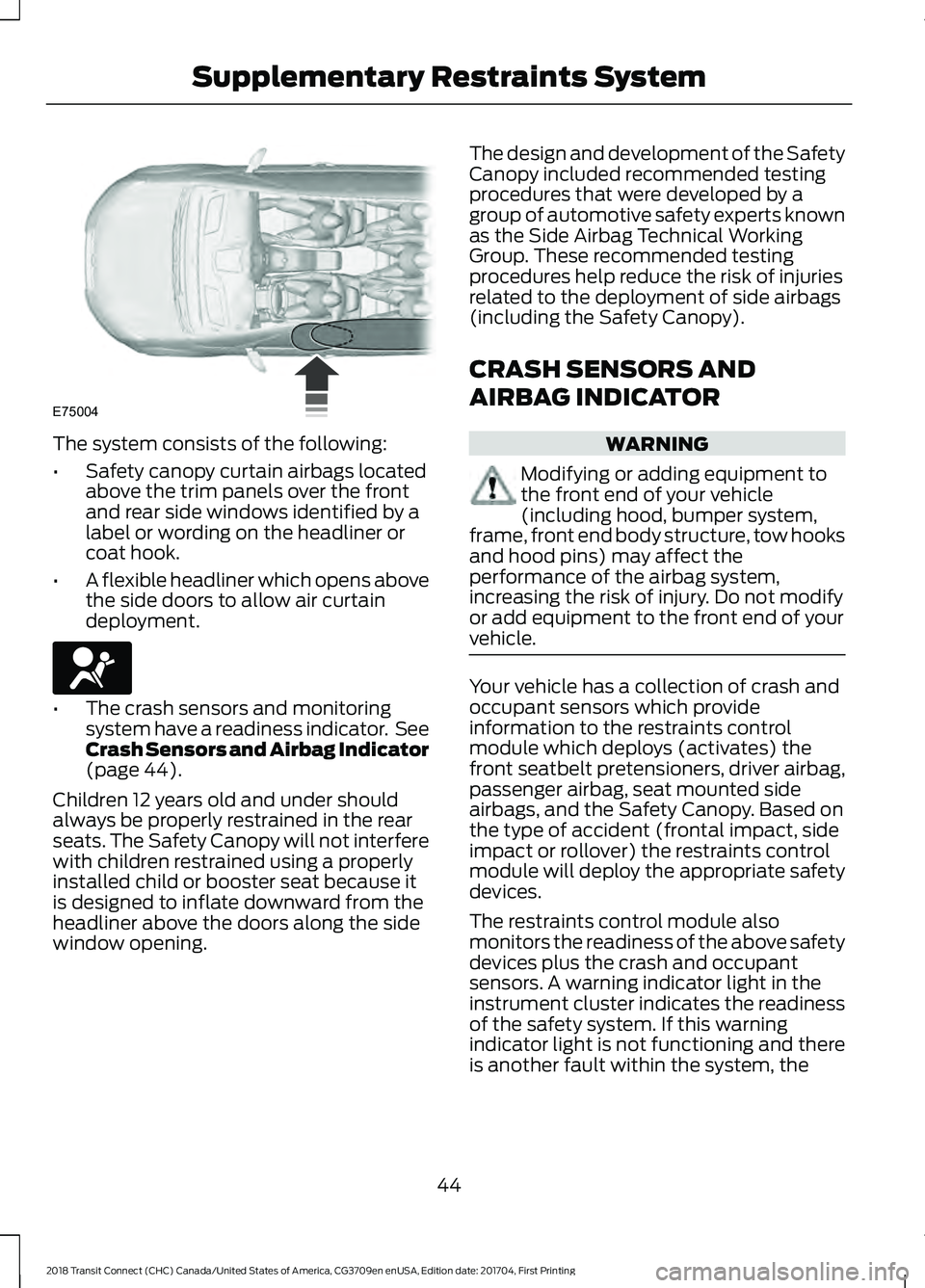
The system consists of the following:
•
Safety canopy curtain airbags located
above the trim panels over the front
and rear side windows identified by a
label or wording on the headliner or
coat hook.
• A flexible headliner which opens above
the side doors to allow air curtain
deployment. •
The crash sensors and monitoring
system have a readiness indicator. See
Crash Sensors and Airbag Indicator
(page 44).
Children 12 years old and under should
always be properly restrained in the rear
seats. The Safety Canopy will not interfere
with children restrained using a properly
installed child or booster seat because it
is designed to inflate downward from the
headliner above the doors along the side
window opening. The design and development of the Safety
Canopy included recommended testing
procedures that were developed by a
group of automotive safety experts known
as the Side Airbag Technical Working
Group. These recommended testing
procedures help reduce the risk of injuries
related to the deployment of side airbags
(including the Safety Canopy).
CRASH SENSORS AND
AIRBAG INDICATOR
WARNING
Modifying or adding equipment to
the front end of your vehicle
(including hood, bumper system,
frame, front end body structure, tow hooks
and hood pins) may affect the
performance of the airbag system,
increasing the risk of injury. Do not modify
or add equipment to the front end of your
vehicle. Your vehicle has a collection of crash and
occupant sensors which provide
information to the restraints control
module which deploys (activates) the
front seatbelt pretensioners, driver airbag,
passenger airbag, seat mounted side
airbags, and the Safety Canopy. Based on
the type of accident (frontal impact, side
impact or rollover) the restraints control
module will deploy the appropriate safety
devices.
The restraints control module also
monitors the readiness of the above safety
devices plus the crash and occupant
sensors. A warning indicator light in the
instrument cluster indicates the readiness
of the safety system. If this warning
indicator light is not functioning and there
is another fault within the system, the
44
2018 Transit Connect (CHC) Canada/United States of America, CG3709en enUSA, Edition date: 201704, First Printing Supplementary Restraints SystemE75004 E67017
Page 53 of 449
Action and Description
Message
Choose your applicable setting.
Note: You can clear or change your MyKey settings at any time during the same key cycle
as you created the MyKey. Once you switch the ignition off you will need an admin key to
change or clear your MyKey settings.
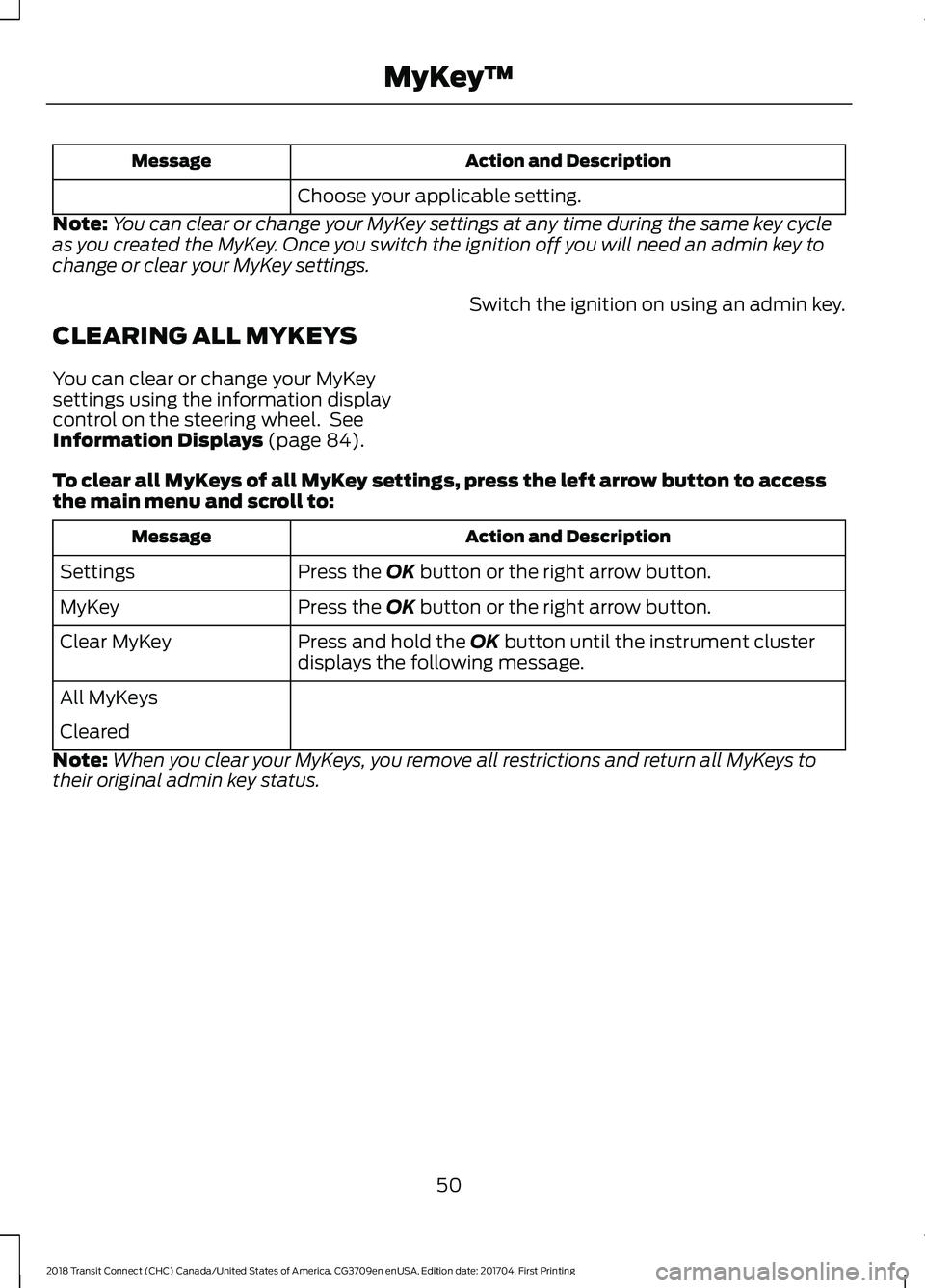
CLEARING ALL MYKEYS
You can clear or change your MyKey
settings using the information display
control on the steering wheel. See
Information Displays (page 84). Switch the ignition on using an admin key.
To clear all MyKeys of all MyKey settings, press the left arrow button to access
the main menu and scroll to: Action and Description
Message
Press the
OK button or the right arrow button.
Settings
Press the
OK button or the right arrow button.
MyKey
Press and hold the
OK button until the instrument cluster
displays the following message.
Clear MyKey
All MyKeys
Cleared
Note: When you clear your MyKeys, you remove all restrictions and return all MyKeys to
their original admin key status.
50
2018 Transit Connect (CHC) Canada/United States of America, CG3709en enUSA, Edition date: 201704, First Printing MyKey
™
Page 69 of 449
GENERAL INFORMATION
Condensation in the Exterior Front
Lamps and Rear Lamps
Exterior front lamps and rear lamps have
vents to accommodate normal changes
in air pressure.
Condensation can be a natural by-product
of this design. When moist air enters the
lamp assembly through the vents, there is
a possibility that condensation can occur
when the temperature is cold. When
normal condensation occurs, a fine mist
can form on the interior of the lens. The
fine mist eventually clears and exits
through the vents during normal operation.
Clearing time may take as long as 48 hours
under dry weather conditions.
Examples of acceptable condensation are:
•
The presence of a fine mist (no streaks,
drip marks or large droplets).
• A fine mist covers less than 50% of the
lens.
Examples of unacceptable condensation
are:
• A water puddle inside the lamp.
• Streaks, drip marks or large droplets
present on the interior of the lens.
If you see any unacceptable condensation,
have your vehicle checked by an authorized
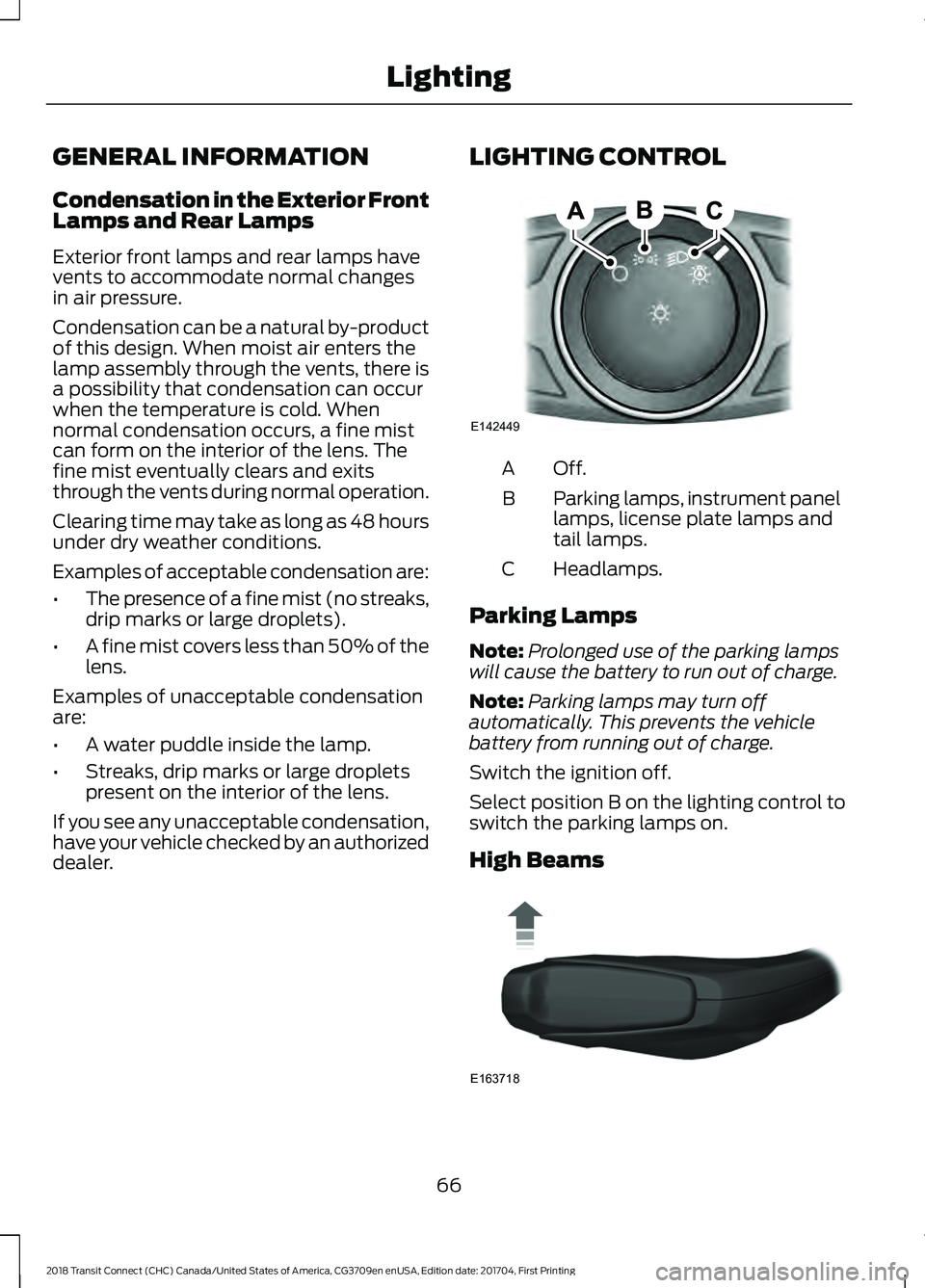
dealer. LIGHTING CONTROL Off.A
Parking lamps, instrument panel
lamps, license plate lamps and
tail lamps.
B
Headlamps.
C
Parking Lamps
Note: Prolonged use of the parking lamps
will cause the battery to run out of charge.
Note: Parking lamps may turn off
automatically. This prevents the vehicle
battery from running out of charge.
Switch the ignition off.
Select position B on the lighting control to
switch the parking lamps on.
High Beams 66
2018 Transit Connect (CHC) Canada/United States of America, CG3709en enUSA, Edition date: 201704, First Printing LightingE142449 E163718
Page 71 of 449
INSTRUMENT LIGHTING
DIMMER
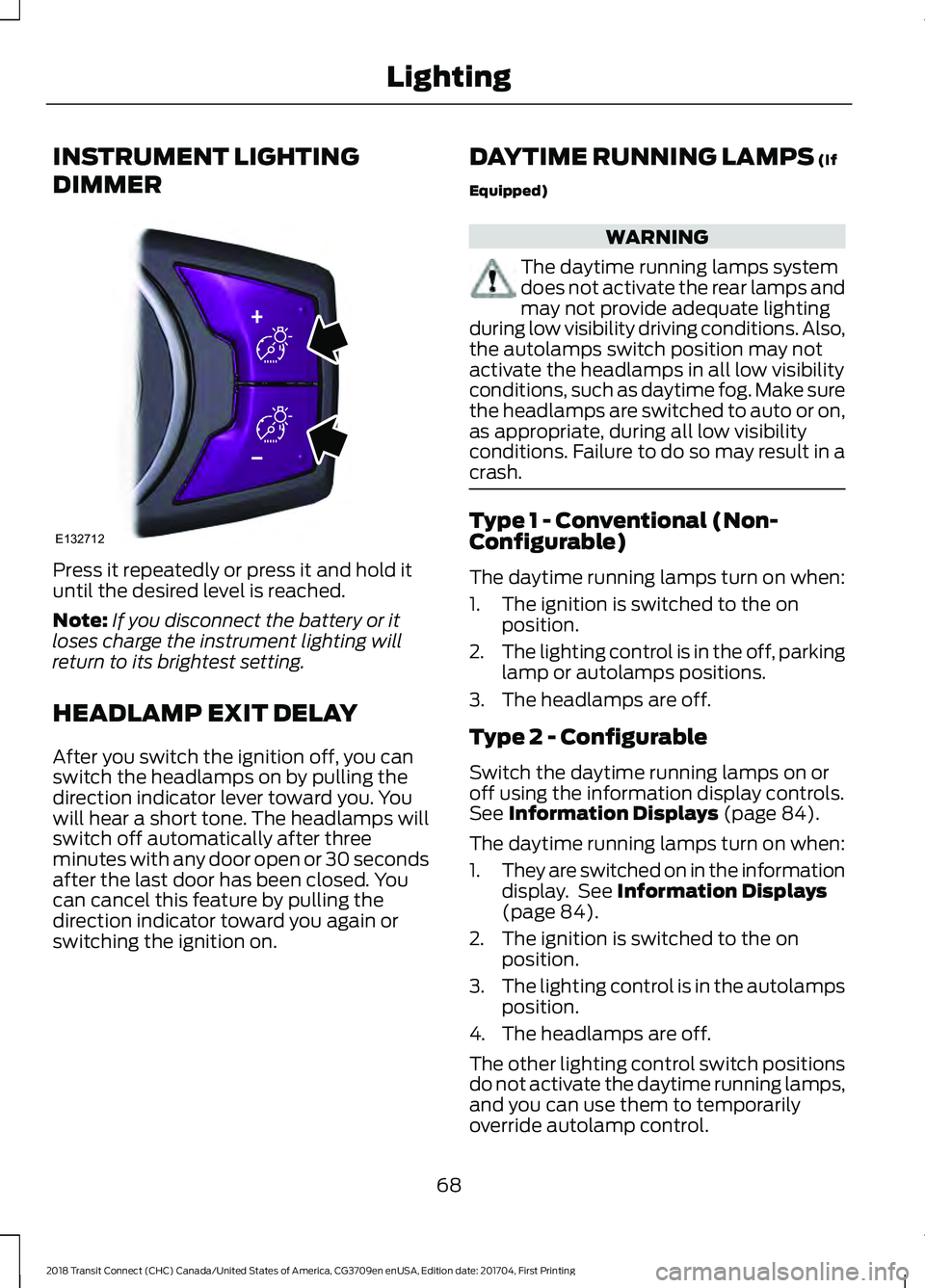
Press it repeatedly or press it and hold it
until the desired level is reached.
Note:
If you disconnect the battery or it
loses charge the instrument lighting will
return to its brightest setting.
HEADLAMP EXIT DELAY
After you switch the ignition off, you can
switch the headlamps on by pulling the
direction indicator lever toward you. You
will hear a short tone. The headlamps will
switch off automatically after three
minutes with any door open or 30 seconds
after the last door has been closed. You
can cancel this feature by pulling the
direction indicator toward you again or
switching the ignition on. DAYTIME RUNNING LAMPS (If
Equipped) WARNING
The daytime running lamps system
does not activate the rear lamps and
may not provide adequate lighting
during low visibility driving conditions. Also,
the autolamps switch position may not
activate the headlamps in all low visibility
conditions, such as daytime fog. Make sure
the headlamps are switched to auto or on,
as appropriate, during all low visibility
conditions. Failure to do so may result in a
crash. Type 1 - Conventional (Non-
Configurable)
The daytime running lamps turn on when:
1. The ignition is switched to the on
position.
2. The lighting control is in the off, parking
lamp or autolamps positions.
3. The headlamps are off.
Type 2 - Configurable
Switch the daytime running lamps on or
off using the information display controls.
See
Information Displays (page 84).
The daytime running lamps turn on when:
1. They are switched on in the information
display. See
Information Displays
(page 84).
2. The ignition is switched to the on position.
3. The lighting control is in the autolamps
position.
4. The headlamps are off.
The other lighting control switch positions
do not activate the daytime running lamps,
and you can use them to temporarily
override autolamp control.
68
2018 Transit Connect (CHC) Canada/United States of America, CG3709en enUSA, Edition date: 201704, First Printing LightingE132712
Page 82 of 449
GAUGES
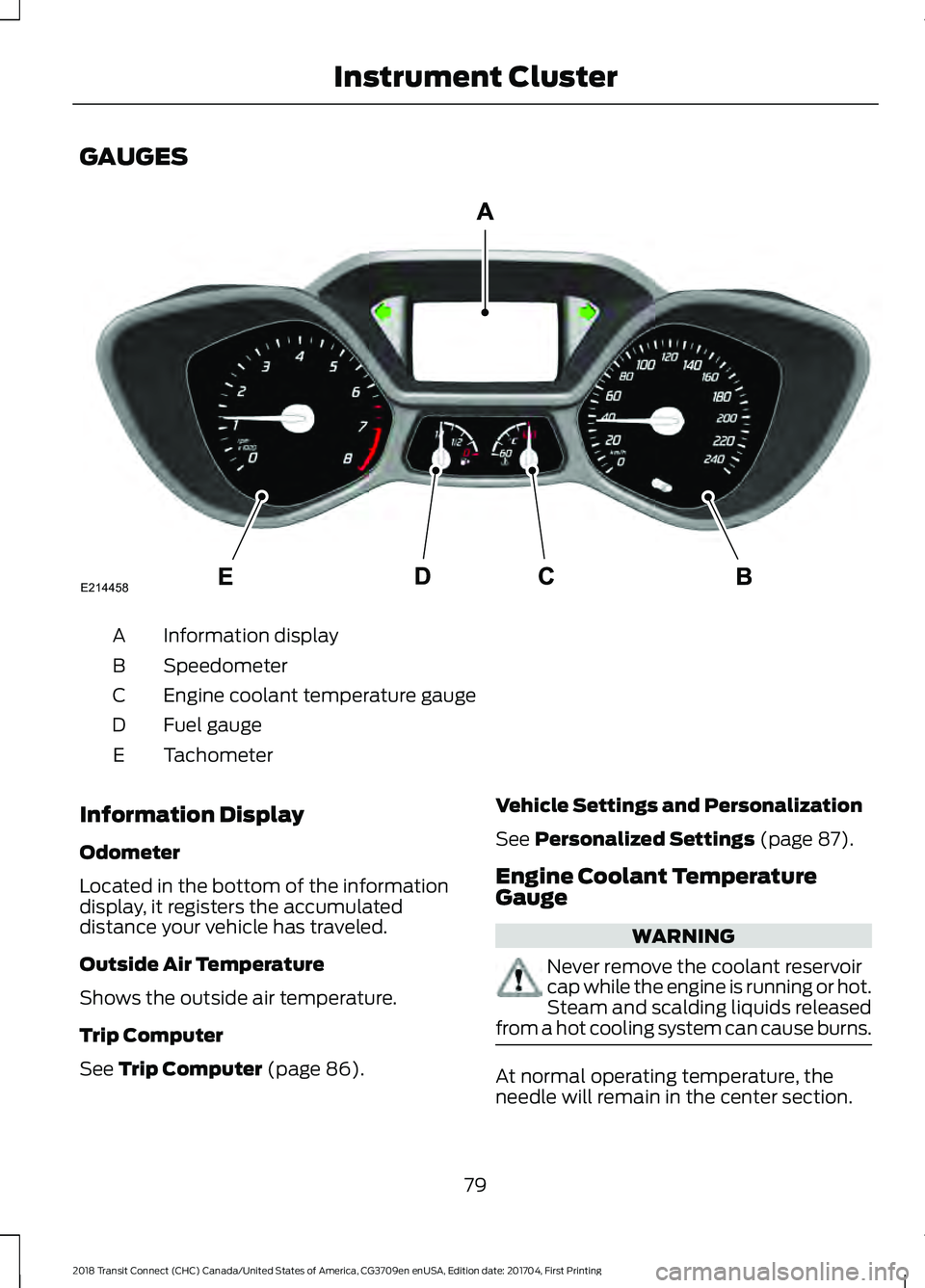
Information display
A
Speedometer
B
Engine coolant temperature gauge
C
Fuel gauge
D
Tachometer
E
Information Display
Odometer
Located in the bottom of the information
display, it registers the accumulated
distance your vehicle has traveled.
Outside Air Temperature
Shows the outside air temperature.
Trip Computer
See Trip Computer (page 86). Vehicle Settings and Personalization
See
Personalized Settings (page 87).
Engine Coolant Temperature
Gauge WARNING
Never remove the coolant reservoir
cap while the engine is running or hot.
Steam and scalding liquids released
from a hot cooling system can cause burns. At normal operating temperature, the
needle will remain in the center section.
79
2018 Transit Connect (CHC) Canada/United States of America, CG3709en enUSA, Edition date: 201704, First Printing Instrument ClusterE214458
Page 83 of 449
If the needle enters the red section, the
engine is overheating. Stop the engine,
switch the ignition off and determine the
cause once the engine has cooled down.
See Engine Coolant Check (page 202).
Note: Do not restart the engine until the
cause of overheating has been resolved.
Fuel Gauge
Switch the ignition on. The fuel gauge will
indicate approximately how much remains
in the fuel tank. The fuel gauge may vary
slightly when your vehicle is moving or on
a gradient. The arrow adjacent to the fuel
pump symbol indicates on which side of
the vehicle the fuel filler door is located.
Low Fuel Level Reminder
Vehicles with Trip Computer
A low fuel level reminder displays and
sounds when the distance to empty
reaches
75 mi (120 km) to empty for
MyKey, and at 50 mi (80 km), 25 mi
(40 km), 10 mi (20 km) and 0 mi (0 km)
for all vehicle keys.
Vehicles without Trip Computer
A low fuel level reminder displays and
sounds when the fuel gauge needle is at
1/16th.
Note: The low fuel warning and
distance-to-empty warning can appear at
different fuel gauge positions depending on
fuel economy conditions. This variation is
normal. WARNING LAMPS AND
INDICATORS
The following warning lamps and
indicators will alert you to a vehicle
condition that may become serious. Some
lamps will illuminate when you start your
vehicle to make sure they work. If any
lamps remain on after starting your vehicle,
refer to the respective system warning
lamp for further information.
Note:
Some warning indicators appear in
the information display and function the
same as a warning lamp but do not display
when you start your vehicle.
Airbag - Front If it fails to illuminate when you
start your vehicle, continues to
flash or remains on, it indicates
a malfunction. Have the system checked
by your authorized dealer.
Anti-Lock Braking System If it illuminates when you are
driving, this indicates a
malfunction. You will continue
to have the normal braking system
(without ABS) unless the brake system
warning lamp is also illuminated. Have the
system checked by your authorized dealer.
Battery If it illuminates while driving, it
indicates a malfunction. Switch
off all unnecessary electrical
equipment and have the system checked
by your authorized dealer immediately.
80
2018 Transit Connect (CHC) Canada/United States of America, CG3709en enUSA, Edition date: 201704, First Printing Instrument ClusterE67017
Page 84 of 449
Blind Spot Monitor (If Equipped)
It will illuminate when you switch
this feature off or in conjunction
with a message. See Blind Spot
Information System
(page 146). See
Information Messages (page 87).
Brake System WARNING
Driving your vehicle with the warning
lamp on is dangerous. A significant
decrease in braking performance
may occur. It may take you longer to stop
your vehicle. Have your vehicle checked as
soon as possible. Driving extended
distances with the parking brake engaged
can cause brake failure and the risk of
personal injury. It will illuminate when you
engage the parking brake with
the ignition on.
If it illuminates when you are driving, check
that the parking brake is not engaged. If
the parking brake is not engaged, this
indicates low brake fluid level or a brake
system malfunction. Have the system
checked immediately by your authorized
dealer.
Cruise Control
(If Equipped) It will illuminate when you switch
this feature on. See
Using
Cruise Control (page 145).
Direction Indicator Illuminates when the left or right
turn signal or the hazard warning
flasher is turned on. If the
indicators stay on or flash faster, check for
a burned out bulb. See
Changing a Bulb
(page 212). Engine Oil If it illuminates with the engine
running or when you are driving,
this indicates a malfunction.
Stop your vehicle as soon as it is safe to
do so and switch the engine off. Check the
engine oil level. See
Engine Oil Check
(page 200).
Note: Do not resume your journey if it
illuminates despite the level being correct.
Have the system checked by your authorized
dealer immediately.
Fasten Seatbelt Warning Lamp It will illuminate and a chime will
sound to remind you to fasten
your seatbelt. See
Seatbelt
Reminder (page 33).
Fog Lamps - Front
(If Equipped) It will illuminate when you switch
the front fog lamps on.
High Beam It will illuminate when you switch
the high beam headlamps on. It
will flash when you use the
headlamp flasher.
Information
(If Equipped) It will illuminate when a new
message is stored in the
information display. It will be red
or amber in color depending on the severity
of the message and will remain on until the
cause of the message has been rectified.
See
Information Messages (page 87).
81
2018 Transit Connect (CHC) Canada/United States of America, CG3709en enUSA, Edition date: 201704, First Printing Instrument ClusterE124823 E144522 E71340 E71880