power steering FORD TRANSIT CONNECT 2019 User Guide
[x] Cancel search | Manufacturer: FORD, Model Year: 2019, Model line: TRANSIT CONNECT, Model: FORD TRANSIT CONNECT 2019Pages: 493, PDF Size: 7.43 MB
Page 219 of 493
STEERING
Electric Power Steering
WARNING: The electric power
steering system has diagnostic checks that
continuously monitor the system. If a fault
is detected, a message displays in the
information display. Stop your vehicle as
soon as it is safe to do so. Switch the
ignition off. After at least 10 seconds,
switch the ignition on and watch the
information display for a steering system
warning message. If a steering system
warning message returns, have the system
checked by an authorized dealer. WARNING: If the system detects an
error, you may not feel a difference in the
steering, however a serious condition may
exist. Obtain immediate service from an
authorized dealer, failure to do so may
result in loss of steering control.
Your vehicle has an electric power steering
system. There is no fluid reservoir. No
maintenance is required.
If your vehicle loses electrical power while
you are driving, electric power steering
assistance is lost. The steering system still
operates and you can steer your vehicle
manually. Manually steering your vehicle
requires more effort.
Extreme continuous steering may increase
the effort required for you to steer your
vehicle. This increased effort prevents
overheating and permanent damage to
the steering system. You do not lose the
ability to steer your vehicle manually.
Typical steering and driving maneuvers
allow the system to cool and return to
normal operation. Steering Tips
If the steering wanders or pulls, check for:
•
Correct tire pressures.
• Uneven tire wear.
• Loose or worn suspension
components.
• Loose or worn steering components.
• Improper vehicle alignment.
Note: A high crown in the road or high
crosswinds may also make the steering
seem to wander or pull.
Adaptive Learning
The electronic power steering system
adaptive learning helps correct road
irregularities and improves overall handling
and steering feel. It communicates with
the brake system to help operate
advanced stability control and accident
avoidance systems. Additionally, whenever
the battery is disconnected or a new
battery installed, you must drive your
vehicle a short distance before the system
relearns the strategy and reactivates all
systems.
PRE-COLLISION ASSIST WARNING:
You are responsible for
controlling your vehicle at all times. The
system is designed to be an aid and does
not relieve you of your responsibility to
drive with due care and attention. Failure
to follow this instruction could result in the
loss of control of your vehicle, personal
injury or death. WARNING:
The system does not
operate during hard acceleration or
steering. Failure to take care may lead to
a crash or personal injury.
215
2019 Transit Connect (CHC) Canada/United States of America, CG3739en enUSA, Edition date: 201804, First-Printing Driving Aids
Page 243 of 493
•
Do not warm up your vehicle on cold
mornings.
• Reduce the use of air conditioning and
heat.
• Avoid using speed control in hilly
terrain.
• Do not rest your foot on the brake
pedal while driving.
• Avoid carrying unnecessary weight.
• Avoid adding particular accessories to
your vehicle (e.g. bug deflectors,
rollbars/light bars, running boards, ski
racks).
• Avoid driving with the wheels out of
alignment.
COLD WEATHER
PRECAUTIONS
The functional operation of some
components and systems can be affected
at temperatures below -13°F (-25°C).
DRIVING THROUGH WATER WARNING:
Do not drive through
flowing or deep water as you may lose
control of your vehicle.
Note: Driving through standing water can
cause vehicle damage.
Note: Engine damage can occur if water
enters the air filter.
Before driving through standing water,
check the depth. Never drive through water
that is higher than the bottom of the front
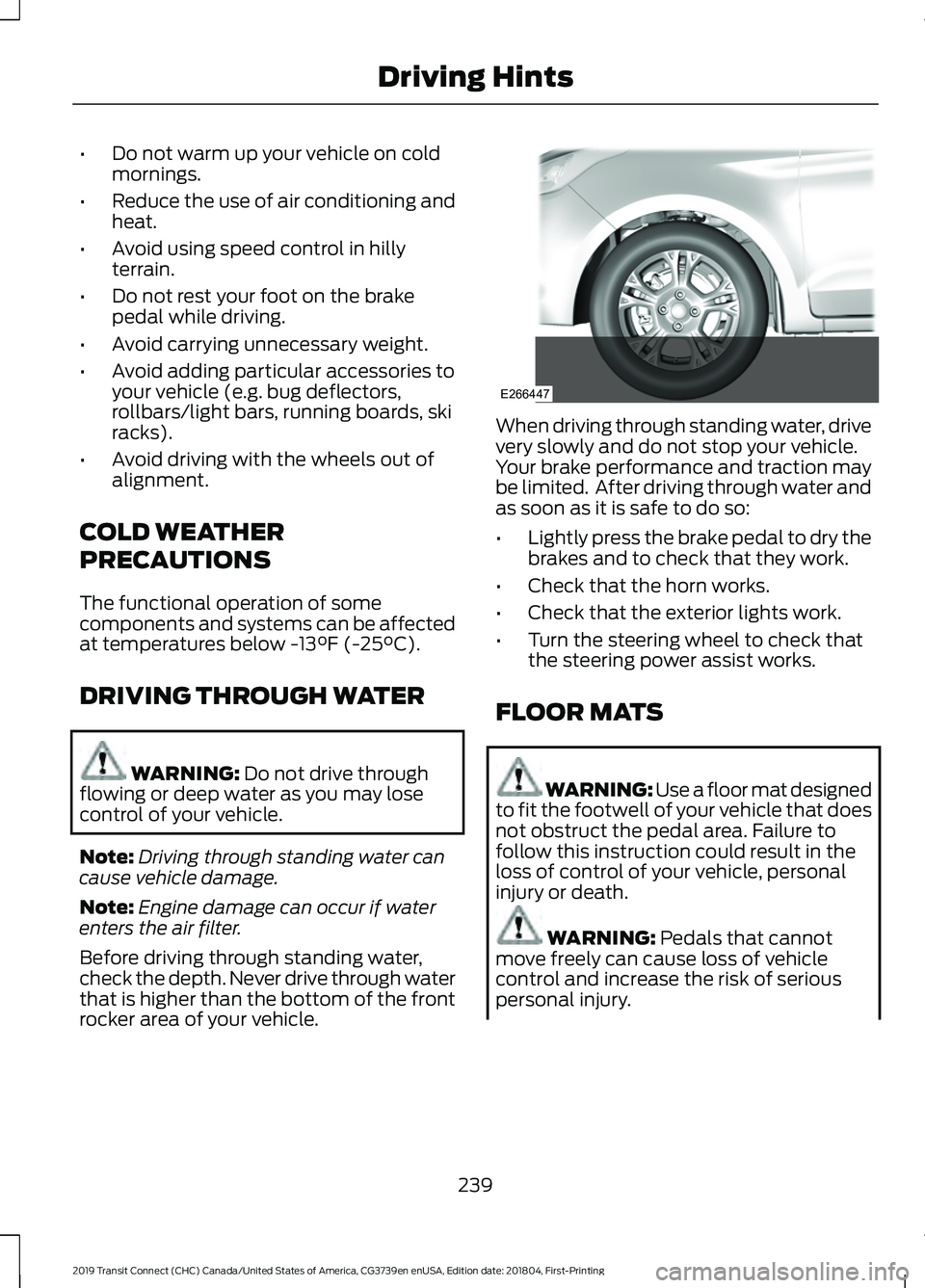
rocker area of your vehicle. When driving through standing water, drive
very slowly and do not stop your vehicle.
Your brake performance and traction may
be limited. After driving through water and
as soon as it is safe to do so:
•
Lightly press the brake pedal to dry the
brakes and to check that they work.
• Check that the horn works.
• Check that the exterior lights work.
• Turn the steering wheel to check that
the steering power assist works.
FLOOR MATS WARNING: Use a floor mat designed
to fit the footwell of your vehicle that does
not obstruct the pedal area. Failure to
follow this instruction could result in the
loss of control of your vehicle, personal
injury or death. WARNING:
Pedals that cannot
move freely can cause loss of vehicle
control and increase the risk of serious
personal injury.
239
2019 Transit Connect (CHC) Canada/United States of America, CG3739en enUSA, Edition date: 201804, First-Printing Driving HintsE266447
Page 260 of 493
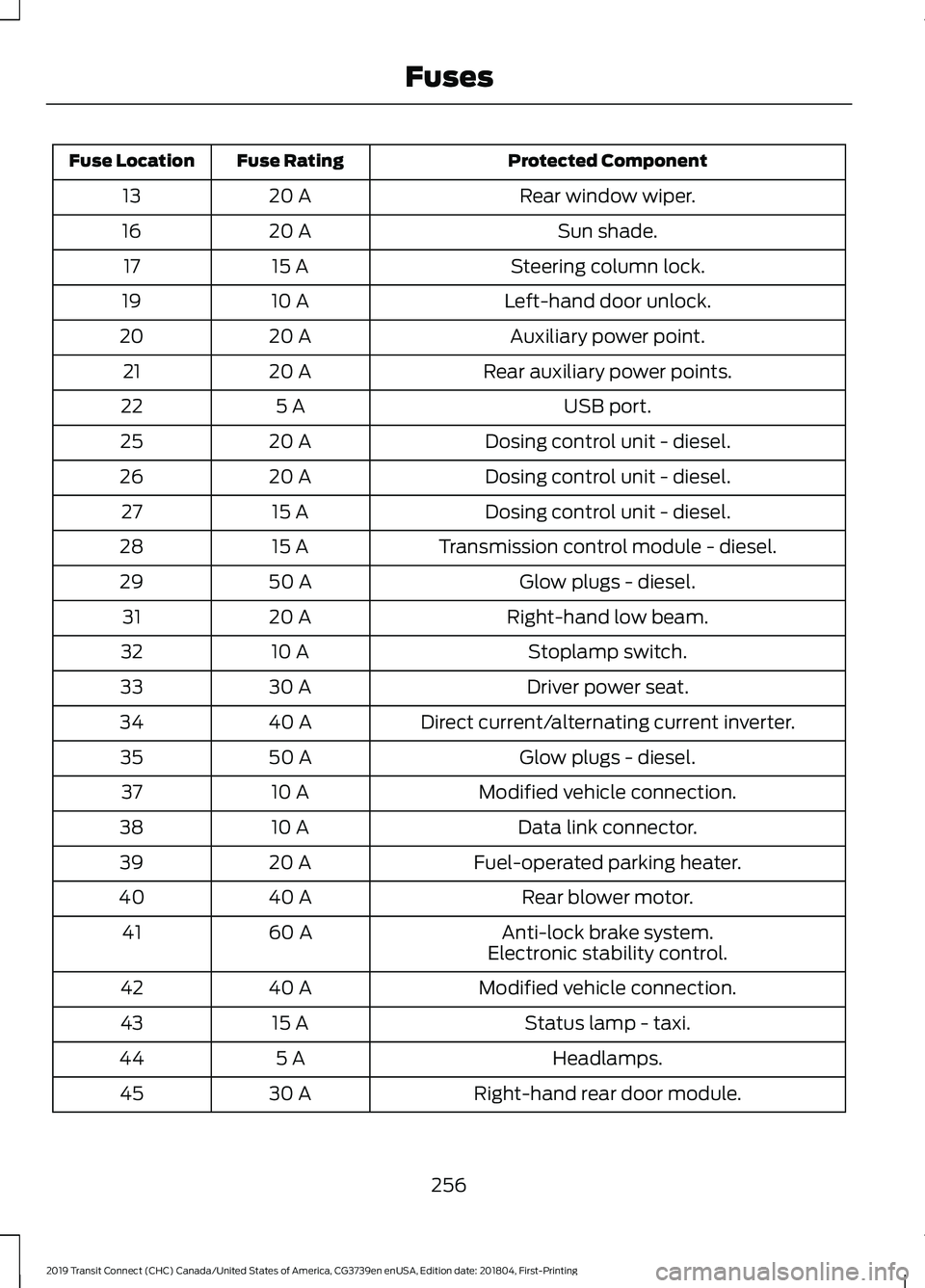
Protected Component
Fuse Rating
Fuse Location
Rear window wiper.
20 A
13
Sun shade.
20 A
16
Steering column lock.
15 A
17
Left-hand door unlock.
10 A
19
Auxiliary power point.
20 A
20
Rear auxiliary power points.
20 A
21
USB port.
5 A
22
Dosing control unit - diesel.
20 A
25
Dosing control unit - diesel.
20 A
26
Dosing control unit - diesel.
15 A
27
Transmission control module - diesel.
15 A
28
Glow plugs - diesel.
50 A
29
Right-hand low beam.
20 A
31
Stoplamp switch.
10 A
32
Driver power seat.
30 A
33
Direct current/alternating current inverter.
40 A
34
Glow plugs - diesel.
50 A
35
Modified vehicle connection.
10 A
37
Data link connector.
10 A
38
Fuel-operated parking heater.
20 A
39
Rear blower motor.
40 A
40
Anti-lock brake system.
60 A
41
Electronic stability control.
Modified vehicle connection.
40 A
42
Status lamp - taxi.
15 A
43
Headlamps.
5 A
44
Right-hand rear door module.
30 A
45
256
2019 Transit Connect (CHC) Canada/United States of America, CG3739en enUSA, Edition date: 201804, First-Printing Fuses
Page 261 of 493
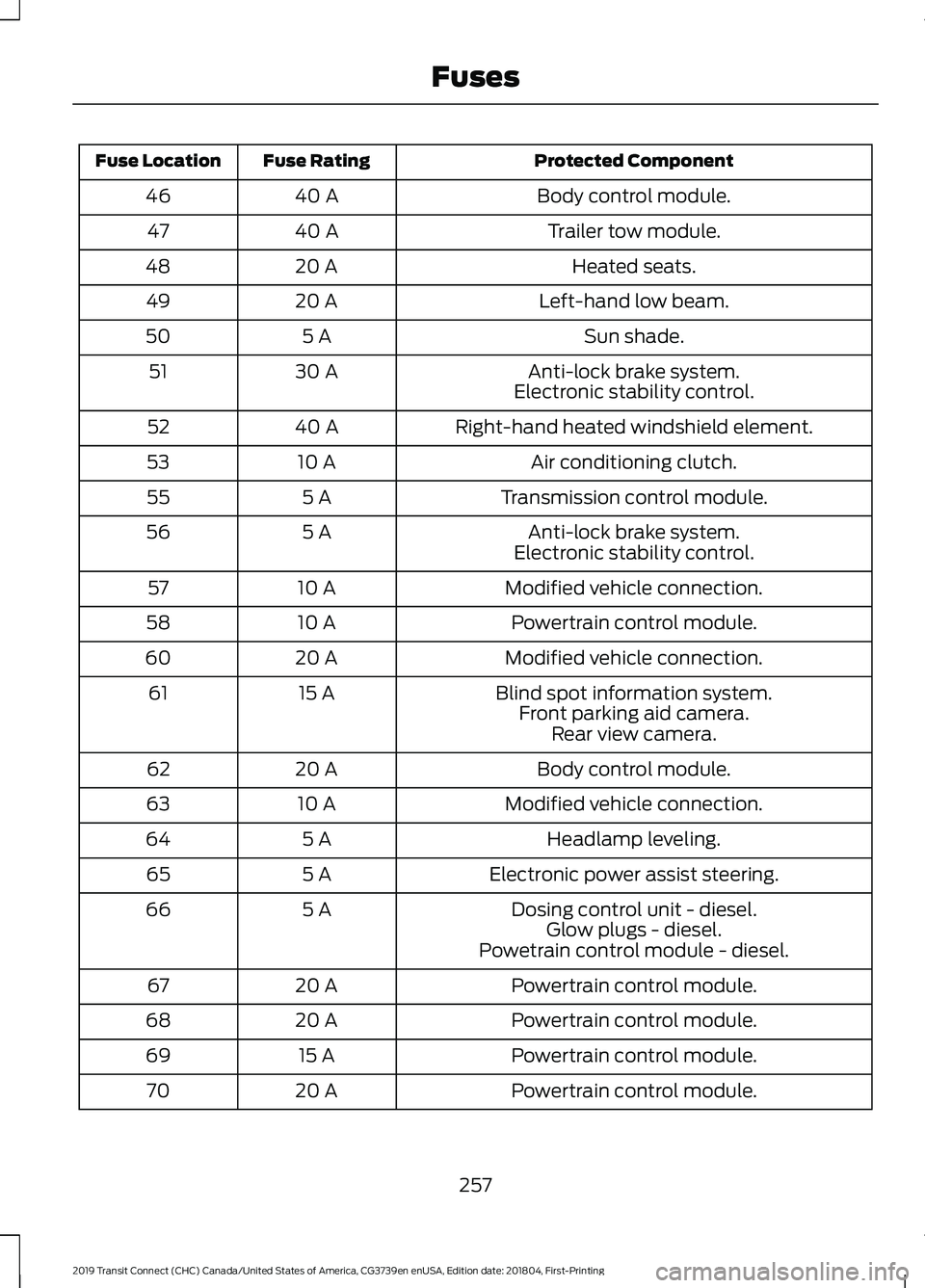
Protected Component
Fuse Rating
Fuse Location
Body control module.
40 A
46
Trailer tow module.
40 A
47
Heated seats.
20 A
48
Left-hand low beam.
20 A
49
Sun shade.
5 A
50
Anti-lock brake system.
30 A
51
Electronic stability control.
Right-hand heated windshield element.
40 A
52
Air conditioning clutch.
10 A
53
Transmission control module.
5 A
55
Anti-lock brake system.
5 A
56
Electronic stability control.
Modified vehicle connection.
10 A
57
Powertrain control module.
10 A
58
Modified vehicle connection.
20 A
60
Blind spot information system.
15 A
61
Front parking aid camera.Rear view camera.
Body control module.
20 A
62
Modified vehicle connection.
10 A
63
Headlamp leveling.
5 A
64
Electronic power assist steering.
5 A
65
Dosing control unit - diesel.
5 A
66
Glow plugs - diesel.
Powetrain control module - diesel.
Powertrain control module.
20 A
67
Powertrain control module.
20 A
68
Powertrain control module.
15 A
69
Powertrain control module.
20 A
70
257
2019 Transit Connect (CHC) Canada/United States of America, CG3739en enUSA, Edition date: 201804, First-Printing Fuses
Page 274 of 493
Do not add extra inhibitors or additives to
the coolant. These can be harmful and
compromise the corrosion protection of
the coolant.
Recycled Coolant
We do not recommend the use of recycled
coolant as an approved recycling process
is not yet available.
Dispose of used engine coolant in an
appropriate manner. Follow your
community's regulations and standards
for recycling and disposing of automotive
fluids.
Severe Climates
If you drive in extremely cold climates:
•
It may be necessary to increase the
coolant concentration above 50%.
• A coolant concentration of 60%
provides improved freeze point
protection. Coolant concentrations
above 60% decrease the overheat
protection characteristics of the
coolant and may cause engine
damage.
If you drive in extremely hot climates:
• You can decrease the coolant
concentration to 40%.
• Coolant concentrations below 40%
decrease the freeze and corrosion
protection characteristics of the
coolant and may cause engine
damage.
Vehicles driven year-round in non-extreme
climates should use prediluted coolant for
optimum cooling system and engine
protection. Coolant Change
At specific mileage intervals, as listed in
the scheduled maintenance information,
the coolant should be changed. Add
prediluted coolant approved to the correct
specification.
Fail-Safe Cooling
Fail-safe cooling allows you to temporarily
drive your vehicle before any incremental
component damage occurs. The fail-safe
distance depends on ambient
temperature, vehicle load and terrain.
How Fail-Safe Cooling Works
If the engine begins to overheat,
the coolant temperature gauge
moves toward the red zone:
A warning lamp illuminates and
a message may appear in the
information display.
If the engine reaches a preset
over-temperature condition, the engine
automatically switches to alternating
cylinder operation. Each disabled cylinder
acts as an air pump and cools the engine.
When this occurs, your vehicle still
operates, however:
• Engine power is limited.
• The air conditioning system turns off.
Continued operation increases the engine
temperature, causing the engine to
completely shut down. Your steering and
braking effort increases in this situation.
When the engine temperature cools, you
can re-start the engine. Have your vehicle
checked as soon as possible to minimize
engine damage.
270
2019 Transit Connect (CHC) Canada/United States of America, CG3739en enUSA, Edition date: 201804, First-Printing Maintenance
Page 275 of 493
When Fail-Safe Mode Is Activated
WARNING: Fail-safe mode is for use
during emergencies only. Operate your
vehicle in fail-safe mode only as long as
necessary to bring your vehicle to rest in a
safe location and seek immediate repairs.
When in fail-safe mode, your vehicle will
have limited power, will not be able to
maintain high-speed operation, and may
completely shut down without warning,
potentially losing engine power, power
steering assist, and power brake assist,
which may increase the possibility of a
crash resulting in serious injury. WARNING:
Do not remove the
coolant reservoir cap when the cooling
system is hot. Wait 10 minutes for the
cooling system to cool down. Cover the
coolant reservoir cap with a thick cloth to
prevent the possibility of scalding and
slowly remove the cap. Failure to follow
this instruction could result in personal
injury.
Your vehicle has limited engine power
when in the fail-safe mode, drive your
vehicle with caution. Your vehicle does not
maintain high-speed operation and the
engine may operate poorly.
Remember that the engine is capable of
automatically shutting down to prevent
engine damage. In this situation:
1. Pull off the road as soon as safely possible and switch the engine off.
2. If you are a member of a roadside assistance program, we recommend
that you contact your roadside
assistance service provider.
3. If this is not possible, wait a short period for the engine to cool. 4. Check the coolant level. If the coolant
level is at or below the minimum mark,
add prediluted coolant immediately.
5. When the engine temperature cools, you can re-start the engine. Have your
vehicle checked as soon as possible to
minimize engine damage.
Note: Driving your vehicle without repair
increases the chance of engine damage.
Engine Coolant Temperature
Management
(If Equipped) WARNING:
To reduce the risk of
crash and injury, be prepared that the
vehicle speed may reduce and the vehicle
may not be able to accelerate with full
power until the coolant temperature
reduces.
If you tow a trailer with your vehicle, the
engine may temporarily reach a higher
temperature during severe operating
conditions, for example ascending a long
or steep grade in high ambient
temperatures.
At this time, you may notice the coolant
temperature gauge moves toward the red
zone and a message may appear in the
information display.
You may notice a reduction in vehicle
speed caused by reduced engine power in
order to manage the engine coolant
temperature. Your vehicle may enter this
mode if certain high-temperature and
high-load conditions take place. The
amount of speed reduction depends on
vehicle loading, grade and ambient
temperature. If this occurs, there is no
need to stop your vehicle. You can
continue to drive.
271
2019 Transit Connect (CHC) Canada/United States of America, CG3739en enUSA, Edition date: 201804, First-Printing Maintenance
Page 304 of 493
11.
Disconnect the tire inflation pipe and
the 12 volt DC power point connector.
Note: Do not remove the sealant bottle
from the compressor.
12. Reinstall the tire valve dust cap.
13. Place the warning label on the steering wheel and correctly stow the
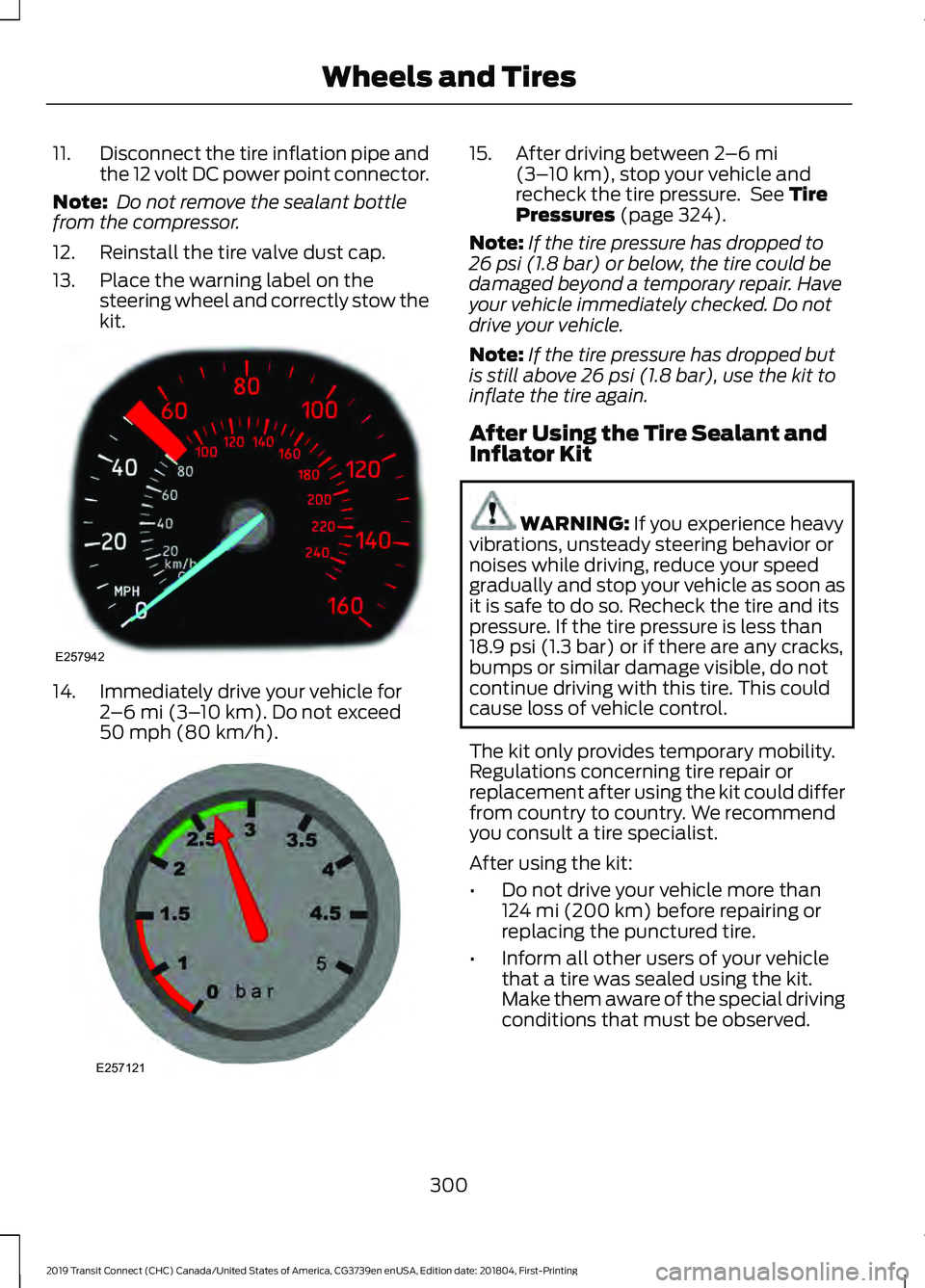
kit.14. Immediately drive your vehicle for
2–6 mi (3– 10 km). Do not exceed
50 mph (80 km/h). 15. After driving between
2
–6 mi
(3– 10 km), stop your vehicle and
recheck the tire pressure. See Tire
Pressures (page 324).
Note: If the tire pressure has dropped to
26 psi (1.8 bar)
or below, the tire could be
damaged beyond a temporary repair. Have
your vehicle immediately checked. Do not
drive your vehicle.
Note: If the tire pressure has dropped but
is still above
26 psi (1.8 bar), use the kit to
inflate the tire again.
After Using the Tire Sealant and
Inflator Kit WARNING:
If you experience heavy
vibrations, unsteady steering behavior or
noises while driving, reduce your speed
gradually and stop your vehicle as soon as
it is safe to do so. Recheck the tire and its
pressure. If the tire pressure is less than
18.9 psi (1.3 bar)
or if there are any cracks,
bumps or similar damage visible, do not
continue driving with this tire. This could
cause loss of vehicle control.
The kit only provides temporary mobility.
Regulations concerning tire repair or
replacement after using the kit could differ
from country to country. We recommend
you consult a tire specialist.
After using the kit:
• Do not drive your vehicle more than
124 mi (200 km)
before repairing or
replacing the punctured tire.
• Inform all other users of your vehicle
that a tire was sealed using the kit.
Make them aware of the special driving
conditions that must be observed.
300
2019 Transit Connect (CHC) Canada/United States of America, CG3739en enUSA, Edition date: 201804, First-Printing Wheels and TiresE257942 E257121
Page 316 of 493
describes the fundamental
characteristics of the tire and also
provides a U.S. DOT Tire
Identification Number for safety
standard certification and in case
of a recall.
This begins with the letters DOT
and indicates that the tire meets
all federal standards. The next
two numbers or letters are the
plant code designating where it
was manufactured, the next two
are the tire size code and the last
four numbers represent the week
and year the tire was built. For
example, the numbers 317 mean
the 31st week of 1997. After 2000
the numbers go to four digits. For
example, 2501 means the 25th
week of 2001. The numbers in
between are identification codes
used for traceability. This
information is used to contact
customers if a tire defect requires
a recall.
Tire Replacement
Requirements
Your vehicle is equipped with tires
designed to provide a safe ride
and handling capability.
WARNING: Only use
replacement tires and wheels that
are the same size, load index,
speed rating and type (such as
P-metric versus LT-metric or
all-season versus all-terrain) as
those originally provided by Ford.
The recommended tire and wheel size may be found on either the
Safety Compliance Certification
Label (affixed to either the door
hinge pillar, door-latch post, or the
door edge that meets the
door-latch post, next to the
driver's seating position), or the
Tire Label which is located on the
B-Pillar or edge of the driver
’s
door. If this information is not
found on these labels, then you
should contact your authorized
dealer as soon as possible. Use of
any tire or wheel not
recommended by Ford can affect
the safety and performance of
your vehicle, which could result in
an increased risk of loss of vehicle
control, vehicle rollover, personal
injury and death. Additionally the
use of non-recommended tires
and wheels could cause steering,
suspension, axle, transfer case or
power transfer unit failure. If you
have questions regarding tire
replacement, contact your
authorized dealer as soon as
possible. WARNING:
When mounting
replacement tires and wheels, you
should not exceed the maximum
pressure indicated on the sidewall
of the tire to set the beads without
additional precautions listed
below. If the beads do not seat at
the maximum pressure indicated,
re-lubricate and try again.
312
2019 Transit Connect (CHC) Canada/United States of America, CG3739en enUSA, Edition date: 201804, First-Printing Wheels and Tires
Page 371 of 493
Cleaning the Touchscreen
You can remove fingerprints with a dry,
clean, soft cloth.
If dirt or fingerprints are still on the screen,
apply a small amount of alcohol to the
cloth and try to clean it again.
Note:
Do not use detergent or any type of
solvent to clean the touchscreen.
Note: Do not pour or spray alcohol onto the
touchscreen.
Using Voice Recognition
Using voice commands allows you to keep
your hands on the wheel and focus on
what is in front of you. The system provides
feedback through audible tones, prompts,
questions and spoken confirmations
depending on the situation and the chosen
level of interaction (voice settings).
The system also asks short questions
(confirmation prompts) when it is not sure
of your request or when there are multiple
possible responses to your request.
When using voice commands, words and
icons may appear in the status bar
indicating the status of the voice command
session. See Using Voice Recognition
(page 372).
Using the Steering Wheel Controls
Depending on your vehicle and option
package, you can use different controls on
your steering wheel to interact with the
touchscreen system in different ways.
VOL:
Control the volume of audio output.
Mute:
Mute the audio output.
Voice:
Press to start a voice session. Press
again to stop the voice prompt and
immediately begin speaking. Press and
hold to end a voice session. SEEK NEXT:
•
While in radio mode, press to seek
between memory presets.
• While in USB, Bluetooth Audio or CD
mode, press to seek between songs or
press and hold to fast seek.
SEEK PREVIOUS:
• While in radio mode, press to seek
between memory presets.
• While in USB, Bluetooth Audio or CD
mode, press to seek between songs or
press and hold to fast seek.
PHONE ACCEPT:
Press to answer a call
or switch between calls.
PHONE REJECT:
Press to end a call or
reject an incoming call.
Note: On some models, SEEK NEXT
may
be combined with PHONE REJECT and
SEEK PREVIOUS may be combined with
PHONE ACCEPT.
M:
Touch the control repeatedly to switch
between media sources (modes).
See
Steering Wheel (page 74).
Using Your Bezel Controls
Depending on your vehicle and option
package, you may also have these controls
on your instrument panel:
• Power:
Switch the audio system on
and off.
• VOL:
Control the volume of playing
audio.
• Seek
and Tune: se as you normally
would in audio modes.
• Eject:
Eject a CD from the audio
system.
• SOURCE
or MEDIA: Press repeatedly
to advance through available media
modes.
367
2019 Transit Connect (CHC) Canada/United States of America, CG3739en enUSA, Edition date: 201804, First-Printing SYNC™ 3
Page 490 of 493
Guarding Against Exhaust Fumes................143
Important Ventilating Information...............143
Starting System Information
Messages.......................................................... 144
Stopping the Engine When Your Vehicle is Moving................................................................ 143
Stopping the Engine When Your Vehicle is Stationary......................................................... 143
Vehicles with an Ignition Key.......................... 142
Vehicles with a Push Button Ignition Switch................................................................ 142
Starting a Flex Fuel Engine.......................140
Automatic Shutdown......................................... 141
Failure to Start...................................................... 141
Flex Fuel Engine Start System...................... 140
Guarding Against Exhaust Fumes................142
Important Ventilating Information...............142
Stopping the Engine When Your Vehicle is Moving................................................................. 141
Stopping the Engine When Your Vehicle is Stationary.......................................................... 141
Starting a Gasoline Engine........................137 Automatic Engine Shutdown......................... 138
Engine Warning Lamps.................................... 139
Failure to Start..................................................... 138
Guarding Against Exhaust Fumes................139
Important Ventilating Information...............139
Starting System Information Messages.......................................................... 140
Stopping the Engine When Your Vehicle is Moving............................................................... 139
Stopping the Engine When Your Vehicle is Stationary......................................................... 139
Vehicles with an Ignition Key.......................... 138
Vehicles with a Push Button Ignition Switch................................................................ 138
Starting and Stopping the Engine..........134 General Information.......................................... 134
Steering............................................................215 Electric Power Steering.................................... 215
Steering Wheel
................................................74
Storage Compartments.............................133
Streaming Bluetooth Audio - Vehicles Without: SYNC 3
........................................361
Selecting a Bluetooth Source........................ 361
Sun Shades......................................................85 Bounce-Back......................................................... 86
Opening and Closing the Sun Shade...........86 Sun Shade Relearning.......................................
86
Supplementary Restraints System.........40 Principle of Operation........................................ 40
Switching Off the Engine...........................144 Vehicles With a Turbocharger........................ 144
Symbols Glossary
.............................................7
SYNC™ 3........................................................363
General Information......................................... 363
SYNC™ 3 Troubleshooting.....................400
T
Technical Specifications See: Capacities and Specifications.............327
The Better Business Bureau (BBB) Auto Line Program (U.S. Only).......................249
Tire Care
...........................................................301
Glossary of Tire Terminology........................ 302
Information About Uniform Tire Quality Grading.............................................................. 301
Information Contained on the Tire Sidewall........................................................... 303
Temperature A B C............................................ 302
Traction AA A B C.............................................. 302
Treadwear............................................................. 301
Tire Inflation When Punctured See: Tire Sealant and Inflator Kit................296
Tire Pressure Monitoring System
...........316
Changing Tires With a Tire Pressure
Monitoring System......................................... 317
Tire Pressure Monitoring System Reset Procedure......................................................... 319
Understanding Your Tire Pressure Monitoring System ........................................ 317
Tire Pressures................................................324
Tire Repair Kit See: Tire Sealant and Inflator Kit................296
Tire Sealant and Inflator Kit
....................296
After Using the Tire Sealant and Inflator
Kit....................................................................... 300
Using the Tire Sealant and Inflator Kit........................................................................\
297
Tires See: Wheels and Tires..................................... 295
Towing a Trailer
............................................230
Load Placement................................................ 230
Towing Points................................................245 Front Towing Point............................................ 245
486
2019 Transit Connect (CHC) Canada/United States of America, CG3739en enUSA, Edition date: 201804, First-Printing Index