wheel FORD TRANSIT CONNECT 2019 User Guide
[x] Cancel search | Manufacturer: FORD, Model Year: 2019, Model line: TRANSIT CONNECT, Model: FORD TRANSIT CONNECT 2019Pages: 493, PDF Size: 7.43 MB
Page 62 of 493
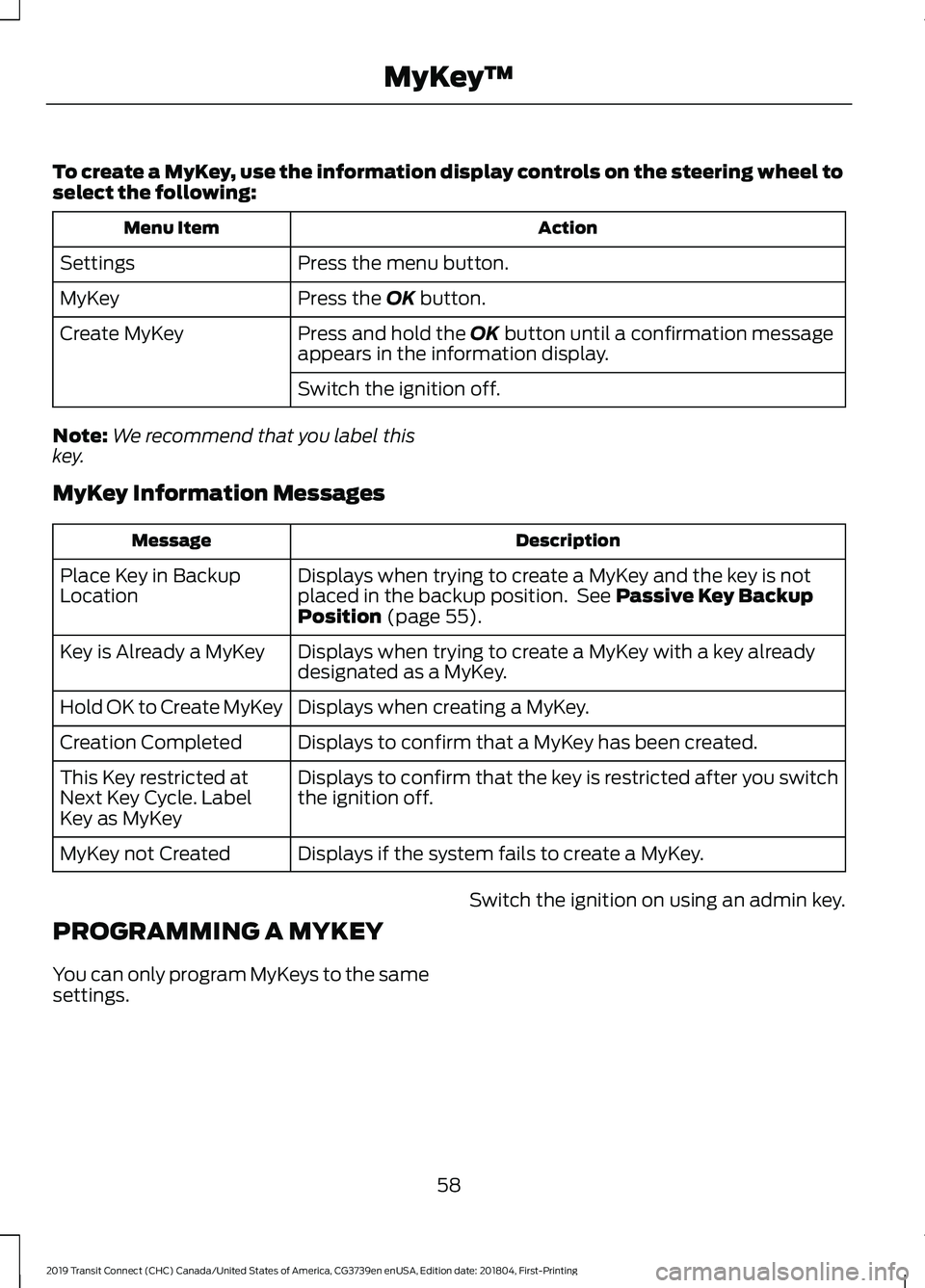
To create a MyKey, use the information display controls on the steering wheel to
select the following:
Action
Menu Item
Press the menu button.
Settings
Press the OK button.
MyKey
Press and hold the
OK button until a confirmation message
appears in the information display.
Create MyKey
Switch the ignition off.
Note: We recommend that you label this
key.
MyKey Information Messages Description
Message
Displays when trying to create a MyKey and the key is not
placed in the backup position. See
Passive Key Backup
Position (page 55).
Place Key in Backup
Location
Displays when trying to create a MyKey with a key already
designated as a MyKey.
Key is Already a MyKey
Displays when creating a MyKey.
Hold OK to Create MyKey
Displays to confirm that a MyKey has been created.
Creation Completed
Displays to confirm that the key is restricted after you switch
the ignition off.
This Key restricted at
Next Key Cycle. Label
Key as MyKey
Displays if the system fails to create a MyKey.
MyKey not Created
PROGRAMMING A MYKEY
You can only program MyKeys to the same
settings. Switch the ignition on using an admin key.
58
2019 Transit Connect (CHC) Canada/United States of America, CG3739en enUSA, Edition date: 201804, First-Printing MyKey
™
Page 63 of 493
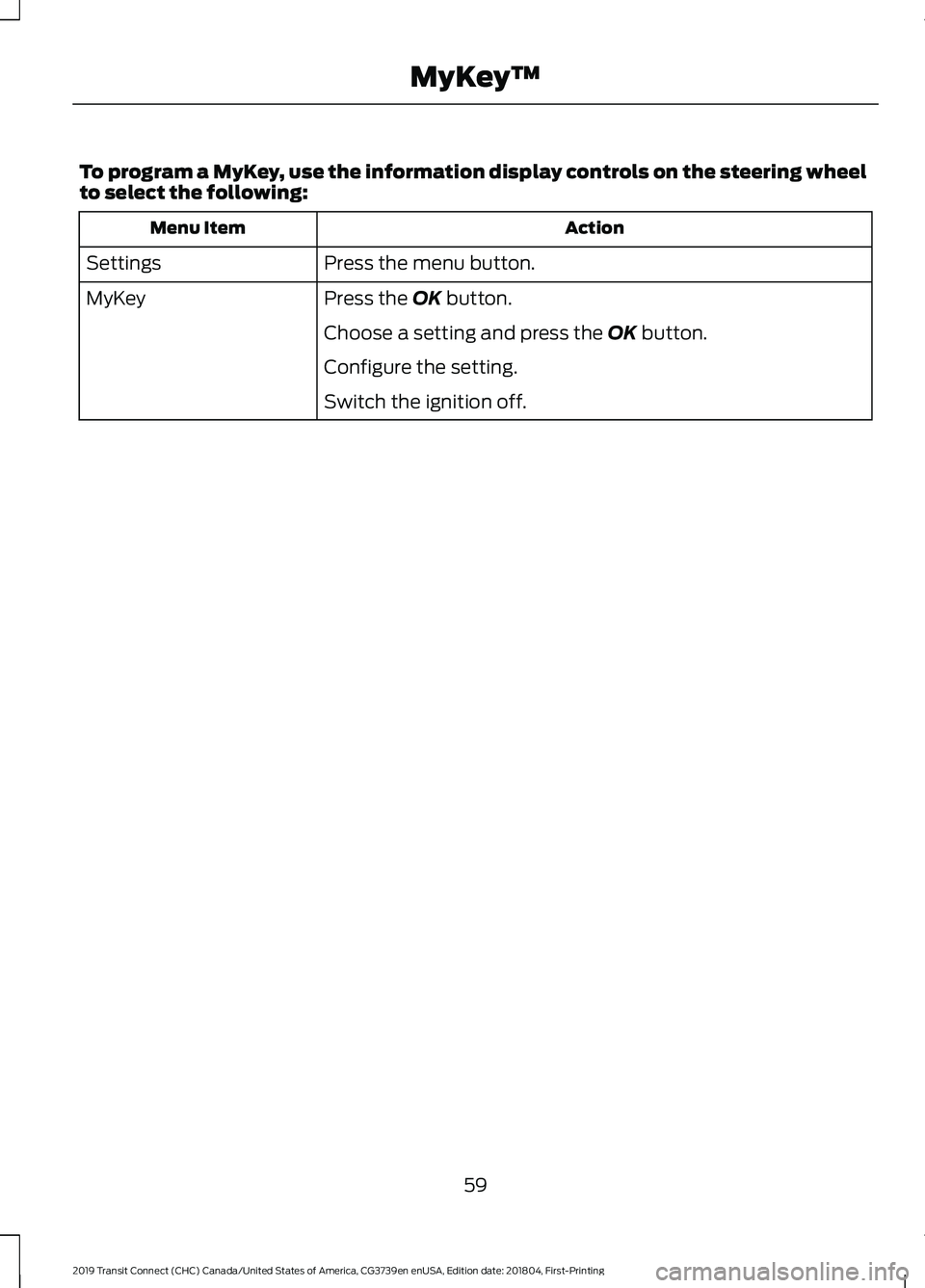
To program a MyKey, use the information display controls on the steering wheel
to select the following:
Action
Menu Item
Press the menu button.
Settings
Press the OK button.
MyKey
Choose a setting and press the
OK button.
Configure the setting.
Switch the ignition off.
59
2019 Transit Connect (CHC) Canada/United States of America, CG3739en enUSA, Edition date: 201804, First-Printing MyKey
™
Page 64 of 493
CLEARING ALL MYKEYS
When you clear all MyKeys, you remove all
restrictions and return all MyKeys to their
original admin key status.
Switch the ignition on using an admin key.
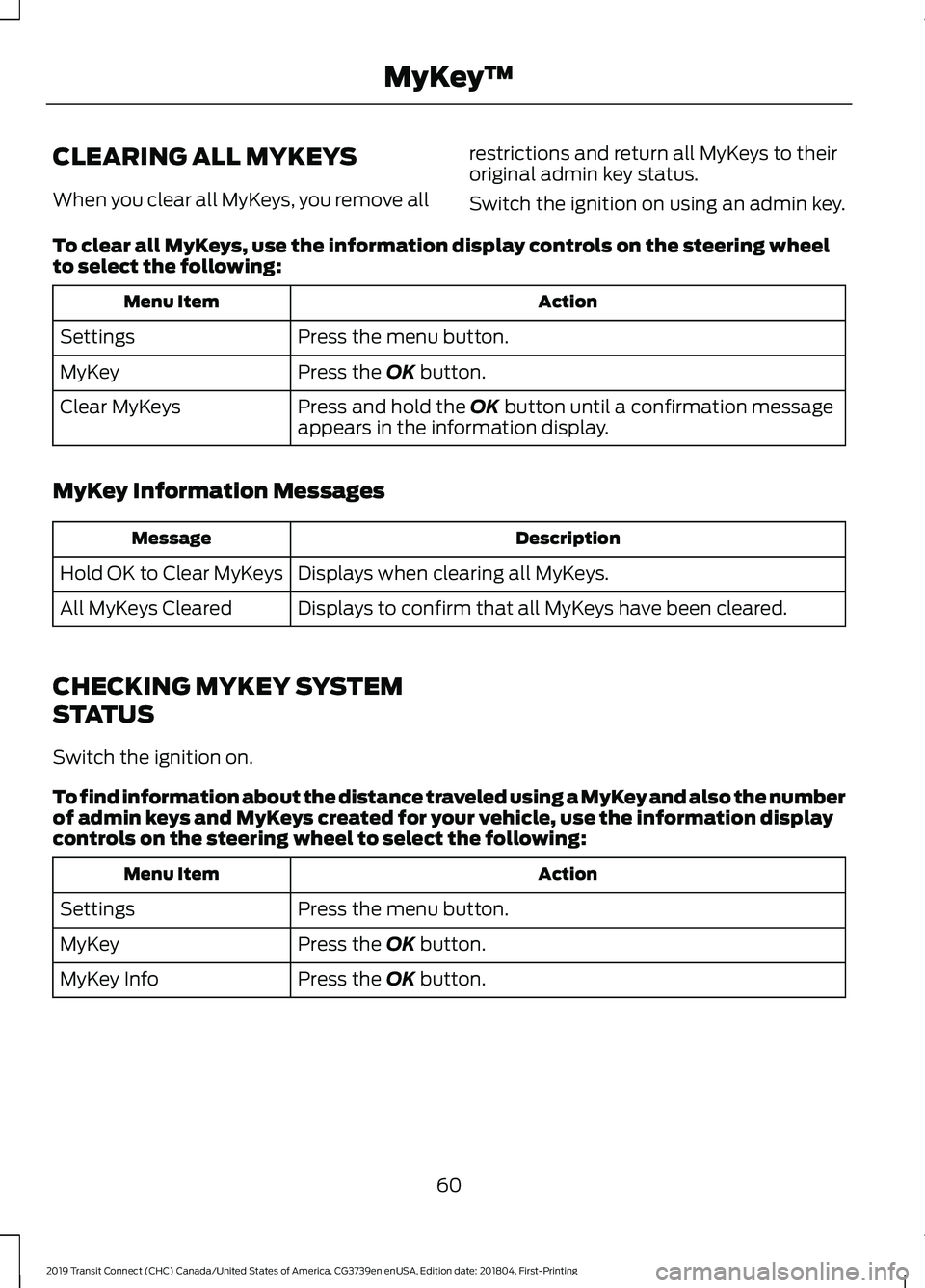
To clear all MyKeys, use the information display controls on the steering wheel
to select the following: Action
Menu Item
Press the menu button.
Settings
Press the OK button.
MyKey
Press and hold the
OK button until a confirmation message
appears in the information display.
Clear MyKeys
MyKey Information Messages Description
Message
Displays when clearing all MyKeys.
Hold OK to Clear MyKeys
Displays to confirm that all MyKeys have been cleared.
All MyKeys Cleared
CHECKING MYKEY SYSTEM
STATUS
Switch the ignition on.
To find information about the distance traveled using a MyKey and also the number
of admin keys and MyKeys created for your vehicle, use the information display
controls on the steering wheel to select the following: Action
Menu Item
Press the menu button.
Settings
Press the
OK button.
MyKey
Press the
OK button.
MyKey Info
60
2019 Transit Connect (CHC) Canada/United States of America, CG3739en enUSA, Edition date: 201804, First-Printing MyKey
™
Page 69 of 493
If both front doors are closed, you can lock
your vehicle by any method, regardless of
whether the key is in the ignition or not.
Autolock
Autolock locks all the doors and liftgate
when all of the following occur:
•
All doors are closed.
• The ignition is on.
• Your vehicle is moving at a speed
greater than 4 mph (7 km/h) for more
than two seconds. Autounlock
Autounlock unlocks all the doors when all
of the following occur:
•
The ignition is on, all doors are closed,
and your vehicle is moving at a speed
greater than
4 mph (7 km/h) for more
than two seconds.
• Your vehicle has come to a stop and
you switch the ignition off or to the
accessory position.
• The driver door is opened within 10
minutes of you switching the ignition
off or to the accessory position.
Note: The doors will not autounlock if your
vehicle has been electronically locked after
you switch the ignition off and before you
open the driver door.
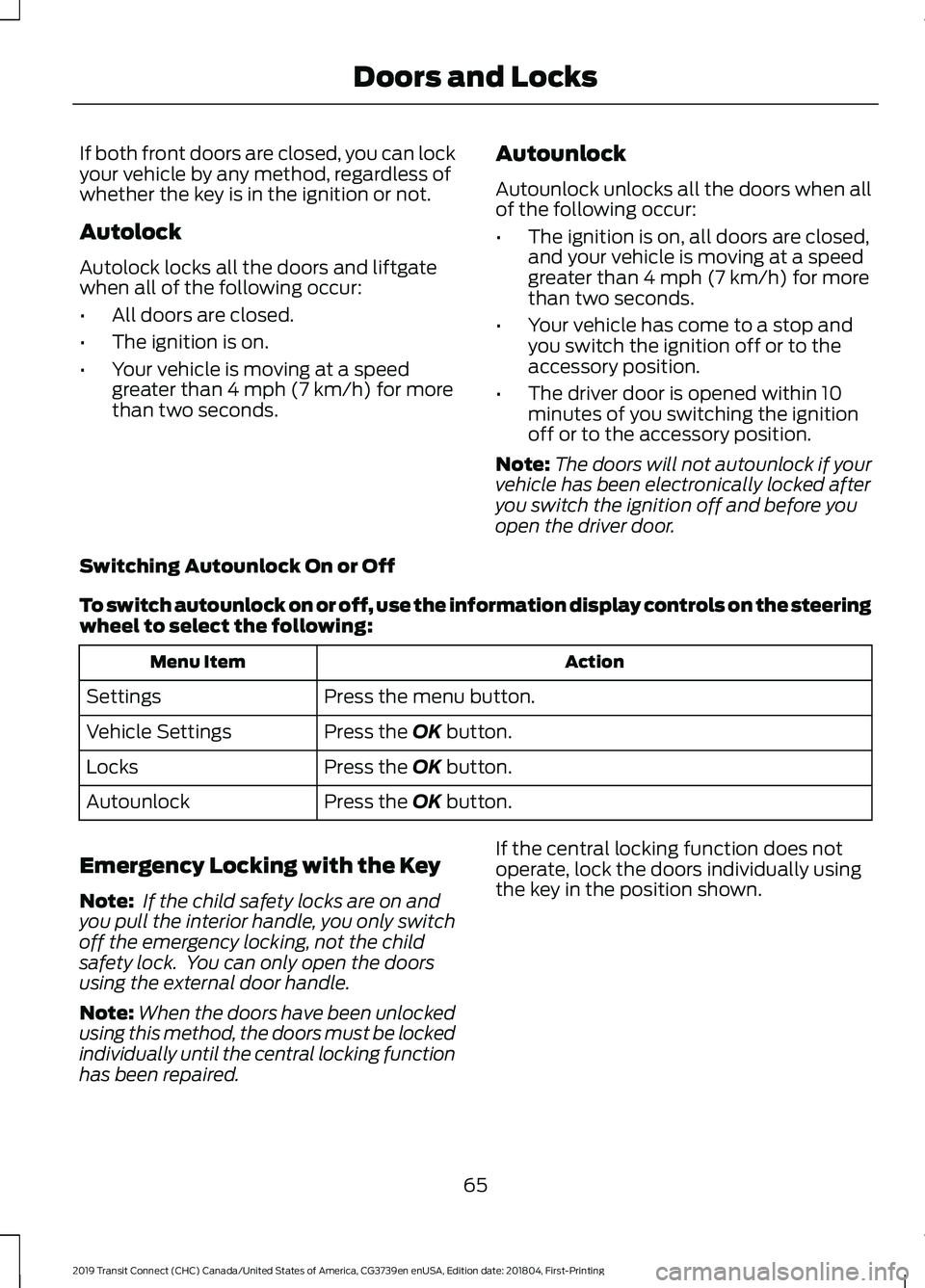
Switching Autounlock On or Off
To switch autounlock on or off, use the information display controls on the steering
wheel to select the following: Action
Menu Item
Press the menu button.
Settings
Press the
OK button.
Vehicle Settings
Press the
OK button.
Locks
Press the
OK button.
Autounlock
Emergency Locking with the Key
Note: If the child safety locks are on and
you pull the interior handle, you only switch
off the emergency locking, not the child
safety lock. You can only open the doors
using the external door handle.
Note: When the doors have been unlocked
using this method, the doors must be locked
individually until the central locking function
has been repaired. If the central locking function does not
operate, lock the doors individually using
the key in the position shown.
65
2019 Transit Connect (CHC) Canada/United States of America, CG3739en enUSA, Edition date: 201804, First-Printing Doors and Locks
Page 78 of 493
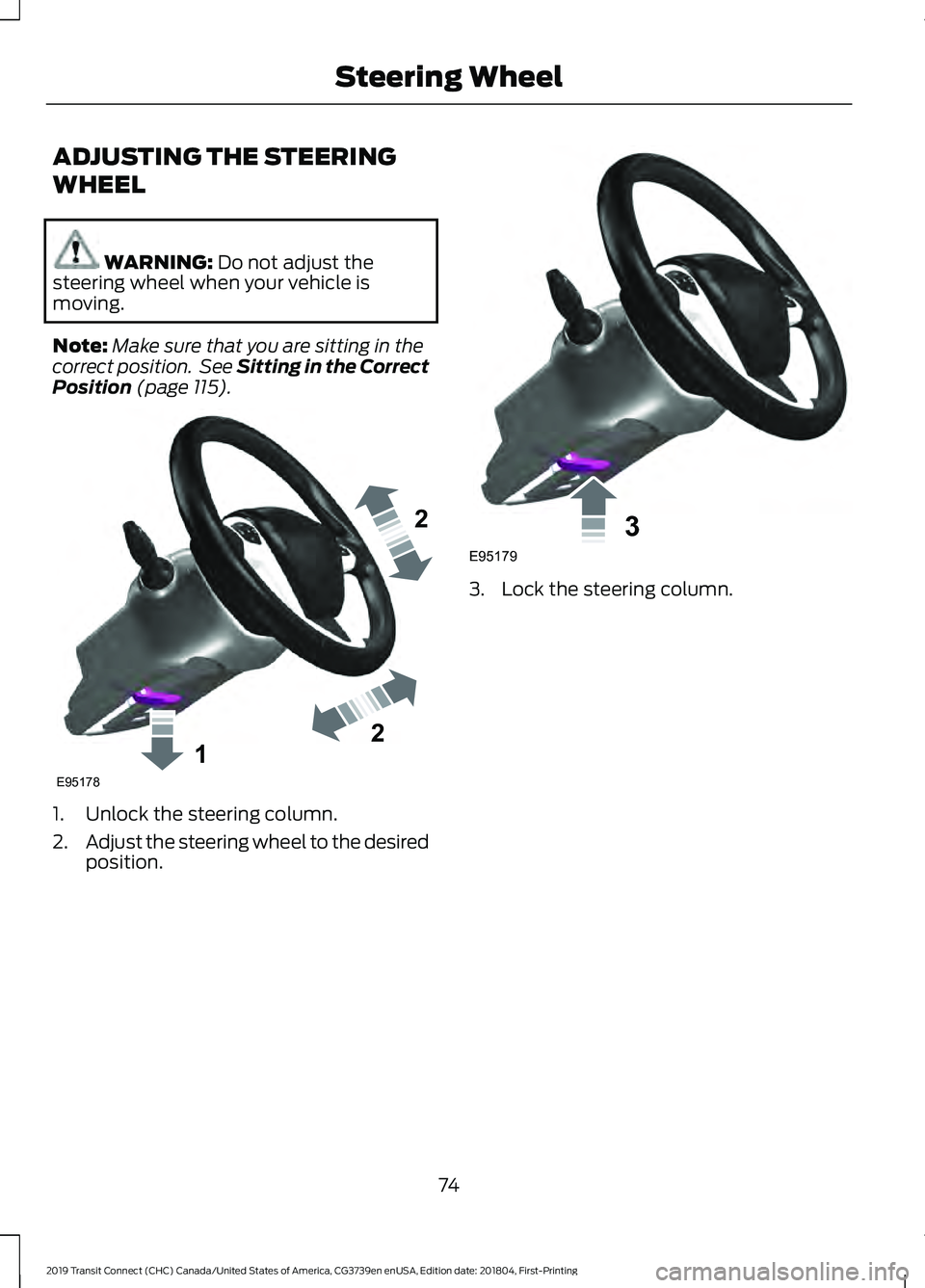
ADJUSTING THE STEERING
WHEEL
WARNING: Do not adjust the
steering wheel when your vehicle is
moving.
Note: Make sure that you are sitting in the
correct position. See Sitting in the Correct
Position
(page 115). 1. Unlock the steering column.
2.
Adjust the steering wheel to the desired
position. 3. Lock the steering column.
74
2019 Transit Connect (CHC) Canada/United States of America, CG3739en enUSA, Edition date: 201804, First-Printing Steering Wheel122E95178 3E95179
Page 85 of 493

Switch the lighting control to the
autolamps position. See Autolamps
(page 79).
Overriding the System
Push the lever away from you to switch
between high beam and low beam.
Automatic High Beam Indicator
(If
Equipped) The indicator illuminates to
confirm when the system is
ready to assist.
FRONT FOG LAMPS
Only switch the front fog lamps on during
reduced visibility.
You can switch the front fog lamps on
when the lighting control is in any position
except off.
If you switch the autolamps on, you can
only switch the front fog lamps on when
the headlamps are on.
The front fog lamps button is on the
lighting control. Press the button to switch the
front fog lamps on and off.
CORNERING LAMPS Headlamp beam.
A
Cornering lamp beam.
B The cornering lamps illuminate the inside
of a corner when you are turning the
steering wheel.
81
2019 Transit Connect (CHC) Canada/United States of America, CG3739en enUSA, Edition date: 201804, First-Printing Lighting E72898
Page 119 of 493
SITTING IN THE CORRECT
POSITION
WARNING: Do not recline the
seatback too far as this can cause the
occupant to slide under the seatbelt,
resulting in serious injury in the event of a
collision. WARNING:
Always sit upright
against your seatback with your feet on
the floor. WARNING:
Do not place objects
higher than the top of the seat backrest.
Failure to follow this instruction could
result in personal injury or death in the
event of a sudden stop or crash. When you use them properly, the seat,
head restraint, seatbelt and airbags will
provide optimum protection in the event
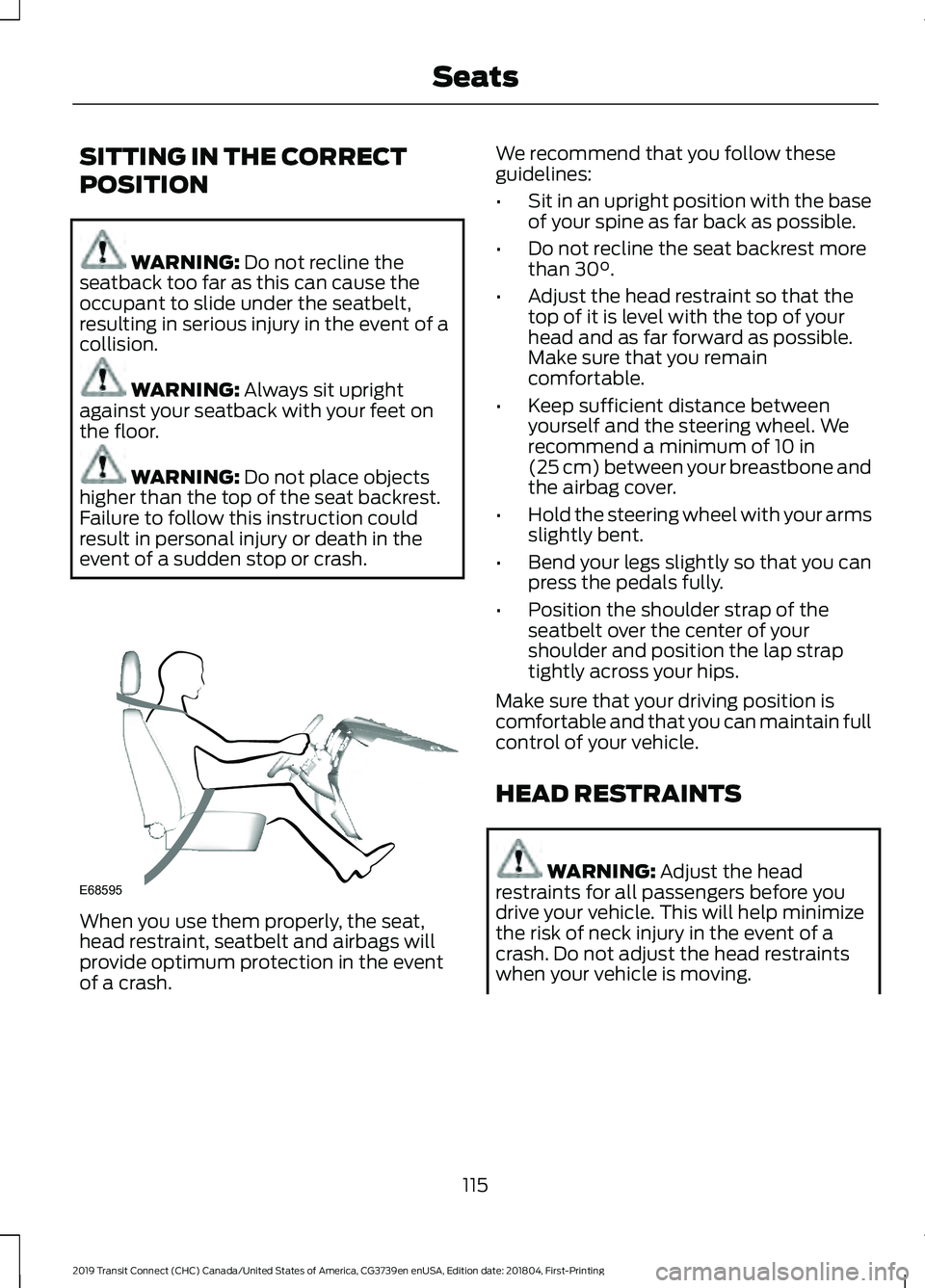
of a crash. We recommend that you follow these
guidelines:
•
Sit in an upright position with the base
of your spine as far back as possible.
• Do not recline the seat backrest more
than
30°.
• Adjust the head restraint so that the
top of it is level with the top of your
head and as far forward as possible.
Make sure that you remain
comfortable.
• Keep sufficient distance between
yourself and the steering wheel. We
recommend a minimum of
10 in
(25 cm) between your breastbone and
the airbag cover.
• Hold the steering wheel with your arms
slightly bent.
• Bend your legs slightly so that you can
press the pedals fully.
• Position the shoulder strap of the
seatbelt over the center of your
shoulder and position the lap strap
tightly across your hips.
Make sure that your driving position is
comfortable and that you can maintain full
control of your vehicle.
HEAD RESTRAINTS WARNING:
Adjust the head
restraints for all passengers before you
drive your vehicle. This will help minimize
the risk of neck injury in the event of a
crash. Do not adjust the head restraints
when your vehicle is moving.
115
2019 Transit Connect (CHC) Canada/United States of America, CG3739en enUSA, Edition date: 201804, First-Printing SeatsE68595
Page 124 of 493
REAR SEATS - SHORT
WHEELBASE
WARNING: Do not use the bench
seats as a bed when your vehicle is moving.
Failure to follow this warning could result
in serious personal injury or death. WARNING:
When folding or
unfolding the seats, take care not to get
your fingers caught between the seat
backrest and seat frame. Failure to follow
this warning could result in serious
personal injury. WARNING: Do not sit in a seat facing
a folded seat. Failure to follow this
instruction could result in personal injury
in the event of a sudden stop or crash. WARNING:
Do not place any objects
on a folded seat. Hard objects may
become projectiles in a crash or sudden
stop, which may increase the risk of serious
personal injury.
Second Row Seats
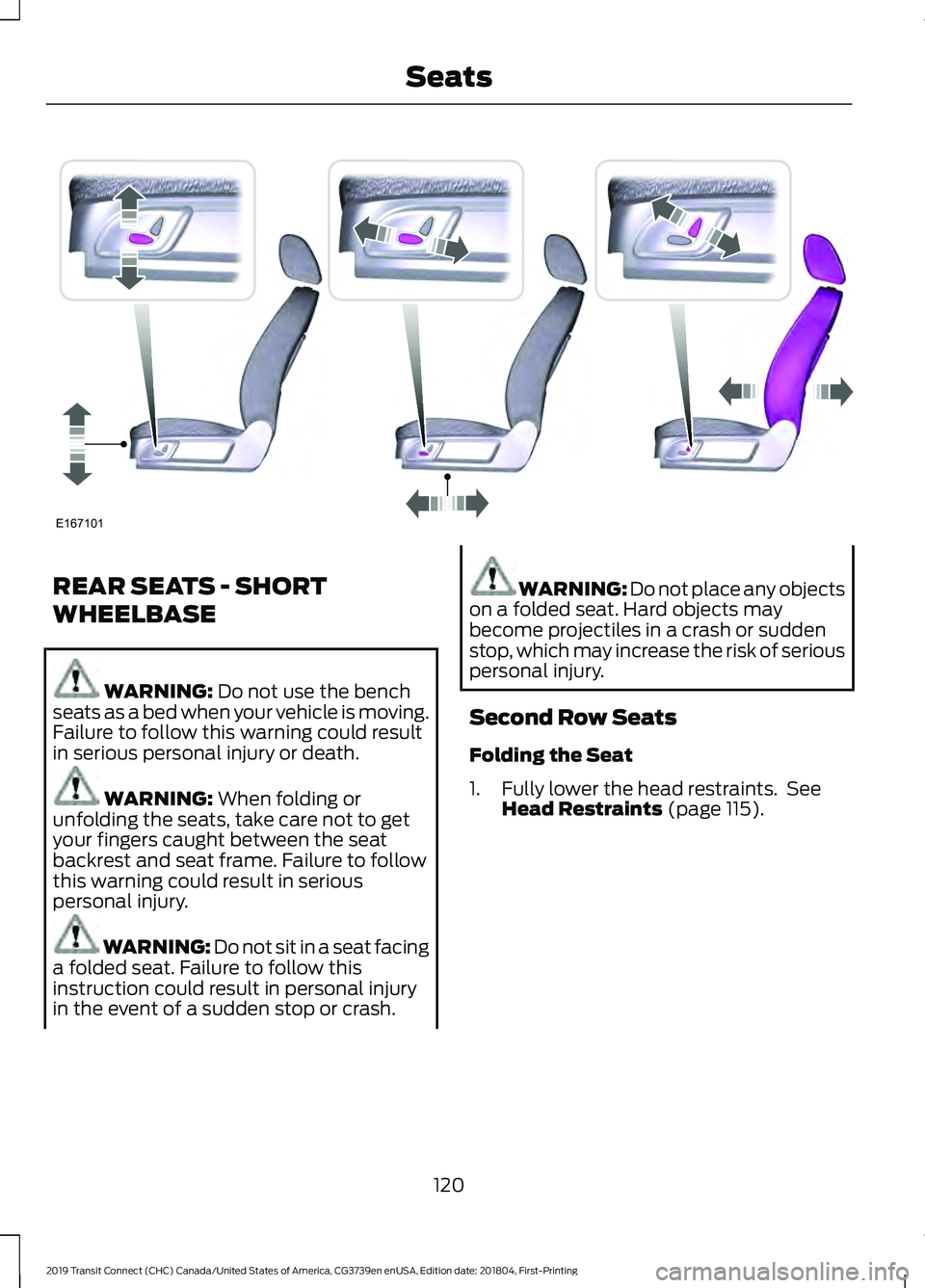
Folding the Seat
1. Fully lower the head restraints. See Head Restraints
(page 115).
120
2019 Transit Connect (CHC) Canada/United States of America, CG3739en enUSA, Edition date: 201804, First-Printing SeatsE167101
Page 128 of 493
REAR SEATS - LONG
WHEELBASE, VEHICLES WITH:
SECOND ROW DUAL CAPTAIN
CHAIRS
WARNING: When folding or
unfolding the seats, take care not to get
your fingers caught between the seat
backrest and seat frame. Failure to follow
this warning could result in serious
personal injury. WARNING:
Do not use the bench
seats as a bed when your vehicle is moving.
Failure to follow this warning could result
in serious personal injury or death. WARNING:
Do not place any objects
on a folded seat. Hard objects may
become projectiles in a crash or sudden
stop, which may increase the risk of serious
personal injury. WARNING: Do not sit in a seat facing
a folded seat. Failure to follow this
instruction could result in personal injury
in the event of a sudden stop or crash.
Second Row Seats
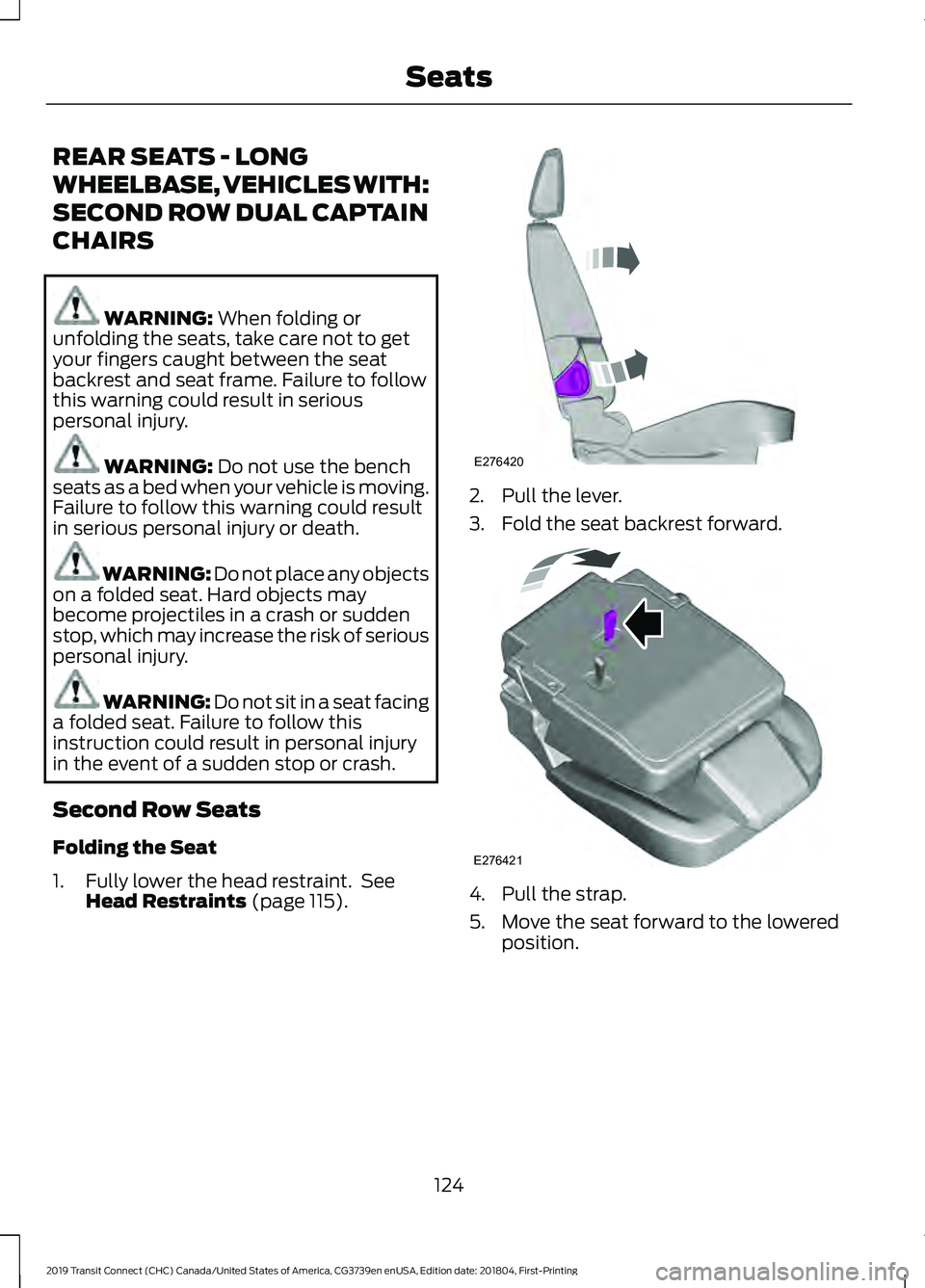
Folding the Seat
1. Fully lower the head restraint. See Head Restraints
(page 115). 2. Pull the lever.
3. Fold the seat backrest forward.
4. Pull the strap.
5. Move the seat forward to the lowered
position.
124
2019 Transit Connect (CHC) Canada/United States of America, CG3739en enUSA, Edition date: 201804, First-Printing SeatsE276420 E276421
Page 131 of 493
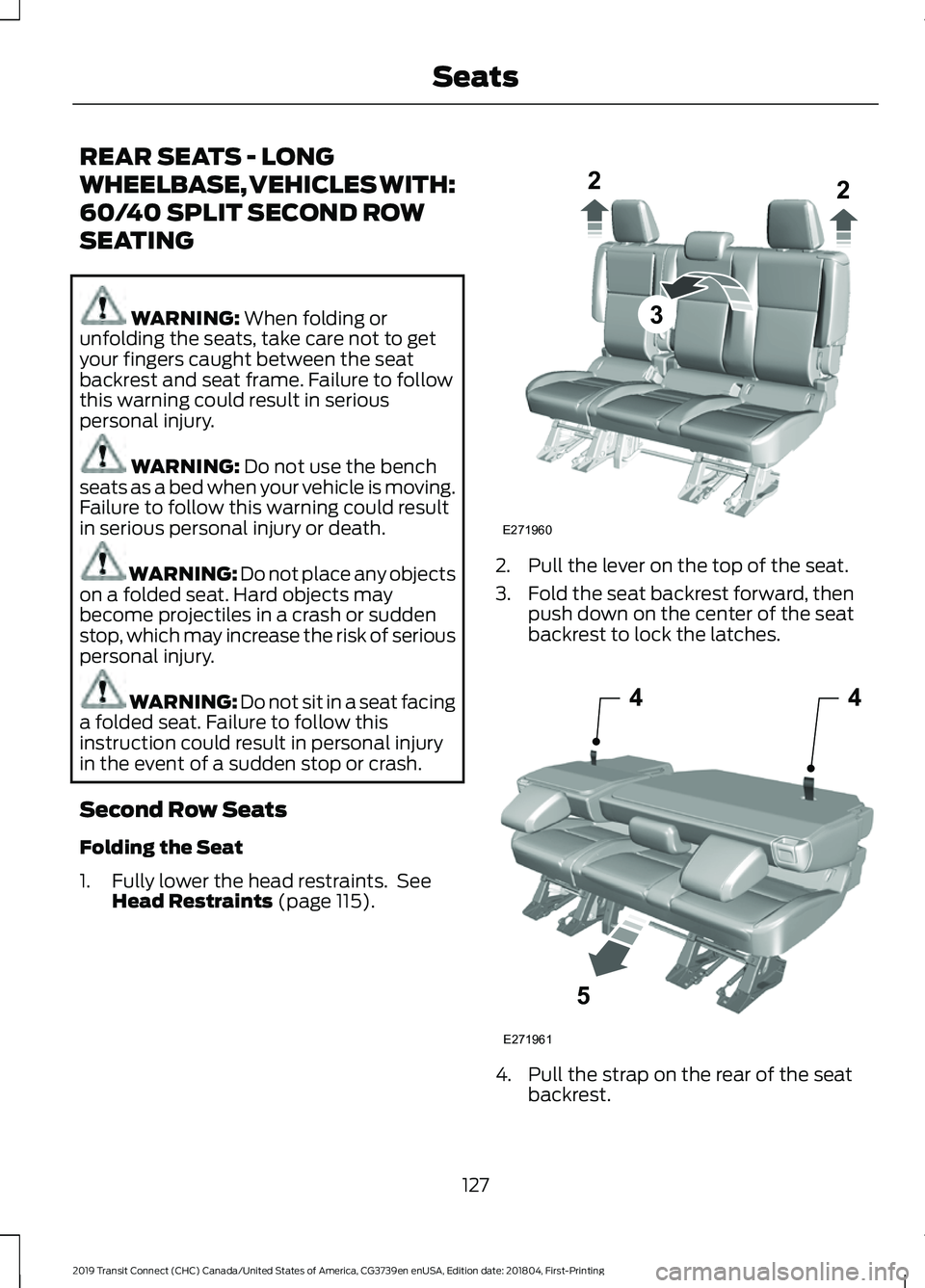
REAR SEATS - LONG
WHEELBASE, VEHICLES WITH:
60/40 SPLIT SECOND ROW
SEATING
WARNING: When folding or
unfolding the seats, take care not to get
your fingers caught between the seat
backrest and seat frame. Failure to follow
this warning could result in serious
personal injury. WARNING:
Do not use the bench
seats as a bed when your vehicle is moving.
Failure to follow this warning could result
in serious personal injury or death. WARNING:
Do not place any objects
on a folded seat. Hard objects may
become projectiles in a crash or sudden
stop, which may increase the risk of serious
personal injury. WARNING: Do not sit in a seat facing
a folded seat. Failure to follow this
instruction could result in personal injury
in the event of a sudden stop or crash.
Second Row Seats
Folding the Seat
1. Fully lower the head restraints. See Head Restraints
(page 115). 2. Pull the lever on the top of the seat.
3. Fold the seat backrest forward, then
push down on the center of the seat
backrest to lock the latches. 4. Pull the strap on the rear of the seat
backrest.
127
2019 Transit Connect (CHC) Canada/United States of America, CG3739en enUSA, Edition date: 201804, First-Printing Seats3
E271960
22 44
5
E271961