wheel FORD TRANSIT CONNECT 2019 Owner's Manual
[x] Cancel search | Manufacturer: FORD, Model Year: 2019, Model line: TRANSIT CONNECT, Model: FORD TRANSIT CONNECT 2019Pages: 493, PDF Size: 7.43 MB
Page 139 of 493
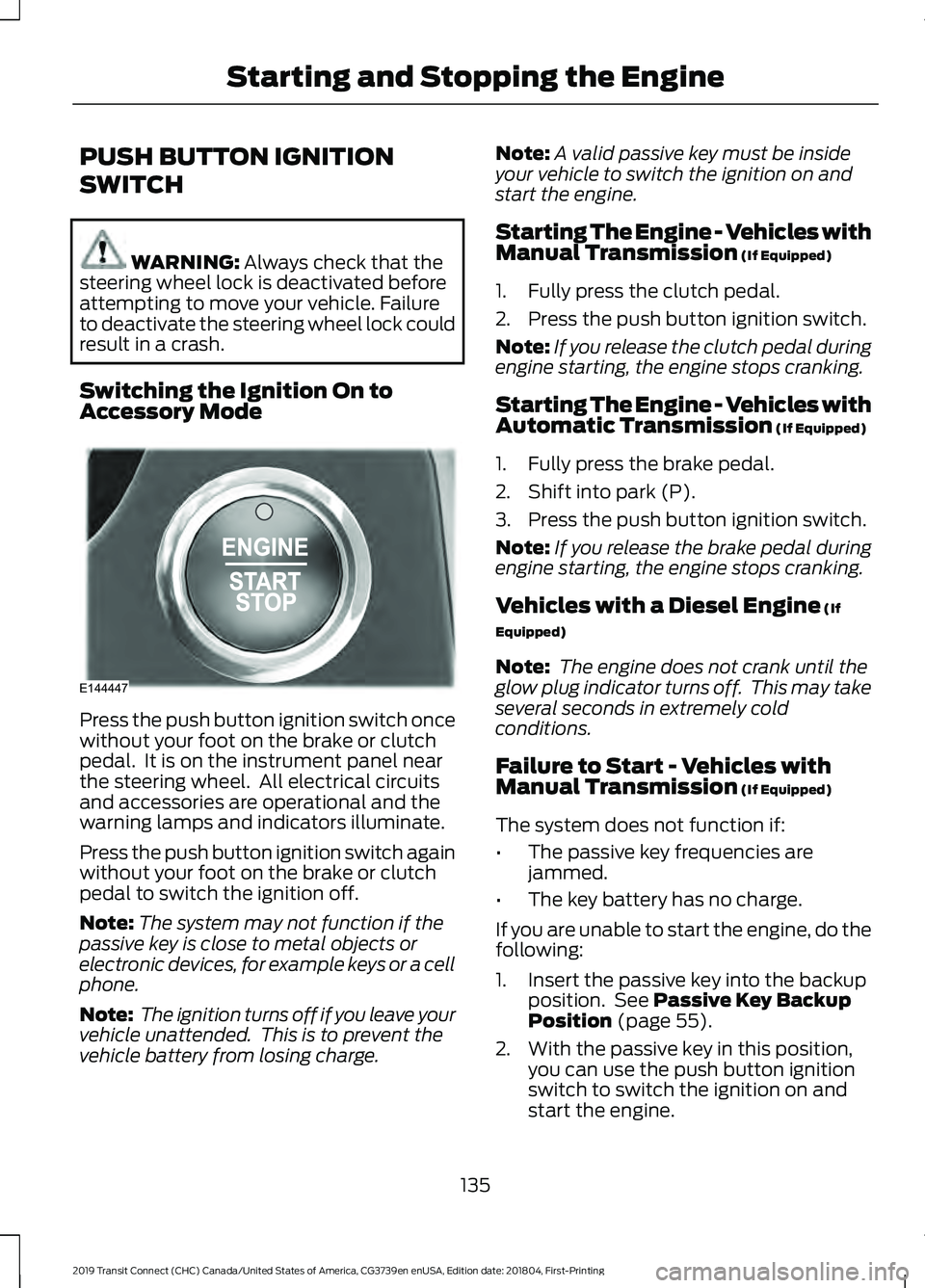
PUSH BUTTON IGNITION
SWITCH
WARNING: Always check that the
steering wheel lock is deactivated before
attempting to move your vehicle. Failure
to deactivate the steering wheel lock could
result in a crash.
Switching the Ignition On to
Accessory Mode Press the push button ignition switch once
without your foot on the brake or clutch
pedal. It is on the instrument panel near
the steering wheel. All electrical circuits
and accessories are operational and the
warning lamps and indicators illuminate.
Press the push button ignition switch again
without your foot on the brake or clutch
pedal to switch the ignition off.
Note:
The system may not function if the
passive key is close to metal objects or
electronic devices, for example keys or a cell
phone.
Note: The ignition turns off if you leave your
vehicle unattended. This is to prevent the
vehicle battery from losing charge. Note:
A valid passive key must be inside
your vehicle to switch the ignition on and
start the engine.
Starting The Engine - Vehicles with
Manual Transmission (If Equipped)
1. Fully press the clutch pedal.
2. Press the push button ignition switch.
Note: If you release the clutch pedal during
engine starting, the engine stops cranking.
Starting The Engine - Vehicles with
Automatic Transmission
(If Equipped)
1. Fully press the brake pedal.
2. Shift into park (P).
3. Press the push button ignition switch.
Note: If you release the brake pedal during
engine starting, the engine stops cranking.
Vehicles with a Diesel Engine
(If
Equipped)
Note: The engine does not crank until the
glow plug indicator turns off. This may take
several seconds in extremely cold
conditions.
Failure to Start - Vehicles with
Manual Transmission
(If Equipped)
The system does not function if:
• The passive key frequencies are
jammed.
• The key battery has no charge.
If you are unable to start the engine, do the
following:
1. Insert the passive key into the backup position. See
Passive Key Backup
Position (page 55).
2. With the passive key in this position, you can use the push button ignition
switch to switch the ignition on and
start the engine.
135
2019 Transit Connect (CHC) Canada/United States of America, CG3739en enUSA, Edition date: 201804, First-Printing Starting and Stopping the EngineE144447
Page 142 of 493
Vehicles with an Ignition Key
1. Fully press the brake pedal.
Note:
Do not touch the accelerator pedal.
2. Turn the key to position III.
Note: The engine may continue cranking
for up to 15 seconds or until it starts.
Note: The engine takes longer to start at
lower temperatures. It may crank for several
seconds when very cold.
Vehicles with a Push Button
Ignition Switch
See
Push Button Ignition Switch (page
135).
Failure to Start
Vehicles with an Ignition Key
If you cannot start the engine after 3
attempts, wait 10 seconds and do the
following:
1. Fully press the brake pedal.
2. Apply the parking brake.
3. Shift into park (P).
4. Fully press the accelerator pedal and hold it there.
5. Turn the key to position
III until the
engine starts. Vehicles with a Push Button Ignition
Switch
See
Push Button Ignition Switch (page
135).
Automatic Engine Shutdown
For vehicles with a push button ignition
switch, the engine shuts down if it has been
idling for an extended period. The ignition
also turns off to save battery power.
Before your vehicle shuts down, a message
appears in the information display showing
a timer counting down. If you do not
intervene within 30 seconds, your vehicle
shuts down. Another message appears in
the information display to inform you that
your vehicle has shut down to save fuel.
Start your vehicle as normal.
Automatic Engine Shutdown Override
You can stop the shutdown, or reset the
timer, at any point before the 30-second
countdown has expired by doing any of the
following:
• Pressing the brake or accelerator pedal.
• Switching off the automatic engine
shutdown in the information display.
• Pressing the
OK or RESET button
during the 30-second countdown.
Switching the Automatic Engine Shutdown On or Off
To switch the automatic engine shutdown on or off, use the information display
controls on the steering wheel to select the following: Action
Menu Item
Press the menu button.
Settings
Press the
OK button.
Vehicle Settings
Press the
OK button.
Auto Engine Off
138
2019 Transit Connect (CHC) Canada/United States of America, CG3739en enUSA, Edition date: 201804, First-Printing Starting and Stopping the Engine
Page 150 of 493
AUTO-START-STOP
WARNING: Always switch the
ignition off and fully apply the parking
brake before carrying out any maintenance
or leaving your vehicle. Failure to follow
this instruction could result in personal
injury or death if the engine restarts.
Principle of Operation
The system is designed to help reduce fuel
consumption and CO 2 emissions by
stopping the engine when it is idling, for
example at traffic lights. Your vehicle has
an enhanced starter motor that is designed
for an increased number of engine starts.
The system does not stop the engine under
certain conditions, for example:
• If you have opened the driver door.
• If you have unfastened the driver
seatbelt.
• If your vehicle is at high altitude.
• If you have switched the heated
windshield on.
• If you have shifted into manual (M).
• If your vehicle is on a steep grade.
• If the engine is warming up.
• If the outside temperature is too low
or too high.
• If the battery charge is low or the
battery temperature is outside the
optimal operating range.
• To maintain the interior climate or
reduce fogging.
• If you have turned the steering more
than 270 degrees. The system restarts the engine under
certain conditions, for example:
•
If you have opened the driver door.
• If you have unfastened the driver
seatbelt.
• If you switch the heated windshield on.
• If you switch maximum defrost on.
• If you turn the steering wheel.
• If your vehicle starts to roll downhill in
neutral.
• To maintain adequate brake
assistance.
• To maintain the interior climate or
reduce fogging.
Note: The blower motor speed could
change when the system restarts the engine.
Using Auto-Start-Stop WARNING: Apply the parking brake
and shift into park (P) before leaving your
vehicle.
Stopping the Engine
Stop your vehicle and keep your foot on
the brake pedal and the transmission in
drive (D).
Note: The engine stops if you shift into park
(P) or neutral (N) regardless of whether you
have your foot on the brake pedal or not.
Note: Power assist steering turns off when
the engine is off.
Restarting the Engine
• Release the brake pedal.
• Press the accelerator pedal.
• Shift into drive (D), reverse (R) or
manual (M).
146
2019 Transit Connect (CHC) Canada/United States of America, CG3739en enUSA, Edition date: 201804, First-Printing Unique Driving Characteristics
Page 173 of 493
AUTOMATIC TRANSMISSION
- 6-SPEED AUTOMATIC
TRANSMISSION
WARNING: Do not apply the brake
pedal and accelerator pedal
simultaneously. Applying both pedals
simultaneously for more than a few
seconds will limit engine performance,
which may result in difficulty maintaining
speed in traffic and could lead to serious
injury.
Selector Lever Positions
The instrument cluster displays the current
gear.
Park (P)
In park (P), power is not transmitted to the
driven wheels and the transmission is
locked. You can start the engine with the
transmission in this position.
Shift into park (P) only when your vehicle
is stationary.
Reverse (R)
Shift into reverse (R) only when your
vehicle is stationary and the engine is at
idle speed.
Neutral (N)
In neutral (N), power is not transmitted to
the driven wheels but the transmission is
not locked. You can start the engine with
the transmission in this position.
Drive (D)
Drive (D) is the normal position for driving.
Sport (S)
In sport (S), the transmission selects the
optimum gear for best performance. SelectShift™
(If Equipped)
About SelectShift™
Use this feature to upshift or downshift
using the buttons on the selector lever.
Using SelectShift™
Shift into sport (S). Press the
+ button to
switch the feature on.
• Press the
+ button to upshift.
• Press the
– button to downshift.
Shift into another gear to switch the
feature off.
Brake Shift Interlock
About Brake Shift Interlock
Brake shift interlock prevents you from
shifting out of park (P) when you have
switched the ignition on and not pressed
the brake pedal.
Shifting Out of Park (P) WARNING: Do not drive your vehicle
until you verify that the stoplamps are
working. WARNING:
If the parking brake is
fully released, but the brake warning lamp
remains illuminated, the brakes may not
be working properly. Have your vehicle
checked as soon as possible.
Use the brake shift interlock lever to move
the selector lever out of park (P) if you
cannot start the engine.
In the event of an electrical malfunction,
it is possible that a fuse has blown or the
stoplamps are not working. See
Fuse
Specification Chart (page 254).
169
2019 Transit Connect (CHC) Canada/United States of America, CG3739en enUSA, Edition date: 201804, First-Printing Transmission
Page 174 of 493
If the vehicle battery has no charge, jump
start your vehicle. See Jump Starting the
Vehicle (page 243).
WARNING:
When doing this
procedure, you need to take the
transmission out of park (P) which means
your vehicle can roll freely. To avoid
unwanted vehicle movement, always fully
apply the parking brake prior to doing this
procedure. Use wheels chocks if
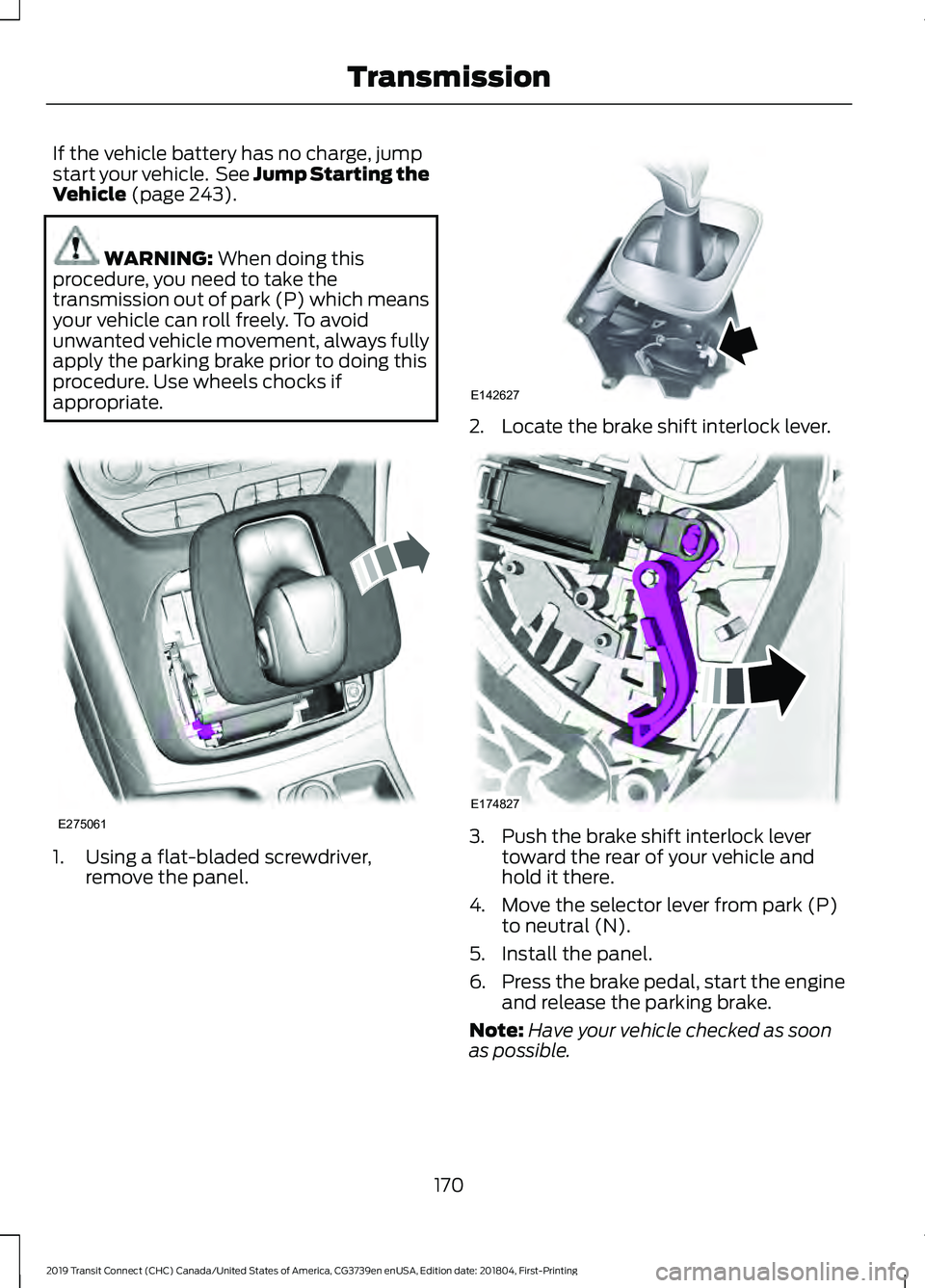
appropriate. 1. Using a flat-bladed screwdriver,
remove the panel. 2. Locate the brake shift interlock lever.
3. Push the brake shift interlock lever
toward the rear of your vehicle and
hold it there.
4. Move the selector lever from park (P) to neutral (N).
5. Install the panel.
6. Press the brake pedal, start the engine
and release the parking brake.
Note: Have your vehicle checked as soon
as possible.
170
2019 Transit Connect (CHC) Canada/United States of America, CG3739en enUSA, Edition date: 201804, First-Printing TransmissionE275061 E142627 E174827
Page 175 of 493
AUTOMATIC TRANSMISSION
- 8-SPEED AUTOMATIC
TRANSMISSION
WARNING: Do not apply the brake
pedal and accelerator pedal
simultaneously. Applying both pedals
simultaneously for more than a few
seconds will limit engine performance,
which may result in difficulty maintaining
speed in traffic and could lead to serious
injury.
Selector Lever Positions
The instrument cluster displays the current
gear.
Park (P)
In park (P), power is not transmitted to the
driven wheels and the transmission is
locked. You can start the engine with the
transmission in this position.
Shift into park (P) only when your vehicle
is stationary.
Reverse (R)
Shift into reverse (R) only when your
vehicle is stationary and the engine is at
idle speed.
Neutral (N)
In neutral (N), power is not transmitted to
the driven wheels but the transmission is
not locked. You can start the engine with
the transmission in this position.
Drive (D)
Drive (D) is the normal position for driving. Manual (M)
In manual (M), you can upshift or
downshift using the buttons on the
selector lever.
SelectShift™
About SelectShift™
Use this feature to upshift or downshift
using the buttons on the selector lever.
Using SelectShift™
Shift into manual (M) to switch the feature
on.
•
Press the
+ button to upshift.
• Press the
– button to downshift.
Shift into another gear to switch the
feature off.
Brake Shift Interlock
About Brake Shift Interlock
Brake shift interlock prevents you from
shifting out of park (P) when you have
switched the ignition on and not pressed
the brake pedal.
Shifting Out of Park (P) WARNING: Do not drive your vehicle
until you verify that the stoplamps are
working. WARNING:
If the parking brake is
fully released, but the brake warning lamp
remains illuminated, the brakes may not
be working properly. Have your vehicle
checked as soon as possible.
Use the brake shift interlock lever to move
the selector lever out of park (P) if you
cannot start the engine.
171
2019 Transit Connect (CHC) Canada/United States of America, CG3739en enUSA, Edition date: 201804, First-Printing Transmission
Page 176 of 493
In the event of an electrical malfunction,
it is possible that a fuse has blown or the
stoplamps are not working. See Fuse
Specification Chart (page 254).
If the vehicle battery has no charge, jump
start your vehicle. See Jump Starting the
Vehicle
(page 243). WARNING:
When doing this
procedure, you need to take the
transmission out of park (P) which means
your vehicle can roll freely. To avoid
unwanted vehicle movement, always fully
apply the parking brake prior to doing this
procedure. Use wheels chocks if
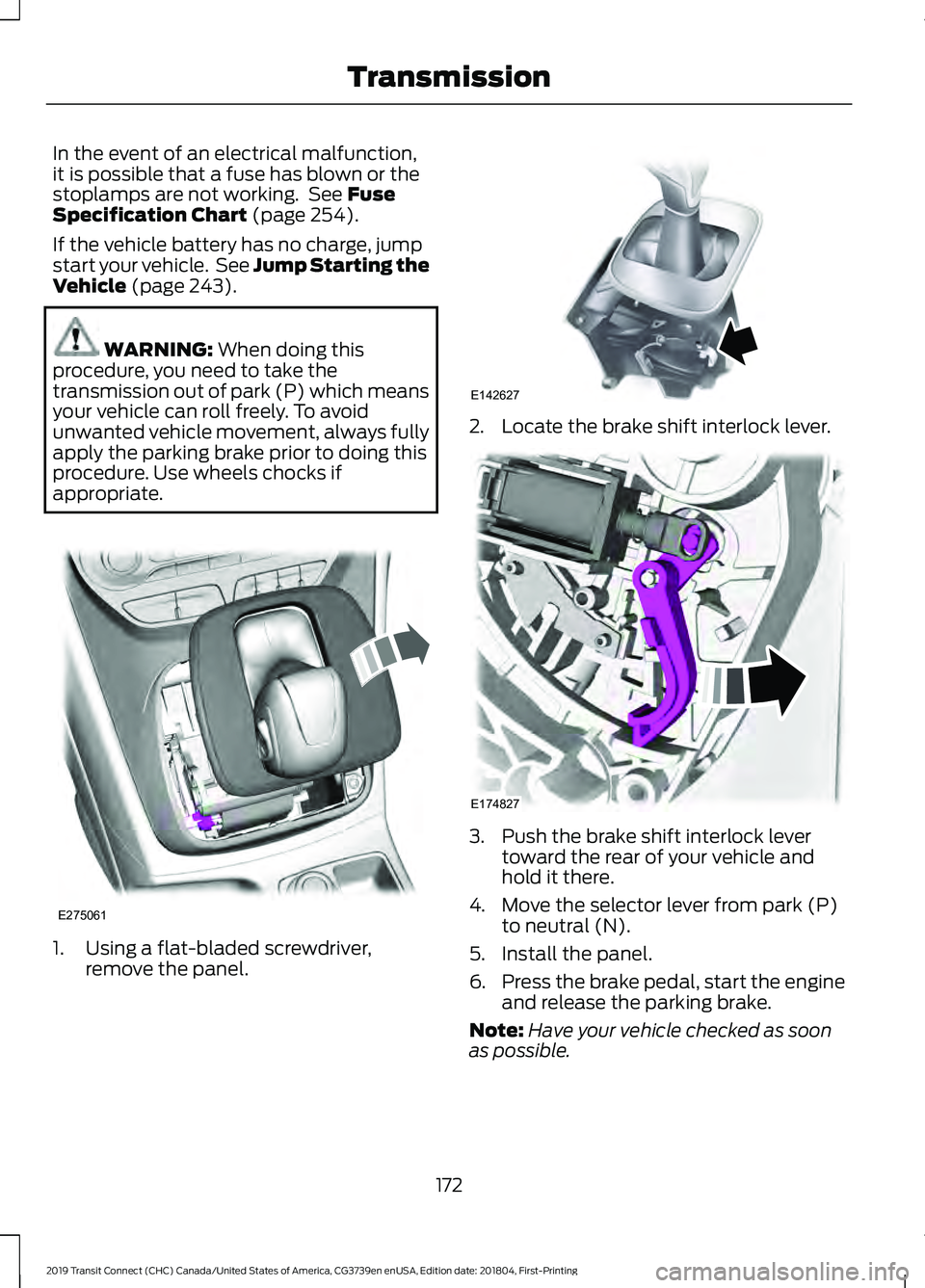
appropriate. 1. Using a flat-bladed screwdriver,
remove the panel. 2. Locate the brake shift interlock lever.
3. Push the brake shift interlock lever
toward the rear of your vehicle and
hold it there.
4. Move the selector lever from park (P) to neutral (N).
5. Install the panel.
6. Press the brake pedal, start the engine
and release the parking brake.
Note: Have your vehicle checked as soon
as possible.
172
2019 Transit Connect (CHC) Canada/United States of America, CG3739en enUSA, Edition date: 201804, First-Printing TransmissionE275061 E142627 E174827
Page 177 of 493
GENERAL INFORMATION
Wet brakes result in reduced braking
efficiency. Gently press the brake pedal a
few times when driving from a car wash or
standing water to dry the brakes.
Note:
Occasional brake noise is normal. If
a metal-to-metal, continuous grinding or
continuous squeal sound is present, the
brake linings may be worn-out. Have the
system checked by an authorized dealer. If
your vehicle has continuous vibration or
shudder in the steering wheel while braking,
have it checked by an authorized dealer.
Note: Brake dust may accumulate on the
wheels, even under normal driving
conditions. Some dust is inevitable as the
brakes wear and does not contribute to
brake noise. See Cleaning the Wheels
(page 292).
Note: Depending on applicable laws and
regulations in the country for which your
vehicle was originally built, the brake lamps
could flash during heavy braking. Following
this, the hazard lights could also flash when
your vehicle comes to a stop.
Brake Over Accelerator
In the event that the accelerator pedal
becomes stuck or entrapped, apply steady
and firm pressure to the brake pedal to
slow your vehicle and reduce engine
power. If you experience this condition,
apply the brakes and bring your vehicle to
a safe stop. Move the transmission to park
(P), switch the engine off and apply the
parking brake. Inspect the accelerator
pedal for any interference. If none are
found and the condition persists, have your
vehicle towed to the nearest authorized
dealer. Brake Assist
Brake assist detects when you rapidly
brake by measuring the rate at which you
press the brake pedal. It provides
maximum braking efficiency as long as you
press the pedal, and can reduce stopping
distances in critical situations
Anti-Lock Brake System
This system helps you maintain steering
control during emergency stops by keeping
the brakes from locking.
If it illuminates when you are
driving, this indicates a
malfunction. Your vehicle
continues to have normal braking without
the anti-lock brake system function. Have
your vehicle checked as soon as possible.
It also momentarily illuminates when you
switch the ignition on to confirm the lamp
is functional. If it does not illuminate when
you switch the ignition on, or begins to
flash at any time, have the system checked
by an authorized dealer. It illuminates when you engage
the parking brake and the
ignition is on.
If it illuminates when your vehicle is
moving, make sure the parking brake is
disengaged. If the parking brake is
disengaged, this indicates low brake fluid
level or a brake system fault. Have your
vehicle immediately checked.
It also momentarily illuminates when you
switch the ignition on to confirm the lamp
is functional. If it does not illuminate when
you switch the ignition on, or begins to
flash at any time, have the system checked
by an authorized dealer.
173
2019 Transit Connect (CHC) Canada/United States of America, CG3739en enUSA, Edition date: 201804, First-Printing Brakes E138644
Page 178 of 493
HINTS ON DRIVING WITH
ANTI-LOCK BRAKES
The anti-lock braking system does not
eliminate the risks when:
•
You drive too closely to the vehicle in
front of you.
• Your vehicle is hydroplaning.
• You take corners too fast.
• The road surface is poor.
Note: If the system activates, the brake
pedal may pulse and may travel further.
Maintain pressure on the brake pedal. You
may also hear a noise from the system. This
is normal.
PARKING BRAKE WARNING: Always fully apply the
parking brake and make sure you shift into
park (P). Switch the ignition off and
remove the key whenever you leave your
vehicle.
To apply the parking brake:
1. Firmly press the brake pedal.
2. Pull the parking brake lever upward to its fullest extent.
Note: Do not press the release button when
pulling the parking brake lever upward.
Note: If you park your vehicle on a hill and
facing uphill, shift into park (P) and turn the
steering wheel away from the curb.
Note: If you park your vehicle on a hill and
facing downhill, shift into park (P) and turn
the steering wheel toward the curb.
To release the parking brake:
1. Firmly press the brake pedal.
2. Slightly pull the parking brake lever upward. 3. Press the release button and push the
parking brake lever downward.
HILL START ASSIST WARNING:
The system does not
replace the parking brake. When you leave
your vehicle, always apply the parking
brake. Failure to leave your vehicle securely
parked may lead to a crash or injury. See
Parking Brake
(page 174). WARNING:
You must remain in your
vehicle once the system activates. Failure
to follow this warning could result in
serious personal injury or death. WARNING:
During all times, you are
responsible for controlling your vehicle,
supervising the system and intervening, if
required. Failure to take care may result in
the loss of control of your vehicle, serious
personal injury or death. WARNING:
The system will turn off
if a malfunction is apparent or if you rev
the engine excessively. Failure to take care
may result in the loss of control of your
vehicle, serious personal injury or death.
The system makes it easier to pull away
when your vehicle is on a slope without the
need to use the parking brake.
When the system is active, your vehicle will
remain stationary on the slope for two to
three seconds after you release the brake
pedal. This allows time to move your foot
from the brake to the accelerator pedal.
The brakes are released automatically
174
2019 Transit Connect (CHC) Canada/United States of America, CG3739en enUSA, Edition date: 201804, First-Printing Brakes
Page 180 of 493
PRINCIPLE OF OPERATION
The traction control system helps avoid
drive wheel spin and loss of traction.
If your vehicle begins to slide, the system
applies the brakes to individual wheels
and, when needed, reduces engine power
at the same time. If the wheels spin when
accelerating on slippery or loose surfaces,
the system reduces engine power in order
to increase traction.
USING TRACTION CONTROL
WARNING: The stability and traction
control light illuminates steadily if the
system detects a failure. Make sure you
did not manually disable the traction
control system using the information
display controls or the switch. If the
stability control and traction control light
is still illuminating steadily, have the
system serviced by an authorized dealer
immediately. Operating your vehicle with
the traction control disabled could lead to
an increased risk of loss of vehicle control,
vehicle rollover, personal injury and death.
The system automatically turns on each
time you switch the ignition on.
If your vehicle is stuck in mud or snow,
switching traction control off may be
beneficial as this allows the wheels to spin.
Note: When you switch traction control off,
stability control remains fully active.
Switching the System Off
When you switch the system off or on, a
message appears in the information
display showing system status.
You can switch the system off by either
using the information display controls or
the switch. Using the Information Display
Controls
You can switch this feature off or on in the
information display. See General
Information (page 92).
Using a Switch
(If Equipped)
Use the traction control switch on the
instrument panel to switch the system off
or on.
System Indicator Lights and
Messages The stability and traction control
light:
• Temporarily illuminates on engine
start-up.
• Flashes when a driving condition
activates either of the systems.
• Illuminates if a problem occurs in either
of the systems. The stability and traction control
off light temporarily illuminates
on engine start-up and stays on
when you switch the traction control
system off.
176
2019 Transit Connect (CHC) Canada/United States of America, CG3739en enUSA, Edition date: 201804, First-Printing Traction ControlE138639 E130458