phone FORD TRANSIT CONNECT 2020 Workshop Manual
[x] Cancel search | Manufacturer: FORD, Model Year: 2020, Model line: TRANSIT CONNECT, Model: FORD TRANSIT CONNECT 2020Pages: 509, PDF Size: 7.73 MB
Page 427 of 509
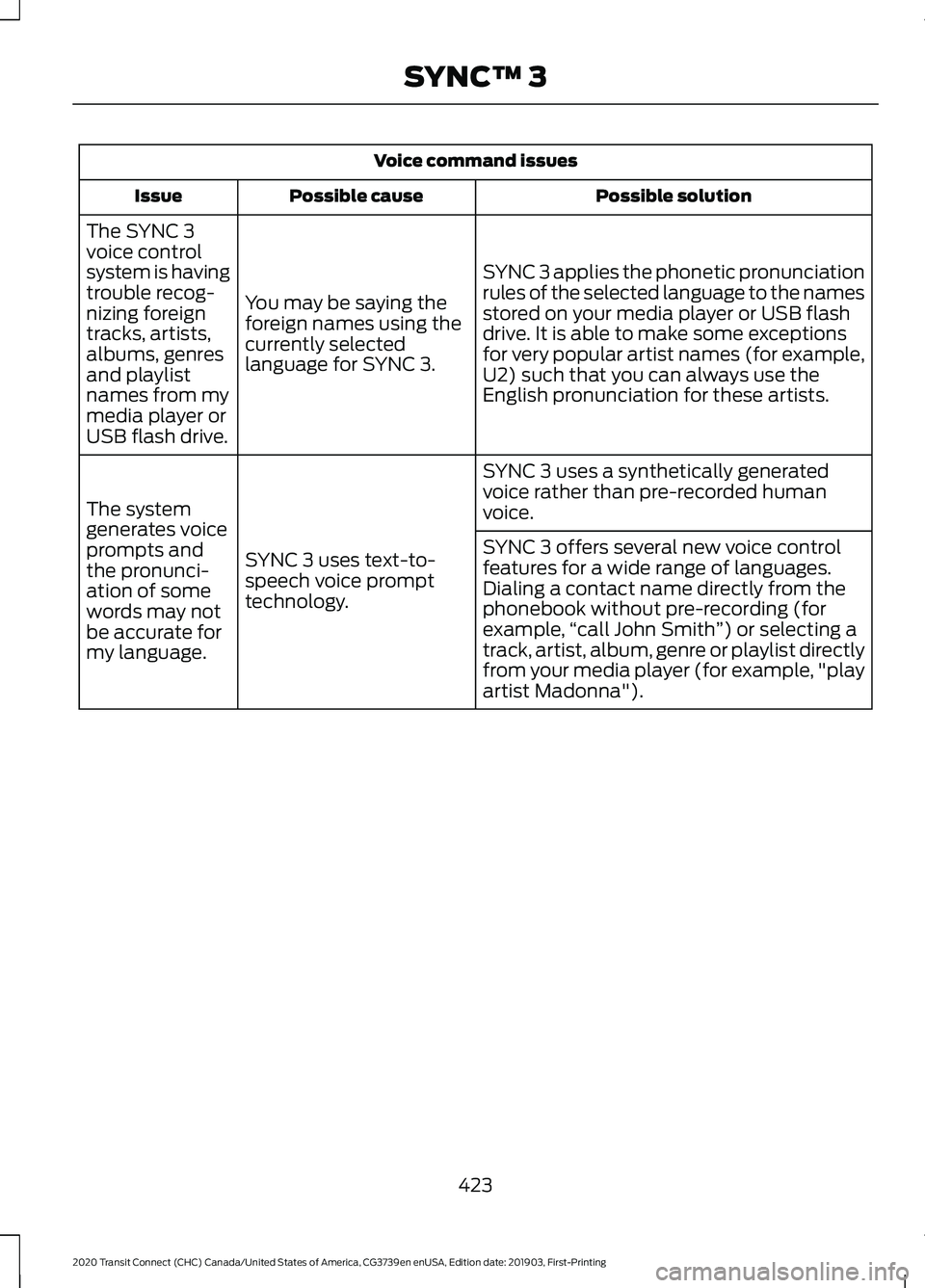
Voice command issues
Possible solution
Possible cause
Issue
SYNC 3 applies the phonetic pronunciation
rules of the selected language to the names
stored on your media player or USB flash
drive. It is able to make some exceptions
for very popular artist names (for example,
U2) such that you can always use the
English pronunciation for these artists.
You may be saying the
foreign names using the
currently selected
language for SYNC 3.
The SYNC 3
voice control
system is having
trouble recog-
nizing foreign
tracks, artists,
albums, genres
and playlist
names from my
media player or
USB flash drive.
SYNC 3 uses a synthetically generated
voice rather than pre-recorded human
voice.
SYNC 3 uses text-to-
speech voice prompt
technology.
The system
generates voice
prompts and
the pronunci-
ation of some
words may not
be accurate for
my language. SYNC 3 offers several new voice control
features for a wide range of languages.
Dialing a contact name directly from the
phonebook without pre-recording (for
example,
“call John Smith ”) or selecting a
track, artist, album, genre or playlist directly
from your media player (for example, "play
artist Madonna").
423
2020 Transit Connect (CHC) Canada/United States of America, CG3739en enUSA, Edition date: 201903, First-Printing SYNC™ 3
Page 428 of 509
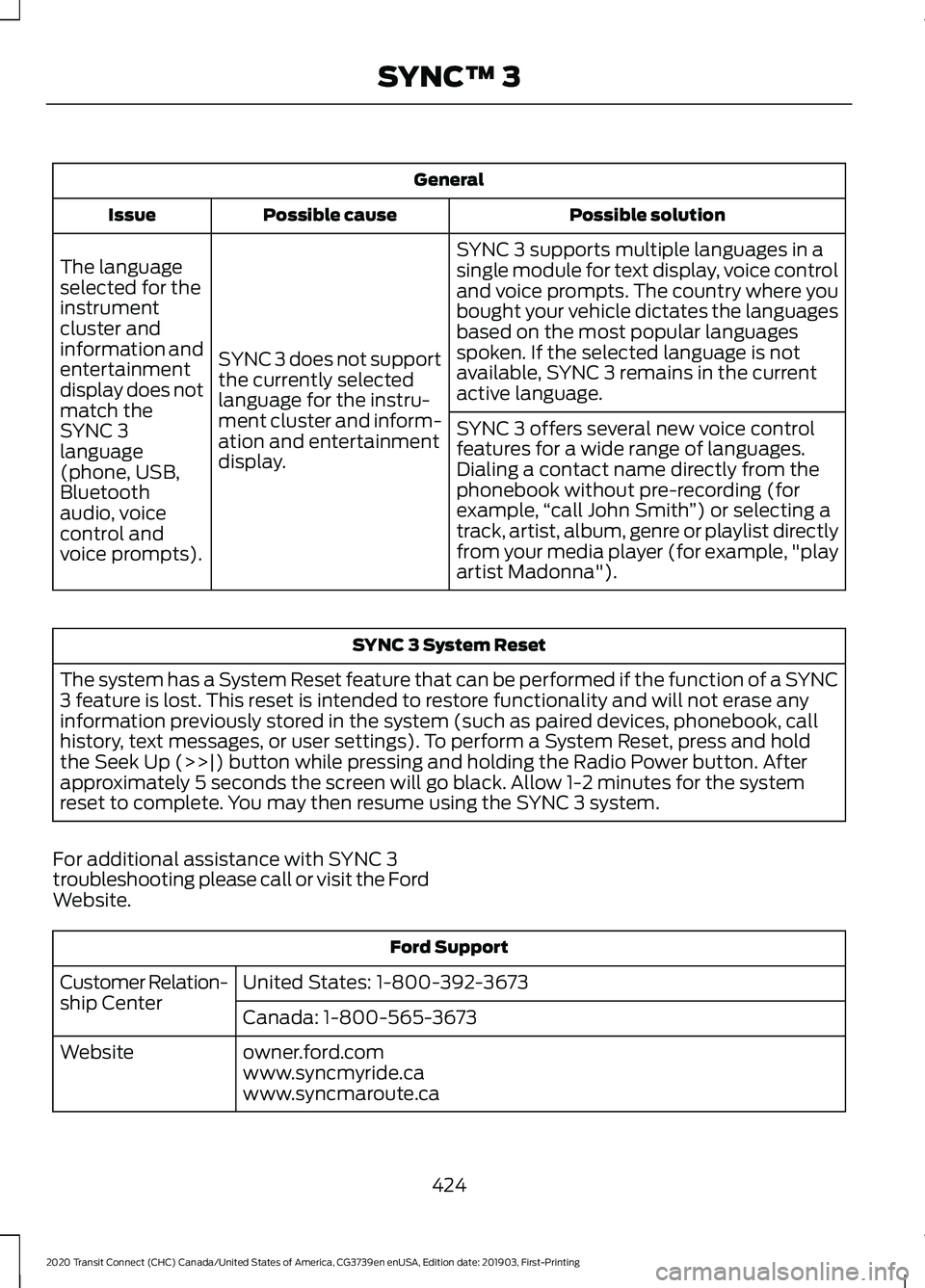
General
Possible solution
Possible cause
Issue
SYNC 3 supports multiple languages in a
single module for text display, voice control
and voice prompts. The country where you
bought your vehicle dictates the languages
based on the most popular languages
spoken. If the selected language is not
available, SYNC 3 remains in the current
active language.
SYNC 3 does not support
the currently selected
language for the instru-
ment cluster and inform-
ation and entertainment
display.
The language
selected for the
instrument
cluster and
information and
entertainment
display does not
match the
SYNC 3
SYNC 3 offers several new voice control
features for a wide range of languages.
Dialing a contact name directly from the
phonebook without pre-recording (for
example,
“call John Smith ”) or selecting a
track, artist, album, genre or playlist directly
from your media player (for example, "play
artist Madonna").
language
(phone, USB,
Bluetooth
audio, voice
control and
voice prompts). SYNC 3 System Reset
The system has a System Reset feature that can be performed if the function of a SYNC
3 feature is lost. This reset is intended to restore functionality and will not erase any
information previously stored in the system (such as paired devices, phonebook, call
history, text messages, or user settings). To perform a System Reset, press and hold
the Seek Up (>>|) button while pressing and holding the Radio Power button. After
approximately 5 seconds the screen will go black. Allow 1-2 minutes for the system
reset to complete. You may then resume using the SYNC 3 system.
For additional assistance with SYNC 3
troubleshooting please call or visit the Ford
Website. Ford Support
United States: 1-800-392-3673
Customer Relation-
ship Center
Canada: 1-800-565-3673
owner.ford.com
Website
www.syncmyride.ca
www.syncmaroute.ca
424
2020 Transit Connect (CHC) Canada/United States of America, CG3739en enUSA, Edition date: 201903, First-Printing SYNC™ 3
Page 429 of 509
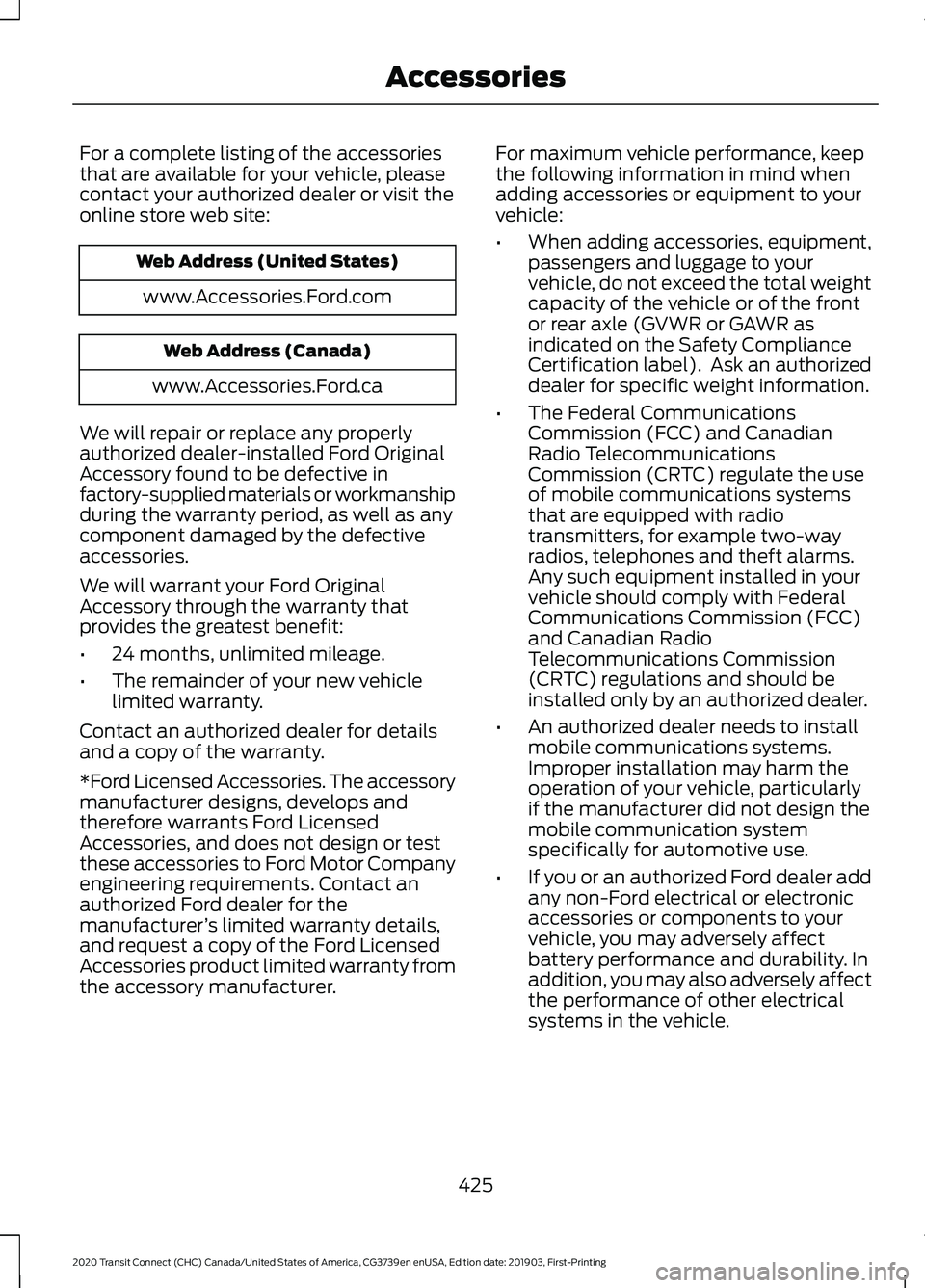
For a complete listing of the accessories
that are available for your vehicle, please
contact your authorized dealer or visit the
online store web site:
Web Address (United States)
www.Accessories.Ford.com Web Address (Canada)
www.Accessories.Ford.ca
We will repair or replace any properly
authorized dealer-installed Ford Original
Accessory found to be defective in
factory-supplied materials or workmanship
during the warranty period, as well as any
component damaged by the defective
accessories.
We will warrant your Ford Original
Accessory through the warranty that
provides the greatest benefit:
• 24 months, unlimited mileage.
• The remainder of your new vehicle
limited warranty.
Contact an authorized dealer for details
and a copy of the warranty.
*Ford Licensed Accessories. The accessory
manufacturer designs, develops and
therefore warrants Ford Licensed
Accessories, and does not design or test
these accessories to Ford Motor Company
engineering requirements. Contact an
authorized Ford dealer for the
manufacturer ’s limited warranty details,
and request a copy of the Ford Licensed
Accessories product limited warranty from
the accessory manufacturer. For maximum vehicle performance, keep
the following information in mind when
adding accessories or equipment to your
vehicle:
•
When adding accessories, equipment,
passengers and luggage to your
vehicle, do not exceed the total weight
capacity of the vehicle or of the front
or rear axle (GVWR or GAWR as
indicated on the Safety Compliance
Certification label). Ask an authorized
dealer for specific weight information.
• The Federal Communications
Commission (FCC) and Canadian
Radio Telecommunications
Commission (CRTC) regulate the use
of mobile communications systems
that are equipped with radio
transmitters, for example two-way
radios, telephones and theft alarms.
Any such equipment installed in your
vehicle should comply with Federal
Communications Commission (FCC)
and Canadian Radio
Telecommunications Commission
(CRTC) regulations and should be
installed only by an authorized dealer.
• An authorized dealer needs to install
mobile communications systems.
Improper installation may harm the
operation of your vehicle, particularly
if the manufacturer did not design the
mobile communication system
specifically for automotive use.
• If you or an authorized Ford dealer add
any non-Ford electrical or electronic
accessories or components to your
vehicle, you may adversely affect
battery performance and durability. In
addition, you may also adversely affect
the performance of other electrical
systems in the vehicle.
425
2020 Transit Connect (CHC) Canada/United States of America, CG3739en enUSA, Edition date: 201903, First-Printing Accessories
Page 450 of 509
ELECTROMAGNETIC
COMPATIBILITY
WARNING: Do not place objects
or mount equipment on or near the
airbag cover, on the side of the seatbacks
(of the front seats), or in front seat areas
that may come into contact with a
deploying airbag. Failure to follow these
instructions may increase the risk of
personal injury in the event of a crash. WARNING:
Do not fasten antenna
cables to original vehicle wiring, fuel
pipes and brake pipes. WARNING:
Keep antenna and
power cables at least 4 in (10 cm) from
any electronic modules and airbags.
Note: We test and certify your vehicle to
meet electromagnetic compatibility
legislation (UNECE Regulation 10 or other
applicable local requirements). It is your
responsibility to make sure that any
equipment an authorized dealer installs on
your vehicle complies with applicable local
legislation and other requirements.
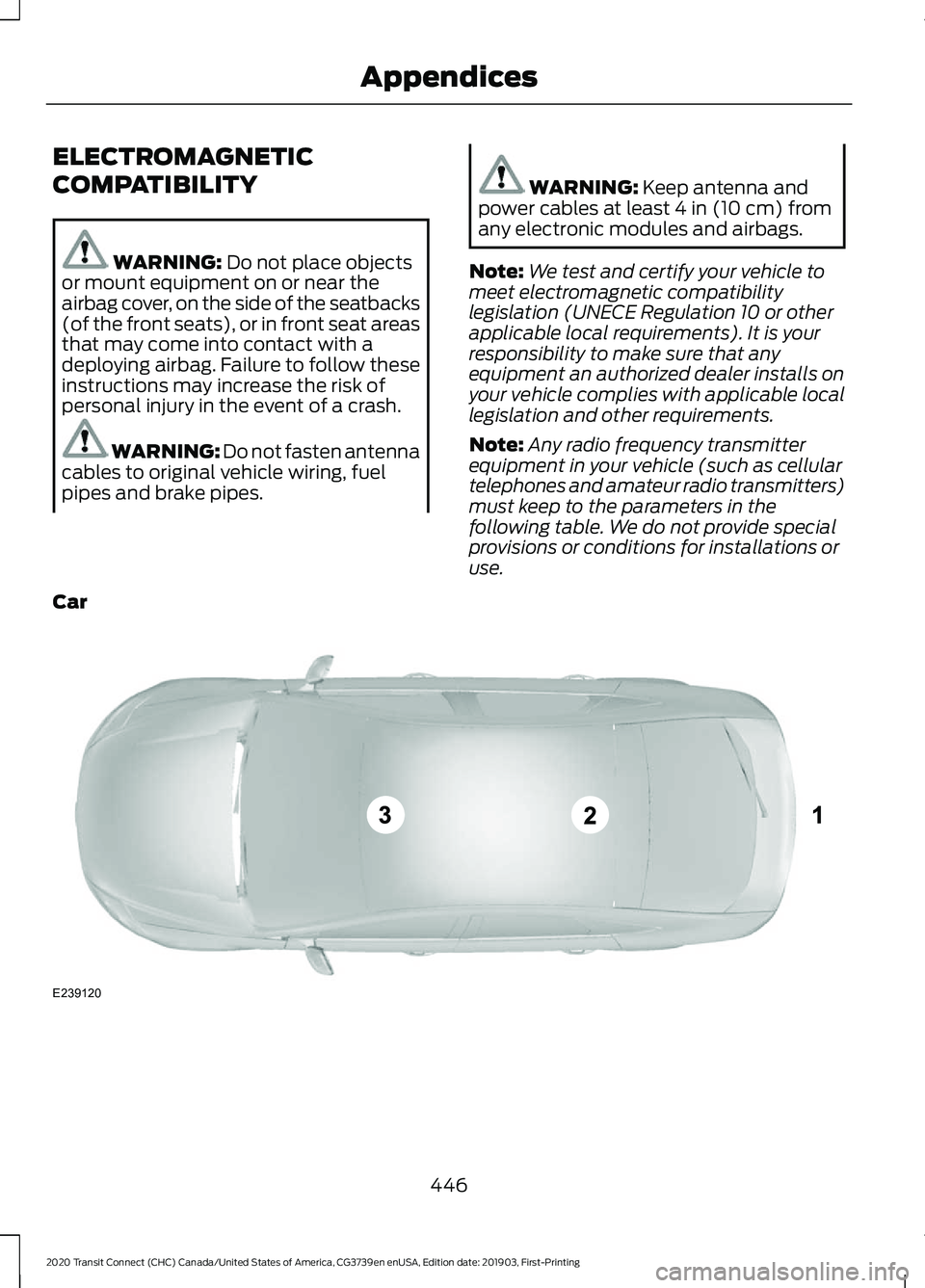
Note: Any radio frequency transmitter
equipment in your vehicle (such as cellular
telephones and amateur radio transmitters)
must keep to the parameters in the
following table. We do not provide special
provisions or conditions for installations or
use.
Car 446
2020 Transit Connect (CHC) Canada/United States of America, CG3739en enUSA, Edition date: 201903, First-Printing AppendicesE239120
Page 465 of 509
Restrictions. Except where you have been
specifically licensed to do so by Telenav,
and without limiting the preceding
paragraph, you may not use this Data (a)
with any products, systems, or applications
installed or otherwise connected to or in
communication with vehicles, capable of
vehicle navigation, positioning, dispatch,
real time route guidance, fleet
management or similar applications; or (b)
with or in communication with any
positioning devices or any mobile or
wireless-connected electronic or computer
devices, including without limitation
cellular phones, palmtop and handheld
computers, pagers, and personal digital
assistants or PDAs.
Warning. The Data may contain
inaccurate or incomplete information due
to the passage of time, changing
circumstances, sources used and the
nature of collecting comprehensive
geographic data, any of which may lead to
incorrect results.
No Warranty.
This Data is provided to you
“ as is, ” and you agree to use it at your own
risk. Telenav and its licensors (and their
licensors and suppliers) make no
guarantees, representations or warranties
of any kind, express or implied, arising by
law or otherwise, including but not limited
to, content, quality, accuracy,
completeness, effectiveness, reliability,
fitness for a particular purpose, usefulness,
use or results to be obtained from this
Data, or that the Data or server will be
uninterrupted or error-free.
Disclaimer of Warranty:
TELENAV AND
ITS LICENSORS (INCLUDING THEIR
LICENSORS AND SUPPLIERS) DISCLAIM
ANY WARRANTIES, EXPRESS OR IMPLIED,
OF QUALITY, PERFORMANCE,
MERCHANTABILITY, FITNESS FOR A PARTICULAR PURPOSE OR
NON-INFRINGEMENT. Some States,
Territories and Countries do not allow
certain warranty exclusions, so to that
extent the above exclusion may not apply
to you.
Disclaimer of Liability:
TELENAV AND
ITS LICENSORS (INCLUDING THEIR
LICENSORS AND SUPPLIERS) SHALL NOT
BE LIABLE TO YOU: IN RESPECT OF ANY
CLAIM, DEMAND OR ACTION,
IRRESPECTIVE OF THE NATURE OF THE
CAUSE OF THE CLAIM, DEMAND OR
ACTION ALLEGING ANY LOSS, INJURY OR
DAMAGES, DIRECT OR INDIRECT, WHICH
MAY RESULT FROM THE USE OR
POSSESSION OF THE INFORMATION; OR
FOR ANY LOSS OF PROFIT, REVENUE,
CONTRACTS OR SAVINGS, OR ANY
OTHER DIRECT, INDIRECT, INCIDENTAL,
SPECIAL OR CONSEQUENTIAL DAMAGES
ARISING OUT OF YOUR USE OF OR
INABILITY TO USE THIS INFORMATION,
ANY DEFECT IN THE INFORMATION, OR
THE BREACH OF THESE TERMS OR
CONDITIONS, WHETHER IN AN ACTION
IN CONTRACT OR TORT OR BASED ON A
WARRANTY, EVEN IF TELENAV OR ITS
LICENSORS HAVE BEEN ADVISED OF THE
POSSIBILITY OF SUCH DAMAGES. Some
States, Territories and Countries do not
allow certain liability exclusions or
damages limitations, so to that extent the
above may not apply to you.
Export Control.
You shall not export from
anywhere any part of the Data or any direct
product thereof except in compliance with,
and with all licenses and approvals
required under, applicable export laws,
rules and regulations, including but not
limited to the laws, rules and regulations
administered by the Office of Foreign
Assets Control of the U.S. Department of
Commerce and the Bureau of Industry and
Security of the U.S. Department of
Commerce. To the extent that any such
461
2020 Transit Connect (CHC) Canada/United States of America, CG3739en enUSA, Edition date: 201903, First-Printing Appendices
Page 473 of 509
view it, and (ii) save it, provided that you
do not remove any copyright notices that
appear and do not modify the Data in any
way. You agree not to otherwise reproduce,
copy, modify, decompile, disassemble or
reverse engineer any portion of this Data,
and may not transfer or distribute it in any
form, for any purpose, except to the extent
permitted by mandatory laws.
Restrictions
Except where you have been specifically
licensed to do so by NAV2 , and without
limiting the preceding paragraph, you may
not (a) use this Data with any products,
systems, or applications installed or
otherwise connected to or in
communication with vehicles, capable of
vehicle navigation, positioning, dispatch,
real time route guidance, fleet
management or similar applications; or (b)
with or in communication with any
positioning devices or any mobile or
wireless-connected electronic or computer
devices, including without limitation
cellular phones, palmtop and handheld
computers, pagers, and personal digital
assistants or PDAs. You agree to cease
using this Data if you fail to comply with
these terms and conditions.
Limited Warranty
NAV2 warrants that (a) the Data will
perform substantially in accordance with
the accompanying written materials for a
period of ninety (90) days from the date
of receipt, and (b) any support services
provided by NAV2 shall be substantially as
described in applicable written materials
provided to you by NAV2, and NAV2’
s
support engineers will make commercially
reasonable efforts to solve any problem
issues. rigCustomer Remedies
NAV2 and its suppliers’
entire liability and
your exclusive remedy shall be, at NAV2’ s
sole discretion, either (a) return of the price
paid, if any, or (b) repair or replacement of
the Data that do not meet NAV2’ s Limited
Warranty and that are returned to NAV2
with a copy of your receipt. This Limited
Warranty is void if failure of the Data has
resulted from accident, abuse, or
misapplication. Any replacement Data will
be warranted for the remainder of the
original warranty period or thirty (30) days,
whichever is longer. Neither these remedies
nor any product support services offered
by NAV2 are available without proof of
purchase from an authorized international
source.
No Other Warranty:
EXCEPT FOR THE LMITED WARRANTY
SET FORTH ABOVE AND TO THE EXTENT
PERMITTED BY APPLICABLE LAW, NAV2
AND ITS LICENSORS (INCLUDING THEIR
LICENSORS AND SUPPLIERS) DISCLAIM
ANY WARRANTIES, EXPRESS OR IMPLIED,
OF QUALITY, PERFORMANCE,
MERCHANTABILITY, FITNESS FOR A
PARTICULAR PURPOSE, OWNERSHIP OR
NON-INFRINGEMENT. Certain warranty
exclusions may not be permitted under
applicable law, so to that extent the above
exclusion may not apply to you.
Limited Liability:
TO THE EXTENT PERMITTED BY
APPLICABLE LAW, NAV2 AND ITS
LICENSORS (INCLUDING THEIR
LICENSORS AND SUPPLIERS) SHALL NOT
BE LIABLE TO YOU: IN RESPECT OF ANY
CLAIM, DEMAND OR ACTION,
IRRESPECTIVE OF THE NATURE OF THE
CAUSE OF THE CLAIM, DEMAND OR
ACTION ALLEGING ANY LOSS, INJURY OR
DAMAGES, DIRECT OR INDIRECT, WHICH
MAY RESULT FROM THE USE OR
POSSESSION OF THE INFORMATION; OR
469
2020 Transit Connect (CHC) Canada/United States of America, CG3739en enUSA, Edition date: 201903, First-Printing Appendices
Page 494 of 509
Using a Cell Phone..............................................
371
Autolamps........................................................83
Windshield Wiper Activated
Headlamps........................................................ 83
Automatic Climate Control........................115 Directing Air to the Footwell Air Vents........116
Directing Air to the Instrument Panel Air
Vents................................................................... 116
Directing Air to the Windshield Air Vents................................................................... 116
Setting the Blower Motor Speed................... 116
Setting the Temperature.................................. 116
Switching Auto Mode On and Off.................115
Switching Maximum Cooling On and Off........................................................................\
. 115
Switching Maximum Defrost On and Off........................................................................\
. 115
Switching the Air Conditioning On and Off........................................................................\
. 115
Switching the Climate Control On and Off........................................................................\
. 115
Switching the Recirculated Air On and Off........................................................................\
. 115
Automatic High Beam Control.................84 Automatic High Beam Control Information
Messages........................................................... 86
Automatic High Beam Indicator.................... 86
Overriding Automatic High Beam Control................................................................ 86
Switching Automatic High Beam Control On or Off............................................................. 85
Automatic Transmission - 6-Speed Automatic Transmission
.........................176
Brake Shift Interlock........................................... 176
Selector Lever Positions................................... 176
SelectShift™........................................................ 176
Automatic Transmission - 8-Speed Automatic Transmission.........................178
Brake Shift Interlock.......................................... 178
Selector Lever Positions................................... 178
SelectShift™........................................................ 178
Automatic Transmission Fluid Check.............................................................282
Auto-Start-Stop
............................................152
Information Messages...................................... 153
Principle of Operation....................................... 152
Replacing the Battery........................................ 153
Switching the System On and Off................153 Using Auto-Start-Stop.....................................
152
Autowipers........................................................79 Settings................................................................... 80
Auxiliary Power Points................................136 12 Volt DC Power Point..................................... 136
B
Battery See: Changing the 12V Battery..................... 284
Blind Spot Information System..............216 ........................................................................\
........... 216
Switching the System On and Off...............218
System Errors....................................................... 218
Using the Blind Spot Information System................................................................ 217
BLIS See: Blind Spot Information System...........216
Bonnet Lock See: Opening and Closing the Hood..........270
Booster Seats..................................................30 Types of Booster Seats...................................... 30
Brake Fluid Check
........................................283
Brakes................................................................181 General Information........................................... 181
Breaking-In.....................................................247
Bulb Specification Chart
..........................360
C
Cabin Air Filter................................................119
Capacities and Specifications - 1.5L EcoBlue........................................................345
Air Conditioning System................................. 345
Automatic Transmission................................ 349
Brake System...................................................... 349
Diesel Exhaust Fluid......................................... 348
Engine.................................................................... 346
Fuel Tank.............................................................. 348
Grease.................................................................... 350
Locks...................................................................... 350
Washer Reservoir............................................... 348
Capacities and Specifications - 2.0L Duratec-HE (MI4)/2.0L Flex
Fuel................................................................350
Air Conditioning System................................... 351
Automatic Transmission................................. 354
Brake System...................................................... 353
490
2020 Transit Connect (CHC) Canada/United States of America, CG3739en enUSA, Edition date: 201903, First-Printing Index
Page 501 of 509
Message Center
See: Information Displays................................. 98
Mirrors See: Windows and Mirrors............................... 89
Mobile Communications Equipment.......15
Motorcraft Parts - 1.5L EcoBlue.............340
Motorcraft Parts - 2.0L Duratec-HE (MI4)/2.0L Flex Fuel................................341
Motorcraft Parts - 2.5L..............................342
MyKey Settings
...............................................59
Configurable Settings......................................... 59
Non-Configurable Settings.............................. 59
MyKey – Troubleshooting - Vehicles With: Push Button Start...........................64
What is an admin key?...................................... 64
Why can I not clear the MyKeys?................... 64
Why can I not create a MyKey?...................... 64
Why can I not program a MyKey?.................. 64
Why can I not start the engine with a MyKey?................................................................ 65
Why does the MyKey distance not accumulate?..................................................... 65
MyKey – Troubleshooting - Vehicles Without: Push Button Start....................64
What is an admin key?...................................... 64
Why can I not clear the MyKeys?................... 64
Why can I not create a MyKey?...................... 64
Why can I not program a MyKey?.................. 64
Why does the MyKey distance not accumulate?..................................................... 64
MyKey ™
.............................................................59
Principle of Operation........................................ 59
N
Navigation......................................................393 Changing the Format of the Map................395
Live Traffic............................................................ 397
Michelin Travel Guide....................................... 397
Navigation Map Updates................................ 397
Route Guidance................................................. 395
Setting a Destination....................................... 394
Zoom...................................................................... 395
Network Connectivity................................362 Connecting the Vehicle to a Mobile
Network............................................................ 362
Network Connectivity – Troubleshooting........................................363 Normal Scheduled Maintenance
...........431
Intelligent Oil-Life Monitor™......................... 431
Maintenance Intervals..................................... 432
O
Oil Change Indicator Reset.......................277 Resetting the Oil Life Monitoring
System............................................................... 277
Oil Check See: Engine Oil Check....................................... 276
Opening and Closing the Hood..............270 Closing the Hood................................................. 271
Opening the Hood............................................. 270
Ordering Additional Owner's Literature.......................................................261
Obtaining a French Owner ’s Manual..........261
Overhead Console
.......................................138
Rear Door Storage Compartment................138
P
Parking Aids....................................................187 Principle of Operation....................................... 187
Parking Brake
.................................................182
Passive Anti-Theft System.........................74
Programming a Passive Key............................. 75
Programming a Remote Flip Key.................... 74
SecuriLock®........................................................... 74
Passive Key Backup Position.....................58
PATS See: Passive Anti-Theft System..................... 74
Perchlorate........................................................13
Personalized Settings
................................100
Measure Units..................................................... 100
Switching Chimes Off...................................... 100
Personal Safety System ™
..........................42
How Does the Personal Safety System
Work?.................................................................. 42
Phone...............................................................392 Android Auto....................................................... 393
Apple CarPlay..................................................... 393
Pairing Your Cell Phone for the First Time................................................................... 392
Text Messaging................................................... 392
Using Your Cell Phone..................................... 392
497
2020 Transit Connect (CHC) Canada/United States of America, CG3739en enUSA, Edition date: 201903, First-Printing Index
Page 504 of 509
Mobile Apps........................................................
406
Navigation............................................................ 405
Phone..................................................................... 401
Radio...................................................................... 404
Sound.................................................................... 399
Valet Mode............................................................ 412
Vehicle.................................................................... 410
Voice Control......................................................... 411
Wi-Fi & Hotspot................................................ 408
Side Airbags.....................................................48
Side Sensing System...................................191
Object Distance Indicator................................ 192
Sitting in the Correct Position..................120
Sliding Door
.....................................................69
Snow Chains See: Using Snow Chains................................. 325
Spare Wheel See: Changing a Road Wheel....................... 330
Special Notices
................................................14
New Vehicle Limited Warranty......................... 14
Notice to Owners of Pickup Trucks and Utility Type Vehicles........................................ 15
On Board Diagnostics Data Link Connector............................................................ 15
Special Instructions.............................................. 14
Using Your Vehicle as an Ambulance............15
Using Your Vehicle With a Snowplow...........15
Special Operating Conditions Scheduled Maintenance..............................................434
Speed Control See: Cruise Control........................................... 203
Stability Control
............................................185
Principle of Operation....................................... 185
Starter Switch See: Ignition Switch........................................... 139
Starting a Diesel Engine
.............................148
Engine Warning Lamps.................................... 149
Failure to Start..................................................... 148
Glow Plug Indicator........................................... 149
Guarding Against Exhaust Fumes................149
Important Ventilating Information...............149
Starting System Information Messages.......................................................... 150
Stopping the Engine When Your Vehicle is Moving............................................................... 148
Stopping the Engine When Your Vehicle is Stationary......................................................... 148
Vehicles with an Ignition Key......................... 148Vehicles with a Push Button Ignition
Switch................................................................ 148
Starting a Flex Fuel Engine.......................146 Automatic Shutdown....................................... 146
Failure to Start..................................................... 146
Flex Fuel Engine Start System...................... 146
Guarding Against Exhaust Fumes................147
Important Ventilating Information...............147
Stopping the Engine When Your Vehicle is Moving................................................................ 147
Stopping the Engine When Your Vehicle is Stationary......................................................... 147
Starting a Gasoline Engine........................142 Automatic Engine Shutdown......................... 143
Engine Warning Lamps.................................... 145
Failure to Start..................................................... 143
Guarding Against Exhaust Fumes................144
Important Ventilating Information...............145
Starting System Information Messages.......................................................... 145
Stopping the Engine When Your Vehicle is Moving............................................................... 144
Stopping the Engine When Your Vehicle is Stationary......................................................... 144
Vehicles with an Ignition Key.......................... 143
Vehicles with a Push Button Ignition Switch................................................................ 143
Starting and Stopping the Engine..........139 General Information.......................................... 139
Steering............................................................222 Adaptive Learning.............................................. 223
Electric Power Steering.................................... 222
Steering Wheel................................................78
Storage Compartments
.............................138
Streaming Bluetooth Audio - Vehicles Without: SYNC 3
.......................................375
Selecting a Bluetooth Source........................ 375
Sun Shades
......................................................92
Bounce-Back......................................................... 92
Opening and Closing the Sun Shade...........92
Sun Shade Relearning........................................ 92
Supplementary Restraints System.........43 Principle of Operation........................................ 43
Switching Off the Engine..........................150 Vehicles With a Turbocharger....................... 150
Symbols Glossary
.............................................7
SYNC™ 3.........................................................377
General Information.......................................... 377
500
2020 Transit Connect (CHC) Canada/United States of America, CG3739en enUSA, Edition date: 201903, First-Printing Index
Page 506 of 509
Under Hood Overview - 2.5L, LHD.........274
Under Hood Overview - 2.5L, RHD........275
Unique Driving Characteristics................152
USB Port..........................................................376
Using Adaptive Cruise Control...............204 Automatic Cancellation.................................. 207
Blocked Sensor.................................................. 208
Canceling the Set Speed................................ 207
Changing the Set Speed................................ 206
Detection Issues................................................. 207
Following a Vehicle........................................... 205
Hilly Condition Usage....................................... 207
Overriding the System..................................... 206
Resuming the Set Speed................................ 207
Setting the Adaptive Cruise Speed............205
Setting the Gap Distance............................... 206
Switching Adaptive Cruise Control Off....................................................................... 207
Switching Adaptive Cruise Control On....................................................................... 204
Switching to Normal Cruise Control..........209
System Not Available...................................... 208
Using Cruise Control...................................203 Switching Cruise Control Off........................ 203
Switching Cruise Control On......................... 203
Using MyKey With Remote Start Systems..........................................................64
Using Snow Chains.....................................325 Vehicles with Stability Control..................... 326
Using Stability Control...............................186
Using Traction Control...............................184 Switching Traction Control On or Off.........184
Traction Control Indicator............................... 184
Traction Control Off Warning Lamp...........184
Using Voice Recognition
............................376
Apps....................................................................... 389
Automatic Blower Motor Speed Reduction........................................................ 390
Entertainment.................................................... 385
General.................................................................. 384
Navigation............................................................ 388
Phone..................................................................... 387
Phone Voice Service......................................... 376
Voice Settings..................................................... 389
Using Winter Tires.......................................325
Utilizing the Mediation/Arbitration Program (Canada Only)
........................259 V
Vehicle Care
...................................................296
Vehicle Certification Label.......................344
Vehicle Identification Number
................343
Vehicle Storage............................................302
Battery................................................................... 303
Body....................................................................... 303
Brakes.................................................................... 303
Cooling system................................................... 303
Engine.................................................................... 303
Fuel system......................................................... 303
General.................................................................. 303
Miscellaneous..................................................... 304
Removing Vehicle From Storage.................304
Tires........................................................................\
303
Ventilation See: Climate Control.......................................... 114
VIN See: Vehicle Identification Number............343
W
Warning Lamps and Indicators................94 Adaptive Cruise Control Indicator.................94
Airbag Warning Lamp........................................ 94
Anti-Lock Brake System Warning Lamp.................................................................... 94
Blind Spot Information System Indicator .............................................................. 94
Brake System Warning Lamp.......................... 95
Cruise Control Indicator..................................... 95
Direction Indicator............................................... 95
Engine Coolant Temperature Warning Lamp
.................................................................... 95
Engine Warning Lamps...................................... 95
Fasten Seatbelt Warning Lamp..................... 95
Front Fog Lamp Indicator................................. 95
Hazard Flashers Warning Lamp..................... 96
High Beam Headlamp Indicator.................... 96
Ignition Warning Lamp...................................... 96
Lamps on Indicator............................................. 96
Low Fuel Level Warning Lamp....................... 96
Low Tire Pressure Warning Lamp.................. 96
Oil Pressure Warning Lamp............................. 96
Stability Control and Traction Control Indicator............................................................. 96
502
2020 Transit Connect (CHC) Canada/United States of America, CG3739en enUSA, Edition date: 201903, First-Printing Index