lock GENESIS G80 2017 User Guide
[x] Cancel search | Manufacturer: GENESIS, Model Year: 2017, Model line: G80, Model: GENESIS G80 2017Pages: 496, PDF Size: 12.82 MB
Page 63 of 496

2-43
Safety system of your vehicle
2
3. Check that the child restraint issecurely attached to the seat by
pushing and pulling the seat for-
ward and from side-to-side.
Securing a child restraint witha lap belt or lap/shoulder belt
When not using the LATCH system,
all child restraints must be secured to
a vehicle rear seat with the lap part
of a lap/shoulder belt.
Automatic lock mode
Since all passenger seat belts move
freely under normal conditions and
only lock under extreme or emer-
gency conditions (emergency locking
mode), you must manually pull the
seat belt all the way out to shift the
retractor to the "Automatic Locking"
mode to secure a child restraint.
The "Automatic Locking" mode will
help prevent the normal movement
of the child in the vehicle from caus-
ing the seat belt to loosen and com-
promise the child restraint system. To
secure a child restraint system, use
the following procedure. To install a child restraint system on
the rear seats, do the following:
1. Place the child restraint system on
a rear seat and route the lap/shoul-
der belt around or through the child
restraint, following the restraint
manufacturer's instructions.
Be sure the seat belt webbing is
not twisted.
✽ ✽ NOTICE
When using the rear center seat belt,
you should also refer to the "3-point
Rear Center Seat Belt" section in
this chapter.
ALWAYS place a rear-facing
child restraint in the rear seat of
the vehicle.
Placing a rear-facing child
restraint in the front seat can
result in serious injury or death
if the child restraint is struck by
an inflating air bag.
WARNING
OLMB033044
Page 64 of 496

2-44
Safety system of your vehicle
2. Fasten the lap/shoulder belt latch into the buckle. Listen for the dis-
tinct "click" sound.
✽ ✽NOTICE
Position the release button so that it
is easy to access in case of an emer-
gency.
3. Pull the shoulder portion of the
seat belt all the way out. When the
shoulder portion of the seat belt is
fully extended, it will shift the
retractor to the "Automatic
Locking" (child restraint) mode. 4. Slowly allow the shoulder portion
of the seat belt to retract and listen
for an audible "clicking" or "ratch-
eting" sound. This indicates that
the retractor is in the "Automatic
Locking" mode. If no distinct sound
is heard, repeat steps 3 and 4.
OLMB033045OLMB033097OLMB033098
Page 65 of 496

2-45
Safety system of your vehicle
2
5. Remove as much slack from thebelt as possible by pushing down
on the child restraint system while
feeding the shoulder belt back into
the retractor.
6. Push and pull on the child restraint system to confirm that the seat
belt is holding it firmly in place. If it
is not, release the seat belt and
repeat steps 2 through 6.
7. Double check that the retractor is in the "Automatic Locking" mode
by attempting to pull more of the
seat belt out of the retractor. If you
cannot, the retractor is in the
"Automatic Locking" mode.
If your CRS manufacturer instructs or
recommends you to use a tether
anchor with the lap/shoulder belt,
refer to the previous pages for more
information.✽ ✽ NOTICE
When the seat belt is allowed to
retract to its fully stowed position, the
retractor will automatically switch
from the "Automatic Locking" mode
to the emergency lock mode for nor-
mal adult usage.
To remove the child restraint, press
the release button on the buckle and
then pull the lap/shoulder belt out of
the restraint and allow the seat belt
to retract fully.If the retractor is not in the
"Automatic Locking" mode, the
child restraint can move when
your vehicle turns or stops sud-
denly. A child can be seriously
injured or killed if the child
restraint is not properly anchored
in the car, including manually
pulling the seat belt all the way
out to shift the rectractor to the
"Automatic Locking" mode.
WARNING
Page 70 of 496
2-50
Safety system of your vehicle
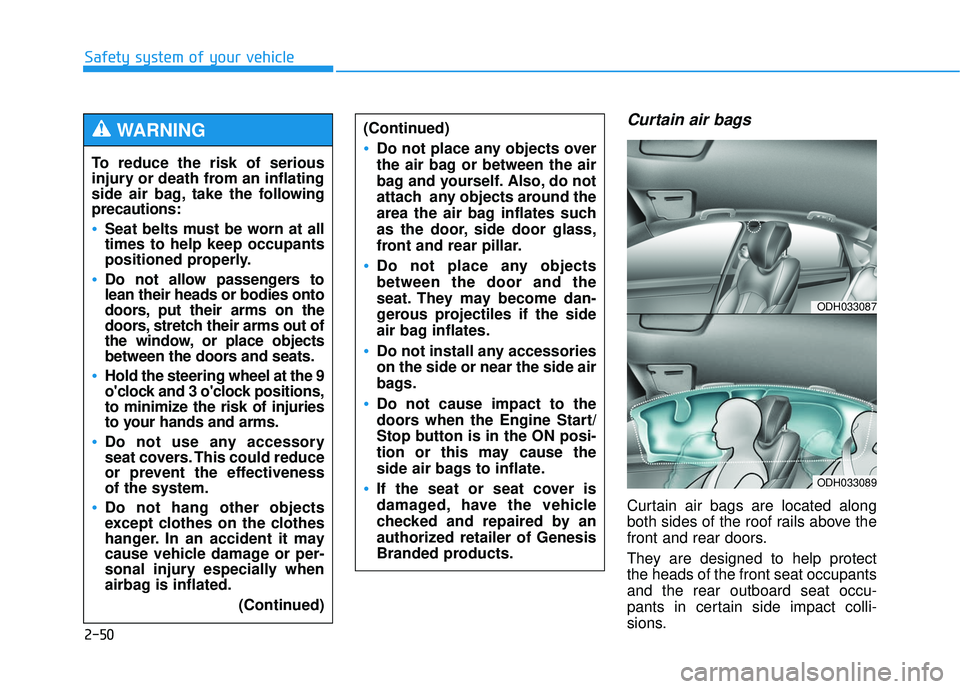
Curtain air bags
Curtain air bags are located along
both sides of the roof rails above the
front and rear doors.
They are designed to help protect
the heads of the front seat occupants
and the rear outboard seat occu-
pants in certain side impact colli-
sions.
To reduce the risk of serious
injury or death from an inflating
side air bag, take the follo
wing
precautions:
Seat belts must be worn at all
times to help keep occupants
positioned properly.
Do not allow passengers to
lean their heads or bodies onto
doors, put their arms on the
doors, stretch their arms out of
the window, or place objects
between the doors and seats.
Hold the steering wheel at the 9
o'clock and 3 o'clock positions,
to minimize the risk of injuries
to your hands and arms.
Do not use any accessory
seat covers. This could reduce
or prevent the effectiveness
of the system.
Do not hang other objects
except clothes on the clothes
hanger. In an accident it may
cause vehicle damage or per-
sonal injury especially when
airbag is inflated.
(Continued)
WARNING (Continued)
Do not place any objects over
the air bag or between the air
bag and yourself. Also, do not
attach any objects around the
area the air bag inflates such
as the door, side door glass,
front and rear pillar.
Do not place any objects
between the door and the
seat. They may become dan-
gerous projectiles if the side
air bag inflates.
Do not install any accessories
on the side or near the side air
bags.
Do not cause impact to the
doors when the Engine Start/
Stop button is in the ON posi-
tion or this may cause the
side air bags to inflate.
If the seat or seat cover is
damaged, have the vehicle
checked and repaired by an
authorized retailer of Genesis
Branded products.
ODH033087
ODH033089
Page 74 of 496

2-54
Safety system of your vehicle
You can take steps to reduce the risk
of being injured by an inflating air
bag. The greatest risk is sitting too
close to the air bag. An air bag needs
about 10 inches (25 cm) of space to
inflate. NHTSA recommends that
drivers allow at least 10 inches
(25 cm) between the center of the
steering wheel and the chest.
When the SRSCM detects a suffi-
ciently severe impact to the front of
the vehicle, it will automatically
deploy the front air bags.
OLMB033054
■Driver’s front air bag (1)
To reduce the risk of serious
injury or death from an inflating
air bag, take the following pre-
cautions:
NEVER place a child restraint
in the front passenger seat.
Always properly restrain chil-
dren under age 13 in the rear
seats of the vehicle.
Adjust the front passenger's
and driver's seats as far to the
rear as possible while allow-
ing you to maintain full con-
trol of the vehicle.
Hold the steering wheel with
hands at the 9 o'clock and 3
o'clock positions.
Never place anything or any-
one between the air bag and
the seat occupant.
Do not allow the front passen-
ger to place their feet or legs
on the dashboard.
WARNING
Page 89 of 496

Convenient features of your vehicle
Accessing your vehicle .........................................3-4
Smart key ........................................................................\
....3-4
Smart key precautions .....................................................3-7
Immobilizer System ...........................................................3-9
Door locks .............................................................3-11
Operating door locks from outside the vehicle ......3-11
Power Door Latch ...........................................................3-12
Operating door locks from inside the vehicle .........3-12
Auto door lock/unlock features..................................3-14
Child-protector rear door locks ..................................3-14
Theft-alarm system.............................................3-15
Driver position memory system .........................3-16
Storing positions into memory ...................................3-16
Resetting the driver's seat memory system ............3-17
Easy access function .....................................................3-18
Steering wheel......................................................3-19
Electric power steering (EPS) ......................................3-19
Tilt steering / Telescope steering...............................3-19
Heated steering wheel ...................................................3-20
Horn ........................................................................\
............3-21
Mirrors ...................................................................3-22
Inside rearview mirror....................................................3-22
Side view mirrors.............................................................3-36
Reverse parking aid function.......................................3-39
Windows ................................................................3-40
Power windows................................................................3-41
Panorama sunroof ...............................................3-44
Sunshade ........................................................................\
...3-44
Sliding the sunroof .........................................................3-45
Tilting the sunroof ..........................................................3-45
Closing the sunroof ........................................................3-46
Resetting the sunroof ....................................................3-47
Exterior features .................................................3-48
Hood ........................................................................\
...........3-48
Trunk ........................................................................\
..........3-49
Smart trunk.......................................................................3\
-55
Fuel filler door .................................................................3-59
Instrument cluster................................................3-62
Instrument Cluster Control............................................3-63
LCD Display Control ........................................................3-63
Gauges ........................................................................\
.......3-64
3
Page 91 of 496

Convenient features of your vehicle
3
Climate control additional features.................3-151
Cluster ionizer ................................................................3-151
Smart ventilation ...........................................................3-151
Rear climate system ON/OFF ....................................3-152
CO2 control auto air conditioner ..............................3-152
Storage compartment ........................................3-153
Center console storage ...............................................3-153
Glove box ........................................................................\
3-154
Sunglass holder .............................................................3-154
Interior features.................................................3-155
Cup holder.......................................................................3\
-155
Sunvisor ........................................................................\
...3-156
Power outlet ...................................................................3-156\
Clock ........................................................................\
.........3-158
Clothes hanger ..............................................................3-158
Bag hanger .....................................................................3-1\
59
Floor mat anchor(s)......................................................3-159
Rear curtain....................................................................3-16\
0
Side curtain.....................................................................3-1\
61
Luggage net holder ......................................................3-162
3
Page 92 of 496
3-4
Convenient features of your vehicle
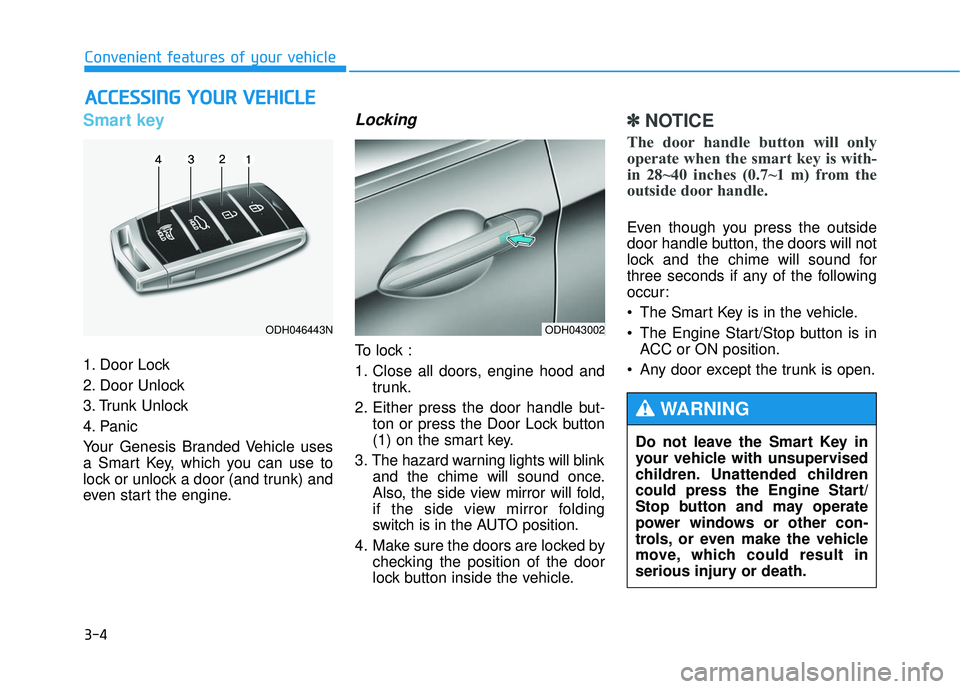
Smart key
1. Door Lock
2. Door Unlock
3. Trunk Unlock
4. Panic
Your Genesis Branded Vehicle uses
a Smart Key, which you can use to
lock or unlock a door (and trunk) and
even start the engine.
Locking
To lock :
1. Close all doors, engine hood andtrunk.
2. Either press the door handle but- ton or press the Door Lock button
(1) on the smart key.
3. The hazard warning lights will blink and the chime will sound once.
Also, the side view mirror will fold,
if the side view mirror folding
switch is in the AUTO position.
4. Make sure the doors are locked by checking the position of the door
lock button inside the vehicle.
✽ ✽NOTICE
The door handle button will only
operate when the smart key is with-
in 28~40 inches (0.7~1 m) from the
outside door handle.
Even though you press the outside
door handle button, the doors will not
lock and the chime will sound for
three seconds if any of the following
occur:
• The Smart Key is in the vehicle.
The Engine Start/Stop button is in
ACC or ON position.
Any door except the trunk is open.
A A C
CC
CE
E S
SS
SI
IN
N G
G
Y
Y O
O U
UR
R
V
V E
EH
H I
IC
C L
LE
E
ODH043002
Do not leave the Smart Key in
your vehicle with unsupervised
children. Unattended children
could press the Engine Start/
Stop button and may operate
power windows or other con-
trols, or even make the vehicle
move, which could result in
serious injury or death.
WARNING
ODH046443N
Page 93 of 496
3-5
Convenient features of your vehicle
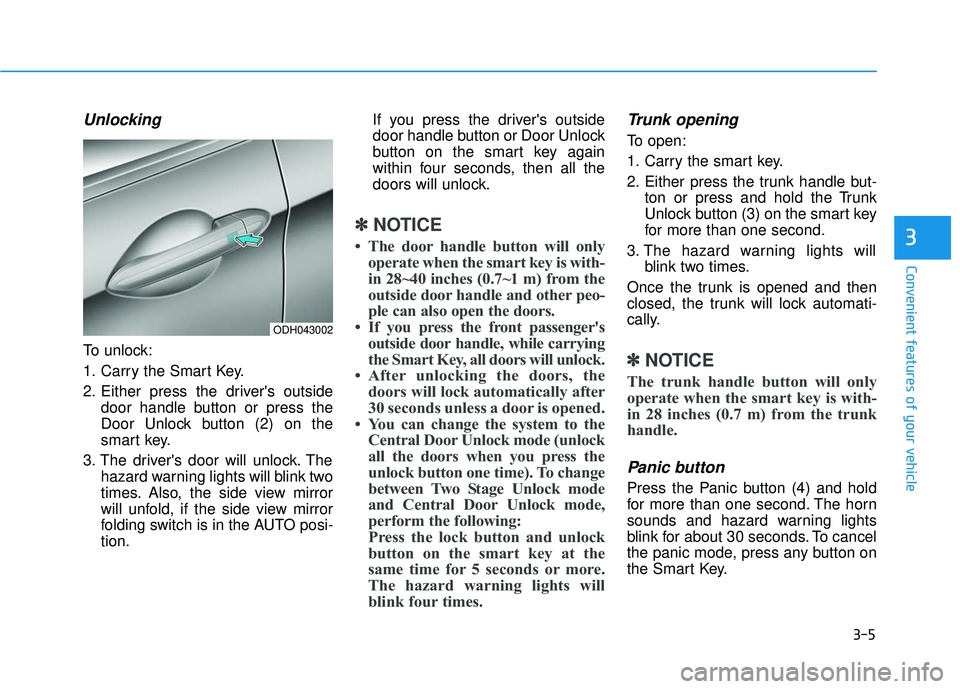
Unlocking
To unlock:
1. Carry the Smart Key.
2. Either press the driver's outsidedoor handle button or press the
Door Unlock button (2) on the
smart key.
3. The driver's door will unlock. The hazard warning lights will blink two
times. Also, the side view mirror
will unfold, if the side view mirror
folding switch is in the AUTO posi-
tion. If you press the driver's outside
door handle button or Door Unlock
button on the smart key again
within four seconds, then all the
doors will unlock.
✽ ✽
NOTICE
• The door handle button will only
operate when the smart key is with-
in 28~40 inches (0.7~1 m) from the
outside door handle and other peo-
ple can also open the doors.
• If you press the front passenger's outside door handle, while carrying
the Smart Key, all doors will unlock.
• After unlocking the doors, the doors will lock automatically after
30 seconds unless a door is opened.
• You can change the system to the Central Door Unlock mode (unlock
all the doors when you press the
unlock button one time). To change
between Two Stage Unlock mode
and Central Door Unlock mode,
perform the following:
Press the lock button and unlock
button on the smart key at the
same time for 5 seconds or more.
The hazard warning lights will
blink four times.
Trunk opening
To open:
1. Carry the smart key.
2. Either press the trunk handle but-
ton or press and hold the Trunk
Unlock button (3) on the smart key
for more than one second.
3. The hazard warning lights will blink two times.
Once the trunk is opened and then
closed, the trunk will lock automati-
cally.
✽ ✽ NOTICE
The trunk handle button will only
operate when the smart key is with-
in 28 inches (0.7 m) from the trunk
handle.
Panic button
Press the Panic button (4) and hold
for more than one second. The horn
sounds and hazard warning lights
blink for about 30 seconds. To cancel
the panic mode, press any button on
the Smart Key.
3
ODH043002
Page 94 of 496
3-6
Start-up
You can start the engine without
inserting the key.
For more information, refer to the
Engine Start/Stop button in chap-
ter 5.
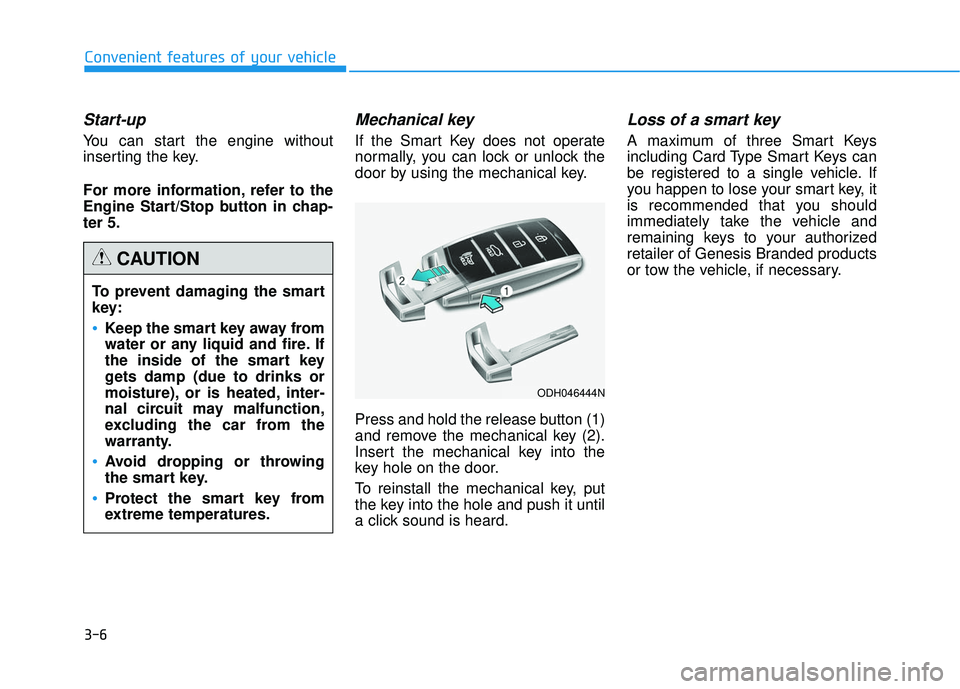
Mechanical key
If the Smart Key does not operate
normally, you can lock or unlock the
door by using the mechanical key.
Press and hold the release button (1)
and remove the mechanical key (2).
Insert the mechanical key into the
key hole on the door.
To reinstall the mechanical key, put
the key into the hole and push it until
a click sound is heard.
Loss of a smart key
A maximum of three Smart Keys
including Card Type Smart Keys can
be registered to a single vehicle. If
you happen to lose your smart key, it
is recommended that you should
immediately take the vehicle and
remaining keys to your authorized
retailer of Genesis Branded products
or tow the vehicle, if necessary.
Convenient features of your vehicleTo prevent damaging the smart
key:
•Keep the smart key away from
water or any liquid and fire. If
the inside of the smart key
gets damp (due to drinks or
moisture), or is heated, inter-
nal circuit may malfunction,
excluding the car from the
warranty.
Avoid dropping or throwing
the smart key.
Protect the smart key from
extreme temperatures.
CAUTION
ODH046444N