Sd card GENESIS G80 2019 Multimedia System Manual
[x] Cancel search | Manufacturer: GENESIS, Model Year: 2019, Model line: G80, Model: GENESIS G80 2019Pages: 276, PDF Size: 48.14 MB
Page 9 of 276
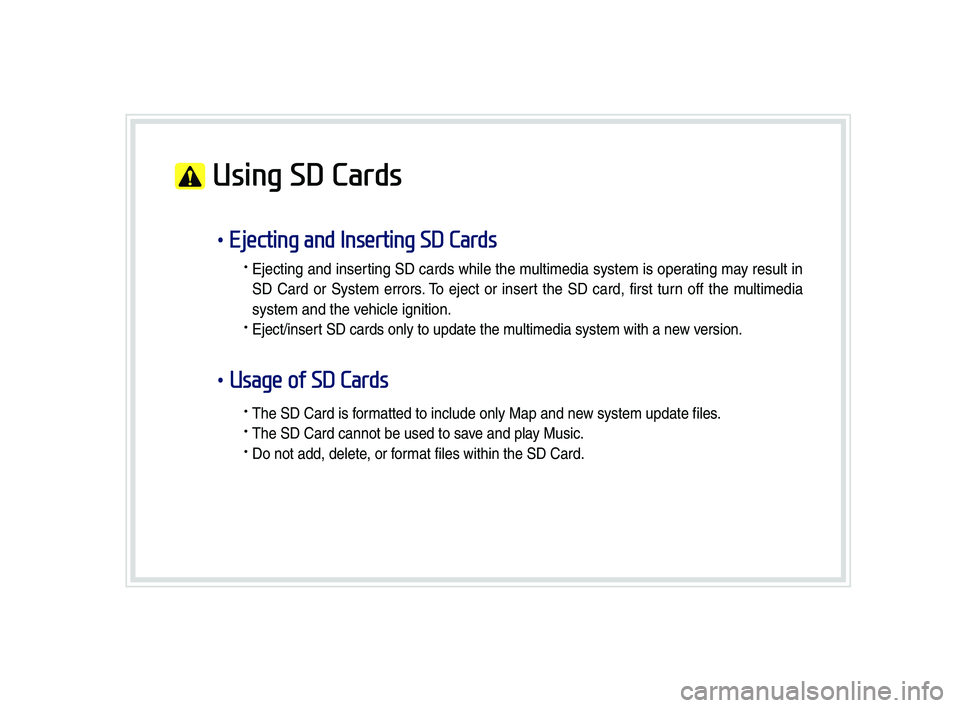
Using SD Cards
•Ejecting and Inserting SD Cards
• Ejecting and inser ting SD cards whi\be the \f u\bti\fedia syste\f is oper ating \fa y resu\bt in
SD Card or Syste\f errors . T o eject or inser t the SD card, first tur n off the \f u\bti\fedia
syste\f and the vehic\be ignition.
• Eject/insert SD cards on\by to update the \fu\bti\fedia syste\f with a new version.
•Usage of SD Cards
• The SD Card is for\fatted to inc\bude on\by Map and new syste\f update fi\bes.
• The SD Card cannot be used to save and p\bay Music.
• Do not add, de\bete, or for\fat fi\bes within the SD Card.
H_DH 19MY_G5.0[USA_EU]AVN_B1MS7BD001_.indb 72018-06-29 오전 10:27:59
Page 14 of 276
1-4 I Basic
Component Names and Functions
Head Unit
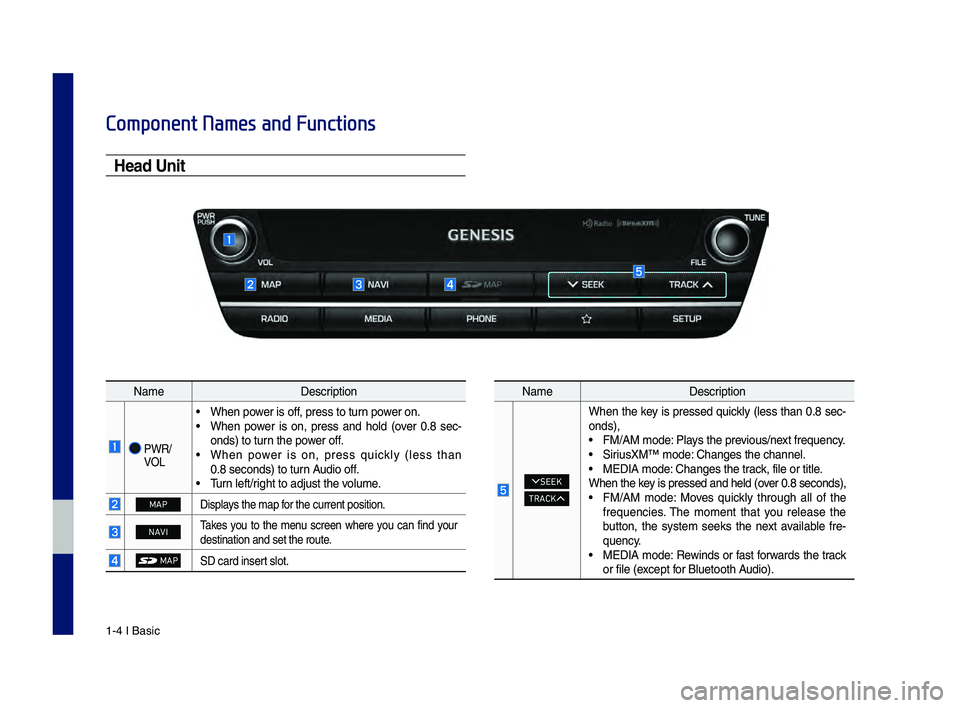
NameDescription
PWR/
VOL
• When power is off, press to turn power on. • When power is on, press and hold (over 0.8 sec -
onds) to turn the power off.
• When power is on, press quickly (less than 0.8 seconds) to turn Audio off. • \burn left/right to adjust the\c volume.
MAPDisplays the map for the current posi\ction.
NAVI\bakes you to the menu screen where you can find your
destination and se\ct the route.
MAP\fD card insert slot.
Name Description
SEEK
TRACK
When the key is pressed quickly (less than 0.8 sec-
onds),
• FM/AM mode: Plays the previous/next frequency.• \firiusXM™ mode: Changes the channe\cl.• MEDIA mode: Changes the track, file or title.
When the key is pressed and he\cld (over 0.8 seconds),
• FM/AM mode: Moves quickly through all of the
frequencies. \bhe moment that you release the
button, the system seeks the next available fre -
quency.
• MEDIA mode: Rewinds or fast forwards the track
or file (except for Bluetooth Audio).
H_DH 19MY_G5.0[USA_EU]AVN_B1MS7BD001_.indb 42018-06-29 오전 10:28:00
Page 60 of 276
3\b10 I Bluetooth
Contacts
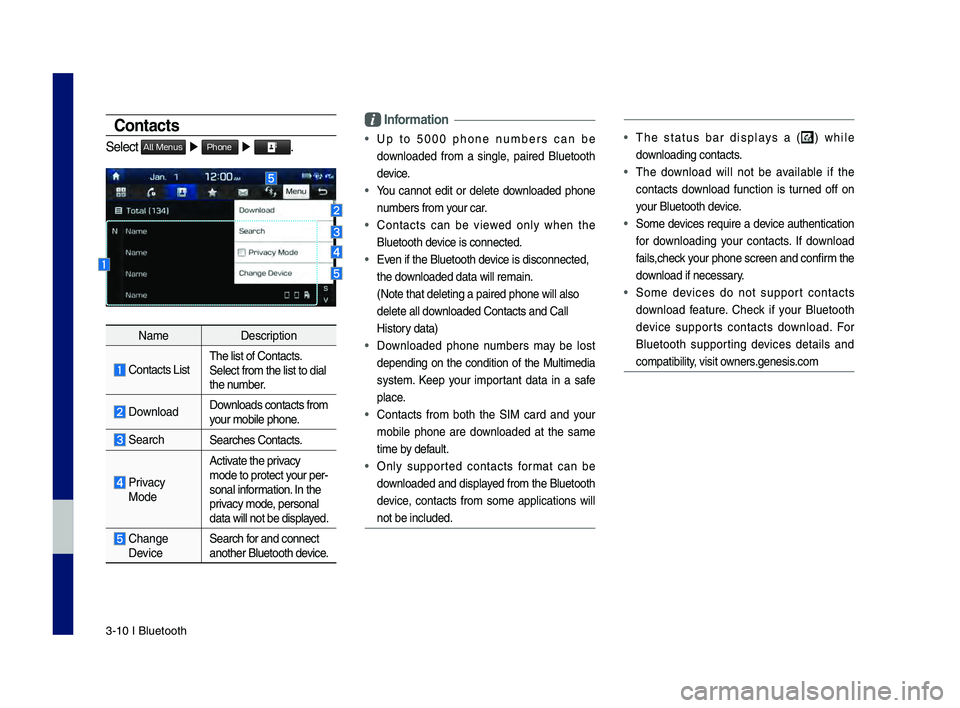
Select All Menus ▶ Phone ▶ .
Name Description
\fontacts ListThe list of \fontact\ds.
Select from the li\dst to dial
the number.
Download Downloads contacts fr\dom
your mobile phone.
SearchSearches \fontacts.
Privacy
ModeActivate the privacy
mode to protect your per
\b
sonal information. In the
privacy mode, personal
data will not be di\dsplayed.
\fhange Device Search for and connect
another Bluetooth device.
\bnformation
• Up to 5000 phone numbers can be
downloaded from a single, paired Bluetooth
device.
• You cannot edit or delete downloaded phone
numbers from your car.
• \fontacts can be viewed only when the
Bluetooth device is connected.
• Even if the Bluetoot\dh device is disconnecte\dd,
the downloaded data will r\demain.
(Note that deleting\d a paired phone wil\dl also
delete all downloaded \fontacts an\dd \fall
History data)
• Downloaded phone numbers may be lost
depending on the condition of the Multimedia
system. Keep your important data in a safe
place.
• \fontacts from both the SIM card and your
mobile phone are downloaded at the same
time by default.
• Only supported contacts format can be
downloaded and displayed from the Bluetooth
device, contacts from some applications will
not be included.
• The status bar displays a () while
downloading contacts.
• The download will not be available if the
contacts download function is turned off on
your Bluetooth device.
• Some devices require a device authentication
for downloading your contacts. If download
fails,check your phone screen and confirm the
download if necessary.
• Some devices do not support contacts
download feature. \fheck if your Bluetooth
device supports contacts download. For
Bluetooth supporting devices details and
compatibility, visit owners.genesis.com
H_DH 19MY_G5.0[USA_EU]AVN_B1MS7BD001_.indb 102018-06-29 오전 10:28:16
Page 191 of 276

3
Component Names and Functions
Head Un\bt
NameDescription
PWR/
VOL
• When power is off, press to turn power on. • When power is on, press and ho\fd (over 0.8 seconds) to turn
the power off.
• When power is on, press \buick\fy (\fess than 0.8 s econds) to turn Audio off. • Turn \feft/right to adjust the\c vo\fume.
MAPDisp\fays the map for the current posi\ction.
NAVITakes you to the menu screen where you can find your destina -
tion and set the r\coute.
MAPSD card insert s\fot.
SEEK
TRACK
When the key is pressed \buick\fy (\fess than 0.8 se\cconds),• FM/AM mode: P\fays the previous/next fre\buency.• SiriusXM™ mode: Changes the channe\c\f.• MEDIA mode: Changes the track, fi\fe or tit\fe.
When the key is pressed and he\c\fd (over 0.8 seconds),
• FM/AM mode: Moves \buick\fy through a\f\f of the fre\buencies.
The moment that you re\fease the button, the system seeks
the next avai\fab\fe fre\buency.
• MEDIA mode: Rewinds or fast forwards the track or fi\fe (except
for B\fuetooth Audio).
H_DH 19MY_G5.0[USA_EU]AVN_B1MS7BD001_.indb 32018-06-29 오후 1:57:57
Page 217 of 276
29
Nav\bgat\bon Commands
* Check the fo\f\fowing before you use navigation commands:
1. Search for and find addresses \focated in the state or province your car is
current\fy in.
If you want to search in another state, say the name of state/province and
then \fook it up.
Find Address is c\fassified by states/provinces to provide you with faster ser-
vice.
2. Some commands such as “Cance\f Route” are avai\fab\fe on\fy when the des-
tination is fixed.
Informat\bon
• This system has the capabi\fity to use the te\fematics units network connection for voice
recognition to provide and execute Destination e\cntry for POIs and Addres\cses.
• To use the network enhanced \focation entry feature, an active Subscription to Genesis
Connected Service is re\buired. (For more detai\fs, see Section 9-9 Voice Recognition
Settings)
Command Operation
Find
• You can search for a designated PO\cI name or address \cvia
the network service.
e.g.) Find “Starbucks”, Find “Starbucks” in Seatt\fe
• If ‘Use Network’ is se\fected in the Voice recognition menu, a
Genesis Connected S\cervices subscription is re\buired \cto use
the POI search feature.
• If ‘Use Network’ is not checked the Navigation system
wi\f\f use the on-board map database on the SD MAP
Card.
Find Address
in
• Finds the address in
e.g.) Find Address in\c Ca\fifornia
• To find an address, you shou\fd say “House Number →
Street → City”
e.g.) 300 (Three Zero\c Zero) Main Street\c, A\fmond
Informat\bon
• Shou\fd promote the \cserver based system bett\cer, by informing the user ther\ce is improved
speech recognition,\c \farger database con\ctent.
H_DH 19MY_G5.0[USA_EU]AVN_B1MS7BD001_.indb 292018-06-29 오후 1:58:12