ABS GENESIS G80 2021 User Guide
[x] Cancel search | Manufacturer: GENESIS, Model Year: 2021, Model line: G80, Model: GENESIS G80 2021Pages: 604, PDF Size: 11.47 MB
Page 266 of 604

6
Before Driving ........................................................................\
...........................6-4Before Entering the Vehicle ........................................................................\
................6-4
Before Starting ........................................................................\
....................................6-4
Engine Start/Stop Button ........................................................................\
.........6-5Engine Stop/Start Button Positions ........................................................................\
...6-6
Starting the Engine ........................................................................\
..............................6 -7
Smart Key Slot - Emergency Starting ........................................................................\
6-8
Turning Off the Engine ........................................................................\
........................6-8
Remote Start ........................................................................\
........................................6-9
Automatic Transmission ........................................................................\
..........6-10Automatic Transmission Operation ........................................................................\
...6-10
LCD Display Messages (Cluster) ........................................................................\
........6-16
Paddle Shifter (Manual Shift Mode) ........................................................................\
..6-19
Good Driving Practices ........................................................................\
......................6-19
Braking System ........................................................................\
........................6-21Power-Assist brakes ........................................................................\
...........................6-21
Disc Brakes Wear Indicator ........................................................................\
................ 6-21
Electronic Parking Brake (EPB)
........................................................................\
..........6-22
Auto Hold ........................................................................\
............................................6-26
Anti-Lock Brake System (ABS) ........................................................................\
..........6-30
Electronic Stability Control (ESC) ........................................................................\
.....6-31
Vehicle Stability Management (VSM) .......................................................................6-34
Hill-Start Assist Control (HAC) ........................................................................\
...........6-35
Good Braking Practices ........................................................................\
....................6-36
All Wheel Drive (AWD) ........................................................................\
............6-37All Wheel Drive (AWD) Operation ........................................................................\
......6-37
Emergency Precautions ........................................................................\
.....................6-39
Electronic Control Suspension ........................................................................\
6-41System Malfunction ........................................................................\
...........................6-41
Electronically Controlled Suspension with Road Preview .......................................6-41
System Malfunction ........................................................................\
..........................6-42
Limitations of the System ........................................................................\
.................6-42
6. Driving Your Vehicle
Driving Your Vehicle
Page 295 of 604

Driving Your Vehicle
6-30
Anti-Lock Brake System (ABS)
WARNING
Anti-Lock Braking System (ABS) or
Electronic Stability Control (ESC)
system will not prevent accidents
due to improper or dangerous driving
maneuvers. Even though vehicle
control is improved during emergency
braking, always maintain a safe
distance between you and objects
ahead of you. Vehicle speeds should
always be reduced during extreme
road conditions. The braking distance
for vehicles equipped with ABS or ESC
may be longer than for those without
these systems in the following road
conditions.
Drive your vehicle at reduced speeds
during the following conditions:
• Rough, gravel or snow-covered
roads.
• On roads where the road surface is
pitted or has different surface height.
• Tire chains are installed on your
vehicle.
The safety features of ABS or ESC
equipped vehicle should not be tested
by high speed driving or cornering. This
could endanger the safety of yourself or
others.
ABS is an electronic braking system that
helps prevent a braking skid. ABS allows
the driver to steer and brake at the same
time.
Using ABS
To obtain the maximum benefit from
your ABS in an emergency situation,
do not attempt to modulate your brake
pressure and do not try to pump your
brakes. Depress your brake pedal as hard
as possible.
When you apply your brakes under
conditions which may lock the wheels,
you may hear sounds from the brakes,
or feel a corresponding sensation in the
brake pedal. This is normal and it means
your ABS is active.
ABS does not reduce the time or distance
it takes to stop the vehicle.
Always maintain a safe distance from the
vehicle in front of you.
ABS will not prevent a skid that results
from sudden changes in direction, such
as trying to take a corner too fast or
making a sudden lane change. Always
drive at a safe speed for the road and
weather conditions.
ABS cannot prevent a loss of stability.
Always steer moderately when braking
hard. Severe or sharp steering wheel
movement can still cause your vehicle to
veer into oncoming traffic or off the road.
On loose or uneven road surfaces,
operation of the anti-lock brake system
may result in a longer stopping distance
than for vehicles equipped with a
conventional brake system.
The ABS (
) warning light will stay
on for several seconds after the Engine
Start/Stop button is in the ON position.
Page 296 of 604
06
6-31
During that time, ABS will go through
self-diagnosis and the light will go off if
everything is normal. If the light stays on,
you may have a problem with your ABS.
Contact an authorized retailer of Genesis
Branded products as soon as possible.
WARNING
If the ABS () warning light is on and
stays on, you may have a problem with
the ABS. Your power brakes will work
normally. To reduce the risk of serious
injury or death, contact your authorized
retailer of Genesis Branded products as
soon as possible.
NOTICE
When you drive on a road having poor
traction, such as an icy road, and apply
your brakes continuously, ABS will be
active continuously and the ABS (
)
warning light may illuminate. Pull your
vehicle over to a safe place and turn the
vehicle off.
Restart the vehicle. If the ABS warning
light is off, then your ABS system is
normal.
Otherwise, you may have a problem
with your ABS system. Contact an
authorized retailer of Genesis Branded
products as soon as possible.
Information
When you jump start your vehicle because
of a drained battery, the ABS ()
warning light may turn on at the same
time. This happens because of the low
battery voltage. It does not mean your
ABS is malfunctioning. Have the battery
recharged before driving the vehicle.
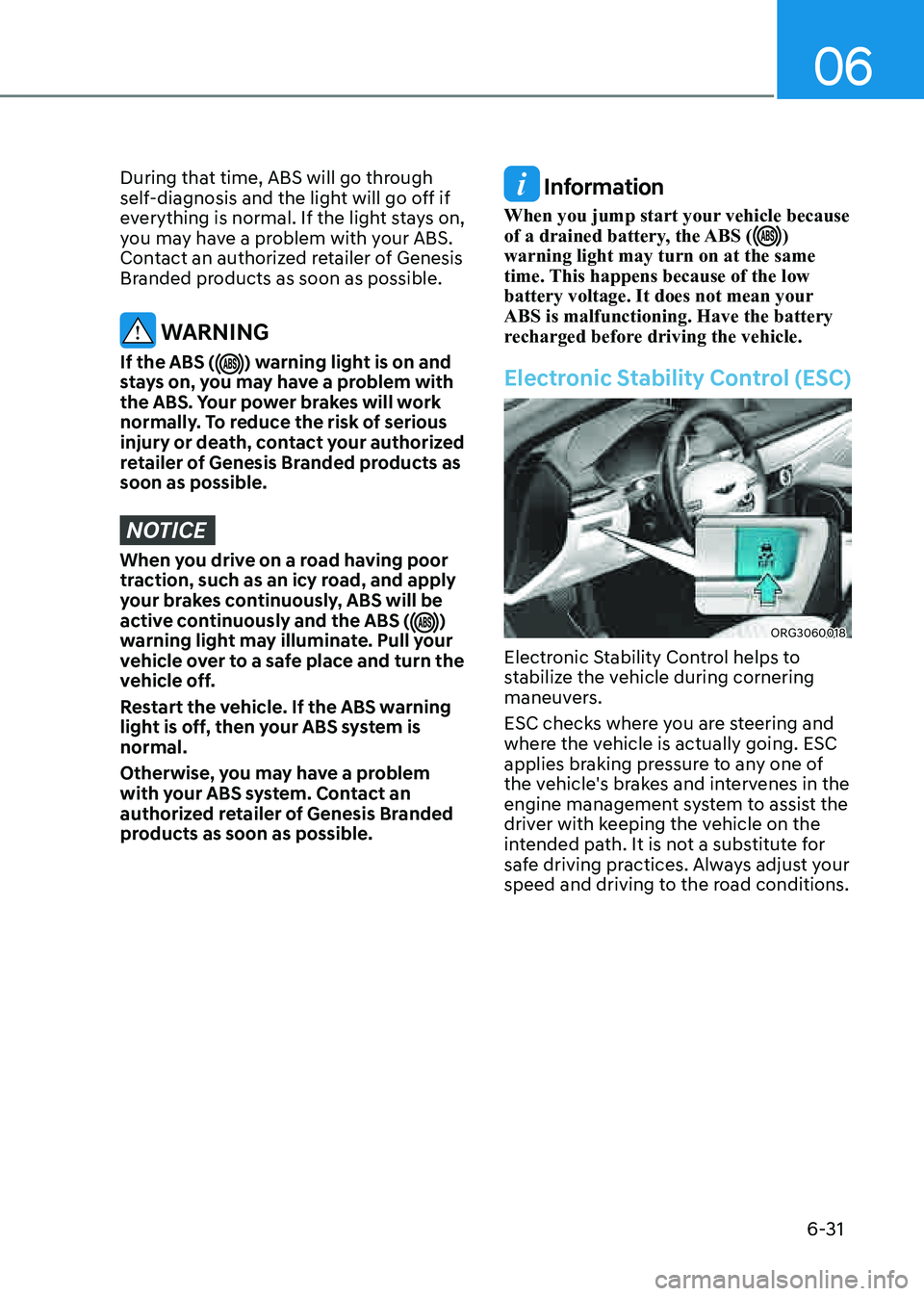
Electronic Stability Control (ESC)
ORG3060018
Electronic Stability Control helps to
stabilize the vehicle during cornering
maneuvers.
ESC checks where you are steering and
where the vehicle is actually going. ESC
applies braking pressure to any one of
the vehicle's brakes and intervenes in the
engine management system to assist the
driver with keeping the vehicle on the
intended path. It is not a substitute for
safe driving practices. Always adjust your
speed and driving to the road conditions.
Page 298 of 604
06
6-33
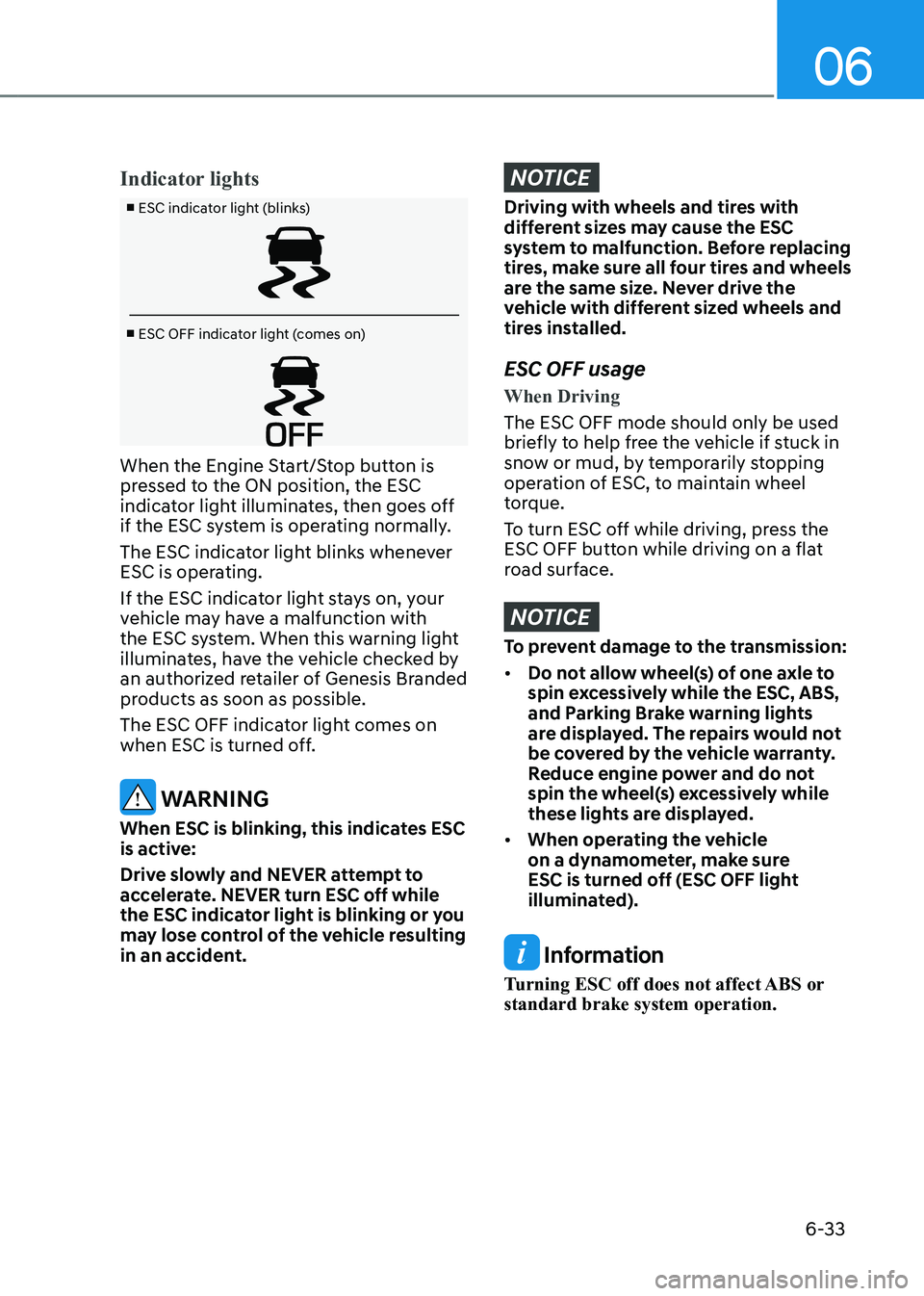
Indicator lights
■ ESC indicator light (blinks)
■ ESC OFF indicator light (comes on)
When the Engine Start/Stop button is
pressed to the ON position, the ESC
indicator light illuminates, then goes off
if the ESC system is operating normally.
The ESC indicator light blinks whenever
ESC is operating.
If the ESC indicator light stays on, your
vehicle may have a malfunction with
the ESC system. When this warning light
illuminates, have the vehicle checked by
an authorized retailer of Genesis Branded
products as soon as possible.
The ESC OFF indicator light comes on
when ESC is turned off.
WARNING
When ESC is blinking, this indicates ESC
is active:
Drive slowly and NEVER attempt to
accelerate. NEVER turn ESC off while
the ESC indicator light is blinking or you
may lose control of the vehicle resulting
in an accident.
NOTICE
Driving with wheels and tires with
different sizes may cause the ESC
system to malfunction. Before replacing
tires, make sure all four tires and wheels
are the same size. Never drive the
vehicle with different sized wheels and
tires installed.
ESC OFF usage
When Driving
The ESC OFF mode should only be used
briefly to help free the vehicle if stuck in
snow or mud, by temporarily stopping
operation of ESC, to maintain wheel
torque.
To turn ESC off while driving, press the
ESC OFF button while driving on a flat
road surface.
NOTICE
To prevent damage to the transmission:
• Do not allow wheel(s) of one axle to
spin excessively while the ESC, ABS,
and Parking Brake warning lights
are displayed. The repairs would not
be covered by the vehicle warranty.
Reduce engine power and do not
spin the wheel(s) excessively while
these lights are displayed.
• When operating the vehicle
on a dynamometer, make sure
ESC is turned off (ESC OFF light
illuminated).
Information
Turning ESC off does not affect ABS or
standard brake system operation.
Page 308 of 604

06
6-43
Idle Stop and Go helps reduce fuel
consumption by automatically shutting
down the engine, when the vehicle is
at a standstill (i.e. red stop light, stop
sign, and traffic jam) subject to certain
prerequisite conditions being satisfied as
listed below.
The engine is automatically started upon
satisfying the starting conditions.
ISG system is always active, when the
engine is running.
Information
When the engine is automatically started
by ISG system, warning lights (i.e. ABS,
ESC, ESC OFF, EPS, and parking brake
warning light) may illuminate for a few
seconds due to low battery voltage.
However, it does not indicate a
malfunction with ISG system.
ISG System Operation
Prerequisite for activation
ISG system operates in the following
situations.
• The driver's seatbelt is fastened
• The driver's door and hood are closed
• The battery sensor is activated and
the battery is sufficiently charged
• Outside temperature is not too low or
too high
• The vehicle is driven over a constant
speed and stops
• The climate control system satisfies
the conditions
• The vehicle is sufficiently warmed up
• ISG related parts are working properly
• The incline is gradual
• The steering wheel is turned less than
180 degrees and then the vehicle
stops
Information
ISG system is not activated, when the
prerequisites to activate the ISG system
are unsatisfied. If this occurs, the ISG
OFF button indicator illuminates, and the
Auto Stop (
) indicator illuminates in
yellow on the instrument cluster.
When the Auto Stop (
) indicator stays
on the instrument cluster, have the system
inspected by an authorized retailer of
Genesis Branded products.
Auto stop
When ISG is on the engine will be
stopped automatically when both of the
following occurs:
1. Vehicle speed decreases to 0mph (0
km/h) full stop condition.
2. Brake pedal is depressed and gear is
in D (Drive) or N (Neutral).
The Auto Stop (
) indicator illuminates
in green on the instrument cluster, when
the engine stops.
Information
Idle stop cannot reoccur again until the
vehicle speed goes above 3 mph (5 km/h)
and then returns again to the automatic
stop conditions as previously mentioned.
IDLE STOP AND GO (ISG)
Page 403 of 604

07
7-7 5
System Operation
Operating conditions
Smart Cruise Control will operate when
the following conditions are satisfied.
Basic function
• The gear is in D (Drive)
• The driver’s door is closed
• EPB (Electronic Parking Brake) is not
applied
• Your vehicle speed is within the
operating speed range
-5~120 mph (10~200 km/h): when
there is no vehicle in front
-0~120 mph (0~200 km/h): when
there is a vehicle in front
• ESC (Electronic Stability Control), TCS
(Traction Control System) or ABS is on
• ESC (Electronic Stability Control), TCS
(Traction Control System) or ABS is not
controlling the vehicle
• Engine rpm is not in the red zone
• Forward Collision-Avoidance Assist
brake control is not operating
• Remote Smart Parking Assist brake
control is not operating
• ISG system is not operating
• Hands-off warning for Lane Keeping
Assist and Highway Driving Assist is
off
Information
At a stop, if there is no vehicle in front of
your vehicle, the system will turn on when
the brake pedal is depressed Overtaking Acceleration Assist
Overtaking Acceleration Assist will
operate when the left turn signal
indicator is turned on while Smart Cruise
Control is operating, and the following
conditions are satisfied:
• Your vehicle speed is above 40 mph
(60 km/h)
• The hazard warning flasher is off
• A vehicle is detected in front of your
vehicle
• Deceleration is not needed to
maintain distance with the vehicle in
front
WARNING
• When the left turn signal indicator
is turned on while there is a vehicle
ahead, the vehicle may accelerate
temporarily. Pay attention to the
road conditions at all times.
• Regardless of your countries driving
direction, Overtaking Acceleration
Assist will operate when the
conditions are satisfied. When
using the function in countries with
different driving direction, always
check the road conditions at all
times.
Page 432 of 604
Driver Assistance system
7-104
• Driving to one side within lane (if
equipped)When vehicle speed is above
40 mph (60 km/h), if a vehicle
around you is driving at a close
distance, your vehicle will control
the steering in the opposite
direction of the vehicle to assist in
safe driving.
If there are vehicles in both sides
of the lane that are driving close to
you, the function will not veer to the
opposite side of the lane.
System standby
When the Smart Cruise Control is
temporarily canceled while Highway
Driving Assist is operating, Highway
Driving Assist will be in the standby state.
At this time, Lane Following Assist will
operate normally.
Information
• Driving Speed Limit helps you drive
below 40 mph (60 km/h). At this time,
the vehicle decelerates due to the
vehicle ahead. After the vehicle has
decelerated, it cannot automatically
accelerate.
• Driving Speed Limit will cancel in the
following circumstances:
-When the driver grabs the steering
wheel again
-When the driver turns on Lane
Following Assist by pressing the button
-When Smart Cruise Control switch
(+, -, ) or button is pushed, or the accelerator pedal or the brake
pedal is depressed
Highway Lane Change Assist (if
equipped)
Function display and control
You can see the status of the Highway
Lane Change Assist function operation
in the Driving Assist view on the cluster.
Refer to “View Modes” section in chapter
4.
Page 455 of 604
07
7-127
CAUTION
Take the following precautions to
maintain optimal performance of the
detecting sensor:
• Never disassemble the detecting
sensor or sensor assembly, or apply
any impact on it.
• If the detecting sensors have been
replaced or repaired, have your
vehicle inspected by an authorized
retailer of Genesis Branded products.
• Forward/Reverse Parking Distance
Warning may not operate normally
when:
-Moisture is frozen to the sensor
-Sensor is covered with foreign
material, such as snow or water
(The system will operate normally
when such foreign material are
removed.)
• Forward/Reverse Parking Distance
Warning may malfunction when:
-Driving on uneven road, gravel
roads or bushes
-Objects that generates ultrasonic
waves such as vehicle horns, loud
motorcycle engine sound or truck
air brakes are near the sensor
-Heavy rain or water spray is
present
-Wireless transmitters or mobile
phones are present near the sensor
-The sensor is covered with snow
-Affected by another vehicle’s
sensors
-Water flows on the surface of the
sensor
-Installing the license plate
differently from the original
location
• Detecting range may decrease when:
-Sensor is covered with foreign
material, such as snow or water
(The system will operate normally
when such foreign material are
removed.)
-The weather is extremely hot or
cold
• The following objects may not be
detected:
-Sharp or slim objects, such as
ropes, chains or small poles.
-Objects, which tend to absorb
sensor frequency, such as clothes,
spongy material or snow.
-Objects smaller than 40 in. (100
cm) in length and narrower than
6 in. (14 cm) in diameter.
Page 471 of 604
07
7-143
• Detecting range may decrease when:
-Sensor is covered with foreign
material, such as snow or water
(The system will operate normally
when such foreign material are
removed.)
-The weather is extremely hot or
cold
• The following objects may not be
detected:
-Sharp or slim objects, such as
ropes, chains or small poles.
-Objects which tend to absorb
sensor frequency, such as clothes,
spongy material or snow.
-Objects smaller than 40 in. (100
cm) in length and narrower than 6
in. (14 cm) in diameter.
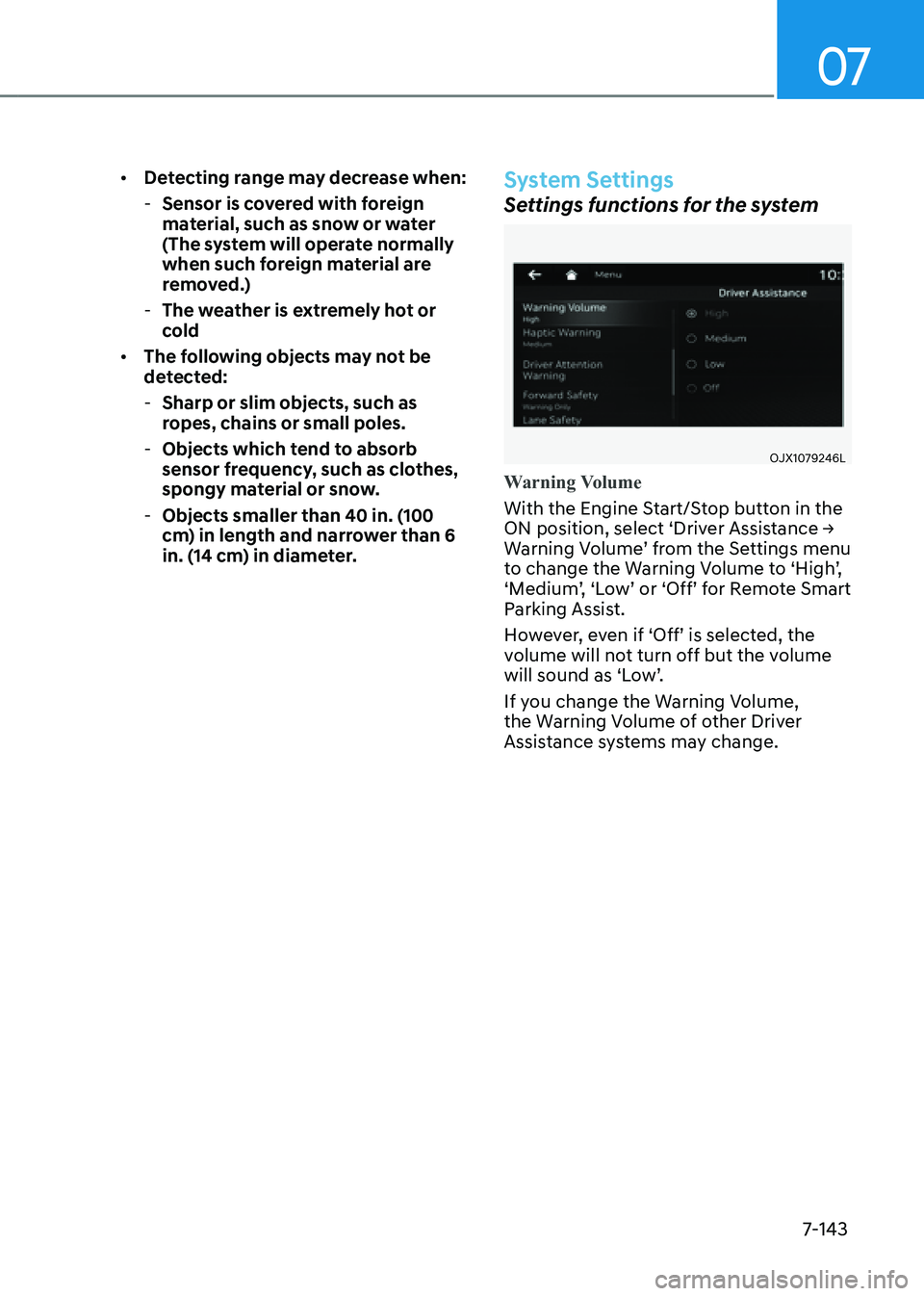
System Settings
Settings functions for the system
OJX1079246L
Warning Volume
With the Engine Start/Stop button in the
ON position, select ‘Driver Assistance →
Warning Volume’ from the Settings menu
to change the Warning Volume to ‘High’,
‘Medium’, ‘Low’ or ‘Off’ for Remote Smart
Parking Assist.
However, even if ‘Off’ is selected, the
volume will not turn off but the volume
will sound as ‘Low’.
If you change the Warning Volume,
the Warning Volume of other Driver
Assistance systems may change.
Page 478 of 604

Driver Assistance system
7-150
The function will pause in the following
conditions when:
• Smart Parking
-There is a pedestrian, animal or
object in the direction the vehicle is
moving
-The door or trunk is open
-The driver’s seat belt is not fastened
-Blind-Spot Collision-Avoidance
Assist or Rear-Cross Traffic Collision
Assist operates while the vehicle
is being controlled in the reverse
direction
-The Parking/View () button is
not continuously pressed
- The vehicle is stopped by
depressing the brake pedal
• Remote Smart Parking
-There is a pedestrian, animal or
object in the direction the vehicle is
moving
-The door or trunk is open
-The Forward () or Backward ()
button is not continuously pressed
- Simultaneously pressing multiple
buttons on a smart key
-The smart key is not operated within
13 ft. (4 m) from the vehicle
-Button of another smart key is
pressed in addition to the operating
smart key
-Blind-Spot Collision-Avoidance
Assist or Rear-Cross Traffic Collision
Assist operates while the vehicle
is being controlled in the reverse
direction
When Parking function is paused, the
vehicle will automatically stop. If the
condition that made the function to
pause disappears, the function may
operate again. The function will cancel in the following
conditions when:
• Smart Parking
-
The steering wheel is steered
-The gear is shifted while the vehicle
is moving
-Operating EPB while the vehicle is
moving
-The engine hood is open
-Vehicle speed is above 3 mph (5
km/h)
-Rapid acceleration occurs
-Vehicle skid occurs
-The wheel is stuck by an obstacle
and cannot move
-There are pedestrians, animals or
objects at the front and rear of the
vehicle at the same time
-Approximately 3 minutes and 50
seconds have past after Smart
Parking function has started to
operate
-The driver opens the door without
the seatbelt unfastened
-The slope of the road exceeds the
operational range
-The steering wheel, gearshift,
braking, and drive controls are not
working normally
-The function is paused for more
than 1 minute
-ABS, TCS or ESC system operates
due to slippery road conditions
When Smart Parking function is
canceled, the vehicle will automatically
stop, shift the gear to P (Park) and
engage EPB (Electronic Parking Brake).