key battery GENESIS G80 2021 User Guide
[x] Cancel search | Manufacturer: GENESIS, Model Year: 2021, Model line: G80, Model: GENESIS G80 2021Pages: 604, PDF Size: 11.47 MB
Page 208 of 604

Convenient Features
5-70
Trunk release lever
ORG3050046
When the vehicle battery is discharged or
the trunk needs to be opened manually:
1. Open the pass through cover (1) at the
center of the rear seat. Manual trunk
release lever is located behind on left
side of pass through cover. Pull the
trunk release lever all the way back.
OHI048543
2. With the lever pulled to the end, fix
the lever (3) on the projecting part (2).
3. Lift and open the trunk manually.
4. Place manual trunk release lever back
to original position or trunk will not
close.
WARNING
Make sure to at least have minimum
space at the back and in the upper area
of the trunk when opening or closing
the trunk. If not, the trunk may hit the
surrounding objects (wall, ceiling,
vehicle, etc.) and result in damaging the
vehicle or injuring the person near.
Smart Trunk (if equipped)
ORG3050048
On a vehicle equipped with a smart key,
the trunk can be opened with hands-free
activation using the smart trunk system.
How to use the smart trunk
The hands-free smart trunk system
can be opened automatically when the
following conditions are met:
• The smart trunk option is enabled the
Settings menu in the infotainment
system screen.
• The smart trunk is activated and ready
15 seconds after all the doors are
closed and locked
• The smart trunk will open when the
smart key is detected in the area
behind the vehicle for 3 seconds
Page 219 of 604

05
5-81
Battery saver function
The purpose of this feature is to prevent
the battery from being discharged.
The system automatically turns off the
parking lamp when the driver turns the
vehicle off and opens the driver-side
door.
With this feature, the parking lamps will
turn off automatically if the driver parks
on the side of road at night.
If necessary, to keep the lamps on when
the vehicle is turned off, perform the
following:
(1) Open the driver-side door.
(2) Turn the parking lamps OFF and ON
again using the headlamp switch on
the steering column.
Headlamp delay function
If the Engine Start/Stop button is in the
ACC parking or the OFF position with
the headlamps ON, the headlamps (and/
or parking lamps) remain on for about
5 minutes. However, if the driver’s door
is opened and closed, the headlamps
are turned off after 15 seconds. Also,
with the vehicle off if the driver’s door is
opened and closed, the headlamps (and/
or parking lamps) are turned off after 15
seconds.
The headlamps (and/or parking lamps)
can be turned off by pressing the lock
button on the smart key twice or turning
the headlamp switch to the OFF or AUTO
position.
You can enable the headlamp delay
function by selecting ‘Setup → Vehicle
Settings → Lights → Headlight Delay (or
Headlight time-out)’ in the infotainment
system screen.
For detailed information, refer to the
separately supplied manual.
NOTICE
If the driver exits the vehicle through
another door besides the driver
door, the battery saver function
does not operate and the headlamp
delay function does not turn OFF
automatically.
This may cause the battery to
discharge. To avoid battery discharge,
turn OFF the headlamps manually from
the headlamp switch before exiting the
vehicle.
Page 220 of 604

Convenient Features
5-82
WARNING
If the function does not work properly,
we recommend that the system be
inspected by an authorized retailer
of Genesis Branded products. Do not
attempt to inspect or replace the wiring
yourself.
Headlamp moisture removal
function
When moisture fogs up inside of the
headlamp with the headlamp on for a
certain period of time, the fan circulates
air inside the headlamp to remove
moisture. If moisture is not removed,
have the vehicle inspected by an
authorized retailer of Genesis Branded
products.
Interior Lights
WARNING
Do not use the interior lights when
driving in the dark. The interior lights
may obscure your view and cause an
accident.
NOTICE
Do not use the interior lights for
extended periods when the vehicle is
turned off or the battery will discharge.
Interior lamp AUTO cut
The interior lamps will automatically go
off approximately 20 minutes after the
vehicle is turned off and the doors are
closed. If a door is opened, the lamp
will go off 25 minutes after the vehicle
is turned off. If the doors are locked by
the smart key and the vehicle enters the
armed stage of the theft alarm system,
the lamps will go off five seconds later.
Page 257 of 604

05
5-119
USB Charger
ORG3050075
The USB charger is designed to recharge
batteries of small size electrical devices
using a USB cable.
The electrical devices can be recharged
when the Engine Start/Stop button is in
the ACC or ON (or START) position.
The battery charging state may be
monitored on the electrical device.
Disconnect the USB cable from the USB
port after use.
• A smart phone or a tablet PC may
get warmer during the re-charging
process. It does not indicate any
malfunction with the charging system.
• A smart phone or a tablet PC, which
adopts a different re-charging
method, may not be properly re-
charged. In this case, use an exclusive
charger of your device.
• The charging terminal is only to
recharge a device. Do not use the
charging terminal either to turn ON
an audio or to play media In the
infotainment system.
Wireless Smart Phone Charging
System (if equipped)
ORG3050076
[A] : Indicator light, [B] : Charging pad
On certain models, the vehicle comes
equipped with a wireless smart phone
charger.
The system is available when all doors
are closed, and when the Engine Start/
Stop button is in the ON (or START)
position.
Charging smart phone
The wireless smart phone charging
system charges only the Qi-enabled
smart phones (
). Read the label on
the smart phone accessory cover or
visit your smart phone manufacturer’s
website to check whether your smart
phone supports the Qi technology.
The wireless charging process starts
when you put a Qi-enabled smart phone
on the wireless charging unit.
1. Remove other items, including the
smart key, from the wireless charging
unit. If not, the wireless charging
process may be interrupted. Place
the smart phone on the center of the
charging pad.
Page 273 of 604
Driving Your Vehicle
6-8
NOTICE
To prevent damage to the vehicle:
• If the engine stalls while you are in
motion, do not attempt to shift the
gear to the P (Park) position.
If traffic and road conditions permit,
you may put the gear in N (Neutral)
while the vehicle is still moving and
press the Engine Start/Stop button in
an attempt to restart the engine.
• Do not push or tow your vehicle to
start the vehicle.
NOTICE
To prevent damage to the vehicle:
Do not press the Engine Start/Stop
button for more than 10 seconds except
when the stop lamp fuse is blown.
When the stop lamp fuse is blown,
you cannot normally start the engine.
Replace the fuse with a new one. If you
are not able to replace the fuse, you
can start the engine by pressing and
holding the Engine Start/Stop button
for 10 seconds with the Engine Start/
Stop button in the ACC position.
For your safety always depress the
brake pedal before starting the vehicle.
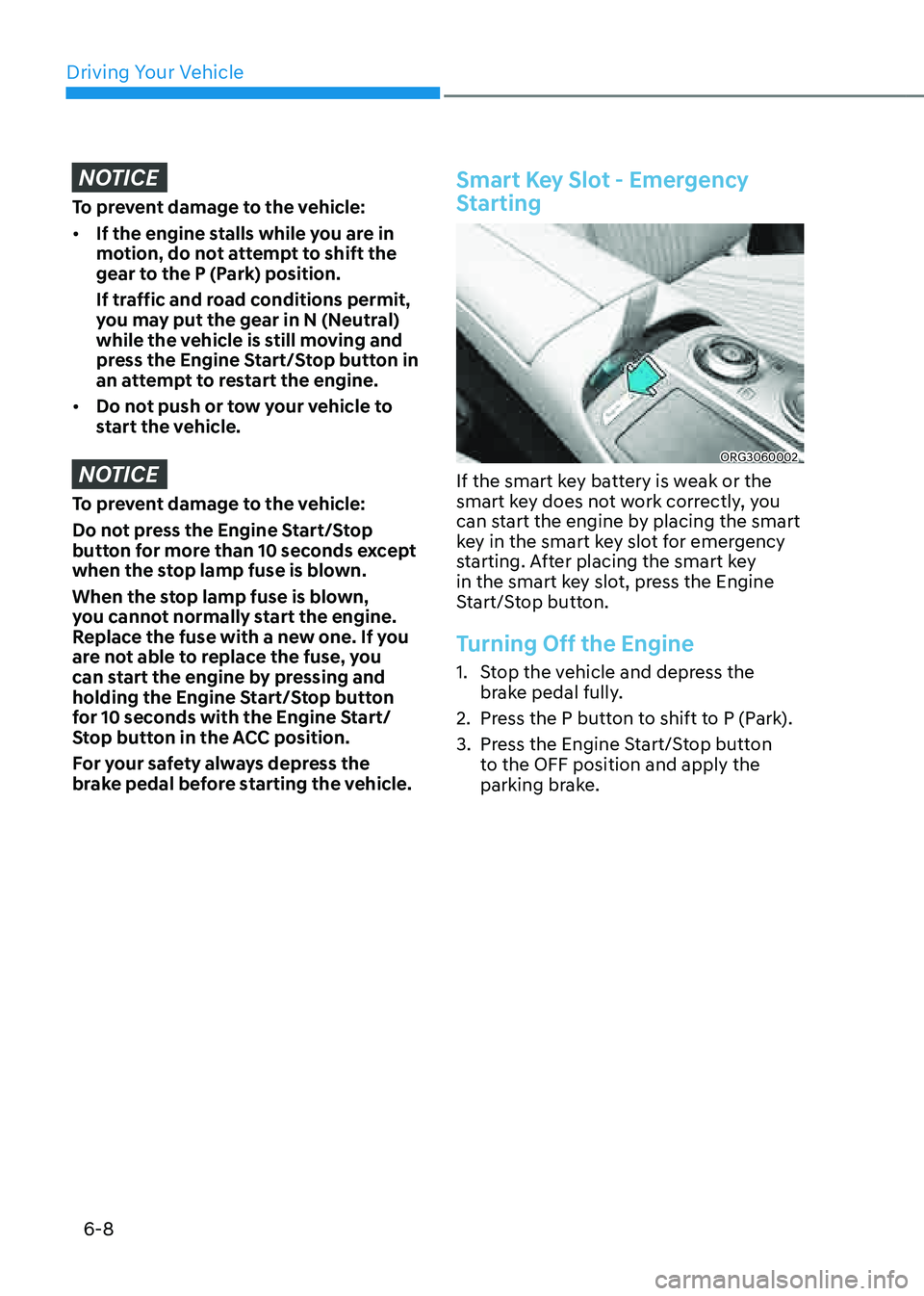
Smart Key Slot - Emergency
Starting
ORG3060002
If the smart key battery is weak or the
smart key does not work correctly, you
can start the engine by placing the smart
key in the smart key slot for emergency
starting. After placing the smart key
in the smart key slot, press the Engine
Start/Stop button.
Turning Off the Engine
1. Stop the vehicle and depress the
brake pedal fully.
2. Press the P button to shift to P (Park).
3. Press the Engine Start/Stop button
to the OFF position and apply the
parking brake.
Page 479 of 604

07
7-151
• Remote Smart Parking
-The gear is shifted while the vehicle
is moving
-Operating EPB while the vehicle is
moving
-The engine hood is open
-Vehicle speed is above 3 mph (5
km/h)
-Rapid acceleration occurs
-Vehicle skid occurs
-The wheel is stuck by an obstacle
and cannot move
-There are pedestrians, animals or
objects at the front and rear of the
vehicle at the same time
-Approximately 3 minutes and 50
seconds have past after Remote
Smart Parking function has started
to operate
-The slope of the road exceeds the
operational range
-The steering wheel, gearshift,
braking, and drive controls are not
working normally
-The function is paused for more
than 1 minute
-There is a problem with the smart
key or the smart key battery is low
-ABS, TCS or ESC system operates
due to slippery road conditions
-The brake pedal or accelerator
pedal is depressed when all the
doors are closed
-The smart key is outside the vehicle
when the brake pedal is depressed
while the driver's door is open.
-The alarm of the Theft Alarm System
sounds
When Remote Smart Parking function is
canceled, the vehicle will automatically
stop, shift the gear to P (Park) and
engage EPB (Electronic Parking Brake).
CAUTION
Check whether the doors are locked
when Remote Smart Parking function is
canceled.
Smart Exit
1. Getting ready for exit
ORG3070088
(1) With the engine turned on,
depress the brake pedal and shift
the gear to P (Park) or N (Neutral).
(2) Press and hold the Parking/View
() button to turn on Remote
Smart Parking Assist.
• The infotainment system has
to operate properly to use Exit
function.
• Drive below 3 mph (5 km/h) with
the engine on to use Exit function.
• If the system is turned on again
after parallel parking is completed
by Remote Smart Parking Assist,
Exit function can be used.
Page 485 of 604
07
7-157
• When remotely moving forward
using method (1), it is recognized
as an exit situation, and the
vehicle moves 13 ft. (4 m) to
check for pedestrians, animals or
objects around the vehicle. After
confirmation, the steering wheel
is controlled according to the
condition ahead.
• When remotely moving forward
using method (2), it is recognized
as a parking situation, and will
immediately control the steering
wheel according to the condition
ahead to assist with entering the
parking space and aligning the
vehicle. However, performance
may reduce depending on the
pedestrians, animals, shape of
objects, location, etc. around the
vehicle.
• For moving remotely backward,
both method (1) and (2) aligns the
steering wheel first, and then will
only move the vehicle straight.
• When remotely moving forward or
backward is completed, the vehicle
will automatically shift to P (Park)
and engage EPB (Electronic Parking
Brake).
CAUTION
• When using Remote Moving
Forward/Backward function, make
sure that all passengers have gotten
out of the vehicle.
• Before leaving the vehicle, close
windows and sunroofs, and make
sure the engine is off before locking
the doors.
• If the vehicle’s battery is discharged
or Remote Smart Parking Assist
malfunctions when parked in a
narrow parking space, Remote
Moving Forward/Backward function
will not operate. Always park your
vehicle in a space wide enough for
you to get in or out of your vehicle.
• Please note that depending on the
parking space, you may not be able
to exit from the space you have
entered by using Remote Moving
Forward/Backward function.
• After parking, the surrounding may
change due to the movement of
surrounding vehicles. If this occurs,
Remote Moving Forward/Backward
function may not operate.
How to turn off Remote Moving Forward/
Backward function while operating
• Press the Remote Start () button on
the smart key.
• Press the Parking/View () button.
• Press the Parking Safety () button
or select ‘Cancel’ on the infotainment
system screen.
• Press the Remote Start () button
on the smart key. Remote Moving
Forward/Backward function will turn
off. At this time, the engine will turn
off.
• Get on the vehicle with the smart key.
Remote Moving Forward/Backward
function will turn off. At this time, the
engine will remain on.
Page 486 of 604

Driver Assistance system
7-158
The function will pause in the following
conditions when:
• There is a pedestrian, animal or object
in the direction the vehicle is moving
• The door or trunk is open
• The Forward () or Backward ()
button is not continuously pressed
• Simultaneously pressing multiple
buttons on a smart key
• The smart key is not operated within
13 ft. (4m) from the vehicle
• Button of another smart key is pressed
in addition to the operating smart key
• Blind-Spot Collision-Avoidance Assist
or Rear-Cross Traffic Collision Assist
operates while the vehicle is being
controlled in the reverse direction
• The vehicle moves 22 ft. (7m) while
the smart key is pressed with Remote
Moving Forward/Backward function
(maximum travel distance per button
press)
When Remote Moving Forward/
Backward function is paused, the vehicle
will stop. If the condition that made
the function to pause disappears, the
function may operate again.
The function will cancel in the following
conditions when:
• The steering wheel is steered
• The gear is shifted while the vehicle is
moving
• Operating EPB while the vehicle is
moving
• The engine hood is open
• Vehicle speed is above 3 mph (5 km/h)
• Rapid acceleration occurs
• Vehicle skid occurs
• The wheel is stuck by an obstacle and
cannot move
• There are pedestrians, animals or
objects at the front and rear of the
vehicle at the same time
• Approximately 3 minutes and 50
seconds have past after Remote
Moving Forward/Backward function
has started to operate
• The slope of the road exceeds the
operational range
• The steering wheel, gearshift, braking,
and drive controls are not working
normally
• The function is paused for more than
1 minute
• The total travel distance of the vehicle
has exceeded 45 ft. (14 m) after
Remote Moving Forward/Backward
function operation
• There is a problem with the smart key
or the smart key battery is low
• ABS, TCS or ESC system operates due
to slippery road conditions
• The brake pedal or accelerator pedal
is depressed when all the doors are
closed
• The smart key is outside the vehicle
when the brake pedal is depressed
while the driver's door is open.
• The alarm of the Theft Alarm System
sounds
When Remote Moving Forward/
Backward function is canceled, the
vehicle will automatically stop, shift
the gear to P (Park) and engage EPB
(Electronic Parking Brake).
CAUTION
Check whether the doors are locked
when Remote Moving Forward/
Backward function is canceled.
Page 489 of 604

07
7-161
OJX1079199L
System standby
When ‘Parking Assist Conditions Not
Met’ message appears, when Parking/
View (
) button has been pressed and
held, Remote Smart Parking Assist is in
standby. After a while, press and hold the
Parking/View (
) button again to see if
the system works.
The message appears even when the
smart key's battery is low. Check the
smart key battery level.
Limitations of the system
In the following circumstances, system
performance to park or exit the vehicle
may be limited, there may be a risk of
collision, or Remote Smart Parking Assist
may turn off. Park or exit the vehicle
manually if necessary.
• The parking space is curved or
diagonal
• There is an obstacle such as a trash
can, bicycle, motorcycle, shopping
cart, narrow pillar etc. near the
parking space
• There is a circular pillar or narrow
pillar, or a pillar surrounded by objects
such as fire extinguisher, etc. near the
parking space
• There is heavy snow, rain or wind
• The vehicle is installed with a snow
chain, spare tire or different size
wheel
• Tire pressure is lower or higher than
the standard tire pressure
• The road is bumpy
• The road is slippery
• The parking space is near a vehicle
with higher ground clearance or big,
such as a truck, etc.
• Your vehicle is loaded with cargo
longer or wider than your vehicle or a
trailer is connected to your vehicle
• The sensor is mounted or positioned
incorrectly by an impact to the
bumper
• The parking space is Inclined
• There is a problem with the wheel
alignment
• Your vehicle is leaned severely to one
side
• Front or rear ultrasonic sensors are
not working properly or does not work
(Refer to “Parking Distance Warning”
section in this chapter.)
• The smart key requires battery
replacement due to low battery level
• Your vehicle is equipped with a trailer
hitch
• A pedestrian or animal passes by your
vehicle