open hood GENESIS G80 2021 User Guide
[x] Cancel search | Manufacturer: GENESIS, Model Year: 2021, Model line: G80, Model: GENESIS G80 2021Pages: 604, PDF Size: 11.47 MB
Page 274 of 604
06
6-9
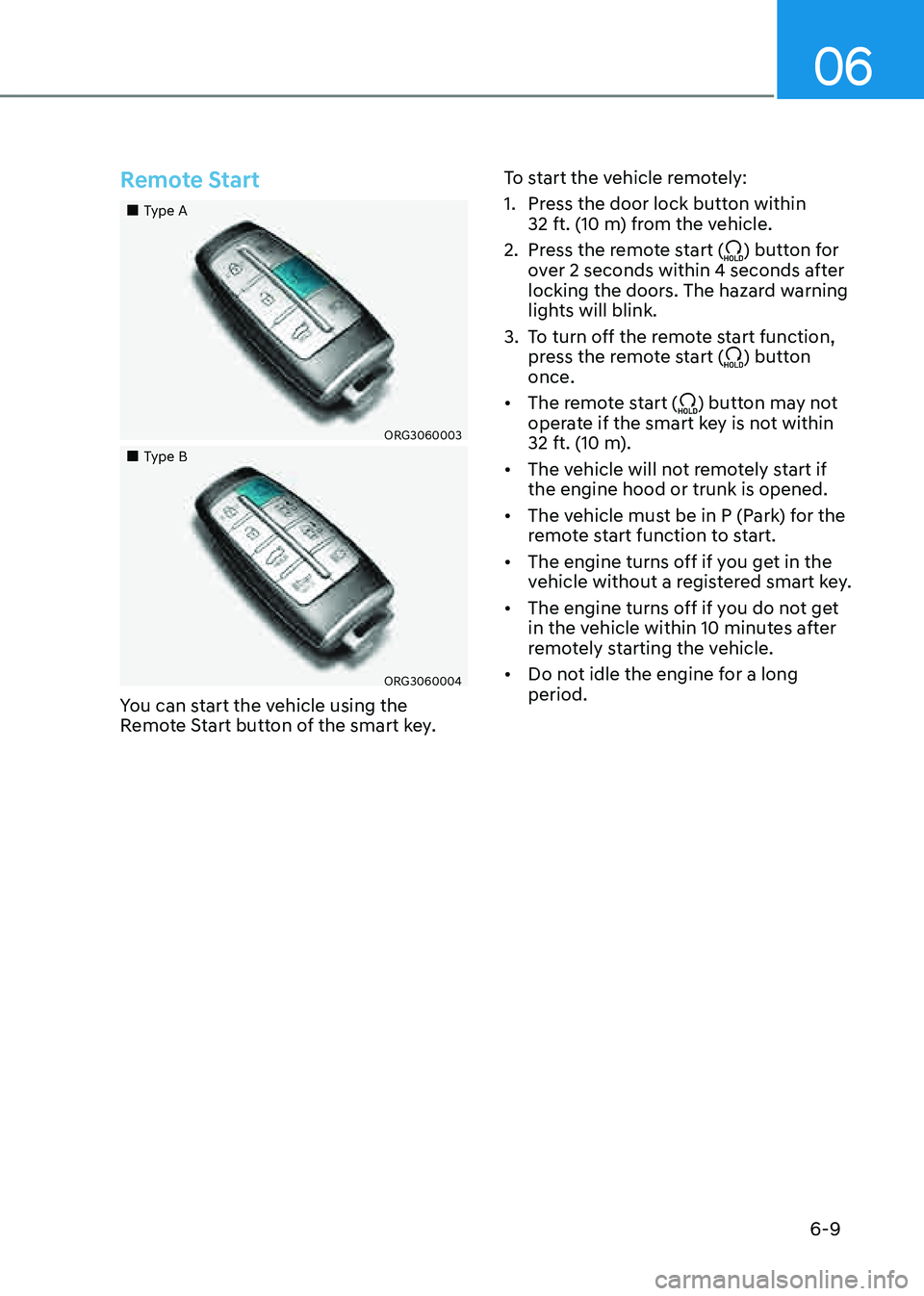
Remote Start
„„Type A
ORG3060003
„„Type B
ORG3060004
You can start the vehicle using the
Remote Start button of the smart key.To start the vehicle remotely:
1. Press the door lock button within
32 ft. (10 m) from the vehicle.
2. Press the remote start () button for
over 2 seconds within 4 seconds after
locking the doors. The hazard warning
lights will blink.
3. To turn off the remote start function,
press the remote start () button
once.
• The remote start () button may not
operate if the smart key is not within
32 ft. (10 m).
• The vehicle will not remotely start if
the engine hood or trunk is opened.
• The vehicle must be in P (Park) for the
remote start function to start.
• The engine turns off if you get in the
vehicle without a registered smart key.
• The engine turns off if you do not get
in the vehicle within 10 minutes after
remotely starting the vehicle.
• Do not idle the engine for a long
period.
Page 289 of 604

Driving Your Vehicle
6-24
Warning messages
ORG3060031N
To release EPB, fasten seatbelt, close door,
hood and trunk
• If you try to drive with EPB applied, a
warning will sound and a message will
appear.
• If the driver's seat belt is unfastened
and the engine hood or trunk is
opened, a warning will sound and a
message will appear.
• If there is a problem with the vehicle,
a warning may sound and a message
may appear.
If the situation occurs, depress the brake
pedal and release EPB by pressing the
EPB switch.
WARNING
• Whenever leaving the vehicle or
parking, always come to a complete
stop and continue to depress the
brake pedal.
Shift the gear into P (Park), press
the EPB switch, and press the
Engine Start/Stop button to the OFF
position. Take the Key with you when
leaving the vehicle.
Vehicles not fully engaged in P (Park)
with the parking brake set are at risk
for moving inadvertently and causing
injury to yourself or others.
• NEVER allow anyone who is
unfamiliar with the vehicle to touch
the EPB switch. If EPB is released
unintentionally, serious injury may
occur.
• Only release EPB when you are
seated inside the vehicle with your
foot firmly on the brake pedal.
NOTICE
• Do not apply the accelerator pedal
while the parking brake is engaged.
If you depress the accelerator pedal
with EPB engaged, a warning will
sound and a message will appear.
Damage to the parking brake may
occur.
• Driving with the parking brake on
can overheat the braking system and
cause premature wear or damage
to brake parts. Make sure EPB is
released and the Parking Brake
warning light is off before driving.
Information
• A clicking sound may be heard while
operating or releasing the EPB. These
conditions are normal and indicate that
EPB is functioning properly.
• When leaving your keys with a parking
attendant or assistant, make sure to
inform him/her how to operate EPB.
Page 293 of 604

Driving Your Vehicle
6-28
Information
• The Auto Hold does not operate when:
-The driver's door is opened
-The engine hood is opened
-The gear is in P (Park) or R (Reverse)
-EPB is applied
• For your safety, the Auto Hold
automatically switches to EPB when:
-The driver's door is opened
-The engine hood is opened
-The vehicle is in a standstill for more
than 10 minutes
-The vehicle is standing on a steep
slope
-The vehicle moved several times
In these cases, the Parking Brake
warning light comes on, the AUTO
HOLD indicator changes from green
to white, and a warning sound and a
message will appear to inform you that
EPB has been automatically engaged.
Before driving off again, depress the
brake pedal, check the surrounding
area near your vehicle and release the
parking brake manually with the EPB
switch.
• While operating Auto Hold, you may
hear mechanical noise. However, it is
normal operating noise.
NOTICE
If the AUTO HOLD indicator changes
to yellow, Auto Hold is not working
properly. Contact an authorized retailer
of Genesis Branded products.
WARNING
• Depress the accelerator pedal slowly
when you start the vehicle.
• For your safety, cancel Auto Hold
when you drive downhill, back up the
vehicle or park the vehicle.
NOTICE
If there is a malfunction with the
driver's door or engine hood open
detection system, Auto Hold may not
work properly.
Contact an authorized retailer of
Genesis Branded products.
Warning messages
OJX1069028L
Parking brake automatically engaged
When EPB is applied while Auto Hold
is activated, a warning will sound and a
message will appear.
Page 309 of 604

Driving Your Vehicle
6-44
In the Auto Stop mode, if the engine
hood is opened, ISG system will be
deactivated.
ORG3060032L
When the system is deactivated, the ISG
off button indicator will illuminate and
a message ‘Auto Stop error. Shift to P or
N to start engine manually’ appears on
the cluster LCD display with a warning
sound.
If this occurs, depress the brake pedal
and restart the engine manually.
Auto start
When the engine stops automatically by
ISG, the engine will restart if one of the
following is done.
-Release the brake pedal.
-When Auto Hold is activated, take
your foot off the brake pedal and then
depress the accelerator pedal.
-While depressing the brake pedal,
shift the gear from N (Neutral) or D
(Drive) to R (Reverse) or P (Park).
-While depressing the brake pedal,
shift the gear from N (Neutral) to D
(Drive).
The Auto Stop (
) indicator goes off on
the instrument cluster, when the engine
is restarted.
LCD display messages
The messages are displayed on the
instrument cluster to help use ISG
system.
OJX1069069L
Auto stop error. Shift to P or N to start
engine manually
When the system is deactivated, the ISG
off button indicator will illuminate and
a message will appear on the cluster
LCD display with a warning sound in the
following situations.
- When the engine hood is opened.
-When ISG system is not working
normally.
If this occurs, depress the brake pedal
and restart the engine manually. For your
safety, restart the vehicle in the P (Park)
position.
Page 478 of 604

Driver Assistance system
7-150
The function will pause in the following
conditions when:
• Smart Parking
-There is a pedestrian, animal or
object in the direction the vehicle is
moving
-The door or trunk is open
-The driver’s seat belt is not fastened
-Blind-Spot Collision-Avoidance
Assist or Rear-Cross Traffic Collision
Assist operates while the vehicle
is being controlled in the reverse
direction
-The Parking/View () button is
not continuously pressed
- The vehicle is stopped by
depressing the brake pedal
• Remote Smart Parking
-There is a pedestrian, animal or
object in the direction the vehicle is
moving
-The door or trunk is open
-The Forward () or Backward ()
button is not continuously pressed
- Simultaneously pressing multiple
buttons on a smart key
-The smart key is not operated within
13 ft. (4 m) from the vehicle
-Button of another smart key is
pressed in addition to the operating
smart key
-Blind-Spot Collision-Avoidance
Assist or Rear-Cross Traffic Collision
Assist operates while the vehicle
is being controlled in the reverse
direction
When Parking function is paused, the
vehicle will automatically stop. If the
condition that made the function to
pause disappears, the function may
operate again. The function will cancel in the following
conditions when:
• Smart Parking
-
The steering wheel is steered
-The gear is shifted while the vehicle
is moving
-Operating EPB while the vehicle is
moving
-The engine hood is open
-Vehicle speed is above 3 mph (5
km/h)
-Rapid acceleration occurs
-Vehicle skid occurs
-The wheel is stuck by an obstacle
and cannot move
-There are pedestrians, animals or
objects at the front and rear of the
vehicle at the same time
-Approximately 3 minutes and 50
seconds have past after Smart
Parking function has started to
operate
-The driver opens the door without
the seatbelt unfastened
-The slope of the road exceeds the
operational range
-The steering wheel, gearshift,
braking, and drive controls are not
working normally
-The function is paused for more
than 1 minute
-ABS, TCS or ESC system operates
due to slippery road conditions
When Smart Parking function is
canceled, the vehicle will automatically
stop, shift the gear to P (Park) and
engage EPB (Electronic Parking Brake).
Page 479 of 604

07
7-151
• Remote Smart Parking
-The gear is shifted while the vehicle
is moving
-Operating EPB while the vehicle is
moving
-The engine hood is open
-Vehicle speed is above 3 mph (5
km/h)
-Rapid acceleration occurs
-Vehicle skid occurs
-The wheel is stuck by an obstacle
and cannot move
-There are pedestrians, animals or
objects at the front and rear of the
vehicle at the same time
-Approximately 3 minutes and 50
seconds have past after Remote
Smart Parking function has started
to operate
-The slope of the road exceeds the
operational range
-The steering wheel, gearshift,
braking, and drive controls are not
working normally
-The function is paused for more
than 1 minute
-There is a problem with the smart
key or the smart key battery is low
-ABS, TCS or ESC system operates
due to slippery road conditions
-The brake pedal or accelerator
pedal is depressed when all the
doors are closed
-The smart key is outside the vehicle
when the brake pedal is depressed
while the driver's door is open.
-The alarm of the Theft Alarm System
sounds
When Remote Smart Parking function is
canceled, the vehicle will automatically
stop, shift the gear to P (Park) and
engage EPB (Electronic Parking Brake).
CAUTION
Check whether the doors are locked
when Remote Smart Parking function is
canceled.
Smart Exit
1. Getting ready for exit
ORG3070088
(1) With the engine turned on,
depress the brake pedal and shift
the gear to P (Park) or N (Neutral).
(2) Press and hold the Parking/View
() button to turn on Remote
Smart Parking Assist.
• The infotainment system has
to operate properly to use Exit
function.
• Drive below 3 mph (5 km/h) with
the engine on to use Exit function.
• If the system is turned on again
after parallel parking is completed
by Remote Smart Parking Assist,
Exit function can be used.
Page 482 of 604

Driver Assistance system
7-154
How to cancel Exit function while
operating
• Press the Parking/View () button
in the following stage:
- Checking space
-Select exit direction
• Shift the gear to R (Reverse) in the
following stage:
-Checking space
-Select exit direction
• Press the Parking Safety () button
or select ‘Cancel’ on the infotainment
system screen to turn off Exit
function.
• While Smart Exit function is operating,
if the vehicle is stopped by depressing
the brake pedal, and the gear is
shifted, Exiting function will turn off.
At this time, EPB (Electronic Parking
Brake) will not be engaged.
The function will pause in the following
conditions when:
• There is a pedestrian, animal or object
in the direction the vehicle is moving
• The driver’s seat belt is not fastened
• Blind-Spot Collision-Avoidance Assist
or Rear-Cross Traffic Collision Assist
operates while the vehicle is being
controlled in the reverse direction
• The Parking/View () button is not
continuously pressed
• The vehicle is stopped by depressing
the brake pedal
When Exit function is paused, the vehicle
will stop. If the condition that made
the function to pause disappears, the
function may operate again. The function will cancel in the following
conditions when:
• Smart Exit
-
The steering wheel is steered
-The gear is shifted while the vehicle
is moving
-Operating EPB while the vehicle is
moving
-The engine hood is open
-Vehicle speed is above 3 mph (5
km/h)
-Rapid acceleration occurs
-Vehicle skid occurs
-The wheel is stuck by an obstacle
and cannot move
-There are pedestrians, animals or
objects at the front and rear of the
vehicle at the same time
-Approximately 3 minutes and 50
seconds have past after Smart Exit
function has started to operate
-The driver opens the door without
the seatbelt unfastened
-The slope of the road exceeds the
operational range
-The steering wheel, gearshift,
braking, and drive controls are not
working normally
-The function was paused for more
than 1 minute
-ABS, TCS or ESC system operates
due to slippery road conditions
When Smart Exit function is canceled,
the vehicle will automatically stop, shift
the gear to P (Park) and engage EPB
(Electronic Parking Brake).
Page 486 of 604

Driver Assistance system
7-158
The function will pause in the following
conditions when:
• There is a pedestrian, animal or object
in the direction the vehicle is moving
• The door or trunk is open
• The Forward () or Backward ()
button is not continuously pressed
• Simultaneously pressing multiple
buttons on a smart key
• The smart key is not operated within
13 ft. (4m) from the vehicle
• Button of another smart key is pressed
in addition to the operating smart key
• Blind-Spot Collision-Avoidance Assist
or Rear-Cross Traffic Collision Assist
operates while the vehicle is being
controlled in the reverse direction
• The vehicle moves 22 ft. (7m) while
the smart key is pressed with Remote
Moving Forward/Backward function
(maximum travel distance per button
press)
When Remote Moving Forward/
Backward function is paused, the vehicle
will stop. If the condition that made
the function to pause disappears, the
function may operate again.
The function will cancel in the following
conditions when:
• The steering wheel is steered
• The gear is shifted while the vehicle is
moving
• Operating EPB while the vehicle is
moving
• The engine hood is open
• Vehicle speed is above 3 mph (5 km/h)
• Rapid acceleration occurs
• Vehicle skid occurs
• The wheel is stuck by an obstacle and
cannot move
• There are pedestrians, animals or
objects at the front and rear of the
vehicle at the same time
• Approximately 3 minutes and 50
seconds have past after Remote
Moving Forward/Backward function
has started to operate
• The slope of the road exceeds the
operational range
• The steering wheel, gearshift, braking,
and drive controls are not working
normally
• The function is paused for more than
1 minute
• The total travel distance of the vehicle
has exceeded 45 ft. (14 m) after
Remote Moving Forward/Backward
function operation
• There is a problem with the smart key
or the smart key battery is low
• ABS, TCS or ESC system operates due
to slippery road conditions
• The brake pedal or accelerator pedal
is depressed when all the doors are
closed
• The smart key is outside the vehicle
when the brake pedal is depressed
while the driver's door is open.
• The alarm of the Theft Alarm System
sounds
When Remote Moving Forward/
Backward function is canceled, the
vehicle will automatically stop, shift
the gear to P (Park) and engage EPB
(Electronic Parking Brake).
CAUTION
Check whether the doors are locked
when Remote Moving Forward/
Backward function is canceled.
Page 497 of 604
08
8-5
Jump starting procedure
Information
Your vehicle has a battery in the luggage
compartment, but when you jump start
your vehicle, use the jumper terminal in
the engine compartment.
1. Position the vehicles close enough
that the jumper cables will reach, but
do not allow the vehicles to touch.
2. Avoid fans or any moving parts in the
engine compartment at all times, even
when the vehicles are turned off.
3. Turn off all electrical devices such as
radios, lights, air conditioning, etc.
Put the vehicles in P (Park) and set the
parking brake. Turn both vehicles OFF.
4. Open the engine hood.
ORG3080003N
[A] : Negative (-) Terminal, [B] : Positive (+) Terminal
5. Remove the engine compartment fuse
box cover.
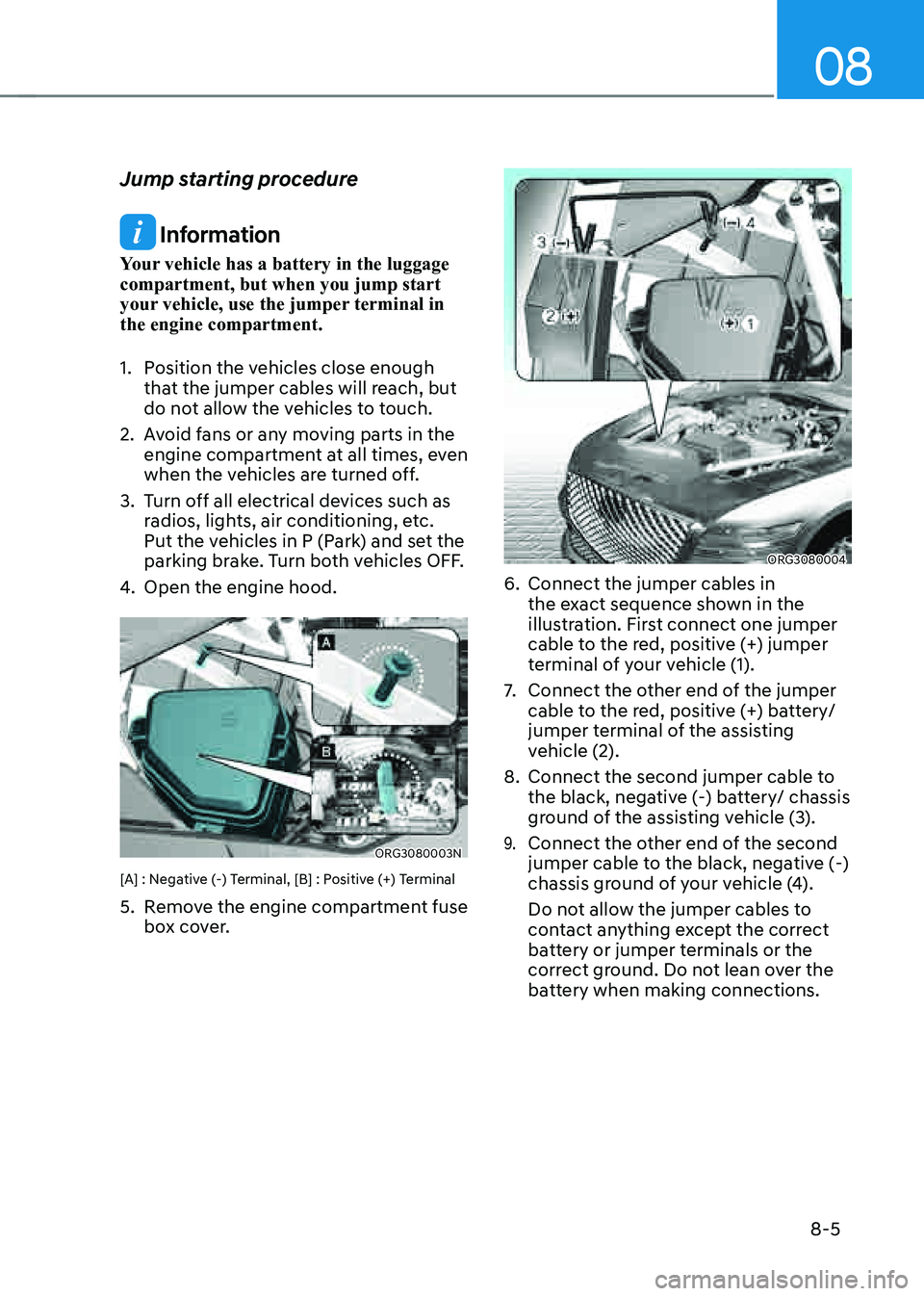
ORG3080004
6. Connect the jumper cables in
the exact sequence shown in the
illustration. First connect one jumper
cable to the red, positive (+) jumper
terminal of your vehicle (1).
7. Connect the other end of the jumper
cable to the red, positive (+) battery/
jumper terminal of the assisting
vehicle (2).
8. Connect the second jumper cable to
the black, negative (-) battery/ chassis
ground of the assisting vehicle (3).
9. Connect the other end of the second
jumper cable to the black, negative (-)
chassis ground of your vehicle (4).
Do not allow the jumper cables to
contact anything except the correct
battery or jumper terminals or the
correct ground. Do not lean over the
battery when making connections.
Page 499 of 604

08
8 -7
If your temperature gauge indicates
overheating, you experience a loss of
power, or hear loud pinging or knocking,
the engine may be overheating. If this
happens, you should:
1. Pull off the road and stop as soon as it
is safe to do so.
2. Shift the gear to P (Park) and set the
parking brake. If the air conditioning is
ON, turn it OFF.
3. If engine coolant is running out under
the vehicle or steam is coming out
from the hood, stop the engine. Do
not open the hood until the coolant
has stopped running or the steaming
has stopped. If there is no visible
loss of engine coolant and no steam,
leave the engine running and check
to be sure the engine cooling fan is
operating. If the fan is not running,
turn the engine off.
WARNING
While the engine is running, keep hands, clothing and tools
away from the moving parts
such as the cooling fan and
drive belt to prevent serious
injury.
4. Check for coolant leaking from the
radiator, hoses or under the vehicle. (If
the air conditioning had been in use, it
is normal for cold water to be draining
from it when you stop.)
5. If engine coolant is leaking out, stop
the engine immediately and call the
nearest authorized retailer of Genesis
Branded products for assistance.
WARNING
Never remove the radiator cap, coolant cap or the drain plug
while the engine and radiator
are hot.Hot coolant and steam may blow out
under pressure, causing serious injury.
Turn the engine off and wait until the
engine cools down. Use extreme care
when removing the radiant cap or
coolant cap. Wrap a thick towel around
it, and turn it counterclockwise slowly
to the first stop. Step back while the
pressure is released from the cooling
system. When you are sure all the
pressure has been released, press down
on the cap, using a thick towel, and
continue turning counterclockwise to
remove it.
6. If you cannot find the cause of the
overheating, wait until the engine
temperature has returned to normal.
Then, if coolant has been lost,
carefully add coolant to the reservoir
to bring the fluid level in the reservoir
up to the halfway mark.
7. Proceed with caution, keeping alert
for further signs of overheating. If
overheating happens again, call an
authorized retailer of Genesis Branded
products for assistance.
CAUTION
• Serious loss of coolant indicates a
leak in the cooling system and should
be checked as soon as possible by
an authorized retailer of Genesis
Branded products.
• When the engine overheats from
low engine coolant, suddenly
adding engine coolant may cause
cracks in the engine. To prevent
damage, add engine coolant slowly
in small quantities. It may require
several refilling cycles to properly
fill the engine cooling system. If
necessary, an authorized retailer of
Genesis Branded products should be
consulted to perform this task.
IF THE ENGINE OVERHEATS