transmission GENESIS G80 2021 User Guide
[x] Cancel search | Manufacturer: GENESIS, Model Year: 2021, Model line: G80, Model: GENESIS G80 2021Pages: 604, PDF Size: 11.47 MB
Page 282 of 604

06
6-17
Gear already selected
OJX1069020L
This message is displayed when the
current gear is selected again.
Rotary shifter turned while pressing
P
OJX1069021L
This message is displayed when the shift
dial is rotated while pressing the P (Park)
button.
Shifter system malfunction
OJX1069012L
This message is displayed when the
transmission or the shift button does not
properly operate in the P (Park) position.
Immediately have the vehicle inspected
by an authorized retailer of Genesis
Branded products.
Check shifter dial
OJX1069013L
This message is displayed when there is
a malfunction with the shift dial.
Immediately have the vehicle inspected
by an authorized retailer of Genesis
Branded products.
Page 283 of 604
Driving Your Vehicle
6-18
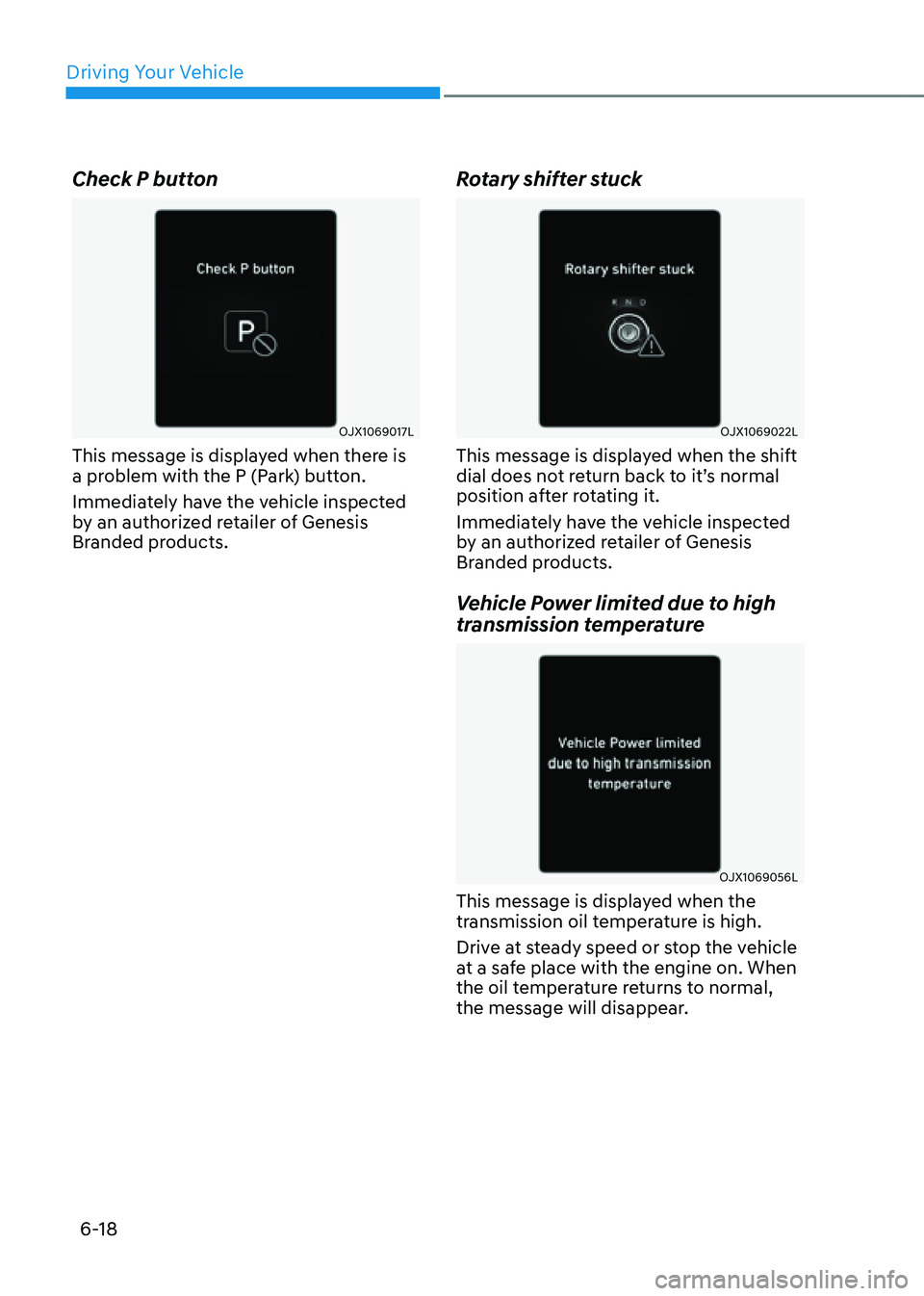
Check P button
OJX1069017L
This message is displayed when there is
a problem with the P (Park) button.
Immediately have the vehicle inspected
by an authorized retailer of Genesis
Branded products.
Rotary shifter stuck
OJX1069022L
This message is displayed when the shift
dial does not return back to it’s normal
position after rotating it.
Immediately have the vehicle inspected
by an authorized retailer of Genesis
Branded products.
Vehicle Power limited due to high
transmission temperature
OJX1069056L
This message is displayed when the
transmission oil temperature is high.
Drive at steady speed or stop the vehicle
at a safe place with the engine on. When
the oil temperature returns to normal,
the message will disappear.
Page 284 of 604
06
6-19
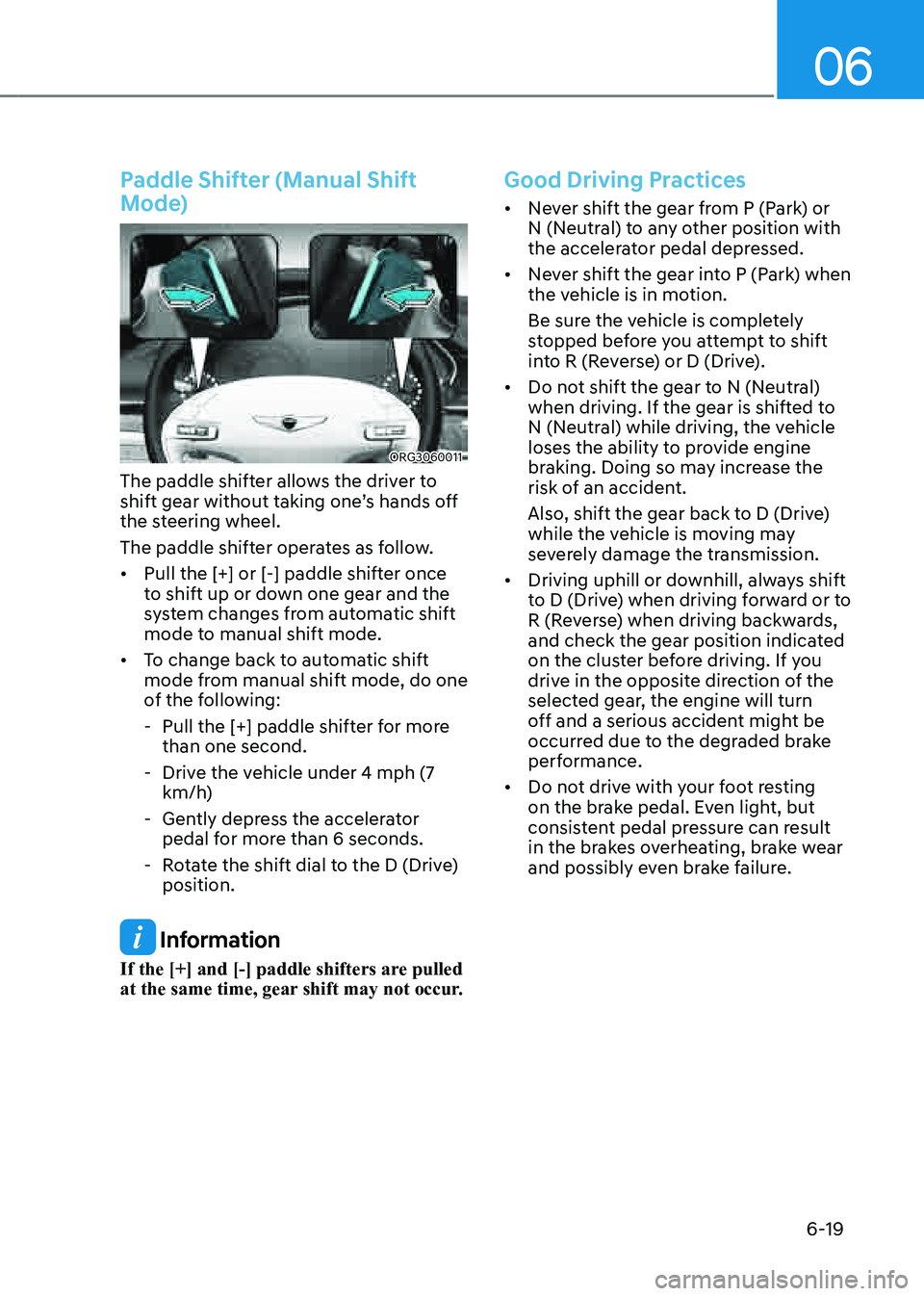
Paddle Shifter (Manual Shift
Mode)
ORG3060011
The paddle shifter allows the driver to
shift gear without taking one’s hands off
the steering wheel.
The paddle shifter operates as follow.
• Pull the [+] or [-] paddle shifter once
to shift up or down one gear and the
system changes from automatic shift
mode to manual shift mode.
• To change back to automatic shift
mode from manual shift mode, do one
of the following:
-Pull the [+] paddle shifter for more
than one second.
-Drive the vehicle under 4 mph (7
km/h)
-Gently depress the accelerator
pedal for more than 6 seconds.
-Rotate the shift dial to the D (Drive)
position.
Information
If the [+] and [-] paddle shifters are pulled
at the same time, gear shift may not occur.
Good Driving Practices
• Never shift the gear from P (Park) or
N (Neutral) to any other position with
the accelerator pedal depressed.
• Never shift the gear into P (Park) when
the vehicle is in motion.
Be sure the vehicle is completely
stopped before you attempt to shift
into R (Reverse) or D (Drive).
• Do not shift the gear to N (Neutral)
when driving. If the gear is shifted to
N (Neutral) while driving, the vehicle
loses the ability to provide engine
braking. Doing so may increase the
risk of an accident.
Also, shift the gear back to D (Drive)
while the vehicle is moving may
severely damage the transmission.
• Driving uphill or downhill, always shift
to D (Drive) when driving forward or to
R (Reverse) when driving backwards,
and check the gear position indicated
on the cluster before driving. If you
drive in the opposite direction of the
selected gear, the engine will turn
off and a serious accident might be
occurred due to the degraded brake
performance.
• Do not drive with your foot resting
on the brake pedal. Even light, but
consistent pedal pressure can result
in the brakes overheating, brake wear
and possibly even brake failure.
Page 285 of 604
Driving Your Vehicle
6-20
• Always apply the parking brake when
leaving the vehicle. Do not depend on
placing the transmission in P (Park) to
keep the vehicle from moving.
• Exercise extreme caution when
driving on a slippery surface. Be
especially careful when braking,
accelerating or shifting gears. On a
slippery surface, an abrupt change
in vehicle speed can cause the drive
wheels to lose traction and may cause
loss of vehicle control resulting in an
accident
• Optimum vehicle performance and
economy is obtained by smoothly
depressing and releasing the
accelerator.
WARNING
To reduce the risk of SERIOUS INJURY
or DEATH:
• ALWAYS wear your seat belt. In a
collision, an unbelted occupant
is significantly more likely to be
seriously injured or killed than a
properly belted occupant.
• Avoid high speeds when cornering or
turning.
• Do not make quick steering wheel
movements, such as sharp lane
changes or fast, sharp turns.
• The risk of rollover is greatly
increased if you lose control of your
vehicle at highway speeds.
• Loss of control often occurs if two or
more wheels drop off the roadway
and the driver over steers to reenter
the roadway.
• In the event your vehicle leaves
the roadway, do not steer sharply.
Instead, slow down before pulling
back into the travel lanes.
• Genesis Branded Vehicle
recommends you to follow all posted
speed limits.
NOTICE
Kickdown mechanism
Use the kickdown mechanism for
maximum acceleration. Depress the
accelerator pedal beyond the pressure
point. The automatic transmission will
shift to a lower gear depending on the
engine speed.
Page 298 of 604
06
6-33
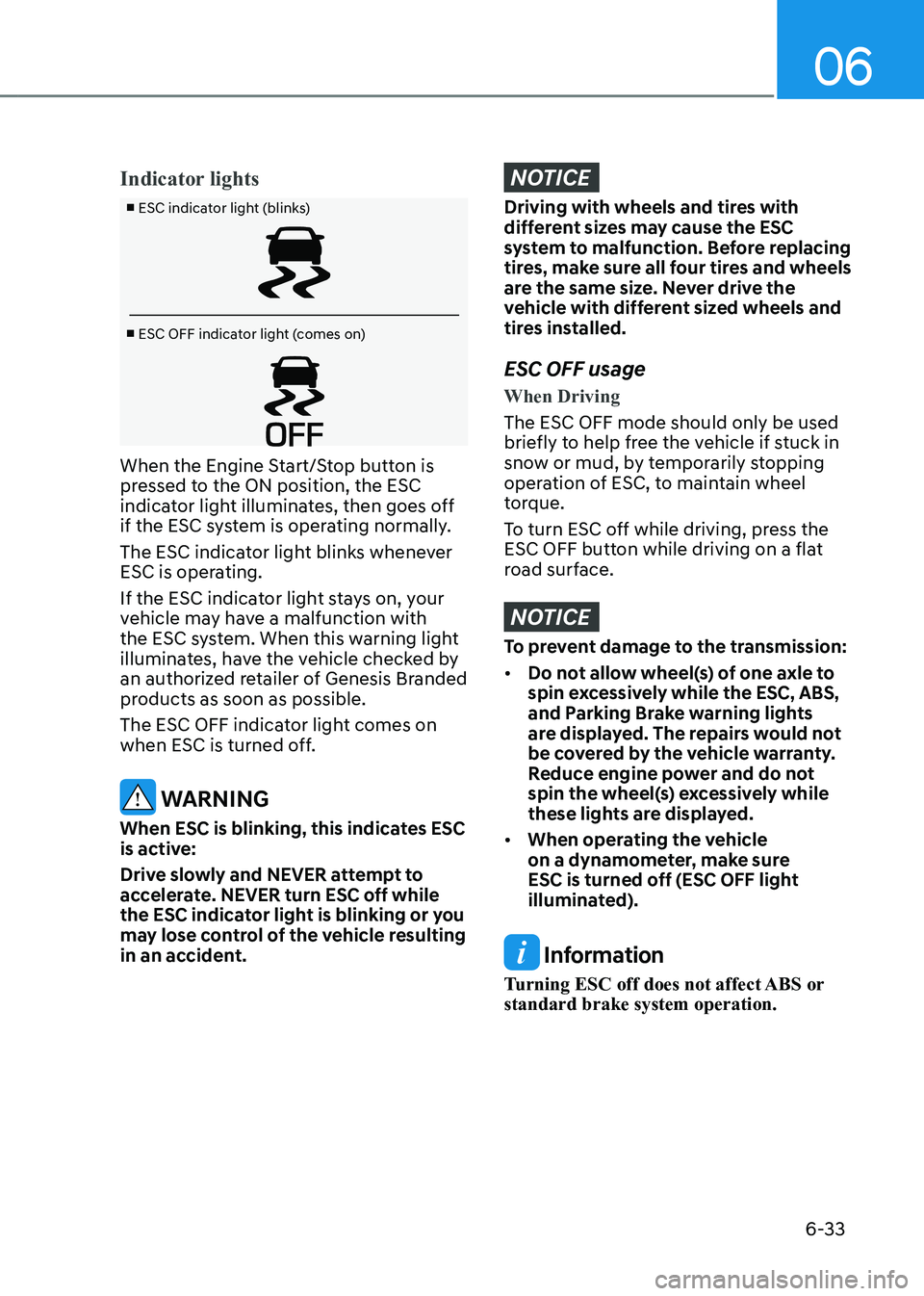
Indicator lights
■ ESC indicator light (blinks)
■ ESC OFF indicator light (comes on)
When the Engine Start/Stop button is
pressed to the ON position, the ESC
indicator light illuminates, then goes off
if the ESC system is operating normally.
The ESC indicator light blinks whenever
ESC is operating.
If the ESC indicator light stays on, your
vehicle may have a malfunction with
the ESC system. When this warning light
illuminates, have the vehicle checked by
an authorized retailer of Genesis Branded
products as soon as possible.
The ESC OFF indicator light comes on
when ESC is turned off.
WARNING
When ESC is blinking, this indicates ESC
is active:
Drive slowly and NEVER attempt to
accelerate. NEVER turn ESC off while
the ESC indicator light is blinking or you
may lose control of the vehicle resulting
in an accident.
NOTICE
Driving with wheels and tires with
different sizes may cause the ESC
system to malfunction. Before replacing
tires, make sure all four tires and wheels
are the same size. Never drive the
vehicle with different sized wheels and
tires installed.
ESC OFF usage
When Driving
The ESC OFF mode should only be used
briefly to help free the vehicle if stuck in
snow or mud, by temporarily stopping
operation of ESC, to maintain wheel
torque.
To turn ESC off while driving, press the
ESC OFF button while driving on a flat
road surface.
NOTICE
To prevent damage to the transmission:
• Do not allow wheel(s) of one axle to
spin excessively while the ESC, ABS,
and Parking Brake warning lights
are displayed. The repairs would not
be covered by the vehicle warranty.
Reduce engine power and do not
spin the wheel(s) excessively while
these lights are displayed.
• When operating the vehicle
on a dynamometer, make sure
ESC is turned off (ESC OFF light
illuminated).
Information
Turning ESC off does not affect ABS or
standard brake system operation.
Page 312 of 604

06
6-47
When certain conditions are met, the
engine is automatically decoupled from
the transmission while gear remains in D
(Drive). When Coasting is operating, the
engine stays at idling speed to reduce
fuel consumption and increase coasting
distance.
Coasting Setting
OJX1069045L
• The Coasting function must be turned
ON from the Settings menu in the
infotainment system screen. Select:
-Setup → Vehicle Settings → Drive
Mode → Coasting
For detailed information, refer to the
separately supplied manual.
• When Coasting is turned ON and
the conditions are met, the function
operates with a ‘Coasting’ message
illuminated on the instrument cluster.
Coasting Operating Conditions
The Coasting function will operate when
the accelerator pedal is depressed and
released under the following conditions.
• ECO is selected for driving mode
• ECO or Smart is selected for
Powertrain in the CUSTOM menu from
the infotainment system screen. If
Smart is selected, driver acceleration
should be mild
• The gear is in D (Drive)
• The Smart Cruise Control button is
OFF
• The accelerator or brake pedal is not
depressed
• The vehicle’s speed is within 30~100
mph (50~160 km/h) range
• The road gradient is within -5~+5%
range
Information
• If the front radar for smart cruise
control system cannot operate
normally, the inter-vehicle distance
and relative speed condition are
automatically ignored.
• The Coasting function works after the
engine is turned on, the transmission is
warmed up, and the engine sensor self-
diagnosis is completed.
• Depending on the driving situation,
Coasting operation may be temporarily
delayed even if the above conditions are
met.
COASTING (IF EQUIPPED)
Page 313 of 604

Driving Your Vehicle
6-48
Coasting Release Conditions
The Coasting function will be
automatically released when the
following conditions are met.
• Comfort or Sport is selected for
driving mode
• The driver uses the paddle shifter
• Smart Cruise Control is activated (Set
speed appears on the cluster)
• The vehicle’s speed exceeds 30~100
mph (50~160 km/h) range
• The road gradient is under -5% or over
+5%
• If the distance between the vehicle
ahead is too close or the relative
speed changes momentarily in Smart
mode
• If lane change is predicated in Smart
mode (e.g. the turn signal is turned
ON or a LKA warning appears due to
steering wheel control, etc.)
Information
It is recommended to turn off the
Coasting function if you are driving under
frequently stop-and-go condition. Change
the drive mode to Comfort or Sport or
deselect Coasting from the infotainment
system screen.
NOTICE
• If the accelerator pedal is pressed
quickly for accelerating with the
Coasting function in operation,
acceleration may occur after the
engagement of the clutch inside the
transmission. In turn, the driver may
continue to feel acceleration even
after the system is turned off.
• Driving with the Coasting function
off may be required in some cases
since the engine brake is not applied
while the Coasting function is
operating.
• Operating the infotainment system
screen to activate or deactivate
the Coasting function while driving
may be dangerous as the driver’s
attention is dispersed.
Page 314 of 604
06
6-49
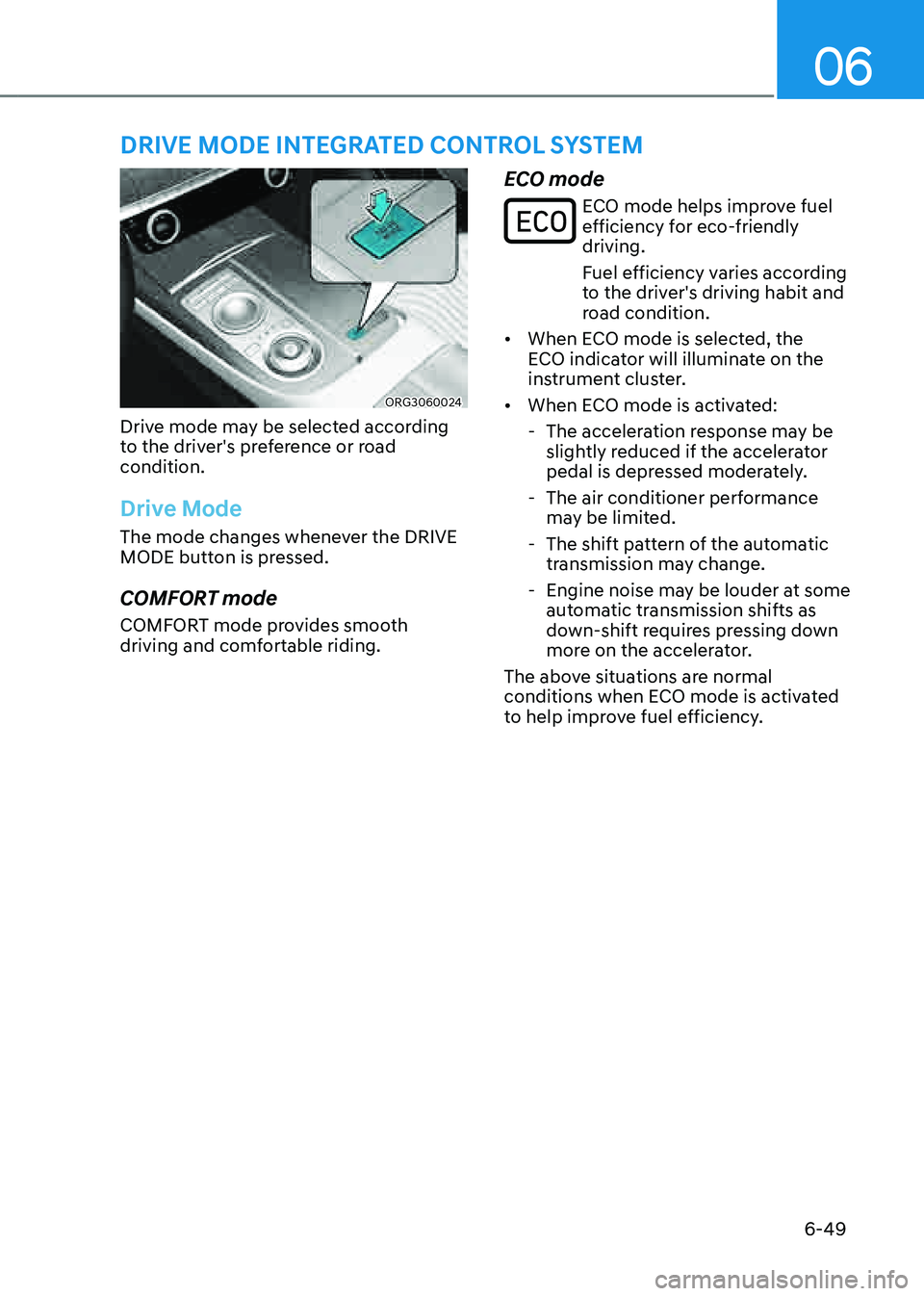
ORG3060024
Drive mode may be selected according
to the driver's preference or road
condition.
Drive Mode
The mode changes whenever the DRIVE
MODE button is pressed.
COMFORT mode
COMFORT mode provides smooth
driving and comfortable riding.
ECO mode
ECO mode helps improve fuel efficiency for eco-friendly
driving.
Fuel efficiency varies according
to the driver's driving habit and
road condition.
• When ECO mode is selected, the
ECO indicator will illuminate on the
instrument cluster.
• When ECO mode is activated:
-The acceleration response may be
slightly reduced if the accelerator
pedal is depressed moderately.
-The air conditioner performance
may be limited.
-The shift pattern of the automatic
transmission may change.
-Engine noise may be louder at some
automatic transmission shifts as
down-shift requires pressing down
more on the accelerator.
The above situations are normal
conditions when ECO mode is activated
to help improve fuel efficiency.
DRIVE MODE INTEGRATED CONTROL SYSTEM
Page 316 of 604

06
6-51
ACTIVE SOUND DESIGN
(IF EQUIPPED)
• Active Sound Design is a function
that provides enhanced engine
sound when driver is pleasure while
depressing the accelerator pedal.
• You can activate or deactivate Active
Sound Design function from the
Settings menu in the infotainment
system screen. Select:
-Setup → Vehicle Settings → Active
Sound Design → Ehanced/Standard/
Minimized/Off, or
- Setup → Sound Settings → Active
Sound Design → Enhanced/
Standard/Minimized/Off
• Any unauthorized replacement of
the vehicle’s speaker and amplifier
may cause Active Sound Design to
malfunction.
SPECIAL DRIVING
CONDITIONS
Hazardous Driving Conditions
When hazardous driving elements
are encountered such as water, snow,
ice, mud and sand, take the following
precautions:
• Drive cautiously and maintain a longer
braking distance.
• Avoid abrupt braking or steering.
• When your vehicle is stuck in
snow, mud, or sand, use second
gear. Accelerate slowly to avoid
unnecessary wheel spin.
• Put sand, rock salt, tire chains or other
non-slip materials under the wheels to
provide additional traction while the
vehicle becomes stuck in ice, snow,
or mud.
WARNING
Downshifting with an automatic
transmission while driving on slippery
surfaces can cause an accident. The
sudden change in tire speed could
cause the tires to skid. Be careful when
downshifting on slippery surfaces.
Rocking the Vehicle
If it is necessary to rock the vehicle to
free it from snow, sand, or mud, first turn
the steering wheel right and left to clear
the area around your front wheels. Then,
shift back and forth between R (Reverse)
and a forward gear.
Try to avoid spinning the wheels, and do
not race the engine.
To prevent transmission wear, wait until
the wheels stop spinning before shifting
gears. Release the accelerator pedal
while shifting, and press lightly on the
accelerator pedal while the transmission
is in gear. Slowly spinning the wheels in
forward and reverse directions causes a
rocking motion that may free the vehicle.
Page 317 of 604

Driving Your Vehicle
6-52
WARNING
If the vehicle is stuck and excessive
wheel spin occurs, the temperature
in the tires can increase very quickly.
If the tires become damaged, a tire
blow out or tire explosion can occur.
This condition is dangerous - you and
others may be injured. Do not attempt
this procedure if people or objects are
anywhere near the vehicle.
If you attempt to free the vehicle, the
vehicle can overheat quickly, possibly
causing an engine compartment fire or
other damage. Try to avoid spinning the
wheels as much as possible to prevent
overheating of either the tires or the
engine. DO NOT allow the vehicle to
spin the wheels above 35 mph
(56 km/h).
Information
The ESC system must be turned OFF
before rocking the vehicle.
NOTICE
If you are still stuck after rocking the
vehicle a few times, have the vehicle
pulled out by a tow vehicle to avoid
engine overheating, possible damage to
the transmission, and tire damage. See
“Towing” section in chapter 8.
Smooth Cornering
Avoid braking or gear changing in
corners, especially when roads are wet.
Ideally, corners should always be taken
under gentle acceleration.
Driving at Night
Night driving presents more hazards than
driving in the daylight. Here are some
important tips to remember:
• Slow down and keep more distance
between you and other vehicles, as it
may be more difficult to see at night,
especially in areas where there may
not be any street lights.
• Adjust your mirrors to reduce the glare
from other drivers’ headlamps.
• Keep your headlamps clean and
properly aimed. Dirty or improperly
aimed headlamps will make it much
more difficult to see at night.
• Avoid staring directly at the
headlamps of oncoming vehicles. You
could be temporarily blinded, and it
will take several seconds for your eyes
to readjust to the darkness.