front door GENESIS G80 2021 Owner's Guide
[x] Cancel search | Manufacturer: GENESIS, Model Year: 2021, Model line: G80, Model: GENESIS G80 2021Pages: 604, PDF Size: 11.47 MB
Page 323 of 604

Driving Your Vehicle
6-58
Two labels on your driver’s door sill show
how much weight your vehicle was
designed to carry: the Tire and Loading
Information Label and the Certification
Label.
Before loading your vehicle, familiarize
yourself with the following terms for
determining your vehicle’s weight
ratings, from the vehicle’s specifications
and the Certification Label:
Base curb weight
This is the weight of the vehicle
including a full tank of fuel and all
standard equipment. It does not
include passengers, cargo, or optional
equipment.
Vehicle curb weight
This is the weight of your new vehicle
when you picked it up from your dealer
plus any aftermarket equipment.
Cargo weight
This figure includes all weight added to
the Base Curb Weight, including cargo
and optional equipment.
GAW (Gross Axle Weight)
This is the total weight placed on each
axle (front and rear) - including vehicle
curb weight and all payload.
GAWR (Gross Axle Weight Rating)
This is the maximum allowable weight
that can be carried by a single axle (front
or rear). These numbers are shown on
the Certification Label. The total load on
each axle must never exceed its GAWR.
GVW (Gross Vehicle Weight)
This is the Base Curb Weight plus actual
Cargo Weight plus passengers.
GVWR (Gross Vehicle Weight Rating)
This is the maximum allowable weight
of the fully loaded vehicle (including
all options, equipment, passengers
and cargo). The GVWR is shown on the
Certification Label located on the driver’s
door sill.
VEHICLE LOAD LIMIT
Page 324 of 604
06
6-59
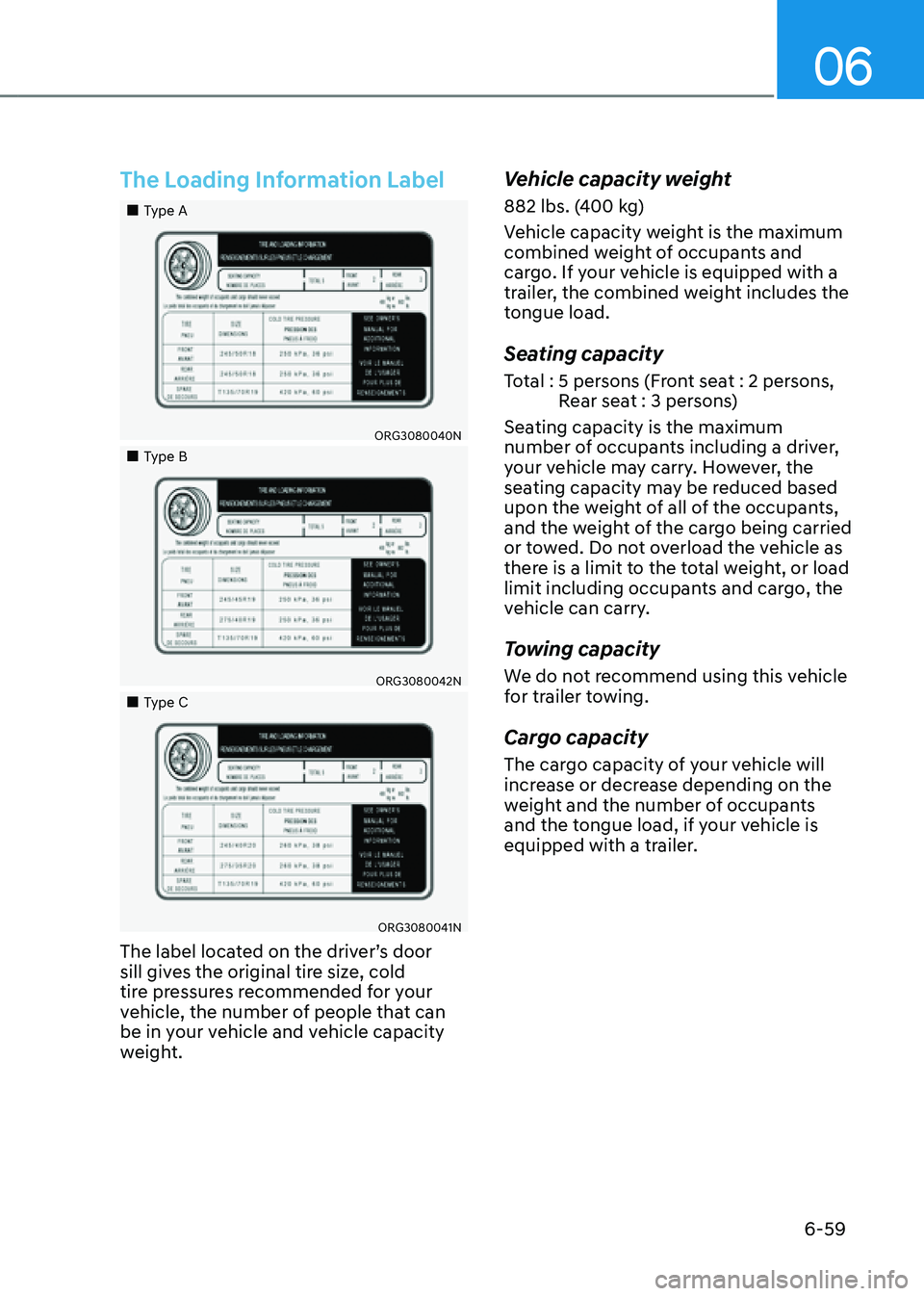
The Loading Information Label
„„Type A
ORG3080040N
„„Type B
ORG3080042N
„„Type C
ORG3080041N
The label located on the driver’s door
sill gives the original tire size, cold
tire pressures recommended for your
vehicle, the number of people that can
be in your vehicle and vehicle capacity
weight.
Vehicle capacity weight
882 lbs. (400 kg)
Vehicle capacity weight is the maximum
combined weight of occupants and
cargo. If your vehicle is equipped with a
trailer, the combined weight includes the
tongue load.
Seating capacity
Total : 5 persons (Front seat : 2 persons, Rear seat : 3 persons)
Seating capacity is the maximum
number of occupants including a driver,
your vehicle may carry. However, the
seating capacity may be reduced based
upon the weight of all of the occupants,
and the weight of the cargo being carried
or towed. Do not overload the vehicle as
there is a limit to the total weight, or load
limit including occupants and cargo, the
vehicle can carry.
Towing capacity
We do not recommend using this vehicle
for trailer towing.
Cargo capacity
The cargo capacity of your vehicle will
increase or decrease depending on the
weight and the number of occupants
and the tongue load, if your vehicle is
equipped with a trailer.
Page 327 of 604

Driving Your Vehicle
6-62
Certification label
OBH059070
The certification label is located on the
driver's door sill at the center pillar and
shows the maximum allowable weight of
the fully loaded vehicle. This is called the
GVWR (Gross Vehicle Weight Rating). The
GVWR includes the weight of the vehicle,
all occupants, fuel and cargo.
This label also tells you the maximum
weight that can be supported by the
front and rear axles, called Gross Axle
Weight Rating (GAWR).
The total weight of the vehicle, including
all occupants, accessories, cargo, and
trailer tongue load must not exceed the
Gross Vehicle Weight Rating (GVWR) or
the Gross Axle Weight Rating (GAWR).
To find out the actual loads on your front
and rear axles, you need to go to a weigh
station and weigh your vehicle. Be sure
to spread out your load equally on both
sides of the centerline.
WARNING
Overloading
• Never exceed the GVWR for your
vehicle, the GAWR for either the front
or rear axle and vehicle capacity
weight. Exceeding these ratings
can affect your vehicle's handling
and braking ability, and cause an
accident.
• Do not overload your vehicle.
Overloading your vehicle can cause
heat buildup in your vehicle's tires
and possible tire failure, increased
stopping distances and poor vehicle
handling-all of which may result in a
crash.
NOTICE
Overloading your vehicle may cause
damage. Repairs would not be covered
by your warranty. Do not overload your
vehicle.
Page 403 of 604

07
7-7 5
System Operation
Operating conditions
Smart Cruise Control will operate when
the following conditions are satisfied.
Basic function
• The gear is in D (Drive)
• The driver’s door is closed
• EPB (Electronic Parking Brake) is not
applied
• Your vehicle speed is within the
operating speed range
-5~120 mph (10~200 km/h): when
there is no vehicle in front
-0~120 mph (0~200 km/h): when
there is a vehicle in front
• ESC (Electronic Stability Control), TCS
(Traction Control System) or ABS is on
• ESC (Electronic Stability Control), TCS
(Traction Control System) or ABS is not
controlling the vehicle
• Engine rpm is not in the red zone
• Forward Collision-Avoidance Assist
brake control is not operating
• Remote Smart Parking Assist brake
control is not operating
• ISG system is not operating
• Hands-off warning for Lane Keeping
Assist and Highway Driving Assist is
off
Information
At a stop, if there is no vehicle in front of
your vehicle, the system will turn on when
the brake pedal is depressed Overtaking Acceleration Assist
Overtaking Acceleration Assist will
operate when the left turn signal
indicator is turned on while Smart Cruise
Control is operating, and the following
conditions are satisfied:
• Your vehicle speed is above 40 mph
(60 km/h)
• The hazard warning flasher is off
• A vehicle is detected in front of your
vehicle
• Deceleration is not needed to
maintain distance with the vehicle in
front
WARNING
• When the left turn signal indicator
is turned on while there is a vehicle
ahead, the vehicle may accelerate
temporarily. Pay attention to the
road conditions at all times.
• Regardless of your countries driving
direction, Overtaking Acceleration
Assist will operate when the
conditions are satisfied. When
using the function in countries with
different driving direction, always
check the road conditions at all
times.
Page 408 of 604
Driver Assistance system
7-80
WARNING
Take the following precautions when
using Smart Cruise Control:
• Smart Cruise Control does not
substitute for proper and safe
driving. It is the responsibility of the
driver to always check the speed and
distance to the vehicle ahead.
• Smart Cruise Control may not
recognize unexpected and sudden
situations or complex driving
situations, so always pay attention to
driving conditions and control your
vehicle speed.
• Keep Smart Cruise Control off when
the system is not in use to avoid
inadvertently setting a speed.
• Do not open the door or leave the
vehicle when Smart Cruise Control
is operating, even if the vehicle is
stopped.
• Always be aware of the selected
speed and vehicle to vehicle
distance.
• Keep a safe distance according to
road conditions and vehicle speed. If
the vehicle to vehicle distance is too
close during high-speed driving, a
serious collision may result.
• When maintaining distance with the
vehicle ahead, if the front vehicle
disappears, the system may suddenly
accelerate to the set speed. Always
be aware of unexpected and sudden
situations from occurring.
• Vehicle speed may decrease on an
upward slope and increase on a
downward slope.
• Always be aware of situations such
as when a vehicle cuts in suddenly.
• When you are towing a trailer or
another vehicle, we recommend that
Smart Cruise Control is turned off
due to safety reasons.
• Turn off Smart Cruise Control when
your vehicle is being towed.
• Smart Cruise Control may not
operate normally if interfered by
strong electromagnetic waves.
• Smart Cruise Control may not
detect an obstacle in front and lead
to a collision. Always look ahead
cautiously to prevent unexpected
and sudden situations from
occurring.
• Vehicles moving in front of you with
a frequent lane change may cause
a delay in the system's reaction or
may cause the system to react to a
vehicle actually in an adjacent lane.
Always drive cautiously to prevent
unexpected and sudden situations
from occurring.
• Always be aware of the surroundings
and drive safely, even though a
warning message does not appear or
an audible warning does not sound.
• If any other system’s warning
message is displayed or warning
sound is generated, Smart Cruise
Control warning message may not
be displayed and warning sound may
not be generated.
• You may not hear the warning sound
of Forward Collision-Avoidance
Assist if the surrounding is noisy.
• The vehicle manufacturer is not
responsible for any traffic violation
or accidents caused by the driver.
• Always set the vehicle speed under
the speed limit in your country.
• Inter-vehicle distance, acceleration
and reaction speed may change if
the driver’s driving style changes.
Page 443 of 604
07
7-115
System Operation
Parking assist view
Operating conditions
• The system will operate when the
following conditions are satisfied:
-The gear is shifted to R (Reverse)
-The gear is shifted from R (Reverse)
to N (Neutral) or D (Drive) when
vehicle speed is below 9 mph
(15 km/h)
-Parking/View button (1) is pressed
with the gear in D (Drive) or N
(Neutral) when vehicle speed is
below 9 mph (15 km/h)
-Parking/View button (1) is pressed
with the gear in P (Parking)
-Parking Distance Warning warns the
driver when the gear is in D (Drive)
However, ‘Driver Assistance →
Parking Safety → Camera Settings
→ Surround View Monitor Auto On’
must be selected from the Settings
menu.
• An indicator on the screen appears
when:
-The trunk is opened
-The driver or front passenger door
is opened
-The side view mirror is folded
• Driving rear view operates regardless
of vehicle speed when the gear is
in D (Drive) or N (Neutral). Refer to
“Driving rear view” in the following
pages.
• Other view modes can be selected
by touching the view icons (2) on the
Surround View Monitor screen. Off conditions
• Parking/View button (1) is repressed.
• When vehicle speed is above 9 mph
(15 km/h), Surround View Monitor will
turn off and the screen will change
back to the previous infotainment
system screen.
• When the gear is in R (Reverse),
Surround View Monitor will turn ON
regardless of vehicle speed or button
status. However, if vehicle speed is
above 9 mph (15 km/h) with the gear
in D (Drive), the system will turn off.
• One of the infotainment system
button (3) is pressed without the gear
in R (Reverse). The screen will change
back to the previous infotainment
system screen.
System Malfunction and
Limitations
System malfunction
When Surround View Monitor is not
working properly, or the screen flickers,
or the camera image does not display
normally, have the system inspected by
an authorized retailer of Genesis Branded
products.
Limitations of the system
When the vehicle is stopped for a long
time in winter or when the vehicle is
parked in an indoor parking lot, the
exhaust fumes may temporarily blur the
image.
Page 478 of 604

Driver Assistance system
7-150
The function will pause in the following
conditions when:
• Smart Parking
-There is a pedestrian, animal or
object in the direction the vehicle is
moving
-The door or trunk is open
-The driver’s seat belt is not fastened
-Blind-Spot Collision-Avoidance
Assist or Rear-Cross Traffic Collision
Assist operates while the vehicle
is being controlled in the reverse
direction
-The Parking/View () button is
not continuously pressed
- The vehicle is stopped by
depressing the brake pedal
• Remote Smart Parking
-There is a pedestrian, animal or
object in the direction the vehicle is
moving
-The door or trunk is open
-The Forward () or Backward ()
button is not continuously pressed
- Simultaneously pressing multiple
buttons on a smart key
-The smart key is not operated within
13 ft. (4 m) from the vehicle
-Button of another smart key is
pressed in addition to the operating
smart key
-Blind-Spot Collision-Avoidance
Assist or Rear-Cross Traffic Collision
Assist operates while the vehicle
is being controlled in the reverse
direction
When Parking function is paused, the
vehicle will automatically stop. If the
condition that made the function to
pause disappears, the function may
operate again. The function will cancel in the following
conditions when:
• Smart Parking
-
The steering wheel is steered
-The gear is shifted while the vehicle
is moving
-Operating EPB while the vehicle is
moving
-The engine hood is open
-Vehicle speed is above 3 mph (5
km/h)
-Rapid acceleration occurs
-Vehicle skid occurs
-The wheel is stuck by an obstacle
and cannot move
-There are pedestrians, animals or
objects at the front and rear of the
vehicle at the same time
-Approximately 3 minutes and 50
seconds have past after Smart
Parking function has started to
operate
-The driver opens the door without
the seatbelt unfastened
-The slope of the road exceeds the
operational range
-The steering wheel, gearshift,
braking, and drive controls are not
working normally
-The function is paused for more
than 1 minute
-ABS, TCS or ESC system operates
due to slippery road conditions
When Smart Parking function is
canceled, the vehicle will automatically
stop, shift the gear to P (Park) and
engage EPB (Electronic Parking Brake).
Page 479 of 604

07
7-151
• Remote Smart Parking
-The gear is shifted while the vehicle
is moving
-Operating EPB while the vehicle is
moving
-The engine hood is open
-Vehicle speed is above 3 mph (5
km/h)
-Rapid acceleration occurs
-Vehicle skid occurs
-The wheel is stuck by an obstacle
and cannot move
-There are pedestrians, animals or
objects at the front and rear of the
vehicle at the same time
-Approximately 3 minutes and 50
seconds have past after Remote
Smart Parking function has started
to operate
-The slope of the road exceeds the
operational range
-The steering wheel, gearshift,
braking, and drive controls are not
working normally
-The function is paused for more
than 1 minute
-There is a problem with the smart
key or the smart key battery is low
-ABS, TCS or ESC system operates
due to slippery road conditions
-The brake pedal or accelerator
pedal is depressed when all the
doors are closed
-The smart key is outside the vehicle
when the brake pedal is depressed
while the driver's door is open.
-The alarm of the Theft Alarm System
sounds
When Remote Smart Parking function is
canceled, the vehicle will automatically
stop, shift the gear to P (Park) and
engage EPB (Electronic Parking Brake).
CAUTION
Check whether the doors are locked
when Remote Smart Parking function is
canceled.
Smart Exit
1. Getting ready for exit
ORG3070088
(1) With the engine turned on,
depress the brake pedal and shift
the gear to P (Park) or N (Neutral).
(2) Press and hold the Parking/View
() button to turn on Remote
Smart Parking Assist.
• The infotainment system has
to operate properly to use Exit
function.
• Drive below 3 mph (5 km/h) with
the engine on to use Exit function.
• If the system is turned on again
after parallel parking is completed
by Remote Smart Parking Assist,
Exit function can be used.
Page 482 of 604

Driver Assistance system
7-154
How to cancel Exit function while
operating
• Press the Parking/View () button
in the following stage:
- Checking space
-Select exit direction
• Shift the gear to R (Reverse) in the
following stage:
-Checking space
-Select exit direction
• Press the Parking Safety () button
or select ‘Cancel’ on the infotainment
system screen to turn off Exit
function.
• While Smart Exit function is operating,
if the vehicle is stopped by depressing
the brake pedal, and the gear is
shifted, Exiting function will turn off.
At this time, EPB (Electronic Parking
Brake) will not be engaged.
The function will pause in the following
conditions when:
• There is a pedestrian, animal or object
in the direction the vehicle is moving
• The driver’s seat belt is not fastened
• Blind-Spot Collision-Avoidance Assist
or Rear-Cross Traffic Collision Assist
operates while the vehicle is being
controlled in the reverse direction
• The Parking/View () button is not
continuously pressed
• The vehicle is stopped by depressing
the brake pedal
When Exit function is paused, the vehicle
will stop. If the condition that made
the function to pause disappears, the
function may operate again. The function will cancel in the following
conditions when:
• Smart Exit
-
The steering wheel is steered
-The gear is shifted while the vehicle
is moving
-Operating EPB while the vehicle is
moving
-The engine hood is open
-Vehicle speed is above 3 mph (5
km/h)
-Rapid acceleration occurs
-Vehicle skid occurs
-The wheel is stuck by an obstacle
and cannot move
-There are pedestrians, animals or
objects at the front and rear of the
vehicle at the same time
-Approximately 3 minutes and 50
seconds have past after Smart Exit
function has started to operate
-The driver opens the door without
the seatbelt unfastened
-The slope of the road exceeds the
operational range
-The steering wheel, gearshift,
braking, and drive controls are not
working normally
-The function was paused for more
than 1 minute
-ABS, TCS or ESC system operates
due to slippery road conditions
When Smart Exit function is canceled,
the vehicle will automatically stop, shift
the gear to P (Park) and engage EPB
(Electronic Parking Brake).
Page 483 of 604

07
7-155
Remote Moving Forward/Backward
1. Getting ready to remotely move
forward and backward
There are two ways to operate Remote
Moving Forward/Backward function.
ORG3070091
Method (1) Using the function with
engine off
(1) Within a certain range from the
vehicle press the door lock ()
button on the smart key and lock
all doors.
(2) Press and hold the Remote Start
button () within 4 seconds until
the engine starts.
• For more details on remotely
starting the engine, refer to
“Remote Start” section in chapter 6.
Information
If the vehicle is remotely started that
has been parked in cold weather for
a long time, the operation of Remote
Moving Forward/Backward function
may be delayed depending on the engine
condition.
ORG3070092
ORG3070146L
Method (2) Using the function with
engine on
(1) Park the vehicle in front of
the space where you want to
use Remote Moving Forward/
Backward function, and shift the
gear to P (Park).
(2) Press and hold the Parking/View
() button to turn on Smart
Parking Assist. A message ‘Under
Remote Control’ will appear on the
infotainment system screen.
(3) Get out of the vehicle with the
smart key and close all doors.