steering wheel GENESIS G90 2017 Owner's Guide
[x] Cancel search | Manufacturer: GENESIS, Model Year: 2017, Model line: G90, Model: GENESIS G90 2017Pages: 524, PDF Size: 19.3 MB
Page 195 of 524
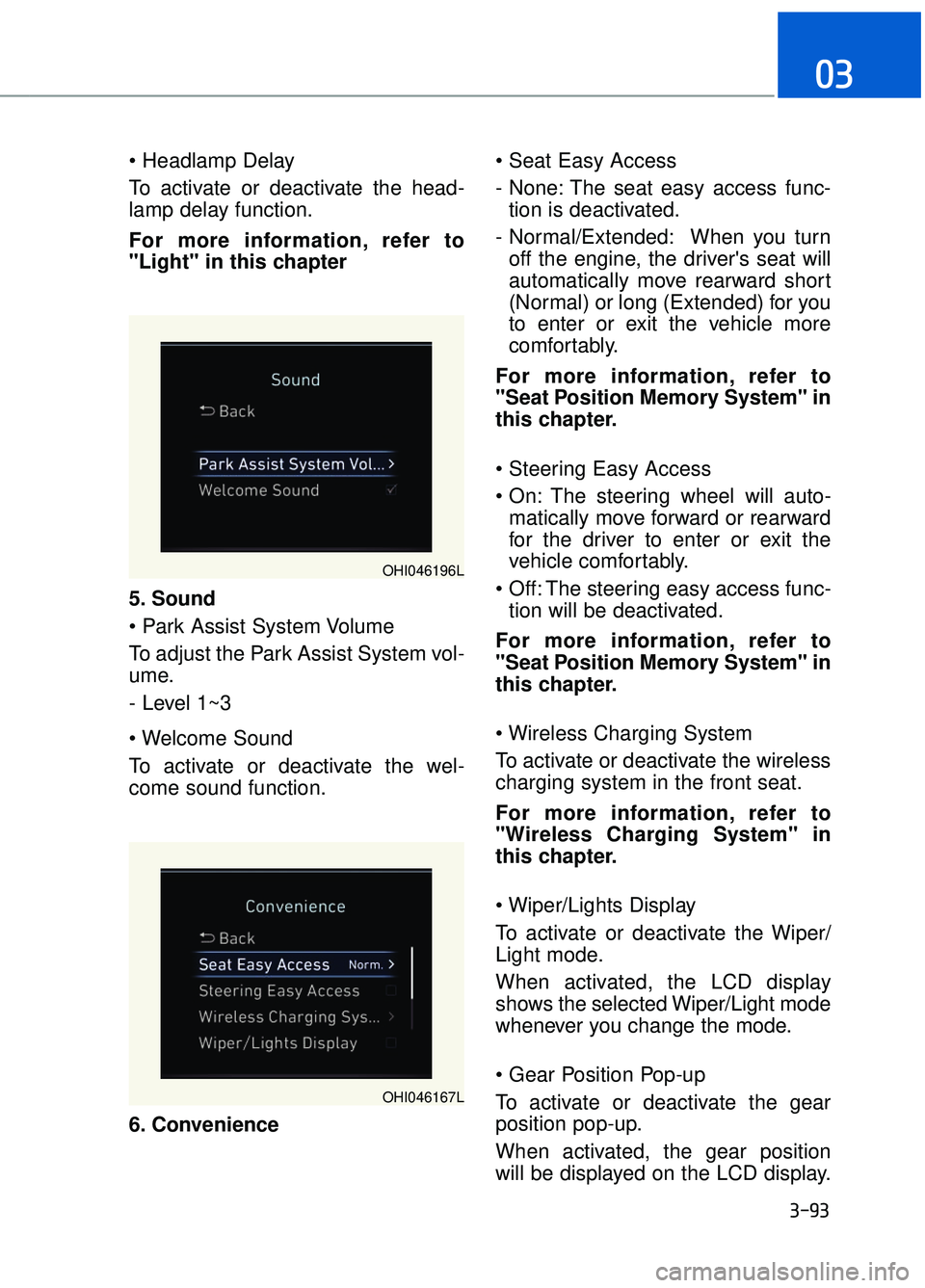
To activate or deactivate the head-
lamp delay function.
For more information, refer to
"Light" in this chapter
5. Sound
To adjust the Park Assist System vol-
ume.
- Level 1~3
To activate or deactivate the wel-
come sound function.
6. Convenience
- None: The seat easy access func-
tion is deactivated.
- Normal/Extended: When you turn off the engine, the driver's seat will
automatically move rearward short
(Normal) or long (Extended) for you
to enter or exit the vehicle more
comfortably.
For more information, refer to
"Seat Position Memory System" in
this chapter.
The steering wheel will auto- matically move forward or rearward
for the driver to enter or exit the
vehicle comfortably.
The steering easy access func- tion will be deactivated.
For more information, refer to
"Seat Position Memory System" in
this chapter.
To activate or deactivate the wireless
charging system in the front seat.
For more information, refer to
"Wireless Charging System" in
this chapter.
To activate or deactivate the Wiper/
Light mode.
When activated, the LCD display
shows the selected Wiper/Light mode
whenever you change the mode.
To activate or deactivate the gear
position pop-up.
When activated, the gear position
will be displayed on the LCD display.
3-93
03
OHI046196L
OHI046167L
Page 197 of 524
3-95
03
The trip computer is a microcomput-
er-controlled driver information sys-
tem that displays information related
to driving.
Information
Some driving information stored in
the trip computer resets if the battery
is disconnected.
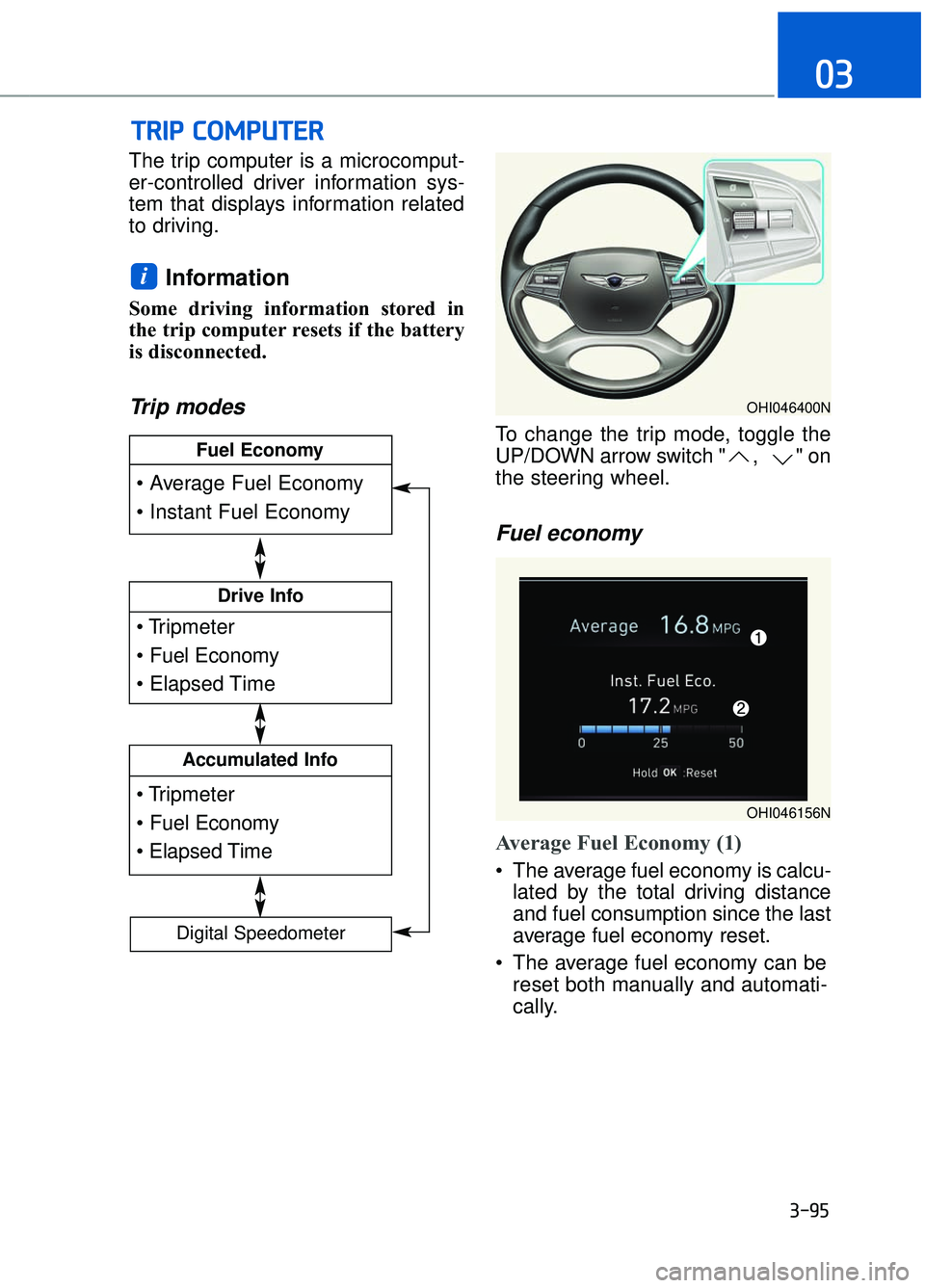
Trip modes
To change the trip mode, toggle the
UP/DOWN arrow switch " , " on
the steering wheel.
Fuel economy
Average Fuel Economy (1)
The average fuel economy is calcu-lated by the total driving distance
and fuel consumption since the last
average fuel economy reset.
The average fuel economy can be reset both manually and automati-
cally.
i
T
TR
R I
IP
P
C
C O
O M
M P
PU
U T
TE
ER
R
Drive Info
Accumulated Info
Fuel Economy
Digital Speedometer
OHI046400N
OHI046156N
Page 198 of 524

3-96
Convenient features of your vehicle
Manual reset
To clear the average fuel economy
manually, press the OK button on the
steering wheel for more than 1 sec-
ond when the average fuel economy
is displayed.
For more information on the OK
button, refer to the "LCD Display
Control" in this chapter.
Automatic reset
To reset the average fuel economy
automatically whenever refueling,
select the "After refueling" menu in
User Settings mode of the LCD dis-
play (Refer to "LCD Display" ).
Under "After refueling" menu, the
average fuel economy will be cleared
to zero (----) when the vehicle speed
exceeds 1 mph (1 km/h) after refuel-
ing more than 2 gallons (6 liters).
Information
The vehicle must be driven for a min-
imum of 0.19 mile (0.3 km) since the
last ignition key cycle before the aver-
age fuel economy will be recalculated.
Instant Fuel Economy (2)
This mode displays the instanta-
neous fuel economy while driving
when the vehicle speed is greater
than 5 mph (8 km/h).
Driving Info display
This display shows the trip distance
(1), the average fuel economy (2),
and the total driving time (3).
The information is calculated for each
ignition cycle. The driving information
data gets initialized, when it has
passed 4 hours after turning OFF the
engine. In other words, the last driv-
ing information is available 4 hours
after you have turned on the engine.
To manually reset the information,
press and hold the OK button when
viewing the Driving info. The trip dis-
tance, the average fuel economy, and
total driving time will reset simultane-
ously.
The driving information will continue to
be counted while the engine is still run-
ning (for example, when the vehicle is
in traffic or stopped at a stop light.)
Information
The vehicle must be driven for a mini-
mum of 0.19 miles (300 meters) since the
last ignition key cycle before the average
fuel economy will be recalculated.
i
i
OHI046171N
Page 258 of 524

M
Mu
ul
lt
t i
im
m e
ed
d i
ia
a
s
s y
y s
st
te
e m
m
4
Multimedia system .......................................................................4\
-2
AUX, USB and iPod®Port ........................................................................\
..4-2
Antenna ........................................................................\
..................................4-2
Steering Wheel Audio Control ..................................................................4-3
DIS Navigation System........................................................................\
........4-4
Bluetooth®Wireless Technology Hands-Free .....................................4-4
Page 260 of 524
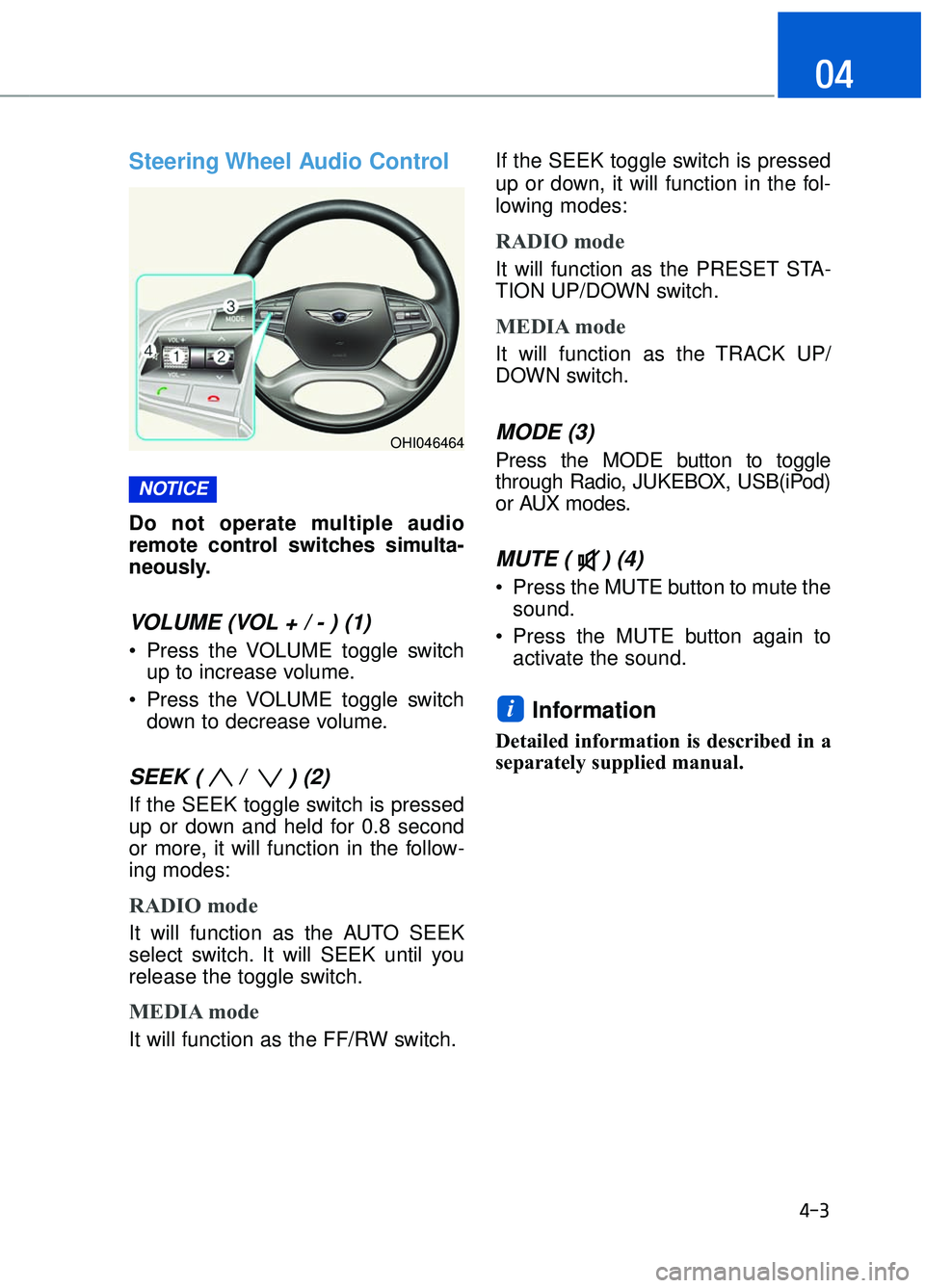
Steering Wheel Audio Control
Do not operate multiple audio
remote control switches simulta-
neously.
VOLUME (VOL + / - ) (1)
Press the VOLUME toggle switchup to increase volume.
Press the VOLUME toggle switch down to decrease volume.
SEEK ( / ) (2)
If the SEEK toggle switch is pressed
up or down and held for 0.8 second
or more, it will function in the follow-
ing modes:
RADIO mode
It will function as the AUTO SEEK
select switch. It will SEEK until you
release the toggle switch.
MEDIA mode
It will function as the FF/RW switch. If the SEEK toggle switch is pressed
up or down, it will function in the fol-
lowing modes:
RADIO mode
It will function as the PRESET STA-
TION UP/DOWN switch.
MEDIA mode
It will function as the TRACK UP/
DOWN switch.
MODE (3)
Press the MODE button to toggle
through Radio, JUKEBOX, USB(iPod)
or AUX modes.
MUTE ( ) (4)
Press the MUTE button to mute the
sound.
Press the MUTE button again to activate the sound.
Information
Detailed information is described in a
separately supplied manual.
i
NOTICE
4-3
04
OHI046464
Page 266 of 524
Before Entering the Vehicle
• Be sure all windows, outside mir-ror(s), and outside lights are clean
and unobstructed.
Remove frost, snow, or ice.
Visually check the tires for uneven wear and damage.
Check under the vehicle for any sign of leaks.
Be sure there are no obstacles behind you if you intend to back up.
Before Starting
Make sure the hood, the trunk, andthe doors are securely closed and
locked.
Adjust the position of the seat and steering wheel.
Adjust the inside and outside rearview mirrors.
Verify all the lights work.
Fasten your seatbelt. Check that all passengers have fastened their
seatbelts.
Check the gauges and indicators in the instrument panel and the mes-
sages on the instrument display
when the ignition switch is in the
ON position.
Check that any items you are car- rying are stored properly or fas-
tened down securely.
B BE
EF
FO
O R
RE
E
D
D R
RI
IV
V I
IN
N G
G
5-5
05
CALIFORNIA PROPOSITION 65
WARNING
Engine exhaust and a wide vari-
ety of automobile components
including components found in
the interior furnishings in a vehi-
cle, contain or emit harmful
chemicals known to the State of
California to cause cancer and
birth defects and reproductive
harm. In addition, certain fluids
contained in vehicles and certain
products of components contain
or emit chemicals known to the
State of California to cause can-
cer and birth defects or other
reproductive harm.
WARNING
Page 269 of 524

Engine Start/Stop button posi-tions
To turn off the
engine, press the
Engine Start/Stop
button with shift
lever in P (Park).
Also, the engine
will turn off when
the Engine Start/
Stop button is
pressed with the shift lever in D
(Drive) or R (Reverse) because the
transmission automatically shifts to
the P (Park) position. But, when it is
pressed in N (Neutral), the Engine
Start/Stop button will go to the ACC
position.
Press the Engine
Start/Stop button
when the button is
in the OFF position
without depressing
the brake pedal.
Some electrical
accessories are
usable.
Information
If you leave the Engine Start/Stop but-
ton in the ACC position for more than
one hour, the battery power will turn
off automatically to prevent the bat-
tery from discharging.Press the Engine
Start/Stop button
while it is in the
ACC position with-
out depressing the
brake pedal.
The warning lights can be checked
before the engine is
started.
Information
Do not leave the Engine Start/Stop
button in the ON position when the
engine is not running to prevent the
battery from discharging.
To start the engine,
depress the brake
pedal and press the
Engine Start/Stop
button with the shift
lever in the P (Park)
or in the N (Neutral)
position.
For your safety,
start the engine with the shift lever in
the P (Park) position.
i
i
5-8
Driving your vehicle
OFF
ACC
ON
START
(Continued)
NEVER reach through the
steering wheel for the Engine
Start/Stop button or any other
control while the vehicle is in
motion. The presence of your
hand or arm in this area may
cause a loss of vehicle control
resulting in an accident.
Page 281 of 524
5-20
Driving your vehicle
Information - KickdownMechanism
Use the kickdown mechanism for
maximum acceleration. Depress the
accelerator pedal beyond the pressure
point. The automatic transmission will
shift to a lower gear depending on the
engine speed.i
To reduce the risk of SERIOUS
INJURY or DEATH :
ALWAYS wear your seatbelt. In a collision, an unbelted
occupant is significantly more
likely to be seriously injured
or killed than a properly belt-
ed occupant.
Avoid high speeds when cor- nering or turning.
Do not make quick steering wheel movements, such as
sharp lane changes or fast,
sharp turns.
The risk of rollover is greatly increased if you lose control
of your vehicle at highway
speeds.
Loss of control often occurs if two or more wheels drop off
the roadway and the driver
over steers to reenter the
roadway.
In the event your vehicle leaves the roadway, do not
steer sharply. Instead, slow
down before pulling back into
the travel lanes.
Genesis Brand recommends you follow all posted speed
limits.
WARNING
Page 282 of 524
5-21
05
Using All Wheel Drive (AWD)
The All Wheel Drive (AWD) System
delivers engine power to the front
and rear wheels for maximum trac-
tion. AWD is useful when extra trac-
tion is required, such as when driving
on slippery, muddy, wet, or snow-
covered roads.
If the system determines there is a
need for addition traction, engine
power will automatically be distrib-
uted to all four wheels.
Information
• Do not drive in water if the level ishigher than the bottom of the vehi-
cle.
• Check your brake condition once you are out of mud or water.
Depress the brake pedal several
times as you move slowly until you
feel normal braking return.
• Shorten your scheduled mainte- nance interval if you drive in off-
road conditions such as sand, mud
or water (see "Maintenance Under
Severe Usage Conditions" in chap-
ter 7).
• Make sure that an AWD vehicle is towed by flatbed tow truck.
i
A AL
LL
L
W
W H
HE
EE
EL
L
D
D R
RI
IV
V E
E
(
( A
A W
W D
D)
)
(
( I
IF
F
E
E Q
Q U
UI
IP
P P
PE
ED
D )
)
If the AWD warning light ( )
stays on the instrument cluster,
your vehicle may have a mal-
function with the AWD system.
When the AWD warning light
( ) illuminates have your
vehicle checked by an author-
ized Dealer of Genesis Brand
Products as soon as possible.
WARNING
To reduce the risk of SERIOUS
INJURY or DEATH:
Do not drive in conditions that
exceed the vehicles intended
design such as challenging
off-road conditions.
Avoid high speeds when cor- nering or turning.
Do not make quick steering wheel movements, such as
sharp lane changes or fast,
sharp turns.
(Continued)
(Continued)
The risk of a rollover is great-ly increased if you lose con-
trol of your vehicle at highway
speeds.
Loss of control often occurs if two or more wheels drop off
the roadway and the driver
over steers to reenter the
roadway.
In the event your vehicle leaves the roadway, do not
steer sharply. Instead, slow
down before pulling back into
the travel lanes.
Always drive safely and use caution when driving an AWD
vehicle.
WARNING
Page 283 of 524
5-22
Driving your vehicle
For safe AWD operation
Before driving
Make sure all passengers arewearing seat belts.
Sit upright and adjust the steering wheel to a position comfortable for
you to drive.
Driving on snow-covered or icy
roads
Start off slowly by applying theaccelerator pedal gently.
Use of snow tires are recommend- ed.
For more information on Snow
Tires refer to "Winter Driving" in
this chapter.
Keep sufficient distance between your vehicle and the vehicle in front
of you.
Use engine braking during deceler- ation.
Avoid speeding, rapid acceleration, sudden brake applications, and
sharp turns to help prevent skids.
Driving in sand or mud
Maintain slow and constant speed.
Keep sufficient distance betweenyour vehicle and the vehicle in front
of you.
Reduce vehicle speed and always check the road condition.
Avoid speeding, rapid acceleration, sudden brake applications, and
sharp turns to prevent getting
stuck. When the vehicle is stuck in snow,
sand or mud, place a nonslip
material under the drive wheels to
provide traction OR
Slowly spin the wheels in forward
and reverse directions which
causes a rocking motion that may
free the vehicle. However, avoid
running the engine continuously
at high rpm, doing so may damage
the AWD system.
Information
• When using Snow Tires, mount
them on the rear wheels.
• If tire chains must be used, use AutoSock (fabric snow chain) and
install the tire chain after reviewing
the instructions provided with the
tire chains.
For more information on Snow Tires
and Tire Chains, refer to "Winter
Driving" in this chapter.
i
NOTICE