lane assist GENESIS G90 2017 Owner's Manual
[x] Cancel search | Manufacturer: GENESIS, Model Year: 2017, Model line: G90, Model: GENESIS G90 2017Pages: 524, PDF Size: 19.3 MB
Page 17 of 524
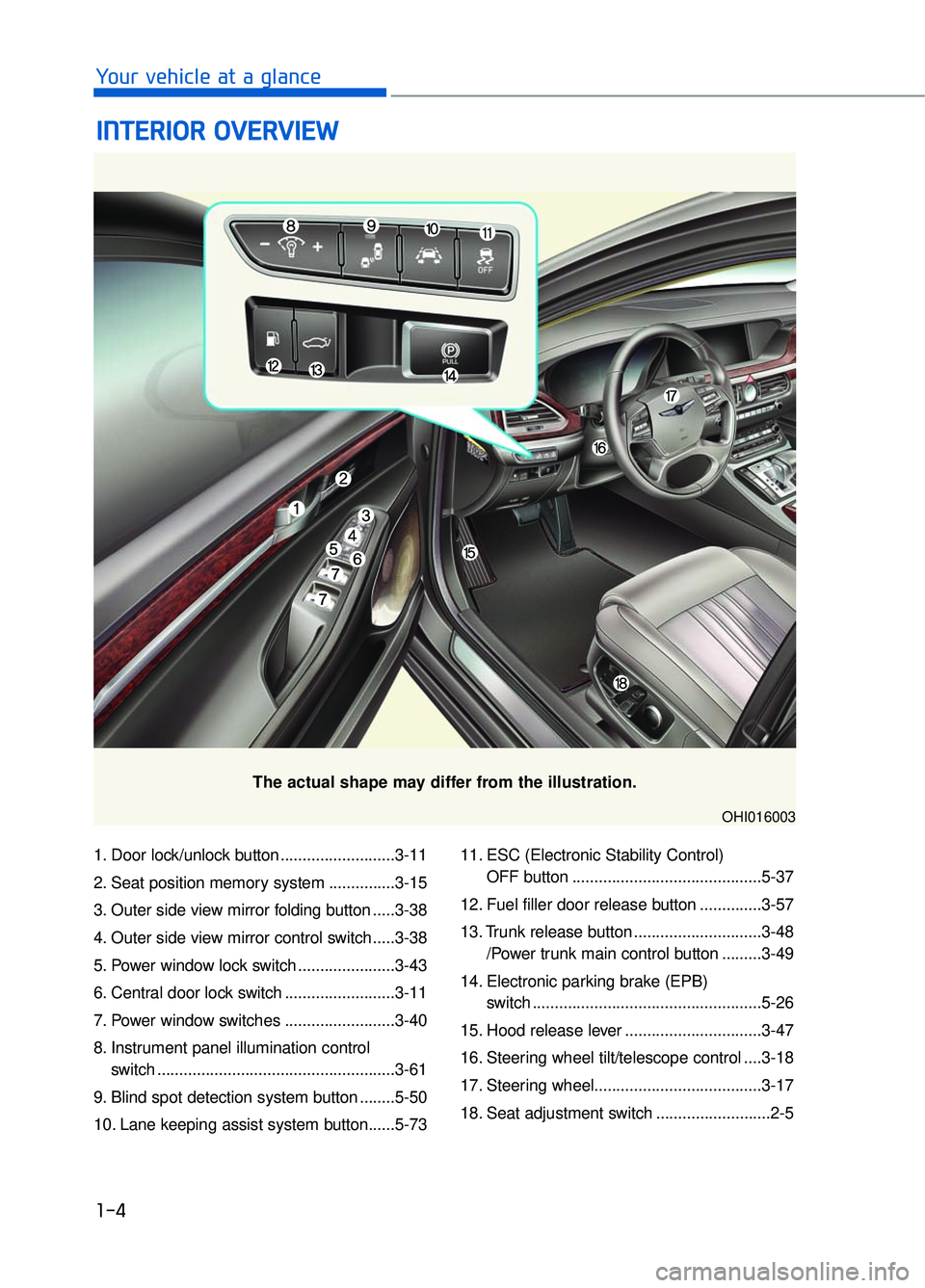
1. Door lock/unlock button ..........................3-11
2. Seat position memory system ...............3-15
3. Outer side view mirror folding button .....3-38
4. Outer side view mirror control switch .....3-38
5. Power window lock switch ......................3-43
6. Central door lock switch .........................3-11
7. Power window switches .........................3-40
8. Instrument panel illumination control switch ......................................................3-61
9. Blind spot detection system button ........5-50
10. Lane keeping assist system button......5-73 11. ESC (Electronic Stability Control)
OFF button ...........................................5-37
12. Fuel filler door release button ..............3-57
13. Trunk release button .............................3-48 /Power trunk main control button .........3-49
14. Electronic parking brake (EPB) switch ....................................................5-26
15. Hood release lever ...............................3-47
16. Steering wheel tilt/telescope control ....3-18
17. Steering wheel......................................3-17
18. Seat adjustment switch ..........................2-5
I I N
N T
TE
ER
R I
IO
O R
R
O
O V
VE
ER
R V
V I
IE
E W
W
1-4
Your vehicle at a glance
The actual shape may differ from the illustration.
OHI016003
Page 173 of 524
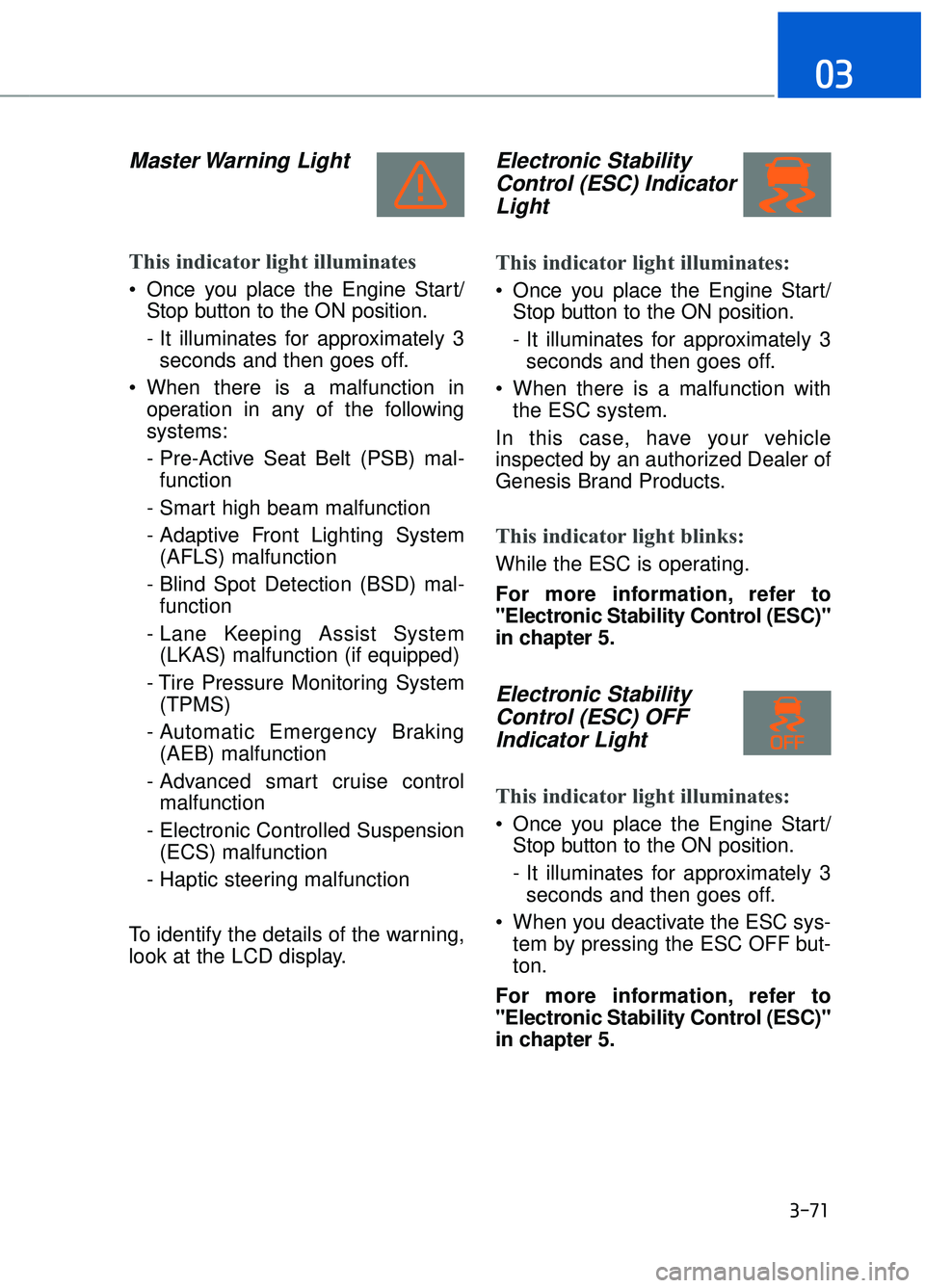
Master Warning Light
This indicator light illuminates
Once you place the Engine Start/Stop button to the ON position.
- It illuminates for approximately 3seconds and then goes off.
When there is a malfunction in operation in any of the following
systems:
- Pre-Active Seat Belt (PSB) mal-function
- Smart high beam malfunction
- Adaptive Front Lighting System (AFLS) malfunction
- Blind Spot Detection (BSD) mal- function
- Lane Keeping Assist System (LKAS) malfunction (if equipped)
- Tire Pressure Monitoring System (TPMS)
- Automatic Emergency Braking (AEB) malfunction
- Advanced smart cruise control malfunction
- Electronic Controlled Suspension (ECS) malfunction
- Haptic steering malfunction
To identify the details of the warning,
look at the LCD display.
Electronic Stability Control (ESC) IndicatorLight
This indicator light illuminates:
Once you place the Engine Start/
Stop button to the ON position.
- It illuminates for approximately 3seconds and then goes off.
When there is a malfunction with the ESC system.
In this case, have your vehicle
inspected by an authorized Dealer of
Genesis Brand Products.
This indicator light blinks:
While the ESC is operating.
For more information, refer to
"Electronic Stability Control (ESC)"
in chapter 5.
Electronic Stability Control (ESC) OFFIndicator Light
This indicator light illuminates:
Once you place the Engine Start/
Stop button to the ON position.
- It illuminates for approximately 3seconds and then goes off.
When you deactivate the ESC sys- tem by pressing the ESC OFF but-
ton.
For more information, refer to
"Electronic Stability Control (ESC)"
in chapter 5.
3-71
03
Page 176 of 524

INDIVIDUAL ModeIndicator Light
This indicator light illuminates:
When you select “INDIVIUAL” mode
as drive mode.
For more information, refer to
"Drive Mode Integrated Control
System" in chapter 5.
AUTO HOLD Indicator Light
This indicator light illuminates:
[White] When you activate the auto
hold system by pressing the AUTO
HOLD switch.
[Green] When you stop the vehicle completely by depressing the
brake pedal with the auto hold sys-
tem activated.
[Yellow] When there is a malfunc- tion with the auto hold system.
In this case, have your vehicle inspect-
ed by an authorized Dealer of Genesis
Brand Products.
For more information, refer to
"Auto Hold" in chapter 5.
Lane Keeping Assist System (LKAS) Indicator Light
This indicator light illuminates:
[Green] When the system operat-
ing conditions are satisfied for
LKAS.
[White] When the system operating conditions are not satisfied or
when the sensor does not detect
the lane line.
[Yellow] When there is a malfunc- tion with the lane keeping assist
system.
In this case, have your vehicle inspect-
ed by an authorized Dealer of Genesis
Brand Products.
For more information, refer to "Lane
Keeping Assist System (LKAS)" in
chapter 5.
3-74
Convenient features of your vehicle
Page 186 of 524

Check AEB system
This warning message is displayed if
there is a problem with the Automatic
Emergency Braking (AEB) system.
In some cases, the AEB sensor or the
cover located in the lower front grille
may be dirty or obscured with dirt or
snow. Check the sensor and cover and
clean them by using a soft cloth.
If the warning message persists, have
your vehicle inspected by an authorized
Dealer of Genesis Brand Products.
For more information, refer to
"Automatic Emergency Braking
(AEB) System" in chapter 5.
Cruise indicator
The indicator is displayed when the
cruise control system is enabled(1)
and the cruise control speed is set(2).
For more information, refer to
"Advanced Smart Cruise Control
System" in chapter 5.
Check LKAS (if equipped)
This warning message is displayed if
there is a problem with the Lane
Keeping Assist System (LKAS). We
recommend you to have the vehicle
inspected by an authorized Dealer of
Genesis Brand Products.
For more information, refer to
"Lane Keeping Assist System
(LKAS)" in chapter 5.
3-84
Convenient features of your vehicle
OHI046143LOHI056134
OHI056117L
Page 189 of 524
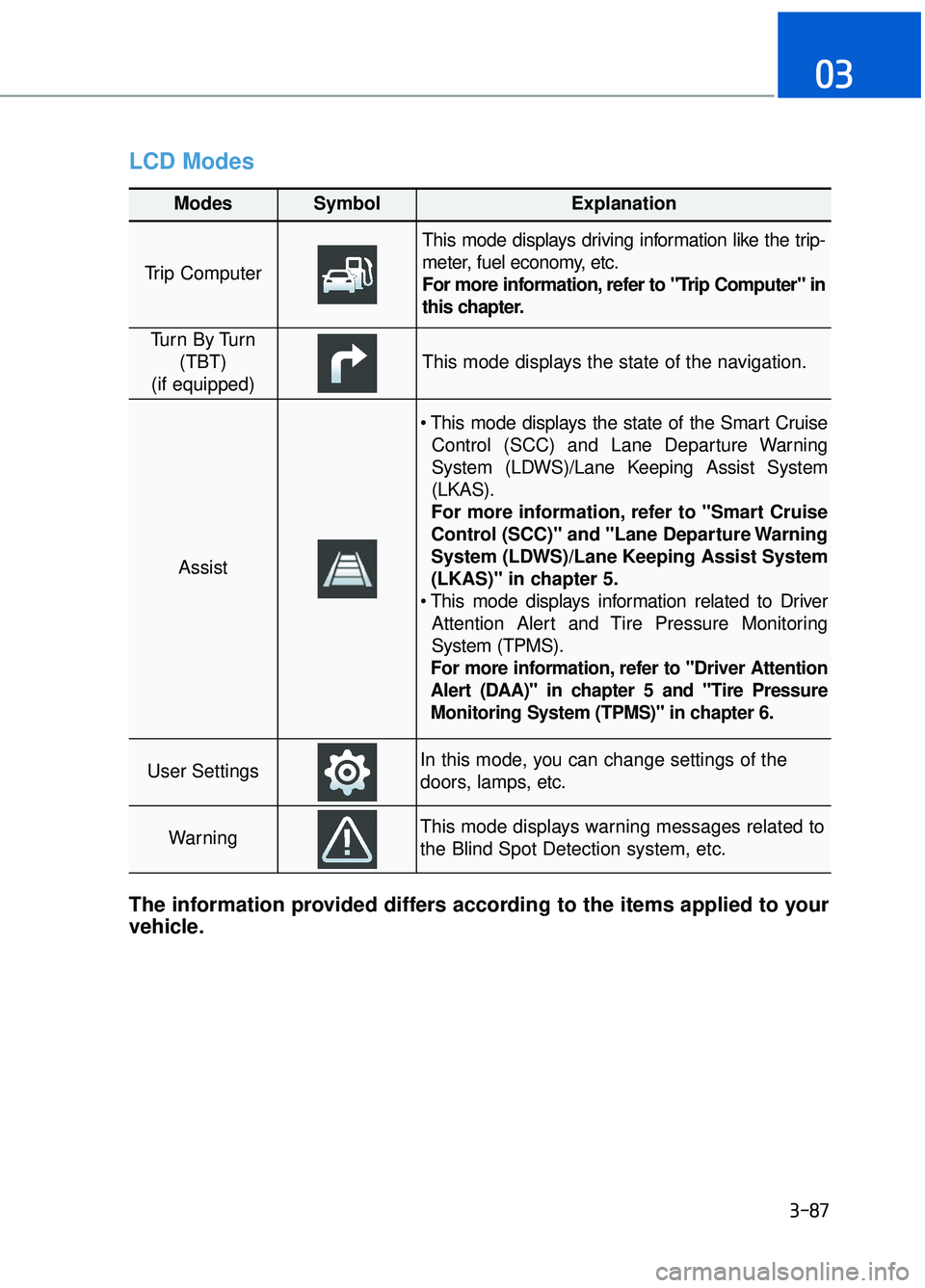
LCD Modes
3-87
03
Modes SymbolExplanation
Trip Computer
This mode displays driving information like the trip-
meter, fuel economy, etc.
For more information, refer to "Trip Computer" in
this chapter.
Tu r n B y Tu r n(TBT)
(if equipped)
This mode displays the state of the navigation.
Assist
Control (SCC) and Lane Departure Warning
System (LDWS)/Lane Keeping Assist System
(LKAS).
For more information, refer to "Smart Cruise
Control (SCC)" and "Lane Departure Warning
System (LDWS)/Lane Keeping Assist System
(LKAS)" in chapter 5.
Attention Alert and Tire Pressure Monitoring
System (TPMS).
For more information, refer to "Driver Attention
Alert (DAA)" in chapter 5 and "Tire Pressure
Monitoring System (TPMS)" in chapter 6.
User SettingsIn this mode, you can change settings of the
doors, lamps, etc.
WarningThis mode displays warning messages related to
the Blind Spot Detection system, etc.
The information provided differs according to the items applied to your
vehicle.
Page 191 of 524
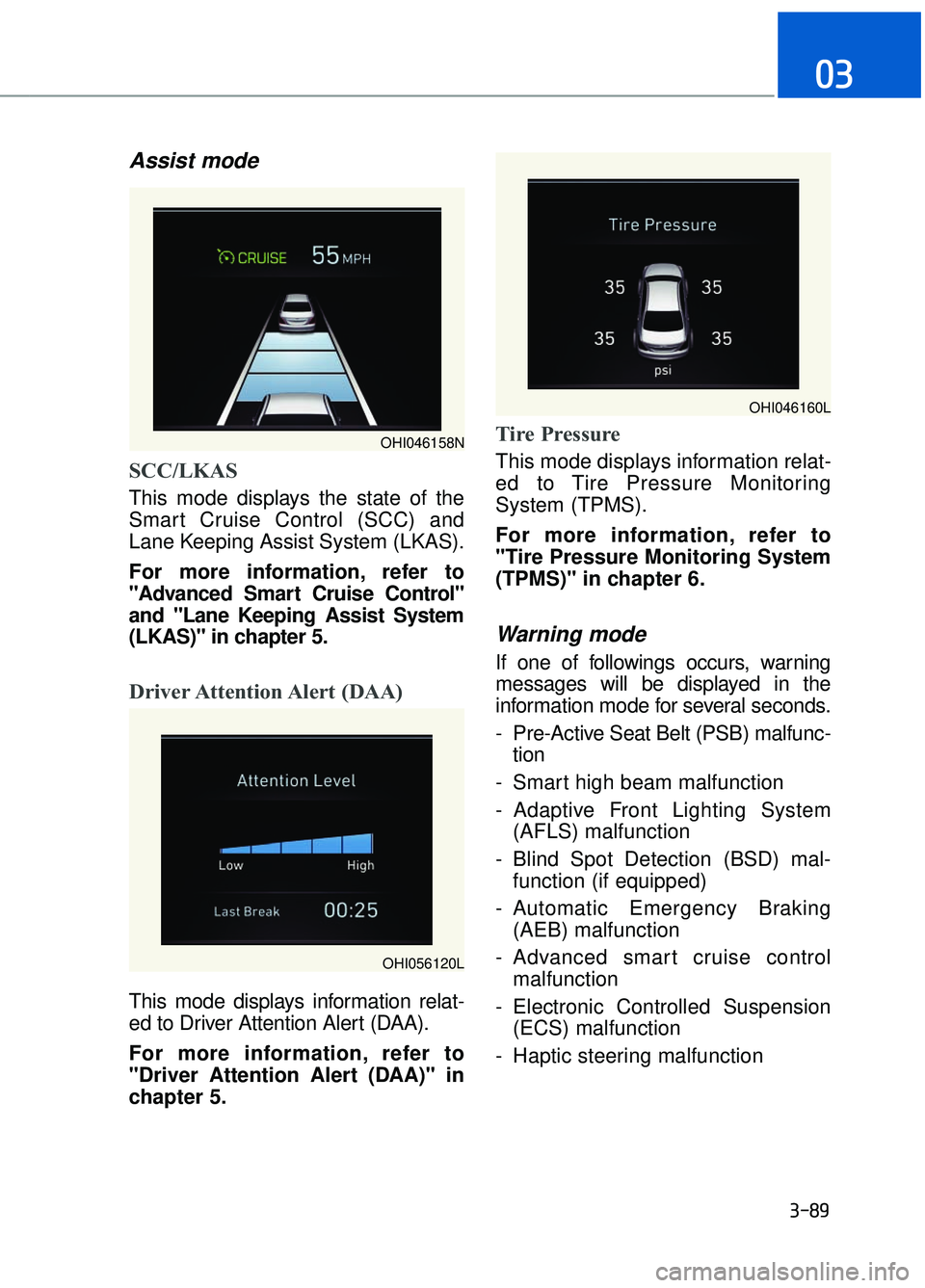
Assist mode
SCC/LKAS
This mode displays the state of the
Smart Cruise Control (SCC) and
Lane Keeping Assist System (LKAS).
For more information, refer to
"Advanced Smart Cruise Control"
and "Lane Keeping Assist System
(LKAS)" in chapter 5.
Driver Attention Alert (DAA)
This mode displays information relat-
ed to Driver Attention Alert (DAA).
For more information, refer to
"Driver Attention Alert (DAA)" in
chapter 5.
Tire Pressure
This mode displays information relat-
ed to Tire Pressure Monitoring
System (TPMS).
For more information, refer to
"Tire Pressure Monitoring System
(TPMS)" in chapter 6.
Warning mode
If one of followings occurs, warning
messages will be displayed in the
information mode for several seconds.
- Pre-Active Seat Belt (PSB) malfunc-tion
- Smart high beam malfunction
- Adaptive Front Lighting System (AFLS) malfunction
- Blind Spot Detection (BSD) mal- function (if equipped)
- Automatic Emergency Braking (AEB) malfunction
- Advanced smart cruise control malfunction
- Electronic Controlled Suspension (ECS) malfunction
- Haptic steering malfunction
3-89
03
OHI046158N
OHI046160L
OHI056120L
Page 192 of 524

User settings mode
In this mode, you can change the
setting of the head-up display, instru-
ment cluster, doors, lamps, etc.
1. Head-Up Display
2. Driving Assist
3. Door
4. Lights
5. Sound
6. Convenience
7. Service Interval
8. Other Features
9. Reset
The information provided differs
according to the items applied to your
vehicle.1. Head-Up Display
If this item is checked, it will turn on
the head-up display.
To adjust the height of the image.
To adjust the angle of the image.
To adjust the brightness of the image.
To select the information displayed
- Tu r n b y Tu r n
- Traffic information
- Smart cruise control
- Lane keeping assist system
- Blind spot detection system
To select the speedometer font size.
- Large/Medium/Small
To select the speedometer font color.
White/Orange/Green
For more information, refer to the
"Head-Up Display" in this chapter.
3-90
Convenient features of your vehicle
OHI046161L
OHI046162L
Page 193 of 524

2. Driving Assist
To adjust the sensitivity of the Lane
Keeping Assist System.
- Lane Departure/Standard LKA/ActiveLKA
For more information, refer to the
"Lane Keeping Assist System" in
chapter 5.
To adjust the sensitivity of the Driver
Attention Alert (DAA). - Off/Normal/Early
For more information, refer to the
"Driver Attention Alert (DAA)" in
chapter 5.
To adjust the sensitivity of the Smart
Cruise Control system.
- Slow/Normal/Fast
For more information, refer to the
"Advanced Smart Cruise Control"
in chapter 5.
To activate or deactivate the Automatic
Emergency Braking (AEB).
For more information, refer to
"Automatic Emergency Braking
(AEB)" in chapter 5.
To adjust the initial warning alert time
for Automatic Emergency Braking
system.
- Late/Normal/Early
For more information, refer to
"Automatic Emergency Braking
(AEB)" in chapter 5.
To adjust the initial warning alert time
for the Lane Change Assist.
- Normal/Late
For more information, refer to
"Blind Spot Detection" in chapter 5.
To activate or deactivate the Rear
Cross Traffic Alert system.
For more information, refer to
"Blind Spot Detection" in chapter 5.
To activate or deactivate the Blind
Spot Detection sound.
For more information, refer to
"Blind Spot Detection" in chapter 5.
3-91
03
OHI046208L
Page 201 of 524

3-99
03
Head-Up Display ON/OFF
To activate the head-up display,
select "Head-Up Display" on the
User Settings mode in the cluster.
If you do not select "Head-Up
Display", the head-up display will be
deactivated.
Head-Up Display information
1. Turn-by-turn (TBT) navigationinformation
2. Road information
3. Driving speed information
4. Cruise system set speed informa- tion
5. Advanced smart cruise informa- tion
6. Lane Keeping Assist System (LKAS) information
7. Blind spot detection warnings
8. Warning lights
9. AV information
Information
If you select the Turn By Turn (TBT)
navigation information as Head-Up
Display contents, the Turn By Turn
(TBT) navigation information will not
be displayed on the LCD Display.
i
OHI046175L
OHI046404N
Page 206 of 524

3-104
Convenient features of your vehicle
Warning light and message
When the Smart High Beam Assist
System is not working properly, the
warning message will come on for a
few second. After the message disap-
pears, the master warning light will illu-
minate. Take your vehicle to an author-
ized Dealer of Genesis Brand Products
and have the system checked.
The system may not operate nor-
mally in the below conditions.
When the light from the on-coming or front vehicle is not
detected because of lamp dam-
age, hidden from sight, etc.
When the lamp of the on-com- ing or front vehicle is covered
with dust, snow or water.
When the light from the on- coming or front vehicle is not
detected because of exhaust
fume, smoke, fog, snow, etc.
When the front window is cov- ered with foreign matters such
as ice, dust, fog, or is damaged.
When there is a similar shape lamp with the front vehicle’s
lamps.
(Continued)
WARNING
(Continued)
When it is hard to see becauseof fog, heavy rain or snow.
When the headlamp is not repaired or replaced at an
authorized dealer.
When headlamp aiming is not properly adjusted.
When driving on a narrow curved road or rough road.
When driving downhill or uphill.
When only part of the vehicle in front is visible on a crossroad
or curved road.
When there is a traffic light, reflecting sign, flashing sign or
mirror.
When the road conditions are bad such as being wet or cov-
ered with snow.
When the front vehicle's head- lamps are off but the fog lamps
on.
When a vehicle suddenly appears from a curve.
When the vehicle is tilted from a flat tire or being towed.
When the LKAS (Lane Keeping Assist System) warning light
illuminates.
OHI046489N/OHI046490N
■
Warning message ■Master warning