phone GENESIS GV80 2021 Owner's Manual
[x] Cancel search | Manufacturer: GENESIS, Model Year: 2021, Model line: GV80, Model: GENESIS GV80 2021Pages: 632, PDF Size: 9.37 MB
Page 2 of 632
IntroductionF2
Your Genesis Branded Vehicle should not be modified in any way. Such
modifications may adversely affect the performance, safety or durability of your
Genesis Branded Vehicle and may, in addition, violate conditions of the limited
warranties covering the vehicle. Certain modifications may also be in violation
of regulations established by the U.S. Department of Transportation and other
federal or state agencies.
Your vehicle is equipped with electronic fuel injection and other electronic
components. It is possible for an improperly installed/adjusted two-way radio
or cellular telephone to adversely affect electronic systems. For this reason, we
recommend that you carefully follow the radio manufacturer’s instructions or
consult your authorized retailer of Genesis Branded products for precautionary
measures or special instructions if you choose to install one of these devices.
CAUTION: MODIFICATIONS TO YOUR GENESIS BRANDED VEHICLE
TWO-WAY RADIO OR CELLULAR TELEPHONE INSTALLATION
Page 18 of 632
2-6
Vehicle Information, Consumer Information and Reporting Safety Defects
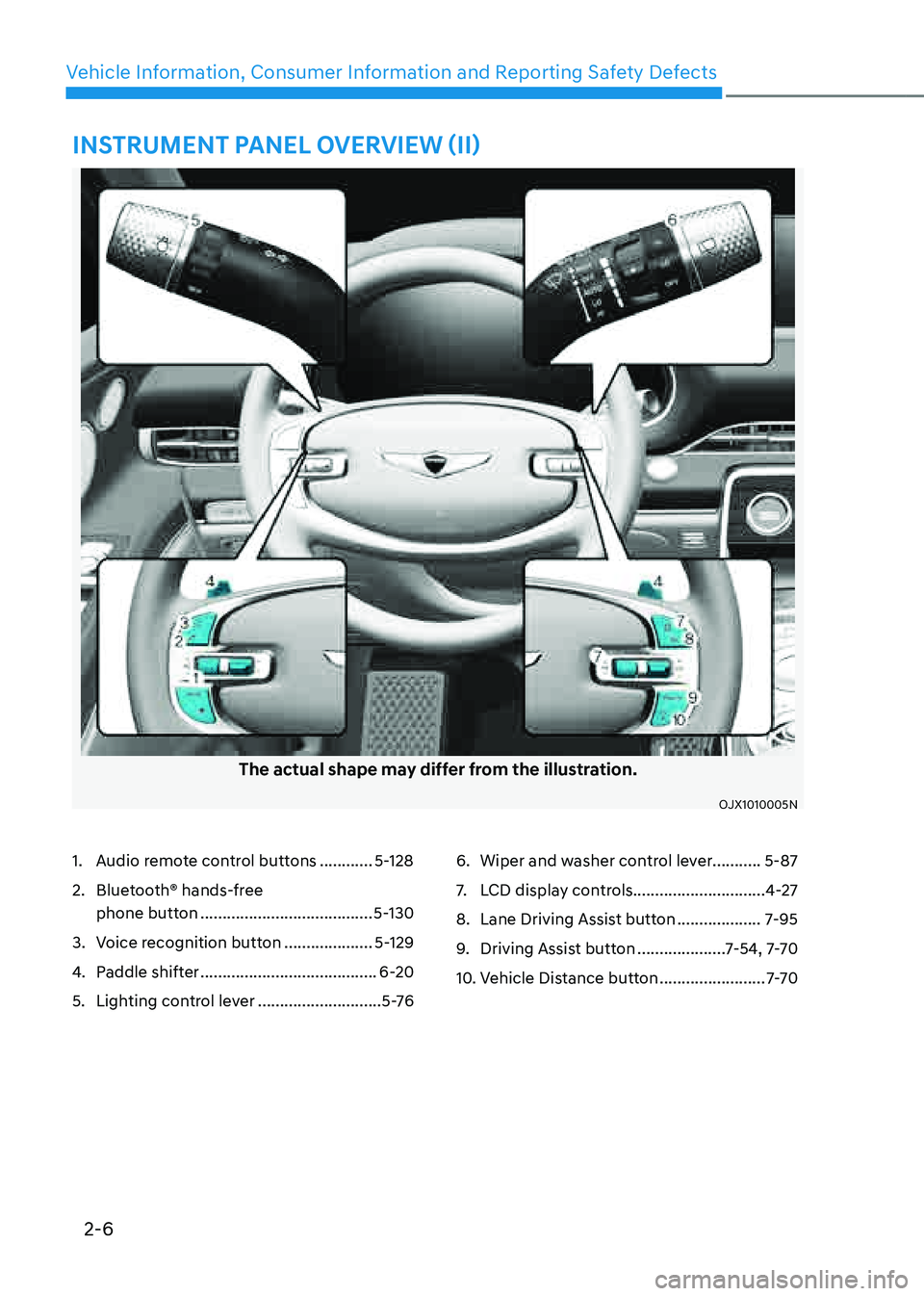
INSTRUMENT PANEL OVERVIEW (II)
The actual shape may differ from the illustration.
OJX1010005NOJX1010005N
1. Audio remote control buttons ............5-128
2. Bluetooth® hands-free
phone button
.......................................5-130
3. Voice recognition button ....................5-129
4. Paddle shifter ........................................6-20
5. Lighting control lever ............................5 -76
6. Wiper and washer control lever...........5-87
7. LCD display controls ..............................4-27
8. Lane Driving Assist button ...................7-95
9. Driving Assist button ....................7-54, 7-7 0
10. Vehicle Distance button ........................7-7 0
Page 31 of 632
Safety System
3-2
You will find many safety precautions
and recommendations throughout this
section, and throughout this manual.
The safety precautions in this section are
among the most important.
Always Wear Your Seat Belt
A seat belt is your best protection in all
types of accidents. Air bags are designed
to supplement seat belts, not replace
them. So even though your vehicle is
equipped with air bags, ALWAYS make
sure you and your passengers wear your
seat belts, and wear them properly.
Restrain All Children
All children under age 13 should ride
in your vehicle properly restrained in a
rear seat, not the front seat. Infants and
small children should be restrained in
an appropriate Child Restraint System.
Larger children should use a booster
seat with the lap/shoulder belt until they
can use the seat belt properly without a
booster seat.
Air Bag Hazards
While air bags can save lives, they can
also cause serious or fatal injuries to
occupants who sit too close to them, or
who are not properly restrained. Infants,
young children, and short adults are at
the greatest risk of being injured by an
inflating air bag. Follow all instructions
and warnings in this manual.
Driver Distraction
Driver distraction presents a serious and
potentially deadly danger, especially for
inexperienced drivers. Safety should be
the first concern when behind the wheel
and drivers need to be aware of the wide
array of potential distractions, such as
drowsiness, reaching for objects, eating,
personal grooming, other passengers,
and using mobile phones.Drivers can become distracted when
they take their eyes and attention off
the road or their hands off the wheel to
focus on activities other than driving.
To reduce your risk of distraction and an
accident:
• ALWAYS set up your mobile devices
(i.e., MP3 players, phones, navigation
units, etc.) when your vehicle is
parked or safely stopped.
• ONLY use your mobile device when
allowed by laws and conditions permit
safe use. NEVER text or email while
driving. Most countries have laws
prohibiting drivers from texting. Some
countries and cities also prohibit
drivers from using handheld phones.
• NEVER let the use of a mobile device
distract you from driving. You have a
responsibility to your passengers and
others on the road to always drive
safely, with your hands on the wheel
as well as your eyes and attention on
the road.
Control Your Speed
Excessive speed is a major factor in crash
injuries and deaths. Generally, the higher
the speed, the greater the risk, but
serious injuries can also occur at lower
speeds. Never drive faster than is safe
for current conditions, regardless of the
maximum speed posted.
Keep Your Vehicle in Safe
Condition
Having a tire blowout or a mechanical
failure can be extremely hazardous. To
reduce the possibility of such problems,
check your tire pressures and condition
frequently, and perform all regularly
scheduled maintenance.
IMPORTANT SAFETY PRECAUTIONS
Page 86 of 632
03
3-57
WARNING
To reduce the risk of serious injury or
death from inflating front air bags, take
the following precautions:
• Seat belts must be worn at all times
to help keep occupants positioned
properly.
• Move your seat as far back as
possible from front air bags, while
still maintaining control of the
vehicle.
• Never lean against the door or center
console.
• Do not allow the front passenger
to place their feet or legs on the
dashboard.
• No objects (such as crash pad
cover, mobile phone holder, cup
holder, perfume or stickers) should
be placed over or near the air bag
modules on the steering wheel,
instrument panel, windshield glass,
and the front passenger’s panel
above the glove box. Such objects
could cause harm if the vehicle is in a
crash severe enough to cause the air
bags to deploy.
• Do not attach any objects on the
front windshield and inside mirror.
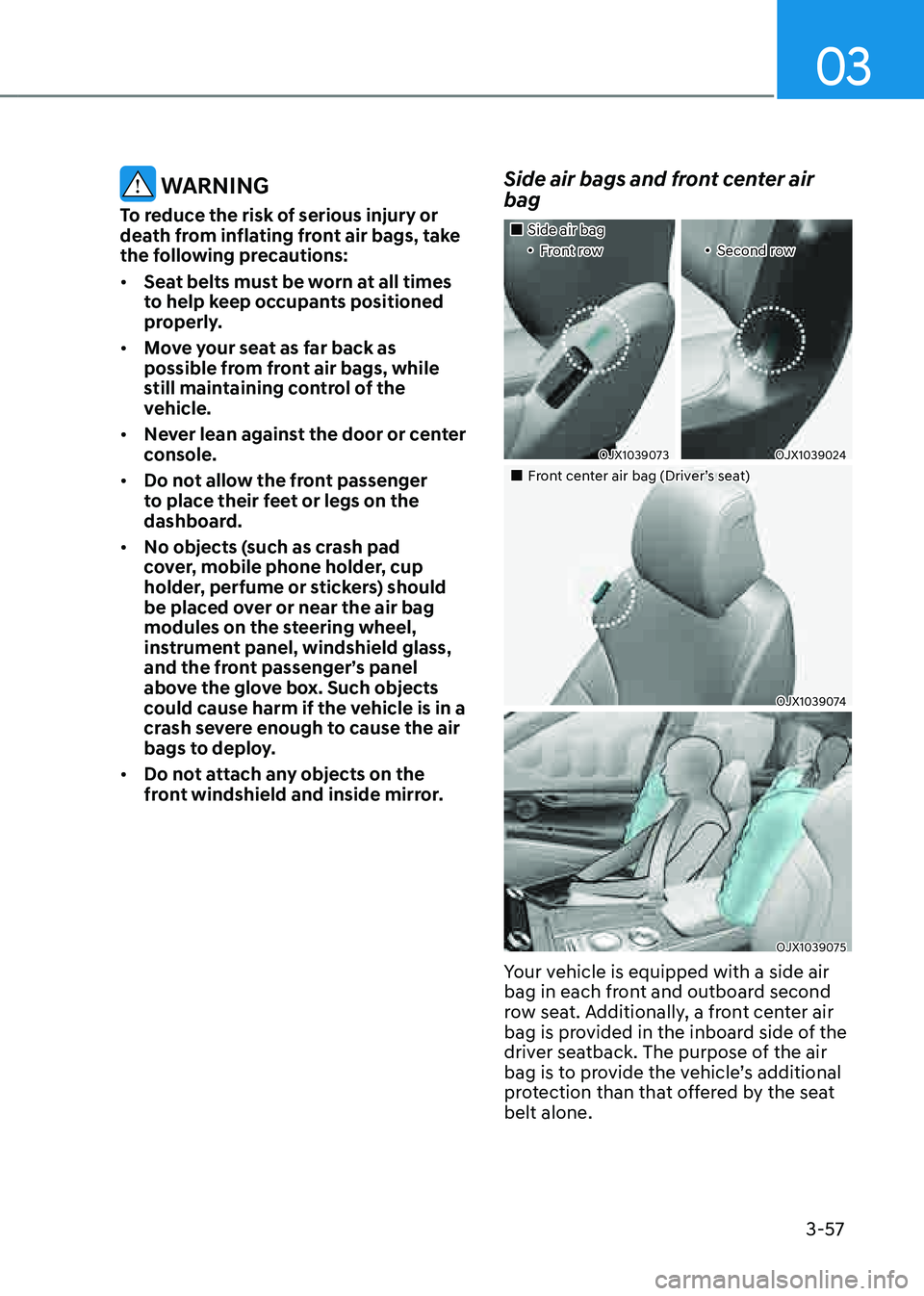
Side air bags and front center air
bag
Page 141 of 632
Instrument Cluster
4-36
WARNING
• You should not use the 3D cluster if
you or any of your family members
or relatives has a history of epilepsy,
convulsions, etc. Flashing or
flickering lights or specific or regular
patterns shown on the cluster may
stimulate epilepsy, convulsions, etc.
• You should not use the 3D effect
immediately if you feel any of the
following symptoms:
Haziness, unconsciousness,
disorientation, nausea, headache,
fatigue, dizziness, etc.
NOTICE
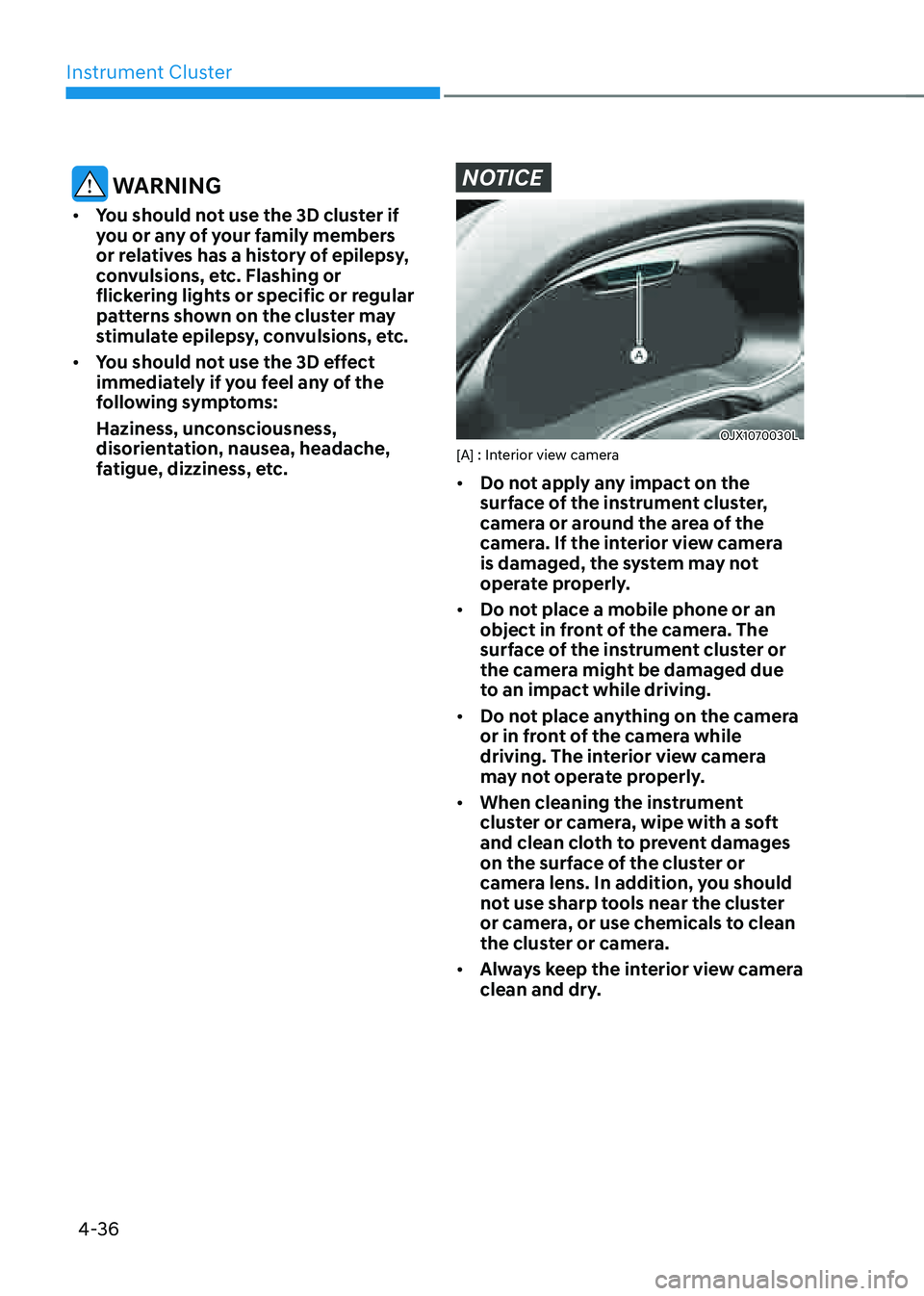
OJX1070030LOJX1070030L[A] : Interior view camera
• Do not apply any impact on the
surface of the instrument cluster,
camera or around the area of the
camera. If the interior view camera
is damaged, the system may not
operate properly.
• Do not place a mobile phone or an
object in front of the camera. The
surface of the instrument cluster or
the camera might be damaged due
to an impact while driving.
• Do not place anything on the camera
or in front of the camera while
driving. The interior view camera
may not operate properly.
• When cleaning the instrument
cluster or camera, wipe with a soft
and clean cloth to prevent damages
on the surface of the cluster or
camera lens. In addition, you should
not use sharp tools near the cluster
or camera, or use chemicals to clean
the cluster or camera.
• Always keep the interior view camera
clean and dry.
Page 143 of 632

Convenient Features
Accessing Your Vehicle ........................................................................\
.............5-4Smart Key ........................................................................\
..............................................5-4
Immobilizer System ........................................................................\
............................5-11
Genesis Digital Key ........................................................................\
.................5-12Digital Key (Smart Phone) ........................................................................\
...................5-12
Digital Key (Card Key) ........................................................................\
.........................5-19
Personalized User Profile and Vehicle Settings ........................................................5-22
Used Vehicle/Digital Key Maintenance ....................................................................5-25
Limitations of the System ........................................................................\
..................5-25
Door Locks ........................................................................\
...............................5-26Operating Door Locks From Outside the Vehicle ....................................................5-26
Operating Door Locks From Inside the Vehicle ........................................................5-28
Automatic Door Lock and Unlock Features
...............................................................5-31
Child-Protector Rear Door Locks ........................................................................\
.......5-31
Electronic Child Safety Lock ........................................................................\
..............5-32
Vehicle Auto-Shut Off ........................................................................\
........................5-33
Theft-Alarm System ........................................................................\
................5-34
Integrated Memory System ........................................................................\
.... 5-35
Storing Memory Positions ........................................................................\
.................5-35
Recalling Memory Positions ........................................................................\
..............5-36
Resetting the System ........................................................................\
.........................5-36
Seat Easy Access ........................................................................\
................................5-37
Smart Posture Care System ........................................................................\
...5-38
Steering Wheel
........................................................................\
........................5-39Electric Power Steering (EPS) ........................................................................\
............5-39
Tilt / Telescopic Steering ........................................................................\
..................5-40
Horn ........................................................................\
..................................................... 5-41
Heated Steering Wheel
........................................................................\
......................5-42
Mirrors ........................................................................\
.....................................5-43Inside Rearview Mirror ........................................................................\
.......................5-43
Side View Mirrors ........................................................................\
..............................5-49
Reverse Parking Aid ........................................................................\
...........................5-51
Windows ........................................................................\
..................................5-53Power Windows ........................................................................\
..................................5-54
5. Convenient Features
5
Page 145 of 632

Climate Control Additional Features ............................................................5-109Auto Defogging System ........................................................................\
...................5-109
Auto Dehumidify ........................................................................\
...............................5-110
Recirculating Air When Washer Fluid Is Used ..........................................................5-111
Sunroof Inside Air Recirculation ........................................................................\
........5-111
Storage Compartment ........................................................................\
............5-112Center Console Storage ........................................................................\
....................5-112
Glove Box ........................................................................\
...........................................5-112
Sunglass Holder ........................................................................\
................................5-113
Storage Tray (7-seater) ........................................................................\
......................5-113
Interior Features ........................................................................\
......................5-114Cup Holder ........................................................................\
.........................................5-114
Sunvisor ........................................................................\
.............................................5-115
Rear Mirror ........................................................................\
.........................................5-116
Power Outlet ........................................................................\
......................................5-116
USB Charger ........................................................................\
......................................5-117
AC Inverter ........................................................................\
.........................................5-118
Wireless Smart Phone Charging System .................................................................5-119
Clock ........................................................................\
..................................................5-121
Coat Hook ........................................................................\
..........................................5-121
Floor Mat Anchor(s) ........................................................................\
...........................5-122
Rear Side Window Sunshades ........................................................................\
..........5-123
Cargo Net Holder ........................................................................\
.............................5-124
Cargo Security Screen ........................................................................\
......................5-125
Exterior Features ........................................................................\
....................5-127Roof Side Rails ........................................................................\
...................................5-127
Infotainment System ........................................................................\
.............5-128USB Port ........................................................................\
............................................5-128
Antenna ........................................................................\
.............................................5-128
Steering Wheel Remote Controls ........................................................................\
....5-128
Infotainment System ........................................................................\
........................5-129
Voice Recognition ........................................................................\
............................5-129
Bluetooth® Wireless Technology
........................................................................\
.....5-130
Lexicon Premium Sound System ........................................................................\
....5-130
5. Convenient Features
5
Page 151 of 632
05
5-9
Mechanical key
If the Smart Key does not operate
normally, you can lock or unlock the
driver’s door by using the mechanical
key.
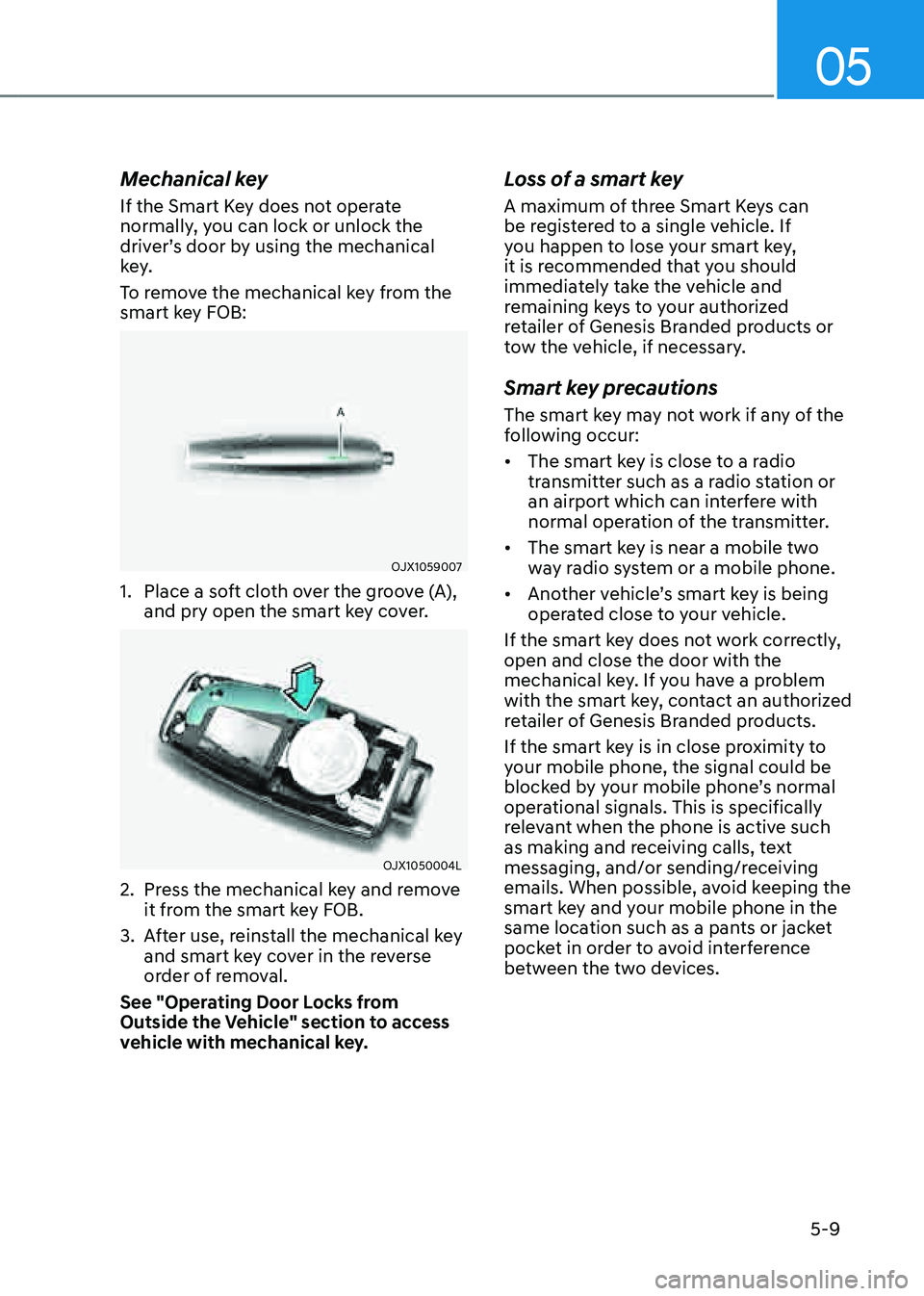
To remove the mechanical key from the
smart key FOB:
OJX1059007OJX1059007
1. Place a soft cloth over the groove (A),
and pry open the smart key cover.
OJX1050004LOJX1050004L
2. Press the mechanical key and remove
it from the smart key FOB.
3. After use, reinstall the mechanical key
and smart key cover in the reverse
order of removal.
See "Operating Door Locks from
Outside the Vehicle" section to access
vehicle with mechanical key.
Loss of a smart key
A maximum of three Smart Keys can
be registered to a single vehicle. If
you happen to lose your smart key,
it is recommended that you should
immediately take the vehicle and
remaining keys to your authorized
retailer of Genesis Branded products or
tow the vehicle, if necessary.
Smart key precautions
The smart key may not work if any of the
following occur:
• The smart key is close to a radio
transmitter such as a radio station or
an airport which can interfere with
normal operation of the transmitter.
• The smart key is near a mobile two
way radio system or a mobile phone.
• Another vehicle’s smart key is being
operated close to your vehicle.
If the smart key does not work correctly,
open and close the door with the
mechanical key. If you have a problem
with the smart key, contact an authorized
retailer of Genesis Branded products.
If the smart key is in close proximity to
your mobile phone, the signal could be
blocked by your mobile phone’s normal
operational signals. This is specifically
relevant when the phone is active such
as making and receiving calls, text
messaging, and/or sending/receiving
emails. When possible, avoid keeping the
smart key and your mobile phone in the
same location such as a pants or jacket
pocket in order to avoid interference
between the two devices.
Page 154 of 632
Convenient Features
5-12
Genesis digital key provides convenience
to the driver, which the driver can use to
lock or unlock the driver and passenger
doors or the liftgate and turn on the
engine.
Digital Key (Smart Phone)
How to register Digital Key (Smart
phone)
To use the smart phone as a digital key
follow the following procedure.
This service is only available for Android
smart phones that has passed the internal
usability test. The driver can confirm
supported/compatible devices on our
website (https://owners.genesis.com).
In case of iPhone, Apple does not assist
any of the NFC services. (Services are
expected to be provided according to
policy change.)
Genesis Digital Key App
1. Search ‘Genesis Digital Key’ from
the Google Play Store and download
the app. Please refer to the detailed
manual of the digital key app or
Genesis website. The option can be
found under the following app menu:
Menu → Application Info → Tutorial.
Please read the manual before using
the app.
2. After downloading the app, sign up for
a Genesis account and service.Smart phone set up
• The driver can use the Digital Key NFC
(Near Field Communication) feature
after enabling it on the smart phone’s
settings menu. To change the NFC
setting of the smart phone, please
refer to the smart phone manual or
contact the customer service center
of smart phone manufacturers.
• The driver should unlock and turn on
the smart phone screen. (Unlock the
screen lock such as password, pattern
or fingerprint, etc.)
Smart phone registration
1. Turn the vehicle on with the smart key
and make sure to keep the smart key
inside the vehicle during digital key
registration.
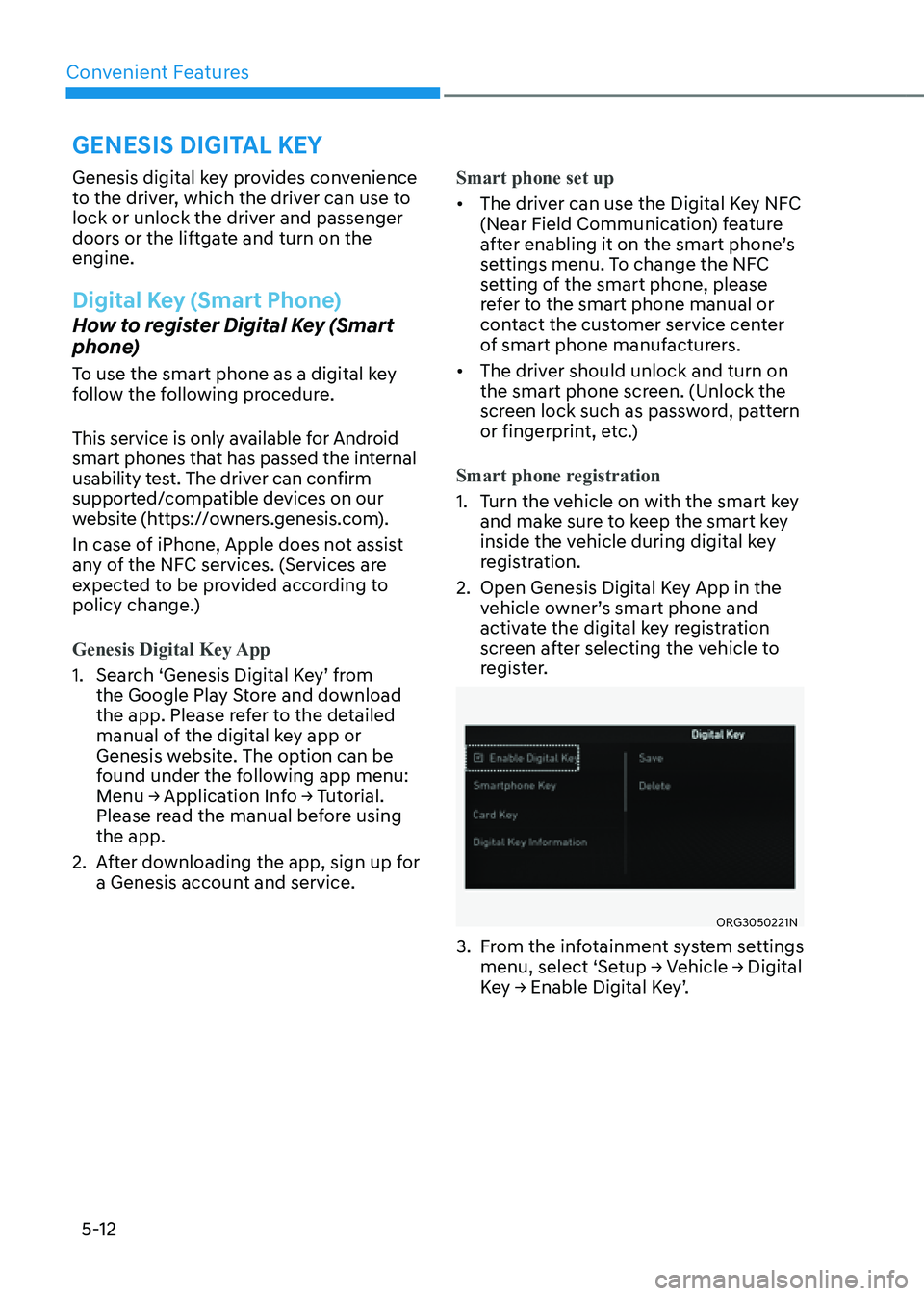
2. Open Genesis Digital Key App in the
vehicle owner’s smart phone and
activate the digital key registration
screen after selecting the vehicle to
register.
ORG3050221NORG3050221N
3. From the infotainment system settings
menu, select ‘Setup → Vehicle → Digital
Key → Enable Digital Key’.
GENESIS DIGITAL KEY
Page 155 of 632
![GENESIS GV80 2021 Owners Manual 05
5-13
OJX1059011LOJX1059011L[A] : In-vehicle authentication pad (Wireless charging pad)
4. After ‘Enabling Digital Key’ is selected,
place the backside of the smart phone
on the in-vehicle au](/img/46/35616/w960_35616-154.png "GENESIS GV80 2021 Owners Manual 05
5-13
OJX1059011LOJX1059011L[A] : In-vehicle authentication pad (Wireless charging pad)
4. After ‘Enabling Digital Key’ is selected,
place the backside of the smart phone
on the in-vehicle au")
05
5-13
OJX1059011LOJX1059011L[A] : In-vehicle authentication pad (Wireless charging pad)
4. After ‘Enabling Digital Key’ is selected,
place the backside of the smart phone
on the in-vehicle authentication pad.
ORG3050222N ORG3050222N
5. Select ‘Smartphone Key → Save’
menu on the infotainment system
screen. The saving process will begin
automatically.
6. When the digital key (smart phone) is
saved, a message will appear on the
infotainment system screen.
7. Remove the smart phone from the
pad and complete the saving process
under the guidance of the smart
phone screen.
Information
• Vehicle
When there is a digital key (smart
phone) already saved in the vehicle, the
‘Save’ menu is disabled. If you want to
save a digital key again, refer to “How
to delete Digital Key (Smart phone)”
and follow the deleting procedure first
before saving a digital key.
• Smart phone
The digital key cannot be saved again
while the vehicle’s digital key is saved
in the owner’s smart phone. Save the
digital key after deleting the digital key
from the Digital Key App.
• During the digital key saving process,
the process will cancel when:
-The smart phone is removed from
the in-vehicle authentication pad
(wireless charging pad)
-Changing the infotainment system or
instrument cluster screen
-The vehicle is turned off
-The gear is shifted
-Saving digital key that does not
belong to the vehicle owner
-The smart phone screen is locked or
turned off
-NFC setting of your smart phone is
off (saving process will not begin)
-There is no smart key (saving process
will not begin)