phone GENESIS GV80 2021 Owner's Guide
[x] Cancel search | Manufacturer: GENESIS, Model Year: 2021, Model line: GV80, Model: GENESIS GV80 2021Pages: 632, PDF Size: 9.37 MB
Page 413 of 632

07
7-65
System disabled
OJX1079073LOJX1079073L
When there is an object right in front
of the camera or between the driver
and the camera for a certain period of
time, Forward Attention Warning will
not operate properly, and the ‘Forward
Attention Warning disabled. Camera
obscured’ warning message will appear
on the cluster.
After the warning message appears, if
the object is removed, or the system
is able to detect the driver’s face, the
system will operate normally.
CAUTION
OJX1070030LOJX1070030L[A] : Interior view camera
• Do not apply any impact on the
surface of the instrument cluster,
camera or around the area of the
camera. If the interior view camera is
damaged, the system may not work
properly.
• Do not place a mobile phone or an
object in front of the camera. The
surface of the instrument cluster or
the camera might be damaged due
to an impact while driving.
• Do not place anything on the camera
or in front of the camera while
driving. The interior view camera
may not operate properly.
• If anything else is placed in front of
the camera, the warning system may
not operate properly.
• When cleaning the instrument
cluster or camera, wipe with a soft
and clean cloth to prevent damages
on the surface of the cluster or
camera lens. In addition, you should
not use sharp tools near the cluster
or camera, or use chemicals to clean
the cluster or camera.
• Always keep the camera and around
the area of the interior view camera
clean and dry.
• Do not apply foreign objects, such
as a sticker, around the infrared LED
located near the camera.
Page 474 of 632
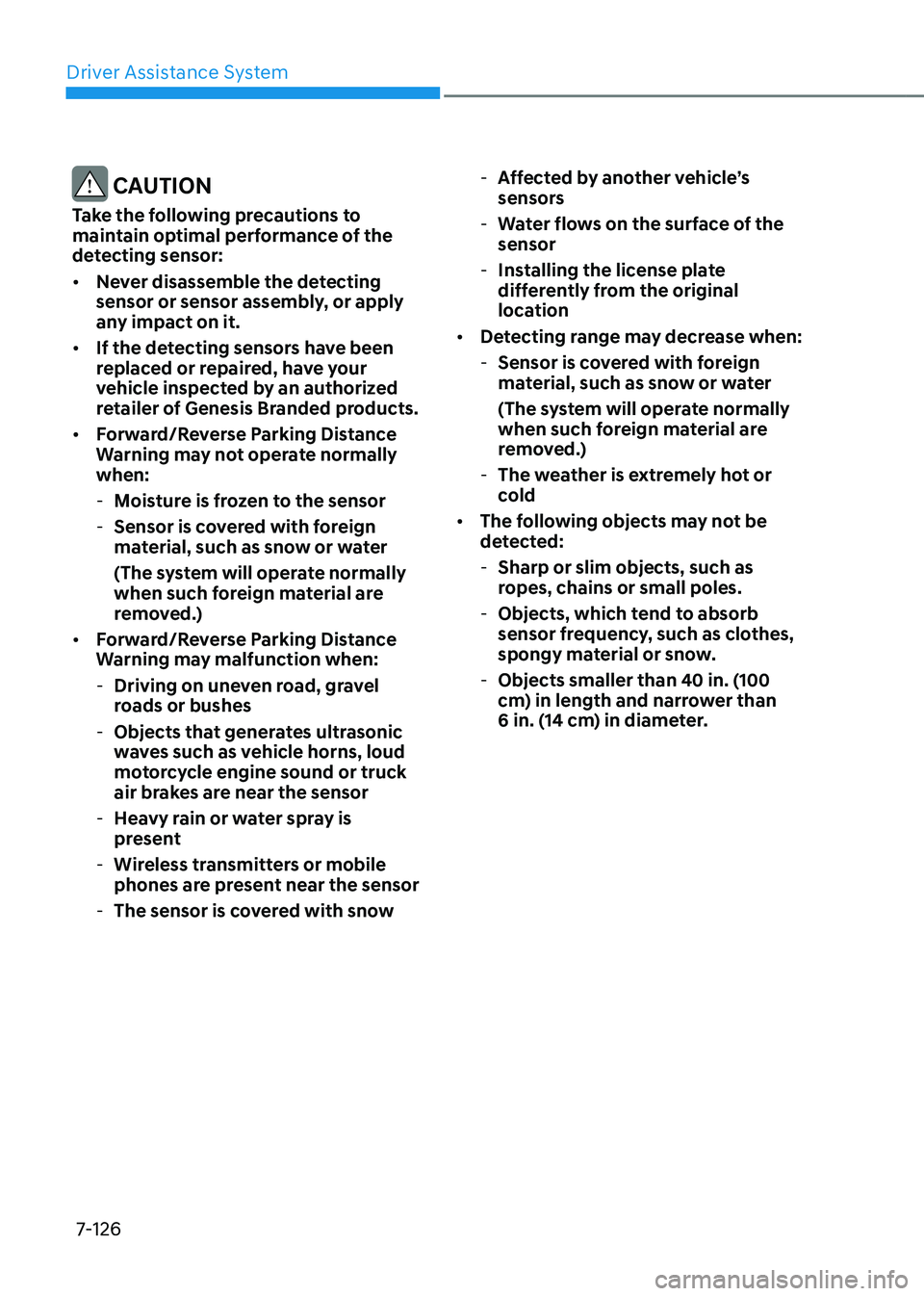
Driver Assistance System
7-126
CAUTION
Take the following precautions to
maintain optimal performance of the
detecting sensor:
• Never disassemble the detecting
sensor or sensor assembly, or apply
any impact on it.
• If the detecting sensors have been
replaced or repaired, have your
vehicle inspected by an authorized
retailer of Genesis Branded products.
• Forward/Reverse Parking Distance
Warning may not operate normally
when:
-Moisture is frozen to the sensor
-Sensor is covered with foreign
material, such as snow or water
(The system will operate normally
when such foreign material are
removed.)
• Forward/Reverse Parking Distance
Warning may malfunction when:
-Driving on uneven road, gravel
roads or bushes
-Objects that generates ultrasonic
waves such as vehicle horns, loud
motorcycle engine sound or truck
air brakes are near the sensor
-Heavy rain or water spray is
present
-Wireless transmitters or mobile
phones are present near the sensor
-The sensor is covered with snow
-Affected by another vehicle’s
sensors
-Water flows on the surface of the
sensor
-Installing the license plate
differently from the original
location
• Detecting range may decrease when:
-Sensor is covered with foreign
material, such as snow or water
(The system will operate normally
when such foreign material are
removed.)
-The weather is extremely hot or
cold
• The following objects may not be
detected:
-Sharp or slim objects, such as
ropes, chains or small poles.
-Objects, which tend to absorb
sensor frequency, such as clothes,
spongy material or snow.
-Objects smaller than 40 in. (100
cm) in length and narrower than
6 in. (14 cm) in diameter.
Page 489 of 632
![GENESIS GV80 2021 Owners Guide 07
7-141
Detecting sensor
OJX1070296LOJX1070296L
OJX1070297LOJX1070297L[1] : Front ultrasonic sensors,
[2] : Front corner ultrasonic sensors,
[3] : Rear corner ultrasonic sensors,
[4] : Rear ultraso](/img/46/35616/w960_35616-488.png "GENESIS GV80 2021 Owners Guide 07
7-141
Detecting sensor
OJX1070296LOJX1070296L
OJX1070297LOJX1070297L[1] : Front ultrasonic sensors,
[2] : Front corner ultrasonic sensors,
[3] : Rear corner ultrasonic sensors,
[4] : Rear ultraso")
07
7-141
Detecting sensor
OJX1070296LOJX1070296L
OJX1070297LOJX1070297L[1] : Front ultrasonic sensors,
[2] : Front corner ultrasonic sensors,
[3] : Rear corner ultrasonic sensors,
[4] : Rear ultrasonic sensors
Refer to the picture above for the
detailed location of the detecting
sensors.
CAUTION
Take the following precautions to
maintain optimal performance of the
detecting sensors:
• Never disassemble the detecting
sensor or sensor assembly, or apply
any impact on it.
• If the detecting sensor have been
replaced or repaired, have your
vehicle inspected by an authorized
retailer of Genesis Branded products.
• Remote Smart Parking Assist may not
operate normally when:
-Moisture is frozen to the sensor
-Sensor is covered with foreign
material, such as snow or water
The system will operate normally
when such foreign material are
removed.
• Remote Smart Parking Assist may
malfunction when:
- Driving on uneven road, gravel
roads or bushes
-Objects that generates ultrasonic
waves such as vehicle horns, loud
motorcycle engine sound or truck
air brakes are near the sensor
-Heavy rain or water spray is
present
-Wireless transmitters or mobile
phones are present near the sensor
-The sensor is covered with snow
-Affected by another vehicle’s
sensors
-Water flows on the surface of the
sensor
-Installing the license plate
differently from the original
location
Page 491 of 632

07
7-143
Remote Smart Parking Assist button
Parking/View buttonSmart keyDigital key
OJX1079107OJX1079107OJX1050005NOJX1050005NOJX1070306NOJX1070306N
LocationNameSymbol Description
Inside
vehicle Parking/View
button
• Press and hold the Parking/View button to turn
on Remote Smart Parking Assist. Also, Forward/
Reverse Parking Distance warning will automatically
turn on.
However, functions may differ depending on the
situations. Refer to each function's description for
more details in the following pages.
• Press and hold the Parking/View button while Smart
Parking or Smart Exit function is on to operate the
function.
Parking
Safety button
• Press the Parking Safety button while Remote Smart
Parking Assist is operating to end system operation.
Smart key Remote Start
button
• Press the Remote Start button after the door is
locked with the engine off to start the engine
remotely.
• Press the Remote Start button while Remote
Smart Parking or Remote Moving Forward/Reverse
function is operating to end function operation.
Forward button
• When using Remote Smart Parking function,
regardless of which direction button is pressed,
parking is supported while the button is pressed.
• When using the Remote Entry/Exit Parking function,
the vehicle moves in the direction of the button
while the button is pressed.
Reverse
button
Digital key Remote
Smart
Parking
Assist icon
• Press the Remote Smart Parking Assist icon on
the smartphone digital key application to activate
Remote Smart Parking.
• When using the Remote Entry/Exit Parking function,
the vehicle moves in the direction of the icon is
pushed and moves while the icon is pushed.
• When using Remote Smart Parking function,
regardless of which direction the icon is pushed,
parking is supported while the icon is pushed.
Page 589 of 632
Maintenance
9-48
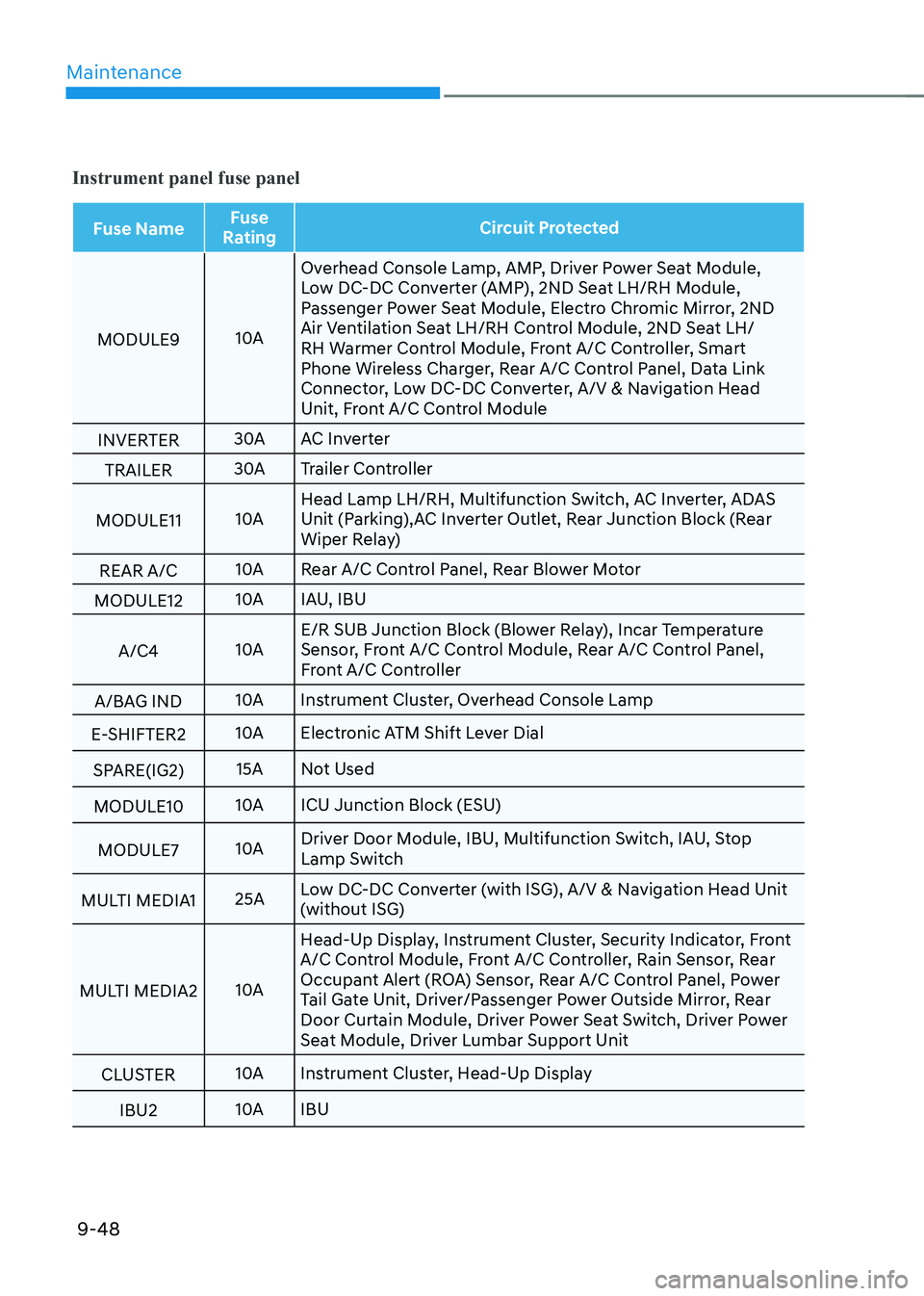
Instrument panel fuse panel
Fuse NameFuse
Rating Circuit Protected
MODULE9 10AOverhead Console Lamp, AMP, Driver Power Seat Module,
Low DC-DC Converter (AMP), 2ND Seat LH/RH Module,
Passenger Power Seat Module, Electro Chromic Mirror, 2ND
Air Ventilation Seat LH/RH Control Module, 2ND Seat LH/
RH Warmer Control Module, Front A/C Controller, Smart
Phone Wireless Charger, Rear A/C Control Panel, Data Link
Connector, Low DC-DC Converter, A/V & Navigation Head
Unit, Front A/C Control Module
INVERTER 30A
AC Inverter
TRAILER 30A
Trailer Controller
MODULE11 10AHead Lamp LH/RH, Multifunction Switch, AC Inverter, ADAS
Unit (Parking),AC Inverter Outlet, Rear Junction Block (Rear
Wiper Relay)
REAR A/C 10A
Rear A/C Control Panel, Rear Blower Motor
MODULE12 10A
IAU, IBU
A/C4 10AE/R SUB Junction Block (Blower Relay), Incar Temperature
Sensor, Front A/C Control Module, Rear A/C Control Panel,
Front A/C Controller
A/BAG IND 10A
Instrument Cluster, Overhead Console Lamp
E-SHIFTER2 10A
Electronic ATM Shift Lever Dial
SPARE(IG2) 15A
Not Used
MODULE10 10A
ICU Junction Block (ESU)
MODULE7 10ADriver Door Module, IBU, Multifunction Switch, IAU, Stop
Lamp Switch
MULTI MEDIA1 25ALow DC-DC Converter (with ISG), A/V & Navigation Head Unit
(without ISG)
MULTI MEDIA2 10AHead-Up Display, Instrument Cluster, Security Indicator, Front
A/C Control Module, Front A/C Controller, Rain Sensor, Rear
Occupant Alert (ROA) Sensor, Rear A/C Control Panel, Power
Tail Gate Unit, Driver/Passenger Power Outside Mirror, Rear
Door Curtain Module, Driver Power Seat Switch, Driver Power
Seat Module, Driver Lumbar Support Unit
CLUSTER 10A
Instrument Cluster, Head-Up Display
IBU2 10A
IBU
Page 590 of 632
09
9-49
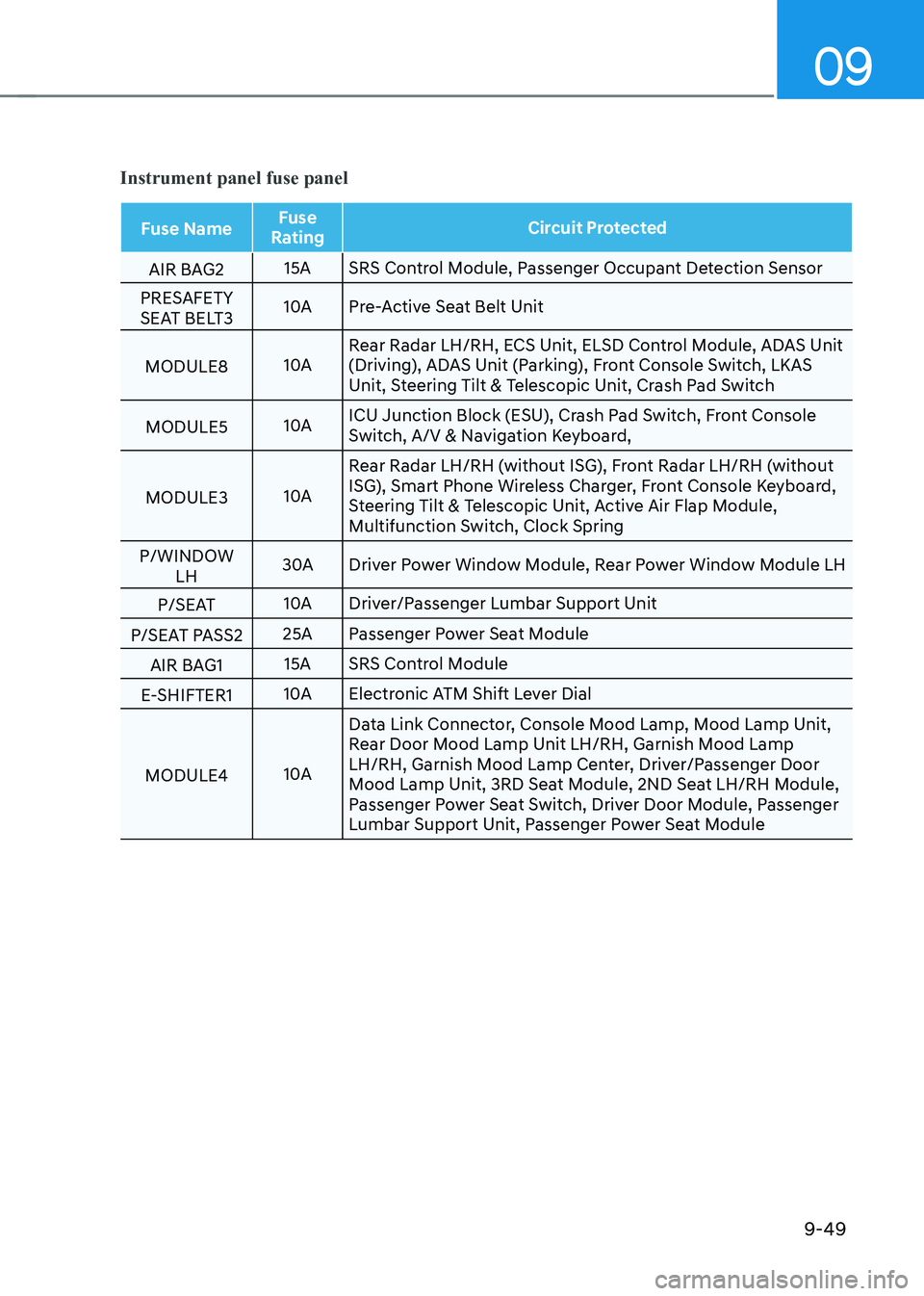
Instrument panel fuse panel
Fuse NameFuse
Rating Circuit Protected
AIR BAG2 15A
SRS Control Module, Passenger Occupant Detection Sensor
PRESAFETY
SEAT BELT3 10A
Pre-Active Seat Belt Unit
MODULE8 10ARear Radar LH/RH, ECS Unit, ELSD Control Module, ADAS Unit
(Driving), ADAS Unit (Parking), Front Console Switch, LKAS
Unit, Steering Tilt & Telescopic Unit, Crash Pad Switch
MODULE5 10AICU Junction Block (ESU), Crash Pad Switch, Front Console
Switch, A/V & Navigation Keyboard,
MODULE3 10ARear Radar LH/RH (without ISG), Front Radar LH/RH (without
ISG), Smart Phone Wireless Charger, Front Console Keyboard,
Steering Tilt & Telescopic Unit, Active Air Flap Module,
Multifunction Switch, Clock Spring
P/WINDOW LH 30A
Driver Power Window Module, Rear Power Window Module LH
P/SEAT 10A
Driver/Passenger Lumbar Support Unit
P/SEAT PASS2 25A
Passenger Power Seat Module
AIR BAG1 15A
SRS Control Module
E-SHIFTER1 10A
Electronic ATM Shift Lever Dial
MODULE4 10AData Link Connector, Console Mood Lamp, Mood Lamp Unit,
Rear Door Mood Lamp Unit LH/RH, Garnish Mood Lamp
LH/RH, Garnish Mood Lamp Center, Driver/Passenger Door
Mood Lamp Unit, 3RD Seat Module, 2ND Seat LH/RH Module,
Passenger Power Seat Switch, Driver Door Module, Passenger
Lumbar Support Unit, Passenger Power Seat Module
Page 596 of 632
09
9-55
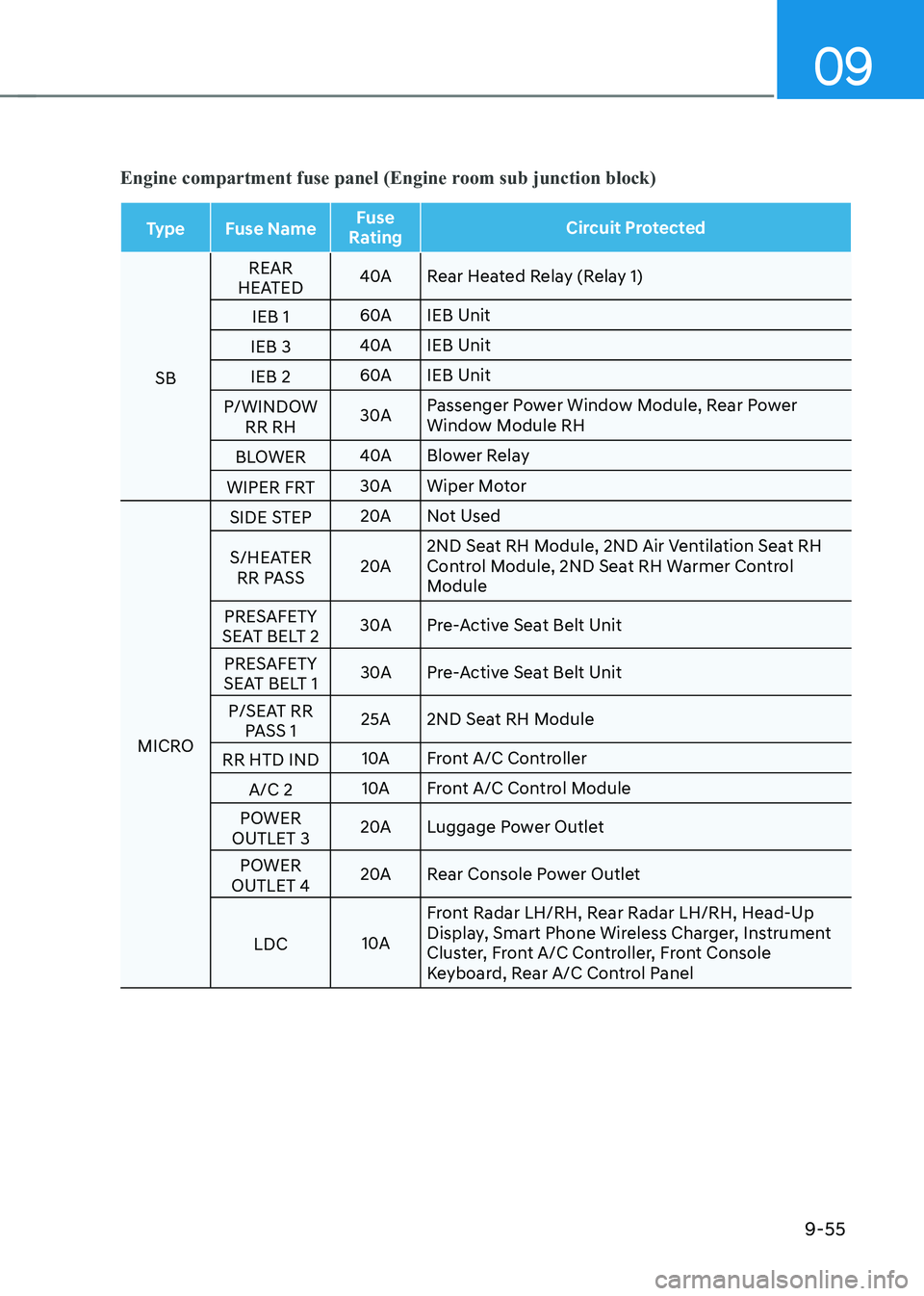
Engine compartment fuse panel (Engine room sub junction block)
TypeFuse Name Fuse
Rating Circuit Protected
SB REAR
HEATED 40A
Rear Heated Relay (Relay 1)
IEB 1 60A
IEB Unit
IEB 3 40A
IEB Unit
IEB 2 60A
IEB Unit
P/WINDOW RR RH 30A
Passenger Power Window Module, Rear Power
Window Module RH
BLOWER 40A
Blower Relay
WIPER FRT 30A
Wiper Motor
MICRO SIDE STEP
20A
Not Used
S/HEATER RR PASS 20A2ND Seat RH Module, 2ND Air Ventilation Seat RH
Control Module, 2ND Seat RH Warmer Control
Module
PRESAFETY
SEAT BELT 2 30A
Pre-Active Seat Belt Unit
PRESAFETY
SEAT BELT 1 30A
Pre-Active Seat Belt Unit
P/SEAT RR PASS 1 25A
2ND Seat RH Module
RR HTD IND 10A
Front A/C Controller
A/C 2 10A
Front A/C Control Module
POWER
OUTLET 3 20A
Luggage Power Outlet
POWER
OUTLET 4 20A
Rear Console Power Outlet
LDC 10AFront Radar LH/RH, Rear Radar LH/RH, Head-Up
Display, Smart Phone Wireless Charger, Instrument
Cluster, Front A/C Controller, Front Console
Keyboard, Rear A/C Control Panel
Page 624 of 632
 ........................................................................\
....................2-2
Exterior Overview (II)
..............................................")
Index
I-6
Exterior Overview (I) ........................................................................\
....................2-2
Exterior Overview (II)
........................................................................\
...................2-3
F
Forward Attention Warning (FAW)
.....................................................................7-63
System Malfunction and Limitations
..............................................................7-64
System Operation
........................................................................\
....................7-64
System Settings
........................................................................\
.......................7-63
Forward Collision–Avoidance Assist (FCA)
.........................................................7-2
System Malfunction and Limitations
..............................................................7-17
System Operation
........................................................................\
......................7-8
System Settings
........................................................................\
.........................7-5
Forward/Reverse Parking Distance Warning (PDW)
........................................7-125
System Malfunction and Precautions
............................................................7-130
System Operation
........................................................................\
..................7-128
System settings
........................................................................\
......................7-127
Fuses
........................................................................\
............................................9-44
Engine Compartment Panel Fuse Replacement
..............................................9-46
Fuse/Relay Panel Description
........................................................................\
.9-47
Instrument Panel Fuse Replacement
...............................................................9-45
G
Genesis Digital Key
........................................................................\
....................5-12
Digital Key (Card Key)
........................................................................\
...........5-19
Digital Key (Smart Phone)
........................................................................\
......5-12
Limitations of the System
........................................................................\
.......5-25
Personalized User Profile and Vehicle Settings
..............................................5-22
Used Vehicle/Digital Key Maintenance
..........................................................5-25
Guide to Genesis Parts
........................................................................\
...................1-3
H
Hazard Warning Flasher
........................................................................\
................8-2
Head-Up Display (HUD)
........................................................................\
.............5-74
Head-Up Display Information ........................................................................\
. 5-74
Head-Up Display Settings
........................................................................\
.......5-74
Precautions While Using the Head-Up Display
..............................................5-75
Page 627 of 632

I
I-9
Sunvisor........................................................................\
................................. 5-115
USB Charger
........................................................................\
.........................5-117
Wireless Smart Phone Charging System
.......................................................5-119
Interior Overview (I) ........................................................................\
...................... 2-4
J
Jump Starting
........................................................................\
.................................8-4
L
Lane Following Assist (LFA)
........................................................................\
......7-95
System Malfunction and Limitations
..............................................................7-98
System Operation
........................................................................\
....................7-96
System Settings
........................................................................\
.......................7-95
Lane Keeping Assist (LKA)
........................................................................\
........7-26
System Malfunction and Limitations
..............................................................7-30
System Operation
........................................................................\
....................7-28
System Settings
........................................................................\
......................7-26
LCD Display
........................................................................\
................................4-27
3D Instrument Cluster (for 12.3-Inch 3D Cluster)
..........................................4-34
LCD Display Control
........................................................................\
..............4-27
Option Menu
........................................................................\
...........................4-32
View Modes
........................................................................\
............................4-27
Light Bulbs
........................................................................\
..................................9-60
Headlamp, Position Lamp, Turn Signal Lamp, Daytime Running Light (DRL)
Replacement
........................................................................\
............................9-61
High Mounted Stop Lamp Replacement
.........................................................9-63
Interior Light Replacement
........................................................................\
.....9-64
License Plate Lamp Replacement
...................................................................9-64
Puddle Lamp Replacement
........................................................................\
.....9-62
Rear combination Lamp Replacement
............................................................9-63
Side Repeater Lamp Replacement
..................................................................9-62
Lighting
........................................................................\
.......................................5-76
Exterior Lights
........................................................................\
........................5-76
Interior Lights ........................................................................\
.......................... 5-79
Welcome System
........................................................................\
.....................5-83