remote control GMC ACADIA 2007 Owner's Guide
[x] Cancel search | Manufacturer: GMC, Model Year: 2007, Model line: ACADIA, Model: GMC ACADIA 2007Pages: 554, PDF Size: 2.76 MB
Page 308 of 554
BAND:Press this button to listen to the radio
when a CD or a DVD is playing. The CD or DVD
remains inside the radio for future listening or
viewing entertainment.
DVD/CD AUX (Auxiliary):Press this button
to cycle through DVD, CD, or Auxiliary when
listening to the radio. The DVD/CD text label
and a message showing track or chapter
number displays when a disc is in either slot.
Press this button again and the system
automatically searches for an auxiliary input
device, such as a portable audio player.
If a portable audio player is not connected,
“No Aux Input Device” displays. If a disc is in
both the DVD slot and the CD slot the DVD/CDAUX button cycles between the two sources and
not indicate “No Aux Input Device”. If a front
auxiliary device is connected, the DVD/CD AUX
button cycles through all available options,
such as: DVD slot, CD slot, Front Auxiliary, and
Rear Auxiliary (if available). See “Using the
Auxiliary Input Jack(s)” later in this section, or
“Audio/Video (A/V) Jacks” under,Rear Seat
Entertainment System on page 311for more
information.
If a MP3/WMA is inserted into top DVD slot, the
rear seat operator can turn on the video screen
and use the remote control to navigate the
CD (tracks only) through the remote control.
308
Page 311 of 554
Navigation/Radio System
Your vehicle may have a navigation radio system.
The navigation system has built-in features
intended to minimize driver distraction. Technology
alone, no matter how advanced, can never
replace your own judgment. See the Navigation
System manual for some tips to help you
reduce distractions while driving.
Rear Seat Entertainment System
Your vehicle may have a DVD Rear Seat
Entertainment (RSE) system. The RSE system
works with the vehicle’s audio system. The
DVD player is part of the front radio. The RSE
system includes a radio with a DVD player, a video
display screen, audio/video jacks, two wireless
headphones, and a remote control. SeeRadio with
CD and DVD on page 278for more information
on the vehicle’s audio/DVD system.
Before You Drive
The RSE is designed for rear seat passengers
only. The driver cannot safely view the video
screen while driving and should not try to do so.
In severe or extreme weather conditions the
RSE system might not work until the temperature
is within the operating range. The operating
range for the RSE system is above−4°F (−20°C)
or below 140°F (60°C). If the temperature of
your vehicle is outside of this range, heat or cool
the vehicle until the temperature is within the
operating range of the RSE system.
Parental Control
The RSE system may have a Parental Control
feature, depending on which radio you have.
To enable Parental Control, press and hold the
radio power button for more than two seconds to
stop all system features such as: radio, video
screen, RSA, DVD and/or CD. While Parental
Control is on, a padlock icon displays.
When the radio is turned back on, Parental
Control is unlocked.
311
Page 314 of 554
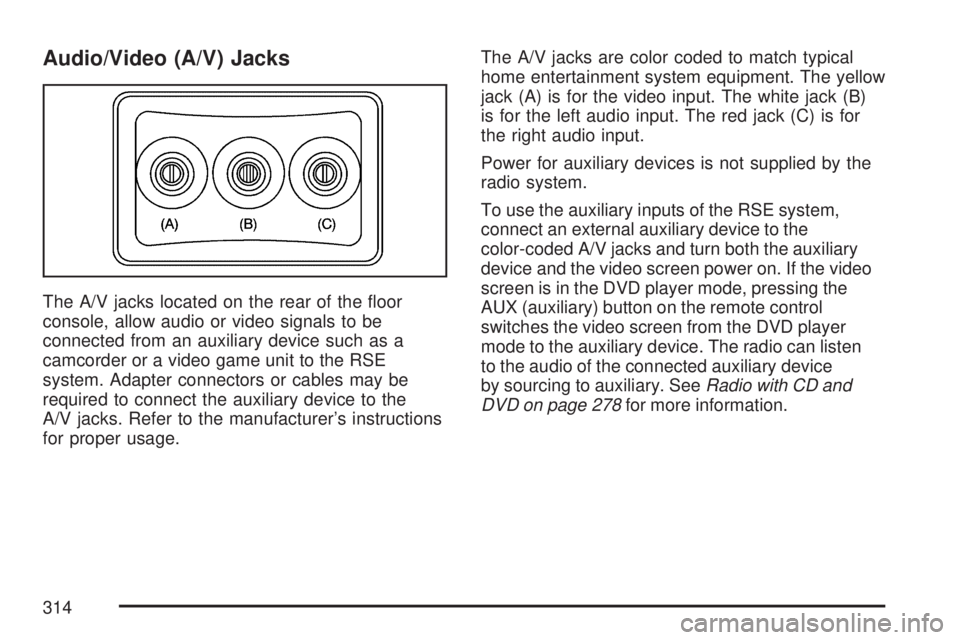
Audio/Video (A/V) Jacks
The A/V jacks located on the rear of the oor
console, allow audio or video signals to be
connected from an auxiliary device such as a
camcorder or a video game unit to the RSE
system. Adapter connectors or cables may be
required to connect the auxiliary device to the
A/V jacks. Refer to the manufacturer’s instructions
for proper usage.The A/V jacks are color coded to match typical
home entertainment system equipment. The yellow
jack (A) is for the video input. The white jack (B)
is for the left audio input. The red jack (C) is for
the right audio input.
Power for auxiliary devices is not supplied by the
radio system.
To use the auxiliary inputs of the RSE system,
connect an external auxiliary device to the
color-coded A/V jacks and turn both the auxiliary
device and the video screen power on. If the video
screen is in the DVD player mode, pressing the
AUX (auxiliary) button on the remote control
switches the video screen from the DVD player
mode to the auxiliary device. The radio can listen
to the audio of the connected auxiliary device
by sourcing to auxiliary. SeeRadio with CD and
DVD on page 278for more information.
314
Page 315 of 554
How to Change the RSE Video Screen
Settings
The screen display mode (normal, full, and zoom),
screen brightness, and setup menu language
can be changed from the on screen setup menu.
To change any feature, do the following:
1. Press the display menu button on the
remote control.
2. Use the remote control menu navigation
arrows and the enter button to use the
setup menu.
3. Press the display menu button again to
remove the setup menu from the screen.
Audio Output
Audio from the DVD player or auxiliary inputs can
be heard through the following possible sources:
Wireless Headphones
Vehicle Speakers
Vehicle wired headphone jacks on the rear
seat audio system, if your vehicle has this
feature.The RSE system always transmits the audio
signal to the wireless headphones, if there is
audio available. See “Headphones” earlier in this
section for more information.
When a device is connected to the A/V jacks,
or the radio’s auxiliary input jack, if your vehicle
has this feature, the rear seat passengers are able
to hear audio from the auxiliary device through
the wireless or wired headphones. The front
seat passengers are able to listen to playback
from this device through the vehicle speakers by
selecting AUX as the source on the radio.
Video Screen
The video screen is located in the RSE overhead
console.
To use the video screen, do the following:
1. Push the release button located on the
RSE overhead console.
2. Move the screen to the desired position.
When the video screen is not in use, push it up
into its locked position.
315
Page 316 of 554
If a DVD is playing and the screen is raised to
its locked position, the screen remains on. This is
normal. The DVD continues to play through the
previous audio source. Use the remote control
power button or eject the disc to turn off the
screen.
The RSE overhead console contains the IR
transmitters for the wireless headphones and
the IR receivers for the remote control. They
are located at the rear of the console.
Notice:Avoid directly touching the video
screen, as damage may occur. See “Cleaning
the Video Screen” later in this section for
more information.Remote Control
To use the remote control, aim it at the transmitter
window at the rear of the RSE overhead console
and press the desired button. Direct sunlight
or very bright light can affect the ability of the
RSE transmitter to receive signals from the remote
control. If the remote control does not seem to
be working, the batteries might need to be
replaced. See “Battery Replacement” later in this
section. Objects blocking the line of sight can
also affect the function of the remote control.
If a CD or DVD is in the Radio DVD slot,
the remote control power button can be used to
turn on the video screen display and start the disc.
The radio can also turn on the video screen
display. SeeRadio with CD and DVD on page 278
for more information.
Notice:Storing the remote control in a hot
area or in direct sunlight can damage it,
and the repairs will not be covered by your
warranty. Keep the remote control stored in a
cool, dry place.
316
Page 317 of 554
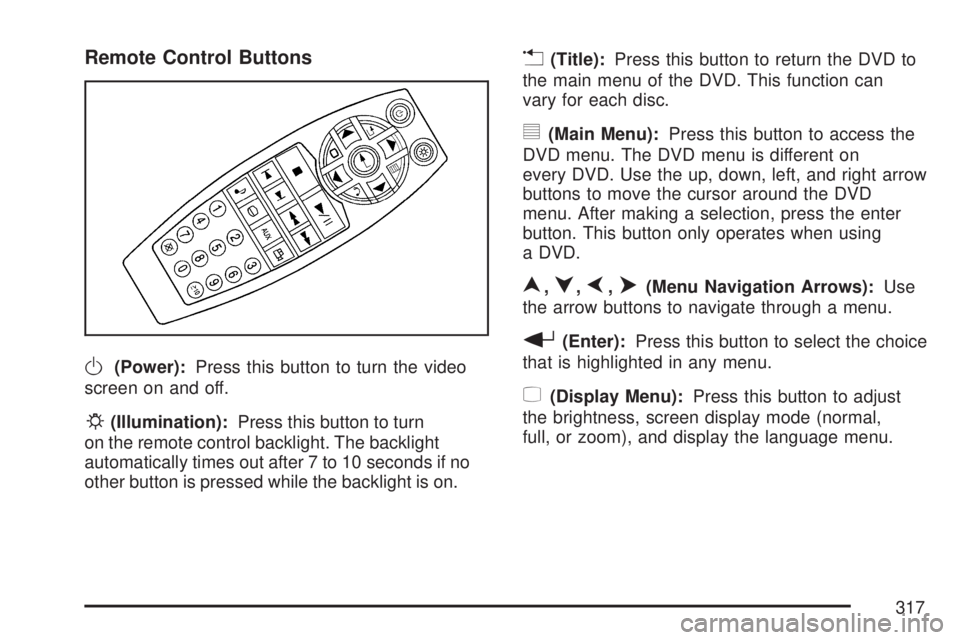
Remote Control Buttons
O(Power):Press this button to turn the video
screen on and off.
P(Illumination):Press this button to turn
on the remote control backlight. The backlight
automatically times out after 7 to 10 seconds if no
other button is pressed while the backlight is on.
v(Title):Press this button to return the DVD to
the main menu of the DVD. This function can
vary for each disc.
y(Main Menu):Press this button to access the
DVD menu. The DVD menu is different on
every DVD. Use the up, down, left, and right arrow
buttons to move the cursor around the DVD
menu. After making a selection, press the enter
button. This button only operates when using
a DVD.
n,q,p,o(Menu Navigation Arrows):Use
the arrow buttons to navigate through a menu.
r(Enter):Press this button to select the choice
that is highlighted in any menu.
z(Display Menu):Press this button to adjust
the brightness, screen display mode (normal,
full, or zoom), and display the language menu.
317
Page 319 of 554
[(Fast Forward):Press this button to fast
forward the DVD or CD. To stop fast forwarding a
DVD video, press the play button. To stop fast
forwarding a DVD audio or CD, release the
fast forward button. This button might not work
when the DVD is playing the copyright information
or the previews.
e(Audio):Press this button to change audio
tracks on DVDs that have this feature when
the DVD is playing. The format and content of this
function vary for each disc.
{(Subtitles):Press this button to turn ON/OFF
subtitles and to move through subtitle options
when a DVD is playing. The format and content
of this function vary for each disc.
AUX (Auxiliary):Press this button to switch the
system between the DVD player and an auxiliary
source.
d(Camera):Press this button to change camera
angles on DVDs that have this feature when a
DVD is playing. The format and content of
this function vary for each disc.
1 through 0 (Numeric Keypad):The numeric
keypad provides the capability of direct chapter or
track number selection.
\(Clear):Press this button within three seconds
after entering a numeric selection, to clear all
numeric inputs.
}10 (Double Digit Entries):Press this button to
select chapter or track numbers greater than
nine. Press this button before entering the number.
If the remote control becomes lost or damaged,
a new universal remote control can be purchased.
If this happens, make sure the universal remote
control uses a code set of Toshiba
®.
319
Page 320 of 554
Battery Replacement
To change the remote control batteries, do the
following:
1. Remove the battery compartment door
located on the bottom of the remote control.
2. Replace the two AA batteries in the
compartment. Make sure that they are
installed correctly, using the diagram on the
inside of the battery compartment.
3. Close the battery door securely.
If the remote control is to be stored for a long
period of time, remove the batteries and keep them
in a cool, dry place.
Problem Recommended Action
No power. The ignition might not be
turned on or in accessory.
The picture does not ll
the screen. There are
black borders on the
top and bottom or on
both sides or it looks
stretched out.Check the display mode
settings in the setup menu
by pressing the display
menu button on the
remote control.
In auxiliary mode, the
picture moves or scrolls.Check the auxiliary input
connections at both
devices.
The remote control
does not work.Check to make sure there
is no obstruction between
the remote control and
the transmitter window.
Check the batteries to
make sure they are not
dead or installed
incorrectly.
After stopping the player,
I push Play but
sometimes the DVD
starts where I left off and
sometimes at the
beginning.If the stop button was
pressed one time, the
DVD player resumes
playing where the DVD
was stopped. If the stop
button was pressed two
times the DVD player
begins to play from the
beginning of the DVD.
320
Page 548 of 554
Maintenance Schedule (cont.)
Maintenance Record................................ 514
Maintenance Requirements...................... 500
Normal Maintenance Replacement Parts ... 512
Owner Checks and Services.................... 507
Recommended Fluids and Lubricants....... 511
Scheduled Maintenance........................... 502
Using....................................................... 501
Your Vehicle and the Environment............ 500
Malfunction Indicator Light........................... 226
Manual Lumbar Controls............................... 11
Manual Seats.................................................. 9
Memory Seat and Mirrors.............................. 13
Message
DIC Warnings and Messages................... 244
Mirrors
Automatic Dimming Rearview with
OnStar
®and Compass......................... 140
Manual Rearview Mirror with OnStar®...... 140
Outside Convex Mirror............................. 144
Outside Heated Mirrors............................ 145
Outside Power Foldaway Mirrors.............. 143
Outside Power Mirrors............................. 142
MP3 ...................................................295, 301
MyGMLink.com............................................ 521
N
Navigation System, Privacy ......................... 538
Navigation/Radio System,
see Navigation Manual............................. 311
New Vehicle Break-In.................................. 123
Normal Maintenance Replacement Parts..... 512
O
Odometer.................................................... 216
Off-Road Recovery...................................... 342
Oil
Engine..................................................... 397
Pressure Light.......................................... 229
Oil, Engine Oil Life System ......................... 400
Older Children, Restraints............................. 48
Online Owner Center................................... 521
OnStar, Privacy........................................... 538
OnStar
®System, see OnStar®Manual........ 145
Operation, Universal Home
Remote System..............................150, 154
Orange Covered Wiring............................... 489
Other Warning Devices................................ 173
Outlet Adjustment........................................ 210
548
Page 550 of 554
Q
Questions and Answers About Safety Belts.... 28
R
Radiator Pressure Cap................................ 410
Radio Frequency Identication (RFID),
Privacy..................................................... 538
Radios........................................................ 264
Care of Your CD and DVD Player............ 328
Care of Your CDs and DVDs................... 328
Navigation/Radio System,
see Navigation Manual......................... 311
Radio with CD......................................... 268
Radio with CD and DVD.......................... 278
Rear Audio Controller (RAC).................... 324
Rear Seat Audio...................................... 322
Setting the Time...................................... 266
Theft-Deterrent......................................... 325
Understanding Reception......................... 326
Reading Lamps........................................... 188
Rear Air Conditioning and Heating System ... 211
Rear Air Conditioning and Heating System
and Electronic Climate Controls............... 212
Rear Audio Controller (RAC)....................... 324Rear Door Security Locks........................... 108
Rear Safety Belt Comfort Guides.................. 43
Rear Seat Armrest...................................... 163
Rear Seat Audio (RSA)............................... 322
Rear Seat Entertainment System................. 311
Rear Seat Operation..................................... 18
Rear Seat Passengers, Safety Belts.............. 40
Rear Windshield Washer/Wiper.................... 179
Rearview Mirror, Automatic Dimming
with OnStar
®and Compass..................... 140
Rearview Mirror with OnStar®...................... 140
Reclining Seatbacks...................................... 15
Recommended Fluids and Lubricants.......... 511
Recreational Vehicle Towing........................ 367
Remote Keyless Entry (RKE) System............ 98
Remote Keyless Entry (RKE) System,
Operation................................................. 100
Removing the Flat Tire and
Installing the Spare Tire........................... 463
Removing the Spare Tire and Tools............ 459
Replacement Bulbs..................................... 433
Reporting Safety Defects
Canadian Government............................. 534
General Motors........................................ 534
United States Government....................... 533
550