wheel GMC ACADIA 2007 Owner's Guide
[x] Cancel search | Manufacturer: GMC, Model Year: 2007, Model line: ACADIA, Model: GMC ACADIA 2007Pages: 554, PDF Size: 2.76 MB
Page 192 of 554
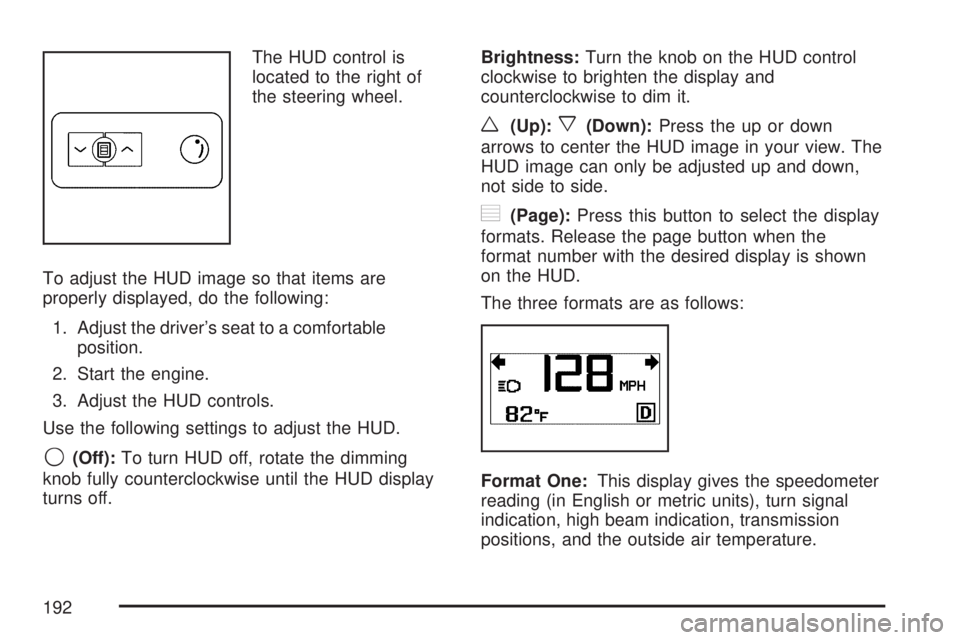
The HUD control is
located to the right of
the steering wheel.
To adjust the HUD image so that items are
properly displayed, do the following:
1. Adjust the driver’s seat to a comfortable
position.
2. Start the engine.
3. Adjust the HUD controls.
Use the following settings to adjust the HUD.
9(Off):To turn HUD off, rotate the dimming
knob fully counterclockwise until the HUD display
turns off.Brightness:Turn the knob on the HUD control
clockwise to brighten the display and
counterclockwise to dim it.
w(Up):x(Down):Press the up or down
arrows to center the HUD image in your view. The
HUD image can only be adjusted up and down,
not side to side.
?(Page):Press this button to select the display
formats. Release the page button when the
format number with the desired display is shown
on the HUD.
The three formats are as follows:
Format One:This display gives the speedometer
reading (in English or metric units), turn signal
indication, high beam indication, transmission
positions, and the outside air temperature.
192
Page 210 of 554
Rear Window Defogger
The rear window defogger uses a warming grid to
remove fog from the rear window.
<(Rear Window Defogger):Press this button
to turn the rear window defogger on or off. The
rear window defogger stays on for about
10 minutes after the button is pressed, before
turning off. The defogger can also be turned off
by pressing the button again or by turning off
the engine. Do not drive the vehicle until all the
windows are clear.
If your vehicle has heated outside rearview
mirrors, the mirrors will heat to help clear fog or
frost from the surface of the mirror when the
rear window defog button is pressed.
Notice:Do not use a razor blade or sharp
object to clear the inside rear window. Do not
adhere anything to the defogger grid lines
in the rear glass. These actions may damage
the rear defogger. Repairs would not be
covered by your warranty.
Outlet Adjustment
Use the slider switch in the center of the outlet,
to change the direction of the air ow. Use
the thumbwheel near the outlet to control the
amount of air ow or to shut off the airow
completely.
Keep all outlets open whenever possible for best
system performance.
Operation Tips
Clear away any ice, snow, or leaves from the
air inlets at the base of the windshield that
can block the ow of air into the vehicle.
Use of non-GM approved hood deectors can
adversely affect the performance of the
system.
Keep the path under all seats clear of objects
to help circulate the air inside the vehicle
more effectively.
If fogging reoccurs while in vent or bi-level
modes with mild temperature throughout
the vehicle, turn on the air conditioner
to reduce windshield fogging.
210
Page 224 of 554
StabiliTrak®Indicator Light
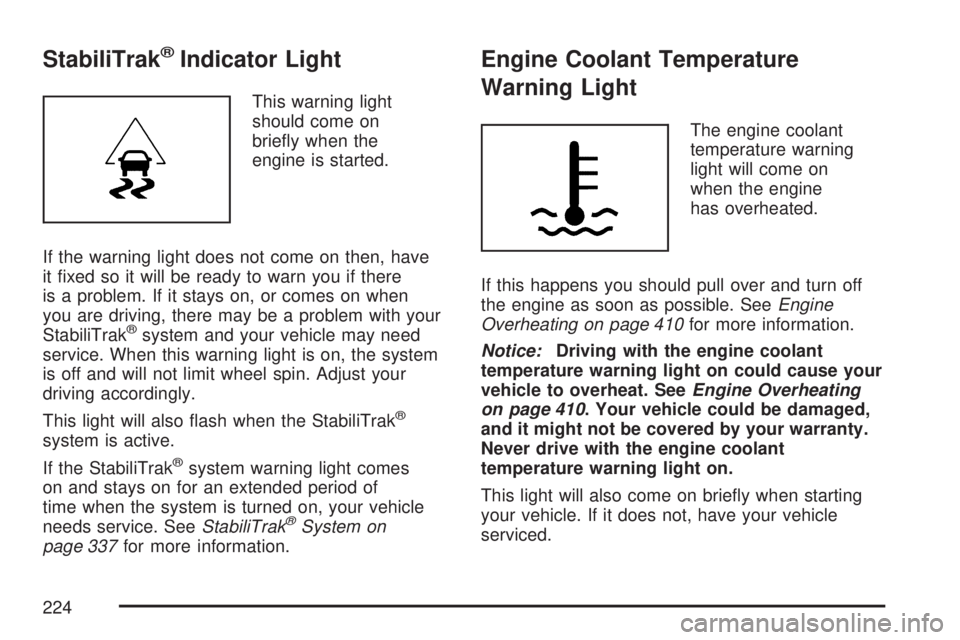
This warning light
should come on
briey when the
engine is started.
If the warning light does not come on then, have
it xed so it will be ready to warn you if there
is a problem. If it stays on, or comes on when
you are driving, there may be a problem with your
StabiliTrak
®system and your vehicle may need
service. When this warning light is on, the system
is off and will not limit wheel spin. Adjust your
driving accordingly.
This light will also ash when the StabiliTrak
®
system is active.
If the StabiliTrak
®system warning light comes
on and stays on for an extended period of
time when the system is turned on, your vehicle
needs service. SeeStabiliTrak
®System on
page 337for more information.
Engine Coolant Temperature
Warning Light
The engine coolant
temperature warning
light will come on
when the engine
has overheated.
If this happens you should pull over and turn off
the engine as soon as possible. SeeEngine
Overheating on page 410for more information.
Notice:Driving with the engine coolant
temperature warning light on could cause your
vehicle to overheat. SeeEngine Overheating
on page 410. Your vehicle could be damaged,
and it might not be covered by your warranty.
Never drive with the engine coolant
temperature warning light on.
This light will also come on briey when starting
your vehicle. If it does not, have your vehicle
serviced.
224
Page 244 of 554
DIC Warnings and Messages
Messages are displayed on the DIC to notify the
driver that the status of the vehicle has changed
and that some action may be needed by the driver
to correct the condition. Multiple messages may
appear one after another.
Some messages may not require immediate
action, but you can press any of the DIC buttons
on the instrument panel or the trip odometer
reset stem on the instrument panel cluster
to acknowledge that you received the messages
and to clear them from the display.
Some messages cannot be cleared from the DIC
display because they are more urgent. These
messages require action before they can be
cleared. You should take any messages that
appear on the display seriously and remember that
clearing the messages will only make the
messages disappear, not correct the problem.
The following are the possible messages that can
be displayed and some information about them.
ALL WHEEL DRIVE OFF
If your vehicle has the All-Wheel Drive (AWD)
system, this message displays when there
is a compact spare tire on the vehicle, when
the Anti-lock Brake System (ABS) warning light
comes on, or when the rear differential uid
is overheating. This message turns off when the
differential uid cools.
The AWD system is disabled until the compact
spare tire is replaced by a full-size tire. If the
warning message is still on after putting on the
full-size tire, you need to reset the warning
message. To reset the warning message, turn
the ignition off and then back on again after
30 seconds. If the message stays on, see your
dealer/retailer right away. SeeAll-Wheel Drive
(AWD) System on page 339for more information.
AUTOMATIC LIGHT CONTROL OFF
This message displays when the automatic
headlamps are turned off. This message clears
itself after 10 seconds.
244
Page 250 of 554
REPLACE BATTERY IN REMOTE KEY
This message displays if a Remote Keyless
Entry (RKE) transmitter battery is low. The battery
needs to be replaced in the transmitter. See
“Battery Replacement” underRemote Keyless
Entry (RKE) System Operation on page 100.
RIGHT REAR DOOR OPEN
This message displays and a chime sounds if the
passenger’s side rear door is not fully closed
and the vehicle is in a drive gear. Stop and turn
off the vehicle, check the door for obstructions,
and close the door again. Check to see if the
message still appears on the DIC.
SERVICE A/C (Air Conditioning)
SYSTEM
This message displays when the electronic
sensors that control the air conditioning and
heating systems are no longer working. Have
the climate control system serviced by your
dealer/retailer if you notice a drop in heating
and air conditioning efficiency.
SERVICE AIR BAG
This message displays if there is a problem with
the airbag system. Have your dealer/retailer
inspect the system for problems. SeeAirbag
Readiness Light on page 217andAirbag System
on page 76for more information.
SERVICE ALL WHEEL DRIVE
If your vehicle has the All-Wheel Drive (AWD)
system, this message displays if there is a problem
with this system. If this message appears, stop
as soon as possible and turn off the vehicle.
Restart the vehicle after 30 seconds and check for
the message on the DIC display. If the message
is still displayed or appears again when you
begin driving, the AWD system needs service.
See your dealer/retailer.
250
Page 252 of 554
SERVICE STABILITRAK
This message displays if there is a problem with
the StabiliTrak®system. If this message appears,
try to reset the system. Stop; turn off the engine
for at least 15 seconds; then start the engine
again. If this message still comes on, it means
there is a problem. See your dealer/retailer
for service. The vehicle is safe to drive, however,
you do not have the benet of StabiliTrak
®,
so reduce your speed and drive accordingly.
SERVICE THEFT DETERRENT SYSTEM
This message displays when there is a problem
with the theft-deterrent system. The vehicle may
or may not restart so you may want to take
the vehicle to your dealer/retailer before turning
off the engine. SeePASS-Key
®III+ Operation
on page 121for more information.
SERVICE TIRE MONITOR SYSTEM
This message displays if a part on the Tire
Pressure Monitor (TPM) system is not working
properly. If you drive your vehicle while any of
the four sensors are missing or inoperable,
the warning comes on in about 20 minutes.
A sensor would be missing, for example, if you
put different wheels on your vehicle without
transferring the sensors. If the warning comes on
and stays on, there may be a problem with the
TPM. See your dealer/retailer.
SERVICE TRACTION CONTROL
This message displays when there is a problem
with the Traction Control System (TCS). When
this message is displayed, the system will not limit
wheel spin. Adjust your driving accordingly. See
your dealer/retailer for service. SeeStabiliTrak
®
System on page 337for more information.
252
Page 264 of 554
Choose one of the available settings and press
the set/reset button while it is displayed on the
DIC to select it.
EXIT FEATURE SETTINGS
This feature allows you to exit the feature
settings menu.
Press the customization button until FEATURE
SETTINGS PRESS
VTO EXIT appears in
the DIC display. Press the set/reset button once
to exit the menu.
If you do not exit, pressing the customization
button again will return you to the beginning of
the feature settings menu.
Exiting the Feature Settings Menu
The feature settings menu will be exited when any
of the following occurs:
The vehicle is shifted out of PARK (P).
The vehicle is no longer in ON.
The trip/fuel or vehicle information DIC buttons
are pressed.
The end of the feature settings menu is
reached and exited.
A 40 second time period has elapsed with
no selection made.
Audio System(s)
Determine which radio your vehicle has and then
read the pages following to familiarize yourself
with its features.
Driving without distraction is a necessity for a
safer driving experience. SeeDefensive Driving
on page 330. By taking a few moments to read
this manual and get familiar with your vehicle’s
audio system, you can use it with less effort,
as well as take advantage of its features.
While your vehicle is parked, set up your audio
system by presetting your favorite radio stations,
setting the tone and adjusting the speakers.
Then, when driving conditions permit, you can
tune to your favorite stations using the presets and
steering wheel controls if the vehicle has them.
264
Page 265 of 554
{CAUTION:
This system provides you with a far greater
access to audio stations and song listings.
Giving extended attention to entertainment
tasks while driving can cause a crash and
you or others can be injured or killed.
Always keep your eyes on the road and
your mind on the drive — avoid engaging
in extended searching while driving.
Keeping your mind on the drive is important for
safe driving. Here are some ways in which you
can help avoid distraction while driving.
While your vehicle is parked:
Familiarize yourself with all of its controls.
Familiarize yourself with its operation.
Set up your audio system by presetting your
favorite radio stations, setting the tone, and
adjusting the speakers. Then, when driving
conditions permit, you can tune to your favorite
radio stations using the presets and steering
wheel controls if the vehicle has them.Notice:Before adding any sound equipment
to your vehicle, such as an audio system,
CD player, CB radio, mobile telephone,
or two-way radio, make sure that it can be
added by checking with your dealer/retailer.
Also, check federal rules covering mobile radio
and telephone units. If sound equipment can
be added, it is very important to do it properly.
Added sound equipment may interfere with
the operation of your vehicle’s engine, radio,
or other systems, and even damage them.
Your vehicle’s systems may interfere with
the operation of sound equipment that
has been added.
Your vehicle has a feature called Retained
Accessory Power (RAP). With RAP, the audio
system can be played even after the ignition
is turned off. SeeRetained Accessory
Power (RAP) on page 125for more information.
265
Page 270 of 554
4(Information) (XM™ Satellite Radio Service,
MP3, and RDS Features):Press the information
button to display additional text information
related to the current FM-RDS or XM™ station,
or MP3 song. A choice of additional information
such as: Channel, Song, Artist, and CAT
(category) can appear. Continue pressing the
information button to highlight the desired label,
or press the pushbutton positioned under any
one of the labels and the information about that
label displays.
When information is not available, No Info
displays.
Storing a Radio Station as a Favorite
Drivers are encouraged to set up their radio
station favorites while the vehicle is parked.
Tune to your favorite stations using the presets,
favorites button, and steering wheel controls, if the
vehicle has this feature. SeeDefensive Driving
on page 330.FAV (Favorites):A maximum of 36 stations
can be programmed as favorites using the
six pushbuttons positioned below the radio station
frequency labels and by using the radio favorites
page button (FAV button). Press the FAV button
to go through up to six pages of favorites,
each having six favorite stations available per
page. Each page of favorites can contain any
combination of AM, FM, or XM™ (if equipped)
stations. To store a station as a favorite, perform
the following steps:
1. Tune to the desired radio station.
2. Press the FAV button to display the page
where you want the station stored.
3. Press and hold one of the six pushbuttons
until a beep sounds. When that pushbutton
is pressed and released, the station that was
set, returns.
4. Repeat the steps for each pushbutton radio
station you want stored as a favorite.
270
Page 281 of 554
4(Information) (XM™ Satellite Radio Service,
MP3, and RDS Features):Press the information
button to display additional text information
related to the current FM-RDS or XM™ station,
or MP3 song. A choice of additional information
such as: Channel, Song, Artist, and CAT
(category) can appear. Continue pressing the
information button to highlight the desired label,
or press the pushbutton positioned under any
one of the labels and the information about that
label displays.
When information is not available, No Info
displays.
Storing a Radio Station as a Favorite
Drivers are encouraged to set up their radio
station favorites while the vehicle is parked.
Tune to your favorite stations using the presets,
favorites button, and steering wheel controls,
if the vehicle has them. SeeDefensive Driving
on page 330.FAV (Favorites):A maximum of 36 stations
can be programmed as favorites using the
six pushbuttons positioned below the radio station
frequency labels and by using the radio favorites
page button (FAV button). Press the FAV button to
go through up to six pages of favorites, each
having six favorite stations available per page.
Each page of favorites can contain any
combination of AM, FM, or XM™ (if equipped)
stations. To store a station as a favorite, perform
the following steps:
1. Tune to the desired radio station.
2. Press the FAV button to display the page
where you want the station stored.
3. Press and hold one of the six pushbuttons
until a beep sounds. When that pushbutton
is pressed and released, the station that was
set, returns.
4. Repeat the steps for each pushbutton radio
station you want stored as a favorite.
281