wheel GMC ACADIA 2007 Repair Manual
[x] Cancel search | Manufacturer: GMC, Model Year: 2007, Model line: ACADIA, Model: GMC ACADIA 2007Pages: 554, PDF Size: 2.76 MB
Page 447 of 554
The TPMS sensor matching process is outlined
below:
1. Set the parking brake.
2. Turn the ignition switch to ON with the
engine off.
3. Using the DIC, press the vehicle information
button until the PRESS
VTO RELEARN TIRE
POSITIONS message displays. If your vehicle
does not have the DIC buttons, press the trip
odometer reset stem located on the instrument
panel cluster until the RELEARN TIRE
POSITIONS message displays.
4. If your vehicle has the DIC buttons, press the
set/reset button. The horn sounds twice to
indicate the TPMS receiver is ready, and the
TIRE LEARNING ACTIVE message
displays. If your vehicle does not have the
DIC buttons, press and hold the trip odometer
reset stem until the horn chirps twice and
the TIRE LEARNING ACTIVE message
is displayed.
5. Start with the driver side front tire. The driver
side front turn signal lamp is on.6. Remove the valve cap from the valve stem.
Activate the TPMS sensor by increasing
or decreasing the tire’s air pressure for
ve seconds, or until a horn chirp sounds.
The horn chirp, which may take up to
30 seconds to sound, conrms that the sensor
identication code has been matched to this
tire and wheel position.
7. Proceed to the passenger side front tire.
The passenger side front turn signal lamp is on.
Repeat the procedure in Step 6.
8. Proceed to the passenger side rear tire.
The passenger side rear turn signal lamp is on.
Repeat the procedure in Step 6.
9. Proceed to the driver side rear tire. The driver
side rear turn signal lamp is on. Repeat the
procedure in Step 6. Instead of a single horn
chirp a double horn chirp signals the TPMS
sensor has been matched to this tire and wheel
position and the matching process is no longer
active.
10. Turn the ignition switch to OFF.
11. Set all four tires to the recommended air
pressure level as indicated on the Tire and
Loading Information label.
12. Put the valve caps back on the valve stems.
447
Page 448 of 554
The spare tire does not have a TPMS sensor.
If you replace one of the road tires with the spare,
the SERVICE TIRE MONITOR SYSTEM
message displays on the DIC screen. This
message should go off once you re-install the
road tire containing the TPMS sensor.
Federal Communications Commission
(FCC) and Industry and Science
Canada
The Tire Pressure Monitor System (TPMS)
operates on a radio frequency and complies with
Part 15 of the FCC Rules. Operation is subject
to the following two conditions:
1. This device may not cause harmful
interference.
2. This device must accept any interference
received, including interference that may
cause undesired operation.The Tire Pressure Monitor System (TPMS)
operates on a radio frequency and complies with
RSS-210 of Industry and Science Canada.
Operation is subject to the following two
conditions:
1. This device may not cause interference.
2. This device must accept any interference
received, including interference that may
cause undesired operation of the device.
Changes or modications to this system by other
than an authorized service facility could void
authorization to use this equipment.
Tire Inspection and Rotation
Tires should be rotated every 5,000 to 8,000 miles
(8 000 to 13 000 km).
Any time you notice unusual wear, rotate your
tires as soon as possible and check wheel
alignment. Also check for damaged tires or wheels.
SeeWhen It Is Time for New Tires on page 450
andWheel Replacement on page 454for
more information.
448
Page 449 of 554
The purpose of regular rotation is to achieve more
uniform wear for all tires on the vehicle. The
rst rotation is the most important. SeeScheduled
Maintenance on page 502.
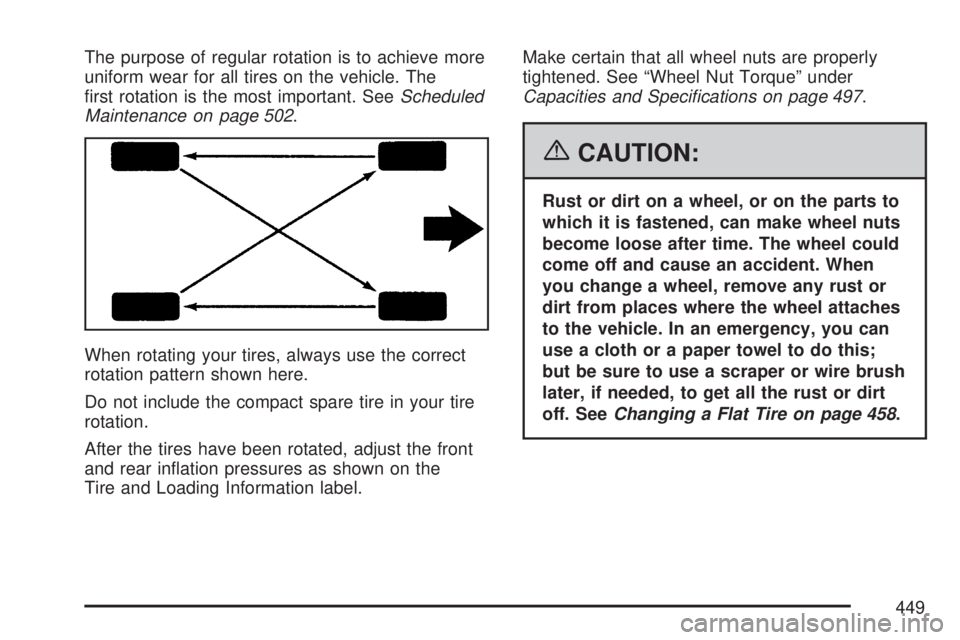
When rotating your tires, always use the correct
rotation pattern shown here.
Do not include the compact spare tire in your tire
rotation.
After the tires have been rotated, adjust the front
and rear ination pressures as shown on the
Tire and Loading Information label.Make certain that all wheel nuts are properly
tightened. See “Wheel Nut Torque” under
Capacities and Specifications on page 497.
{CAUTION:
Rust or dirt on a wheel, or on the parts to
which it is fastened, can make wheel nuts
become loose after time. The wheel could
come off and cause an accident. When
you change a wheel, remove any rust or
dirt from places where the wheel attaches
to the vehicle. In an emergency, you can
use a cloth or a paper towel to do this;
but be sure to use a scraper or wire brush
later, if needed, to get all the rust or dirt
off. SeeChanging a Flat Tire on page 458.
449
Page 451 of 554
{CAUTION:
Mixing tires could cause you to lose
control while driving. If you mix tires of
different sizes, brands, or types (radial
and bias-belted tires), the vehicle may not
handle properly, and you could have a
crash. Using tires of different sizes,
brands, or types may also cause damage
to your vehicle. Be sure to use the correct
size, brand, and type of tires on all
wheels. It is all right to drive with your
compact spare temporarily, as it was
developed for use on your vehicle.
SeeCompact Spare Tire on page 477.
{CAUTION:
If you use bias-ply tires on your vehicle,
the wheel rim anges could develop
cracks after many miles of driving. A tire
and/or wheel could fail suddenly, causing
a crash. Use only radial-ply tires with the
wheels on your vehicle.
If you must replace your vehicle’s tires with those
that do not have a TPC Spec number, make
sure they are the same size, load range,
speed rating, and construction type (radial and
bias-belted tires) as your vehicle’s original tires.
Your vehicle’s original equipment tires are listed on
the Tire and Loading Information label. This label
is attached to the vehicle’s center pillar (B-pillar).
SeeLoading Your Vehicle on page 361, for
more information about the Tire and Loading
Information label and its location on your vehicle.
451
Page 452 of 554
Different Size Tires and Wheels
If you add wheels or tires that are a different size
than your original equipment wheels and tires,
this could affect the way your vehicle performs,
including its braking, ride and handling
characteristics, stability, and resistance to rollover.
Additionally, if your vehicle has electronic
systems such as anti-lock brakes, rollover airbags,
traction control, and electronic stability control,
the performance of these systems can be affected.{CAUTION:
If you add different sized wheels, your
vehicle may not provide an acceptable
level of performance and safety if tires not
recommended for those wheels are
selected. You may increase the chance
that you will crash and suffer serious
injury. Only use GM specic wheel and
tire systems developed for your vehicle,
and have them properly installed by a
GM certied technician.
SeeBuying New Tires on page 450and
Accessories and Modifications on page 385
for additional information.
452
Page 454 of 554
Temperature – A, B, C
The temperature grades are A (the highest), B,
and C, representing the tire’s resistance to
the generation of heat and its ability to dissipate
heat when tested under controlled conditions on a
specied indoor laboratory test wheel. Sustained
high temperature can cause the material of the tire
to degenerate and reduce tire life, and excessive
temperature can lead to sudden tire failure.
The grade C corresponds to a level of performance
which all passenger car tires must meet under
the Federal Motor Vehicle Safety Standard
No. 109. Grades B and A represent higher levels
of performance on the laboratory test wheel
than the minimum required by law.
Warning:The temperature grade for this tire is
established for a tire that is properly inated
and not overloaded. Excessive speed,
underination, or excessive loading, either
separately or in combination, can cause heat
buildup and possible tire failure.
Wheel Alignment and Tire Balance
The tires and wheels on your vehicle were aligned
and balanced carefully at the factory to give you
the longest tire life and best overall performance.
Adjustments to wheel alignment and tire
balancing will not be necessary on a regular basis.
However, if you notice unusual tire wear or your
vehicle pulling to one side or the other, the
alignment may need to be checked. If you notice
your vehicle vibrating when driving on a smooth
road, your tires and wheels may need to be
rebalanced. See your dealer/retailer for proper
diagnosis.
Wheel Replacement
Replace any wheel that is bent, cracked, or badly
rusted or corroded. If wheel nuts keep coming
loose, the wheel, wheel bolts, and wheel
nuts should be replaced. If the wheel leaks air,
replace it (except some aluminum wheels,
which can sometimes be repaired). See your
dealer/retailer if any of these conditions exist.
Your dealer/retailer will know the kind of wheel
you need.
454
Page 455 of 554
Each new wheel should have the same
load-carrying capacity, diameter, width, offset
and be mounted the same way as the one
it replaces.
If you need to replace any of your wheels, wheel
bolts, or wheel nuts, replace them only with
new GM original equipment parts. This way,
you will be sure to have the right wheel, wheel
bolts, and wheel nuts for your vehicle.
{CAUTION:
Using the wrong replacement wheels,
wheel bolts, or wheel nuts on your vehicle
can be dangerous. It could affect the
braking and handling of your vehicle,
make your tires lose air and make you
lose control. You could have a collision
in which you or others could be injured.
Always use the correct wheel, wheel bolts,
and wheel nuts for replacement.Notice:The wrong wheel can also cause
problems with bearing life, brake cooling,
speedometer or odometer calibration,
headlamp aim, bumper height, vehicle ground
clearance, and tire or tire chain clearance
to the body and chassis.
SeeChanging a Flat Tire on page 458for more
information.
Used Replacement Wheels
{CAUTION:
Putting a used wheel on your vehicle is
dangerous. You cannot know how it has
been used or how far it has been driven.
It could fail suddenly and cause a crash.
If you have to replace a wheel, use a new
GM original equipment wheel.
455
Page 456 of 554
Tire Chains
{CAUTION:
Do not use tire chains. There is not
enough clearance. Tire chains used on a
vehicle without the proper amount of
clearance can cause damage to the
brakes, suspension or other vehicle parts.
The area damaged by the tire chains
could cause you to lose control of your
vehicle and you or others may be injured
in a crash.
CAUTION: (Continued)
CAUTION: (Continued)
Use another type of traction device only if
its manufacturer recommends it for use
on your vehicle and tire size combination
and road conditions. Follow that
manufacturer’s instructions. To help avoid
damage to your vehicle, drive slowly,
readjust or remove the device if it is
contacting your vehicle, and do not spin
your vehicle’s wheels. If you do nd
traction devices that will t, install them
on the front tires.
456
Page 457 of 554
If a Tire Goes Flat
It is unusual for a tire to blowout while you are
driving, especially if you maintain your vehicle’s
tires properly. If air goes out of a tire, it is
much more likely to leak out slowly. But if you
should ever have a blowout, here are a few tips
about what to expect and what to do:
If a front tire fails, the at tire will create a drag
that pulls the vehicle toward that side. Take your
foot off the accelerator pedal and grip the
steering wheel rmly. Steer to maintain lane
position, and then gently brake to a stop well out
of the traffic lane.
A rear blowout, particularly on a curve, acts much
like a skid and may require the same correction
you would use in a skid. In any rear blowout
remove your foot from the accelerator pedal. Get
the vehicle under control by steering the way
you want the vehicle to go. It may be very bumpy
and noisy, but you can still steer. Gently brake
to a stop, well off the road if possible.{CAUTION:
Lifting a vehicle and getting under it to do
maintenance or repairs is dangerous
without the appropriate safety equipment
and training. The jack provided with your
vehicle is designed only for changing a
at tire. If it is used for anything else, you
or others could be badly injured or killed
if the vehicle slips off the jack. Use the
jack provided with your vehicle only for
changing a at tire.
If a tire goes at, the next part shows how to use the
jacking equipment to change a at tire safely.
457
Page 458 of 554
Changing a Flat Tire
If a tire goes at, avoid further tire and wheel
damage by driving slowly to a level place. Turn on
your vehicle’s hazard warning ashers. See
Hazard Warning Flashers on page 172for more
information.
{CAUTION:
Changing a tire can be dangerous. The
vehicle can slip off the jack and roll over
or fall on you or other people. You and
they could be badly injured or even killed.
Find a level place to change your tire.
To help prevent the vehicle from moving:
1. Set the parking brake rmly.
2. Put the shift lever in PARK (P).
CAUTION: (Continued)
CAUTION: (Continued)
3. Turn off the engine and do not restart
while the vehicle is raised.
4. Do not allow passengers to remain in
the vehicle.
To be even more certain the vehicle will
not move, you should put blocks at the
front and rear of the tire farthest away
from the one being changed. That would
be the tire, on the other side, at the
opposite end of the vehicle.
When your vehicle has a at tire, use the following
example as a guide to assist you in the placement
of wheel blocks.
458