height GMC ACADIA 2007 Owner's Manual
[x] Cancel search | Manufacturer: GMC, Model Year: 2007, Model line: ACADIA, Model: GMC ACADIA 2007Pages: 554, PDF Size: 2.76 MB
Page 7 of 554
Front Seats..................................................... 9
Manual Seats................................................ 9
Driver Seat Height Adjuster......................... 10
Power Seats............................................... 10
Manual Lumbar........................................... 11
Power Lumbar............................................. 12
Heated Seats.............................................. 12
Memory Seat and Mirrors............................ 13
Reclining Seatbacks.................................... 15
Head Restraints.......................................... 17
Rear Seats.................................................... 18
Rear Seat Operation................................... 18
Third Row Seats......................................... 21
Safety Belts.................................................. 24
Safety Belts: They Are for Everyone........... 24
Questions and Answers About
Safety Belts............................................. 28
How to Wear Safety Belts Properly............. 29Driver Position............................................. 30
Shoulder Belt Height Adjustment................. 38
Safety Belt Use During Pregnancy.............. 39
Right Front Passenger Position................... 39
Rear Seat Passengers................................ 40
Rear Safety Belt Comfort Guides................ 43
Safety Belt Pretensioners............................ 47
Safety Belt Extender................................... 47
Child Restraints............................................ 48
Older Children............................................. 48
Infants and Young Children......................... 51
Child Restraint Systems.............................. 55
Where to Put the Restraint.......................... 60
Lower Anchors and Tethers for
Children (LATCH).................................... 61
Securing a Child Restraint in a Rear
Seat Position........................................... 69
Securing a Child Restraint in the Right
Front Seat Position.................................. 72
Section 1 Seats and Restraint Systems
7
Page 9 of 554
Front Seats
Manual Seats
{CAUTION:
You can lose control of the vehicle if you
try to adjust a manual driver’s seat while
the vehicle is moving. The sudden
movement could startle and confuse you,
or make you push a pedal when you do
not want to. Adjust the driver’s seat only
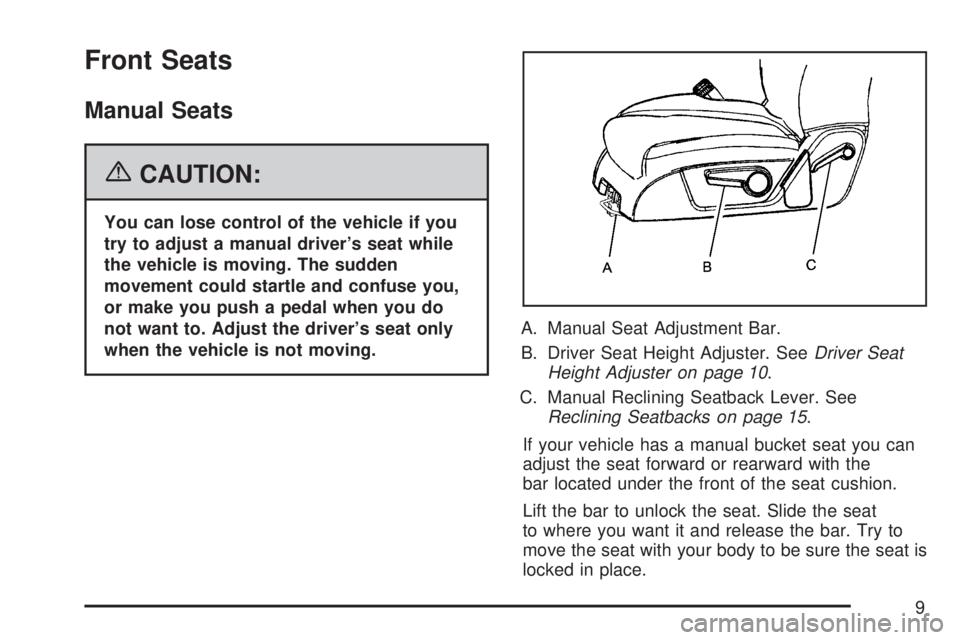
when the vehicle is not moving.A. Manual Seat Adjustment Bar.
B. Driver Seat Height Adjuster. SeeDriver Seat
Height Adjuster on page 10.
C. Manual Reclining Seatback Lever. See
Reclining Seatbacks on page 15.
If your vehicle has a manual bucket seat you can
adjust the seat forward or rearward with the
bar located under the front of the seat cushion.
Lift the bar to unlock the seat. Slide the seat
to where you want it and release the bar. Try to
move the seat with your body to be sure the seat is
locked in place.
9
Page 10 of 554
Driver Seat Height Adjuster
If your vehicle has a manual driver seat height
adjuster, it is located on the outboard side of the
seat. SeeManual Seats on page 9for more
information. To raise the seat, move the lever
upward repeatedly until the seat is at the desired
height. To lower the seat, move the lever
downward repeatedly until the seat is at the
desired height.
Power Seats
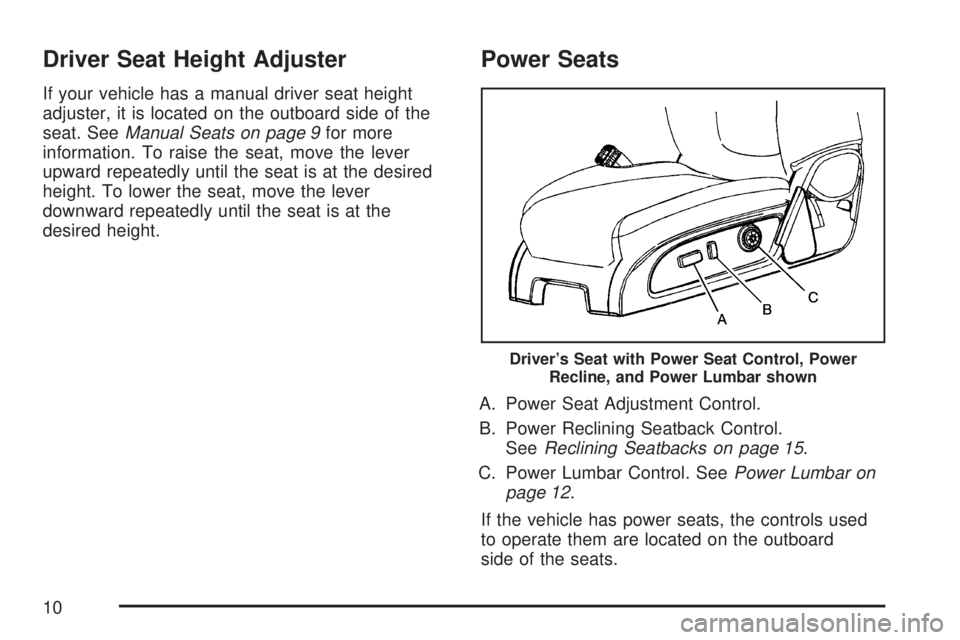
A. Power Seat Adjustment Control.
B. Power Reclining Seatback Control.
SeeReclining Seatbacks on page 15.
C. Power Lumbar Control. SeePower Lumbar on
page 12.
If the vehicle has power seats, the controls used
to operate them are located on the outboard
side of the seats.
Driver’s Seat with Power Seat Control, Power
Recline, and Power Lumbar shown
10
Page 12 of 554
Power Lumbar
If the seats have power lumbar, the controls used
to operate this feature are located on the
outboard side of the seats. SeePower Seats on
page 10for more information.
To increase lumbar support, press and hold
the front of the control.
To decrease lumbar support, press and hold
the rear of the control.
To raise the height of the lumbar support,
press and hold the top of the control.
To lower the height of the lumbar support,
press and hold the bottom of the control.
Release the control when the lower seatback
reaches the desired level of lumbar support.
Keep in mind that as your seating position
changes, as it may during long trips, so should the
position of your lumbar support. Adjust the seat
as needed.
Heated Seats
On vehicles with heated front seats the controls
are located on the center console near the climate
controls. To operate the heated seats the
ignition must be on.
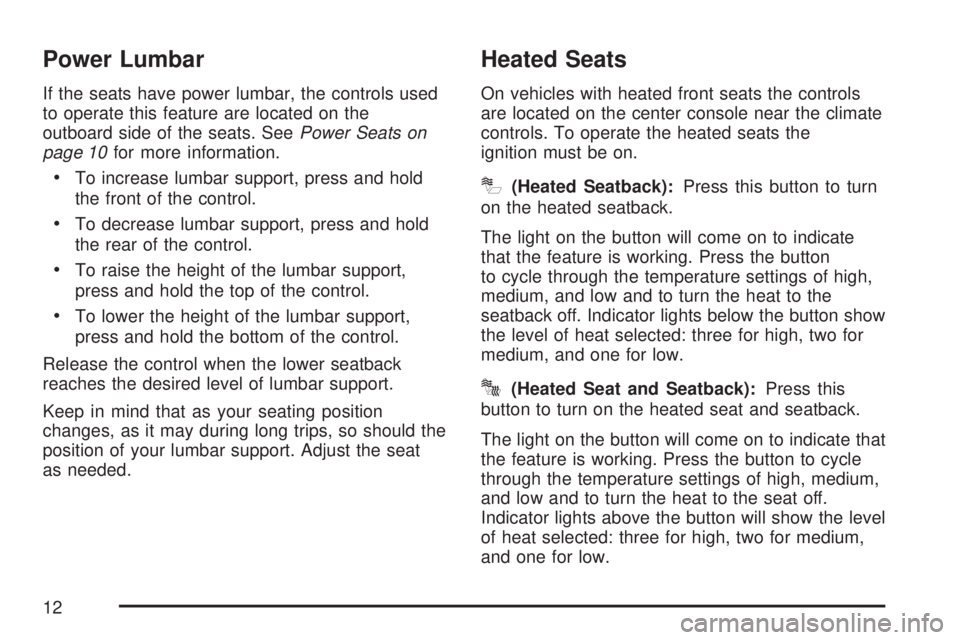
I(Heated Seatback):Press this button to turn
on the heated seatback.
The light on the button will come on to indicate
that the feature is working. Press the button
to cycle through the temperature settings of high,
medium, and low and to turn the heat to the
seatback off. Indicator lights below the button show
the level of heat selected: three for high, two for
medium, and one for low.
J(Heated Seat and Seatback):Press this
button to turn on the heated seat and seatback.
The light on the button will come on to indicate that
the feature is working. Press the button to cycle
through the temperature settings of high, medium,
and low and to turn the heat to the seat off.
Indicator lights above the button will show the level
of heat selected: three for high, two for medium,
and one for low.
12
Page 17 of 554
Do not have a seatback reclined if your vehicle
is moving.
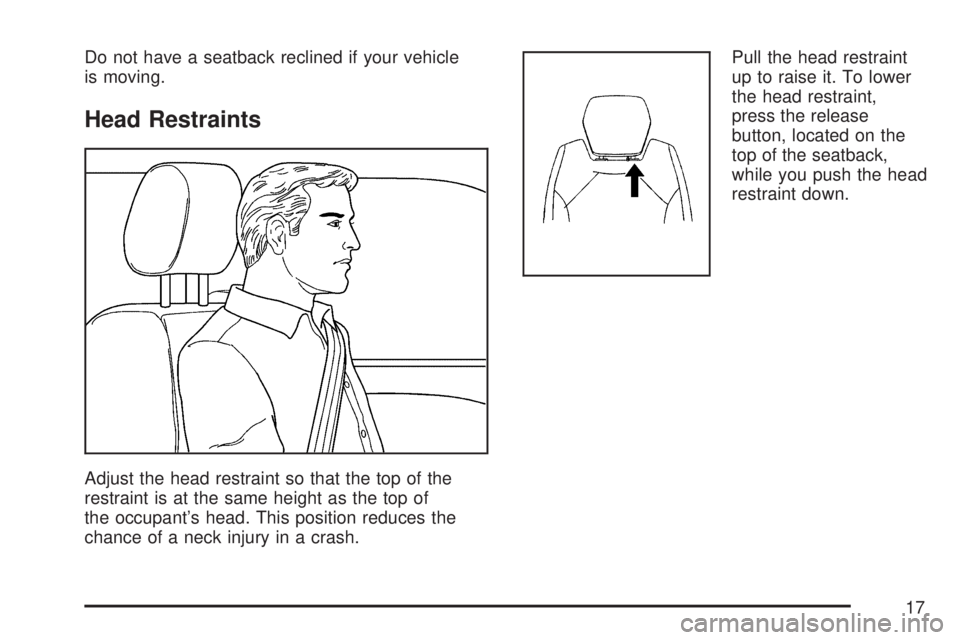
Head Restraints
Adjust the head restraint so that the top of the
restraint is at the same height as the top of
the occupant’s head. This position reduces the
chance of a neck injury in a crash.Pull the head restraint
up to raise it. To lower
the head restraint,
press the release
button, located on the
top of the seatback,
while you push the head
restraint down.
17
Page 30 of 554
Driver Position
Lap-Shoulder Belt
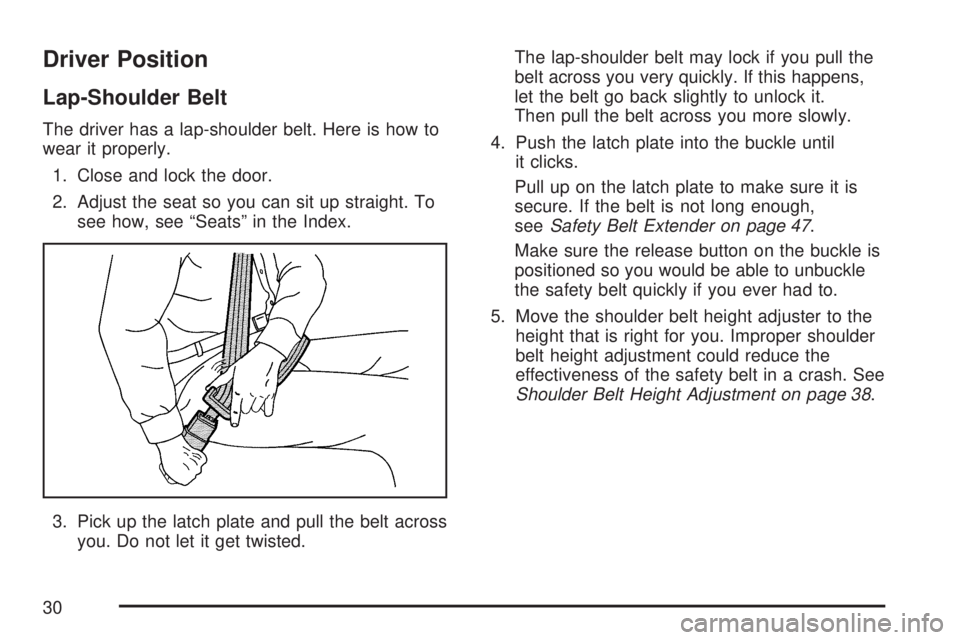
The driver has a lap-shoulder belt. Here is how to
wear it properly.
1. Close and lock the door.
2. Adjust the seat so you can sit up straight. To
see how, see “Seats” in the Index.
3. Pick up the latch plate and pull the belt across
you. Do not let it get twisted.The lap-shoulder belt may lock if you pull the
belt across you very quickly. If this happens,
let the belt go back slightly to unlock it.
Then pull the belt across you more slowly.
4. Push the latch plate into the buckle until
it clicks.
Pull up on the latch plate to make sure it is
secure. If the belt is not long enough,
seeSafety Belt Extender on page 47.
Make sure the release button on the buckle is
positioned so you would be able to unbuckle
the safety belt quickly if you ever had to.
5. Move the shoulder belt height adjuster to the
height that is right for you. Improper shoulder
belt height adjustment could reduce the
effectiveness of the safety belt in a crash. See
Shoulder Belt Height Adjustment on page 38.
30
Page 38 of 554
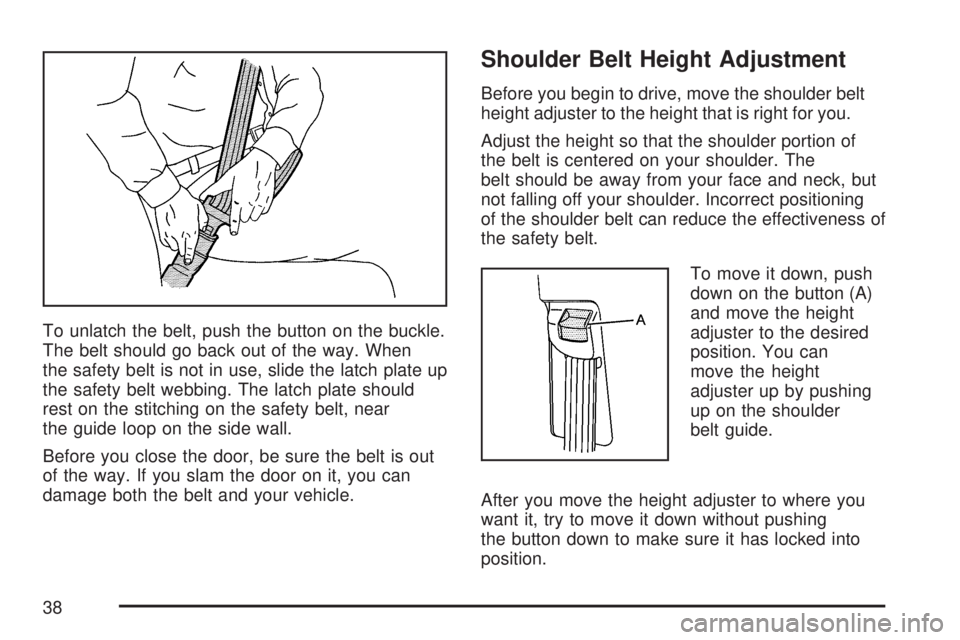
To unlatch the belt, push the button on the buckle.
The belt should go back out of the way. When
the safety belt is not in use, slide the latch plate up
the safety belt webbing. The latch plate should
rest on the stitching on the safety belt, near
the guide loop on the side wall.
Before you close the door, be sure the belt is out
of the way. If you slam the door on it, you can
damage both the belt and your vehicle.
Shoulder Belt Height Adjustment
Before you begin to drive, move the shoulder belt
height adjuster to the height that is right for you.
Adjust the height so that the shoulder portion of
the belt is centered on your shoulder. The
belt should be away from your face and neck, but
not falling off your shoulder. Incorrect positioning
of the shoulder belt can reduce the effectiveness of
the safety belt.
To move it down, push
down on the button (A)
and move the height
adjuster to the desired
position. You can
move the height
adjuster up by pushing
up on the shoulder
belt guide.
After you move the height adjuster to where you
want it, try to move it down without pushing
the button down to make sure it has locked into
position.
38
Page 54 of 554
Q:What are the different types of add-on
child restraints?
A:Add-on child restraints, which are purchased by
the vehicle’s owner, are available in four basic
types. Selection of a particular restraint should
take into consideration not only the child’s
weight, height, and age but also whether or not
the restraint will be compatible with the motor
vehicle in which it will be used.
For most basic types of child restraints, there
are many different models available. When
purchasing a child restraint, be sure it is
designed to be used in a motor vehicle. If it is,
the restraint will have a label saying that it
meets federal motor vehicle safety standards.
The restraint manufacturer’s instructions that
come with the restraint state the weight and
height limitations for a particular child restraint.
In addition, there are many kinds of restraints
available for children with special needs.
{CAUTION:
Newborn infants need complete support,
including support for the head and neck.
This is necessary because a newborn
infant’s neck is weak and its head weighs
so much compared with the rest of its
body. In a crash, an infant in a rear-facing
seat settles into the restraint, so the crash
forces can be distributed across the
strongest part of an infant’s body, the
back and shoulders. Infants always
should be secured in appropriate infant
restraints.
54
Page 91 of 554
Adding Equipment to Your
Airbag-Equipped Vehicle
Q:Is there anything I might add to the
exterior of the vehicle that could keep the
airbags from working properly?
A:Yes. If you add things that change your
vehicle’s frame, bumper system, height,
front end or side sheet metal, they may keep
the airbag system from working properly.
Also, the airbag system may not work properly
if you relocate any of the airbag sensors. If
you have any questions about this, you should
contact Customer Assistance before you
modify your vehicle. The phone numbers and
addresses for Customer Assistance are in
Step Two of the Customer Satisfaction
Procedure in this manual. See Customer
Satisfaction Procedure.
If your vehicle has rollover roof-rail airbags,
seeDifferent Size Tires and Wheels on
page 452for additional important information.
Q:Because I have a disability, I have to get
my vehicle modied. How can I nd out
whether this will affect my airbag system?
A:Changing or moving any parts of the
front seats, safety belts, the airbag sensing
and diagnostic module, steering wheel,
instrument panel, roof-rail airbag modules,
ceiling headliner, and pillar garnish trim, side
impact sensors, rollover sensor module,
or airbag wiring can affect the operation of the
airbag system. If you have questions, call
Customer Assistance. The phone numbers
and addresses for Customer Assistance are in
Step Two of the Customer Satisfaction
Procedure in this manual. SeeCustomer
Satisfaction Procedure on page 518.
Your dealer/retailer and the service manual have
information about the location of the airbag
sensors, sensing and diagnostic module and
airbag wiring.
91
Page 194 of 554
If You Cannot See the HUD Image
When the Ignition Is On
Is anything covering the HUD lens?
Is the HUD dimmer setting bright enough?
Is the HUD image adjusted to the proper
height?
Are you wearing polarized sunglasses?
Still no HUD image? Check the fuse in the
instrument panel fuse block. SeeInstrument
Panel Fuse Block on page 490.
If the HUD Image Is Not Clear
Is the HUD image too bright?
Are the windshield and HUD lens clean?
If the HUD image is not correct, contact your
dealer/retailer.
Keep in mind that the windshield is part of the
HUD system.
Ultrasonic Rear Parking
Assist (URPA)
If your vehicle has the Ultrasonic Rear Parking
Assist (URPA) system it is designed to help
you park while in Reverse (R). It operates only
at speeds less than 5 mph (8 km/h). URPA
helps make parking easier and helps you avoid
colliding with objects such as parked vehicles.
The URPA system detects objects that are close
to the rear of the vehicle which are at least
10 inches (25.4 cm) off the ground and below
hood or trunk level. The system detects objects
up to 8 feet (2.5 m) behind your vehicle. The
URPA sensors determine how close these objects
are from your bumper within this area.
194