ac controls GMC ACADIA 2008 User Guide
[x] Cancel search | Manufacturer: GMC, Model Year: 2008, Model line: ACADIA, Model: GMC ACADIA 2008Pages: 472, PDF Size: 5.72 MB
Page 101 of 472
Power Windows
{CAUTION:
Leaving children, helpless adults, or pets in a
vehicle with the windows closed is dangerous.
They can be overcome from extreme heat in
warm or hot weather and suffer permanent
injuries or even death from heat stroke.
Leaving children in a vehicle with the ignition
key is dangerous for many reasons, children
or others could be badly injured or even killed.
They could operate the power windows or
other controls or even make the vehicle move.
The windows will function with the keys in the
ignition and they could be seriously injured or
killed if caught in the path of a closing
window. Do not leave keys in a vehicle with
children.
When there are children in the rear seat use
the window lockout button to prevent
unintentional operation of the windows.The power window
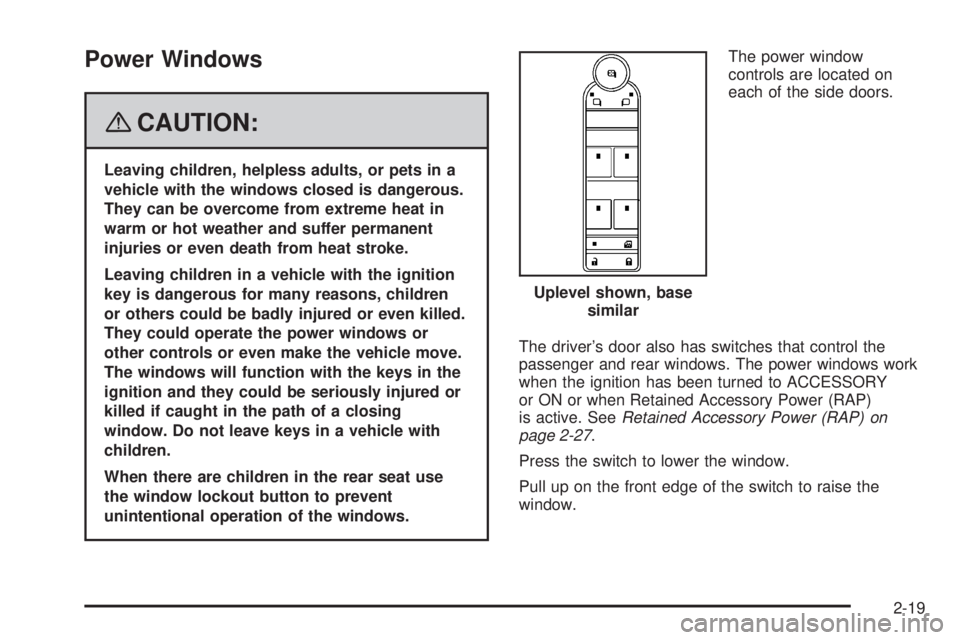
controls are located on
each of the side doors.
The driver’s door also has switches that control the
passenger and rear windows. The power windows work
when the ignition has been turned to ACCESSORY
or ON or when Retained Accessory Power (RAP)
is active. SeeRetained Accessory Power (RAP) on
page 2-27.
Press the switch to lower the window.
Pull up on the front edge of the switch to raise the
window.Uplevel shown, base
similar
2-19
Page 116 of 472
Tow/Haul Mode
Your vehicle may have a Tow/Haul mode.
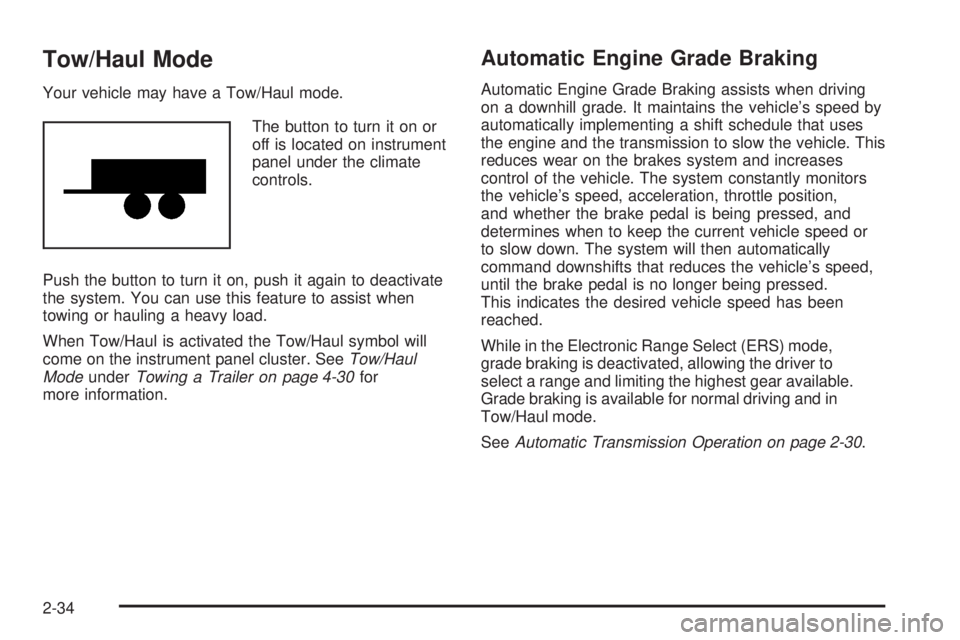
The button to turn it on or
off is located on instrument
panel under the climate
controls.
Push the button to turn it on, push it again to deactivate
the system. You can use this feature to assist when
towing or hauling a heavy load.
When Tow/Haul is activated the Tow/Haul symbol will
come on the instrument panel cluster. SeeTow/Haul
ModeunderTowing a Trailer on page 4-30for
more information.
Automatic Engine Grade Braking
Automatic Engine Grade Braking assists when driving
on a downhill grade. It maintains the vehicle’s speed by
automatically implementing a shift schedule that uses
the engine and the transmission to slow the vehicle. This
reduces wear on the brakes system and increases
control of the vehicle. The system constantly monitors
the vehicle’s speed, acceleration, throttle position,
and whether the brake pedal is being pressed, and
determines when to keep the current vehicle speed or
to slow down. The system will then automatically
command downshifts that reduces the vehicle’s speed,
until the brake pedal is no longer being pressed.
This indicates the desired vehicle speed has been
reached.
While in the Electronic Range Select (ERS) mode,
grade braking is deactivated, allowing the driver to
select a range and limiting the highest gear available.
Grade braking is available for normal driving and in
Tow/Haul mode.
SeeAutomatic Transmission Operation on page 2-30.
2-34
Page 124 of 472
Outside Power Mirrors
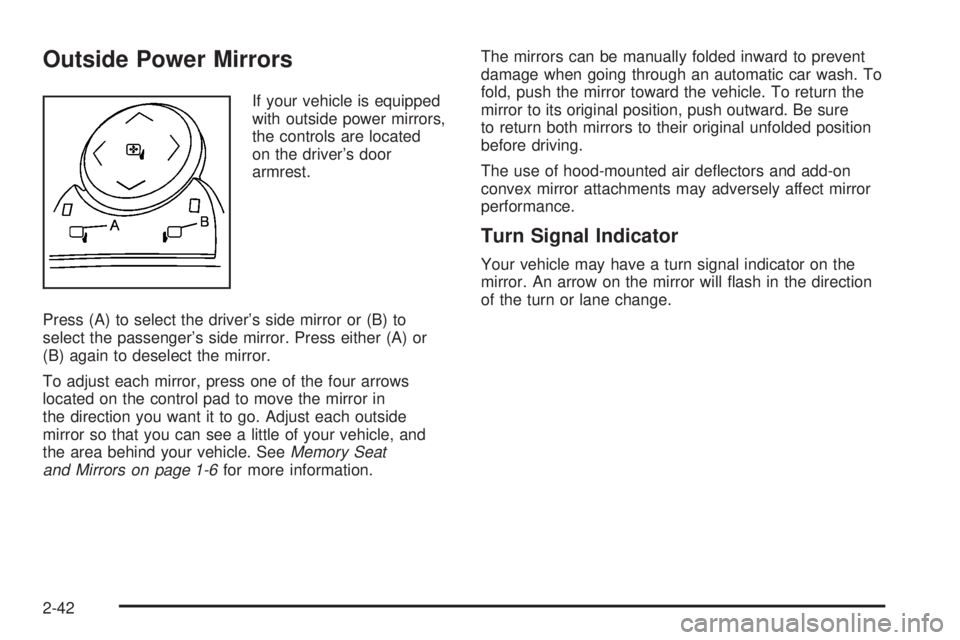
If your vehicle is equipped
with outside power mirrors,
the controls are located
on the driver’s door
armrest.
Press (A) to select the driver’s side mirror or (B) to
select the passenger’s side mirror. Press either (A) or
(B) again to deselect the mirror.
To adjust each mirror, press one of the four arrows
located on the control pad to move the mirror in
the direction you want it to go. Adjust each outside
mirror so that you can see a little of your vehicle, and
the area behind your vehicle. SeeMemory Seat
and Mirrors on page 1-6for more information.The mirrors can be manually folded inward to prevent
damage when going through an automatic car wash. To
fold, push the mirror toward the vehicle. To return the
mirror to its original position, push outward. Be sure
to return both mirrors to their original unfolded position
before driving.
The use of hood-mounted air deectors and add-on
convex mirror attachments may adversely affect mirror
performance.
Turn Signal Indicator
Your vehicle may have a turn signal indicator on the
mirror. An arrow on the mirror will ash in the direction
of the turn or lane change.
2-42
Page 125 of 472
Outside Power Foldaway Mirrors
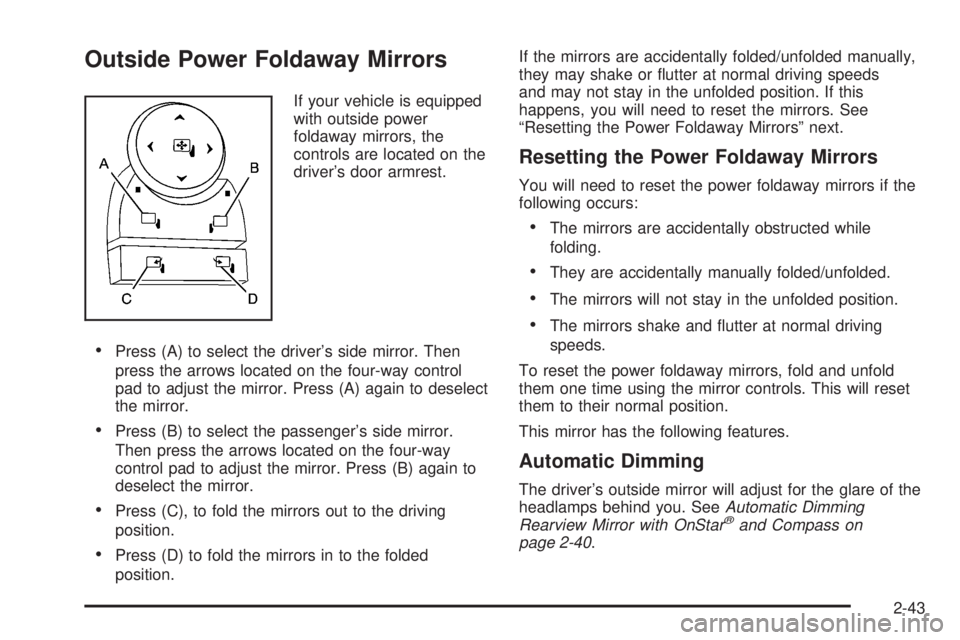
If your vehicle is equipped
with outside power
foldaway mirrors, the
controls are located on the
driver’s door armrest.
Press (A) to select the driver’s side mirror. Then
press the arrows located on the four-way control
pad to adjust the mirror. Press (A) again to deselect
the mirror.
Press (B) to select the passenger’s side mirror.
Then press the arrows located on the four-way
control pad to adjust the mirror. Press (B) again to
deselect the mirror.
Press (C), to fold the mirrors out to the driving
position.
Press (D) to fold the mirrors in to the folded
position.If the mirrors are accidentally folded/unfolded manually,
they may shake or utter at normal driving speeds
and may not stay in the unfolded position. If this
happens, you will need to reset the mirrors. See
“Resetting the Power Foldaway Mirrors” next.
Resetting the Power Foldaway Mirrors
You will need to reset the power foldaway mirrors if the
following occurs:
The mirrors are accidentally obstructed while
folding.
They are accidentally manually folded/unfolded.
The mirrors will not stay in the unfolded position.
The mirrors shake and utter at normal driving
speeds.
To reset the power foldaway mirrors, fold and unfold
them one time using the mirror controls. This will reset
them to their normal position.
This mirror has the following features.
Automatic Dimming
The driver’s outside mirror will adjust for the glare of the
headlamps behind you. SeeAutomatic Dimming
Rearview Mirror with OnStar
®and Compass on
page 2-40.
2-43
Page 131 of 472
OnStar Hands-Free Calling
OnStar Hands-Free Calling allows eligible OnStar
subscribers to make and receive calls using voice
commands. Hands-Free Calling is fully integrated into
the vehicle, and can be used with OnStar Pre-Paid
Minute Packages. Hands-Free Calling may also
be linked to a Verizon Wireless service plan in the U.S.
or a Bell Mobility service plan in Canada, depending
on eligibility. To nd out more, refer to the OnStar
Owner’s Guide in the vehicle’s glove box, visit
www.onstar.com or www.onstar.ca, or speak with an
OnStar advisor by pressing the OnStar button or calling
1-888-4-ONSTAR (1-888-466-7827).
OnStar Virtual Advisor
OnStar Virtual Advisor is a feature of OnStar
Hands-Free Calling that uses your minutes to access
location-based weather, local traffic reports, and
stock quotes. By pressing the phone button and giving
a few simple voice commands, you can browse
through the various topics. See the OnStar Owner’s
Guide for more information (Only available in the
continental U.S.).
OnStar Steering Wheel Controls
Your vehicle may have a Talk/Mute button that can be
used to interact with OnStar Hands-Free Calling.
SeeAudio Steering Wheel Controls on page 3-128for
more information.
On some vehicles, you may have to hold the button for
a few seconds and give the command “ONSTAR” to
activate the OnStar Hands-Free Calling.
On some vehicles, the mute button can be used to dial
numbers into voicemail systems, or to dial phone
extensions. See the OnStar Owner’s Guide for more
information.
How OnStar Service Works
Your vehicle’s OnStar system has the capability of
recording and transmitting vehicle information. This
information is automatically sent to an OnStar Call
Center at the time of an OnStar button press,
Emergency button press or if your airbags or AACN
system deploys. The vehicle information usually includes
your GPS location and, in the event of a crash,
additional information regarding the accident that your
vehicle has been involved in (e.g. the direction from
which your vehicle was hit). When you use the Virtual
Advisor feature of OnStar Hands-Free Calling, your
vehicle also sends OnStar your GPS location so that we
can provide you with location-based services.
2-49
Page 143 of 472
Instrument Panel Overview...............................3-4
Hazard Warning Flashers................................3-6
Other Warning Devices...................................3-6
Horn.............................................................3-6
Tilt and Telescopic Steering Wheel...................3-6
Power Tilt Wheel and Telescopic Steering
Column......................................................3-7
Turn Signal/Multifunction Lever.........................3-8
Turn and Lane-Change Signals........................3-8
Headlamp High/Low-Beam Changer..................3-9
Flash-to-Pass.................................................3-9
Windshield Wipers..........................................3-9
Windshield Washer.......................................3-10
Rear Window Wiper/Washer...........................3-11
Cruise Control..............................................3-12
Exterior Lamps.............................................3-14
Delayed Headlamps......................................3-15
Daytime Running Lamps (DRL)/
Automatic Headlamp System.......................3-16
Fog Lamps..................................................3-16
Instrument Panel Brightness...........................3-17
Courtesy Lamps...........................................3-17
Dome Lamps...............................................3-17
Dome Lamp Override....................................3-17
Entry Lighting...............................................3-17
Delayed Entry Lighting...................................3-18
Delayed Exit Lighting.....................................3-18Parade Dimming...........................................3-18
Reading Lamps............................................3-19
Electric Power Management...........................3-19
Battery Run-Down Protection..........................3-20
Head-Up Display (HUD).................................3-20
Accessory Power Outlet(s).............................3-24
Power Outlet 115 Volt Alternating Current........3-25
Climate Controls............................................3-26
Climate Control System.................................3-26
Dual Automatic Climate Control System...........3-29
Outlet Adjustment.........................................3-36
Rear Air Conditioning and
Heating System.........................................3-36
Rear Air Conditioning and Heating System and
Electronic Climate Controls.........................3-38
Warning Lights, Gages,
and Indicators.............................................3-39
Instrument Panel Cluster................................3-40
Speedometer and Odometer...........................3-41
Tachometer.................................................3-41
Safety Belt Reminders...................................3-41
Airbag Readiness Light..................................3-42
Passenger Airbag Status Indicator...................3-43
Charging System Light..................................3-45
Voltmeter Gage............................................3-46
Brake System Warning Light..........................3-47
Section 3 Instrument Panel
3-1
Page 144 of 472
Antilock Brake System
Warning Light...........................................3-48
StabiliTrak
®Indicator Light..............................3-48
Engine Coolant Temperature Warning Light......3-49
Engine Coolant Temperature Gage..................3-49
Tire Pressure Light.......................................3-50
Malfunction Indicator Lamp.............................3-50
Oil Pressure Light.........................................3-54
Security Light...............................................3-54
Fog Lamp Light............................................3-55
Cruise Control Light......................................3-55
Highbeam On Light.......................................3-55
Tow/Haul Mode Light....................................3-55
Fuel Gage...................................................3-56
Driver Information Center (DIC).......................3-57
DIC Operation and Displays
(With DIC Buttons)....................................3-57
DIC Operation and Displays (Without DIC
Buttons)...................................................3-63DIC Warnings and Messages.........................3-66
DIC Vehicle Customization (With DIC Buttons). . . .3-75
Audio System(s).............................................3-84
Setting the Time...........................................3-85
Radio(s) (MP3).............................................3-87
Using an MP3 (Radio with CD and Six-Disc
CD Player).............................................3-104
Using an MP3 (Radio with CD and DVD
Player)...................................................3-108
XM Radio Messages...................................3-113
Navigation/Radio System..............................3-115
Rear Seat Entertainment (RSE) System.........3-115
Rear Seat Audio (RSA)................................3-125
Rear Audio Controller (RAC).........................3-127
Theft-Deterrent Feature................................3-127
Audio Steering Wheel Controls......................3-128
Radio Reception.........................................3-129
Multi-Band Antenna.....................................3-129
Section 3 Instrument Panel
3-2
Page 147 of 472
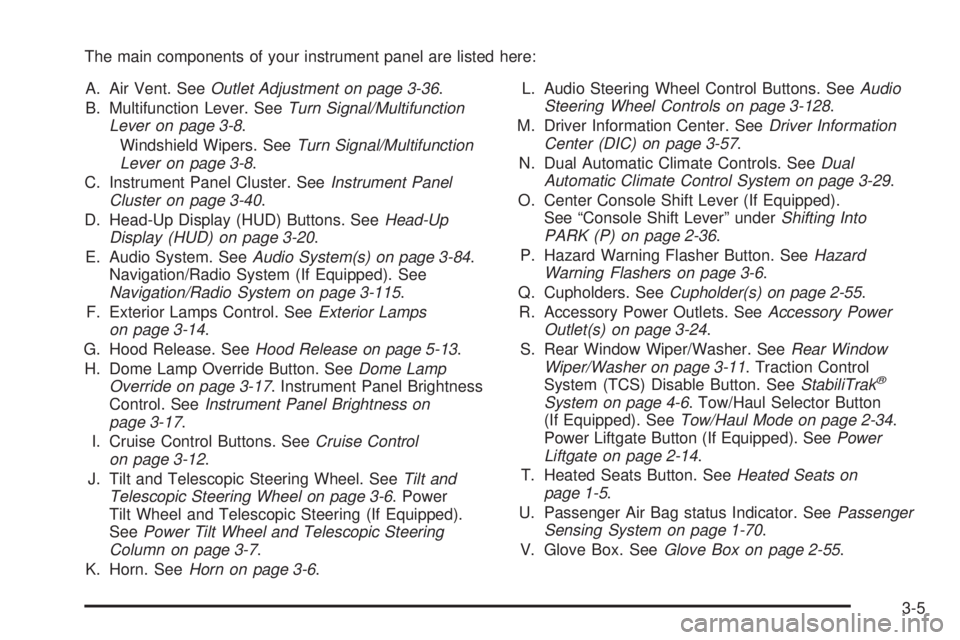
The main components of your instrument panel are listed here:
A. Air Vent. SeeOutlet Adjustment on page 3-36.
B. Multifunction Lever. SeeTurn Signal/Multifunction
Lever on page 3-8.
Windshield Wipers. SeeTurn Signal/Multifunction
Lever on page 3-8.
C. Instrument Panel Cluster. SeeInstrument Panel
Cluster on page 3-40.
D. Head-Up Display (HUD) Buttons. SeeHead-Up
Display (HUD) on page 3-20.
E. Audio System. SeeAudio System(s) on page 3-84.
Navigation/Radio System (If Equipped). See
Navigation/Radio System on page 3-115.
F. Exterior Lamps Control. SeeExterior Lamps
on page 3-14.
G. Hood Release. SeeHood Release on page 5-13.
H. Dome Lamp Override Button. SeeDome Lamp
Override on page 3-17. Instrument Panel Brightness
Control. SeeInstrument Panel Brightness on
page 3-17.
I. Cruise Control Buttons. SeeCruise Control
on page 3-12.
J. Tilt and Telescopic Steering Wheel. SeeTilt and
Telescopic Steering Wheel on page 3-6. Power
Tilt Wheel and Telescopic Steering (If Equipped).
SeePower Tilt Wheel and Telescopic Steering
Column on page 3-7.
K. Horn. SeeHorn on page 3-6.L. Audio Steering Wheel Control Buttons. SeeAudio
Steering Wheel Controls on page 3-128.
M. Driver Information Center. SeeDriver Information
Center (DIC) on page 3-57.
N. Dual Automatic Climate Controls. SeeDual
Automatic Climate Control System on page 3-29.
O. Center Console Shift Lever (If Equipped).
See “Console Shift Lever” underShifting Into
PARK (P) on page 2-36.
P. Hazard Warning Flasher Button. SeeHazard
Warning Flashers on page 3-6.
Q. Cupholders. SeeCupholder(s) on page 2-55.
R. Accessory Power Outlets. SeeAccessory Power
Outlet(s) on page 3-24.
S. Rear Window Wiper/Washer. SeeRear Window
Wiper/Washer on page 3-11. Traction Control
System (TCS) Disable Button. SeeStabiliTrak
®
System on page 4-6. Tow/Haul Selector Button
(If Equipped). SeeTow/Haul Mode on page 2-34.
Power Liftgate Button (If Equipped). SeePower
Liftgate on page 2-14.
T. Heated Seats Button. SeeHeated Seats on
page 1-5.
U. Passenger Air Bag status Indicator. SeePassenger
Sensing System on page 1-70.
V. Glove Box. SeeGlove Box on page 2-55.
3-5
Page 156 of 472
Passing Another Vehicle While Using
Cruise Control
Use the accelerator pedal to increase vehicle speed.
When you take your foot off the pedal, your vehicle
will slow down to the previously set cruise speed.
Using Cruise Control on Hills
How well your cruise control will work on hills depends
upon the vehicle speed, load, and the steepness of
the hills. When going up steep hills, you might have to
step on the accelerator pedal to maintain the vehicle
speed. When going downhill, you might have to brake or
shift to a lower gear to keep the vehicle speed down.
Of course, applying the brake turns off the cruise control.
Many drivers nd this to be too much trouble and do
not use cruise control on steep hills.
Ending Cruise Control
There are three ways to end cruise control:
Step lightly on the brake pedal.
Press the[(cancel) button on the steering wheel.
Press theT(on/off) button on the steering wheel.
Erasing Speed Memory
The cruise control set speed memory is erased by
turning off the cruise control or the ignition.
Exterior Lamps
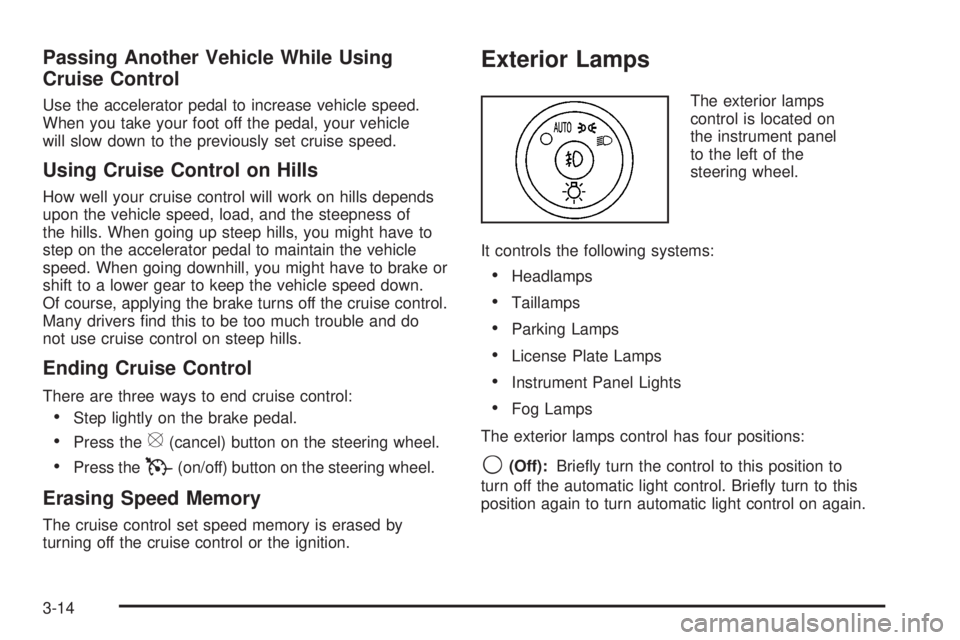
The exterior lamps
control is located on
the instrument panel
to the left of the
steering wheel.
It controls the following systems:
Headlamps
Taillamps
Parking Lamps
License Plate Lamps
Instrument Panel Lights
Fog Lamps
The exterior lamps control has four positions:
9(Off):Briey turn the control to this position to
turn off the automatic light control. Briey turn to this
position again to turn automatic light control on again.
3-14
Page 164 of 472
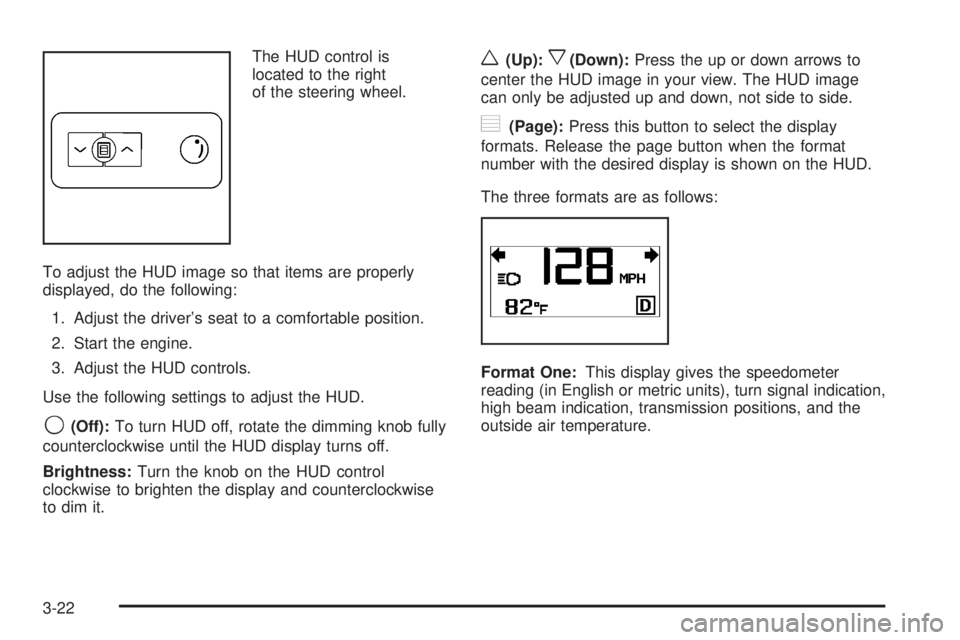
The HUD control is
located to the right
of the steering wheel.
To adjust the HUD image so that items are properly
displayed, do the following:
1. Adjust the driver’s seat to a comfortable position.
2. Start the engine.
3. Adjust the HUD controls.
Use the following settings to adjust the HUD.
9(Off):To turn HUD off, rotate the dimming knob fully
counterclockwise until the HUD display turns off.
Brightness:Turn the knob on the HUD control
clockwise to brighten the display and counterclockwise
to dim it.
w(Up):x(Down):Press the up or down arrows to
center the HUD image in your view. The HUD image
can only be adjusted up and down, not side to side.
?(Page):Press this button to select the display
formats. Release the page button when the format
number with the desired display is shown on the HUD.
The three formats are as follows:
Format One:This display gives the speedometer
reading (in English or metric units), turn signal indication,
high beam indication, transmission positions, and the
outside air temperature.
3-22