maintenance GMC ACADIA 2008 User Guide
[x] Cancel search | Manufacturer: GMC, Model Year: 2008, Model line: ACADIA, Model: GMC ACADIA 2008Pages: 472, PDF Size: 5.72 MB
Page 316 of 472
Wheel Replacement......................................5-68
Tire Chains..................................................5-70
If a Tire Goes Flat........................................5-71
Changing a Flat Tire.....................................5-72
Removing the Spare Tire and Tools................5-73
Removing the Flat Tire and Installing the
Spare Tire................................................5-76
Secondary Latch System...............................5-81
Storing a Flat or Spare Tire and Tools............5-84
Compact Spare Tire......................................5-88
Appearance Care............................................5-89
Interior Cleaning...........................................5-89
Fabric/Carpet...............................................5-90
Leather.......................................................5-91
Instrument Panel, Vinyl, and Other Plastic
Surfaces..................................................5-91
Care of Safety Belts......................................5-92
Weatherstrips...............................................5-92
Washing Your Vehicle...................................5-92
Cleaning Exterior Lamps/Lenses.....................5-93
Finish Care..................................................5-93Windshield, Backglass, and Wiper Blades.........5-94
Aluminum or Chrome-Plated Wheels and Trim.....5-94
Tires...........................................................5-95
Sheet Metal Damage.....................................5-95
Finish Damage.............................................5-95
Underbody Maintenance................................5-96
Chemical Paint Spotting.................................5-96
Vehicle Care/Appearance Materials..................5-97
Vehicle Identication......................................5-98
Vehicle Identication Number (VIN).................5-98
Service Parts Identication Label.....................5-98
Electrical System............................................5-99
High Voltage Devices and Wiring....................5-99
Add-On Electrical Equipment..........................5-99
Windshield Wiper Fuses...............................5-100
Power Windows and Other Power Options......5-100
Fuses and Circuit Breakers..........................5-100
Instrument Panel Fuse Block........................5-100
Underhood Fuse Block................................5-103
Capacities and Specications........................5-107
Section 5 Service and Appearance Care
5-2
Page 319 of 472
Doing Your Own Service Work
{CAUTION:
You can be injured and your vehicle could be
damaged if you try to do service work on a
vehicle without knowing enough about it.
Be sure you have sufficient knowledge,
experience, the proper replacement parts,
and tools before you attempt any vehicle
maintenance task.
Be sure to use the proper nuts, bolts, and
other fasteners. English and metric
fasteners can be easily confused. If you
use the wrong fasteners, parts can later
break or fall off. You could be hurt.If you want to do some of your own service work, you
should use the proper service manual. It tells you much
more about how to service your vehicle than this
manual can. To order the proper service manual, see
Service Publications Ordering Information on page 7-14.
Your vehicle has an airbag system. Before attempting
to do your own service work, seeServicing Your
Airbag-Equipped Vehicle on page 1-75.
You should keep a record with all parts receipts and list
the mileage and the date of any service work you
perform. SeeMaintenance Record on page 6-16.
5-5
Page 320 of 472
Adding Equipment to the Outside of
Your Vehicle
Things you might add to the outside of your vehicle can
affect the airow around it. This can cause wind
noise and can affect fuel economy and windshield
washer performance. Check with your dealer/retailer
before adding equipment to the outside of your vehicle.
Fuel
Use of the recommended fuel is an important part of the
proper maintenance of your vehicle. To help keep the
engine clean and maintain optimum vehicle
performance, we recommend the use of gasoline
advertised as TOP TIER Detergent Gasoline.
Gasoline Octane
Use regular unleaded gasoline with a posted octane
rating of 87 or higher. For best performance or
trailer towing, you could choose to use middle grade 89
octane unleaded gasoline. If the octane rating is less
than 87, you might notice an audible knocking noise
when you drive, commonly referred to as spark knock. If
this occurs, use a gasoline rated at 87 octane or
higher as soon as possible. If you are using gasoline
rated at 87 octane or higher and you hear heavy
knocking, the engine needs service.
Gasoline Specications
At a minimum, gasoline should meet ASTM specication
D 4814 in the United States or CAN/CGSB-3.5 or
3.511 in Canada. Some gasolines contain an
octane-enhancing additive called methylcyclopentadienyl
manganese tricarbonyl (MMT). We recommend
against the use of gasolines containing MMT. See
Additives on page 5-7for additional information.
5-6
Page 334 of 472
Engine Air Cleaner/Filter
When to Inspect the Engine Air
Cleaner/Filter
Inspect the air cleaner/lter at the MaintenanceII
intervals and replace it at the rst oil change after each
50,000 mile (80 000 km) interval. SeeScheduled
Maintenance on page 6-4for more information. If you
are driving in dusty/dirty conditions, inspect the lter
at each engine oil change.
SeeEngine Compartment Overview on page 5-14for
the location of the engine air cleaner/lter.
How to Inspect the Engine Air
Cleaner/Filter
To inspect the air cleaner/lter, remove the lter from
the vehicle and lightly shake the lter (away from
vehicle) to release loose dust and dirt. If the lter
remains caked with dirt, a new lter is required.
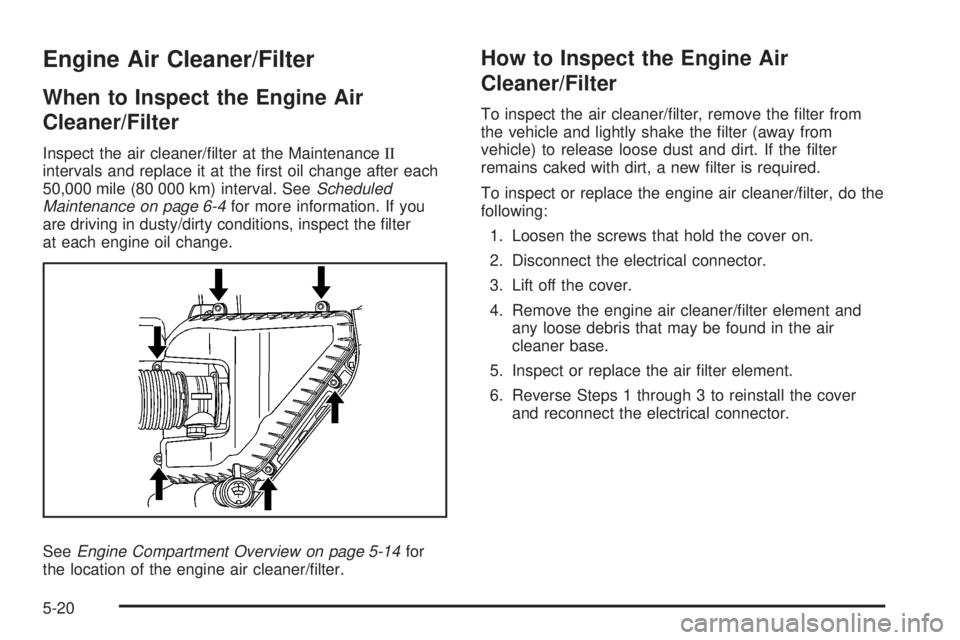
To inspect or replace the engine air cleaner/lter, do the
following:
1. Loosen the screws that hold the cover on.
2. Disconnect the electrical connector.
3. Lift off the cover.
4. Remove the engine air cleaner/lter element and
any loose debris that may be found in the air
cleaner base.
5. Inspect or replace the air lter element.
6. Reverse Steps 1 through 3 to reinstall the cover
and reconnect the electrical connector.
5-20
Page 336 of 472
Engine Coolant
The cooling system in your vehicle is lled with
DEX-COOL®engine coolant. This coolant is designed
to remain in your vehicle for ve years or 150,000 miles
(240 000 km), whichever occurs rst, if you add only
DEX-COOL
®extended life coolant.
The following explains your cooling system and how to
add coolant when it is low. If you have a problem
with engine overheating or if you need to add coolant to
the radiator, seeEngine Overheating on page 5-25.
A 50/50 mixture of clean, drinkable water and
DEX-COOL
®coolant will:
Give freezing protection down to−34°F (−37°C).
Give boiling protection up to 265°F (129°C).
Protect against rust and corrosion.
Help keep the proper engine temperature.
Let the warning lights and gages work as they
should.
Notice:Using coolant other than DEX-COOL
®may
cause premature engine, heater core, or radiator
corrosion. In addition, the engine coolant may
require changing sooner, at the rst maintenance
service after each 30,000 miles (50 000 km) or
24 months, whichever occurs rst. Any repairs
would not be covered by your warranty. Always use
DEX-COOL
®(silicate-free) coolant in your vehicle.
What to Use
Use a mixture of one-half clean, drinkable water and
one-half DEX-COOL®coolant which will not damage
aluminum parts. If you use this coolant mixture, you do
not need to add anything else.
{CAUTION:
Adding only plain water to your cooling
system can be dangerous. Plain water, or
some other liquid such as alcohol, can boil
before the proper coolant mixture will. Your
vehicle’s coolant warning system is set for the
proper coolant mixture. With plain water or the
wrong mixture, your engine could get too hot
but you would not get the overheat warning.
Your engine could catch re and you or others
could be burned. Use a 50/50 mixture of clean,
drinkable water and DEX-COOL
®coolant.
5-22
Page 352 of 472
Battery
Your vehicle has a maintenance free battery. When it is
time for a new battery, see your dealer/retailer for
one that has the replacement number shown on the
original battery’s label.
For battery replacement, see your dealer/retailer or the
service manual. To purchase a service manual, see
Service Publications Ordering Information on page 7-14.
Warning:Battery posts, terminals, and related
accessories contain lead and lead compounds,
chemicals known to the State of California to cause
cancer and reproductive harm. Wash hands after
handling.
Vehicle Storage
{CAUTION:
Batteries have acid that can burn you and gas
that can explode. You can be badly hurt if you
are not careful. SeeJump Starting on
page 5-39for tips on working around a battery
without getting hurt.
Infrequent Usage: If you drive your vehicle infrequently,
remove the black, negative (−) cable from the battery.
This will help keep the battery from running down.
Extended Storage: For extended storage of your vehicle,
remove the black, negative (−) cable from the battery or
use a battery trickle charger. This will help maintain the
charge of the battery over an extended period of time.
5-38
Page 357 of 472
All-Wheel Drive
Be sure to perform the lubricant checks described in
this section. There are two additional systems that need
lubrication.
Transfer Case
When to Check Lubricant
Refer to the Maintenance Schedule to determine how
often to check the lubricant. SeeScheduled
Maintenance on page 6-4.
How to Check Lubricant
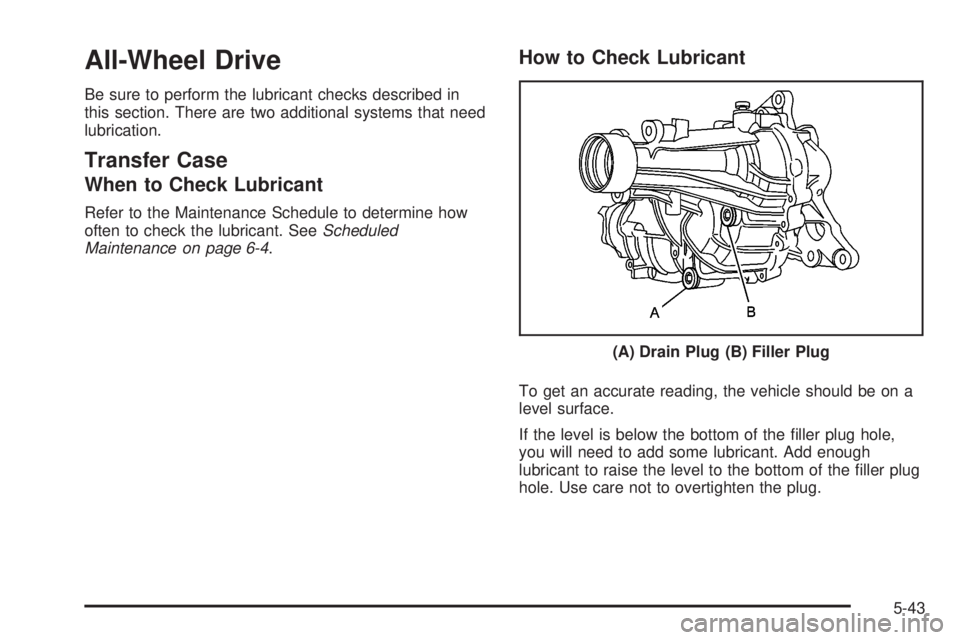
To get an accurate reading, the vehicle should be on a
level surface.
If the level is below the bottom of the ller plug hole,
you will need to add some lubricant. Add enough
lubricant to raise the level to the bottom of the ller plug
hole. Use care not to overtighten the plug.(A) Drain Plug (B) Filler Plug
5-43
Page 358 of 472
What to Use
Refer to the Maintenance Schedule to determine what
kind of lubricant to use. SeeRecommended Fluids
and Lubricants on page 6-12.
Rear Drive Module
When to Check Lubricant
Refer to the Maintenance Schedule to determine how
often to check the lubricant. SeeScheduled
Maintenance on page 6-4.
How to Check Lubricant
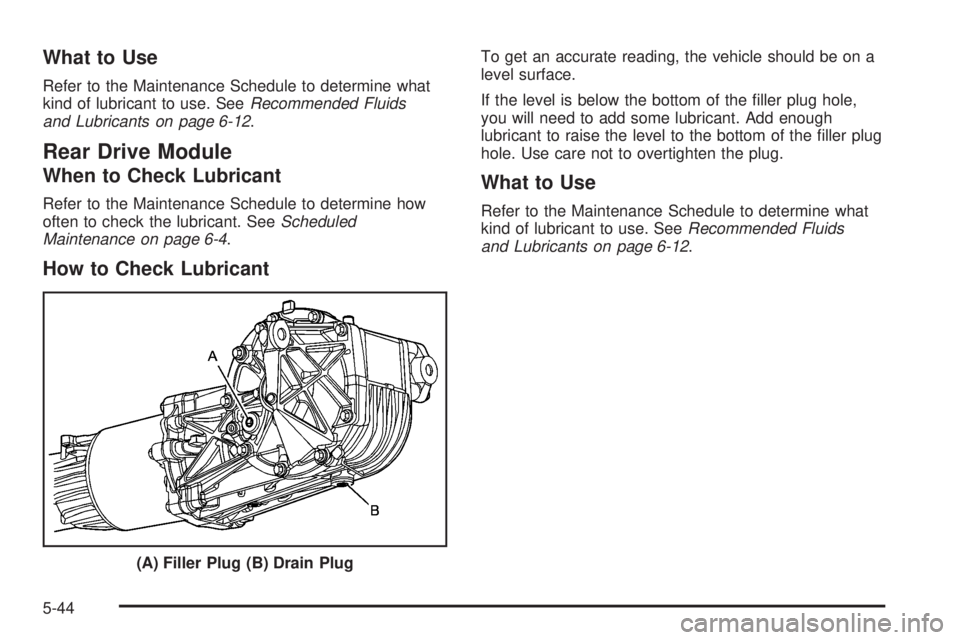
To get an accurate reading, the vehicle should be on a
level surface.
If the level is below the bottom of the ller plug hole,
you will need to add some lubricant. Add enough
lubricant to raise the level to the bottom of the ller plug
hole. Use care not to overtighten the plug.
What to Use
Refer to the Maintenance Schedule to determine what
kind of lubricant to use. SeeRecommended Fluids
and Lubricants on page 6-12.
(A) Filler Plug (B) Drain Plug
5-44
Page 361 of 472
Windshield Wiper Blade
Replacement
Windshield wiper blades should be inspected for wear
or cracking. SeeScheduled Maintenance on page 6-4
for more information.
Replacement blades come in different types and are
removed in different ways. To replace the wiper
blade assembly, do the following:
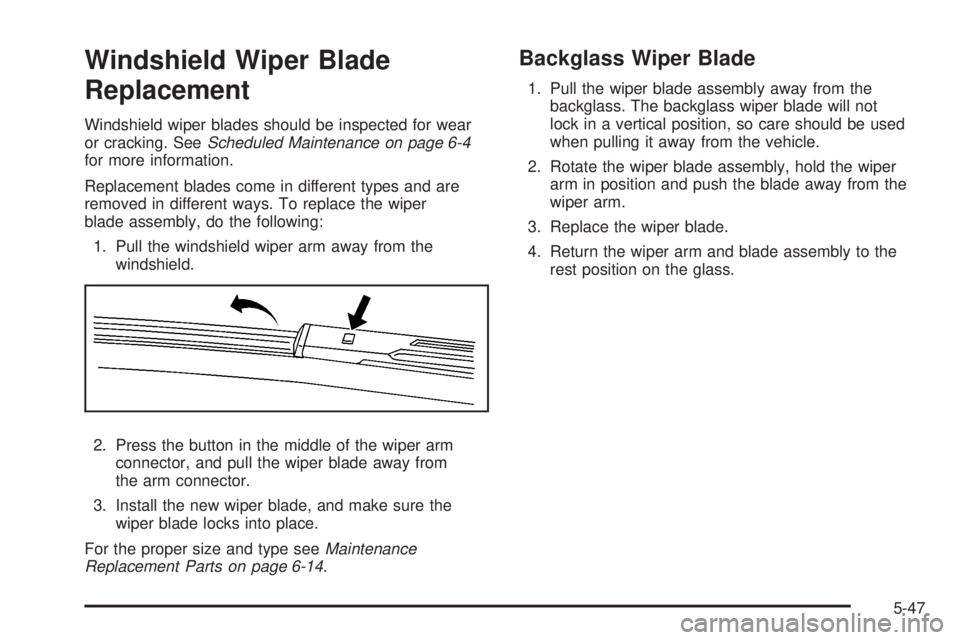
1. Pull the windshield wiper arm away from the
windshield.
2. Press the button in the middle of the wiper arm
connector, and pull the wiper blade away from
the arm connector.
3. Install the new wiper blade, and make sure the
wiper blade locks into place.
For the proper size and type seeMaintenance
Replacement Parts on page 6-14.
Backglass Wiper Blade
1. Pull the wiper blade assembly away from the
backglass. The backglass wiper blade will not
lock in a vertical position, so care should be used
when pulling it away from the vehicle.
2. Rotate the wiper blade assembly, hold the wiper
arm in position and push the blade away from the
wiper arm.
3. Replace the wiper blade.
4. Return the wiper arm and blade assembly to the
rest position on the glass.
5-47
Page 371 of 472
Tire Pressure Monitor System
The Tire Pressure Monitor System (TPMS) uses radio
and sensor technology to check tire pressure levels. The
TPMS sensors monitor the air pressure in your
vehicle’s tires and transmit tire pressure readings to a
receiver located in the vehicle.
Each tire, including the spare (if provided), should be
checked monthly when cold and inated to the ination
pressure recommended by the vehicle manufacturer
on the vehicle placard or tire ination pressure label. (If
your vehicle has tires of a different size than the size
indicated on the vehicle placard or tire ination pressure
label, you should determine the proper tire ination
pressure for those tires.)
As an added safety feature, your vehicle has been
equipped with a tire pressure monitoring system (TPMS)
that illuminates a low tire pressure telltale when one
or more of your tires is signicantly under-inated.
Accordingly, when the low tire pressure telltale
illuminates, you should stop and check your tires as
soon as possible, and inate them to the proper
pressure. Driving on a signicantly under-inated tire
causes the tire to overheat and can lead to tire failure.
Under-ination also reduces fuel efficiency and tire
tread life, and may affect the vehicle’s handling
and stopping ability.Please note that the TPMS is not a substitute for proper
tire maintenance, and it is the driver’s responsibility to
maintain correct tire pressure, even if under-ination has
not reached the level to trigger illumination of the
TPMS low tire pressure telltale.
Your vehicle has also been equipped with a TPMS
malfunction indicator to indicate when the system is not
operating properly. The TPMS malfunction indicator
is combined with the low tire pressure telltale. When the
system detects a malfunction, the telltale will ash for
approximately one minute and then remain continuously
illuminated. This sequence will continue upon
subsequent vehicle start-ups as long as the malfunction
exists.
When the malfunction indicator is illuminated, the
system may not be able to detect or signal low tire
pressure as intended. TPMS malfunctions may occur for
a variety of reasons, including the installation of
replacement or alternate tires or wheels on the vehicle
that prevent the TPMS from functioning properly.
Always check the TPMS malfunction telltale after
replacing one or more tires or wheels on your vehicle to
ensure that the replacement or alternate tires and
wheels allow the TPMS to continue to function properly.
SeeTire Pressure Monitor Operation on page 5-58,
for additional information.
5-57