tow GMC ACADIA 2008 Owner's Guide
[x] Cancel search | Manufacturer: GMC, Model Year: 2008, Model line: ACADIA, Model: GMC ACADIA 2008Pages: 472, PDF Size: 5.72 MB
Page 124 of 472
Outside Power Mirrors
If your vehicle is equipped
with outside power mirrors,
the controls are located
on the driver’s door
armrest.
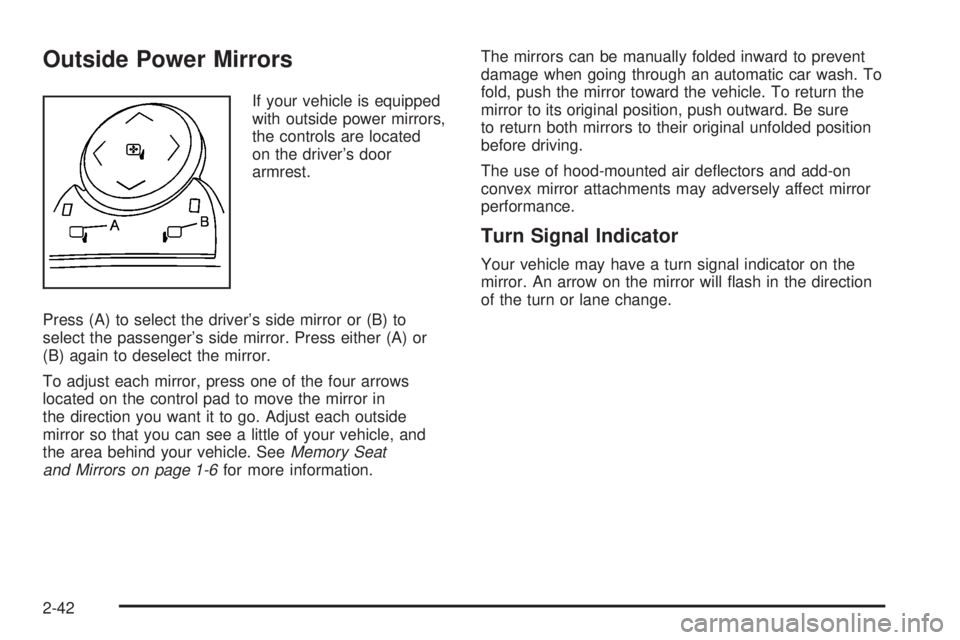
Press (A) to select the driver’s side mirror or (B) to
select the passenger’s side mirror. Press either (A) or
(B) again to deselect the mirror.
To adjust each mirror, press one of the four arrows
located on the control pad to move the mirror in
the direction you want it to go. Adjust each outside
mirror so that you can see a little of your vehicle, and
the area behind your vehicle. SeeMemory Seat
and Mirrors on page 1-6for more information.The mirrors can be manually folded inward to prevent
damage when going through an automatic car wash. To
fold, push the mirror toward the vehicle. To return the
mirror to its original position, push outward. Be sure
to return both mirrors to their original unfolded position
before driving.
The use of hood-mounted air deectors and add-on
convex mirror attachments may adversely affect mirror
performance.
Turn Signal Indicator
Your vehicle may have a turn signal indicator on the
mirror. An arrow on the mirror will ash in the direction
of the turn or lane change.
2-42
Page 129 of 472
When the System Does Not Seem to
Work Properly
The driver disables the system.
The parking brake pedal is depressed.
The ultrasonic sensors are not clean. Keep your
vehicle’s rear bumper free of mud, dirt, snow,
ice and slush. For cleaning instructions, see
Washing Your Vehicle on page 5-92.
A trailer was attached to your vehicle, or a bicycle
or an object was hanging out of your liftgate
during your last drive cycle, the red light may
illuminate in the rear display. Once the attached
object is removed, URPA will return to normal
operation.
A tow bar is attached to your vehicle.
The vehicle’s bumper is damaged. Take the vehicle
to your dealer/retailer to repair the system.
Other conditions may affect system performance,
such as vibrations from a jackhammer or the
compression of air brakes on a very large truck.
If the system is still disabled, after driving forward at
least 15 mph (25 km/h), take your vehicle to your
dealer/retailer.
Rear Vision Camera
Your vehicle may have a Rear Vision Camera system.
Read the entire section before using the system.
The rear vision camera system is designed to help the
driver when backing up. See “Rear Vision Camera”
in the Index of the navigation manual.
OnStar®System
OnStar uses several innovative technologies and live
advisors to provide you with a wide range of safety,
security, information, and convenience services. If your
airbags deploy, the system is designed to make an
automatic call to OnStar Emergency advisors who can
request emergency services be sent to your location.
If you lock your keys in the vehicle, call OnStar at
1-888-4-ONSTAR and they can send a signal to unlock
your doors. If you need roadside assistance, press
the OnStar button and they can contact Roadside
Service for you.
2-47
Page 139 of 472
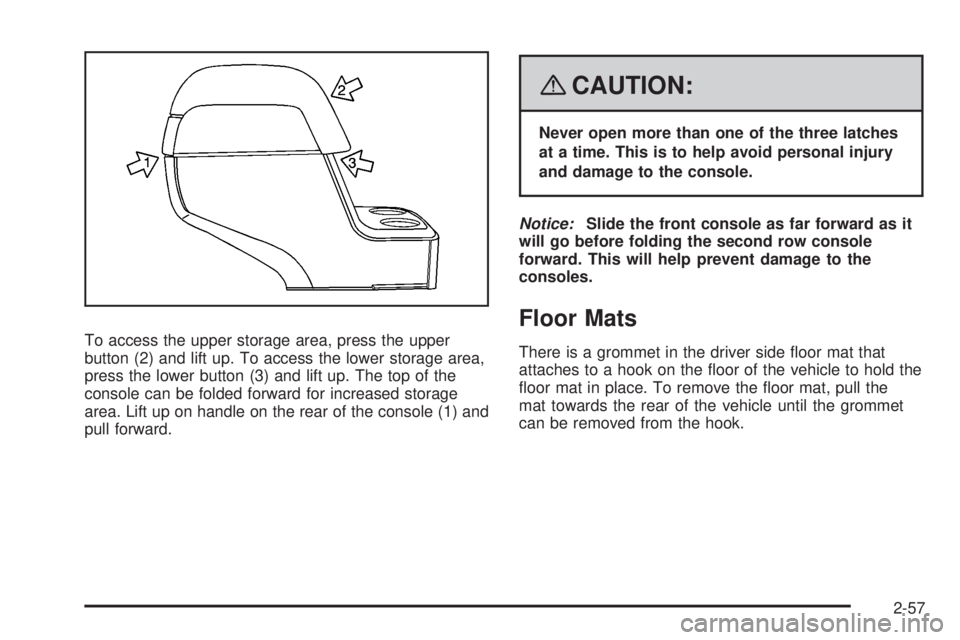
To access the upper storage area, press the upper
button (2) and lift up. To access the lower storage area,
press the lower button (3) and lift up. The top of the
console can be folded forward for increased storage
area. Lift up on handle on the rear of the console (1) and
pull forward.
{CAUTION:
Never open more than one of the three latches
at a time. This is to help avoid personal injury
and damage to the console.
Notice:Slide the front console as far forward as it
will go before folding the second row console
forward. This will help prevent damage to the
consoles.
Floor Mats
There is a grommet in the driver side oor mat that
attaches to a hook on the oor of the vehicle to hold the
oor mat in place. To remove the oor mat, pull the
mat towards the rear of the vehicle until the grommet
can be removed from the hook.
2-57
Page 141 of 472
Cargo Tie Downs
Cargo tie-downs located in the rear of the vehicle are
used to secure small loads.
Cargo Management System
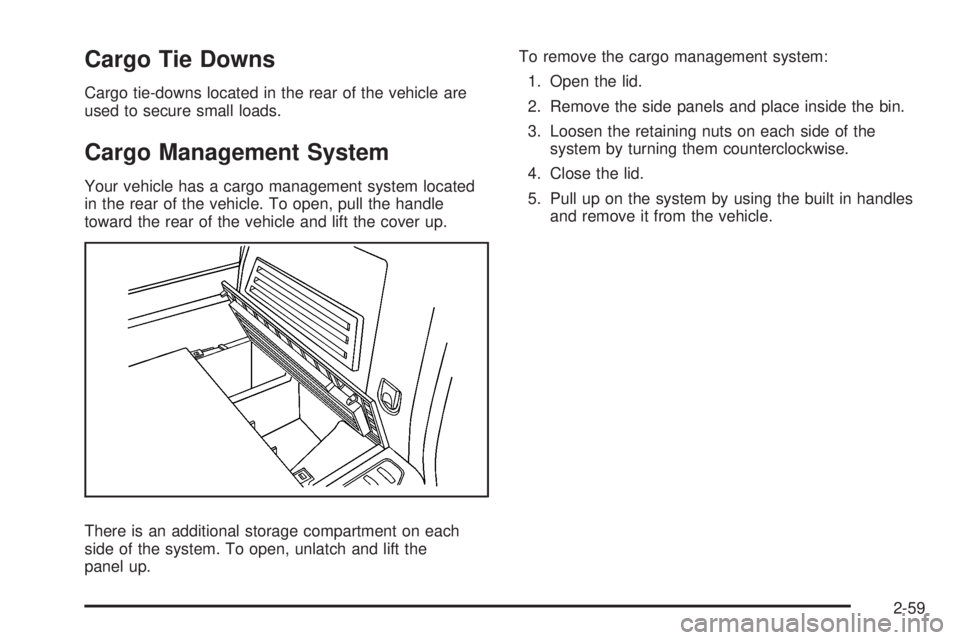
Your vehicle has a cargo management system located
in the rear of the vehicle. To open, pull the handle
toward the rear of the vehicle and lift the cover up.
There is an additional storage compartment on each
side of the system. To open, unlatch and lift the
panel up.To remove the cargo management system:
1. Open the lid.
2. Remove the side panels and place inside the bin.
3. Loosen the retaining nuts on each side of the
system by turning them counterclockwise.
4. Close the lid.
5. Pull up on the system by using the built in handles
and remove it from the vehicle.
2-59
Page 144 of 472
Antilock Brake System
Warning Light...........................................3-48
StabiliTrak
®Indicator Light..............................3-48
Engine Coolant Temperature Warning Light......3-49
Engine Coolant Temperature Gage..................3-49
Tire Pressure Light.......................................3-50
Malfunction Indicator Lamp.............................3-50
Oil Pressure Light.........................................3-54
Security Light...............................................3-54
Fog Lamp Light............................................3-55
Cruise Control Light......................................3-55
Highbeam On Light.......................................3-55
Tow/Haul Mode Light....................................3-55
Fuel Gage...................................................3-56
Driver Information Center (DIC).......................3-57
DIC Operation and Displays
(With DIC Buttons)....................................3-57
DIC Operation and Displays (Without DIC
Buttons)...................................................3-63DIC Warnings and Messages.........................3-66
DIC Vehicle Customization (With DIC Buttons). . . .3-75
Audio System(s).............................................3-84
Setting the Time...........................................3-85
Radio(s) (MP3).............................................3-87
Using an MP3 (Radio with CD and Six-Disc
CD Player).............................................3-104
Using an MP3 (Radio with CD and DVD
Player)...................................................3-108
XM Radio Messages...................................3-113
Navigation/Radio System..............................3-115
Rear Seat Entertainment (RSE) System.........3-115
Rear Seat Audio (RSA)................................3-125
Rear Audio Controller (RAC).........................3-127
Theft-Deterrent Feature................................3-127
Audio Steering Wheel Controls......................3-128
Radio Reception.........................................3-129
Multi-Band Antenna.....................................3-129
Section 3 Instrument Panel
3-2
Page 147 of 472
The main components of your instrument panel are listed here:
A. Air Vent. SeeOutlet Adjustment on page 3-36.
B. Multifunction Lever. SeeTurn Signal/Multifunction
Lever on page 3-8.
Windshield Wipers. SeeTurn Signal/Multifunction
Lever on page 3-8.
C. Instrument Panel Cluster. SeeInstrument Panel
Cluster on page 3-40.
D. Head-Up Display (HUD) Buttons. SeeHead-Up
Display (HUD) on page 3-20.
E. Audio System. SeeAudio System(s) on page 3-84.
Navigation/Radio System (If Equipped). See
Navigation/Radio System on page 3-115.
F. Exterior Lamps Control. SeeExterior Lamps
on page 3-14.
G. Hood Release. SeeHood Release on page 5-13.
H. Dome Lamp Override Button. SeeDome Lamp
Override on page 3-17. Instrument Panel Brightness
Control. SeeInstrument Panel Brightness on
page 3-17.
I. Cruise Control Buttons. SeeCruise Control
on page 3-12.
J. Tilt and Telescopic Steering Wheel. SeeTilt and
Telescopic Steering Wheel on page 3-6. Power
Tilt Wheel and Telescopic Steering (If Equipped).
SeePower Tilt Wheel and Telescopic Steering
Column on page 3-7.
K. Horn. SeeHorn on page 3-6.L. Audio Steering Wheel Control Buttons. SeeAudio
Steering Wheel Controls on page 3-128.
M. Driver Information Center. SeeDriver Information
Center (DIC) on page 3-57.
N. Dual Automatic Climate Controls. SeeDual
Automatic Climate Control System on page 3-29.
O. Center Console Shift Lever (If Equipped).
See “Console Shift Lever” underShifting Into
PARK (P) on page 2-36.
P. Hazard Warning Flasher Button. SeeHazard
Warning Flashers on page 3-6.
Q. Cupholders. SeeCupholder(s) on page 2-55.
R. Accessory Power Outlets. SeeAccessory Power
Outlet(s) on page 3-24.
S. Rear Window Wiper/Washer. SeeRear Window
Wiper/Washer on page 3-11. Traction Control
System (TCS) Disable Button. SeeStabiliTrak
®
System on page 4-6. Tow/Haul Selector Button
(If Equipped). SeeTow/Haul Mode on page 2-34.
Power Liftgate Button (If Equipped). SeePower
Liftgate on page 2-14.
T. Heated Seats Button. SeeHeated Seats on
page 1-5.
U. Passenger Air Bag status Indicator. SeePassenger
Sensing System on page 1-70.
V. Glove Box. SeeGlove Box on page 2-55.
3-5
Page 149 of 472
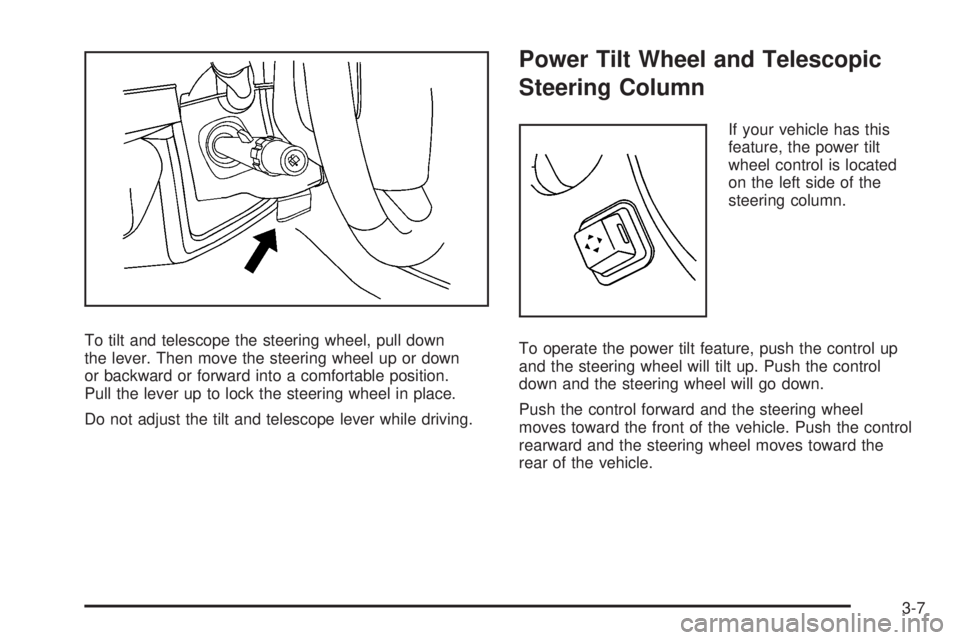
To tilt and telescope the steering wheel, pull down
the lever. Then move the steering wheel up or down
or backward or forward into a comfortable position.
Pull the lever up to lock the steering wheel in place.
Do not adjust the tilt and telescope lever while driving.
Power Tilt Wheel and Telescopic
Steering Column
If your vehicle has this
feature, the power tilt
wheel control is located
on the left side of the
steering column.
To operate the power tilt feature, push the control up
and the steering wheel will tilt up. Push the control
down and the steering wheel will go down.
Push the control forward and the steering wheel
moves toward the front of the vehicle. Push the control
rearward and the steering wheel moves toward the
rear of the vehicle.
3-7
Page 151 of 472
If a bulb is burned out, replace it to help avoid an
accident. If the arrows do not go on at all when you
signal a turn, check for burned-out bulbs and then check
the fuse. SeeFuses and Circuit Breakers on
page 5-100.
Turn Signal On Chime
If either one of the turn signals are left on and you have
drove more than 3/4 mile (1.2 km), a chime will sound.
Headlamp High/Low-Beam
Changer
To change the headlamps from low beam to high beam,
push the turn signal/multifunction lever toward the
front of the vehicle.
This light on the instrument
panel cluster comes on
if the high beam lamps
are turned on while
the ignition is on.
To change the headlamps from high beam to low beam,
pull the turn signal lever toward the rear of the vehicle.
Flash-to-Pass
With the turn signal lever in the low-beam position,
pull the lever toward you momentarily to switch
to high-beam, to signal that you are going to pass.
If the headlamps are on, they will return to low-beam
when the lever is released.
Windshield Wipers
Clear ice and snow from the wiper blades before
using them. If they are frozen to the windshield, gently
loosen or thaw them. Damaged wiper blades may
not clear the windshield well, making it harder to see
and drive safely. If the blades do become damaged,
install new blades or blade inserts. For more information,
seeWindshield Wiper Blade Replacement on page 5-47.
Heavy snow or ice can overload the wiper motor.
A circuit breaker will stop the motor until it cools down.
Clear away snow or ice to prevent an overload.
Turn the band with the wiper symbol to control the
windshield wipers.
3-9
Page 163 of 472
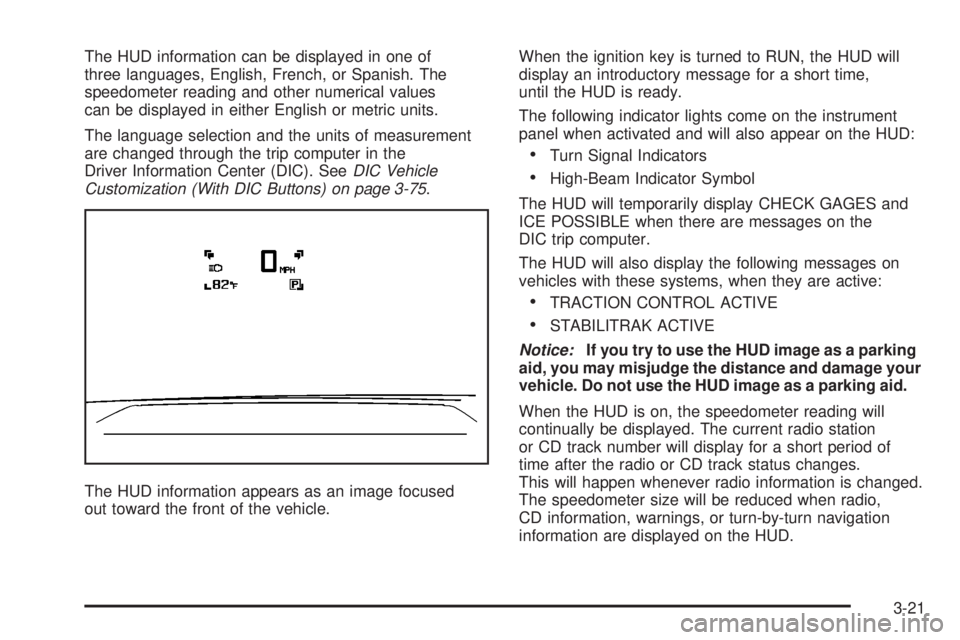
The HUD information can be displayed in one of
three languages, English, French, or Spanish. The
speedometer reading and other numerical values
can be displayed in either English or metric units.
The language selection and the units of measurement
are changed through the trip computer in the
Driver Information Center (DIC). SeeDIC Vehicle
Customization (With DIC Buttons) on page 3-75.
The HUD information appears as an image focused
out toward the front of the vehicle.When the ignition key is turned to RUN, the HUD will
display an introductory message for a short time,
until the HUD is ready.
The following indicator lights come on the instrument
panel when activated and will also appear on the HUD:
Turn Signal Indicators
High-Beam Indicator Symbol
The HUD will temporarily display CHECK GAGES and
ICE POSSIBLE when there are messages on the
DIC trip computer.
The HUD will also display the following messages on
vehicles with these systems, when they are active:
TRACTION CONTROL ACTIVE
STABILITRAK ACTIVE
Notice:If you try to use the HUD image as a parking
aid, you may misjudge the distance and damage your
vehicle. Do not use the HUD image as a parking aid.
When the HUD is on, the speedometer reading will
continually be displayed. The current radio station
or CD track number will display for a short period of
time after the radio or CD track status changes.
This will happen whenever radio information is changed.
The speedometer size will be reduced when radio,
CD information, warnings, or turn-by-turn navigation
information are displayed on the HUD.
3-21
Page 169 of 472
Airow Mode Control:Turn the right knob clockwise
or counterclockwise to direct the airow inside of
the vehicle.
To change the current mode, select one of the following:
H(Vent):This mode directs air to the instrument
panel outlets.
)(Bi-Level):This mode directs about half of the
air to the instrument panel outlets and half to the oor
outlets. A little air is directed towards the windshield
and side window outlets. Cooler air is directed to
the upper outlets and warmer air to the oor outlets.
6(Floor):This mode directs most of the air to
the oor outlets, with some of the air directed to the
windshield, side window outlets, and second row
oor outlets. In this mode, the system automatically
selects outside air. Recirculation cannot be selected
when in Floor Mode.
The right knob can also be used to select defog or
defrost mode. For more information, see “Defogging
and Defrosting” later in this section.
By positioning the right knob between two modes,
a combination of those two modes is selected.
@(Recirculation):Press this button to turn the
recirculation mode on or off. The indicator light on
the button turns on when this mode is selected.This mode keeps outside air from entering the vehicle.
It can be used to reduce the outside air and odors
entering the vehicle. Recirculation may also help cool the
air inside the vehicle more quickly once the temperature
inside the vehicle is less than the outside temperature.
The recirculation mode can be turned off in vent
and bi-level modes by pressing the button again.
Recirculation mode automatically turns off when the
engine is turned off and must be re-selected when the
engine is turned on again.
The recirculation mode cannot be used with oor, defrost,
or defogging modes. If you try to select recirculation in
one of those modes, the indicator ashes three times
and turns off. The air conditioning compressor also
comes on when this mode is activated unless the
outside air temperature is less than 40°F (4°C). While
in recirculation mode the windows may fog when the
weather is cold and damp. To clear the fog, select either
the defog or defrost mode and increase the fan speed.
#(Air Conditioning):Press this button on the left
knob to turn the air conditioning system on or off.
When A/C is pressed, an indicator light comes on to
show that the air conditioning has been activated. The air
conditioning compressor does not operate when outside
temperatures fall below 40°F (4°C). The indicator light
ashes three times and turns off when outside conditions
affect air conditioning operation. This is normal.
3-27