light GMC ACADIA 2008 Owner's Guide
[x] Cancel search | Manufacturer: GMC, Model Year: 2008, Model line: ACADIA, Model: GMC ACADIA 2008Pages: 472, PDF Size: 5.72 MB
Page 144 of 472
Antilock Brake System
Warning Light...........................................3-48
StabiliTrak
®Indicator Light..............................3-48
Engine Coolant Temperature Warning Light......3-49
Engine Coolant Temperature Gage..................3-49
Tire Pressure Light.......................................3-50
Malfunction Indicator Lamp.............................3-50
Oil Pressure Light.........................................3-54
Security Light...............................................3-54
Fog Lamp Light............................................3-55
Cruise Control Light......................................3-55
Highbeam On Light.......................................3-55
Tow/Haul Mode Light....................................3-55
Fuel Gage...................................................3-56
Driver Information Center (DIC).......................3-57
DIC Operation and Displays
(With DIC Buttons)....................................3-57
DIC Operation and Displays (Without DIC
Buttons)...................................................3-63DIC Warnings and Messages.........................3-66
DIC Vehicle Customization (With DIC Buttons). . . .3-75
Audio System(s).............................................3-84
Setting the Time...........................................3-85
Radio(s) (MP3).............................................3-87
Using an MP3 (Radio with CD and Six-Disc
CD Player).............................................3-104
Using an MP3 (Radio with CD and DVD
Player)...................................................3-108
XM Radio Messages...................................3-113
Navigation/Radio System..............................3-115
Rear Seat Entertainment (RSE) System.........3-115
Rear Seat Audio (RSA)................................3-125
Rear Audio Controller (RAC).........................3-127
Theft-Deterrent Feature................................3-127
Audio Steering Wheel Controls......................3-128
Radio Reception.........................................3-129
Multi-Band Antenna.....................................3-129
Section 3 Instrument Panel
3-2
Page 151 of 472
If a bulb is burned out, replace it to help avoid an
accident. If the arrows do not go on at all when you
signal a turn, check for burned-out bulbs and then check
the fuse. SeeFuses and Circuit Breakers on
page 5-100.
Turn Signal On Chime
If either one of the turn signals are left on and you have
drove more than 3/4 mile (1.2 km), a chime will sound.
Headlamp High/Low-Beam
Changer
To change the headlamps from low beam to high beam,
push the turn signal/multifunction lever toward the
front of the vehicle.
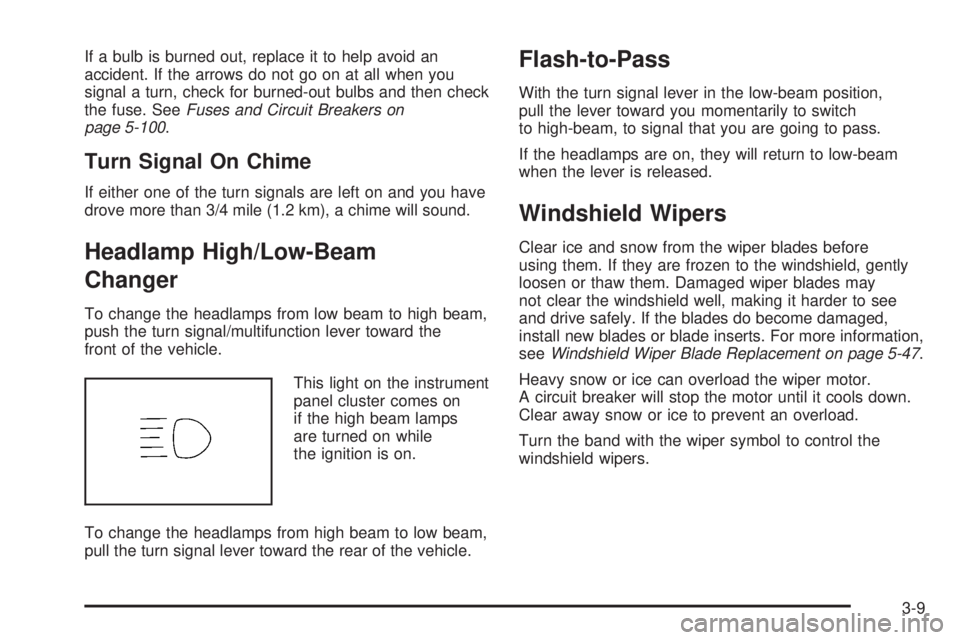
This light on the instrument
panel cluster comes on
if the high beam lamps
are turned on while
the ignition is on.
To change the headlamps from high beam to low beam,
pull the turn signal lever toward the rear of the vehicle.
Flash-to-Pass
With the turn signal lever in the low-beam position,
pull the lever toward you momentarily to switch
to high-beam, to signal that you are going to pass.
If the headlamps are on, they will return to low-beam
when the lever is released.
Windshield Wipers
Clear ice and snow from the wiper blades before
using them. If they are frozen to the windshield, gently
loosen or thaw them. Damaged wiper blades may
not clear the windshield well, making it harder to see
and drive safely. If the blades do become damaged,
install new blades or blade inserts. For more information,
seeWindshield Wiper Blade Replacement on page 5-47.
Heavy snow or ice can overload the wiper motor.
A circuit breaker will stop the motor until it cools down.
Clear away snow or ice to prevent an overload.
Turn the band with the wiper symbol to control the
windshield wipers.
3-9
Page 152 of 472
8(Mist):Turn the band to mist for a single wiping
cycle. Hold it there until the wipers start. Then let
go. The wipers stop after one wipe. Hold the band
on mist longer, for more wipe cycles.
9(Off):To stop the wipers, move the band to off.
6(Delay):Turn the band to adjust the delay time.
The delay between wiping cycles becomes shorter
as the band is moved to the top of the lever. This can
be very useful in light rain or snow.
1 (Low Speed):Turn the band away from you to
the rst solid band past the delay settings, for steady
wiping at low speed.
2 (High Speed):Turn the band further, to the second
solid band past the delay settings, for high-speed wiping.
Windshield Washer
J(Washer Fluid):Press the button located at the
end of the turn signal/multifunction lever, to spray
washer uid on the windshield. The wipers clear the
windshield and either stop or return to the preset speed.
The ignition key must be in ACCESSORY or ON for
this to work. SeeWindshield Washer Fluid on page 5-34
Windshield Washer Fluid.
{CAUTION:
In freezing weather, do not use your washer
until the windshield is warmed. Otherwise the
washer uid can form ice on the windshield,
blocking your vision.
WASHER FLUID LOW ADD FLUID is displayed on the
Driver Information Center (DIC) when the washer uid is
low. SeeDIC Warnings and Messages on page 3-66.
3-10
Page 155 of 472
Setting Cruise Control
Cruise control will not work if your parking brake is set,
or if the master cylinder brake uid level is low.
The cruise control light on the instrument panel cluster
comes on after the cruise control has been set to
the desired speed.
{CAUTION:
If you leave your cruise control on when you
are not using cruise, you might hit a button
and go into cruise when you do not want to.
You could be startled and even lose control.
Keep the cruise control switch off until you
want to use cruise control.
1. Press the cruise control on/off button.
2. Get up to the speed desired.
3. Press and release the SET– button located
on the steering wheel.
4. Take your foot off the accelerator.
Resuming a Set Speed
Suppose you set your cruise control at a desired
speed and then you apply the brake. This shuts off
the cruise control. But you do not need to reset it.Once you are driving about 25 mph (40 km/h) or
more, press the +RES button on your steering wheel.
The vehicle will go back to the previously chosen
speed and stay there.
Increasing Speed While Using
Cruise Control
To increase the cruise speed while using cruise control:
Press and hold the +RES button on the steering
wheel until you reach the desired speed, then
release it.
To increase vehicle speed in small increments,
press the +RES button.
Reducing Speed While Using
Cruise Control
To reduce your speed while using cruise control:
Press and hold the SET– button on the steering
wheel until you reach the lower speed desired,
then release it.
To slow down in very small amounts, press
the SET– button on the steering wheel briey.
Each time this is done, the vehicle will go
about 1 mph (1.6 km/h) slower.
3-13
Page 156 of 472
Passing Another Vehicle While Using
Cruise Control
Use the accelerator pedal to increase vehicle speed.
When you take your foot off the pedal, your vehicle
will slow down to the previously set cruise speed.
Using Cruise Control on Hills
How well your cruise control will work on hills depends
upon the vehicle speed, load, and the steepness of
the hills. When going up steep hills, you might have to
step on the accelerator pedal to maintain the vehicle
speed. When going downhill, you might have to brake or
shift to a lower gear to keep the vehicle speed down.
Of course, applying the brake turns off the cruise control.
Many drivers nd this to be too much trouble and do
not use cruise control on steep hills.
Ending Cruise Control
There are three ways to end cruise control:
Step lightly on the brake pedal.
Press the[(cancel) button on the steering wheel.
Press theT(on/off) button on the steering wheel.
Erasing Speed Memory
The cruise control set speed memory is erased by
turning off the cruise control or the ignition.
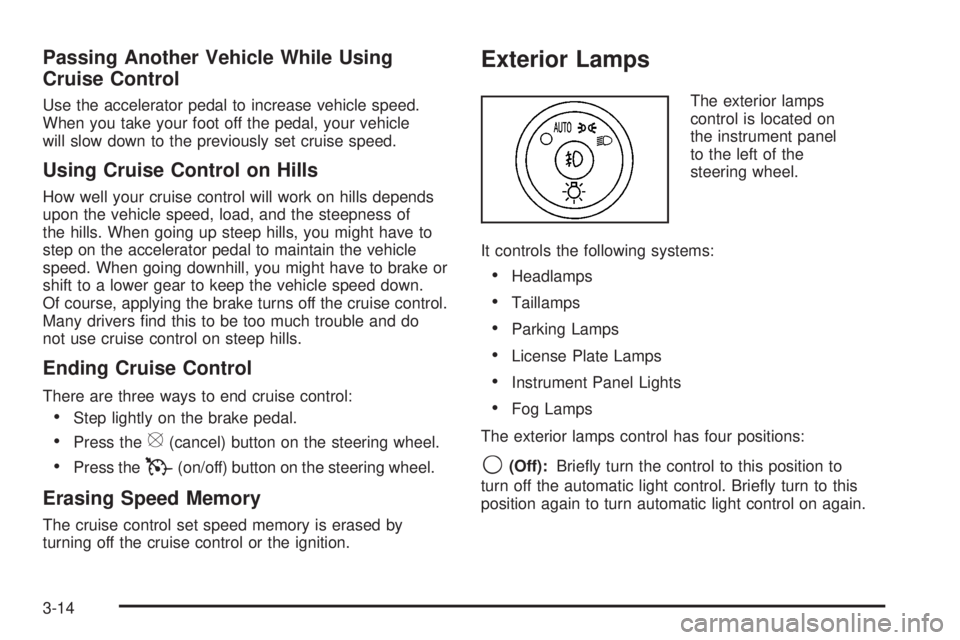
Exterior Lamps
The exterior lamps
control is located on
the instrument panel
to the left of the
steering wheel.
It controls the following systems:
Headlamps
Taillamps
Parking Lamps
License Plate Lamps
Instrument Panel Lights
Fog Lamps
The exterior lamps control has four positions:
9(Off):Briey turn the control to this position to
turn off the automatic light control. Briey turn to this
position again to turn automatic light control on again.
3-14
Page 157 of 472
AUTO (Automatic):Turn the control to this position
to automatically turn on the headlamps at normal
brightness, together with the following:
Parking Lamps
Taillamps
License Plate Lamps
Instrument Panel Lights
;(Parking Lamps):Turn the control to this position
to turn on the parking lamps together with the
following:
Taillamps
License Plate Lamps
Instrument Panel Lights
2(Headlamps):Turn the control to this position to
turn on the headlamps together with the following lamps
listed below. A warning chime will sound if you open
the driver’s door when the ignition switch is off and the
headlamps are on.
Parking Lamps
Taillamps
License Plate Lamps
Instrument Panel Lights
-(Fog Lamps):Push the fog lamps control in
to turn on the fog lamps.
SeeFog Lamps on page 3-16.
Delayed Headlamps
The delayed headlamps feature provides a period of
exterior lighting as you leave the area around your
vehicle. The feature is activated when the headlamps
are on due to the automatic headlamps control
feature described previously in this section, and when
the ignition is turned off. Your headlamps will then
remain on until the exterior lamps control is moved to
the parking lamps position or until the pre-selected
delayed headlamp lighting period has ended.
If you turn off the ignition with the headlamps switch in
the parking lamps or headlamps position, the delayed
headlamps cycle will not occur.
To disable the delayed headlamps feature or change
the time of delay, seeDIC Vehicle Customization
(With DIC Buttons) on page 3-75.
3-15
Page 158 of 472
Daytime Running Lamps (DRL)/
Automatic Headlamp System
Daytime Running Lamps (DRL) can make it easier
for others to see the front of your vehicle during the
day. DRL can be helpful in many different driving
conditions, but they can be especially helpful in
the short periods after dawn and before sunset.
Fully functional daytime running lamps are required
on all vehicles rst sold in Canada.
A light sensor on top of the instrument panel makes
the DRL work, so be sure it is not covered.
The DRL system’s automatic headlamp control will
make the low-beam headlamps come on at a reduced
brightness when the following conditions are met:
The ignition is in the ON/RUN position.
The exterior lamps control is in AUTO.
The engine is running.
When the DRL are on, only the low-beam headlamps,
at a reduced level of brightness, will be on. The
headlamps, taillamps, sidemarker, and other lamps
will not be on. The instrument panel and cluster will
also not be lit.
When it is dark enough outside, the low-beam
headlamps will turn off and the headlamps and parking
lamps will turn on. The other lamps that come on
with the headlamps will also come on.When it is bright enough outside, the headlamps will
go off and the DRL will come on.
As with any vehicle, you should turn on the regular
headlamp system when it is needed.
Fog Lamps
Use the fog lamps for better vision in foggy or misty
conditions.
-(Fog Lamps):The fog lamps button is located on
the exterior lamps control. The exterior lamps control
is located on the instrument panel to the left of the
steering column.
The ignition must be on for the fog lamps to work.
Press the exterior lamps button to turn the fog lamps
on or off. A light will come on in the instrument
panel cluster when the fog lamps are in use.
When the headlamps are changed to high-beam, the
fog lamps will turn off. The fog lamps come back
on again when the high-beam headlamps are turned off.
Some localities have laws that require the headlamps
to be on along with the fog lamps.
3-16
Page 159 of 472
Instrument Panel Brightness
D(Instrument Panel Brightness):The knob with
this symbol on it is located next to the exterior lamps
control. Push the knob in all the way until it extends
out and then turn the knob clockwise to brighten
or counterclockwise to dim the lights. Push the knob
back in when nished.
Courtesy Lamps
When a door is opened, the courtesy lamps automatically
come on. They make it easy for you to enter and leave
your vehicle. You can also manually turn these lamps on
by fully turning the instrument panel brightness control
clockwise.
The reading lamps, located on the headliner above the
rearview mirror, can be turned on or off independent
of the automatic courtesy lamps, when the doors
are closed.
Dome Lamps
The dome lamps automatically come on when a door
is opened, unless the dome lamp override button
is pressed in.
The lamps can also be turned on and off by turning
the instrument panel brightness control clockwise to
the farthest position.
Dome Lamp Override
The dome lamp override button is located next to the
exterior lamps control.
The dome lamp override is used to set the dome lamps
to remain off or come on automatically when a door
is opened.
E(Dome Lamp Override):Press the button in and
the dome lamps remain off when a door is opened.
Press the button again to return it to the extended
position so that the dome lamps come on when a
door is opened.
Entry Lighting
Your vehicle may have courtesy lamps that will come
on and stay on for a set time whenever the unlock
symbol is pressed on the Remote Keyless Entry (RKE)
Transmitter, if the vehicle has one.
If a door is opened, the lamps stay on while it is open
and then turn off automatically about 25 seconds
after the door is closed. If the unlock symbol is pressed
and you do not open a door, the lamps turn off after
about 20 seconds.
3-17
Page 160 of 472
Entry lighting includes a feature called theater dimming.
With theater dimming, the lamps do not turn off at the end
of the delay time. Instead, they slowly dim after the delay
time until they go out. The delay time is canceled if you
turn the ignition key to ON/RUN or press the power door
lock switch. The lamps will dim right away.
When the ignition is on, illuminated entry is inactive,
which means the courtesy lamps will not come on
unless a door is opened.
Delayed Entry Lighting
Delayed entry lighting illuminates the interior for a
period of time after all the doors have been closed.
The ignition must be off for delayed entry lighting
to work. Immediately after all the doors have been
closed, the delayed entry lighting feature will continue
to work until one of the following occurs:
The ignition is in ON/RUN.
The doors are locked.
An illumination period of 25 seconds has elapsed.
If during the illumination period a door is opened,
the timed illumination period will be canceled and the
interior lamps will remain on because a door is open.
Delayed Exit Lighting
This feature illuminates the interior for a period of time
after the key is removed from the ignition.
The ignition must be off for delayed exit lighting to
work. When the key is removed, interior illumination
will activate and remain on until one of the following
occurs:
The ignition is in ON/RUN.
The power door locks are activated.
An illumination period of 20 seconds has elapsed.
If during the illumination period a door is opened,
the timed illumination period will be canceled and the
interior lamps will remain on because a door is open.
Parade Dimming
The instrument panel has an added feature called
parade mode. It automatically prohibits the dimming
of the instrument panel displays during the daylight
while the headlamps are on so that you will still be
able to see the displays.
3-18
Page 161 of 472
Reading Lamps
The vehicle has reading lamps that also act as the
dome lamp. Press the button to turn them on and off.
Electric Power Management
The vehicle has Electric Power Management (EPM)
that estimates the battery’s temperature and state
of charge. It then adjusts the voltage for best
performance and extended life of the battery.
When the battery’s state of charge is low, the voltage
is raised slightly to quickly put the charge back in.
When the state of charge is high, the voltage is lowered
slightly to prevent overcharging. If the vehicle has a
voltmeter gage or a voltage display on the Driver
Information Center (DIC), you may see the voltage
move up or down. This is normal. If there is a problem,
an alert will be displayed.
The battery can be discharged at idle if the electrical
loads are very high. This is true for all vehicles.
This is because the generator (alternator) may not be
spinning fast enough at idle to produce all the power
that is needed for very high electrical loads.A high electrical load occurs when several of the
following loads are on: headlamps, high beams,
fog lamps, rear window defogger, climate control fan
at high speed, heated seats, engine cooling fans,
trailer loads, and loads plugged into accessory power
outlets.
EPM works to prevent excessive discharge of the
battery. It does this by balancing the generator’s output
and the vehicle’s electrical needs. It can increase
engine idle speed to generate more power, whenever
needed. It can temporarily reduce the power demands
of some accessories.
Normally, these actions occur in steps or levels, without
being noticeable. In rare cases at the highest levels
of corrective action, this action may be noticeable
to the driver. If so, a Driver Information Center (DIC)
message might be displayed, such as Battery Saver
Active or Service Battery Charging System. If this
message is displayed, it is recommended that the
driver reduce the electrical loads as much as possible.
SeeDIC Warnings and Messages on page 3-66.
3-19