lock GMC ACADIA 2008 Workshop Manual
[x] Cancel search | Manufacturer: GMC, Model Year: 2008, Model line: ACADIA, Model: GMC ACADIA 2008Pages: 472, PDF Size: 5.72 MB
Page 152 of 472
8(Mist):Turn the band to mist for a single wiping
cycle. Hold it there until the wipers start. Then let
go. The wipers stop after one wipe. Hold the band
on mist longer, for more wipe cycles.
9(Off):To stop the wipers, move the band to off.
6(Delay):Turn the band to adjust the delay time.
The delay between wiping cycles becomes shorter
as the band is moved to the top of the lever. This can
be very useful in light rain or snow.
1 (Low Speed):Turn the band away from you to
the rst solid band past the delay settings, for steady
wiping at low speed.
2 (High Speed):Turn the band further, to the second
solid band past the delay settings, for high-speed wiping.
Windshield Washer
J(Washer Fluid):Press the button located at the
end of the turn signal/multifunction lever, to spray
washer uid on the windshield. The wipers clear the
windshield and either stop or return to the preset speed.
The ignition key must be in ACCESSORY or ON for
this to work. SeeWindshield Washer Fluid on page 5-34
Windshield Washer Fluid.
{CAUTION:
In freezing weather, do not use your washer
until the windshield is warmed. Otherwise the
washer uid can form ice on the windshield,
blocking your vision.
WASHER FLUID LOW ADD FLUID is displayed on the
Driver Information Center (DIC) when the washer uid is
low. SeeDIC Warnings and Messages on page 3-66.
3-10
Page 159 of 472
Instrument Panel Brightness
D(Instrument Panel Brightness):The knob with
this symbol on it is located next to the exterior lamps
control. Push the knob in all the way until it extends
out and then turn the knob clockwise to brighten
or counterclockwise to dim the lights. Push the knob
back in when nished.
Courtesy Lamps
When a door is opened, the courtesy lamps automatically
come on. They make it easy for you to enter and leave
your vehicle. You can also manually turn these lamps on
by fully turning the instrument panel brightness control
clockwise.
The reading lamps, located on the headliner above the
rearview mirror, can be turned on or off independent
of the automatic courtesy lamps, when the doors
are closed.
Dome Lamps
The dome lamps automatically come on when a door
is opened, unless the dome lamp override button
is pressed in.
The lamps can also be turned on and off by turning
the instrument panel brightness control clockwise to
the farthest position.
Dome Lamp Override
The dome lamp override button is located next to the
exterior lamps control.
The dome lamp override is used to set the dome lamps
to remain off or come on automatically when a door
is opened.
E(Dome Lamp Override):Press the button in and
the dome lamps remain off when a door is opened.
Press the button again to return it to the extended
position so that the dome lamps come on when a
door is opened.
Entry Lighting
Your vehicle may have courtesy lamps that will come
on and stay on for a set time whenever the unlock
symbol is pressed on the Remote Keyless Entry (RKE)
Transmitter, if the vehicle has one.
If a door is opened, the lamps stay on while it is open
and then turn off automatically about 25 seconds
after the door is closed. If the unlock symbol is pressed
and you do not open a door, the lamps turn off after
about 20 seconds.
3-17
Page 160 of 472
Entry lighting includes a feature called theater dimming.
With theater dimming, the lamps do not turn off at the end
of the delay time. Instead, they slowly dim after the delay
time until they go out. The delay time is canceled if you
turn the ignition key to ON/RUN or press the power door
lock switch. The lamps will dim right away.
When the ignition is on, illuminated entry is inactive,
which means the courtesy lamps will not come on
unless a door is opened.
Delayed Entry Lighting
Delayed entry lighting illuminates the interior for a
period of time after all the doors have been closed.
The ignition must be off for delayed entry lighting
to work. Immediately after all the doors have been
closed, the delayed entry lighting feature will continue
to work until one of the following occurs:
The ignition is in ON/RUN.
The doors are locked.
An illumination period of 25 seconds has elapsed.
If during the illumination period a door is opened,
the timed illumination period will be canceled and the
interior lamps will remain on because a door is open.
Delayed Exit Lighting
This feature illuminates the interior for a period of time
after the key is removed from the ignition.
The ignition must be off for delayed exit lighting to
work. When the key is removed, interior illumination
will activate and remain on until one of the following
occurs:
The ignition is in ON/RUN.
The power door locks are activated.
An illumination period of 20 seconds has elapsed.
If during the illumination period a door is opened,
the timed illumination period will be canceled and the
interior lamps will remain on because a door is open.
Parade Dimming
The instrument panel has an added feature called
parade mode. It automatically prohibits the dimming
of the instrument panel displays during the daylight
while the headlamps are on so that you will still be
able to see the displays.
3-18
Page 164 of 472
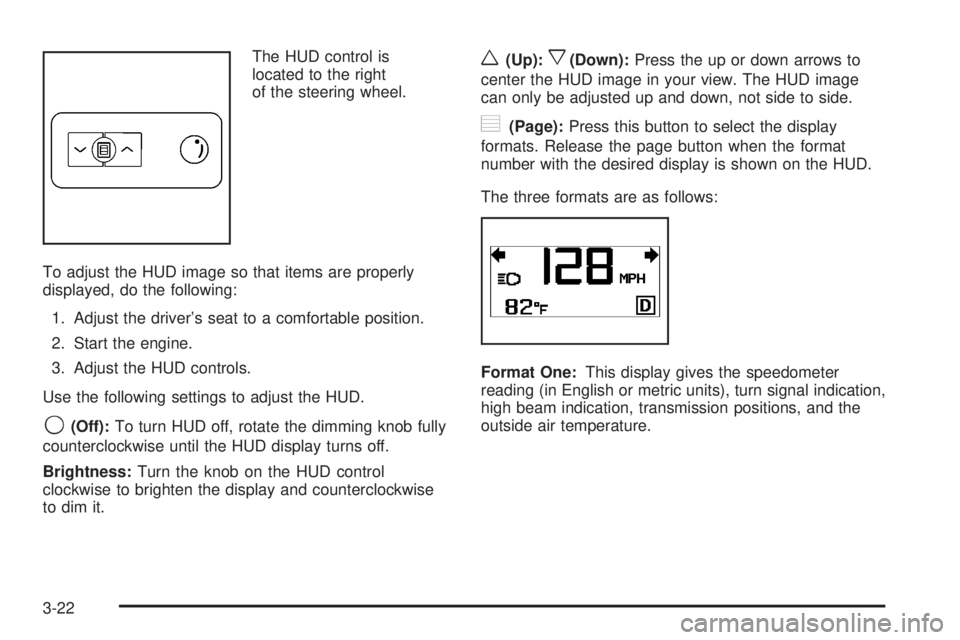
The HUD control is
located to the right
of the steering wheel.
To adjust the HUD image so that items are properly
displayed, do the following:
1. Adjust the driver’s seat to a comfortable position.
2. Start the engine.
3. Adjust the HUD controls.
Use the following settings to adjust the HUD.
9(Off):To turn HUD off, rotate the dimming knob fully
counterclockwise until the HUD display turns off.
Brightness:Turn the knob on the HUD control
clockwise to brighten the display and counterclockwise
to dim it.
w(Up):x(Down):Press the up or down arrows to
center the HUD image in your view. The HUD image
can only be adjusted up and down, not side to side.
?(Page):Press this button to select the display
formats. Release the page button when the format
number with the desired display is shown on the HUD.
The three formats are as follows:
Format One:This display gives the speedometer
reading (in English or metric units), turn signal indication,
high beam indication, transmission positions, and the
outside air temperature.
3-22
Page 166 of 472
If You Cannot See the HUD Image
When the Ignition Is On
Is anything covering the HUD lens?
Is the HUD dimmer setting bright enough?
Is the HUD image adjusted to the proper height?
Are you wearing polarized sunglasses?
Still no HUD image? Check the fuse in the
instrument panel fuse block. SeeInstrument
Panel Fuse Block on page 5-100.
If the HUD Image Is Not Clear
Is the HUD image too bright?
Are the windshield and HUD lens clean?
If the HUD image is not correct, contact your
dealer/retailer.
Keep in mind that the windshield is part of the
HUD system.
Accessory Power Outlet(s)
The accessory power outlets can be used to connect
electrical equipment such as a cellular phone or
CB radio.
Your vehicle may have four accessory power outlets.
They are located on the instrument panel below
the climate controls, inside the front center console
storage bin, at the rear of the center console, and in
the rear cargo area.
To use the outlets, remove the cover. When not in
use, always cover the outlet with the protective cap.
Notice:Leaving electrical equipment on for
extended periods will drain the battery. Always
turn off electrical equipment when not in use
and do not plug in equipment that exceeds the
maximum amperage rating of 20 amperes.
3-24
Page 168 of 472
The indicator light does not come on when the ignition
is in LOCK/OFF or if no equipment is plugged into
the outlet.
If you try to connect equipment using more than
150 watts or a system fault is detected, a protection
circuit shuts off the power supply and the indicator
light turns off. To reset the circuit, unplug the item
and plug it back in or turn the Remote Accessory Power
(RAP) off and then back on. SeeRetained Accessory
Power (RAP) on page 2-27. The power restarts
when equipment using 150 watts or less is plugged
into the outlet and a system fault is not detected.
The power outlet is not designed for the following
electrical equipment and may not work properly if
these items are plugged into the power outlet:
Equipment with high initial peak wattage such
as: compressor-driven refrigerators and electric
power tools.
Other equipment requiring an extremely stable
power supply such as: microcomputer-controlled
electric blankets, touch sensor lamps, etc.
SeeHigh Voltage Devices and Wiring on page 5-99.
Climate Controls
Climate Control System
With this system you can control the heating, cooling,
defrost, defog, and ventilation of the vehicle.
Manual Operation
9
(Fan):Turn the left knob clockwise or
counterclockwise to increase or decrease the fan speed.
Turn the knob all the way counterclockwise to turn the
front system off.
Temperature Control:Turn the center knob clockwise
or counterclockwise to increase or decrease the
temperature of the air owing from the system.
3-26
Page 169 of 472
Airow Mode Control:Turn the right knob clockwise
or counterclockwise to direct the airow inside of
the vehicle.
To change the current mode, select one of the following:
H(Vent):This mode directs air to the instrument
panel outlets.
)(Bi-Level):This mode directs about half of the
air to the instrument panel outlets and half to the oor
outlets. A little air is directed towards the windshield
and side window outlets. Cooler air is directed to
the upper outlets and warmer air to the oor outlets.
6(Floor):This mode directs most of the air to
the oor outlets, with some of the air directed to the
windshield, side window outlets, and second row
oor outlets. In this mode, the system automatically
selects outside air. Recirculation cannot be selected
when in Floor Mode.
The right knob can also be used to select defog or
defrost mode. For more information, see “Defogging
and Defrosting” later in this section.
By positioning the right knob between two modes,
a combination of those two modes is selected.
@(Recirculation):Press this button to turn the
recirculation mode on or off. The indicator light on
the button turns on when this mode is selected.This mode keeps outside air from entering the vehicle.
It can be used to reduce the outside air and odors
entering the vehicle. Recirculation may also help cool the
air inside the vehicle more quickly once the temperature
inside the vehicle is less than the outside temperature.
The recirculation mode can be turned off in vent
and bi-level modes by pressing the button again.
Recirculation mode automatically turns off when the
engine is turned off and must be re-selected when the
engine is turned on again.
The recirculation mode cannot be used with oor, defrost,
or defogging modes. If you try to select recirculation in
one of those modes, the indicator ashes three times
and turns off. The air conditioning compressor also
comes on when this mode is activated unless the
outside air temperature is less than 40°F (4°C). While
in recirculation mode the windows may fog when the
weather is cold and damp. To clear the fog, select either
the defog or defrost mode and increase the fan speed.
#(Air Conditioning):Press this button on the left
knob to turn the air conditioning system on or off.
When A/C is pressed, an indicator light comes on to
show that the air conditioning has been activated. The air
conditioning compressor does not operate when outside
temperatures fall below 40°F (4°C). The indicator light
ashes three times and turns off when outside conditions
affect air conditioning operation. This is normal.
3-27
Page 170 of 472
For quicker cool down on hot days, do the following:
1. Open the windows to let hot air escape.
2. Select the vent mode.
3. Select the air conditioner.
4. Select the coolest temperature.
5. Select the highest fan speed.
6. Close the windows after the hot air has escaped.
7. Once the vehicle’s interior temperature is below
the outside temperature, select recirculation
mode for better cooling.
This helps to reduce the time it takes for the vehicle
to cool down. It also helps the system to operate
more efficiently.
Using recirculation for long periods of time may
cause the air inside of the vehicle to become too dry.
To prevent this from happening, after the inside of
the vehicle has cooled, turn the recirculation mode off.
The air conditioning system removes moisture from
the air, so you might notice a small amount of water
dripping underneath the front center and right rear
of the vehicle while idling or after turning off the engine.
This is normal.Defogging and Defrosting
Fog on the inside of the windows is a result of high
humidity (moisture) condensing on the cool window
glass. This can be minimized if the climate control
system is used properly. There are two modes to clear
fog or frost from the windshield. Turn the right knob
clockwise to select the defog or defrost mode.
-(Defog):The defog mode is used to clear the
windows of fog or moisture and warm the passengers.
This mode directs air to the windshield, oor outlets,
and side window vents. When you select this mode,
the system turns off recirculation and runs the air
conditioning compressor unless the outside temperature
is less than 40°F (4°C). The recirculation mode
cannot be selected while in the defog mode. Do not
drive the vehicle until all the windows are clear.
0(Defrost):The defrost mode is used to remove fog
or frost from the windshield more quickly. This mode
directs most of the air to the windshield and side window
vents and some to the oor vents. In this mode, the
system will automatically force outside air into your
vehicle. The recirculation mode cannot be selected while
in the defrost mode. The air conditioning compressor
will run automatically in this setting, unless the outside
temperature is less than 40°F (4°C). Do not drive
the vehicle until all the windows are clear.
3-28
Page 178 of 472
Outlet Adjustment
Use the slider switch in the center of the outlet,
to change the direction of the air ow. Use the
thumbwheel near the outlet to control the amount
of air ow or to shut off the airow completely.
Keep all outlets open whenever possible for best
system performance.
Operation Tips
Clear away any ice, snow, or leaves from the
air inlets at the base of the windshield that can
block the ow of air into the vehicle.
Use of non-GM approved hood deectors can
adversely affect the performance of the system.
Keep the path under all seats clear of objects
to help circulate the air inside the vehicle more
effectively.
If fogging reoccurs while in vent or bi-level modes
with mild temperature throughout the vehicle, turn
on the air conditioner to reduce windshield fogging.
Rear Air Conditioning and
Heating System
If your vehicle has this system, the rear controls are
three knobs located on the rear of the center console.
The system can be controlled from the front controls
as well as the rear controls.
To turn the system on, press the AUX button on the
front climate control system, an indicator will be
lit. Pressing the AUX button the rst time will turn the
rear system on in a mimic mode. In this mode, the
airow in the rear will be approximately the same
direction, temperature, and fan speed as the front.
Pressing the AUX button again will turn the rear system
and the indicator off.
If the rear controls are adjusted, the system turns
on in a rear independent mode. Airow in the rear
will then be directed according to the settings of the
rear controls. The rear system can be turned off
by pressing the AUX button on the front climate control
system and the indicator will turn off. The system
can be turned back on, by adjusting any of the rear
air conditioning control knobs.
3-36
Page 179 of 472
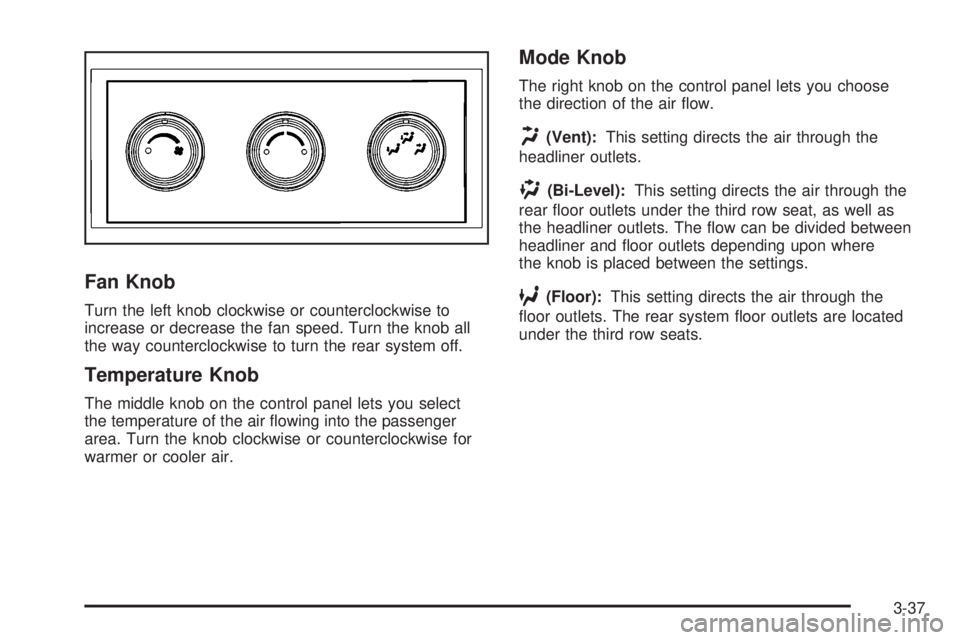
Fan Knob
Turn the left knob clockwise or counterclockwise to
increase or decrease the fan speed. Turn the knob all
the way counterclockwise to turn the rear system off.
Temperature Knob
The middle knob on the control panel lets you select
the temperature of the air owing into the passenger
area. Turn the knob clockwise or counterclockwise for
warmer or cooler air.
Mode Knob
The right knob on the control panel lets you choose
the direction of the air ow.
H(Vent):This setting directs the air through the
headliner outlets.
)(Bi-Level):This setting directs the air through the
rear oor outlets under the third row seat, as well as
the headliner outlets. The ow can be divided between
headliner and oor outlets depending upon where
the knob is placed between the settings.
6(Floor):This setting directs the air through the
oor outlets. The rear system oor outlets are located
under the third row seats.
3-37