air conditioning GMC ACADIA 2009 User Guide
[x] Cancel search | Manufacturer: GMC, Model Year: 2009, Model line: ACADIA, Model: GMC ACADIA 2009Pages: 420, PDF Size: 2.23 MB
Page 151 of 420
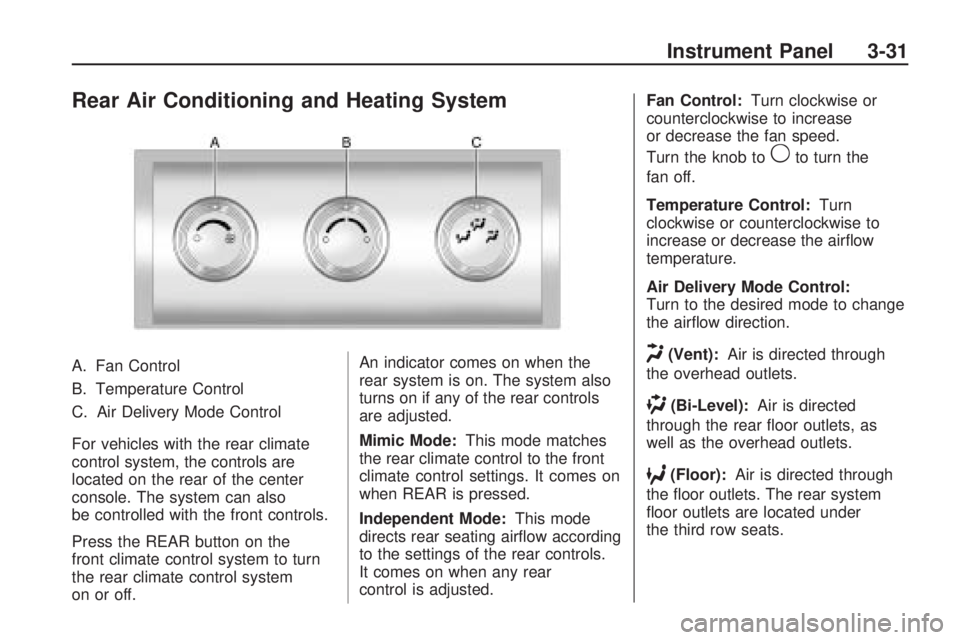
Rear Air Conditioning and Heating System
A. Fan Control
B. Temperature Control
C. Air Delivery Mode Control
For vehicles with the rear climate
control system, the controls are
located on the rear of the center
console. The system can also
be controlled with the front controls.
Press the REAR button on the
front climate control system to turn
the rear climate control system
on or off.An indicator comes on when the
rear system is on. The system also
turns on if any of the rear controls
are adjusted.
Mimic Mode:
This mode matches
the rear climate control to the front
climate control settings. It comes on
when REAR is pressed.
Independent Mode: This mode
directs rear seating airow according
to the settings of the rear controls.
It comes on when any rear
control is adjusted. Fan Control:
Turn clockwise or
counterclockwise to increase
or decrease the fan speed.
Turn the knob to
9to turn the
fan off.
Temperature Control: Turn
clockwise or counterclockwise to
increase or decrease the airow
temperature.
Air Delivery Mode Control:
Turn to the desired mode to change
the airow direction.
H(Vent): Air is directed through
the overhead outlets.
)(Bi-Level): Air is directed
through the rear oor outlets, as
well as the overhead outlets.
6(Floor): Air is directed through
the oor outlets. The rear system
oor outlets are located under
the third row seats.
Instrument Panel 3-31
Page 152 of 420
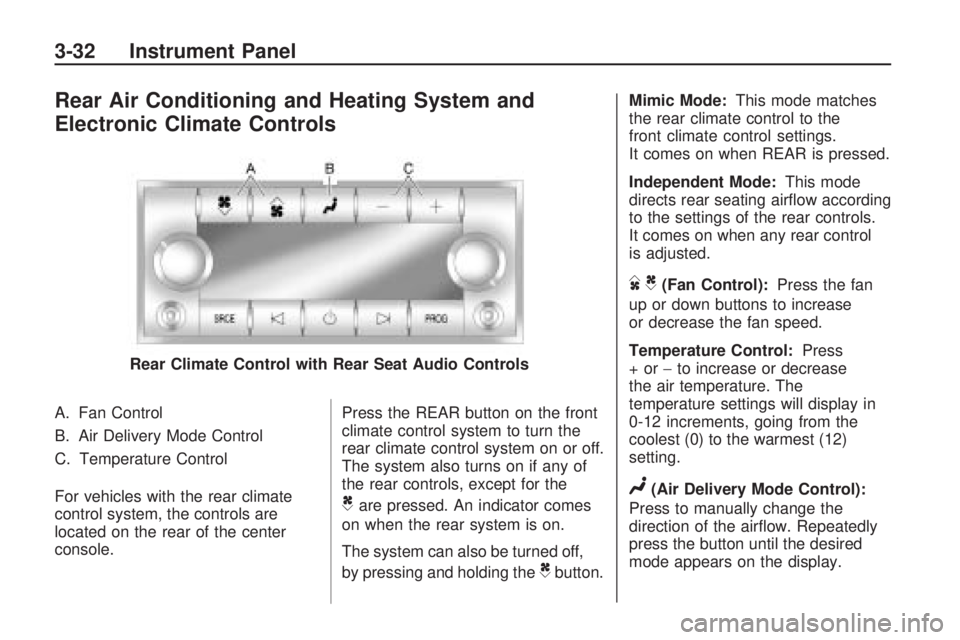
Rear Air Conditioning and Heating System and
Electronic Climate Controls
A. Fan Control
B. Air Delivery Mode Control
C. Temperature Control
For vehicles with the rear climate
control system, the controls are
located on the rear of the center
console.Press the REAR button on the front
climate control system to turn the
rear climate control system on or off.
The system also turns on if any of
the rear controls, except for the
Care pressed. An indicator comes
on when the rear system is on.
The system can also be turned off,
by pressing and holding the
Cbutton. Mimic Mode:
This mode matches
the rear climate control to the
front climate control settings.
It comes on when REAR is pressed.
Independent Mode: This mode
directs rear seating airow according
to the settings of the rear controls.
It comes on when any rear control
is adjusted.
DC(Fan Control): Press the fan
up or down buttons to increase
or decrease the fan speed.
Temperature Control: Press
+or− to increase or decrease
the air temperature. The
temperature settings will display in
0-12 increments, going from the
coolest (0) to the warmest (12)
setting.
N(Air Delivery Mode Control):
Press to manually change the
direction of the airow. Repeatedly
press the button until the desired
mode appears on the display.
Rear Climate Control with Rear Seat Audio Controls
3-32 Instrument Panel
Page 177 of 420
Turn off all unnecessary accessories
to allow the battery to recharge.
The normal battery voltage range is
11.5 to 15.5 volts.
CHANGE ENGINE OIL SOON
This message displays when
the engine oil needs to be changed.
When you change the engine oil,
be sure to reset the CHANGE
ENGINE OIL SOON message.
SeeEngine Oil Life System
on page 5-13for information on how
to reset the message. SeeEngine
Oil on page 5-11andScheduled
Maintenance on page 6-3for more
information.
CHECK TIRE PRESSURE
On vehicles with the Tire Pressure
Monitor System (TPMS), this
message displays when the
pressure in one or more of the
vehicle’s tires needs to be checked.
This message also displays LEFT
FRONT, RIGHT FRONT, LEFT
REAR, or RIGHT REAR to indicate
which tire needs to be checked.You can receive more than one tire
pressure message at a time.
To read the other messages that
may have been sent at the
same time, press the set/reset
button or the trip odometer reset
stem. If a tire pressure message
appears on the DIC, stop as soon as
you can. Have the tire pressures
checked and set to those shown on
the Tire Loading Information
label. SeeTires on page 5-35,
Loading the Vehicle on page 4-16,
andInflation - Tire Pressure on
page 5-41. The DIC also shows the
tire pressure values. See “DIC
Operation and Displays (With DIC
Buttons)” earlier in this section. If the
tire pressure is low, the low tire
pressure warning light comes
on. SeeTire Pressure Light on
page 3-41.
CRUISE SET TO XXX
This message displays whenever
the cruise control is set. SeeCruise
Control on page 3-9for more
information.
DRIVER DOOR OPEN
This message displays and a chime
sounds if the driver door is not
fully closed and the vehicle is shifted
out of P (Park). Stop and turn off
the vehicle, check the door for
obstructions, and close the door
again. Check to see if the message
still appears on the DIC.
ENGINE HOT A/C (Air
Conditioning) OFF
This message displays when the
engine coolant becomes hotter than
the normal operating temperature.
SeeEngine Coolant Temperature
Gage on page 3-40. To avoid added
strain on a hot engine, the air
conditioning compressor
automatically turns off. When the
coolant temperature returns to
normal, the air conditioning
compressor turns back on. You can
continue to drive your vehicle.
Instrument Panel 3-57
Page 181 of 420
RIGHT REAR DOOR OPEN
This message displays and a chime
sounds if the passenger side rear
door is not fully closed and the
vehicle is shifted out of P (Park).
Stop and turn off the vehicle, check
the door for obstructions, and
close the door again. Check to see
if the message still appears on
the DIC.
SERVICE A/C (Air
Conditioning) SYSTEM
This message displays when the
electronic sensors that control
the air conditioning and heating
systems are no longer working.
Have the climate control system
serviced by your dealer/retailer
if you notice a drop in heating and
air conditioning efficiency.
SERVICE AIR BAG
This message displays if there is a
problem with the airbag system.
Have your dealer/retailer inspect the
system for problems. SeeAirbagReadiness Light on page 3-36and
Airbag System on page 1-48for
more information.
SERVICE ALL WHEEL DRIVE
If your vehicle has the All-Wheel
Drive (AWD) system, this message
displays if there is a problem
with this system. If this message
appears, stop as soon as possible
and turn off the vehicle. Restart
the vehicle after 30 seconds
and check for the message on the
DIC display. If the message is
still displayed or appears again
when you begin driving, the AWD
system needs service. See your
dealer/retailer.
SERVICE BATTERY
CHARGING SYSTEM
On some vehicles, this message
displays if there is a problem
with the battery charging system.
Under certain conditions, the
charging system light may also turn
on in the instrument panel cluster.
SeeCharging System Light onpage 3-37. Driving with this problem
could drain the battery. Turn off
all unnecessary accessories.
Have the electrical system checked
as soon as possible. See your
dealer/retailer.
SERVICE BRAKE SYSTEM
This message displays along with
the brake system warning light
if there is a problem with the brake
system. SeeBrake System
Warning Light on page 3-38. If this
message appears, stop as soon
as possible and turn off the vehicle.
Restart the vehicle and check for
the message on the DIC display.
If the message is still displayed or
appears again when you begin
driving, the brake system needs
service as soon as possible.
See your dealer/retailer.
SERVICE PARK ASSIST
If your vehicle has the Ultrasonic
Rear Parking Assist (URPA) system,
this message displays if there is a
problem with the URPA system.
Instrument Panel 3-61
Page 272 of 420
Backing Up
Hold the bottom of the steering
wheel with one hand. Then, to move
the trailer to the left, move that
hand to the left. To move the trailer
to the right, move your hand to
the right. Always back up slowly
and, if possible, have someone
guide you.
Making Turns
Notice:Making very sharp turns
while trailering could cause
the trailer to come in contact with
the vehicle. The vehicle could
be damaged. Avoid making very
sharp turns while trailering.
When turning with a trailer, make
wider turns than normal. Do this so
the trailer won’t strike soft shoulders,
curbs, road signs, trees or other
objects. Avoid jerky or sudden
maneuvers. Signal well in advance.
Turn Signals When Towing a
Trailer
The arrows on the instrument panel
ash whenever signaling a turn
or lane change. Properly hooked up,
the trailer lamps also ash, telling
other drivers the vehicle is turning,
changing lanes or stopping.
When towing a trailer, the arrows on
the instrument panel ash for turns
even if the bulbs on the trailer are
burned out. For this reason you may
think other drivers are seeing the
signal when they are not. It is
important to check occasionally to be
sure the trailer bulbs are still working.
Driving on Grades
Because of the added load of the
trailer, the vehicle’s engine may
overheat on hot days, when going
up a long or steep grade with a
trailer. If the engine coolant
temperature gage indicates
overheating, turn off the air
conditioning to reduce engine load,
pull off the road and stop in a
safe spot. Let the engine run while
parked, preferably on level
ground, with the transmission in
P (Park) for a few minutes before
turning the engine off.
Reduce speed and shift to a lower
gearbeforestarting down a long
or steep downgrade. If the
transmission is not shifted down, the
brakes might have to be used so
much that they would get hot and no
longer work well.
On a long uphill grade, shift down
and reduce the vehicle speed
to around 55 mph (88 km/h) to
reduce the possibility of the engine
and the transmission overheating.
4-30 Driving Your Vehicle
Page 298 of 420
If Steam Is Coming From The
Engine Compartment
{CAUTION
Steam from an overheated engine
can burn you badly, even if you
just open the hood. Stay away
from the engine if you see or hear
steam coming from it. Turn it off
and get everyone away from the
vehicle until it cools down. Wait
until there is no sign of steam or
coolant before you open the hood.
If you keep driving when the
vehicles engine is overheated, the
liquids in it can catch re. You or
others could be badly burned.
Stop the engine if it overheats,
and get out of the vehicle until the
engine is cool.
SeeOverheated Engine
Protection Operating Mode on
page 5-23for information on
driving to a safe place in an
emergency.
If No Steam Is Coming From
The Engine Compartment
If an engine overheat warning is
displayed but no steam can be seen
or heard, the problem may not be too
serious. Sometimes the engine can
get a little too hot when the vehicle:
Climbs a long hill on a hot day.
Stops after high-speed driving.
Idles for long periods in traffic.
Tows a trailer.
If the overheat warning is displayed
with no sign of steam:
1. Turn the air conditioning off.
2. Turn the heater on to the highest
temperature and to the highest
fan speed. Open the windows as
necessary.
3. If in a traffic jam, shift to
N (Neutral), otherwise, shift
to the highest gear while
driving—D(Drive) or L (Low).If the temperature overheat gage is
no longer in the overheat zone or an
overheat warning no longer displays,
the vehicle can be driven. Continue
to drive the vehicle slow for about
10 minutes. Keep a safe vehicle
distance from the car in front of you.
If the warning does not come back
on, continue to drive normally.
If the warning continues, pull
over, stop, and park the vehicle
right away.
If there is no sign of steam, idle
the engine for three minutes while
parked. If the warning is still
displayed, turn off the engine until it
cools down. Also, see “Overheated
Engine Protection Operating Mode”
next in this section.
5-22 Service and Appearance Care
Page 314 of 420
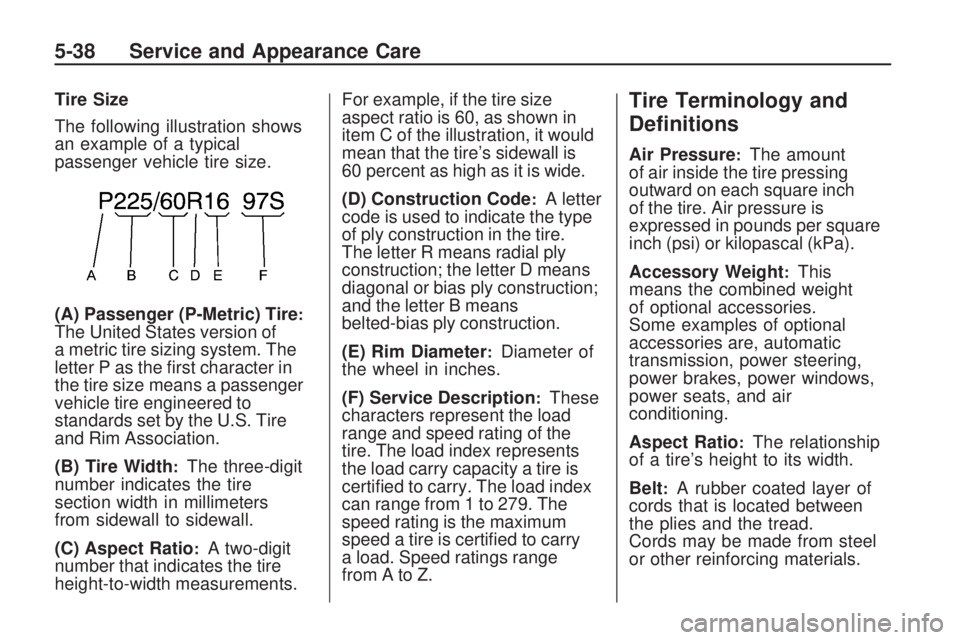
Tire Size
The following illustration shows
an example of a typical
passenger vehicle tire size.
(A) Passenger (P-Metric) Tire
:The United States version of
a metric tire sizing system. The
letter P as the rst character in
the tire size means a passenger
vehicle tire engineered to
standards set by the U.S. Tire
and Rim Association.
(B) Tire Width
:The three-digit
number indicates the tire
section width in millimeters
from sidewall to sidewall.
(C) Aspect Ratio
:A two-digit
number that indicates the tire
height-to-width measurements.For example, if the tire size
aspect ratio is 60, as shown in
item C of the illustration, it would
mean that the tire’s sidewall is
60 percent as high as it is wide.
(D) Construction Code
:A letter
code is used to indicate the type
of ply construction in the tire.
The letter R means radial ply
construction; the letter D means
diagonal or bias ply construction;
and the letter B means
belted-bias ply construction.
(E) Rim Diameter
:Diameter of
the wheel in inches.
(F) Service Description
:These
characters represent the load
range and speed rating of the
tire. The load index represents
the load carry capacity a tire is
certied to carry. The load index
can range from 1 to 279. The
speed rating is the maximum
speed a tire is certied to carry
a load. Speed ratings range
fromAtoZ.
Tire Terminology and
Denitions
Air Pressure:The amount
of air inside the tire pressing
outward on each square inch
of the tire. Air pressure is
expressed in pounds per square
inch (psi) or kilopascal (kPa).
Accessory Weight
:This
means the combined weight
of optional accessories.
Some examples of optional
accessories are, automatic
transmission, power steering,
power brakes, power windows,
power seats, and air
conditioning.
Aspect Ratio
:The relationship
of a tire’s height to its width.
Belt
:A rubber coated layer of
cords that is located between
the plies and the tread.
Cords may be made from steel
or other reinforcing materials.
5-38 Service and Appearance Care
Page 367 of 420
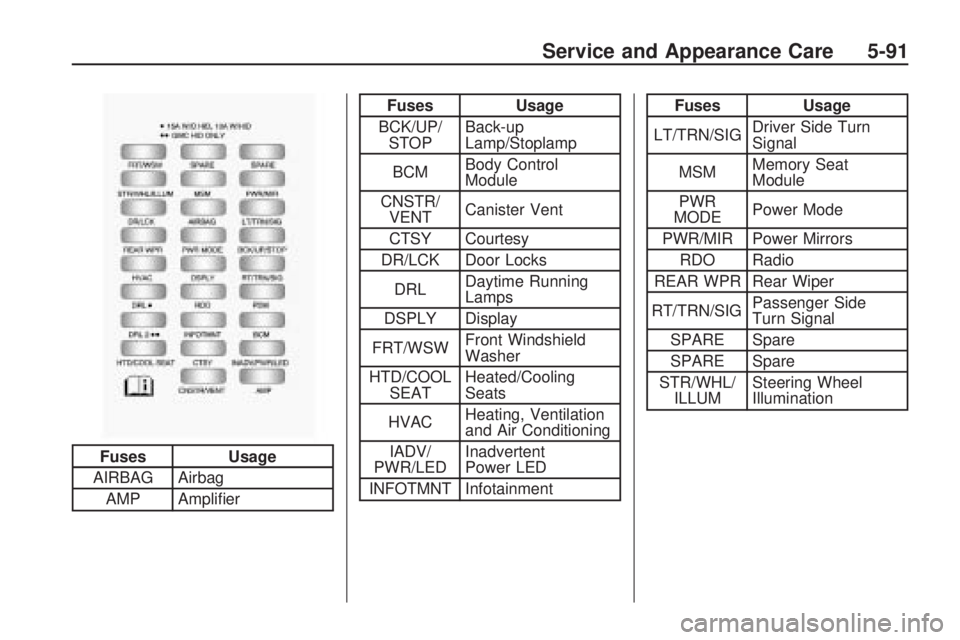
Fuses Usage
AIRBAG Airbag
AMP Amplier
Fuses Usage
BCK/UP/
STOPBack-up
Lamp/Stoplamp
BCMBody Control
Module
CNSTR/
VENTCanister Vent
CTSY Courtesy
DR/LCK Door Locks
DRLDaytime Running
Lamps
DSPLY Display
FRT/WSWFront Windshield
Washer
HTD/COOL
SEATHeated/Cooling
Seats
HVACHeating, Ventilation
and Air Conditioning
IADV/
PWR/LEDInadvertent
Power LED
INFOTMNT InfotainmentFuses Usage
LT/TRN/SIGDriver Side Turn
Signal
MSMMemory Seat
Module
PWR
MODEPower Mode
PWR/MIR Power Mirrors
RDO Radio
REAR WPR Rear Wiper
RT/TRN/SIGPassenger Side
Turn Signal
SPARE Spare
SPARE Spare
STR/WHL/
ILLUMSteering Wheel
Illumination
Fuse Side
Service and Appearance Care 5-91
Page 369 of 420
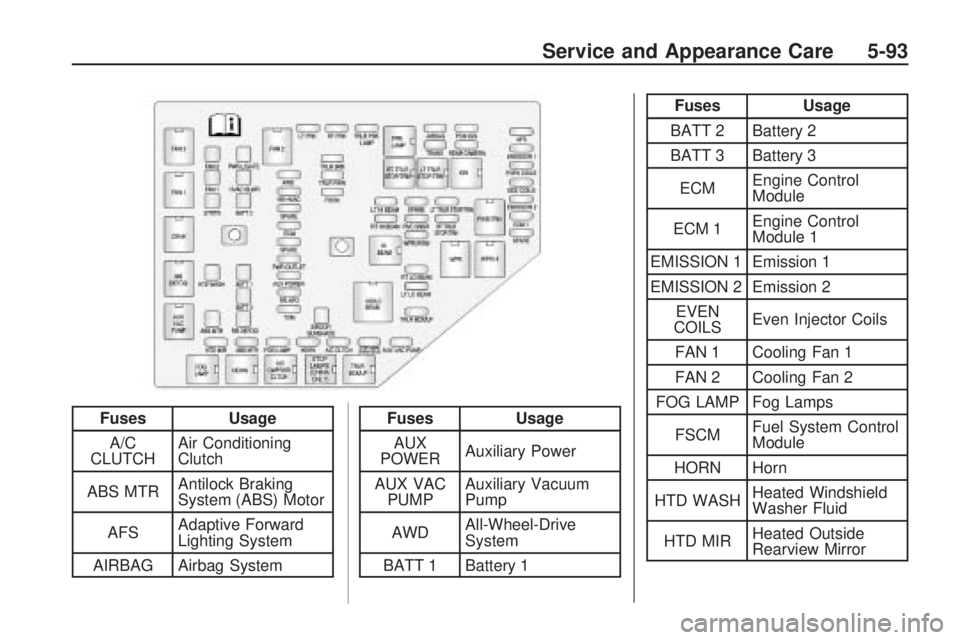
FusesUsage
A/C
CLUTCH Air Conditioning
Clutch
ABS MTR Antilock Braking
System (ABS) Motor
AFS Adaptive Forward
Lighting System
AIRBAG Airbag SystemFuses Usage
AUX
POWER Auxiliary Power
AUX VAC PUMP Auxiliary Vacuum
Pump
AWD All-Wheel-Drive
System
BATT 1 Battery 1
Fuses Usage
BATT 2 Battery 2
BATT 3 Battery 3
ECM Engine Control
Module
ECM 1 Engine Control
Module 1
EMISSION 1 Emission 1
EMISSION 2 Emission 2 EVEN
COILS Even Injector Coils
FAN 1 Cooling Fan 1
FAN 2 Cooling Fan 2
FOG LAMP Fog Lamps
FSCM Fuel System Control
Module
HORN Horn
HTD WASH Heated Windshield
Washer Fluid
HTD MIR Heated Outside
Rearview Mirror
Service and Appearance Care 5-93
Page 370 of 420
Fuses Usage
HVAC
BLWRHeating, Ventilation
and Air Conditioning
Blower
LT HI
BEAMLeft High-Beam
Headlamp
LT LO
BEAMLeft Low-Beam
Headlamp
LT PRK Left Parking Lamp
LT TRLR
STOP/TRNTrailer Left
Stoplamp and Turn
Signal
ODD
COILSOdd Injector Coils
PCM IGNPowertrain Control
Module Ignition
PWR
L/GATEPower Liftgate
PWR
OUTLETPower OutletFuses Usage
REAR
CAMERARear Camera
RR APORear Accessory
Power Outlet
RR DEFOG Rear Defogger
RR HVACRear Climate
Control System
RT HI
BEAMRight High-Beam
Headlamp
RT LO
BEAMRight Low-Beam
Headlamp
RT PRK Right Parking Lamp
RT TRLR
STOP/TRNTrailer Right
Stoplamp and
Turn Signal
RVC SNSRRegulated Voltage
Control Sensor
S/ROOF/
SUNSHADESunroofFuses Usage
SPARE Spare
Stop Lamps
(China
Only)Stop Lamps
(China Only)
STRTR Starter
TCMTransmission
Control Module
TRANS Transmission
TRLR
BCK/UPTrailer Back-up
Lamps
TRLR BRK Trailer Brake
TRLR PRK
LAMPTrailer Parking
Lamps
TRLR PWR Trailer Power
WPR/WSWWindshield
Wiper/Washer
5-94 Service and Appearance Care