reset GMC ACADIA 2009 User Guide
[x] Cancel search | Manufacturer: GMC, Model Year: 2009, Model line: ACADIA, Model: GMC ACADIA 2009Pages: 420, PDF Size: 2.23 MB
Page 169 of 420
2. Press the set/reset button until
REMOTE KEY LEARNING
ACTIVE is displayed.
3. Press and hold the lock and
unlock buttons on the rst
transmitter at the same time for
about 15 seconds.
On vehicles with memory recall
seats, the rst transmitter
learned will match driver 1 and
the second will match driver 2.
A chime will sound indicating that
the transmitter is matched.
4. To match additional transmitters
at this time, repeat Step 3.
Each vehicle can have a
maximum of eight transmitters
matched to it.
5. To exit the programming mode,
you must cycle the key to
LOCK/OFF.
COMPASS ZONE SETTING
This display will be available if the
vehicle has a compass. SeeDIC
Compass on page 3-54for
more information.COMPASS RECALIBRATION
This display will be available if the
vehicle has a compass. SeeDIC
Compass on page 3-54for
more information.
Blank Display
This display shows no information.
Trip/Fuel Menu Items
3(Trip/Fuel):Press this button
to scroll through the following
menu items:
ODOMETER
Press the trip/fuel button until
ODOMETER displays. This display
shows the distance the vehicle
has been driven in either miles (mi)
or kilometers (km). Pressing the
trip odometer reset stem will
also display the odometer.
To switch between English and
metric measurements, see “UNITS”
earlier in this section.TRIP A and TRIP B
Press the trip/fuel button until
TRIP A or TRIP B displays. This
display shows the current distance
traveled in either miles (mi) or
kilometers (km) since the last reset
for each trip odometer. Both trip
odometers can be used at the same
time. Pressing the trip odometer
reset stem will also display the trip
odometers.
Each trip odometer can be reset to
zero separately by pressing the
set/reset button or the trip odometer
reset stem while the desired trip
odometer is displayed.
The trip odometer has a feature
called the retro-active reset.
This can be used to set the trip
odometer to the number of miles
(kilometers) driven since the ignition
was last turned on. This can be
used if the trip odometer is not reset
at the beginning of the trip.
Instrument Panel 3-49
Page 170 of 420
To use the retro-active reset feature,
press and hold the set/reset button
for at least four seconds. The trip
odometer will display the number of
miles (mi) or kilometers (km) driven
since the ignition was last turned on
and the vehicle was moving. Once
the vehicle begins moving, the trip
odometer will accumulate mileage.
For example, if the vehicle was
driven 5 miles (8 km) before it is
started again, and then the
retro-active reset feature is activated,
the display will show 5 miles (8 km).
As the vehicle begins moving, the
display will then increase to 5.1 miles
(8.2 km), 5.2 miles (8.4 km), etc.
If the retro-active reset feature is
activated after the vehicle is started,
but before it begins moving, the
display will show the number
of miles (mi) or kilometers (km) that
were driven during the last ignition
cycle.RANGE
Press the trip/fuel button until
RANGE displays. This display
shows the approximate number
of remaining miles (mi) or
kilometers (km) the vehicle can be
driven without refueling. The
display will show LOW if the fuel
level is low.
The fuel range estimate is based on
an average of the vehicle’s fuel
economy over recent driving history
and the amount of fuel remaining
in the fuel tank. This estimate
will change if driving conditions
change. For example, if driving
in traffic and making frequent stops,
this display may read one number,
but if the vehicle is driven on a
freeway, the number may change
even though the same amount
of fuel is in the fuel tank. This is
because different driving conditions
produce different fuel economies.
Generally, freeway driving produces
better fuel economy than city
driving. Fuel range cannot be reset.AVG (Average) ECONOMY
Press the trip/fuel button until AVG
ECONOMY displays. This display
shows the approximate average
miles per gallon (mpg) or liters per
100 kilometers (L/100 km). This
number is calculated based on
the number of mpg (L/100 km)
recorded since the last time this
menu item was reset. To reset
AVG ECONOMY, press and hold
the set/reset button.
TIMER
Press the trip/fuel button until
TIMER displays. This display
can be used as a timer.
To start the timer, press the
set/reset button while TIMER is
displayed. The display will show the
amount of time that has passed
since the timer was last reset, not
including time the ignition is off.
Time will continue to be counted as
long as the ignition is on, even if
another display is being shown on
the DIC. The timer will record
3-50 Instrument Panel
Page 171 of 420
up to 99 hours, 59 minutes and
59 seconds (99:59:59) after which
the display will return to zero.
To stop the timer, press the set/reset
button briey while TIMER is
displayed.
To reset the timer to zero, press
and hold the set/reset button while
TIMER is displayed.
FUEL USED
Press the trip/fuel button until FUEL
USED displays. This display shows
the number of gallons (gal) or
liters (L) of fuel used since the last
reset of this menu item. To reset the
fuel used information, press and hold
the set/reset button while FUEL
USED is displayed.
AVG (Average) SPEED
Press the trip/fuel button until AVG
SPEED displays. This display
shows the average speed of the
vehicle in miles per hour (mph) or
kilometers per hour (km/h). This
average is calculated based on thevarious vehicle speeds recorded
since the last reset of this value.
To reset the value to zero,
press and hold the set/reset button.
Blank Display
This display shows no information.
DIC Operation and
Displays (Without DIC
Buttons)
If your vehicle does not have DIC
buttons, the information below
explains the operation of this
system.
The DIC has different displays
which can be accessed by pressing
the trip odometer reset stem
located on the instrument panel
cluster. Pressing the trip odometer
reset stem will also turn off, or
acknowledge, DIC messages.
The DIC displays trip and vehicle
system information, and warning
messages if a system problem
is detected.If your vehicle does not have DIC
buttons, you can use the trip
odometer reset stem to view the
following displays: odometer,
trip odometers, oil life, park assist
menu for vehicles with the Ultrasonic
Rear Parking Assist (URPA)
system, Remote Keyless Entry
(RKE) transmitter programming,
units, and display language.
If your vehicle has DIC buttons, you
can use the trip odometer reset
stem to view the following displays:
odometer and trip odometers.
Trip Odometer Reset Stem
Menu Items
ODOMETER
Press the trip odometer reset stem
until ODOMETER displays. This
display shows the distance the
vehicle has been driven in either
miles (mi) or kilometers (km).
To switch between English and
metric measurements, see “UNITS”
later in this section.
Instrument Panel 3-51
Page 172 of 420
TRIP A or TRIP B
Press the trip odometer reset stem
until TRIP A or TRIP B displays.
This display shows the current
distance traveled in either miles (mi)
or kilometers (km) since the last
reset for each trip odometer. Both
trip odometers can be used at
the same time.
Each trip odometer can be reset to
zero separately by pressing and
holding the trip odometer reset stem
while the desired trip odometer is
displayed.
The trip odometer has a feature
called the retro-active reset.
This can be used to set the trip
odometer to the number of miles
(kilometers) driven since the ignition
was last turned on. This can be
used if the trip odometer is not reset
at the beginning of the trip.
To use the retro-active reset feature,
press and hold the trip odometer
reset stem for at least four seconds.
The trip odometer will display the
number of miles (mi) orkilometers (km) driven since the
ignition was last turned on and the
vehicle was moving. Once the
vehicle begins moving, the
trip odometer will accumulate
mileage. For example, if the vehicle
was driven 5 miles (8 km) before
it is started again, and then
the retro-active reset feature is
activated, the display will show
5 miles (8 km). As the vehicle begins
moving, the display will then
increase to 5.1 miles (8.2 km),
5.2 miles (8.4 km), etc.
If the retro-active reset feature is
activated after the vehicle is started,
but before it begins moving, the
display will show the number
of miles (mi) or kilometers (km) that
were driven during the last ignition
cycle.
OIL LIFE
To access this display, the vehicle
must be in P (Park). Press the
trip odometer reset stem until
OIL LIFE REMAINING displays.This display shows an estimate of
the oil’s remaining useful life. If you
see 99% OIL LIFE REMAINING on
the display, that means 99% of the
current oil life remains. The engine
oil life system will alert you
to change the oil on a schedule
consistent with your driving
conditions.
When the remaining oil life is low,
the CHANGE ENGINE OIL
SOON message will appear on the
display. See “CHANGE ENGINE
OIL SOON” underDIC Warnings
and Messages on page 3-56.
You should change the oil as soon
as you can. SeeEngine Oil on
page 5-11. In addition to the engine
oil life system monitoring the oil
life, additional maintenance is
recommended in the Maintenance
Schedule in this manual. See
Scheduled Maintenance on page 6-3
for more information.
Remember, you must reset the OIL
LIFE display yourself after each oil
change. It will not reset itself. Also,
be careful not to reset the OIL LIFE
3-52 Instrument Panel
Page 173 of 420
display accidentally at any time other
than when the oil has just been
changed. It cannot be reset
accurately until the next oil change.
To reset the engine oil life system,
seeEngine Oil Life System on
page 5-13.
PARK ASSIST
To access this display, the vehicle
must be in P (Park). If your vehicle
has the Ultrasonic Rear Parking
Assist (URPA) system, press the trip
odometer reset stem until PARK
ASSIST displays. This display allows
the system to be turned on or off.
Once in this display, press and hold
the trip odometer reset stem to select
between ON or OFF. If you choose
ON, the system will be turned on.
If you choose OFF, the system will
be turned off. The URPA system
automatically turns back on after
each vehicle start. When the URPA
system is turned off and the vehicle
is shifted out of P (Park), the DIC will
display the PARK ASSIST OFF
message as a reminder that thesystem has been turned off. SeeDIC
Warnings and Messages on
page 3-56andUltrasonic Rear
Parking Assist (URPA) on page 2-34
for more information.
RELEARN REMOTE KEY
To access this display, the vehicle
must be in P (Park). This display
allows you to match Remote
Keyless Entry (RKE) transmitters to
your vehicle. To match an RKE
transmitter to your vehicle:
1. Press the trip odometer reset
stem until RELEARN REMOTE
KEY displays.
2. Press and hold the trip odometer
reset stem until REMOTE KEY
LEARNING ACTIVE is displayed.
3. Press and hold the lock and
unlock buttons on the rst
transmitter at the same time for
about 15 seconds.
On vehicles with memory recall
seats, the rst transmitter
learned will match driver 1 and
the second will match driver 2.A chime will sound indicating
that the transmitter is matched.
4. To match additional transmitters
at this time, repeat Step 3.
Each vehicle can have a
maximum of eight transmitters
matched to it.
5. To exit the programming mode,
you must cycle the key to
LOCK/OFF.
UNITS
To access this display, the vehicle
must be in P (Park). Press the
trip odometer reset stem until UNITS
displays. This display allows you
to select between English or Metric
units of measurement. Once in
this display, press and hold the trip
odometer reset stem to select
between ENGLISH or METRIC
units. All of the vehicle information
will then be displayed in the unit
of measurement selected.
Instrument Panel 3-53
Page 174 of 420
DISPLAY LANGUAGE
To access this display, the vehicle
must be in P (Park). This display
allows you to select the language in
which the DIC messages will
appear. To select a language:
1. Press the trip odometer reset
stem until DISPLAY LANGUAGE
displays.
2. Continue to press and hold the
trip odometer reset stem to
scroll through all of the available
languages.
The available languages are
ENGLISH (default), FRANCAIS
(French), ESPANOL (Spanish),
and NO CHANGE.
3. Once the desired language is
displayed, release the trip
odometer reset stem to set
your choice.DIC Compass
Your vehicle may have a compass in
the Driver Information Center (DIC).
Compass Zone
The zone is set to zone eight upon
leaving the factory. Your dealer/
retailer will set the correct zone for
your location.
Under certain circumstances,
such as during a long distance
cross-country trip or moving
to a new state or province, it will be
necessary to compensate for
compass variance by resetting the
zone through the DIC if the zone
is not set correctly.
Compass variance is the difference
between the earth’s magnetic
north and true geographic north.
If the compass is not set to the zone
where you live, the compass may
give false readings. The compass
must be set to the variance zone in
which the vehicle is traveling.To adjust for compass variance,
use the following procedure:
Compass Variance (Zone)
Procedure
1. Do not set the compass zone
when the vehicle is moving.
Only set it when the vehicle is
in P (Park).
Press the vehicle information
button until PRESS
VTO
CHANGE COMPASS ZONE
displays.
3-54 Instrument Panel
Page 175 of 420
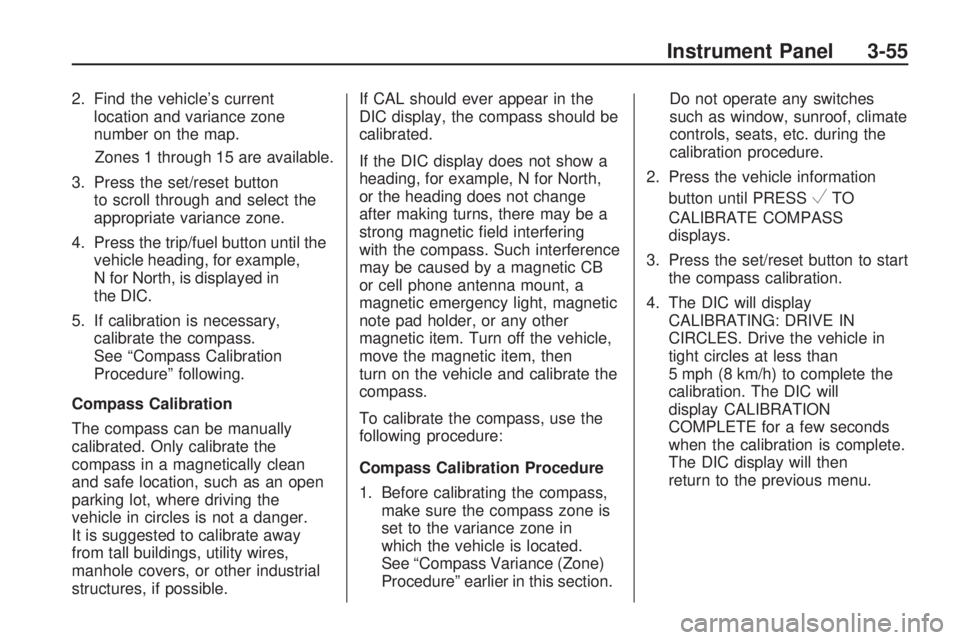
2. Find the vehicle’s current
location and variance zone
number on the map.
Zones 1 through 15 are available.
3. Press the set/reset button
to scroll through and select the
appropriate variance zone.
4. Press the trip/fuel button until the
vehicle heading, for example,
N for North, is displayed in
the DIC.
5. If calibration is necessary,
calibrate the compass.
See “Compass Calibration
Procedure” following.
Compass Calibration
The compass can be manually
calibrated. Only calibrate the
compass in a magnetically clean
and safe location, such as an open
parking lot, where driving the
vehicle in circles is not a danger.
It is suggested to calibrate away
from tall buildings, utility wires,
manhole covers, or other industrial
structures, if possible.If CAL should ever appear in the
DIC display, the compass should be
calibrated.
If the DIC display does not show a
heading, for example, N for North,
or the heading does not change
after making turns, there may be a
strong magnetic eld interfering
with the compass. Such interference
may be caused by a magnetic CB
or cell phone antenna mount, a
magnetic emergency light, magnetic
note pad holder, or any other
magnetic item. Turn off the vehicle,
move the magnetic item, then
turn on the vehicle and calibrate the
compass.
To calibrate the compass, use the
following procedure:
Compass Calibration Procedure
1. Before calibrating the compass,
make sure the compass zone is
set to the variance zone in
which the vehicle is located.
See “Compass Variance (Zone)
Procedure” earlier in this section.Do not operate any switches
such as window, sunroof, climate
controls, seats, etc. during the
calibration procedure.
2. Press the vehicle information
button until PRESS
VTO
CALIBRATE COMPASS
displays.
3. Press the set/reset button to start
the compass calibration.
4. The DIC will display
CALIBRATING: DRIVE IN
CIRCLES. Drive the vehicle in
tight circles at less than
5 mph (8 km/h) to complete the
calibration. The DIC will
display CALIBRATION
COMPLETE for a few seconds
when the calibration is complete.
The DIC display will then
return to the previous menu.
Instrument Panel 3-55
Page 176 of 420
DIC Warnings and
Messages
Messages are displayed on the DIC
to notify the driver that the status
of the vehicle has changed and that
some action may be needed by
the driver to correct the condition.
Multiple messages may appear one
after another.
Some messages may not require
immediate action, but you can press
any of the DIC buttons on the
instrument panel or the trip odometer
reset stem on the instrument panel
cluster to acknowledge that you
received the messages and to clear
them from the display.
Some messages cannot be cleared
from the DIC display because
they are more urgent. These
messages require action before they
can be cleared. You should take
any messages that appear on
the display seriously and remember
that clearing the messages will
only make the messages disappear,
not correct the problem.The following are the possible
messages that can be displayed
and some information about them.ALL WHEEL DRIVE OFF
If your vehicle has the All-Wheel
Drive (AWD) system, this message
displays when there is a compact
spare tire on the vehicle, when
the Antilock Brake System (ABS)
warning light comes on, or when the
rear differential uid is overheating.
This message turns off when
the differential uid cools.
The AWD system is disabled until
the compact spare tire is replaced
by a full-size tire. If the warning
message is still on after putting on
the full-size tire, you need to reset
the warning message. To reset
the warning message, turn
the ignition off and then back on
again after 30 seconds. If the
message stays on, see your
dealer/retailer right away. See
All-Wheel Drive (AWD) System on
page 4-7for more information.
AUTOMATIC LIGHT
CONTROL OFF
This message displays when the
automatic headlamps are turned off.
This message clears itself after
10 seconds.
AUTOMATIC LIGHT
CONTROL ON
This message displays when the
automatic headlamps are turned on.
This message clears itself after
10 seconds.
BATTERY SAVER ACTIVE
This message displays when
the system detects that the battery
voltage is dropping below
expected levels. The battery saver
system starts reducing certain
features of the vehicle that you may
be able to notice. At the point
that the features are disabled, this
message is displayed. It means that
the vehicle is trying to save the
charge in the battery.
3-56 Instrument Panel
Page 177 of 420
Turn off all unnecessary accessories
to allow the battery to recharge.
The normal battery voltage range is
11.5 to 15.5 volts.
CHANGE ENGINE OIL SOON
This message displays when
the engine oil needs to be changed.
When you change the engine oil,
be sure to reset the CHANGE
ENGINE OIL SOON message.
SeeEngine Oil Life System
on page 5-13for information on how
to reset the message. SeeEngine
Oil on page 5-11andScheduled
Maintenance on page 6-3for more
information.
CHECK TIRE PRESSURE
On vehicles with the Tire Pressure
Monitor System (TPMS), this
message displays when the
pressure in one or more of the
vehicle’s tires needs to be checked.
This message also displays LEFT
FRONT, RIGHT FRONT, LEFT
REAR, or RIGHT REAR to indicate
which tire needs to be checked.You can receive more than one tire
pressure message at a time.
To read the other messages that
may have been sent at the
same time, press the set/reset
button or the trip odometer reset
stem. If a tire pressure message
appears on the DIC, stop as soon as
you can. Have the tire pressures
checked and set to those shown on
the Tire Loading Information
label. SeeTires on page 5-35,
Loading the Vehicle on page 4-16,
andInflation - Tire Pressure on
page 5-41. The DIC also shows the
tire pressure values. See “DIC
Operation and Displays (With DIC
Buttons)” earlier in this section. If the
tire pressure is low, the low tire
pressure warning light comes
on. SeeTire Pressure Light on
page 3-41.
CRUISE SET TO XXX
This message displays whenever
the cruise control is set. SeeCruise
Control on page 3-9for more
information.
DRIVER DOOR OPEN
This message displays and a chime
sounds if the driver door is not
fully closed and the vehicle is shifted
out of P (Park). Stop and turn off
the vehicle, check the door for
obstructions, and close the door
again. Check to see if the message
still appears on the DIC.
ENGINE HOT A/C (Air
Conditioning) OFF
This message displays when the
engine coolant becomes hotter than
the normal operating temperature.
SeeEngine Coolant Temperature
Gage on page 3-40. To avoid added
strain on a hot engine, the air
conditioning compressor
automatically turns off. When the
coolant temperature returns to
normal, the air conditioning
compressor turns back on. You can
continue to drive your vehicle.
Instrument Panel 3-57
Page 180 of 420
OIL PRESSURE LOW STOP
ENGINE
Notice:If you drive your vehicle
while the engine oil pressure
is low, severe engine damage
may occur. If a low oil pressure
warning appears on the Driver
Information Center (DIC), stop the
vehicle as soon as possible.
Do not drive the vehicle until the
cause of the low oil pressure
is corrected. SeeEngine Oil on
page 5-11for more information.
This message displays if low
oil pressure levels occur. Stop the
vehicle as soon as safely possible
and do not operate it until the cause
of the low oil pressure has been
corrected. Check the oil as soon as
possible and have your vehicle
serviced by your dealer/retailer.
SeeEngine Oil on page 5-11.
PARK ASSIST OFF
If your vehicle has the Ultrasonic
Rear Parking Assist (URPA) system,
after the vehicle has been started
and shifted out of P (Park), this
message displays to remind the
driver that the URPA system has
been turned off. Press the set/reset
button or the trip odometer reset
stem to acknowledge this message
and clear it from the DIC display.
To turn the URPA system back on,
seeUltrasonic Rear Parking Assist
(URPA) on page 2-34.
PASSENGER DOOR OPEN
This message displays and a chime
sounds if the passenger door is
not fully closed and the vehicle is
shifted out of P (Park). Stop and turn
off the vehicle, check the door for
obstructions, and close the door
again. Check to see if the message
still appears on the DIC.
REMOTE KEY LEARNING
ACTIVE
This message displays while you
are matching a Remote Keyless
Entry (RKE) transmitter to your
vehicle. See “Matching
Transmitter(s) to Your Vehicle”
underRemote Keyless Entry (RKE)
System Operation on page 2-3
andDIC Operation and Displays
(With DIC Buttons) on page 3-46or
DIC Operation and Displays
(Without DIC Buttons) on page 3-51
for more information.
REPLACE BATTERY IN
REMOTE KEY
This message displays if a Remote
Keyless Entry (RKE) transmitter
battery is low. The battery needs to
be replaced in the transmitter.
See “Battery Replacement” under
Remote Keyless Entry (RKE)
System Operation on page 2-3.
3-60 Instrument Panel