transmission GMC ACADIA 2009 User Guide
[x] Cancel search | Manufacturer: GMC, Model Year: 2009, Model line: ACADIA, Model: GMC ACADIA 2009Pages: 420, PDF Size: 2.23 MB
Page 113 of 420
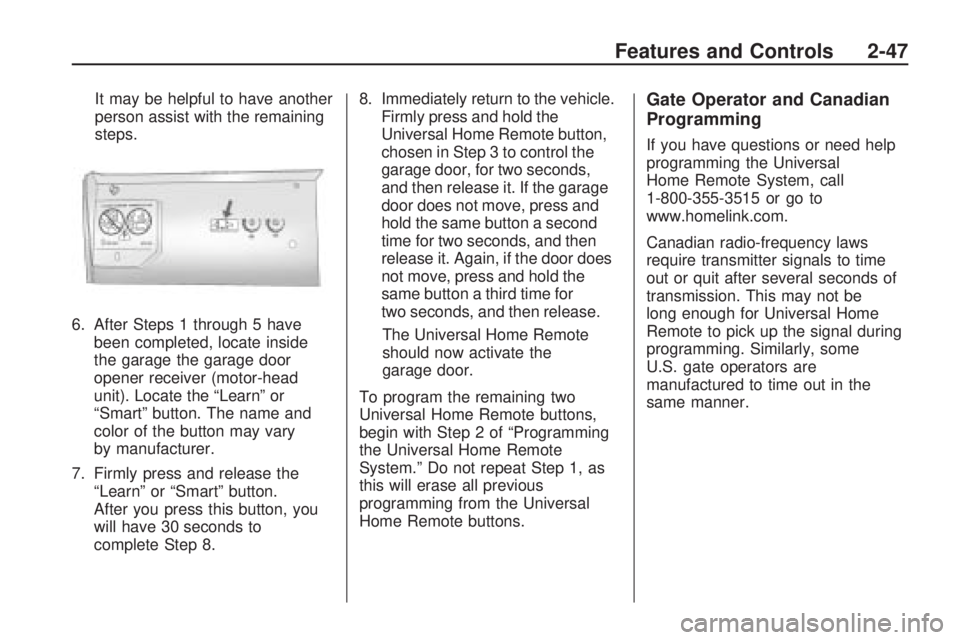
It may be helpful to have another
person assist with the remaining
steps.
6. After Steps 1 through 5 have
been completed, locate inside
the garage the garage door
opener receiver (motor-head
unit). Locate the “Learn” or
“Smart” button. The name and
color of the button may vary
by manufacturer.
7. Firmly press and release the
“Learn” or “Smart” button.
After you press this button, you
will have 30 seconds to
complete Step 8.8. Immediately return to the vehicle.
Firmly press and hold the
Universal Home Remote button,
chosen in Step 3 to control the
garage door, for two seconds,
and then release it. If the garage
door does not move, press and
hold the same button a second
time for two seconds, and then
release it. Again, if the door does
not move, press and hold the
same button a third time for
two seconds, and then release.
The Universal Home Remote
should now activate the
garage door.
To program the remaining two
Universal Home Remote buttons,
begin with Step 2 of “Programming
the Universal Home Remote
System.” Do not repeat Step 1, as
this will erase all previous
programming from the Universal
Home Remote buttons.Gate Operator and Canadian
Programming
If you have questions or need help
programming the Universal
Home Remote System, call
1-800-355-3515 or go to
www.homelink.com.
Canadian radio-frequency laws
require transmitter signals to time
out or quit after several seconds of
transmission. This may not be
long enough for Universal Home
Remote to pick up the signal during
programming. Similarly, some
U.S. gate operators are
manufactured to time out in the
same manner.
Features and Controls 2-47
Page 137 of 420
Head-Up Display (HUD)
{CAUTION
If the HUD image is too bright or
too high in your eld of view, it
may take you more time to see
things you need to see when it is
dark outside. Be sure to keep the
HUD image dim and placed low in
your eld of view.
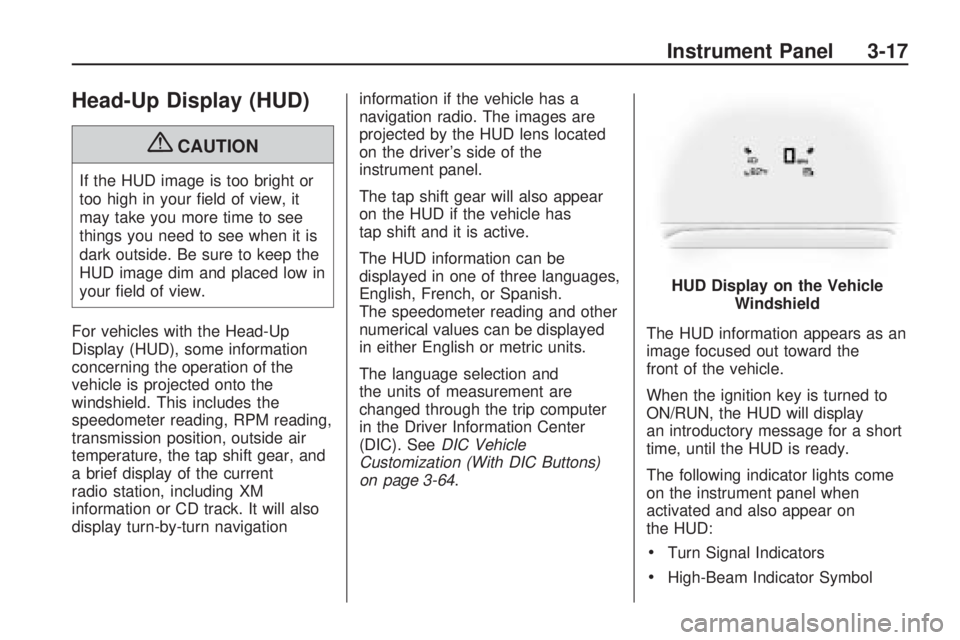
For vehicles with the Head-Up
Display (HUD), some information
concerning the operation of the
vehicle is projected onto the
windshield. This includes the
speedometer reading, RPM reading,
transmission position, outside air
temperature, the tap shift gear, and
a brief display of the current
radio station, including XM
information or CD track. It will also
display turn-by-turn navigationinformation if the vehicle has a
navigation radio. The images are
projected by the HUD lens located
on the driver’s side of the
instrument panel.
The tap shift gear will also appear
on the HUD if the vehicle has
tap shift and it is active.
The HUD information can be
displayed in one of three languages,
English, French, or Spanish.
The speedometer reading and other
numerical values can be displayed
in either English or metric units.
The language selection and
the units of measurement are
changed through the trip computer
in the Driver Information Center
(DIC). SeeDIC Vehicle
Customization (With DIC Buttons)
on page 3-64.The HUD information appears as an
image focused out toward the
front of the vehicle.
When the ignition key is turned to
ON/RUN, the HUD will display
an introductory message for a short
time, until the HUD is ready.
The following indicator lights come
on the instrument panel when
activated and also appear on
the HUD:
Turn Signal Indicators
High-Beam Indicator SymbolHUD Display on the Vehicle
Windshield
Instrument Panel 3-17
Page 139 of 420
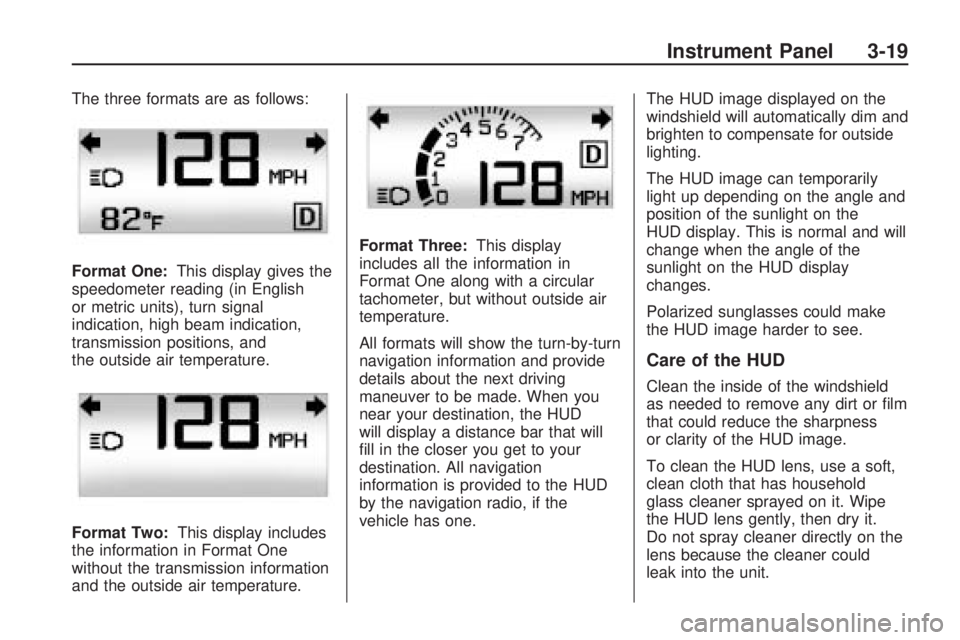
The three formats are as follows:
Format One:This display gives the
speedometer reading (in English
or metric units), turn signal
indication, high beam indication,
transmission positions, and
the outside air temperature.
Format Two:This display includes
the information in Format One
without the transmission information
and the outside air temperature.Format Three:This display
includes all the information in
Format One along with a circular
tachometer, but without outside air
temperature.
All formats will show the turn-by-turn
navigation information and provide
details about the next driving
maneuver to be made. When you
near your destination, the HUD
will display a distance bar that will
ll in the closer you get to your
destination. All navigation
information is provided to the HUD
by the navigation radio, if the
vehicle has one.The HUD image displayed on the
windshield will automatically dim and
brighten to compensate for outside
lighting.
The HUD image can temporarily
light up depending on the angle and
position of the sunlight on the
HUD display. This is normal and will
change when the angle of the
sunlight on the HUD display
changes.
Polarized sunglasses could make
the HUD image harder to see.
Care of the HUD
Clean the inside of the windshield
as needed to remove any dirt or lm
that could reduce the sharpness
or clarity of the HUD image.
To clean the HUD lens, use a soft,
clean cloth that has household
glass cleaner sprayed on it. Wipe
the HUD lens gently, then dry it.
Do not spray cleaner directly on the
lens because the cleaner could
leak into the unit.
Instrument Panel 3-19
Page 162 of 420
Malfunctions often are indicated by
the system before any problem is
apparent. Being aware of the light
can prevent more serious damage to
the vehicle. This system assists the
service technician in correctly
diagnosing any malfunction.
Notice:If the vehicle is
continually driven with this light
on, after a while, the emission
controls might not work as well,
the vehicle’s fuel economy might
not be as good, and the engine
might not run as smoothly.
This could lead to costly repairs
that might not be covered by the
vehicle warranty.
Notice:Modications made to
the engine, transmission, exhaust,
intake, or fuel system of the
vehicle or the replacement of the
original tires with other than those
of the same Tire Performance
Criteria (TPC) can affect the
vehicle’s emission controls and
can cause this light to come on.
Modications to these systemscould lead to costly repairs not
covered by the vehicle warranty.
This could also result in a failure
to pass a required Emission
Inspection/Maintenance test.
SeeAccessories and
Modifications on page 5-3.
This light comes on during a
malfunction in one of two ways:
Light Flashing:A misre condition
has been detected. A misre
increases vehicle emissions and
could damage the emission control
system on the vehicle. Diagnosis
and service might be required.
The following can prevent more
serious damage to the vehicle:
Reduce vehicle speed.
Avoid hard accelerations.
Avoid steep uphill grades.
If towing a trailer, reduce the
amount of cargo being hauled
as soon as it is possible.If the light continues to ash,
when it is safe to do so, stop the
vehicle. Find a safe place to
park the vehicle. Turn the key off,
wait at least 10 seconds, and restart
the engine. If the light is still
ashing, follow the previous steps
and see your dealer/retailer for
service as soon as possible.
Light On Steady:An emission
control system malfunction has been
detected on the vehicle. Diagnosis
and service might be required.
An emission system malfunction
might be corrected by:
Make sure the fuel cap is fully
installed. SeeFilling the Tank
on page 5-7. The diagnostic
system can determine if the
fuel cap has been left off or
improperly installed. A loose or
missing fuel cap allows fuel
to evaporate into the atmosphere.
A few driving trips with the cap
properly installed should turn
the light off.
3-42 Instrument Panel
Page 166 of 420
Driver Information
Center (DIC)
Your vehicle has a Driver
Information Center (DIC).
The DIC displays information about
your vehicle. It also displays
warning messages if a system
problem is detected.
All messages will appear in the DIC
display located at the top of the
instrument panel cluster.
The DIC comes on when the
ignition is on. After a short delay,
the DIC will display the information
that was last displayed before
the engine was turned off.
The DIC also displays a shift lever
position indicator on the bottom
line of the display. SeeAutomatic
Transmission Operation on
page 2-24for more information.
The outside air temperature
and compass, if equipped, also
displays on the DIC when viewing
the trip and fuel information.The outside air temperature
automatically appears in the top
right corner of the DIC display.
If there is a problem with the system
that controls the temperature
display, the numbers will be
replaced with dashes. If this occurs,
have the vehicle serviced. The
compass will be shown in the bottom
right corner of the DIC display.
SeeDIC Compass on page 3-54for
more information.
If your vehicle has DIC buttons,
see “DIC Operation and Displays
(With DIC Buttons)” later in this
section andDIC Vehicle
Customization (With DIC Buttons)
on page 3-64for the displays
available.
If your vehicle does not have
DIC buttons, see “DIC Operation
and Displays (Without DIC Buttons)”
later in this section for the displays
available.
DIC Operation and
Displays (With DIC
Buttons)
If your vehicle has DIC buttons, the
information below explains the
operation of this system.
The DIC has different displays
which can be accessed by pressing
the DIC buttons located on the
instrument panel. SeeInstrument
Panel Overview on page 3-4
for more information.
The DIC displays trip, fuel, and
vehicle system information, and
warning messages if a system
problem is detected.
The DIC also allows some features
to be customized. SeeDIC
Vehicle Customization (With DIC
Buttons) on page 3-64for more
information.
If your vehicle has DIC buttons,
you can also use the trip odometer
reset stem to view the odometer
and trip odometers.
3-46 Instrument Panel
Page 182 of 420
Do not use this system to help you
park. SeeUltrasonic Rear Parking
Assist (URPA) on page 2-34
for more information. See your
dealer/retailer for service.
SERVICE POWER STEERING
This message displays when a
problem is detected with the power
steering system. When this
message is displayed, you may
notice that the effort required
to steer the vehicle increases or
feels heavier, but you will still
be able to steer the vehicle.
Have your vehicle serviced by
your dealer/retailer immediately.
SERVICE STABILITRAK
This message displays if there is a
problem with the StabiliTrak®
system. If this message appears, try
to reset the system. Stop; turn off the
engine for at least 15 seconds;
then start the engine again. If this
message still comes on, it means
there is a problem. See your dealer/
retailer for service. The vehicle issafe to drive, however, you do not
have the benet of StabiliTrak, so
reduce your speed and drive
accordingly.
SERVICE THEFT DETERRENT
SYSTEM
This message displays when there
is a problem with the theft-deterrent
system. The vehicle may or may
not restart so you may want to take
the vehicle to your dealer/retailer
before turning off the engine.
SeePASS-Key
®III+ Electronic
Immobilizer Operation on page 2-18
for more information.
SERVICE TIRE MONITOR
SYSTEM
On vehicles with the Tire Pressure
Monitor System (TPMS), this
message displays if a part on the
TPMS is not working properly.
The tire pressure light also ashes
and then remains on during the
same ignition cycle. SeeTire
Pressure Light on page 3-41.Several conditions may cause this
message to appear. SeeTire
Pressure Monitor Operation on
page 5-44for more information.
If the warning comes on and stays
on, there may be a problem with
the TPMS. See your dealer/retailer.
SERVICE TRACTION
CONTROL
This message displays when there
is a problem with the Traction
Control System (TCS). When this
message is displayed, the system
will not limit wheel spin. Adjust your
driving accordingly. See your
dealer/retailer for service. See
StabiliTrak
®System on page 4-5for
more information.
SERVICE TRANSMISSION
This message displays when there
is a problem with the transmission.
See your dealer/retailer for service.
3-62 Instrument Panel
Page 184 of 420
TRANSMISSION HOT IDLE
ENGINE
Notice:If you drive your vehicle
while the transmission uid is
overheating and the transmission
temperature warning is displayed
on the instrument panel cluster
and/or DIC, you can damage
the transmission. This could lead
to costly repairs that would
not be covered by your warranty.
Do not drive your vehicle with
overheated transmission uid
or while the transmission
temperature warning is displayed.
This message displays and a chime
sounds if the transmission uid in the
vehicle gets hot. Driving with the
transmission uid temperature high
can cause damage to the vehicle.
Stop the vehicle and let it idle to
allow the transmission to cool.
This message clears when the uid
temperature reaches a safe level.
TURN SIGNAL ON
This message displays and a chime
sounds if a turn signal is left on
for 3/4 of a mile (1.2 km). Move the
turn signal/multifunction lever to
the off position.
WASHER FLUID LOW ADD
FLUID
This message displays when the
windshield washer uid is low.
Fill the windshield washer uid
reservoir as soon as possible.
SeeEngine Compartment Overview
on page 5-10for the location of
the windshield washer uid
reservoir. Also, seeWindshield
Washer Fluid on page 5-24for more
information.
DIC Vehicle
Customization
(With DIC Buttons)
Your vehicle may have
customization capabilities that allow
you to program certain features to
one preferred setting. Customization
features can only be programmed to
one setting on the vehicle and cannot
be programmed to a preferred
setting for two different drivers.
All of the customization options may
not be available on your vehicle.
Only the options available will
be displayed on the DIC.
The default settings for the
customization features were set
when your vehicle left the factory,
but may have been changed
from their default state since then.
3-64 Instrument Panel
Page 249 of 420
The traction control system is
enabled automatically when the
vehicle is started. It will activate and
the StabiliTrak light will ash if it
senses that any of the wheels are
spinning or beginning to lose traction
while driving. If traction control is
turned off, only the brake-traction
control portion of traction control
will work. The engine speed
management will be disabled. In this
mode, engine power is not reduced
automatically and the driven
wheels can spin more freely. This
can cause the brake-traction control
to activate constantly.
Notice:If the wheel(s) of one axle
is allowed to spin excessively
while the StabiliTrak, ABS and
brake warning lights and any
relevant DIC messages are
displayed, the transfer case could
be damaged. The repairs would
not be covered by the vehicle
warranty. Reduce engine power
and do not spin the wheel(s)
excessively while these lights
and messages are displayed.The traction control system may
activate on dry or rough roads
or under conditions such as heavy
acceleration while turning or
abrupt upshifts/downshifts of the
transmission. When this happens, a
reduction in acceleration may be
noticed, or a noise or vibration may
be heard. This is normal.
If cruise control is being used when
the system activates, the StabiliTrak
light will ash and cruise control
will automatically disengage. Cruise
control may be reengaged when
road conditions allow. SeeCruise
Control on page 3-9.
StabiliTrak may also turn off
automatically if it determines that a
problem exists with the system.
If the problem does not clear itself
after restarting the vehicle, see your
dealer/retailer for service.All-Wheel Drive (AWD)
System
If the vehicle has this feature,
engine power is sent to all four
wheels when extra traction is
needed. This is like four-wheel drive,
but there is no separate lever or
switch to engage or disengage the
axle. It is fully automatic, and
adjusts itself as needed for road
conditions.
When using a compact spare tire
on the AWD equipped vehicle,
the AWD system automatically
detects the presence of the compact
spare and the AWD is disabled.
To restore the AWD operation and
prevent excessive wear on the
AWD system, replace the compact
spare with a full-size tire as
soon as possible. SeeCompact
Spare Tire on page 5-81for more
information.
Driving Your Vehicle 4-7
Page 254 of 420
Before Leaving on a
Long Trip
To prepare your vehicle for a long
trip, consider having it serviced
by your dealer/retailer before
departing.
Things to check on your own
include:
Windshield Washer Fluid:
Reservoir full? Windows
clean — inside and outside?
Wiper Blades:In good shape?
Fuel, Engine Oil, Other Fluids:All
levels checked?
Lamps:Do they all work and are
lenses clean?
Tires:Are treads good? Are tires
inated to recommended
pressure?
Weather and Maps:Safe to
travel? Have up-to-date maps?
Highway Hypnosis
Always be alert and pay attention
to your surroundings while driving.
If you become tired or sleepy,
nd a safe place to park your
vehicle and rest.
Other driving tips include:
Keep the vehicle well ventilated.
Keep interior temperature cool.
Keep your eyes moving — scan
the road ahead and to the sides.
Check the rearview mirror and
vehicle instruments often.
Hill and Mountain Roads
Driving on steep hills or through
mountains is different than driving
on at or rolling terrain. Tips for
driving in these conditions include:
Keep the vehicle serviced
and in good shape.
Check all uid levels and brakes,
tires, cooling system, and
transmission.
Going down steep or long hills,
shift to a lower gear.
{CAUTION
If you do not shift down, the
brakes could get so hot that they
would not work well. You would
then have poor braking or even
none going down a hill. You could
crash. Shift down to let the engine
assist the brakes on a steep
downhill slope.
4-12 Driving Your Vehicle
Page 257 of 420
To save fuel, run the engine for only
short periods as needed to warm the
vehicle and then shut the engine off
and close the window most of the
way to save heat. Repeat this until
help arrives but only when you feel
really uncomfortable from the cold.
Moving about to keep warm also
helps.
If it takes some time for help to
arrive, now and then when you run
the engine, push the accelerator
pedal slightly so the engine runs
faster than the idle speed. This
keeps the battery charged to restart
the vehicle and to signal for help with
the headlamps. Do this as little as
possible to save fuel.
If Your Vehicle is
Stuck in Sand, Mud, Ice,
or Snow
Slowly and cautiously spin the
wheels to free the vehicle when
stuck in sand, mud, ice, or snow.
SeeRocking Your Vehicle to Get It
Out on page 4-15.If the vehicle has a traction system,
it can often help to free a stuck
vehicle. Refer to the vehicle’s
traction system in the Index. If stuck
too severely for the traction
system to free the vehicle, turn the
traction system off and use the
rocking method.
{CAUTION
If you let your vehicle’s tires spin
at high speed, they can explode,
and you or others could be
injured. The vehicle can overheat,
causing an engine compartment
re or other damage. Spin the
wheels as little as possible and
avoid going above 35 mph
(55 km/h) as shown on the
speedometer.
For information about using tire
chains on the vehicle, seeTire
Chains on page 5-54.
Rocking Your Vehicle to
Get It Out
Turn the steering wheel left and
right to clear the area around
the front wheels. Turn off any
traction or stability system. Shift
back and forth between R (Reverse)
and a forward gear, spinning the
wheels as little as possible. To
prevent transmission wear, wait until
the wheels stop spinning before
shifting gears. Release the
accelerator pedal while shifting, and
press lightly on the accelerator
pedal when the transmission is in
gear. Slowly spinning the wheels in
the forward and reverse directions
causes a rocking motion that
could free the vehicle. If that does
not get the vehicle out after a
few tries, it might need to be towed
out. If the vehicle does need to
be towed out, seeTowing Your
Vehicle on page 4-20.
Driving Your Vehicle 4-15