wheel GMC ACADIA 2009 Owner's Guide
[x] Cancel search | Manufacturer: GMC, Model Year: 2009, Model line: ACADIA, Model: GMC ACADIA 2009Pages: 420, PDF Size: 2.23 MB
Page 134 of 420
Instrument Panel
Brightness
D
(Instrument Panel
Brightness):The knob with this
symbol on it is located next to
the exterior lamps control to the left
of the steering wheel. Push the
knob in all the way until it extends
out and then turn the knob clockwise
or counterclockwise to brighten or
dim the lights. Push the knob back
in when nished.
Courtesy Lamps
When a door is opened, the
courtesy lamps automatically come
on. They make it easier when
entering and exiting the vehicle.
The lamps can also be turned
on manually by fully turning the
instrument panel brightness control
clockwise.The reading lamps, located on the
headliner above the rearview
mirror, can be turned on or off
independent of the automatic
courtesy lamps, when the doors
are closed.
Dome Lamps
The dome lamps automatically
come on when a door is opened,
unless the dome lamp override
button is pressed in.
The lamps can also be turned on
and off by turning the instrument
panel brightness control clockwise to
the farthest position.
Dome Lamp Override
The dome lamp override button is
located next to the exterior lamps
control.
The dome lamp override sets the
dome lamps to remain off or come on
automatically when a door is opened.
E(Dome Lamp Override):Press
the button in and the dome lamps
remain off when a door is opened.
Press the button again to return it to
the extended position so that the
dome lamps come on when a door
is opened.
Entry Lighting
For vehicles with courtesy lamps,
they come on and stay on for a set
time whenever the unlock symbol
is pressed on the Remote Keyless
Entry (RKE) Transmitter, if the
vehicle has one.
If a door is opened, the lamps stay
on while it is open and then turn
off automatically about 25 seconds
after the door is closed. If the
unlock symbol is pressed and no
door is opened, the lamps turn
off after about 20 seconds.
Entry lighting includes a feature
called theater dimming. With theater
dimming, the lamps do not turn off at
the end of the delay time. Instead,
3-14 Instrument Panel
Page 138 of 420
The HUD temporarily displays
CHECK GAGES and ICE
POSSIBLE when these messages
are on the DIC trip computer.
The HUD also displays the following
messages on vehicles with these
systems, when they are active:
TRACTION CONTROL ACTIVE
STABILITRAK ACTIVE
Notice:If you try to use the HUD
image as a parking aid, you may
misjudge the distance and
damage your vehicle. Do not use
the HUD image as a parking aid.
When the HUD is on, the
speedometer reading is continually
displayed. The current radio
station or CD track number will
display for a short period of
time after the radio or CD track
status changes. This happens
whenever radio information is
changed. The speedometer sizeis reduced when radio, CD
information, warnings, or
turn-by-turn navigation information
are displayed on the HUD.
The HUD control is located to the
right of the steering wheel.
To adjust the HUD image so that
items are properly displayed, do the
following:
1. Adjust the driver’s seat to a
comfortable position.
2. Start the engine.
3. Adjust the HUD controls.Use the following settings to adjust
the HUD.
9(Off):To turn HUD off,
rotate the dimming knob fully
counterclockwise until the HUD
display turns off.
Brightness:Turn the knob on
the HUD control clockwise or
counterclockwise to brighten or dim
the display.
w(Up)x(Down):Press the
up or down arrows to center the
HUD image in your view. The HUD
image can only be adjusted up
and down, not side to side.
?(Page):Press this button to
select the display formats. Release
the page button when the format
number with the desired display is
shown on the HUD.
3-18 Instrument Panel
Page 150 of 420
adjusting the temperature, fan
speed, and the air delivery mode.
The system may also supply cooler
air to the side of the vehicle
facing the sun. The recirculation
mode will also be used as needed
to maintain cool outlet temperatures.
Outlet Adjustment
Use the slider switch in the center
of the outlet, to change the direction
of the air ow. Use the thumbwheel
near the outlet to control the
amount of air ow or to shut off the
airow completely.
Keep all outlets open whenever
possible for best system
performance.
Operation Tips
Clear away any ice, snow, or
leaves from the air inlets at
the base of the windshield that
can block the ow of air into
the vehicle.
Use of non-GM approved hood
deectors can adversely affect
the performance of the system.
Keep the path under all seats
clear of objects to help circulate
the air inside the vehicle
more effectively.
If fogging reoccurs while in vent
or bi-level modes with mild
temperature throughout the
vehicle, turn on the air conditioner
to reduce windshield fogging.
3-30 Instrument Panel
Page 160 of 420
vehicle may need service. When
this warning light is on, the system is
off and will not limit wheel spin.
This light will also ash when the
StabiliTrak system is active.
If the StabiliTrak system warning light
comes on and stays on for an
extended period of time when the
system is turned on, the vehicle
needs service. SeeStabiliTrak
®
System on page 4-5for more
information.
Engine Coolant
Temperature Warning
Light
The engine coolant temperature
warning light will come on when the
engine has overheated.If this happens pull over and turn off
the engine as soon as possible.
SeeEngine Overheating on
page 5-21for more information.
Notice:Driving with the engine
coolant temperature warning light
on could cause the vehicle to
overheat. SeeEngine Overheating
on page 5-21. The vehicle’s
engine could be damaged, and it
might not be covered by the
vehicle warranty. Never drive with
the engine coolant temperature
warning light on.
This light will also come on briey
when starting the vehicle. If it
does not, see your delear/retailer.
Engine Coolant
Temperature Gage
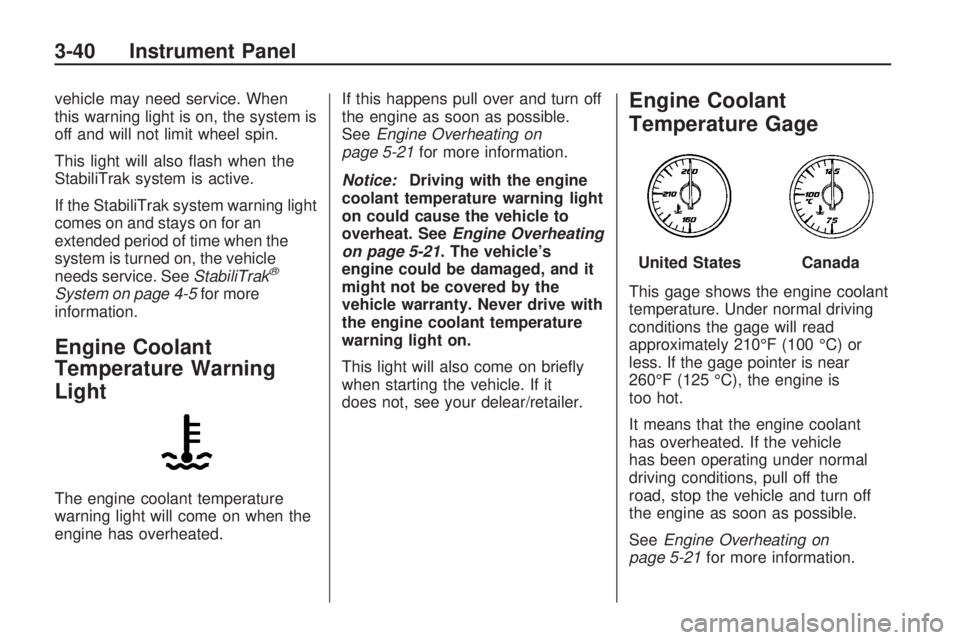
This gage shows the engine coolant
temperature. Under normal driving
conditions the gage will read
approximately 210°F (100 °C) or
less. If the gage pointer is near
260°F (125 °C), the engine is
too hot.
It means that the engine coolant
has overheated. If the vehicle
has been operating under normal
driving conditions, pull off the
road, stop the vehicle and turn off
the engine as soon as possible.
SeeEngine Overheating on
page 5-21for more information.
United StatesCanada
3-40 Instrument Panel
Page 176 of 420
DIC Warnings and
Messages
Messages are displayed on the DIC
to notify the driver that the status
of the vehicle has changed and that
some action may be needed by
the driver to correct the condition.
Multiple messages may appear one
after another.
Some messages may not require
immediate action, but you can press
any of the DIC buttons on the
instrument panel or the trip odometer
reset stem on the instrument panel
cluster to acknowledge that you
received the messages and to clear
them from the display.
Some messages cannot be cleared
from the DIC display because
they are more urgent. These
messages require action before they
can be cleared. You should take
any messages that appear on
the display seriously and remember
that clearing the messages will
only make the messages disappear,
not correct the problem.The following are the possible
messages that can be displayed
and some information about them.ALL WHEEL DRIVE OFF
If your vehicle has the All-Wheel
Drive (AWD) system, this message
displays when there is a compact
spare tire on the vehicle, when
the Antilock Brake System (ABS)
warning light comes on, or when the
rear differential uid is overheating.
This message turns off when
the differential uid cools.
The AWD system is disabled until
the compact spare tire is replaced
by a full-size tire. If the warning
message is still on after putting on
the full-size tire, you need to reset
the warning message. To reset
the warning message, turn
the ignition off and then back on
again after 30 seconds. If the
message stays on, see your
dealer/retailer right away. See
All-Wheel Drive (AWD) System on
page 4-7for more information.
AUTOMATIC LIGHT
CONTROL OFF
This message displays when the
automatic headlamps are turned off.
This message clears itself after
10 seconds.
AUTOMATIC LIGHT
CONTROL ON
This message displays when the
automatic headlamps are turned on.
This message clears itself after
10 seconds.
BATTERY SAVER ACTIVE
This message displays when
the system detects that the battery
voltage is dropping below
expected levels. The battery saver
system starts reducing certain
features of the vehicle that you may
be able to notice. At the point
that the features are disabled, this
message is displayed. It means that
the vehicle is trying to save the
charge in the battery.
3-56 Instrument Panel
Page 181 of 420
RIGHT REAR DOOR OPEN
This message displays and a chime
sounds if the passenger side rear
door is not fully closed and the
vehicle is shifted out of P (Park).
Stop and turn off the vehicle, check
the door for obstructions, and
close the door again. Check to see
if the message still appears on
the DIC.
SERVICE A/C (Air
Conditioning) SYSTEM
This message displays when the
electronic sensors that control
the air conditioning and heating
systems are no longer working.
Have the climate control system
serviced by your dealer/retailer
if you notice a drop in heating and
air conditioning efficiency.
SERVICE AIR BAG
This message displays if there is a
problem with the airbag system.
Have your dealer/retailer inspect the
system for problems. SeeAirbagReadiness Light on page 3-36and
Airbag System on page 1-48for
more information.
SERVICE ALL WHEEL DRIVE
If your vehicle has the All-Wheel
Drive (AWD) system, this message
displays if there is a problem
with this system. If this message
appears, stop as soon as possible
and turn off the vehicle. Restart
the vehicle after 30 seconds
and check for the message on the
DIC display. If the message is
still displayed or appears again
when you begin driving, the AWD
system needs service. See your
dealer/retailer.
SERVICE BATTERY
CHARGING SYSTEM
On some vehicles, this message
displays if there is a problem
with the battery charging system.
Under certain conditions, the
charging system light may also turn
on in the instrument panel cluster.
SeeCharging System Light onpage 3-37. Driving with this problem
could drain the battery. Turn off
all unnecessary accessories.
Have the electrical system checked
as soon as possible. See your
dealer/retailer.
SERVICE BRAKE SYSTEM
This message displays along with
the brake system warning light
if there is a problem with the brake
system. SeeBrake System
Warning Light on page 3-38. If this
message appears, stop as soon
as possible and turn off the vehicle.
Restart the vehicle and check for
the message on the DIC display.
If the message is still displayed or
appears again when you begin
driving, the brake system needs
service as soon as possible.
See your dealer/retailer.
SERVICE PARK ASSIST
If your vehicle has the Ultrasonic
Rear Parking Assist (URPA) system,
this message displays if there is a
problem with the URPA system.
Instrument Panel 3-61
Page 182 of 420
Do not use this system to help you
park. SeeUltrasonic Rear Parking
Assist (URPA) on page 2-34
for more information. See your
dealer/retailer for service.
SERVICE POWER STEERING
This message displays when a
problem is detected with the power
steering system. When this
message is displayed, you may
notice that the effort required
to steer the vehicle increases or
feels heavier, but you will still
be able to steer the vehicle.
Have your vehicle serviced by
your dealer/retailer immediately.
SERVICE STABILITRAK
This message displays if there is a
problem with the StabiliTrak®
system. If this message appears, try
to reset the system. Stop; turn off the
engine for at least 15 seconds;
then start the engine again. If this
message still comes on, it means
there is a problem. See your dealer/
retailer for service. The vehicle issafe to drive, however, you do not
have the benet of StabiliTrak, so
reduce your speed and drive
accordingly.
SERVICE THEFT DETERRENT
SYSTEM
This message displays when there
is a problem with the theft-deterrent
system. The vehicle may or may
not restart so you may want to take
the vehicle to your dealer/retailer
before turning off the engine.
SeePASS-Key
®III+ Electronic
Immobilizer Operation on page 2-18
for more information.
SERVICE TIRE MONITOR
SYSTEM
On vehicles with the Tire Pressure
Monitor System (TPMS), this
message displays if a part on the
TPMS is not working properly.
The tire pressure light also ashes
and then remains on during the
same ignition cycle. SeeTire
Pressure Light on page 3-41.Several conditions may cause this
message to appear. SeeTire
Pressure Monitor Operation on
page 5-44for more information.
If the warning comes on and stays
on, there may be a problem with
the TPMS. See your dealer/retailer.
SERVICE TRACTION
CONTROL
This message displays when there
is a problem with the Traction
Control System (TCS). When this
message is displayed, the system
will not limit wheel spin. Adjust your
driving accordingly. See your
dealer/retailer for service. See
StabiliTrak
®System on page 4-5for
more information.
SERVICE TRANSMISSION
This message displays when there
is a problem with the transmission.
See your dealer/retailer for service.
3-62 Instrument Panel
Page 197 of 420
©SEEK¨:Press to go to the
previous or to the next station
and stay there.
To scan stations, press and hold
©or¨until a beep sounds.
The radio goes to a station, plays
for a few seconds, then goes to the
next station. Press either arrow
again to stop scanning.
The radio only seeks and scans
stations with a strong signal that are
in the selected band.
Storing a Radio Station as a
Favorite
Drivers are encouraged to set up
their radio station favorites while the
vehicle is in P (Park). Tune to
favorite stations using the presets,
favorites button, and steering
wheel controls. SeeDefensive
Driving on page 4-2.
FAV (Favorites):A maximum of
36 stations can be programmed as
favorites using the six pushbuttonspositioned below the radio station
frequency labels and by using
the radio favorites page button
(FAV button). Press to go through
up to six pages of favorites,
each having six favorite stations
available per page. Each page
of favorites can contain any
combination of AM, FM, or XM
stations.
The balance/fade and tone settings
that were previously adjusted,
are stored with the favorite stations.
To store a station as a favorite:
1. Tune to the desired radio station.
2. Press FAV to display the page
where to store the station.
3. Press and hold one of the
six pushbuttons until a beep
sounds. When that pushbutton is
pressed and released, the
station that was set, returns.
4. Repeat the steps for each
pushbutton radio station to
be stored as a favorite.To setup the number of favorites
pages:
1. Press MENU to display the radio
setup menu.
2. Press the pushbutton located
below the FAV 1-6 label.
3. Select the desired number of
favorites pages by pressing
the pushbutton located below the
displayed page numbers.
4. Press FAV, or let the menu time
out, to return to the original main
radio screen showing the
radio station frequency labels
and to begin the process
of programming favorites for the
chosen amount of numbered
pages.
Auto Text (Satellite Radio Service,
CD, MP3, and WMA features):
If additional information is available
for the current song being played,
Auto Text will automatically
page/scroll the information every
ve seconds above the FAV presets
on the radio display.
Instrument Panel 3-77
Page 220 of 420
Audio System
When using the in-vehicle Bluetooth
system, sound comes through the
vehicle’s front audio system
speakers and over-rides the audio
system. Use the audio system
volume knob, during a call, to change
the volume level. The adjusted
volume level remains in memory for
later calls. To prevent missed calls, a
minimum volume level is used if the
volume is turned down too low.
Bluetooth Controls
Use the buttons located on the
steering wheel to operate the
in-vehicle Bluetooth system. See
Audio Steering Wheel Controls
on page 3-121for more information.
bg(Push To Talk):Press to
answer incoming calls, to conrm
system information, and to start
speech recognition.
cx(Phone On Hook):Press to
end a call, reject a call, or to cancel
an operation.
Pairing
A Bluetooth enabled cell phone
must be paired to the in-vehicle
Bluetooth system rst and then
connected to the vehicle before it
can be used. See the cell phone
manufacturers user guide for
Bluetooth functions before pairing
the cell phone. If a Bluetooth phone
is not connected, calls will be
made using OnStar
®Hands-Free
Calling, if available. Refer to
the OnStar owner’s guide for more
information.
Pairing Information:
Up to ve cell phones can be
paired to the in-vehicle
Bluetooth system.
The pairing process is disabled
when the vehicle is moving.
The in-vehicle Bluetooth system
automatically links with the rst
available paired cell phone in the
order the phone was paired.
Only one paired cell phone can
be connected to the in-vehicle
Bluetooth system at a time.
Pairing should only need to be
completed once, unless
changes to the pairing
information have been made or
the phone is deleted.
To link to a different paired phone,
see Linking to a Different Phone
later in this section.
Pairing a Phone
1. Press and hold
bgfor
two seconds. The system
responds with “Ready” followed
by a tone.
2. Say “Bluetooth”. The system
responds with “Bluetooth
ready” followed by a tone.
3. Say “Pair”. The system responds
with instructions and a four digit
PIN number. The PIN number
will be used in Step 4.
3-100 Instrument Panel
Page 241 of 420
Audio Steering Wheel
Controls
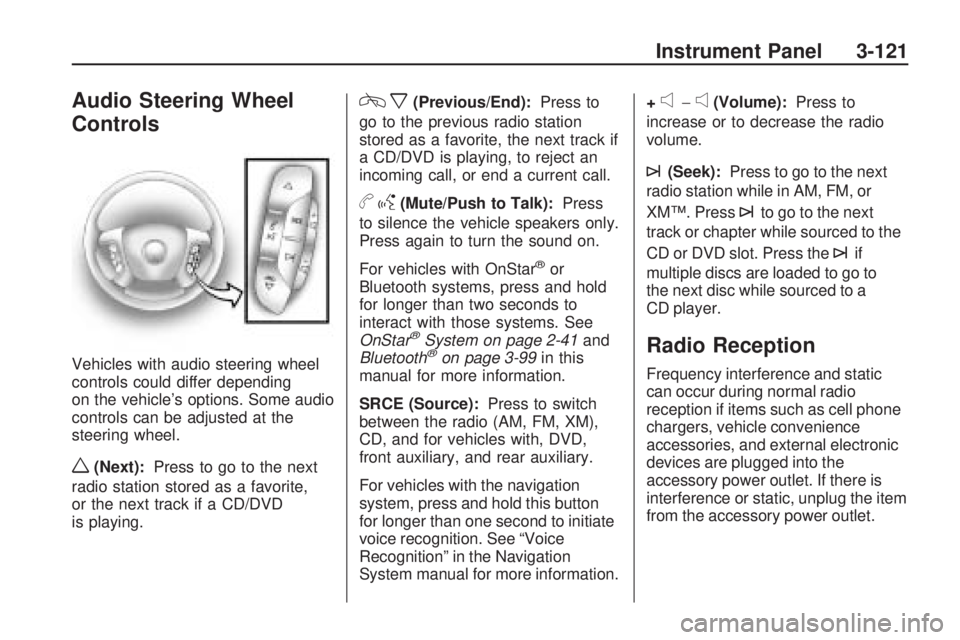
Vehicles with audio steering wheel
controls could differ depending
on the vehicle’s options. Some audio
controls can be adjusted at the
steering wheel.
w(Next):Press to go to the next
radio station stored as a favorite,
or the next track if a CD/DVD
is playing.
cx(Previous/End):Press to
go to the previous radio station
stored as a favorite, the next track if
a CD/DVD is playing, to reject an
incoming call, or end a current call.
bg(Mute/Push to Talk):Press
to silence the vehicle speakers only.
Press again to turn the sound on.
For vehicles with OnStar
®or
Bluetooth systems, press and hold
for longer than two seconds to
interact with those systems. See
OnStar
®System on page 2-41and
Bluetooth®on page 3-99in this
manual for more information.
SRCE (Source):Press to switch
between the radio (AM, FM, XM),
CD, and for vehicles with, DVD,
front auxiliary, and rear auxiliary.
For vehicles with the navigation
system, press and hold this button
for longer than one second to initiate
voice recognition. See “Voice
Recognition” in the Navigation
System manual for more information.+
e−e(Volume):Press to
increase or to decrease the radio
volume.
¨(Seek):Press to go to the next
radio station while in AM, FM, or
XM™. Press
¨to go to the next
track or chapter while sourced to the
CD or DVD slot. Press the
¨if
multiple discs are loaded to go to
the next disc while sourced to a
CD player.
Radio Reception
Frequency interference and static
can occur during normal radio
reception if items such as cell phone
chargers, vehicle convenience
accessories, and external electronic
devices are plugged into the
accessory power outlet. If there is
interference or static, unplug the item
from the accessory power outlet.
Instrument Panel 3-121