buttons GMC ACADIA 2009 Owner's Manual
[x] Cancel search | Manufacturer: GMC, Model Year: 2009, Model line: ACADIA, Model: GMC ACADIA 2009Pages: 420, PDF Size: 2.23 MB
Page 10 of 420
Heated and Cooled Seats
If the front seats have the heated
and cooled seat feature, the buttons
used to control this feature are
located on the front doors near the
door handle.
H(Cooled Seat):To cool the
entire seat, press the button with the
cooled seat symbol.
This symbol will appear on the
climate control display to indicate
that the feature is on. Press the
button to cycle through the
temperature settings of high,
medium, and low and to turn the
cooled seat off. Indicator bars next to
the symbol designate the level of
cooling selected: three for high,
two for medium, and one for low.
z(Heated Seat and Seatback):
To heat the entire seat, press
the button with the heated seat and
seatback symbol.
This symbol will appear on the
climate control display to indicate
that the feature is on. Press the
button to cycle through the
temperature settings of high,
medium, and low and to turn the
heated seat off. Indicator bars next to
the symbol designate the level of
heat selected: three for high, two for
medium, and one for low.
The heated and cooled seats will be
canceled after the ignition is
turned off. To use the heated and
cooled seat feature after the vehicle
is started, you will need to press
the appropriate seat button again.Memory Seat and Mirrors
The vehicle may have the memory
package.
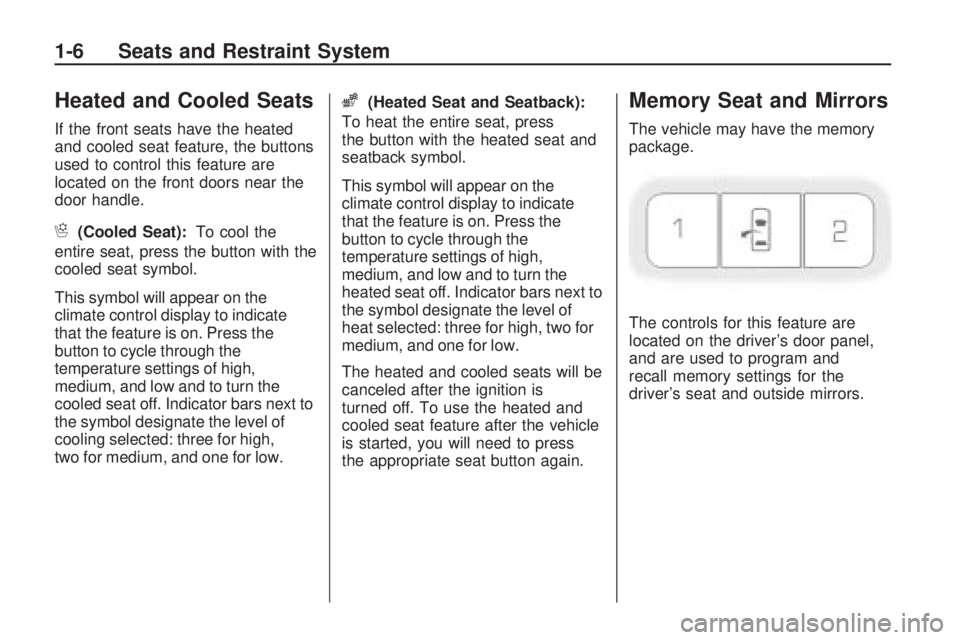
The controls for this feature are
located on the driver’s door panel,
and are used to program and
recall memory settings for the
driver’s seat and outside mirrors.
1-6 Seats and Restraint System
Page 11 of 420
To save your positions in memory,
do the following:
1. Adjust the driver seat, including
the seatback recliner and both
outside mirrors to a comfortable
position.
SeeOutside Power Mirrors on
page 2-32for more information.
Not all mirrors will have the
ability to save and recall
the mirror positions.
2. Press and hold button 1 until
two beeps let you know that
the position has been stored.
A second seating and mirror position
can be programmed by repeating
the above steps and pressing
button 2.
To recall the memory positions,
the vehicle must be in P (Park).
Press and release either button 1
or button 2 corresponding to
the desired driving position.The seat and outside mirrors will
move to the position previously
stored. You will hear a single beep.
Using the Remote Keyless
Entry (RKE) transmitter to enter
the vehicle with the remote recall
memory feature on causes automatic
seat and mirror adjustment. There is
no adjustment when the position has
not been changed by another seating
position or the easy exit feature. See
“MEMORY SEAT RECALL” under
DIC Vehicle Customization (With
DIC Buttons) on page 3-64for more
information.
To stop recall movement of the
memory feature at any time, press
one of the power seat controls,
memory buttons, or power mirror
buttons.If something has blocked the driver
seat while recalling a memory
position, the driver seat recall may
stop working. If this happens, press
the appropriate control for the area
that is not recalling for two seconds,
after the obstruction is removed.
Then try recalling the memory
position again by pressing the
appropriate memory button. If the
memory position is still not being
recalled, see your dealer/retailer
for service.
Easy Exit Seat
The control for this feature is
located on the driver door panel
between buttons 1 and 2.
With the vehicle in P (Park), the
exit position can be recalled
by pressing the exit button. You
will hear a single beep. The driver
seat will move back.
Seats and Restraint System 1-7
Page 12 of 420
If the easy exit seat feature is on in
the Driver Information Center (DIC),
automatic seat movement will occur
when the key is removed from the
ignition. See “EASY EXIT SEAT”
underDIC Vehicle Customization
(With DIC Buttons) on page 3-64for
more information.
Further programming for the
memory seat feature can be done
using the DIC. You can select
or cancel the following:
The automatic easy exit seat
feature.
The remote memory seat recall
feature.
For programming information,
seeDIC Vehicle Customization
(With DIC Buttons) on page 3-64.
Reclining Seatbacks
Manual Reclining Seatbacks
{CAUTION
You can lose control of the
vehicle if you try to adjust a
manual driver’s seat while the
vehicle is moving. The sudden
movement could startle and
confuse you, or make you push a
pedal when you do not want to.
Adjust the driver’s seat only when
the vehicle is not moving.
{CAUTION
If either seatback is not locked, it
could move forward in a sudden
stop or crash. That could cause
injury to the person sitting there.
Always push and pull on the
seatbacks to be sure they are
locked.In vehicles with seats that have
manual reclining seatbacks, the lever
used to operate them is located on
the outboard side of the seat.
To recline the seatback, do the
following:
1. Lift the recline lever.
2. Move the seatback to the desired
position, then release the lever to
lock the seatback in place.
3. Push and pull on the seatback to
make sure it is locked.
To return the seatback to an upright
position, do the following:
1. Lift the lever fully without
applying pressure to the
seatback and the seatback will
return to the upright position.
2. Push and pull on the seatback to
make sure it is locked.
1-8 Seats and Restraint System
Page 70 of 420
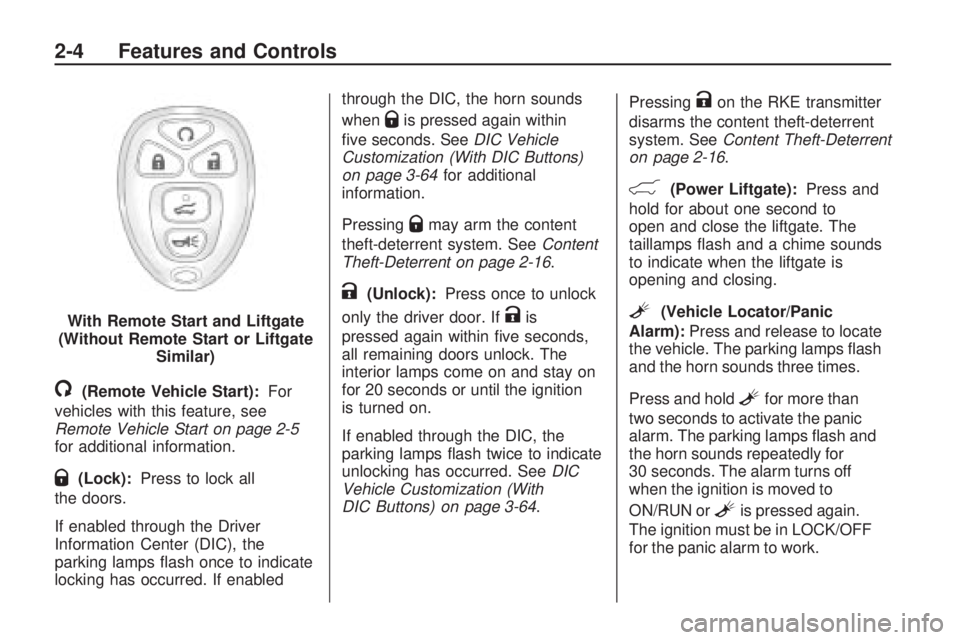
/(Remote Vehicle Start):For
vehicles with this feature, see
Remote Vehicle Start on page 2-5
for additional information.
Q(Lock):Press to lock all
the doors.
If enabled through the Driver
Information Center (DIC), the
parking lamps ash once to indicate
locking has occurred. If enabledthrough the DIC, the horn sounds
when
Qis pressed again within
ve seconds. SeeDIC Vehicle
Customization (With DIC Buttons)
on page 3-64for additional
information.
Pressing
Qmay arm the content
theft-deterrent system. SeeContent
Theft-Deterrent on page 2-16.
K(Unlock):Press once to unlock
only the driver door. If
Kis
pressed again within ve seconds,
all remaining doors unlock. The
interior lamps come on and stay on
for 20 seconds or until the ignition
is turned on.
If enabled through the DIC, the
parking lamps ash twice to indicate
unlocking has occurred. SeeDIC
Vehicle Customization (With
DIC Buttons) on page 3-64.Pressing
Kon the RKE transmitter
disarms the content theft-deterrent
system. SeeContent Theft-Deterrent
on page 2-16.
&(Power Liftgate):Press and
hold for about one second to
open and close the liftgate. The
taillamps ash and a chime sounds
to indicate when the liftgate is
opening and closing.
L(Vehicle Locator/Panic
Alarm):Press and release to locate
the vehicle. The parking lamps ash
and the horn sounds three times.
Press and hold
Lfor more than
two seconds to activate the panic
alarm. The parking lamps ash and
the horn sounds repeatedly for
30 seconds. The alarm turns off
when the ignition is moved to
ON/RUN or
Lis pressed again.
The ignition must be in LOCK/OFF
for the panic alarm to work. With Remote Start and Liftgate
(Without Remote Start or Liftgate
Similar)
2-4 Features and Controls
Page 71 of 420
Programming Transmitters to
the Vehicle
Only RKE transmitters programmed
to this vehicle will work. If a
transmitter is lost or stolen, a
replacement can be purchased and
programmed through your dealer/
retailer. When the replacement
transmitter is programmed to this
vehicle using the DIC, all remaining
transmitters must also be
reprogrammed. Any lost or stolen
transmitters will no longer work once
the new transmitter is programmed.
Each vehicle can have up to
eight transmitters programmed to it.
See “Relearn Remote Key” under
DIC Operation and Displays
(With DIC Buttons) on page 3-46or
DIC Operation and Displays
(Without DIC Buttons) on page 3-51
for instructions on how to program
transmitters to this vehicle.
Battery Replacement
Replace the battery if the REPLACE
BATTERY IN REMOTE KEY
message displays in the DIC.Notice:When replacing the
battery, do not touch any of the
circuitry on the transmitter. Static
from your body could damage
the transmitter.
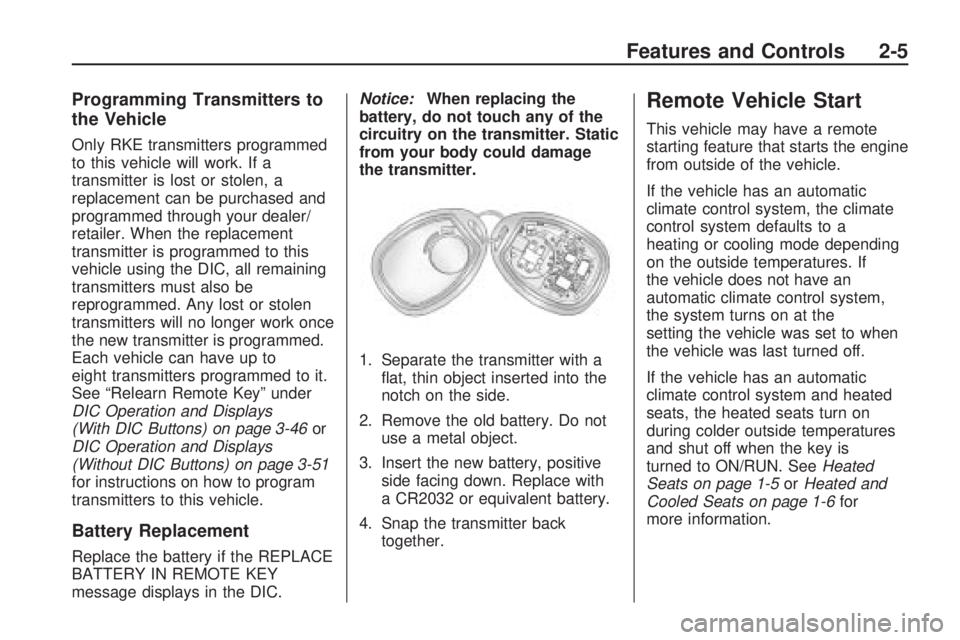
1. Separate the transmitter with a
at, thin object inserted into the
notch on the side.
2. Remove the old battery. Do not
use a metal object.
3. Insert the new battery, positive
side facing down. Replace with
a CR2032 or equivalent battery.
4. Snap the transmitter back
together.
Remote Vehicle Start
This vehicle may have a remote
starting feature that starts the engine
from outside of the vehicle.
If the vehicle has an automatic
climate control system, the climate
control system defaults to a
heating or cooling mode depending
on the outside temperatures. If
the vehicle does not have an
automatic climate control system,
the system turns on at the
setting the vehicle was set to when
the vehicle was last turned off.
If the vehicle has an automatic
climate control system and heated
seats, the heated seats turn on
during colder outside temperatures
and shut off when the key is
turned to ON/RUN. SeeHeated
Seats on page 1-5orHeated and
Cooled Seats on page 1-6for
more information.
Features and Controls 2-5
Page 73 of 420
The vehicle can be started using the
remote start feature two separate
times between driving sequences.
The engine runs for 10 minutes after
each remote start. Or, the engine
run time can be extended another
10 minutes within the rst 10 minute
remote start time frame, and
before the engine stops.
For example, if
Qand then/are
pressed again after the vehicle
has been running for ve minutes,
10 minutes are added, allowing
the engine to run for 15 minutes.
The additional 10 minutes are
considered a second remote start.The vehicle must be started with the
key once two remote starts, or a
single remote start with one time
extension has been done.
The vehicle can be started using the
remote start feature again after
the key is removed from the ignition.
The vehicle cannot be started
using the remote start feature if the
key is in the ignition, the hood is
open, or if there is an emission
control system malfunction.
The engine turns off during a remote
start if the coolant temperature
gets too high or if the oil pressure
gets low.Vehicles that have the remote
vehicle start feature are shipped
from the factory with the remote
vehicle start system enabled. The
system may be enabled or disabled
through the DIC if the vehicle has
DIC buttons. See “REMOTE
START” underDIC Vehicle
Customization (With DIC Buttons)
on page 3-64for additional
information. If the vehicle does not
have DIC buttons, see your
dealer/retailer to enable or disable
the remote start system.
Features and Controls 2-7
Page 74 of 420
Doors and Locks
Door Locks
{CAUTION
Unlocked doors can be
dangerous.
Passengers, especially
children, can easily open the
doors and fall out of a moving
vehicle. When a door is
locked, the handle will not
open it. You increase the
chance of being thrown out of
the vehicle in a crash if the
doors are not locked. So, wear
safety belts properly and lock
the doors whenever you drive.
Young children who get into
unlocked vehicles may be
unable to get out. A child can
be overcome by extreme heat
and can suffer permanent
(Continued)
CAUTION (Continued)
injuries or even death from
heat stroke. Always lock
your vehicle whenever you
leave it.
Outsiders can easily enter
through an unlocked door
when you slow down or stop
your vehicle. Locking your
doors can help prevent this
from happening.
To lock or unlock a door, use the
key from the outside or the door lock
from the inside.
Power Door Locks
The power door lock switches are
located on the front doors.
"(Unlock):Press to unlock
the doors.
Q(Lock):Remove the key from
the ignition and press to lock
the doors.
Delayed Locking
When locking the doors with the
power lock switch and a door or the
liftgate is open, the doors will lock
ve seconds after the last door is
closed. You will hear three chimes to
signal that the delayed locking
feature is in use.
Pressing the power lock switch
twice or the lock button on the RKE
transmitter twice will override the
delayed locking feature and
immediately lock all the doors.
This feature will not operate if the
key is in the ignition.
This feature can be programmed
by using the Driver Information
Center (DIC). See “DELAY DOOR
LOCK” underDIC Vehicle
Customization (With DIC Buttons)
on page 3-64.
2-8 Features and Controls
Page 75 of 420
Programmable Automatic
Door Locks
Vehicles with an automatic
lock/unlock feature enable you to
program the vehicle’s power
door locks. This feature can be
programmed through the Driver
Information Center (DIC). SeeDIC
Vehicle Customization (With
DIC Buttons) on page 3-64for more
information.
Rear Door Security
Locks
The vehicle has rear door security
locks to prevent passengers
from opening the rear doors from
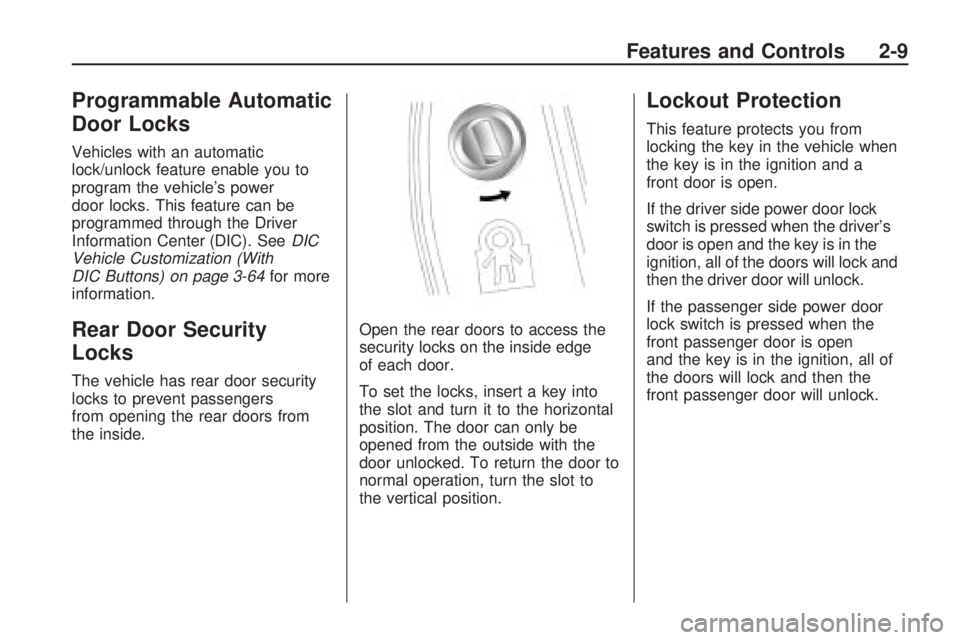
the inside.Open the rear doors to access the
security locks on the inside edge
of each door.
To set the locks, insert a key into
the slot and turn it to the horizontal
position. The door can only be
opened from the outside with the
door unlocked. To return the door to
normal operation, turn the slot to
the vertical position.
Lockout Protection
This feature protects you from
locking the key in the vehicle when
the key is in the ignition and a
front door is open.
If the driver side power door lock
switch is pressed when the driver’s
door is open and the key is in the
ignition, all of the doors will lock and
then the driver door will unlock.
If the passenger side power door
lock switch is pressed when the
front passenger door is open
and the key is in the ignition, all of
the doors will lock and then the
front passenger door will unlock.
Features and Controls 2-9
Page 78 of 420
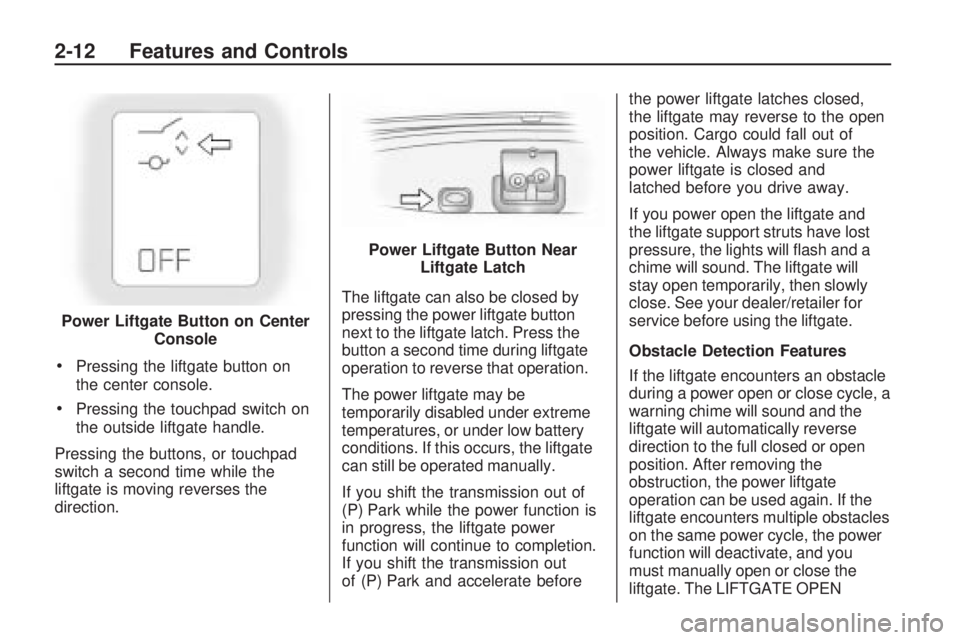
Pressing the liftgate button on
the center console.
Pressing the touchpad switch on
the outside liftgate handle.
Pressing the buttons, or touchpad
switch a second time while the
liftgate is moving reverses the
direction.The liftgate can also be closed by
pressing the power liftgate button
next to the liftgate latch. Press the
button a second time during liftgate
operation to reverse that operation.
The power liftgate may be
temporarily disabled under extreme
temperatures, or under low battery
conditions. If this occurs, the liftgate
can still be operated manually.
If you shift the transmission out of
(P) Park while the power function is
in progress, the liftgate power
function will continue to completion.
If you shift the transmission out
of (P) Park and accelerate beforethe power liftgate latches closed,
the liftgate may reverse to the open
position. Cargo could fall out of
the vehicle. Always make sure the
power liftgate is closed and
latched before you drive away.
If you power open the liftgate and
the liftgate support struts have lost
pressure, the lights will ash and a
chime will sound. The liftgate will
stay open temporarily, then slowly
close. See your dealer/retailer for
service before using the liftgate.
Obstacle Detection Features
If the liftgate encounters an obstacle
during a power open or close cycle, a
warning chime will sound and the
liftgate will automatically reverse
direction to the full closed or open
position. After removing the
obstruction, the power liftgate
operation can be used again. If the
liftgate encounters multiple obstacles
on the same power cycle, the power
function will deactivate, and you
must manually open or close the
liftgate. The LIFTGATE OPEN Power Liftgate Button on Center
Console
Power Liftgate Button Near
Liftgate Latch
2-12 Features and Controls
Page 92 of 420
page 3-46andDIC Operation and
Displays (With DIC Buttons) on
page 3-46orDIC Operation and
Displays (Without DIC Buttons) on
page 3-51for more information. The
number displayed in the DIC is the
highest gear that the transmission
will be allowed to operate in. This
means that all gears below that
number are available. For example,
when 4 (Fourth) is shown next to
the L, 1 (First) through 4 (Fourth)
gears are automatically shifted by
the vehicle. The transmission will not
shift into 5 (Fifth) until the + (Plus)
button is used or you shift back into
D (Drive).
While in L (Low), the transmission
will prevent shifting to a lower
gear range if the engine speed is
too high. You have a brief period of
time to slow the vehicle. If vehicle
speed is not reduced within the time
allowed, the lower gear range
shift will not be completed. You must
further slow the vehicle, then
press the−(Minus) button to the
desired lower gear range.Automatic Engine Grade braking is
not available when the ERS is
active. It is available in D (Drive) for
both normal and Tow/Haul mode.
While using the ERS, cruise control
and the tow/haul mode can be
used. SeeTow/Haul Mode
on page 2-26for more information.
Tow/Haul Mode
_
(Tow/Haul):The vehicle may
have a Tow/Haul mode.
The button is located on the
instrument panel under the climate
controls.
Push the button to activate the
system. Push it again to deactivate
the system. You can use this
feature to assist when towing or
hauling a heavy load.
When Tow/Haul is activated the
Tow/Haul symbol will come on the
instrument panel cluster. See
“Tow/Haul Mode” underTowing a
Trailer on page 4-24for more
information.
Automatic Engine Grade
Braking
Automatic Engine Grade Braking
assists when driving on a downhill
grade. It maintains vehicle speed by
automatically implementing a shift
schedule that uses the engine and
the transmission to slow the vehicle.
The system will automatically
command downshifts to reduce
vehicle speed, until the brake pedal
is no longer being pressed.
While in the Electronic Range
Select (ERS) mode, grade braking
is deactivated, allowing the
driver to select a range and limiting
the highest gear available. Grade
braking is available for normal
driving and in Tow/Haul mode.
SeeAutomatic Transmission
Operation on page 2-24.
2-26 Features and Controls