turn GMC ACADIA 2010 Owner's Manual
[x] Cancel search | Manufacturer: GMC, Model Year: 2010, Model line: ACADIA, Model: GMC ACADIA 2010Pages: 444, PDF Size: 2.58 MB
Page 10 of 444
1-4 In Brief
Initial Drive
Information
This section provides a brief
overview about some of the
important features that may or may
not be on your specific vehicle.
For more detailed information, refer
to each of the features which can be
found later in this owner manual.
Remote Keyless Entry
(RKE) System
The RKE transmitter is used to
remotely lock and unlock the doors
from up to 60 m (195 feet) away
from the vehicle.
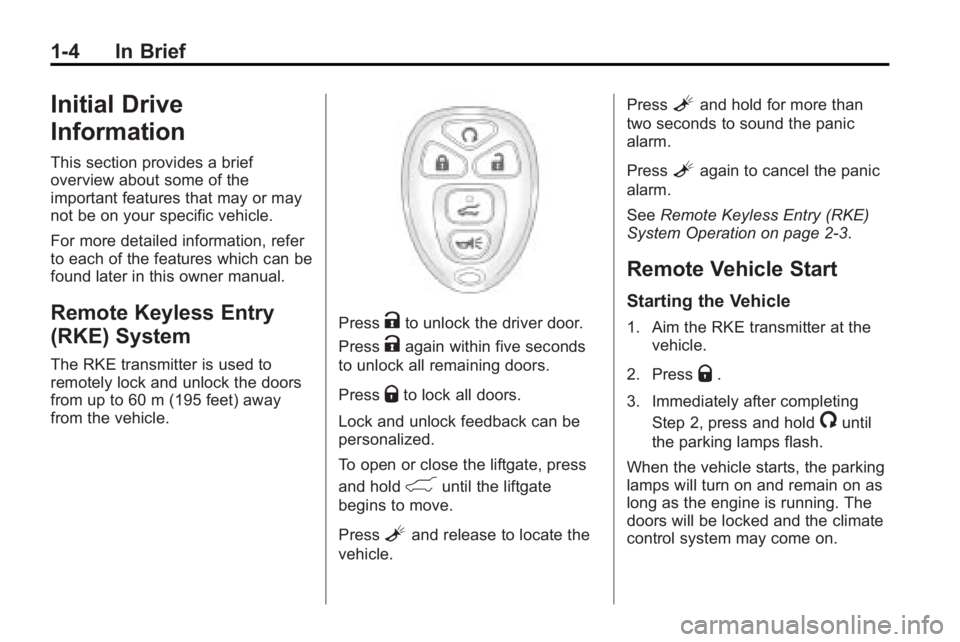
PressKto unlock the driver door.
Press
Kagain within five seconds
to unlock all remaining doors.
Press
Qto lock all doors.
Lock and unlock feedback can be
personalized.
To open or close the liftgate, press
and hold
&until the liftgate
begins to move.
Press
Land release to locate the
vehicle. Press
Land hold for more than
two seconds to sound the panic
alarm.
Press
Lagain to cancel the panic
alarm.
See Remote Keyless Entry (RKE)
System Operation on page 2‑3.
Remote Vehicle Start
Starting the Vehicle
1. Aim the RKE transmitter at the
vehicle.
2. Press
Q.
3. Immediately after completing Step 2, press and hold
/until
the parking lamps flash.
When the vehicle starts, the parking
lamps will turn on and remain on as
long as the engine is running. The
doors will be locked and the climate
control system may come on.
Page 11 of 444
In Brief 1-5
The engine will continue to run for
10 minutes. Repeat the steps for a
10-minute time extension. Remote
start can be extended only once.
Canceling a Remote Start
To cancel a remote start:
.Aim the RKE transmitter at the
vehicle and press and hold
/
until the parking lamps turn off.
.Turn on the hazard warning
flashers.
.Turn the ignition switch on and
then off.
See Remote Vehicle Start
on
page 2‑5.
Door Locks
To lock or unlock a door manually:
.From the inside use the door
lock knob on the window sill.
.From the outside turn the key
toward the front or rear of the
vehicle, or press the
Qor"
button on the Remote Keyless
Entry (RKE) transmitter.
Power Door Locks
On vehicles with power door locks,
the controls are located on the front
doors.
"(Unlock): Press to unlock the
doors.
Q(Lock): Press to lock the doors.
See:
.Power Door Lockson
page 2‑7
Liftgate
To open the liftgate the vehicle must
be in P (Park). Press the touchpad
under the liftgate handle. To close
the liftgate, use the pull cup or pull
strap as an aid.
Page 14 of 444
1-8 In Brief
Heated Seats
Heated Front Seats
The heated seat controls are
located on the center console.
The engine must be running to
operate them.
I:Press to turn on the heated
seatback.
J: Press to turn on or off the
heated seat and seatback.
For more information see Heated
Front Seats on page 3‑8.
Heated and Ventilated
Seats
On vehicles with this feature, the
controls are on the front doors near
the handle.
H: Press to ventilate the seat.
z:Press to heat the seat.
For more information see Heated
and Ventilated Front Seats
on
page 3‑9.
Head Restraint
Adjustment
Do not drive until the head restraints
for all occupants are installed and
adjusted properly.
For more information see Head
Restraints on page 3‑2.
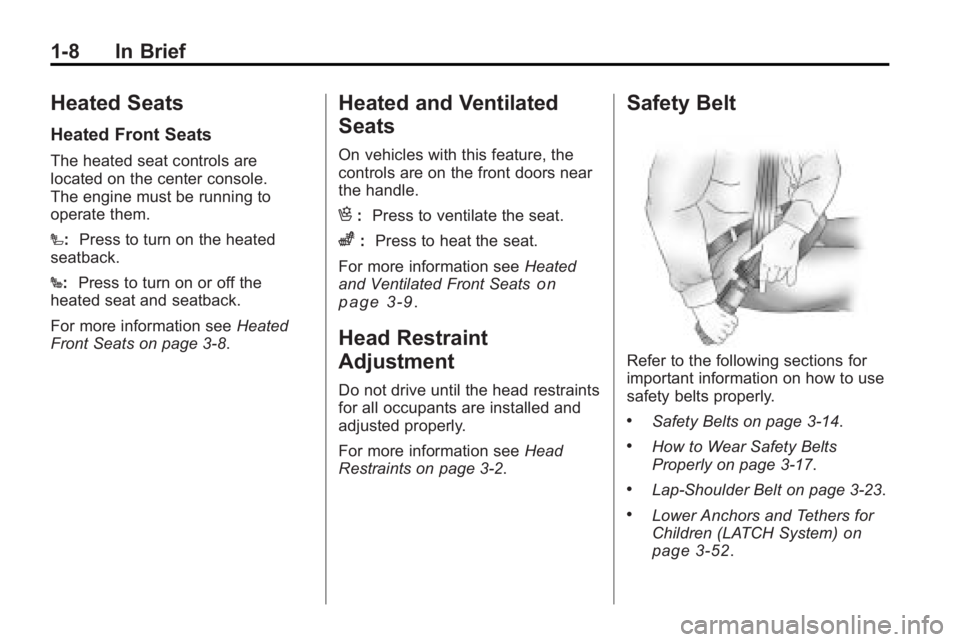
Safety Belt
Refer to the following sections for
important information on how to use
safety belts properly.
.Safety Belts on page 3‑14.
.How to Wear Safety Belts
Properly on page 3‑17.
.Lap-Shoulder Belt on page 3‑23.
.Lower Anchors and Tethers for
Children (LATCH System)on
page 3‑52.
Page 15 of 444
In Brief 1-9
Sensing System for
Passenger Airbag
United States
Canada
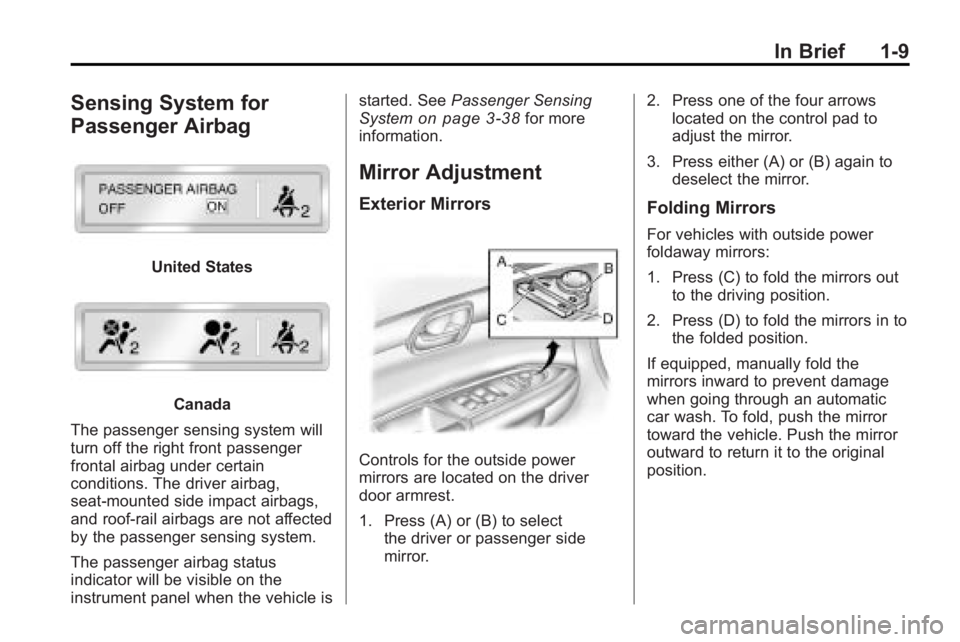
The passenger sensing system will
turn off the right front passenger
frontal airbag under certain
conditions. The driver airbag,
seat-mounted side impact airbags,
and roof-rail airbags are not affected
by the passenger sensing system.
The passenger airbag status
indicator will be visible on the
instrument panel when the vehicle is started. See
Passenger Sensing
System
on page 3‑38for more
information.
Mirror Adjustment
Exterior Mirrors
Controls for the outside power
mirrors are located on the driver
door armrest.
1. Press (A) or (B) to select the driver or passenger side
mirror. 2. Press one of the four arrows
located on the control pad to
adjust the mirror.
3. Press either (A) or (B) again to deselect the mirror.
Folding Mirrors
For vehicles with outside power
foldaway mirrors:
1. Press (C) to fold the mirrors outto the driving position.
2. Press (D) to fold the mirrors in to the folded position.
If equipped, manually fold the
mirrors inward to prevent damage
when going through an automatic
car wash. To fold, push the mirror
toward the vehicle. Push the mirror
outward to return it to the original
position.
Page 16 of 444
1-10 In Brief
Interior Mirror
If equipped, a manual inside
rearview mirror can be adjusted so
that the driver can see behind the
vehicle more clearly. Hold the mirror
in the center to move it up or down
and side to side. Use the day/night
adjustment to help prevent glare
from the headlamps behind you.
Move the lever located at the base
of the mirror, to the right for
nighttime use and to the left for
daytime use.
For vehicles with an automatic
dimming rearview mirror, the mirror
will move automatically to reduce
the glare from the headlamps of the
vehicle behind. The dimming feature
comes on and the indicator light
illuminates each time the ignition is
turned to start.
SeeAutomatic Dimming Rearview
Mirror on page 2‑18.
Steering Wheel
Adjustment
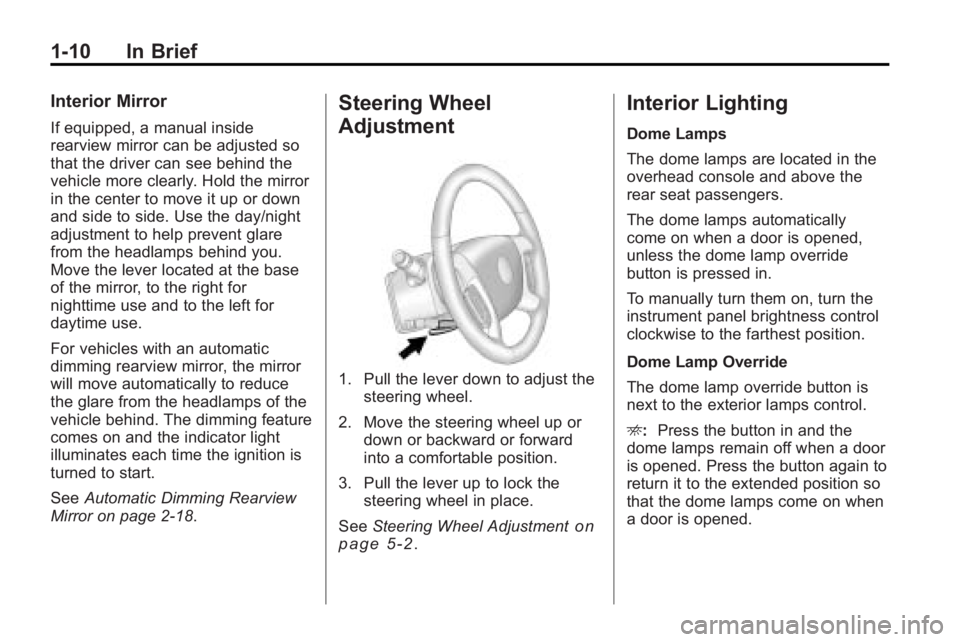
1. Pull the lever down to adjust the steering wheel.
2. Move the steering wheel up or down or backward or forward
into a comfortable position.
3. Pull the lever up to lock the steering wheel in place.
See Steering Wheel Adjustment
on
page 5‑2.
Interior Lighting
Dome Lamps
The dome lamps are located in the
overhead console and above the
rear seat passengers.
The dome lamps automatically
come on when a door is opened,
unless the dome lamp override
button is pressed in.
To manually turn them on, turn the
instrument panel brightness control
clockwise to the farthest position.
Dome Lamp Override
The dome lamp override button is
next to the exterior lamps control.
E: Press the button in and the
dome lamps remain off when a door
is opened. Press the button again to
return it to the extended position so
that the dome lamps come on when
a door is opened.
Page 17 of 444
In Brief 1-11
Reading Lamps
Press the button near each lamp to
turn them on or off.
For more information, see:
.Dome Lamps on page 6‑5.
.Instrument Panel Illumination
Control on page 6‑5.
Exterior Lighting
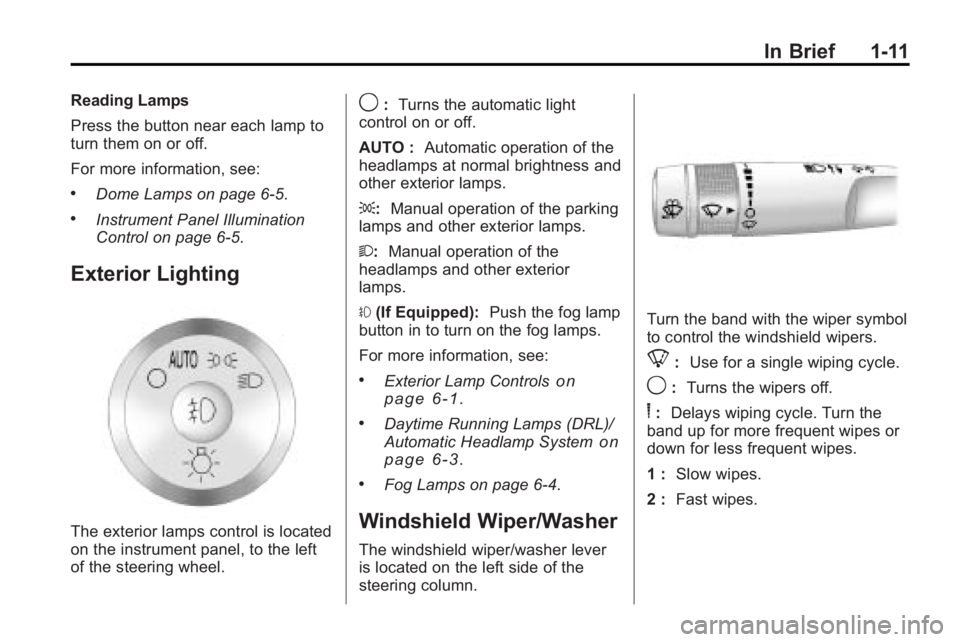
The exterior lamps control is located
on the instrument panel, to the left
of the steering wheel.
9:Turns the automatic light
control on or off.
AUTO : Automatic operation of the
headlamps at normal brightness and
other exterior lamps.
;: Manual operation of the parking
lamps and other exterior lamps.
2: Manual operation of the
headlamps and other exterior
lamps.
# (If Equipped): Push the fog lamp
button in to turn on the fog lamps.
For more information, see:
.Exterior Lamp Controlson
page 6‑1.
.Daytime Running Lamps (DRL)/
Automatic Headlamp Systemon
page 6‑3.
.Fog Lamps on page 6‑4.
Windshield Wiper/Washer
The windshield wiper/washer lever
is located on the left side of the
steering column.
Turn the band with the wiper symbol
to control the windshield wipers.
8: Use for a single wiping cycle.
9:Turns the wipers off.
6:Delays wiping cycle. Turn the
band up for more frequent wipes or
down for less frequent wipes.
1 : Slow wipes.
2 : Fast wipes.
Page 18 of 444
1-12 In Brief
Windshield Washer
J:Press the button at the end of
the turn signal/lane change lever to
spray washer fluid on the
windshield.
See Windshield Wiper/Washer
on
page 5‑5.
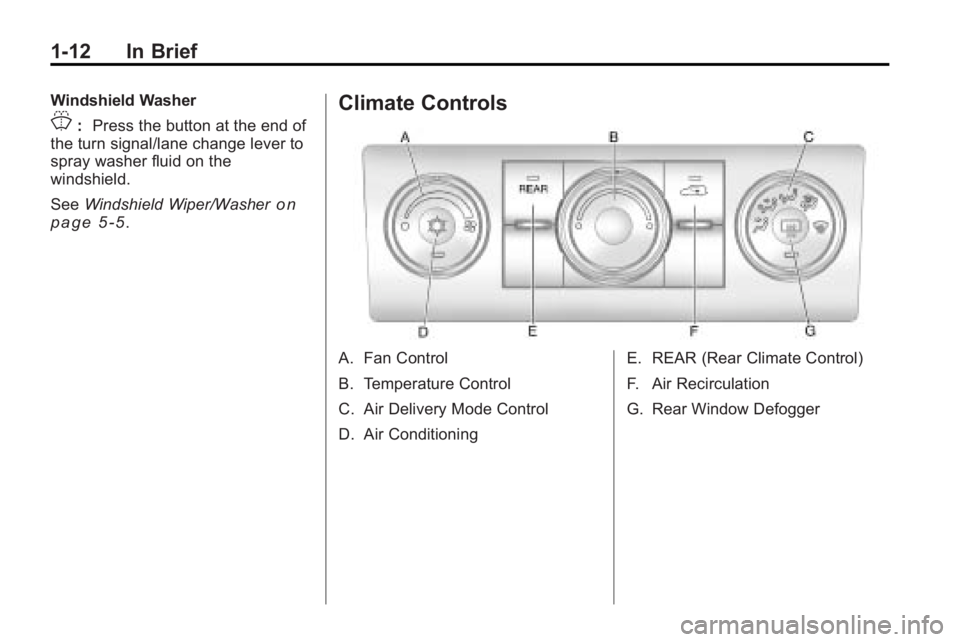
Climate Controls
A. Fan Control
B. Temperature Control
C. Air Delivery Mode Control
D. Air Conditioning E. REAR (Rear Climate Control)
F. Air Recirculation
G. Rear Window Defogger
Page 20 of 444
1-14 In Brief
Vehicle Features
Radio(s)
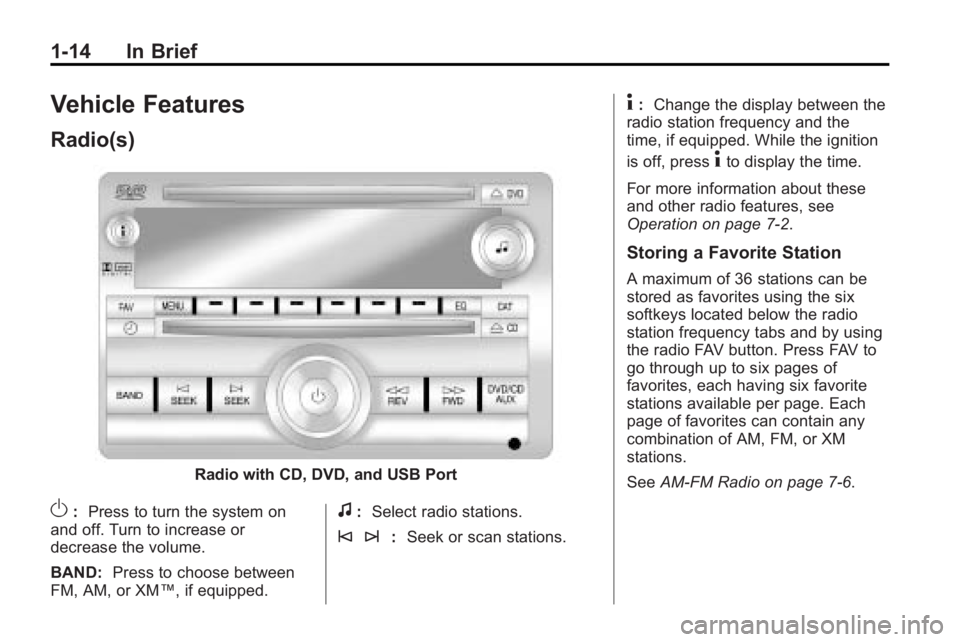
Radio with CD, DVD, and USB Port
O:Press to turn the system on
and off. Turn to increase or
decrease the volume.
BAND: Press to choose between
FM, AM, or XM™, if equipped.f: Select radio stations.
© ¨: Seek or scan stations.
4:Change the display between the
radio station frequency and the
time, if equipped. While the ignition
is off, press
4to display the time.
For more information about these
and other radio features, see
Operation on page 7‑2.
Storing a Favorite Station
A maximum of 36 stations can be
stored as favorites using the six
softkeys located below the radio
station frequency tabs and by using
the radio FAV button. Press FAV to
go through up to six pages of
favorites, each having six favorite
stations available per page. Each
page of favorites can contain any
combination of AM, FM, or XM
stations.
See AM-FM Radio on page 7‑6.
Page 21 of 444
In Brief 1-15
Setting the Clock
To set the time and date for the
radio with CD, DVD, and USB Port:
1. Turn the ignition key to ACC/ACCESSORY or ON/RUN, then
press
O, to turn the radio on.
2. Press
Gto display HR, MIN,
MM, DD, YYYY (hour, minute,
month, day, and year).
3. Press the pushbutton located under any one of the labels to be
changed.
4. To increase or decrease the time or date, turn
fclockwise or
counter-clockwise.
For detailed instructions on setting
the clock for the vehicles specific
audio system, see Clock
on
page 5‑8.
Satellite Radio
Vehicles with an XM™ Satellite
Radio tuner and a valid XM Satellite
Radio subscription can receive XM
programming.
XM Satellite Radio Service
XM is a satellite radio service that is
based in the 48 contiguous United
States and 10 Canadian provinces.
XM Satellite Radio has a wide
variety of programming and
commercial-free music,
coast-to-coast, and in digital-quality
sound. A fee is required to receive
the XM service. For more
information, contact XM at in the
U.S. and Canada.
For more information refer to:
.www.xmradio.com or call
1-800-929-2100 (U.S.).
.www.xmradio.ca or call
1-877-438-9677 (Canada).
See Satellite Radio on page 7‑8.
Portable Audio Devices
This vehicle may have an auxiliary
input located on the radio faceplate
and a USB port located in the center
console. External devices such as
iPod
®, laptop computers, MP3
players, CD changers, USB storage
device, etc. can be connected to the
auxiliary port using a 3.5 mm (1/8 in)
input jack or the USB port
depending on the audio system.
See Auxiliary Devices
on
page 7‑34.
Bluetooth®
The in-vehicle Bluetooth system
allows users with a
Bluetooth-enabled cell phone to
make and receive hands-free calls
using the vehicle’ s audio system,
microphone and controls.
Page 22 of 444
1-16 In Brief
The Bluetooth-enabled cell phone
must be paired with the in-vehicle
Bluetooth system before it can be
used in the vehicle. Not all phones
will support all functions.
SeeBluetooth on page 7‑46.
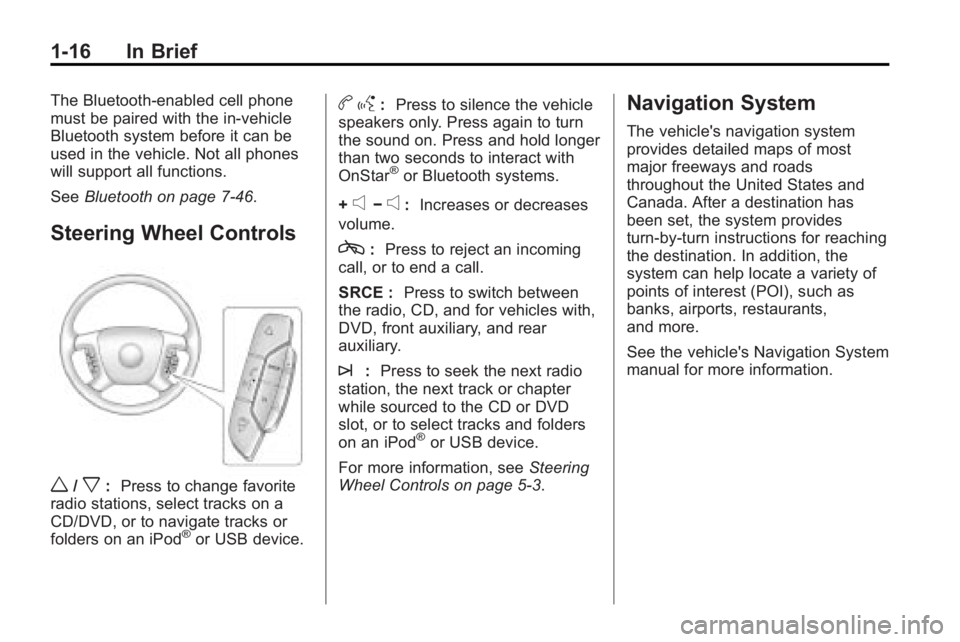
Steering Wheel Controls
w/x:Press to change favorite
radio stations, select tracks on a
CD/DVD, or to navigate tracks or
folders on an iPod
®or USB device.
b g: Press to silence the vehicle
speakers only. Press again to turn
the sound on. Press and hold longer
than two seconds to interact with
OnStar
®or Bluetooth systems.
+
e−e: Increases or decreases
volume.
c: Press to reject an incoming
call, or to end a call.
SRCE : Press to switch between
the radio, CD, and for vehicles with,
DVD, front auxiliary, and rear
auxiliary.
¨: Press to seek the next radio
station, the next track or chapter
while sourced to the CD or DVD
slot, or to select tracks and folders
on an iPod
®or USB device.
For more information, see Steering
Wheel Controls on page 5‑3.
Navigation System
The vehicle's navigation system
provides detailed maps of most
major freeways and roads
throughout the United States and
Canada. After a destination has
been set, the system provides
turn-by-turn instructions for reaching
the destination. In addition, the
system can help locate a variety of
points of interest (POI), such as
banks, airports, restaurants,
and more.
See the vehicle's Navigation System
manual for more information.