radio GMC ACADIA 2011 Workshop Manual
[x] Cancel search | Manufacturer: GMC, Model Year: 2011, Model line: ACADIA, Model: GMC ACADIA 2011Pages: 478, PDF Size: 5.52 MB
Page 230 of 478
Black plate (30,1)GMC Acadia/Acadia Denali Owner Manual - 2011
7-30 Infotainment System
To skip through large lists, the five
softkeys can be used to navigate in
the following order:
.First softkey, first item in the list.
.Second softkey, 1% through
the list each time the softkey is
pressed.
.Third softkey, 5% through the list
each time the softkey is pressed.
.Fourth softkey, 10% through
the list each time the softkey
is pressed.
.Fifth softkey, end of the list.
Repeat Functionality
To use Repeat:
Press the softkey below
"or'
to select between Repeat All and
Repeat Track.
"(Repeat All): Press the softkey
below
"to repeat all tracks.
The tab appears lowered when
Repeat All is being used. This is the
default mode when a USB storage
device or iPod is first connected.
'(Repeat Track): Press the
softkey below
'to repeat one
track. The tab appears raised
when Repeat Track is being used.
Shuffle Functionality
To use Shuffle:
Press the softkey below
>,2,
Shuffle Songs, Shuffle Album,
or Shuffle Folder.
>(Shuffle Off): This is the
default mode when a USB storage
device or iPod is first connected.
2(Shuffle All Songs / Shuffle
Songs): Shuffles all songs on the
USB storage device or iPod.
<(Shuffle Album): Shuffles
all songs in the current album on
an iPod.
=(Shuffle Folder): Shuffles all
songs in the current folder on a USB
storage device.
MP3 (Radios
with CD/DVD)
Format
The radio can play .mp3 or
.wma files that were recorded
onto a CD-R or CD-RW disc.
The USB port can play .mp3 and
.wma files that are stored on a USB
storage device as well as AAC files
that are stored on an iPod
®.
Compressed Audio or Mixed
Mode Discs
The radio plays discs that contain
both uncompressed CD audio and
MP3/WMA files depending on which
slot the disc is loaded into.
The DVD Player only reads
uncompressed audio and ignores
MP3/WMA files on a mixed
mode disc.
Page 231 of 478
Black plate (31,1)GMC Acadia/Acadia Denali Owner Manual - 2011
Infotainment System 7-31
The CD Player reads both
uncompressed audio and
MP3/WMA files on a mixed
mode disc. Uncompressed audio
is played before MP3/WMA files.
Press the CAT (category) button
to toggle between uncompressed
audio and MP3/WMA files.
CD‐R or CD‐RW Supported File
and Folder Structure
The DVD Player supports:
.Up to 255 folders.
.Up to 8 folders in depth.
.Up to 15 playlists.
.Up to 40 sessions.
.Playlists with an .m3u or
.wpl extension.
.Files with an .mp3, .wma, or
.cda file extension.The CD Player supports:
.Up to 512 files and folders.
.Up to 8 folders in depth.
.Playlists with an .m3u or
.wpl extension.
.Files with an .mp3, .wma, or
.cda file extension.
USB Supported File and Folder
Structure
The radio supports:
.Up to 700 folders.
.Up to 8 folders in depth.
.Up to 65,535 files.
.Folder and file names up to
64 bytes.
.Files with an .mp3 or .wma file
extension.
.AAC files stored on an iPod.
.FAT16
.FAT32 Root Directory
The root directory of the disc is
treated as a folder. If the root
directory has compressed audio
files, the directory displays as
F1 ROOT on the radio.
If a disc contains both
uncompressed CD audio and
MP3/WMA files, a folder under
the root directory called CD
accesses all of the CD audio
tracks on the disc.
Empty Folder
Folders that do not contain files are
skipped, and the player advances to
the next folder that contains files.
No Folder
When the disc contains only
compressed files, the files are
located under the root folder.
Page 232 of 478
Black plate (32,1)GMC Acadia/Acadia Denali Owner Manual - 2011
7-32 Infotainment System
The next and previous folder
function does not function on a
disc that was recorded without
folders or playlists. When displaying
the name of the folder the radio
displays ROOT.
When the disc contains only
playlists and compressed audio
files, but no folders, all files are
located under the root folder.
The folder down and the folder up
buttons search playlists first and
then goes to the root folder. When
the radio displays the name of the
folder the radio displays ROOT.
Order of Play
Compressed audio files are
accessed in the following order:
.Playlists.
.Files stored in the root directory.
.Files stored in folders in the root
directory.Tracks are played in the following
order:
.Play begins from the first track
in the first playlist and continues
sequentially through all tracks
in each playlist. When the last
track of the last playlist has
played, play continues from the
first track of the first playlist.
.Play begins from the first track
in the first folder and continues
sequentially through all tracks in
each folder. When the last track
of the last folder has played,
play continues from the first
track of the first folder.
When play enters a new folder, the
display does not automatically show
the new folder name unless the
folder mode has been chosen as
the default display. The new track
name displays. File System and Naming
The song name that displays is the
song name that is contained in the
ID3 tag. If the song name is not
present in the ID3 tag, then the
radio displays the file name without
the extension (such as .mp3) as
the track name.
Track names longer than
32 characters or four pages are
shortened. Parts of words on the
last page of text and the extension
of the filename does not display.
Preprogrammed Playlists
Preprogrammed playlists that
were created using WinAmp™,
MusicMatch™, or Real Jukebox™
software can be accessed, however,
they cannot be edited using the
radio. These playlists are treated
as special folders containing
compressed audio song files.
Playlists that have an .m3u or
.pls file extension and are stored
on a USB device may be supported
by the radio with a USB port.
Page 233 of 478
Black plate (33,1)GMC Acadia/Acadia Denali Owner Manual - 2011
Infotainment System 7-33
Playing an MP3/WMA File
From a Disc (In Either the DVD
or CD Slot)
If a disc is inserted into the top DVD
slot, the rear seat operator can turn
on the video screen and use the
remote control to navigate the
CD (tracks only).
f(Tune):Turn to select MP3/WMA
files.
©SEEK: Press to go to the
start of the track, if more than
five seconds have played. Press
to go to the previous track if less
than five seconds have played.
Press and hold or press multiple
times to continue moving backward
through tracks.
¨SEEK: Press to go to the next
track. Press and hold or press
multiple times to continue moving
forward through tracks.
sREV (Reverse): Press and hold
to reverse playback quickly. Sound
is heard at a reduced volume and
the elapsed time of the file displays.
Release
sREV to resume playing.
\FWD (Fast Forward): Press
and hold to advance playback
quickly. Sound is heard at a reduced
volume and the elapsed time of the
file displays. Release
\FWD to
resume playing. The elapsed time
of the file displays.
S c(Previous Folder): Press
the softkey below
S cto go to the
first track in the previous folder.
cT (Next Folder): Press the
softkey below
cT to go to the
first track in the next folder.
RDM (Random): Files on the
disc can be listened to in random,
rather than sequential order. To use
random, press the softkey under the
RDM tab until Random Current Disc displays to play songs in random
order. Press the same softkey again
to turn off random play.
h(Music Navigator):
Press the
softkey below
hto play files in
order by artist or album.
The player scans the disc to sort
the files by artist and album ID3 tag
information. It can take several
minutes to scan the disc depending
on the number of files on the disc.
The radio may begin playing while
it is scanning in the background.
When the scan is finished, the disc
begins playing files in order by
artist. The current artist playing is
shown on the second line of the
display. Once all songs by that artist
are played, the player moves to the
next artist in alphabetical order and
begins playing files by that artist.
To listen to files by another artist,
press the softkey located below
either arrow tab. The disc goes to
the next or previous artist in
Page 234 of 478
Black plate (34,1)GMC Acadia/Acadia Denali Owner Manual - 2011
7-34 Infotainment System
alphabetical order. Continue
pressing either softkey below the
arrow tab until the artist displays.
To change from playback by artist to
playback by album:
1. Press the softkey located belowthe Sort By tab.
2. Press one of the softkeys below the album tab from the sort
screen.
3. Press the softkey below the back tab to return to the main
music navigator screen.
The album name displays on the
second line between the arrows
and songs from the current album
begins to play. Once all songs
from that album have played, the
player moves to the next album in
alphabetical order on the CD and
begins playing MP3 files from that
album.
To exit music navigator mode, press
the softkey below the Back tab to
return to normal MP3 playback.Connecting a USB Storage
Device or iPod®
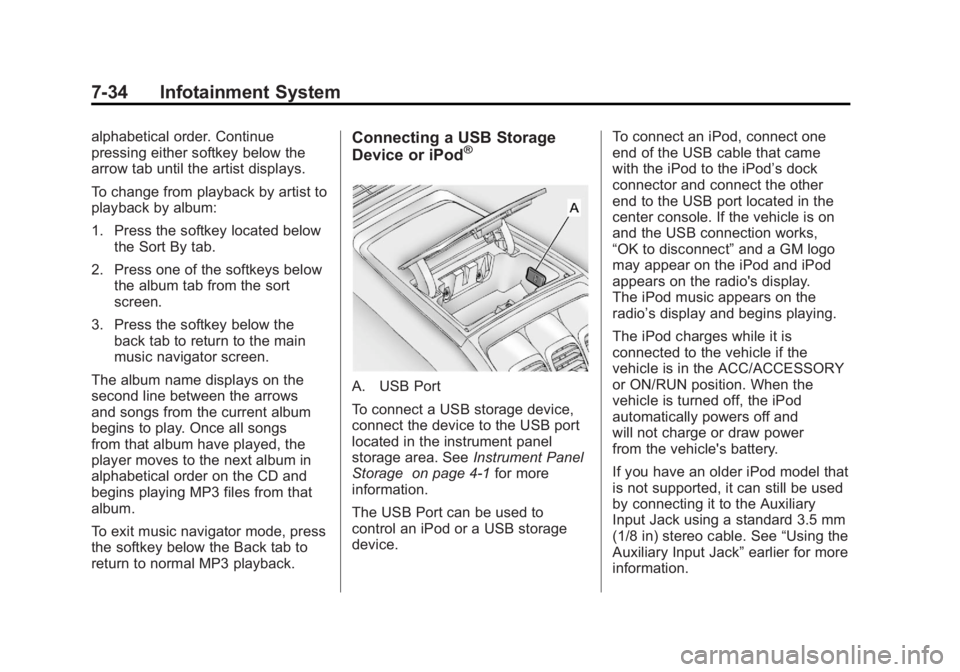
A. USB Port
To connect a USB storage device,
connect the device to the USB port
located in the instrument panel
storage area. See Instrument Panel
Storage on page 4‑1 for more
information.
The USB Port can be used to
control an iPod or a USB storage
device. To connect an iPod, connect one
end of the USB cable that came
with the iPod to the iPod’s dock
connector and connect the other
end to the USB port located in the
center console. If the vehicle is on
and the USB connection works,
“OK to disconnect”
and a GM logo
may appear on the iPod and iPod
appears on the radio's display.
The iPod music appears on the
radio’s display and begins playing.
The iPod charges while it is
connected to the vehicle if the
vehicle is in the ACC/ACCESSORY
or ON/RUN position. When the
vehicle is turned off, the iPod
automatically powers off and
will not charge or draw power
from the vehicle's battery.
If you have an older iPod model that
is not supported, it can still be used
by connecting it to the Auxiliary
Input Jack using a standard 3.5 mm
(1/8 in) stereo cable. See “Using the
Auxiliary Input Jack” earlier for more
information.
Page 235 of 478
Black plate (35,1)GMC Acadia/Acadia Denali Owner Manual - 2011
Infotainment System 7-35
Using the Radio to Control a
USB Storage Device or iPod
The radio can control a USB
storage device or an iPod using
the radio buttons and knobs and
display song information on the
radio’s display.
f(Tune):Turn to select files.
©SEEK:Press to go to the start of
the track, if more than ten seconds
have played. Press and hold or
press multiple times to continue
moving backward through tracks.
¨SEEK: Press to go to the next
track. Press and hold or press
multiple times to continue moving
forward through tracks.
sREV (Reverse): Press and hold
to reverse playback quickly. Sound
is heard at a reduced volume.
Release
sREV to resume playing.
The elapsed time of the file
displays.
\FWD (Fast Forward): Press
and hold to advance playback
quickly. Sound is heard at a
reduced volume. Release
\FWD
to resume playing. The elapsed
time of the file displays.
4(Information): Press to display
additional information about the
selected track.
Using Softkeys to Control a
USB Storage Device or iPod
The five softkeys below the radio
display are used to control the
functions listed below.
To use the softkeys:
1. Press the first or fifth softkey below the radio display to
display the functions listed
below, or press the softkey
below the function if it is
currently displayed.
2. Press the softkey below the tab with the function on it to use that
function.
j(Pause): Press the softkey
below
jto pause the track.
The tab appears raised when pause
is being used. Press the softkey
below
jagain to resume playback.
Back: Press the softkey below the
back tab to go back to the main
display screen on an iPod, or the
root directory on a USB storage
device.
c(Folder View): Press the
softkey below
cto view the
contents of the current folder on
the USB drive. To browse and
select files:
1. Press the softkey below
c.
2. Turn
fto scroll through the list
of folders.
3. Press
fto select the folder.
If there is more than one folder,
repeat Steps 1 and 2 until the
folder is reached.
Page 238 of 478
Black plate (38,1)GMC Acadia/Acadia Denali Owner Manual - 2011
7-38 Infotainment System
Drivers are encouraged to
set up any auxiliary device
while the vehicle is in P (Park).
SeeDefensive Driving on page 9‑2
for more information on driver
distraction.
To use an auxiliary input device,
connect a 3.5 mm (1/8 in) cable to
the radio's front auxiliary input jack.
O(Power/Volume): Turn clockwise
or counterclockwise to increase
or decrease the volume of the
portable player. Additional volume
adjustments might have to be made
from the portable device if the
volume is not loud or soft enough.
BAND: Press to listen to the radio
when a portable audio device is
playing. The portable audio device
continues playing, so you might
want to stop it or turn it off. CD/AUX (CD/Auxiliary):
Press to
select between CD, or Auxiliary.
.When a CD is in the player
the CD icon and a message
showing the disc and/or track
number displays.
.If an auxiliary input device is not
connected, “No Input Device
Found” displays.
DVD/CD AUX (Auxiliary): Press
to select between DVD, CD,
or Auxiliary.
.If an auxiliary input device is
not connected, “No Aux Input
Device” displays.
.When a disc is in either slot, the
DVD/CD text tab and a message
showing the track or chapter
number displays.
.If an auxiliary input device is not
connected, and a disc is in both
the DVD slot and the CD slot the
DVD/CD AUX button only cycles
between the two sources and
does not indicate “No Aux Input
Device.”
.If a front auxiliary input device is
connected, the DVD/CD AUX
button cycles through all
available options.
If a disc is inserted into top DVD
slot, the rear seat operator can turn
on the video screen and use the
remote control to only navigate
the CD tracks through the remote
control.
See “Using the Auxiliary Input
Jack(s)” later in this section,
or “Audio/Video (A/V) Jacks” under,
Rear Seat Entertainment (RSE)
System on page 7‑39 for more
information.
Page 239 of 478
Black plate (39,1)GMC Acadia/Acadia Denali Owner Manual - 2011
Infotainment System 7-39
Using the USB Port
For vehicles with a USB port,
the connector is located in the
instrument panel storage area.
SeeInstrument Panel Storage on
page 4‑1 for more information.
Radios with a USB port can control
a USB storage device or an iPod
®
using the radio buttons and knobs.
See MP3 (Radios with CD/USB) on
page 7‑24 orMP3 (Radios with
CD/DVD) on page 7‑30 for
information about how to connect
and control a USB storage device
or an iPod. USB Supported Devices
.USB Flash Drives
.Portable USB Hard Drives
.Fifth generation or later iPod
.iPod nanos
.iPod touch
.iPod classic
Not all iPods and USB Drives are
compatible with the USB port.
Make sure the iPod has the latest
firmware from Apple
®for proper
operation. iPod firmware can be
updated using the latest iTunes
®
application. See www.apple.com/
itunes.
For help with identifying your iPod,
go to www.apple.com/support.
Rear Seat
Infotainment
Rear Seat Entertainment
(RSE) System
The vehicle may have a DVD Rear
Seat Entertainment (RSE) system.
The RSE system works with the
vehicle's audio system. The DVD
player is part of the front radio.
The RSE system includes a radio
with a DVD player, a video display
screen, audio/video jacks, two
wireless headphones, and a remote
control. See Operation on page 7‑2
for more information on the vehicle's
infotainment system.
Page 240 of 478
Black plate (40,1)GMC Acadia/Acadia Denali Owner Manual - 2011
7-40 Infotainment System
Before Driving
The RSE is designed for rear seat
passengers only. The driver cannot
safely view the video screen while
driving and should not try to do so.
In severe or extreme weather
conditions the RSE system might or
might not work until the temperature
is within the operating range. The
operating range for the RSE system
is above−20°C (−4°F) or below
60°C (140°F). If the temperature of
the vehicle is outside of this range,
heat or cool the vehicle until the
temperature is within the operating
range of the RSE system.
Parental Control
The RSE system may have a
Parental Control feature, depending
on the radio. To enable Parental
Control, press and hold the radio
power button for more than
two seconds to stop all system
features such as: radio, video
screen, RSA, DVD and/or CD.
While Parental Control is on,
Qdisplays.
When the radio is turned back on,
Parental Control is unlocked.
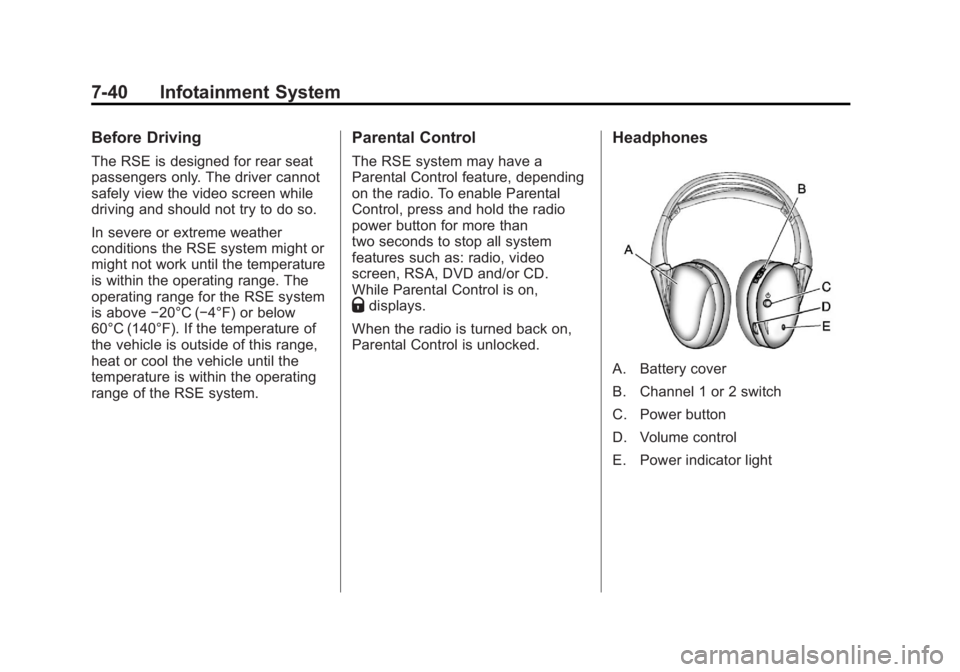
Headphones
A. Battery cover
B. Channel 1 or 2 switch
C. Power button
D. Volume control
E. Power indicator light
Page 241 of 478
Black plate (41,1)GMC Acadia/Acadia Denali Owner Manual - 2011
Infotainment System 7-41
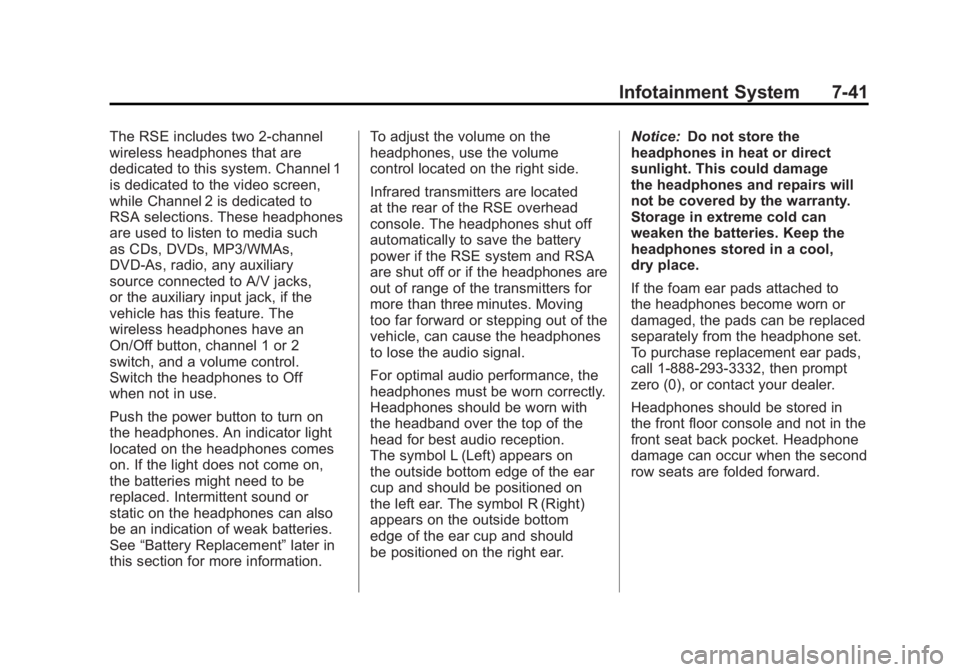
The RSE includes two 2-channel
wireless headphones that are
dedicated to this system. Channel 1
is dedicated to the video screen,
while Channel 2 is dedicated to
RSA selections. These headphones
are used to listen to media such
as CDs, DVDs, MP3/WMAs,
DVD-As, radio, any auxiliary
source connected to A/V jacks,
or the auxiliary input jack, if the
vehicle has this feature. The
wireless headphones have an
On/Off button, channel 1 or 2
switch, and a volume control.
Switch the headphones to Off
when not in use.
Push the power button to turn on
the headphones. An indicator light
located on the headphones comes
on. If the light does not come on,
the batteries might need to be
replaced. Intermittent sound or
static on the headphones can also
be an indication of weak batteries.
See“Battery Replacement” later in
this section for more information. To adjust the volume on the
headphones, use the volume
control located on the right side.
Infrared transmitters are located
at the rear of the RSE overhead
console. The headphones shut off
automatically to save the battery
power if the RSE system and RSA
are shut off or if the headphones are
out of range of the transmitters for
more than three minutes. Moving
too far forward or stepping out of the
vehicle, can cause the headphones
to lose the audio signal.
For optimal audio performance, the
headphones must be worn correctly.
Headphones should be worn with
the headband over the top of the
head for best audio reception.
The symbol L (Left) appears on
the outside bottom edge of the ear
cup and should be positioned on
the left ear. The symbol R (Right)
appears on the outside bottom
edge of the ear cup and should
be positioned on the right ear.
Notice:
Do not store the
headphones in heat or direct
sunlight. This could damage
the headphones and repairs will
not be covered by the warranty.
Storage in extreme cold can
weaken the batteries. Keep the
headphones stored in a cool,
dry place.
If the foam ear pads attached to
the headphones become worn or
damaged, the pads can be replaced
separately from the headphone set.
To purchase replacement ear pads,
call 1‐888‐293‐3332, then prompt
zero (0), or contact your dealer.
Headphones should be stored in
the front floor console and not in the
front seat back pocket. Headphone
damage can occur when the second
row seats are folded forward.