child GMC ACADIA 2011 Owner's Manual
[x] Cancel search | Manufacturer: GMC, Model Year: 2011, Model line: ACADIA, Model: GMC ACADIA 2011Pages: 478, PDF Size: 5.52 MB
Page 1 of 478
Black plate (1,1)GMC Acadia/Acadia Denali Owner Manual - 2011
2011 GMC Acadia/Acadia Denali Owner ManualM
In Brief. . . . . . . . . . . . . . . . . . . . . . . . 1-1
Instrument Panel . . . . . . . . . . . . . . 1-2
Initial Drive Information . . . . . . . . 1-4
Vehicle Features . . . . . . . . . . . . . 1-16
Performance and Maintenance . . . . . . . . . . . . . . . . 1-20
Keys, Doors and Windows . . . 2-1
Keys and Locks . . . . . . . . . . . . . . . 2-2
Doors . . . . . . . . . . . . . . . . . . . . . . . . 2-10
Vehicle Security . . . . . . . . . . . . . . 2-13
Exterior Mirrors . . . . . . . . . . . . . . . 2-16
Interior Mirrors . . . . . . . . . . . . . . . . 2-19
Windows . . . . . . . . . . . . . . . . . . . . . 2-20
Roof . . . . . . . . . . . . . . . . . . . . . . . . . . 2-22
Seats and Restraints . . . . . . . . . 3-1
Head Restraints . . . . . . . . . . . . . . . 3-2
Front Seats . . . . . . . . . . . . . . . . . . . . 3-3
Rear Seats . . . . . . . . . . . . . . . . . . . 3-10
Safety Belts . . . . . . . . . . . . . . . . . . 3-16
Airbag System . . . . . . . . . . . . . . . . 3-33
Child Restraints . . . . . . . . . . . . . . 3-48 Storage
. . . . . . . . . . . . . . . . . . . . . . . 4-1
Storage Compartments . . . . . . . . 4-1
Additional Storage Features . . . 4-3
Roof Rack System . . . . . . . . . . . . . 4-5
Instruments and Controls . . . . 5-1
Controls . . . . . . . . . . . . . . . . . . . . . . . 5-2
Warning Lights, Gauges, and
Indicators . . . . . . . . . . . . . . . . . . . 5-11
Information Displays . . . . . . . . . . 5-25
Vehicle Messages . . . . . . . . . . . . 5-37
Vehicle Personalization . . . . . . . 5-47
Universal Remote System . . . . 5-55
Lighting . . . . . . . . . . . . . . . . . . . . . . . 6-1
Exterior Lighting . . . . . . . . . . . . . . . 6-1
Interior Lighting . . . . . . . . . . . . . . . . 6-5
Lighting Features . . . . . . . . . . . . . . 6-6
Infotainment System . . . . . . . . . 7-1
Introduction . . . . . . . . . . . . . . . . . . . . 7-1
Radio . . . . . . . . . . . . . . . . . . . . . . . . . . 7-7
Audio Players . . . . . . . . . . . . . . . . 7-14
Rear Seat Infotainment . . . . . . . 7-39
Phone . . . . . . . . . . . . . . . . . . . . . . . . 7-50 Climate Controls
. . . . . . . . . . . . . 8-1
Climate Control Systems . . . . . . 8-1
Air Vents . . . . . . . . . . . . . . . . . . . . . 8-12
Maintenance . . . . . . . . . . . . . . . . . 8-13
Driving and Operating . . . . . . . . 9-1
Driving Information . . . . . . . . . . . . . 9-2
Starting and Operating . . . . . . . 9-17
Engine Exhaust . . . . . . . . . . . . . . 9-24
Automatic Transmission . . . . . . 9-25
Drive Systems . . . . . . . . . . . . . . . . 9-28
Brakes . . . . . . . . . . . . . . . . . . . . . . . 9-29
Ride Control Systems . . . . . . . . 9-31
Cruise Control . . . . . . . . . . . . . . . . 9-33
Object Detection Systems . . . . 9-35
Fuel . . . . . . . . . . . . . . . . . . . . . . . . . . 9-42
Towing . . . . . . . . . . . . . . . . . . . . . . . 9-46
Conversions and Add-Ons . . . 9-56
Vehicle Care . . . . . . . . . . . . . . . . . 10-1
General Information . . . . . . . . . . 10-2
Vehicle Checks . . . . . . . . . . . . . . . 10-4
Headlamp Aiming . . . . . . . . . . . 10-30
Bulb Replacement . . . . . . . . . . 10-30
Electrical System . . . . . . . . . . . . 10-31
Page 5 of 478
Black plate (5,1)GMC Acadia/Acadia Denali Owner Manual - 2011
Introduction v
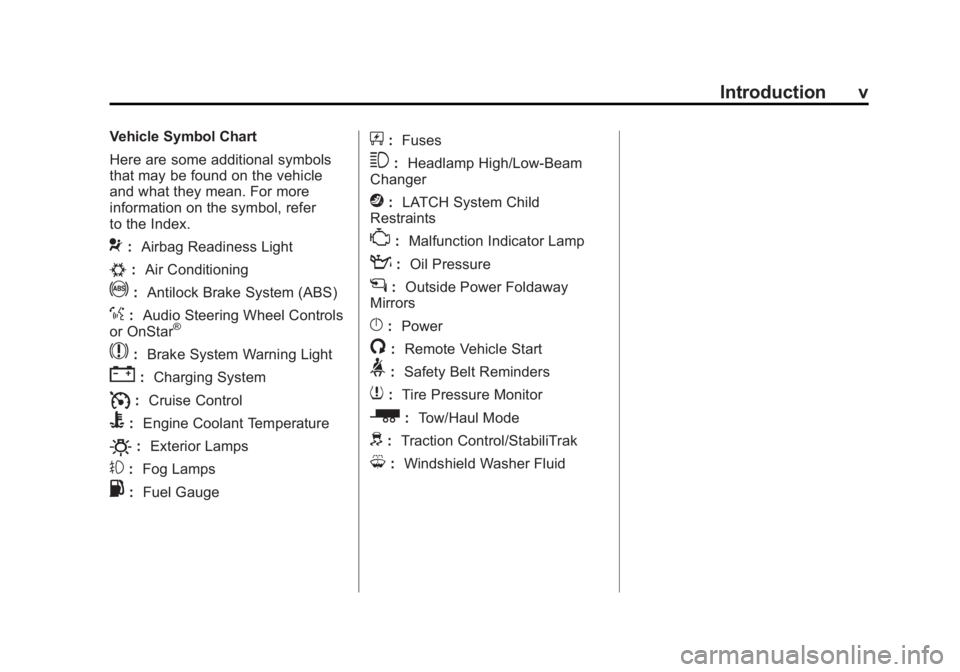
Vehicle Symbol Chart
Here are some additional symbols
that may be found on the vehicle
and what they mean. For more
information on the symbol, refer
to the Index.
9:Airbag Readiness Light
#:Air Conditioning
!:Antilock Brake System (ABS)
%:Audio Steering Wheel Controls
or OnStar®
$: Brake System Warning Light
":Charging System
I:Cruise Control
B: Engine Coolant Temperature
O:Exterior Lamps
#:Fog Lamps
.: Fuel Gauge
+:Fuses
3: Headlamp High/Low-Beam
Changer
j: LATCH System Child
Restraints
*: Malfunction Indicator Lamp
::Oil Pressure
g:Outside Power Foldaway
Mirrors
}: Power
/:Remote Vehicle Start
>:Safety Belt Reminders
7:Tire Pressure Monitor
_: Tow/Haul Mode
d:Traction Control/StabiliTrak
M:Windshield Washer Fluid
Page 16 of 478
Black plate (10,1)GMC Acadia/Acadia Denali Owner Manual - 2011
1-10 In Brief
Safety Belts
Refer to the following sections for
important information on how to use
safety belts properly.
.Safety Belts on page 3‑16.
.How to Wear Safety Belts
Properly on page 3‑19.
.Lap-Shoulder Belt on page 3‑25.
.Lower Anchors and Tethers for
Children (LATCH System) on
page 3‑57.
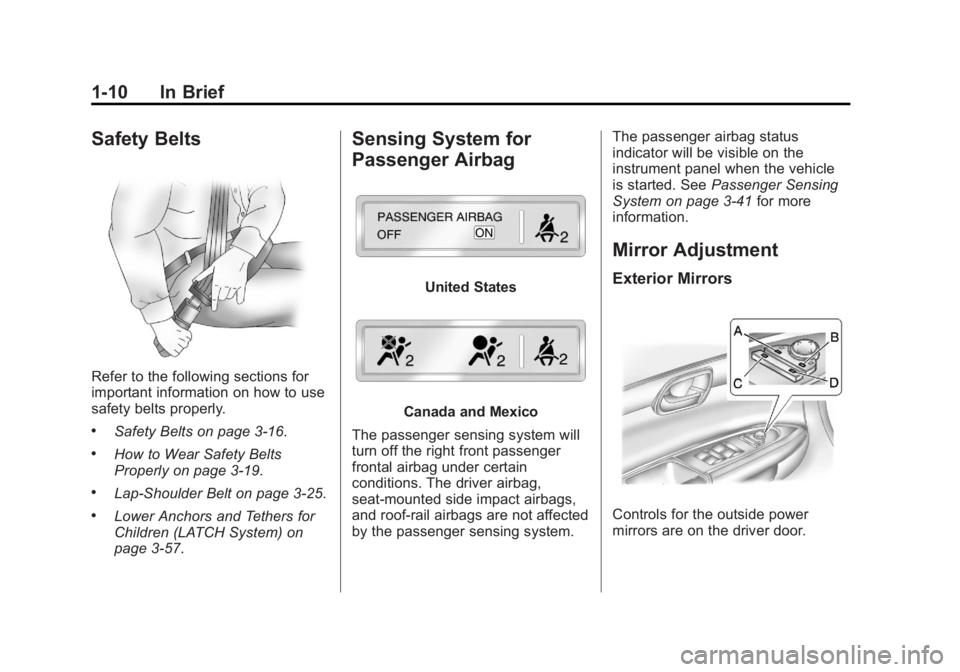
Sensing System for
Passenger Airbag
United States
Canada and Mexico
The passenger sensing system will
turn off the right front passenger
frontal airbag under certain
conditions. The driver airbag,
seat‐mounted side impact airbags,
and roof‐rail airbags are not affected
by the passenger sensing system. The passenger airbag status
indicator will be visible on the
instrument panel when the vehicle
is started. See
Passenger Sensing
System on page 3‑41 for more
information.
Mirror Adjustment
Exterior Mirrors
Controls for the outside power
mirrors are on the driver door.
Page 34 of 478
Black plate (2,1)GMC Acadia/Acadia Denali Owner Manual - 2011
2-2 Keys, Doors and Windows
Keys and Locks
Keys
{WARNING
Leaving children in a vehicle with
the ignition key is dangerous for
many reasons. Children or others
could be badly injured or even
killed. They could operate the
power windows or other controls
or even make the vehicle move.
The windows will function with the
keys in the ignition and children
could be seriously injured or killed
if caught in the path of a closing
window. Do not leave the keys in
a vehicle with children.
The key is used for the ignition and
all door locks.
The key has a bar-coded key tag
that the dealer or qualified locksmith
can use to make new keys. Store
this information in a safe place,
not in the vehicle.See your dealer if a replacement
key or additional key is needed.
Notice:
If the keys get locked
in the vehicle, it may have to be
damaged to get them out. Always
carry a spare key.
If locked out of the vehicle, call
Roadside Assistance. See Roadside
Assistance Program (U.S. and
Canada) on page 13‑8 orRoadside
Assistance Program (Mexico) on
page 13‑10.
Remote Keyless Entry
(RKE) System
See Radio Frequency Statement on
page 13‑20 for information
regarding Part 15 of the Federal
Communications Commission
(FCC) rules and Industry Canada
Standards RSS-210/220/310.
Page 40 of 478
Black plate (8,1)GMC Acadia/Acadia Denali Owner Manual - 2011
2-8 Keys, Doors and Windows
Door Locks
{WARNING
Unlocked doors can be
dangerous.
.Passengers, especially
children, can easily open
the doors and fall out of a
moving vehicle. When a door
is locked, the handle will not
open it. The chance of being
thrown out of the vehicle in
a crash is increased if the
doors are not locked. So, all
passengers should wear
safety belts properly and
the doors should be locked
whenever the vehicle is
driven.(Continued)
WARNING (Continued)
.Young children who get into
unlocked vehicles may be
unable to get out. A child can
be overcome by extreme heat
and can suffer permanent
injuries or even death from
heat stroke. Always lock the
vehicle whenever leaving it.
.Outsiders can easily enter
through an unlocked door
when you slow down or stop
the vehicle. Locking the doors
can help prevent this from
happening.
To lock or unlock a door, use the
key from the outside or the door
lock from the inside.
Power Door Locks
The power door lock switches are
located on the front doors.
K(Unlock): Press to unlock the
doors.
Q(Lock): Remove the key from
the ignition and press to lock the
doors.
Delayed Locking
When locking the doors with the
power lock switch and a door or the
liftgate is open, the doors will lock
five seconds after the last door is
closed. You will hear three chimes
to signal that the delayed locking
feature is in use.
Pressing the power lock switch
twice or the lock button on the
RKE transmitter twice will override
the delayed locking feature and
immediately lock all the doors.
Page 52 of 478
Black plate (20,1)GMC Acadia/Acadia Denali Owner Manual - 2011
2-20 Keys, Doors and Windows
Windows
{WARNING
Leaving children, helpless adults,
or pets in a vehicle with the
windows closed is dangerous.
They can be overcome by
the extreme heat and suffer
permanent injuries or even death
from heat stroke. Never leave a
child, a helpless adult, or a pet
alone in a vehicle, especially with
the windows closed in warm or
hot weather.
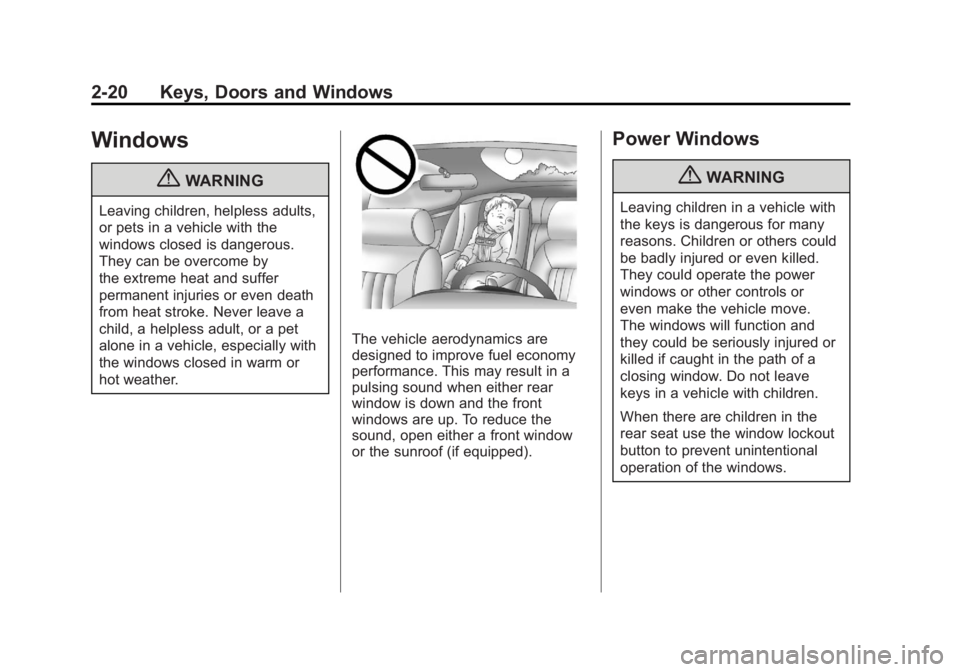
The vehicle aerodynamics are
designed to improve fuel economy
performance. This may result in a
pulsing sound when either rear
window is down and the front
windows are up. To reduce the
sound, open either a front window
or the sunroof (if equipped).
Power Windows
{WARNING
Leaving children in a vehicle with
the keys is dangerous for many
reasons. Children or others could
be badly injured or even killed.
They could operate the power
windows or other controls or
even make the vehicle move.
The windows will function and
they could be seriously injured or
killed if caught in the path of a
closing window. Do not leave
keys in a vehicle with children.
When there are children in the
rear seat use the window lockout
button to prevent unintentional
operation of the windows.
Page 57 of 478
Black plate (1,1)GMC Acadia/Acadia Denali Owner Manual - 2011
Seats and Restraints 3-1
Seats and
Restraints
Head Restraints
Head Restraints . . . . . . . . . . . . . . . 3-2
Front Seats
Seat Adjustment . . . . . . . . . . . . . . 3-3
Power Seat Adjustment . . . . . . . 3-4
Lumbar Adjustment . . . . . . . . . . . 3-6
Reclining Seatbacks . . . . . . . . . . 3-7
Heated and Ventilated FrontSeats . . . . . . . . . . . . . . . . . . . . . . . . 3-9
Rear Seats
Rear Seats . . . . . . . . . . . . . . . . . . 3-10
Third Row Seats . . . . . . . . . . . . . 3-13
Safety Belts
Safety Belts . . . . . . . . . . . . . . . . . . 3-16
How to Wear Safety BeltsProperly . . . . . . . . . . . . . . . . . . . . 3-19
Lap-Shoulder Belt . . . . . . . . . . . 3-25 Safety Belt Use During
Pregnancy . . . . . . . . . . . . . . . . . . 3-30
Safety Belt Extender . . . . . . . . . 3-31
Safety System Check . . . . . . . . 3-31
Safety Belt Care . . . . . . . . . . . . . 3-32
Replacing Safety Belt System Parts After a Crash . . . . . . . . . 3-32
Airbag System
Airbag System . . . . . . . . . . . . . . . 3-33
Where Are the Airbags? . . . . . 3-35
When Should an AirbagInflate? . . . . . . . . . . . . . . . . . . . . . 3-36
What Makes an Airbag Inflate? . . . . . . . . . . . . . . . . . . . . . 3-38
How Does an Airbag Restrain? . . . . . . . . . . . . . . . . . . . 3-38
What Will You See After an Airbag Inflates? . . . . . . . . . . . . 3-39
Passenger Sensing System . . . . . . . . . . . . . . . . . . . . . 3-41
Servicing the Airbag-Equipped Vehicle . . . . . . . . . . . . . . . . . . . . . 3-45 Adding Equipment to the
Airbag-Equipped Vehicle . . . 3-46
Airbag System Check . . . . . . . . 3-47
Replacing Airbag System Parts After a Crash . . . . . . . . . 3-48
Child Restraints
Older Children . . . . . . . . . . . . . . . 3-48
Infants and Young
Children . . . . . . . . . . . . . . . . . . . . 3-51
Child Restraint Systems . . . . . 3-53
Where to Put the Restraint . . . 3-55
Lower Anchors and Tethers for Children
(LATCH System) . . . . . . . . . . . 3-57
Replacing LATCH System Parts After a Crash . . . . . . . . . 3-64
Securing Child Restraints (Rear Seat) . . . . . . . . . . . . . . . . . 3-65
Securing Child Restraints (Right Front
Passenger Seat) . . . . . . . . . . . 3-67
Page 75 of 478
Black plate (19,1)GMC Acadia/Acadia Denali Owner Manual - 2011
Seats and Restraints 3-19
Questions and Answers About
Safety Belts
Q: Will I be trapped in the vehicleafter a crash if I am wearing a
safety belt?
A: You could be—whether you
are wearing a safety belt or
not. But your chance of being
conscious during and after an
accident, so you canunbuckle
and get out, is muchgreater if
you are belted. And you can
unbuckle a safety belt, even if
you are upside down.
Q: If my vehicle has airbags, why should I have to wear safety
belts?
A: Airbags are supplemental
systems only; so they work
with safety belts —not instead
of them. Whether or not an
airbag is provided, all occupants
still have to buckle up to get the
most protection. That is true not
only in frontal collisions, but
especially in side and other
collisions. Q: If I am a good driver, and I
never drive far from home,
why should I wear safety
belts?
A: You may be an excellent driver,
but if you are in a crash —even
one that is not your fault —you
and your passenger(s) can be
hurt. Being a good driver does
not protect you from things
beyond your control, such
as bad drivers.
Most accidents occur within
40 km (25 mi) of home.
And the greatest number of
serious injuries and deaths
occur at speeds of less than
65 km/h (40 mph).
Safety belts are for everyone.
How to Wear Safety Belts
Properly
This section is only for people of
adult size.
Be aware that there are special
things to know about safety belts
and children. And there are different
rules for smaller children and
infants. If a child will be riding in
the vehicle, see Older Children on
page 3‑48 orInfants and Young
Children on page 3‑51. Follow
those rules for everyone's
protection.
It is very important for all occupants
to buckle up. Statistics show that
unbelted people are hurt more often
in crashes than those who are
wearing safety belts.
Page 82 of 478
Black plate (26,1)GMC Acadia/Acadia Denali Owner Manual - 2011
3-26 Seats and Restraints
If the shoulder portion of a
passenger belt is pulled out
all the way, the child restraint
locking feature may be engaged.
If this happens, let the belt go
back all the way and start again.
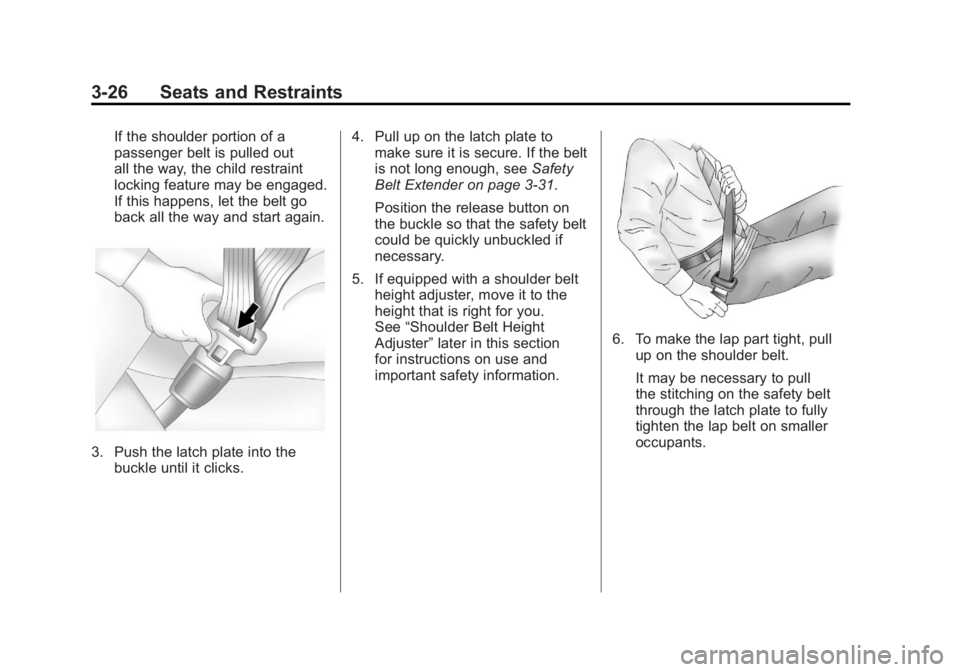
3. Push the latch plate into thebuckle until it clicks. 4. Pull up on the latch plate to
make sure it is secure. If the belt
is not long enough, see Safety
Belt Extender on page 3‑31.
Position the release button on
the buckle so that the safety belt
could be quickly unbuckled if
necessary.
5. If equipped with a shoulder belt height adjuster, move it to the
height that is right for you.
See “Shoulder Belt Height
Adjuster” later in this section
for instructions on use and
important safety information.
6. To make the lap part tight, pull up on the shoulder belt.
It may be necessary to pull
the stitching on the safety belt
through the latch plate to fully
tighten the lap belt on smaller
occupants.
Page 84 of 478
Black plate (28,1)GMC Acadia/Acadia Denali Owner Manual - 2011
3-28 Seats and Restraints
Safety Belt Pretensioners
This vehicle has safety belt
pretensioners for the front outboard
occupants. Although the safety
belt pretensioners cannot be seen,
they are part of the safety belt
assembly. They can help tighten
the safety belts during the early
stages of a moderate to severe
frontal, near frontal, or rear crash
if the threshold conditions for
pretensioner activation are met.
And, for vehicles with side impact
airbags, safety belt pretensioners
can help tighten the safety belts in
a side crash or a rollover event.
Pretensioners work only once.
If the pretensioners activate in a
crash, they will need to be replaced,
and probably other new parts for
the vehicle's safety belt system.
SeeReplacing Safety Belt System
Parts After a Crash on page 3‑32.
Rear Safety Belt Comfort
Guides
This vehicle may have rear shoulder
belt comfort guides. If not, they
are available through your dealer.
The guides may provide added
safety belt comfort for older children
who have outgrown booster seats
and for some adults. When installed
and properly adjusted, the comfort
guide positions the shoulder belt
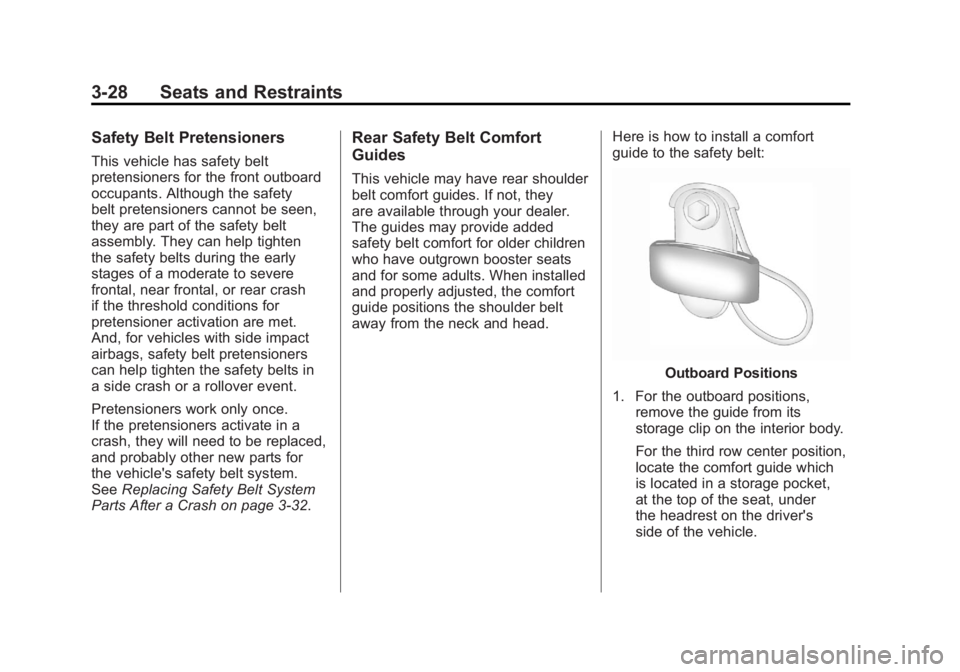
away from the neck and head. Here is how to install a comfort
guide to the safety belt:
Outboard Positions
1. For the outboard positions, remove the guide from its
storage clip on the interior body.
For the third row center position,
locate the comfort guide which
is located in a storage pocket,
at the top of the seat, under
the headrest on the driver's
side of the vehicle.