Reverse GMC ACADIA 2012 Owner's Guide
[x] Cancel search | Manufacturer: GMC, Model Year: 2012, Model line: ACADIA, Model: GMC ACADIA 2012Pages: 468, PDF Size: 5.57 MB
Page 295 of 468
Black plate (37,1)GMC Acadia/Acadia Denali Owner Manual - 2012
Driving and Operating 9-37
The delay received after shifting out
of R (Reverse) is approximately
10 seconds. The delay can be
canceled by performing one of the
following:
.Pressing a hard key on the
navigation system.
.Shifting into P (Park).
.Reach a vehicle speed of
5 mph (8 km/h).
There is a message on the rear
vision camera screen that states
“Check Surroundings for Safety.”
Adjusting the Brightness and
Contrast of the Screen
To adjust the brightness and
contrast of the screen, press the
MENU button while the rear vision
camera image is on the display.
Any adjustments made will only
affect the rear vision camera screen.
](Brightness): Touch the + (plus)
or –(minus) screen buttons to
increase or decrease the brightness
of the screen.
_(Contrast): Touch the + (plus)
or –(minus) screen buttons to
increase or decrease the contrast
of the screen.
Symbols
The navigation system may have
a feature that lets the driver view
symbols on the navigation screen
while using the rear vision camera.
The Ultrasonic Rear Park Assist
(URPA) system must not be
disabled to use the caution symbols.
If URPA has been disabled and the
symbols have been turned on,
the Rear Parking Assist Symbols
Unavailable error message may
display. See Ultrasonic Parking
Assist on page 9‑34. The symbols appear when an object
has been detected by the URPA
system. The symbol may cover the
object when viewing the navigation
screen.
To turn the symbols on or off:
1. Make sure that URPA has not
been disabled.
2. Shift into P (Park).
3. Press the MENU hard key to enter the configure menu
options, then press the MENU
hard key repeatedly until Display
is selected or touch the Display
screen button.
4. Select the Rear Camera Options screen button. The Rear Camera
Options screen will display.
5. Touch the Symbols screen button. The screen button will be
highlighted when on.
Page 297 of 468
Black plate (39,1)GMC Acadia/Acadia Denali Owner Manual - 2012
Driving and Operating 9-39
When the System Does Not
Seem To Work Properly
The rear vision camera system
might not work properly or display
a clear image if:
.The RVC is turned off.
See“Turning the Rear Camera
System On or Off” earlier in this
section.
.It is dark.
.The sun or the beam of
headlights is shining directly
into the camera lens.
.Ice, snow, mud, or anything else
builds up on the camera lens.
Clean the lens, rinse it with
water, and wipe it with a soft
cloth.
.The back of the vehicle is in an
accident. The position and
mounting angle of the camera
can change or the camera can
be affected. Be sure to have the
camera and its position and
mounting angle checked at
your dealer.
.There are extreme temperature
changes.
The rear vision camera system
display in the rearview mirror
may turn off or not appear as
expected due to one of the following
conditions. If this occurs the left
indicator light on the mirror will
flash.
.A slow flash may indicate a
loss of video signal, or no
video signal present during the
reverse cycle.
.A fast flash may indicate that
the display has been on for
the maximum allowable time
during a reverse cycle, or the
display has reached an Over
Temperature limit.
The fast flash conditions are
used to protect the video
device from high temperature
conditions. Once conditions
return to normal the device will
reset and the green indicator
will stop flashing.
During any of these fault conditions,
the display will be blank and the
indicator will continue to flash as
long as the vehicle is in R (Reverse)
or until the conditions return to
normal.
Pressing and holding
zwhen the
left indicator light is flashing will turn
off the video display along with the
left indicator light.
Page 320 of 468
Black plate (8,1)GMC Acadia/Acadia Denali Owner Manual - 2012
10-8 Vehicle Care
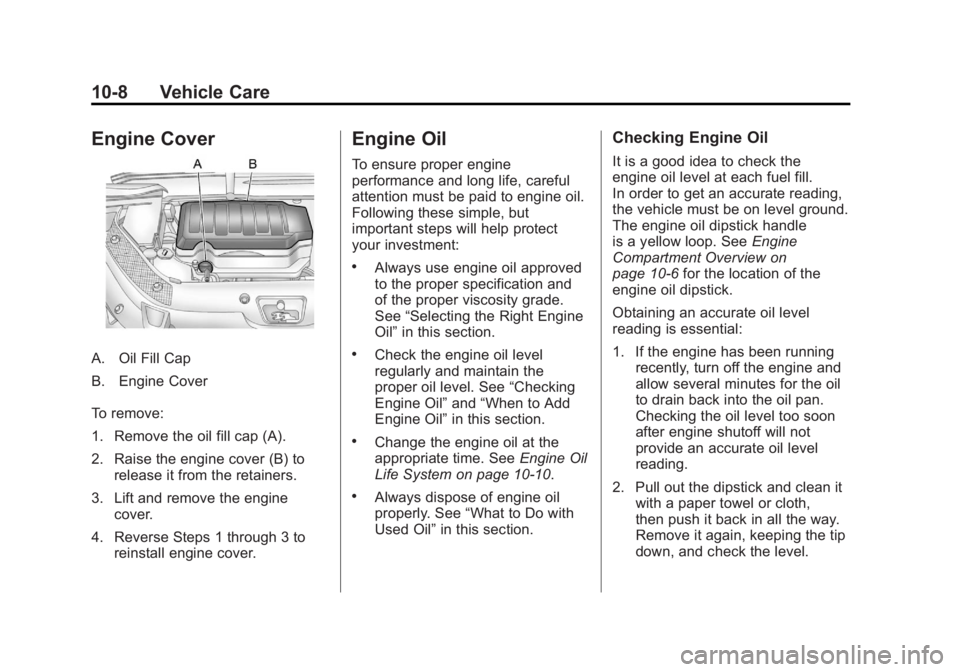
Engine Cover
A. Oil Fill Cap
B. Engine Cover
To remove:
1. Remove the oil fill cap (A).
2. Raise the engine cover (B) torelease it from the retainers.
3. Lift and remove the engine cover.
4. Reverse Steps 1 through 3 to reinstall engine cover.
Engine Oil
To ensure proper engine
performance and long life, careful
attention must be paid to engine oil.
Following these simple, but
important steps will help protect
your investment:
.Always use engine oil approved
to the proper specification and
of the proper viscosity grade.
See “Selecting the Right Engine
Oil” in this section.
.Check the engine oil level
regularly and maintain the
proper oil level. See “Checking
Engine Oil” and“When to Add
Engine Oil” in this section.
.Change the engine oil at the
appropriate time. See Engine Oil
Life System on page 10‑10.
.Always dispose of engine oil
properly. See “What to Do with
Used Oil” in this section.
Checking Engine Oil
It is a good idea to check the
engine oil level at each fuel fill.
In order to get an accurate reading,
the vehicle must be on level ground.
The engine oil dipstick handle
is a yellow loop. See Engine
Compartment Overview on
page 10‑6 for the location of the
engine oil dipstick.
Obtaining an accurate oil level
reading is essential:
1. If the engine has been running recently, turn off the engine and
allow several minutes for the oil
to drain back into the oil pan.
Checking the oil level too soon
after engine shutoff will not
provide an accurate oil level
reading.
2. Pull out the dipstick and clean it with a paper towel or cloth,
then push it back in all the way.
Remove it again, keeping the tip
down, and check the level.
Page 325 of 468
Black plate (13,1)GMC Acadia/Acadia Denali Owner Manual - 2012
Vehicle Care 10-13
To inspect or replace the engine air
cleaner/filter, do the following:
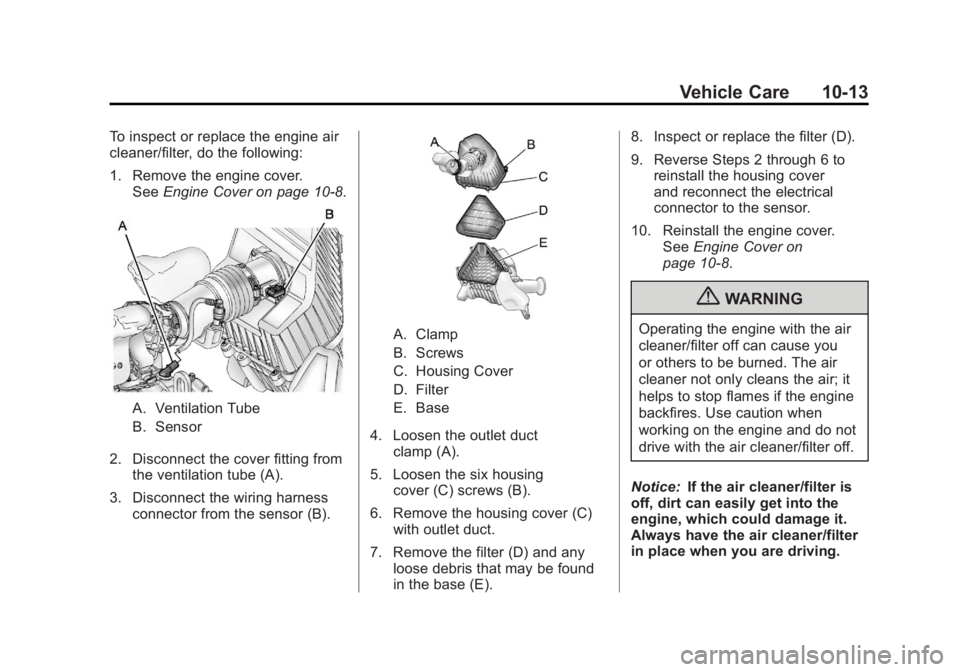
1. Remove the engine cover.See Engine Cover on page 10‑8.
A. Ventilation Tube
B. Sensor
2. Disconnect the cover fitting from the ventilation tube (A).
3. Disconnect the wiring harness connector from the sensor (B).
A. Clamp
B. Screws
C. Housing Cover
D. Filter
E. Base
4. Loosen the outlet duct clamp (A).
5. Loosen the six housing cover (C) screws (B).
6. Remove the housing cover (C) with outlet duct.
7. Remove the filter (D) and any loose debris that may be found
in the base (E). 8. Inspect or replace the filter (D).
9. Reverse Steps 2 through 6 to
reinstall the housing cover
and reconnect the electrical
connector to the sensor.
10. Reinstall the engine cover. SeeEngine Cover on
page 10‑8.
{WARNING
Operating the engine with the air
cleaner/filter off can cause you
or others to be burned. The air
cleaner not only cleans the air; it
helps to stop flames if the engine
backfires. Use caution when
working on the engine and do not
drive with the air cleaner/filter off.
Notice: If the air cleaner/filter is
off, dirt can easily get into the
engine, which could damage it.
Always have the air cleaner/filter
in place when you are driving.
Page 341 of 468
Black plate (29,1)GMC Acadia/Acadia Denali Owner Manual - 2012
Vehicle Care 10-29
Bulb Replacement
For the proper type of replacement
bulbs, seeReplacement Bulbs on
page 10‑29.
For any bulb‐changing procedure
not listed in this section, contact
your dealer.
LED Lighting
This vehicle has several LED lamps.
For replacement of any LED lighting
assembly, contact your dealer.
License Plate Lamp
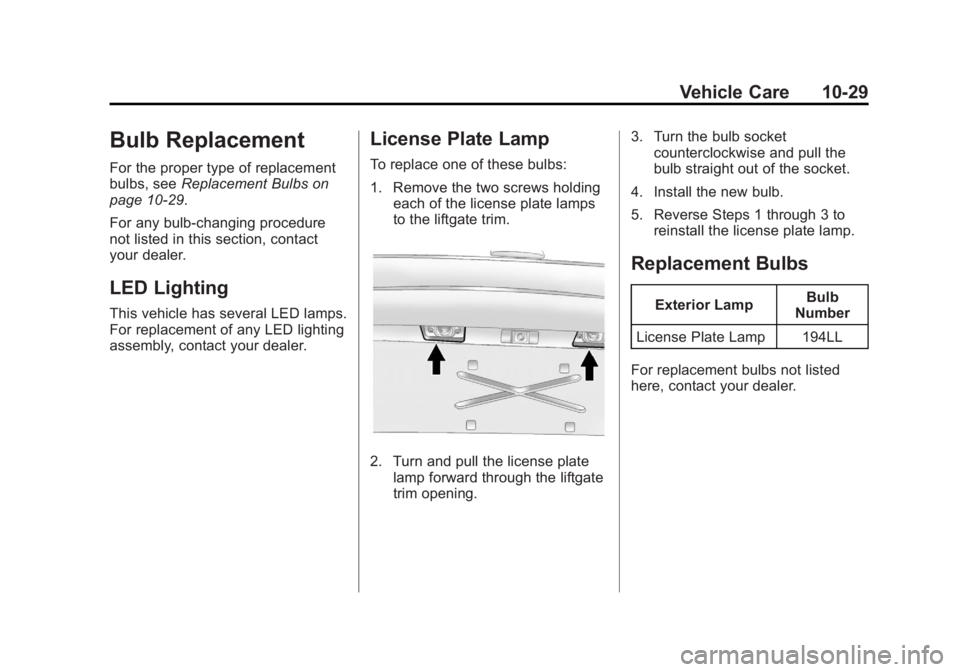
To replace one of these bulbs:
1. Remove the two screws holding each of the license plate lamps
to the liftgate trim.
2. Turn and pull the license plate
lamp forward through the liftgate
trim opening. 3. Turn the bulb socket
counterclockwise and pull the
bulb straight out of the socket.
4. Install the new bulb.
5. Reverse Steps 1 through 3 to reinstall the license plate lamp.
Replacement Bulbs
Exterior Lamp Bulb
Number
License Plate Lamp 194LL
For replacement bulbs not listed
here, contact your dealer.
Page 371 of 468
Black plate (59,1)GMC Acadia/Acadia Denali Owner Manual - 2012
Vehicle Care 10-59
{WARNING
Changing a tire can be
dangerous. The vehicle can
slip off the jack and roll over or
fall causing injury or death.
Find a level place to change the
tire. To help prevent the vehicle
from moving:1. Set the parking brake firmly.
2. Put an automatic transmission in P (Park) or
a manual transmission in
1 (First) or R (Reverse).
3. Turn off the engine and do not restart while the vehicle
is raised.
(Continued)
WARNING (Continued)
4. Do not allow passengers toremain in the vehicle.
5. Place wheel blocks on both sides of the tire at the
opposite corner of the tire
being changed.
This vehicle may come with a jack
and spare tire or a tire sealant and
compressor kit. To use the jacking
equipment to change a spare tire
safely, follow the instructions below.
Then see Tire Changing on
page 10‑68. To use the tire sealant
and compressor kit, see Tire
Sealant and Compressor Kit on
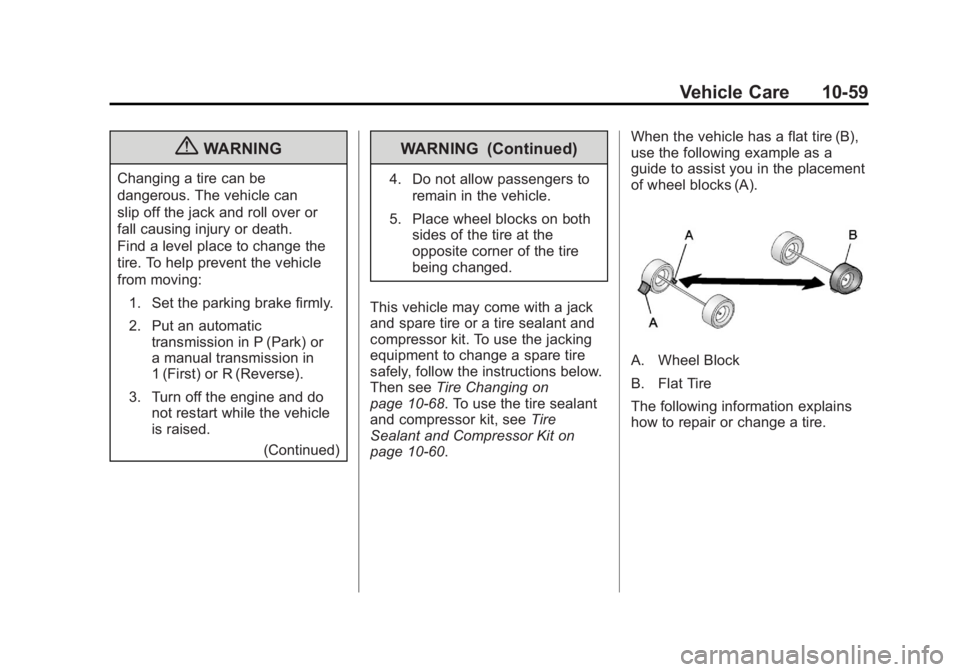
page 10‑60. When the vehicle has a flat tire (B),
use the following example as a
guide to assist you in the placement
of wheel blocks (A).
A. Wheel Block
B. Flat Tire
The following information explains
how to repair or change a tire.
Page 380 of 468
Black plate (68,1)GMC Acadia/Acadia Denali Owner Manual - 2012
10-68 Vehicle Care
Storing the Tire Sealant
and Compressor Kit
The tire sealant and compressor
kit is located in the storage
compartment on the driver side,
at the rear of the vehicle.
1. Press down on the latch tab andpull the cover off to access the
storage compartment. 2. Press the two tabs on the quick
release buckle to release the tire
sealant and compressor kit
strap.
3. Remove the sealant and compressor kit from its tray.
To store the tire sealant and
compressor kit, reverse the steps.
Tire Changing
Removing Tools
The tools needed to remove the
spare tire are located in the storage
compartment on the driver side,
at the rear of the vehicle.
1. Open the jack storage compartment by pulling on the
latch tab, located toward the rear
of the vehicle, and pulling the
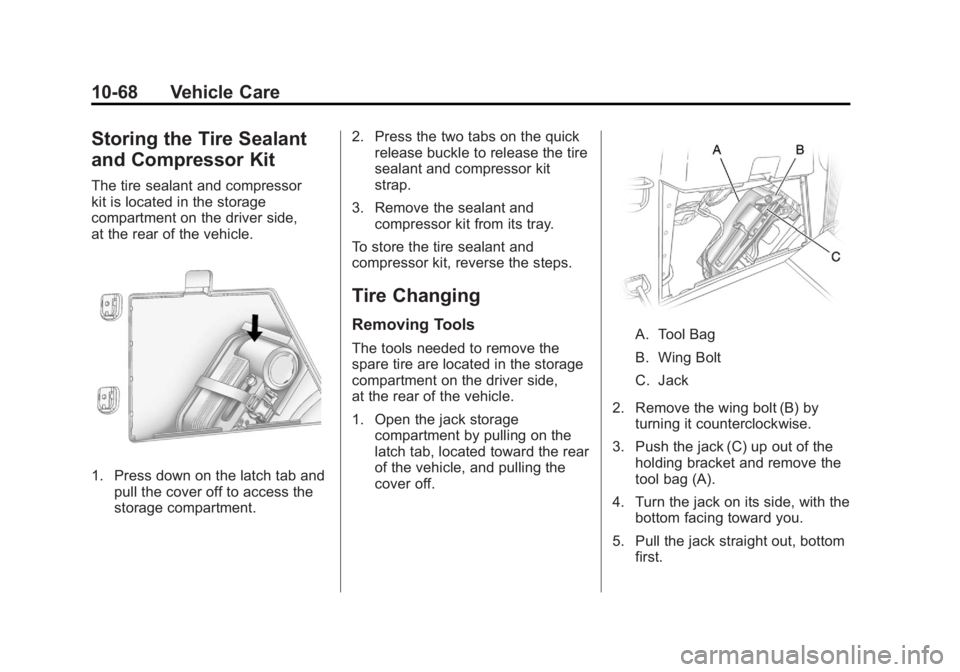
cover off.A. Tool Bag
B. Wing Bolt
C. Jack
2. Remove the wing bolt (B) by turning it counterclockwise.
3. Push the jack (C) up out of the holding bracket and remove the
tool bag (A).
4. Turn the jack on its side, with the bottom facing toward you.
5. Pull the jack straight out, bottom first.