buttons GMC ACADIA 2012 Owner's Guide
[x] Cancel search | Manufacturer: GMC, Model Year: 2012, Model line: ACADIA, Model: GMC ACADIA 2012Pages: 468, PDF Size: 5.57 MB
Page 178 of 468
Black plate (58,1)GMC Acadia/Acadia Denali Owner Manual - 2012
5-58 Instruments and Controls
Erasing Universal Remote
Buttons
All programmed buttons should be
erased when the vehicle is sold or
the lease ends.
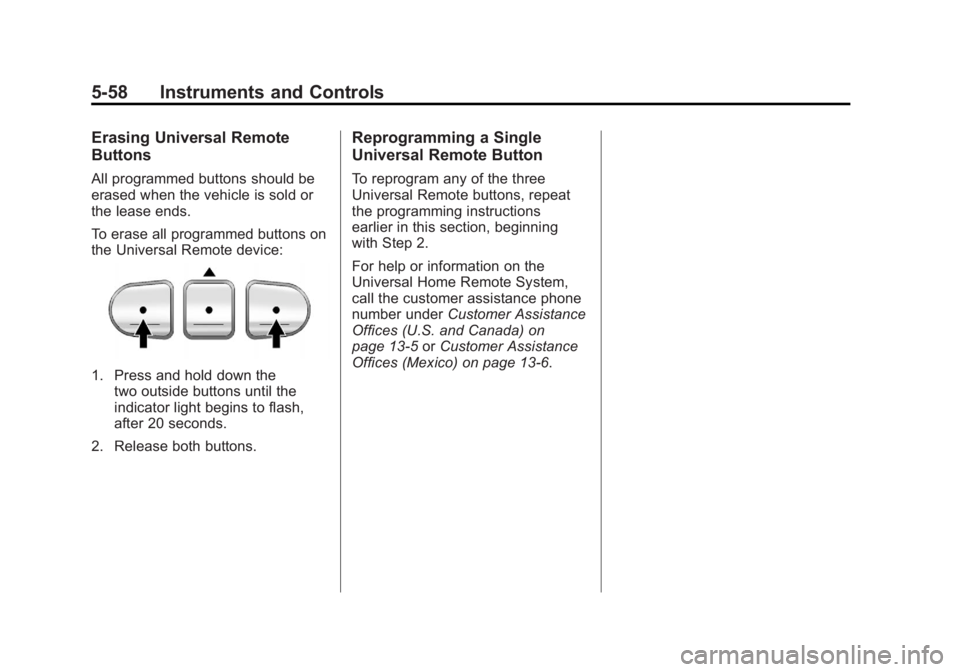
To erase all programmed buttons on
the Universal Remote device:
1. Press and hold down thetwo outside buttons until the
indicator light begins to flash,
after 20 seconds.
2. Release both buttons.
Reprogramming a Single
Universal Remote Button
To reprogram any of the three
Universal Remote buttons, repeat
the programming instructions
earlier in this section, beginning
with Step 2.
For help or information on the
Universal Home Remote System,
call the customer assistance phone
number under Customer Assistance
Offices (U.S. and Canada) on
page 13‑5 orCustomer Assistance
Offices (Mexico) on page 13‑6.
Page 181 of 468
Black plate (3,1)GMC Acadia/Acadia Denali Owner Manual - 2012
Lighting 6-3
Daytime Running
Lamps (DRL)/Automatic
Headlamp System
Daytime Running Lamps (DRL) can
make it easier for others to see the
front of your vehicle during the day.
Fully functional daytime running
lamps are required on all vehicles
first sold in Canada.
The DRL system makes the
low-beam headlamps come on at a
reduced brightness when the
following conditions are met:
.The ignition is in the ON/RUN
position.
.The exterior lamps control is
in AUTO.
.The engine is running.When the DRL are on, the regular
headlamps, taillamps, sidemarker,
and other lamps will not be on.
The instrument panel and cluster
will also not be lit.
The headlamps automatically
change from DRL to the regular
headlamps depending on the
darkness of the surroundings.
The other lamps that come on with
the headlamps will also come on.
When it is bright enough outside,
the headlamps will go off and the
DRL will come on.
The regular headlamp system
should be turned on when needed.
Do not cover the light sensor on top
of the instrument panel because it
works with the DRL.
Delayed Headlamps
Delayed headlamps provide a
period of exterior lighting as you
leave the area around the vehicle.
This feature is activated when
the headlamps are on due to the
automatic headlamps control
feature, and when the ignition is
turned off. The headlamps remain
on until the exterior lamps control is
moved to the parking lamps position
or until the pre-selected delayed
headlamp lighting period has ended.
If the ignition is turned off with the
exterior lamp control in the parking
lamps or headlamps position, the
delayed headlamps cycle will not
occur.
To disable the delayed headlamps
feature or change the time of
delay, see
Vehicle Personalization
(With DIC Buttons) on page 5‑46.
Page 186 of 468
Black plate (8,1)GMC Acadia/Acadia Denali Owner Manual - 2012
6-8 Lighting
EPM works to prevent excessive
discharge of the battery. It does this
by balancing the generator's output
and the vehicle's electrical needs.
It can increase engine idle speed to
generate more power whenever
needed. It can temporarily reduce
the power demands of some
accessories.
Normally, these actions occur in
steps or levels, without being
noticeable. In rare cases at the
highest levels of corrective action,
this action may be noticeable to the
driver. If so, a DIC message might
be displayed, such as BATTERY
SAVER ACTIVE, BATTERY
VOLTAGE LOW, or LOW BATTERY.
If one of these messages displays,
it is recommended that the driver
reduce the electrical loads as much
as possible. SeeDriver Information
Center (DIC) (Without DIC Buttons)
on page 5‑30 orDriver Information
Center (DIC) (With DIC Buttons) on
page 5‑25.Battery Power Protection
This feature helps prevent the
battery from being drained, if the
interior courtesy lamps or reading
lamps are accidentally left on.
If any of these lamps are left on,
they automatically turn off after
10 minutes, if the ignition is off.
The lamps will not come back on
again until one of the following
occurs:
.The ignition is turned on.
.The exterior lamps control is
turned off, then on again.
The headlamps will time out after
10 minutes, if they are manually
turned on while the ignition is on
or off.
Page 195 of 468
Black plate (9,1)GMC Acadia/Acadia Denali Owner Manual - 2012
Infotainment System 7-9
Finding a Category (CAT)
Station
CAT (Category):The CAT button
is used to find XM stations when
the radio is in the XM mode.
To find XM channels within a
desired category:
1. Press BAND until the XM frequency displays.
2. Press CAT to display the category tabs.
3. Continue pressing CAT until the desired category name displays.
.Radios with CD and DVD
can also navigate the
category list by pressing
sREV or\FWD.
4. Press either of the two buttons below the desired category tab
to immediately tune to the first
XM station associated with that
category. 5. To go to the next or previous
XM station within the selected
category, do one of the
following:
.Turnf.
.Press the buttons below the
right or left arrows on the
display.
.Press either SEEK arrow.
6. To exit the category search mode, press the FAV button or
BAND button to display the
favorites again.
Undesired XM categories can be
removed through the setup menu.
To remove an undesired category,
perform the following:
1. Press MENU to display the radio setup menu.
2. Press the softkey below the XM CAT tab. 3. Turn
fto display the category
to be removed.
4. Press the softkey under the Remove tab until the category
name along with the word
Removed displays.
5. Repeat the steps to remove more categories.
Removed categories can be
restored by pressing the softkey
under the Add tab when a removed
category is displayed or by pressing
the softkey under the Restore
All tab.
Categories cannot be removed or
added while the vehicle is moving
faster than 8 km/h (5 mph).
Page 201 of 468
Black plate (15,1)GMC Acadia/Acadia Denali Owner Manual - 2012
Infotainment System 7-15
Playing an MP3/WMA CD-R or
CD-RW Disc
The radio has the capability of
playing an MP3/WMA CD-R or
CD-RW disc. For more information
on how to play an MP3/WMA CD-R
or CD-RW disc, seeMP3 (Radios
with CD/DVD) on page 7‑29 or
MP3 (Radios with CD/USB) on
page 7‑23.
CD Messages
Check Disc: Radios with a single
CD player display Check Disc
and/or eject the CD if an error
occurs.
Optical Error: The disc was
inserted upside down.
Disk Read Error: A disc was
inserted with an invalid or unknown
format. Player Error:
There are disc LOAD
or disc EJECT problems.
.It is very hot. When the
temperature returns to normal,
the CD should play.
.The road is very rough. When
the road becomes smoother,
the CD should play.
.The CD is dirty, scratched, wet,
or upside down.
.The air is very humid. If so, wait
about an hour and try again.
.There was a problem while
burning the CD.
.The label is caught in the
CD player.
If the CD is not playing correctly for
any other reason, try a known
good CD.
If any error occurs repeatedly or if
an error cannot be corrected,
contact your dealer. If the radio
displays an error message, write it
down and provide it to your dealer
when reporting the problem.
CD/DVD Player
Playing a CD (In Either the
DVD or CD Slot)
Insert a CD partway into the slot,
label side up. The player pulls it in
and the CD should begin playing.
(Loading a disc into the system,
depending on media type and
format, ranges from five to
20 seconds for a CD, and
up to 30 seconds for a DVD to
begin playing.)
If the ignition or radio is turned off
while a CD is in the player, it stays
in the player. When the ignition or
radio is turned on, the CD starts
playing where it stopped, if it was
the last selected audio source.
The CD is controlled by the
buttons on the radio faceplate
or by the RSA unit. See Rear
Seat Audio (RSA) System on
page 7‑47 for more information.
Page 205 of 468
Black plate (19,1)GMC Acadia/Acadia Denali Owner Manual - 2012
Infotainment System 7-19
CD Messages
Optical Error:The disc was
inserted upside down.
Disk Read Error: A disc was
inserted with an invalid or unknown
format.
Player Error: There are disc LOAD
or disc EJECT problems.
.It is very hot. When the
temperature returns to normal,
the CD should play.
.The road is very rough. When
the road becomes smoother,
the CD should play.
.The CD is dirty, scratched, wet,
or upside down.
.The air is very humid. If so, wait
about an hour and try again.
.There was a problem while
burning the CD.
.The label is caught in the
CD player. If the CD is not playing correctly
for any other reason, try a known
good CD.
If any error occurs repeatedly or
if an error cannot be corrected,
contact your dealer. If the radio
displays an error message, write it
down and provide it to your dealer
when reporting the problem.
Using the DVD Player
The DVD player can be controlled
by the buttons on the remote
control, the RSA system, or by the
buttons on the radio faceplate.
See
“Remote Control” underRear
Seat Entertainment (RSE) System
on page 7‑38 andRear Seat Audio
(RSA) System on page 7‑47 for
more information.
The DVD player is only compatible
with DVDs of the appropriate region
code printed on the jacket of
most DVDs. The DVD slot of the radio is
compatible with most audio CDs,
CD-R, CD-RW, DVD-Video,
DVD-Audio, DVD-R/RW,
DVD+R/RW media along with
MP3 and WMA formats.
If an error message displays on
the video screen or the radio, see
“DVD Display Error Messages”
under
Rear Seat Entertainment
(RSE) System on page 7‑38 and
“DVD Radio Error Messages” in this
section for more information.
Playing a DVD
f(Tune): Turn to change tracks on
a CD or DVD, to manually tune a
radio station, or to change clock or
date settings, while in the clock
or date setting mode. See the
information earlier in this section
specific to the radio, CD, and the
DVD. Also, see Clock on page 5‑8
for information on setting the clock
and date.
Page 206 of 468
Black plate (20,1)GMC Acadia/Acadia Denali Owner Manual - 2012
7-20 Infotainment System
©SEEK (Previous Track/
Chapter): Press to return to the
start of the current track or chapter.
Press
©SEEK again to go to
the previous track or chapter.
This button may not work when
the DVD is playing the copyright
information or the previews.
SEEK
¨(Next Track/Chapter):
Press to go to the next track or
chapter. This button may not work
when the DVD is playing the
copyright information or the
previews.
sREV (Fast Reverse): Press to
quickly reverse the DVD at
five times the normal speed.
The radio displays the elapsed time
while in fast reverse. To stop fast
reversing, press again. This button
may not work when the DVD is
playing the copyright information or
the previews.
\FWD (Fast Forward): Press to
fast forward the DVD. The radio
displays the elapsed time and fast
forwards five times the normal
speed. To stop fast forwarding,
press again. This button may not
work when the DVD is playing the
copyright information or the
previews.
Z(Eject): Press to eject a DVD.
If the DVD is ejected, but not
removed, the player automatically
pulls it back in after 15 seconds.
If loading and reading of a DVD
cannot be completed because of an
unknown format, etc., and the disc
fails to eject, press and hold for
more than five seconds to force the
disc to eject.
DVD-V (Video) Display Buttons
Once a DVD-V is inserted, the radio
display menu shows several icons.
Press the softkeys under any icon
during DVD playback. See the icon
list below for more information. A rear seat passenger can navigate
the DVD-V menus and controls
through the remote control.
See
“Remote Control” underRear
Seat Entertainment (RSE) System
on page 7‑38 for more information.
The Video Screen automatically
turns on when the DVD-V is
inserted into the DVD slot.r/j(Play/Pause): Press either
the play or pause icon displayed on
the radio system, to toggle between
pausing or restarting playback of
a DVD.
.If the forward arrow is showing,
the system is in pause mode.
.If the pause icon is showing,
the system is in playback mode.
.If the DVD screen is off, press
the play button to turn the
screen on.
Some DVDs begin playing after the
previews have finished, although
there could be a delay of up to
30 seconds. If the DVD does not
Page 207 of 468
Black plate (21,1)GMC Acadia/Acadia Denali Owner Manual - 2012
Infotainment System 7-21
begin playing the movie
automatically, press the softkey
under the play/pause icon displayed
on the radio. If the DVD still does
not play, refer to the on-screen
instructions, if available.
c(Stop):Press to stop playing,
rewinding, or fast forwarding a DVD.
r(Enter): Press to select the
choices that are highlighted in
any menu.
y(Menu): Press to access the
DVD menu. The DVD menu is
different on every DVD. Use the
softkeys under the navigation
arrows to navigate the cursor
through the DVD menu. After
making a selection, press this
button. This button only operates
when using a DVD.
Nav (Navigate): Press to display
directional arrows for navigating
through the menus.
q(Return): Press to exit the
current active menu and return to
the previous menu. This button
operates only when a DVD is
playing and a menu is active.
DVD-A (Audio) Display Buttons
Once a DVD-A is inserted, the radio
display menu shows several icons.
Press the softkeys under any icon
during DVD playback. See the icon
list below for more information.
A rear seat passenger can navigate
the DVD-A menus and controls
through the remote control. See
“Remote Control” underRear Seat
Entertainment (RSE) System on
page 7‑38 for more information.
The Video Screen does not
automatically power on when the
DVD-A is inserted into the DVD slot.
It must be manually turned on by
the rear seat passenger through the
remote control power button.r/j(Play/Pause): Press either
the play or pause icon displayed on
the radio system, to toggle between
pausing or restarting playback of
a DVD.
.If the forward arrow is showing,
the system is in pause mode.
.If the pause icon is showing,
the system is in playback mode.
qGroupr: Press to cycle
through musical groupings on the
DVD-A disc.
Nav (Navigate): Press to display
directional arrows for navigating
through the menus.
e(Audio Stream): Press to cycle
through audio stream formats
located on the DVD-A disc.
The video screen shows the audio
stream changing.
Page 213 of 468

Black plate (27,1)GMC Acadia/Acadia Denali Owner Manual - 2012
Infotainment System 7-27
To connect an iPod, connect one
end of the USB cable that came
with the iPod to the iPod’s dock
connector and connect the other
end to the USB port located in the
instrument panel storage area.
If the vehicle is on and the USB
connection works,“OK to
disconnect” and a GM logo may
appear on the iPod, and iPod
appears on the radio's display.
The iPod music appears on the
radio’s display and begins playing.
The iPod charges while it is
connected to the vehicle if the
vehicle is in the ACC/ACCESSORY
or ON/RUN position. When the
vehicle is turned off, the iPod
automatically powers off and will not
charge or draw power from the
vehicle's battery.
If you have an older iPod model that
is not supported, it can still be used
by connecting it to the Auxiliary
Input Jack using a standard 3.5 mm
(1/8 in) stereo cable. See Clock on
page 5‑8 for more information.Using the Radio to Control a
USB Storage Device or iPod
The radio can control a USB
storage device or an iPod using the
radio buttons and knobs and display
song information on the radio’s
display.
f(Tune):Turn to select files.
©SEEK:Press to go to the start of
the track, if more than 10 seconds
have played. Press and hold or
press multiple times to continue
moving backward through tracks.
¨SEEK: Press to go to the next
track. Press and hold or press
multiple times to continue moving
forward through tracks.
sREV (Reverse): Press and
hold to reverse playback quickly.
Sound is heard at a reduced
volume. Release
sREV to resume
playing. The elapsed time of the file
displays.
\FWD (Fast Forward): Press
and hold to advance playback
quickly. Sound is heard at a reduced
volume. Release
\FWD to
resume playing. The elapsed time of
the file displays.
4(Information): Press to display
additional information about the
selected track.
Using Softkeys to Control a
USB Storage Device or iPod
The five softkeys below the radio
display are used to control the
functions listed below.
To use the softkeys:
1. Press the first or fifth softkey below the radio display to
display the functions listed
below, or press the softkey
below the function if it is
currently displayed.
2. Press the softkey below the tab with the function on it to
use that function.
Page 217 of 468

Black plate (31,1)GMC Acadia/Acadia Denali Owner Manual - 2012
Infotainment System 7-31
The next and previous folder
function does not function on a
disc that was recorded without
folders or playlists. When displaying
the name of the folder the radio
displays ROOT.
When the disc contains only
playlists and compressed audio
files, but no folders, all files are
located under the root folder.
The folder down and the folder up
buttons search playlists first and
then go to the root folder. When the
radio displays the name of the folder
the radio displays ROOT.
Order of Play
Compressed audio files are
accessed in the following order:
.Playlists.
.Files stored in the root directory.
.Files stored in folders in the root
directory.Tracks are played in the following
order:
.Play begins from the first track
in the first playlist and continues
sequentially through all tracks in
each playlist. When the last
track of the last playlist has
played, play continues from the
first track of the first playlist.
.Play begins from the first track
in the first folder and continues
sequentially through all tracks in
each folder. When the last track
of the last folder has played,
play continues from the first
track of the first folder.
When play enters a new folder, the
display does not automatically show
the new folder name unless the
folder mode has been chosen as
the default display. The new track
name displays. File System and Naming
The song name that displays is the
song name contained in the ID3 tag.
If the song name is not present in
the ID3 tag, then the radio displays
the file name without the extension
(such as .mp3) as the track name.
Track names longer than
32 characters or four pages are
shortened. Parts of words on the
last page of text and the extension
of the filename do not display.
Preprogrammed Playlists
Preprogrammed playlists created
using WinAmp™, MusicMatch™,
or Real Jukebox™
software can be
accessed; however, they cannot
be edited using the radio. These
playlists are treated as special
folders containing compressed
audio song files.
Playlists that have an .m3u or .pls
file extension and are stored on a
USB device may be supported by
the radio with a USB port.