service indicator GMC ACADIA 2013 User Guide
[x] Cancel search | Manufacturer: GMC, Model Year: 2013, Model line: ACADIA, Model: GMC ACADIA 2013Pages: 410, PDF Size: 5.46 MB
Page 137 of 410
Black plate (23,1)Acadia/Acadia Denali Owner Manual - 2013 - crc2 - 12/11/12
Instruments and Controls 5-23
Information Displays
Driver Information
Center (DIC)
The DIC displays information about
your vehicle. It also displays
warning messages if a system
problem is detected.
All messages will appear in the DIC
display located at the top of the
instrument cluster.
The DIC comes on when the ignition
is on. After a short delay, the DIC
will display the information that was
last displayed before the engine
was turned off.
The DIC also displays a shift lever
position indicator on the bottom line
of the display. SeeAutomatic
Transmission on page 9‑21 for more
information. The outside air temperature and
compass, if equipped, also display
on the DIC when viewing the trip
and fuel information. The outside air
temperature automatically appears
in the top right corner of the DIC
display. If there is a problem with
the system that controls the
temperature display, the numbers
will be replaced with dashes. If this
occurs, have the vehicle serviced.
The compass will be shown in the
bottom right corner of the DIC
display. See
Compass on page 5‑4
for more information.
The DIC has different displays
which can be accessed by pressing
the DIC buttons located on the
instrument panel.
The DIC also allows some features
to be customized. See Vehicle
Personalization on page 5‑41 for
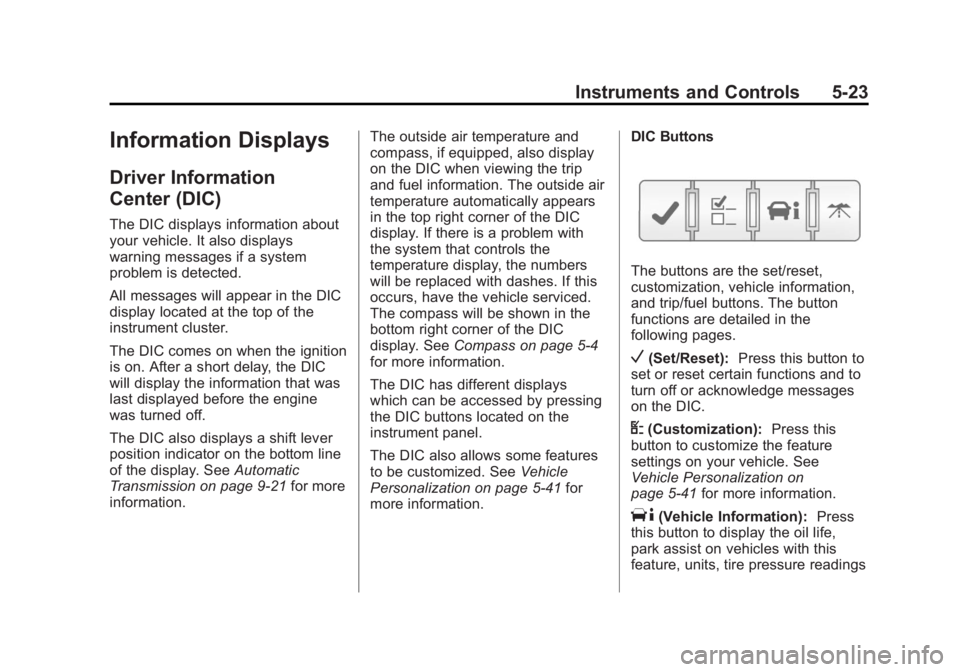
more information. DIC Buttons
The buttons are the set/reset,
customization, vehicle information,
and trip/fuel buttons. The button
functions are detailed in the
following pages.
V(Set/Reset):
Press this button to
set or reset certain functions and to
turn off or acknowledge messages
on the DIC.
U(Customization): Press this
button to customize the feature
settings on your vehicle. See
Vehicle Personalization on
page 5‑41 for more information.
T(Vehicle Information): Press
this button to display the oil life,
park assist on vehicles with this
feature, units, tire pressure readings
Page 149 of 410
Black plate (35,1)Acadia/Acadia Denali Owner Manual - 2013 - crc2 - 12/11/12
Instruments and Controls 5-35
OIL PRESSURE LOW STOP
ENGINE
Notice:If you drive the vehicle
while the engine oil pressure is
low, severe engine damage may
occur. If a low oil pressure
warning appears on the Driver
Information Center (DIC), stop the
vehicle as soon as possible. Do
not drive the vehicle until the
cause of the low oil pressure is
corrected. See Engine Oil on
page 10‑7 for more information.
This message displays when the
vehicle's engine oil pressure is low.
The oil pressure light also appears
on the instrument cluster. See
Engine Oil Pressure Light on
page 5‑21.
Stop the vehicle immediately, as
engine damage can result from
driving a vehicle with low oil
pressure. Have the vehicle serviced
by your dealer as soon as possible
when this message is displayed.
Engine Power Messages
ENGINE POWER IS REDUCED
This message displays and a chime
sounds when the cooling system
temperature gets too hot and the
engine further enters the engine
coolant protection mode. See
Engine Overheating on page 10‑16
for further information.
This message also displays when
the vehicle's engine power is
reduced. Reduced engine power
can affect the vehicle's ability to
accelerate. If this message is on,
but there is no reduction in
performance, proceed to your
destination. The performance may
be reduced the next time the vehicle
is driven. The vehicle may be driven
at a reduced speed while this
message is on, but acceleration and
speed may be reduced. Anytime
this message stays on, the vehicle
should be taken to your dealer for
service as soon as possible.
Fuel System Messages
FUEL LEVEL LOW
This message displays and a chime
sounds if the fuel level is low. Refuel
as soon as possible. See Fuel
Gauge on page 5‑11 andFuel on
page 9‑38 for more information.
TIGHTEN GAS CAP
This message may display along
with the check engine light on the
instrument cluster if the vehicle's
fuel cap is not tightened properly.
SeeMalfunction Indicator Lamp on
page 5‑16. Reinstall the fuel cap
fully. See Filling the Tank on
page 9‑41. The diagnostic system
can determine if the fuel cap has
been left off or improperly installed.
A loose or missing fuel cap allows
fuel to evaporate into the
atmosphere. A few driving trips with
the cap properly installed should
turn this light and message off.
Page 232 of 410
Black plate (16,1)Acadia/Acadia Denali Owner Manual - 2013 - crc2 - 12/11/12
9-16 Driving and Operating
R(ON/RUN):This position can be
used to operate the electrical
accessories and to display some
instrument panel warning and
indicator lights. This position can
also be used for service and
diagnostics, and to verify the proper
operation of the malfunction
indicator lamp as may be required
for emission inspection purposes.
The switch stays in this position
when the engine is running. The
transmission is also unlocked in this
position. If you leave the key in the
ACC/ACCESSORY or ON/RUN
position with the engine off, the
battery could be drained. You may
not be able to start the vehicle if the
battery is allowed to drain for an
extended period of time.
/(START): This is the position
that starts the engine. When the
engine starts, release the key. The
ignition switch will return to ON/RUN
for driving.
Key Lock Release
The vehicle has an electronic key
lock release system. This system is
to prevent ignition key removal
unless the shift lever is in P (Park).
The key lock release will not work if
the battery is charged less than
9-volts, or uncharged. Try charging
or jump starting the battery. See
Jump Starting on page 10‑68
Starting the Engine
Move the shift lever to P (Park) or
N (Neutral). The engine will not start
in any other position. To restart the
engine when the vehicle is already
moving, use N (Neutral) only.
Notice: Do not try to shift to
P (Park) if the vehicle is moving.
If you do, you could damage the
transmission. Shift to P (Park)
only when the vehicle is stopped.
Notice: If you add electrical parts
or accessories, you could change
the way the engine operates. Any
resulting damage would not be covered by the vehicle warranty.
See
Add-On Electrical Equipment
on page 9‑50.
Starting Procedure
1. With your foot off the accelerator pedal, turn the ignition to START.
When the engine starts, let go of
the key. The idle speed will slow
down as the engine warms. Do
not race the engine immediately
after starting it. Operate the
engine and transmission gently
to allow the oil to warm up and
lubricate all moving parts.
The vehicle has a
Computer-Controlled Cranking
System. This feature assists in
starting the engine and protects
components. If the ignition key is
turned to the START position,
and then released when the
engine begins cranking, the
engine will continue cranking for
a few seconds or until the
vehicle starts. If the engine does
not start and the key is held in
START, cranking will be stopped
Page 239 of 410
Black plate (23,1)Acadia/Acadia Denali Owner Manual - 2013 - crc2 - 12/11/12
Driving and Operating 9-23
D (Drive):This position is for
normal driving. It provides the best
fuel economy. If you need more
power for passing, and you are:
.Going less than 56 km/h
(35 mph), push the accelerator
pedal about halfway down.
.Going about 56 km/h (35 mph) or
more, push the accelerator all
the way down.
Notice: If the vehicle seems to
accelerate slowly or not shift
gears when you go faster, and
you continue to drive the vehicle
that way, you could damage the
transmission. Have the vehicle
serviced right away. You can
drive in L (Low) when you are
driving less than 56 km/h (35 mph)
and D (Drive) for higher speeds
until then.
If the vehicle is stopped on a hill,
with your foot off the brake pedal,
the vehicle may roll. This is normal
and is due to the torque converter
designed to improve fuel economy and performance. Use the brake to
hold the vehicle on a hill. Do not use
the accelerator pedal.
L (Low):
This position gives you
access to gear ranges. This
provides more engine braking but
lower fuel economy than D (Drive).
You can use it on very steep hills,
or in deep snow or mud. See
Manual Mode on page 9‑23.
Manual Mode
Electronic Range Select
(ERS) Mode
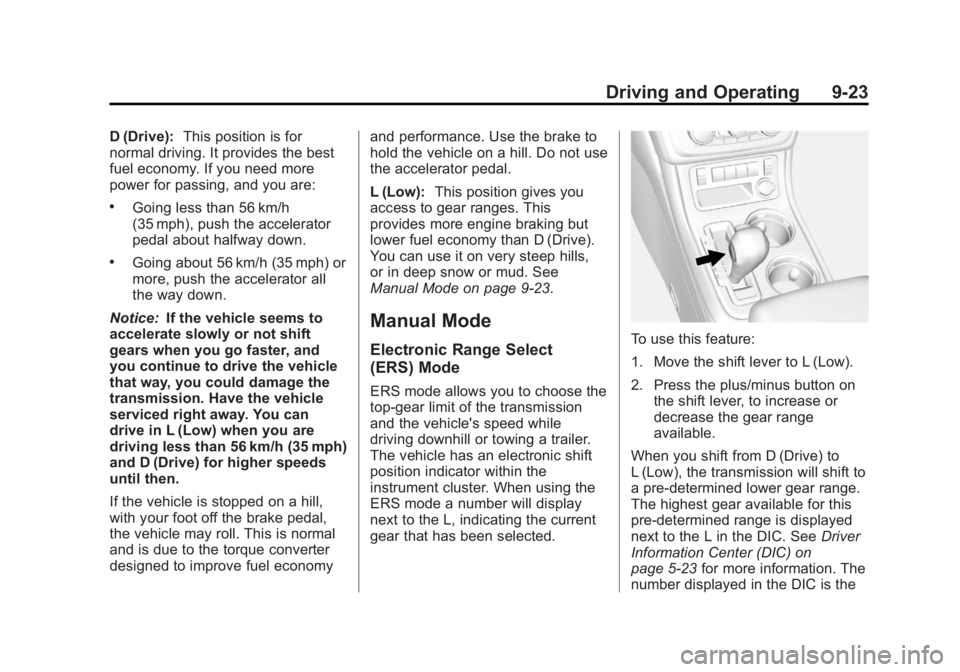
ERS mode allows you to choose the
top-gear limit of the transmission
and the vehicle's speed while
driving downhill or towing a trailer.
The vehicle has an electronic shift
position indicator within the
instrument cluster. When using the
ERS mode a number will display
next to the L, indicating the current
gear that has been selected.
To use this feature:
1. Move the shift lever to L (Low).
2. Press the plus/minus button on the shift lever, to increase or
decrease the gear range
available.
When you shift from D (Drive) to
L (Low), the transmission will shift to
a pre-determined lower gear range.
The highest gear available for this
pre-determined range is displayed
next to the L in the DIC. See Driver
Information Center (DIC) on
page 5‑23 for more information. The
number displayed in the DIC is the
Page 255 of 410
Black plate (39,1)Acadia/Acadia Denali Owner Manual - 2013 - crc2 - 12/11/12
Driving and Operating 9-39
Prohibited Fuels
Gasolines containing oxygenates,
such as ethers and ethanol, as well
as reformulated gasolines are
available in some cities. If these
gasolines comply with the
previously described specification,
then they are acceptable to use.
However, E85 (85% ethanol) and
other fuels containing more than
15% ethanol must be used only in
flex fuel vehicles.
{CAUTION
Do not use fuel containing
methanol. It can corrode metal
parts in the fuel system and also
damage plastic and rubber parts.
That damage would not be
covered under the vehicle
warranty.Some gasolines that are not
reformulated for low emissions can
contain an octane-enhancing
additive called
methylcyclopentadienyl manganese
tricarbonyl (MMT). Do not use
gasolines with MMT as they can
reduce spark plug life and affect
emission control system
performance. The malfunction
indicator lamp may turn on. If this
occurs, see your dealer for service.
Gasoline Specifications
At a minimum, gasoline should meet
ASTM specification D 4814. Some
gasolines contain an
octane-enhancing additive called
methylcyclopentadienyl manganese
tricarbonyl (MMT). We recommend
against the use of gasolines
containing MMT. See
“Prohibited
Fuels" in Recommended Fuel on
page 9‑38.
California Fuel
Requirements
If the vehicle is certified to meet
California Emissions Standards, it is
designed to operate on fuels that
meet California specifications. See
the underhood emission control
label. If this fuel is not available in
states adopting California Emissions
Standards, the vehicle will operate
satisfactorily on fuels meeting
federal specifications, but emission
control system performance might
be affected. The malfunction
indicator lamp could turn on and the
vehicle may not pass a smog-check
test. See Malfunction Indicator
Lamp on page 5‑16. If this occurs,
return to your authorized dealer for
diagnosis. If it is determined that the
condition is caused by the type of
fuel used, repairs may not be
covered by the vehicle warranty.
Page 257 of 410
Black plate (41,1)Acadia/Acadia Denali Owner Manual - 2013 - crc2 - 12/11/12
Driving and Operating 9-41
fuel contains MMT. We recommend
against the use of such gasolines.
Fuels containing MMT can reduce
spark plug life and affect emission
control system performance. The
malfunction indicator lamp might
turn on. If this occurs, return to your
dealer for service.
Filling the Tank
{WARNING
Fuel vapors and fuel fires burn
violently and can cause injury or
death.
.To help avoid injuries to you
and others, read and follow
all the instructions on the fuel
pump island.
.Turn off the engine when
refueling.
.Keep sparks, flames, and
smoking materials away
from fuel.(Continued)
WARNING (Continued)
.Do not leave the fuel pump
unattended.
.Do not reenter the vehicle
while pumping fuel.
.Keep children away from the
fuel pump and never let
children pump fuel.
.Fuel can spray out if the fuel
cap is opened too quickly.
This spray can happen if the
tank is nearly full, and is
more likely in hot weather.
Open the fuel cap slowly and
wait for any hiss noise to stop
then unscrew the cap all
the way
The tethered fuel cap is located
behind a hinged fuel door on the
driver side of the vehicle.
To open the fuel door, push the
rearward center edge in and release
and it will open.
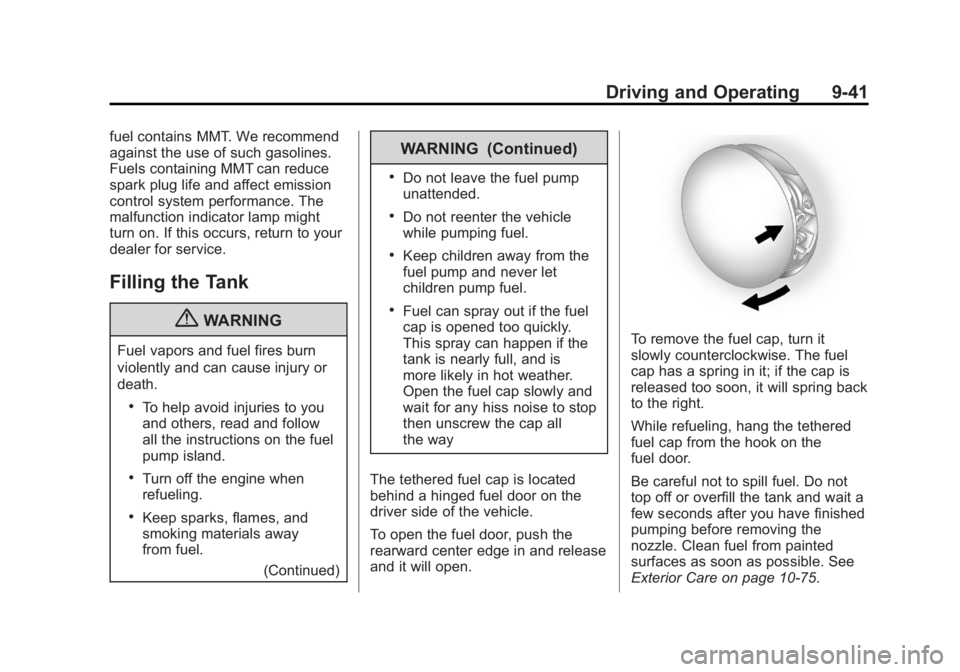
To remove the fuel cap, turn it
slowly counterclockwise. The fuel
cap has a spring in it; if the cap is
released too soon, it will spring back
to the right.
While refueling, hang the tethered
fuel cap from the hook on the
fuel door.
Be careful not to spill fuel. Do not
top off or overfill the tank and wait a
few seconds after you have finished
pumping before removing the
nozzle. Clean fuel from painted
surfaces as soon as possible. See
Exterior Care on page 10‑75.
Page 282 of 410
Black plate (16,1)Acadia/Acadia Denali Owner Manual - 2013 - crc2 - 12/11/12
10-16 Vehicle Care
8. If the coolant level inside theradiator filler neck is low, add
more of the proper DEX-COOL
coolant mixture through the filler
neck until the level is back up to
the base of the filler neck.
9. Replace the pressure cap tightly. At any time during this
procedure if coolant begins to
flow out of the filler neck,
reinstall the pressure cap.
Notice: If the pressure cap is not
tightly installed, coolant loss and
possible engine damage may
occur. Be sure the cap is properly
and tightly secured.
Engine Overheating
The vehicle has several indicators
to warn of engine overheating.
There is an engine coolant
temperature gauge on the
instrument panel cluster. See
Engine Coolant Temperature Gauge
on page 5‑12. The vehicle may also display an
ENGINE OVERHEATED IDLE
ENGINE and ENGINE
OVERHEATED STOP ENGINE
message in the Driver Information
Center (DIC). See
Engine Cooling
System Messages on page 5‑33.
You may decide not to lift the hood
when this warning appears, but
instead get service help right away.
See Roadside Assistance Program
(Mexico) on page 13‑7 orRoadside
Assistance Program (U.S. and
Canada) on page 13‑10.
If you do decide to lift the hood,
make sure the vehicle is parked on
a level surface.
Then check to see if the engine
cooling fans are running. If the
engine is overheating, both fans
should be running. If they are not,
do not continue to run the engine
and have the vehicle serviced.
Notice: Running the engine
without coolant may cause
damage or a fire. Vehicle damage
would not be covered by the warranty. See
Overheated Engine
Protection Operating Mode on
page 10‑17 for information on
driving to a safe place in an
emergency.
If Steam Is Coming from the
Engine Compartment
{WARNING
Steam from an overheated engine
can burn you badly, even if you
just open the hood. Stay away
from the engine if you see or hear
steam coming from it. Turn it off
and get everyone away from the
vehicle until it cools down. Wait
until there is no sign of steam or
coolant before you open
the hood.
If you keep driving when the
vehicles engine is overheated,
the liquids in it can catch fire. You
or others could be badly burned.
(Continued)
Page 285 of 410
Black plate (19,1)Acadia/Acadia Denali Owner Manual - 2013 - crc2 - 12/11/12
Vehicle Care 10-19
may fall below freezing, use a fluid
that has sufficient protection against
freezing.
Adding Washer Fluid
When the windshield washer fluid
reservoir is low, a WASHER FLUID
LOW ADD FLUID message will be
displayed on the Driver Information
Center (DIC). SeeWasher Fluid
Messages on page 5‑41 for more
information.
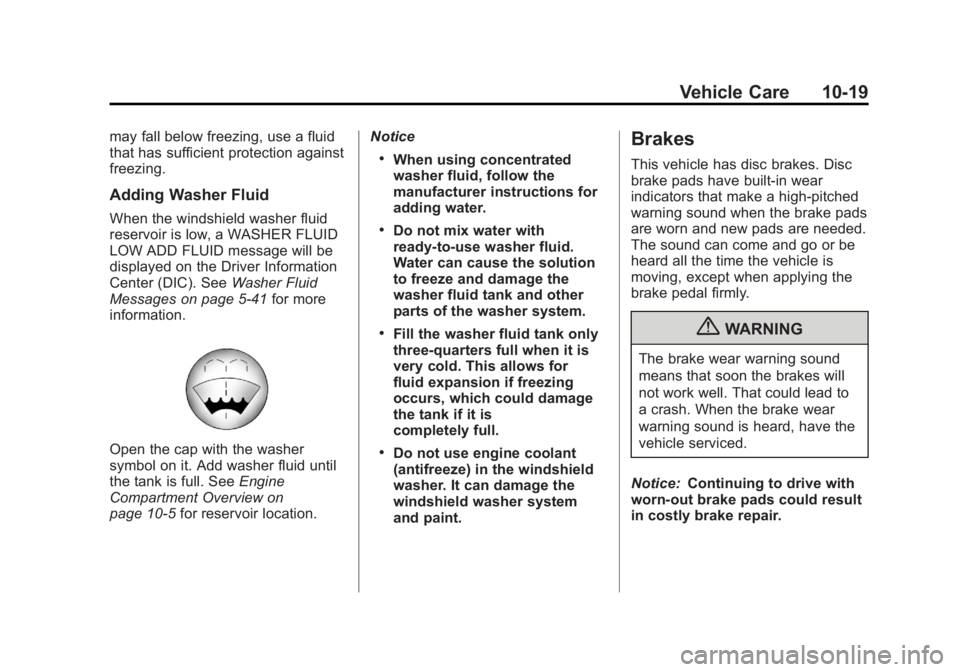
Open the cap with the washer
symbol on it. Add washer fluid until
the tank is full. See Engine
Compartment Overview on
page 10‑5 for reservoir location. Notice
.When using concentrated
washer fluid, follow the
manufacturer instructions for
adding water.
.Do not mix water with
ready-to-use washer fluid.
Water can cause the solution
to freeze and damage the
washer fluid tank and other
parts of the washer system.
.Fill the washer fluid tank only
three-quarters full when it is
very cold. This allows for
fluid expansion if freezing
occurs, which could damage
the tank if it is
completely full.
.Do not use engine coolant
(antifreeze) in the windshield
washer. It can damage the
windshield washer system
and paint.
Brakes
This vehicle has disc brakes. Disc
brake pads have built-in wear
indicators that make a high-pitched
warning sound when the brake pads
are worn and new pads are needed.
The sound can come and go or be
heard all the time the vehicle is
moving, except when applying the
brake pedal firmly.
{WARNING
The brake wear warning sound
means that soon the brakes will
not work well. That could lead to
a crash. When the brake wear
warning sound is heard, have the
vehicle serviced.
Notice: Continuing to drive with
worn-out brake pads could result
in costly brake repair.
Page 358 of 410
Black plate (10,1)Acadia/Acadia Denali Owner Manual - 2013 - crc2 - 12/11/12
11-10 Service and Maintenance
Hoses
Hoses transport fluids and should
be regularly inspected to ensure
that there are no cracks or leaks.
With a multi-point inspection, your
dealer can inspect the hoses and
advise if replacement is needed.
Lamps
Properly working headlamps,
taillamps, and brake lamps are
important to see and be seen on
the road.
.Signs that the headlamps need
attention include dimming, failure
to light, cracking, or damage.
The brake lamps need to be
checked periodically to ensure
that they light when braking.
.With a multi-point inspection,
your dealer can check the lamps
and note any concerns.Shocks and Struts
Shocks and struts help aid in control
for a smoother ride.
.Signs of wear may include
steering wheel vibration, bounce/
sway while braking, longer
stopping distance, or uneven
tire wear.
.As part of the multi-point
inspection, trained dealer
technicians can visually inspect
the shocks and struts for signs
of leaking, blown seals,
or damage, and can advise
when service is needed.
Tires
Tires need to be properly inflated,
rotated, and balanced. Maintaining
the tires can save money and fuel,
and can reduce the risk of tire
failure.
.Signs that the tires need to be
replaced include three or more
visible treadwear indicators; cord
or fabric showing through the rubber; cracks or cuts in the
tread or sidewall; or a bulge or
split in the tire.
.Trained dealer technicians can
inspect and recommend the right
tires. Your dealer can also
provide tire/wheel balancing
services to ensure smooth
vehicle operation at all speeds.
Your dealer sells and services
name brand tires.
Vehicle Care
To help keep the vehicle looking like
new, vehicle care products are
available from your dealer. For
information on how to clean and
protect the vehicle’s interior and
exterior, see Interior Care on
page 10‑78 andExterior Care on
page 10‑75.
Page 403 of 410
Black plate (5,1)Acadia/Acadia Denali Owner Manual - 2013 - crc2 - 12/11/12
INDEX i-5
Fuel . . . . . . . . . . . . . . . . . . . . . . . . . . . 9-38Additives . . . . . . . . . . . . . . . . . . . . . 9-40
Economy Driving . . . . . . . . . . . . . 1-22
Filling a Portable Fuel
Container . . . . . . . . . . . . . . . . . . . 9-42
Filling the Tank . . . . . . . . . . . . . . . 9-41
Foreign Countries . . . . . . . . . . . . 9-40
Gasoline Specifications . . . . . . . 9-39
Gauge . . . . . . . . . . . . . . . . . . . . . . . . 5-11
Recommended . . . . . . . . . . . . . . . 9-38
Requirements, California . . . . . 9-39
System Messages . . . . . . . . . . . . 5-35
Fuses Engine CompartmentFuse Block . . . . . . . . . . . . . . . . 10-28
Fuses and Circuit
Breakers . . . . . . . . . . . . . . . . . . 10-28
Instrument Panel Fuse Block . . . . . . . . . . . . . . . . . . . . . . 10-34
G
Garage Door Opener . . . . . . . . . . 5-49Programming . . . . . . . . . . . . . . . . . 5-49
Gasoline Specifications . . . . . . . . . . . . . . . . . 9-39 Gauges
Engine Coolant
Temperature . . . . . . . . . . . . . . . . 5-12
Fuel . . . . . . . . . . . . . . . . . . . . . . . . . . 5-11
Odometer . . . . . . . . . . . . . . . . . . . . . 5-11
Speedometer . . . . . . . . . . . . . . . . . 5-11
Tachometer . . . . . . . . . . . . . . . . . . . 5-11
Voltmeter . . . . . . . . . . . . . . . . . . . . . 5-13
Warning Lights and Indicators . . . . . . . . . . . . . . . . . . . . 5-9
General Information
Service and Maintenance . . . . . 11-1
Towing . . . . . . . . . . . . . . . . . . . . . . . . 9-43
Vehicle Care . . . . . . . . . . . . . . . . . . 10-2
Glove Box . . . . . . . . . . . . . . . . . . . . . . 4-1
GM Mobility Reimbursement Program . . . . . . . . . . . . . . . . . . . . . . 13-7
H
Hazard Warning Flashers . . . . . . . 6-3
Head Restraints . . . . . . . . . . . . . . . . 3-2
Head-up Display . . . . . . . . . . . . . . . 5-28 Headlamps
Aiming . . . . . . . . . . . . . . . . . . . . . . 10-25
Bulb Replacement . . . . . . . . . . 10-26
Daytime Running Lamps/
Automatic Headlamp
System . . . . . . . . . . . . . . . . . . . . . . . 6-2
Delayed . . . . . . . . . . . . . . . . . . . . . . . 6-3
Flash-to-Pass . . . . . . . . . . . . . . . . . . 6-2
High-Beam On Light . . . . . . . . . . 5-22
High/Low Beam Changer . . . . . . 6-2
Heated and Ventilated Front
Seats . . . . . . . . . . . . . . . . . . . . . . . . . 3-8
Heated Mirrors . . . . . . . . . . . . . . . . . 2-16
Heater Engine . . . . . . . . . . . . . . . . . . . . . . . . 9-17
Heating and Air Conditioning . . . 8-1
High Voltage Devices and
Wiring . . . . . . . . . . . . . . . . . . . . . . . 10-27
High-Beam On Light . . . . . . . . . . . 5-22
Highway Hypnosis . . . . . . . . . . . . . . 9-6
Hill and Mountain Roads . . . . . . . . 9-6
Hill Start Assist (HSA) . . . . . . . . . 9-27
Hood . . . . . . . . . . . . . . . . . . . . . . . . . . 10-4
Horn . . . . . . . . . . . . . . . . . . . . . . . . . . . . 5-3
How to Wear Safety Belts Properly . . . . . . . . . . . . . . . . . . . . . . 3-15