mirror controls GMC ACADIA 2014 Owner's Manual
[x] Cancel search | Manufacturer: GMC, Model Year: 2014, Model line: ACADIA, Model: GMC ACADIA 2014Pages: 414, PDF Size: 4.21 MB
Page 1 of 414
Black plate (1,1)GMC Acadia/Acadia Denali Owner Manual (GMNA-Localizing-U.S./Canada/
Mexico-6014315) - 2014 - crc - 8/15/13
2014 GMC Acadia/Acadia Denali Owner ManualM
In Brief. . . . . . . . . . . . . . . . . . . . . . . . 1-1
Instrument Panel . . . . . . . . . . . . . . 1-2
Initial Drive Information . . . . . . . . 1-4
Vehicle Features . . . . . . . . . . . . . 1-16
Performance and Maintenance . . . . . . . . . . . . . . . . 1-21
Keys, Doors, and Windows . . . . . . . . . . . . . . . . . . . . 2-1
Keys and Locks . . . . . . . . . . . . . . . 2-1
Doors . . . . . . . . . . . . . . . . . . . . . . . . . . 2-8
Vehicle Security . . . . . . . . . . . . . . 2-11
Exterior Mirrors . . . . . . . . . . . . . . . 2-14
Interior Mirrors . . . . . . . . . . . . . . . . 2-17
Windows . . . . . . . . . . . . . . . . . . . . . 2-18
Roof . . . . . . . . . . . . . . . . . . . . . . . . . . 2-20
Seats and Restraints . . . . . . . . . 3-1
Head Restraints . . . . . . . . . . . . . . . 3-2
Front Seats . . . . . . . . . . . . . . . . . . . . 3-3
Rear Seats . . . . . . . . . . . . . . . . . . . . 3-9
Safety Belts . . . . . . . . . . . . . . . . . . 3-14
Airbag System . . . . . . . . . . . . . . . . 3-23
Child Restraints . . . . . . . . . . . . . . 3-36 Storage
. . . . . . . . . . . . . . . . . . . . . . . 4-1
Storage Compartments . . . . . . . . 4-1
Additional Storage Features . . . 4-3
Roof Rack System . . . . . . . . . . . . . 4-4
Instruments and Controls . . . . 5-1
Controls . . . . . . . . . . . . . . . . . . . . . . . 5-2
Warning Lights, Gauges, and
Indicators . . . . . . . . . . . . . . . . . . . . 5-9
Information Displays . . . . . . . . . . 5-23
Vehicle Messages . . . . . . . . . . . . 5-32
Vehicle Personalization . . . . . . . 5-42
Universal Remote System . . . . 5-49
Lighting . . . . . . . . . . . . . . . . . . . . . . . 6-1
Exterior Lighting . . . . . . . . . . . . . . . 6-1
Interior Lighting . . . . . . . . . . . . . . . . 6-5
Lighting Features . . . . . . . . . . . . . . 6-6
Infotainment System . . . . . . . . . 7-1
Introduction . . . . . . . . . . . . . . . . . . . . 7-1
Radio . . . . . . . . . . . . . . . . . . . . . . . . . . 7-6
Audio Players . . . . . . . . . . . . . . . . 7-12
Rear Seat Infotainment . . . . . . . 7-18 Phone . . . . . . . . . . . . . . . . . . . . . . . . 7-20
Settings . . . . . . . . . . . . . . . . . . . . . . 7-27
Trademarks and License
Agreements . . . . . . . . . . . . . . . . . 7-30
Climate Controls . . . . . . . . . . . . . 8-1
Climate Control Systems . . . . . . 8-1
Air Vents . . . . . . . . . . . . . . . . . . . . . 8-11
Maintenance . . . . . . . . . . . . . . . . . 8-12
Driving and Operating . . . . . . . . 9-1
Driving Information . . . . . . . . . . . . . 9-2
Starting and Operating . . . . . . . 9-14
Engine Exhaust . . . . . . . . . . . . . . 9-21
Automatic Transmission . . . . . . 9-22
Drive Systems . . . . . . . . . . . . . . . . 9-25
Brakes . . . . . . . . . . . . . . . . . . . . . . . 9-26
Ride Control Systems . . . . . . . . 9-28
Cruise Control . . . . . . . . . . . . . . . . 9-30
Driver Assistance Systems . . . 9-32
Fuel . . . . . . . . . . . . . . . . . . . . . . . . . . 9-42
Trailer Towing . . . . . . . . . . . . . . . . 9-46
Conversions and Add-Ons . . . 9-53
Page 5 of 414
Black plate (5,1)GMC Acadia/Acadia Denali Owner Manual (GMNA-Localizing-U.S./Canada/
Mexico-6014315) - 2014 - crc - 8/15/13
Introduction v
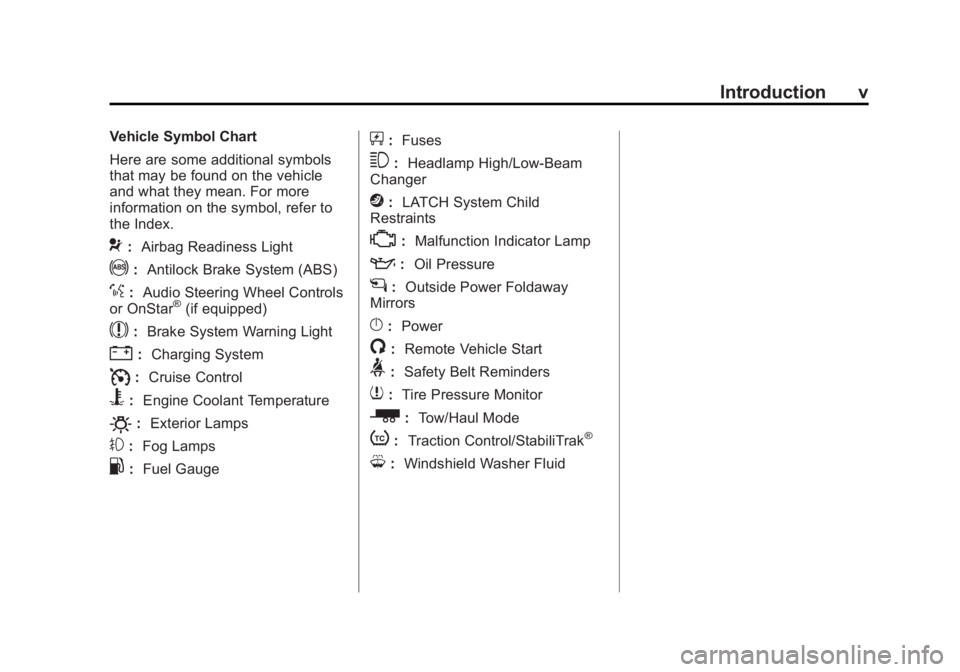
Vehicle Symbol Chart
Here are some additional symbols
that may be found on the vehicle
and what they mean. For more
information on the symbol, refer to
the Index.
9:Airbag Readiness Light
!:Antilock Brake System (ABS)
%:Audio Steering Wheel Controls
or OnStar®(if equipped)
$: Brake System Warning Light
":Charging System
I:Cruise Control
B: Engine Coolant Temperature
O:Exterior Lamps
#:Fog Lamps
.: Fuel Gauge
+:Fuses
3: Headlamp High/Low-Beam
Changer
j: LATCH System Child
Restraints
*: Malfunction Indicator Lamp
::Oil Pressure
g:Outside Power Foldaway
Mirrors
}: Power
/:Remote Vehicle Start
>:Safety Belt Reminders
7:Tire Pressure Monitor
_: Tow/Haul Mode
t:Traction Control/StabiliTrak®
M:Windshield Washer Fluid
Page 7 of 414
Black plate (1,1)GMC Acadia/Acadia Denali Owner Manual (GMNA-Localizing-U.S./Canada/
Mexico-6014315) - 2014 - crc - 8/15/13
In Brief 1-1
In Brief
Instrument Panel
Instrument Panel . . . . . . . . . . . . . . 1-2
Initial Drive Information
Initial Drive Information . . . . . . . . 1-4
Remote Keyless Entry (RKE)System . . . . . . . . . . . . . . . . . . . . . . 1-4
Remote Vehicle Start . . . . . . . . . 1-4
Door Locks . . . . . . . . . . . . . . . . . . . 1-5
Liftgate . . . . . . . . . . . . . . . . . . . . . . . . 1-6
Windows . . . . . . . . . . . . . . . . . . . . . . 1-6
Seat Adjustment . . . . . . . . . . . . . . 1-7
Memory Features . . . . . . . . . . . . . 1-8
Second Row Seats . . . . . . . . . . . 1-8
Third Row Seats . . . . . . . . . . . . . . 1-8
Heated and Cooled Front Seats . . . . . . . . . . . . . . . . . . . . . . . . 1-9
Head Restraint Adjustment . . . . 1-9
Safety Belts . . . . . . . . . . . . . . . . . . 1-10 Passenger Sensing
System . . . . . . . . . . . . . . . . . . . . . 1-10
Mirror Adjustment . . . . . . . . . . . . 1-10
Steering Wheel Adjustment . . . . . . . . . . . . . . . . . 1-12
Interior Lighting . . . . . . . . . . . . . . 1-12
Exterior Lighting . . . . . . . . . . . . . 1-13
Windshield Wiper/Washer . . . . 1-13
Climate Controls . . . . . . . . . . . . . 1-14
Transmission . . . . . . . . . . . . . . . . 1-15
Vehicle Features
Radio(s) . . . . . . . . . . . . . . . . . . . . . 1-16
Satellite Radio . . . . . . . . . . . . . . . 1-17
Portable Audio Devices . . . . . . 1-17
Bluetooth
®. . . . . . . . . . . . . . . . . . . 1-18
Steering Wheel Controls . . . . . 1-18
Cruise Control . . . . . . . . . . . . . . . 1-19
Infotainment System . . . . . . . . . 1-19
Forward Collision Alert (FCA)
System . . . . . . . . . . . . . . . . . . . . . 1-19 Lane Departure
Warning (LDW) . . . . . . . . . . . . . 1-19
Side Blind Zone Alert (SBZA) . . . . . . . . . . . . . . . 1-20
Rear Vision
Camera (RVC) . . . . . . . . . . . . . 1-20
Ultrasonic Parking Assist . . . . 1-20
Power Outlets . . . . . . . . . . . . . . . 1-20
Universal Remote System . . . 1-20
Sunroof . . . . . . . . . . . . . . . . . . . . . . 1-21
Performance and Maintenance
Traction Control/Electronic Stability Control . . . . . . . . . . . . 1-21
Tire Pressure Monitor . . . . . . . . 1-22
Engine Oil Life System . . . . . . 1-22
Driving for Better Fuel Economy . . . . . . . . . . . . . . . . . . . 1-22
Roadside Assistance Program . . . . . . . . . . . . . . . . . . . . 1-23
OnStar
®. . . . . . . . . . . . . . . . . . . . . 1-23
Page 14 of 414
Black plate (8,1)GMC Acadia/Acadia Denali Owner Manual (GMNA-Localizing-U.S./Canada/
Mexico-6014315) - 2014 - crc - 8/15/13
1-8 In Brief
Memory Features
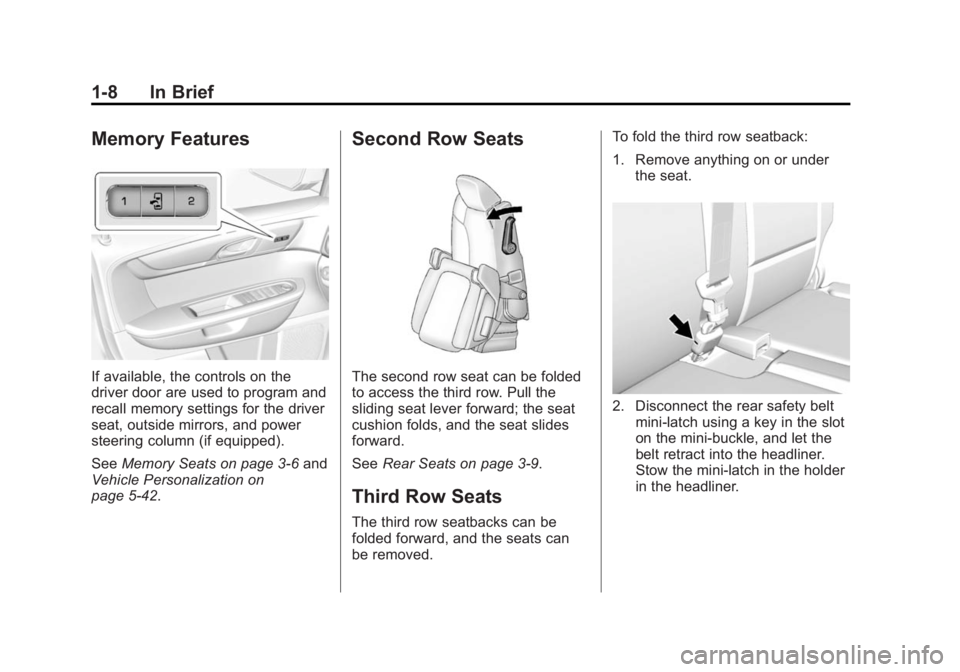
If available, the controls on the
driver door are used to program and
recall memory settings for the driver
seat, outside mirrors, and power
steering column (if equipped).
SeeMemory Seats on page 3-6 and
Vehicle Personalization on
page 5-42.
Second Row Seats
The second row seat can be folded
to access the third row. Pull the
sliding seat lever forward; the seat
cushion folds, and the seat slides
forward.
See Rear Seats on page 3-9.
Third Row Seats
The third row seatbacks can be
folded forward, and the seats can
be removed. To fold the third row seatback:
1. Remove anything on or under
the seat.
2. Disconnect the rear safety beltmini-latch using a key in the slot
on the mini-buckle, and let the
belt retract into the headliner.
Stow the mini-latch in the holder
in the headliner.
Page 26 of 414
Black plate (20,1)GMC Acadia/Acadia Denali Owner Manual (GMNA-Localizing-U.S./Canada/
Mexico-6014315) - 2014 - crc - 8/15/13
1-20 In Brief
Side Blind Zone
Alert (SBZA)
If equipped, SBZA will detect
vehicles in the next lane over in the
vehicle's side blind zone area.
When this happens, the SBZA
display will light up in the
corresponding outside side mirror
and will flash if the turn signal is on.
SeeSide Blind Zone Alert (SBZA)
on page 9-35.
Rear Vision
Camera (RVC)
If equipped, RVC displays a view of
the area behind the vehicle, on the
center stack display, when the
vehicle is shifted into R (Reverse).
See Rear Vision Camera (RVC) on
page 9-37.
Ultrasonic Parking Assist
If equipped, this system uses
sensors on the rear bumper to
assist with parking and avoiding
objects while in R (Reverse).
It operates at speeds less than
8 km/h (5 mph). Ultrasonic Rear
Parking Assist (URPA) uses audible
beeps to provide distance and
system information.
Keep the sensors on the vehicle's
rear bumper clean to ensure proper
operation.
See Ultrasonic Parking Assist on
page 9-34.
Power Outlets
The vehicle has 12-volt accessory
power outlets, which can be used to
plug in electrical equipment, such as
a cell phone or MP3 player.
The power outlets are located:
.On the center stack below the
climate controls.
.Inside the center floor console.
.At the rear of the center floor
console.
.In the rear cargo area.
To use the outlets, remove the
cover.
See Power Outlets on page 5-7.
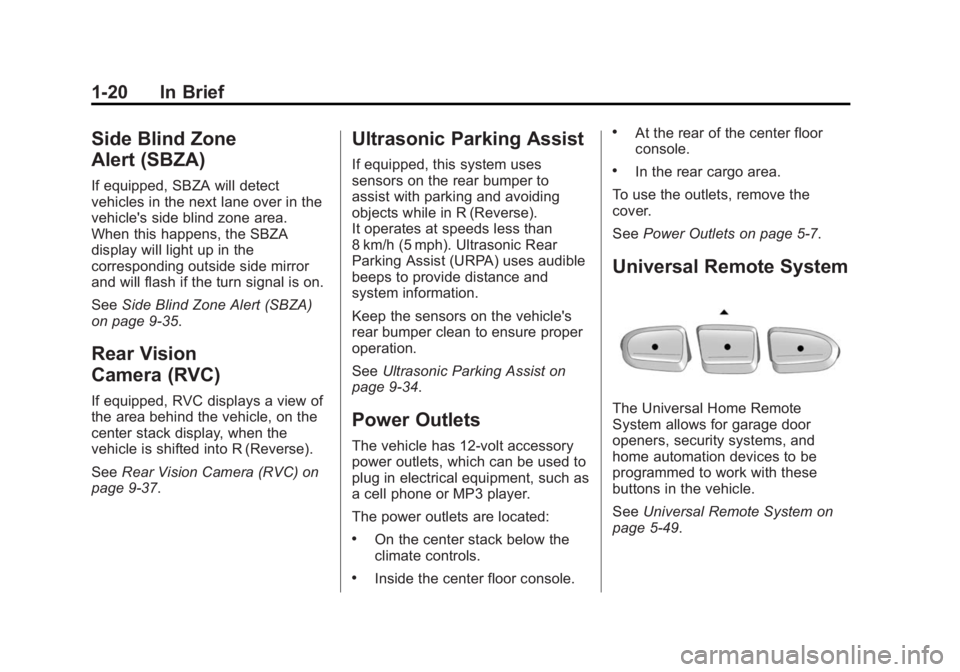
Universal Remote System
The Universal Home Remote
System allows for garage door
openers, security systems, and
home automation devices to be
programmed to work with these
buttons in the vehicle.
SeeUniversal Remote System on
page 5-49.
Page 31 of 414
Black plate (1,1)GMC Acadia/Acadia Denali Owner Manual (GMNA-Localizing-U.S./Canada/
Mexico-6014315) - 2014 - crc - 8/15/13
Keys, Doors, and Windows 2-1
Keys, Doors, and
Windows
Keys and Locks
Keys . . . . . . . . . . . . . . . . . . . . . . . . . . 2-1
Remote Keyless Entry (RKE)System . . . . . . . . . . . . . . . . . . . . . . 2-2
Remote Keyless Entry (RKE) System Operation . . . . . . . . . . . 2-2
Remote Vehicle Start . . . . . . . . . 2-4
Door Locks . . . . . . . . . . . . . . . . . . . 2-6
Power Door Locks . . . . . . . . . . . . 2-6
Delayed Locking . . . . . . . . . . . . . . 2-7
Automatic Door Locks . . . . . . . . . 2-7
Lockout Protection . . . . . . . . . . . . 2-7
Safety Locks . . . . . . . . . . . . . . . . . . 2-7
Doors
Liftgate . . . . . . . . . . . . . . . . . . . . . . . . 2-8
Vehicle Security
Vehicle Security . . . . . . . . . . . . . . 2-11
Vehicle Alarm System . . . . . . . . 2-11
Immobilizer . . . . . . . . . . . . . . . . . . 2-13
Immobilizer Operation . . . . . . . 2-13
Exterior Mirrors
Convex Mirrors . . . . . . . . . . . . . . 2-14
Power Mirrors . . . . . . . . . . . . . . . . 2-14
Folding Mirrors . . . . . . . . . . . . . . . 2-15
Heated Mirrors . . . . . . . . . . . . . . . 2-15
Automatic Dimming Mirror . . . 2-16
Blind Spot Mirrors . . . . . . . . . . . 2-16
Park Tilt Mirrors . . . . . . . . . . . . . . 2-17
Interior Mirrors
Interior Rearview Mirrors . . . . . 2-17
Manual Rearview Mirror . . . . . . 2-18
Automatic Dimming Rearview Mirror . . . . . . . . . . . . . . . . . . . . . . . 2-18
Windows
Windows . . . . . . . . . . . . . . . . . . . . . 2-18
Power Windows . . . . . . . . . . . . . 2-18
Sun Visors . . . . . . . . . . . . . . . . . . . 2-20
Roof
Sunroof . . . . . . . . . . . . . . . . . . . . . . 2-20
Keys and Locks
Keys
{Warning
Leaving children in a vehicle with
the ignition key is dangerous and
children or others could be
seriously injured or killed. They
could operate the power windows
or other controls or make the
vehicle move. The windows will
function with the keys in the
ignition, and children or others
could be caught in the path of a
closing window. Do not leave
children in a vehicle with the
ignition key.
Page 45 of 414
Black plate (15,1)GMC Acadia/Acadia Denali Owner Manual (GMNA-Localizing-U.S./Canada/
Mexico-6014315) - 2014 - crc - 8/15/13
Keys, Doors, and Windows 2-15
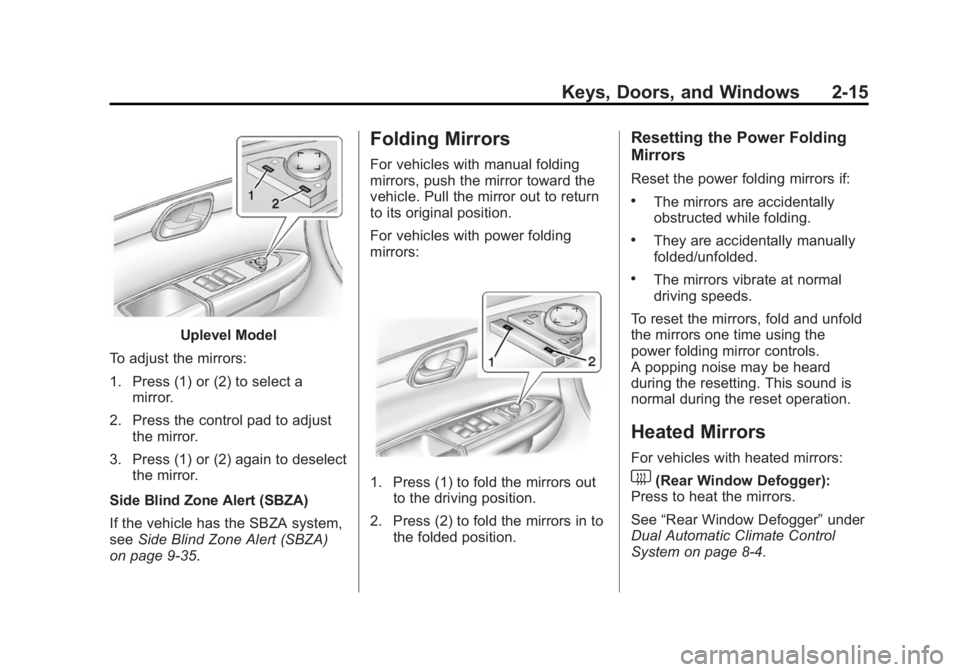
Uplevel Model
To adjust the mirrors:
1. Press (1) or (2) to select a mirror.
2. Press the control pad to adjust the mirror.
3. Press (1) or (2) again to deselect the mirror.
Side Blind Zone Alert (SBZA)
If the vehicle has the SBZA system,
see Side Blind Zone Alert (SBZA)
on page 9-35.
Folding Mirrors
For vehicles with manual folding
mirrors, push the mirror toward the
vehicle. Pull the mirror out to return
to its original position.
For vehicles with power folding
mirrors:
1. Press (1) to fold the mirrors out to the driving position.
2. Press (2) to fold the mirrors in to the folded position.
Resetting the Power Folding
Mirrors
Reset the power folding mirrors if:
.The mirrors are accidentally
obstructed while folding.
.They are accidentally manually
folded/unfolded.
.The mirrors vibrate at normal
driving speeds.
To reset the mirrors, fold and unfold
the mirrors one time using the
power folding mirror controls.
A popping noise may be heard
during the resetting. This sound is
normal during the reset operation.
Heated Mirrors
For vehicles with heated mirrors:
1(Rear Window Defogger):
Press to heat the mirrors.
See “Rear Window Defogger” under
Dual Automatic Climate Control
System on page 8-4.
Page 58 of 414
Black plate (6,1)GMC Acadia/Acadia Denali Owner Manual (GMNA-Localizing-U.S./Canada/
Mexico-6014315) - 2014 - crc - 8/15/13
3-6 Seats and Restraints
To recline the seatback:
1. Lift the lever.
2. Move the seatback to thedesired position, and then
release the lever to lock the
seatback in place.
3. Push and pull on the seatback to make sure it is locked.
To return the seatback to the upright
position:
1. Lift the lever fully without applying pressure to the
seatback, and the seatback will
return to the upright position. 2. Push and pull on the seatback to
make sure it is locked.
Power Reclining Seatbacks
To adjust a power seatback,
if equipped:
.Tilt the top of the control
rearward to recline.
.Tilt the top of the control forward
to raise.
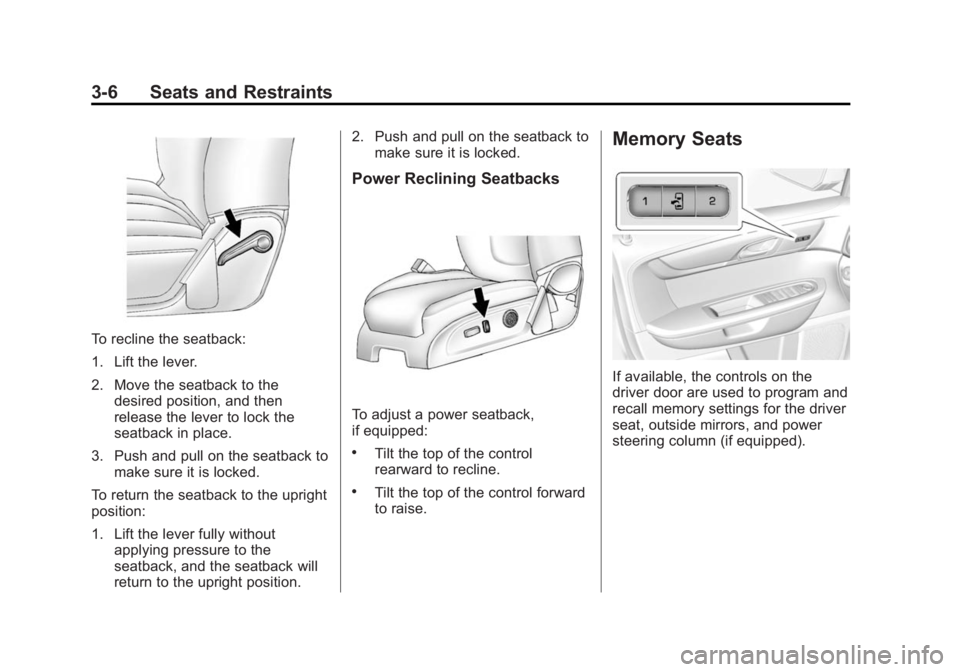
Memory Seats
If available, the controls on the
driver door are used to program and
recall memory settings for the driver
seat, outside mirrors, and power
steering column (if equipped).
Page 59 of 414
Black plate (7,1)GMC Acadia/Acadia Denali Owner Manual (GMNA-Localizing-U.S./Canada/
Mexico-6014315) - 2014 - crc - 8/15/13
Seats and Restraints 3-7
Storing Memory Positions
To save into memory:
1. Adjust the driver seat andseatback recliner, both outside
mirrors, and the power steering
column (if equipped).
Not all vehicles will have the
ability to save and recall the
mirror positions.
2. Press and hold “1”until
two beeps sound.
3. Repeat for a second driver position using “2.”
To recall, press and release “1”or
“2.” The vehicle must be in P (Park).
A single beep will sound. The seat,
outside mirrors, and power steering
column (if equipped) will move to
the positions previously stored for
the identified driver. Memory Remote Recall
The memory feature can recall the
driver seat, outside mirrors, and
power steering column (if equipped)
to stored positions when entering
the vehicle.
To activate, unlock the driver door
with the Remote Keyless
Entry (RKE) transmitter. The driver
seat, outside mirrors, and power
steering column (if equipped) will
move to the memory positions
associated with the transmitter used
to unlock the vehicle.
This feature is turned on or off using
the vehicle personalization menu.
See
Vehicle Personalization on
page 5-42.
To stop recall movement, press one
of the power seat controls, memory
buttons, power mirror buttons, or the
power steering column control (if
equipped).
If something has blocked the driver
seat and/or steering column while
recalling a memory position, the recall may stop. Remove the
obstruction; then press and hold the
appropriate manual control for the
memory item that is not recalling for
two seconds. Try recalling the
memory position again by pressing
the appropriate memory button.
If the memory position is still not
recalling, see your dealer for
service.
Easy Exit Driver Seat
The easy exit feature can move the
driver seat rearward and the power
steering column (if equipped) up
and forward to allow extra room to
exit the vehicle.
S(Easy Exit Positions):
Press to
activate the recall. The vehicle must
be in P (Park).
If this feature is programmed on in
the vehicle personalization menu,
automatic driver seat and power
steering column movement occur
when the ignition key is removed.
Page 150 of 414
Black plate (36,1)GMC Acadia/Acadia Denali Owner Manual (GMNA-Localizing-U.S./Canada/
Mexico-6014315) - 2014 - crc - 8/15/13
5-36 Instruments and Controls
TIGHTEN GAS CAP
This message may display along
with the check engine light on the
instrument cluster if the vehicle's
fuel cap is not tightened properly.
SeeMalfunction Indicator Lamp on
page 5-16. Reinstall the fuel cap
fully. See Filling the Tank on
page 9-43. The diagnostic system
can determine if the fuel cap has
been left off or improperly installed.
A loose or missing fuel cap allows
fuel to evaporate into the
atmosphere. A few driving trips with
the cap properly installed should
turn this light and message off.
Key and Lock Messages
REPLACE BATTERY IN
REMOTE KEY
This message displays if a Remote
Keyless Entry (RKE) transmitter
battery is low. The battery needs to
be replaced in the transmitter. See
“Battery Replacement” under
Remote Keyless Entry (RKE)
System Operation on page 2-2.
Lamp Messages
AUTOMATIC LIGHT
CONTROL OFF
This message displays when the
automatic headlamps are turned off.
This message clears itself after
10 seconds.
AUTOMATIC LIGHT
CONTROL ON
This message displays when the
automatic headlamps are turned on.
This message clears itself after
10 seconds.
TURN SIGNAL ON
This message displays and a chime
sounds if a turn signal is left on for
1.2 km (0.75 mi). Move the turn
signal lever to the off position.
Object Detection System
Messages
FORWARD COLLISION ALERT
UNAVAILABLE
This message displays when
attempting to activate the Forward
Collision Alert (FCA) system when it
is temporarily unavailable. The FCA
system does not need service.
This message could be due to the
camera being blocked. Cleaning the
outside of the windshield behind the
rearview mirror may correct the
issue.
FRT CAMERA BLOCKED
CLEAN WINDSHIELD
This message displays when the
camera is blocked. Cleaning the
outside of the windshield behind the
rearview mirror may correct the
issue. The Lane Departure Warning
system will not operate. Forward
Collision Alert (FCA) may not work
or may not work as well.