lock GMC ACADIA 2018 Repair Manual
[x] Cancel search | Manufacturer: GMC, Model Year: 2018, Model line: ACADIA, Model: GMC ACADIA 2018Pages: 423, PDF Size: 7.26 MB
Page 157 of 423
GMC Acadia/Acadia Denali Owner Manual (GMNA-Localizing-U.S./Canada/
Mexico-11349114) - 2018 - crc - 9/21/17
156 Instruments and Controls
Hands Free Liftgate Control
The liftgate may be operated with a
kicking motion under the left corner
of the rear bumper. SeeLiftgate
0 42.
Select Off, On-Open and Close,
or On-Open Only.
Reverse Tilt Mirror
When on, both the driver and
passenger, driver, or passenger
outside mirrors will tilt downward
when the vehicle is shifted to
R (Reverse) to improve visibility of
the ground near the rear wheels.
They will return to their previous
driving position when the vehicle is
shifted out of R (Reverse) or the
engine is turned off. See Reverse
Tilt Mirrors 050.
Select Off, On - Driver and
Passenger, On - Driver, or On -
Passenger.
Auto Wipe in Reverse Gear
When on and the front wiper is on,
the rear wiper will automatically
activate when the vehicle is shifted
to R (Reverse). Select Off or On.
Extended Hill Start Assist
This allows the duration of the Hill
Start Assist to be changed. See
Hill
Start Assist (HSA) 0235.
Select Extended Hold or
Standard Hold.
Lighting
Select and the following may
display:
. Vehicle Locator Lights
. Exit Lighting
Vehicle Locator Lights
This feature will flash the exterior
lamps and allows some of the
exterior lamps and most of the
interior lamps to turn on briefly when
Kon the Remote Keyless Entry
(RKE) transmitter is pressed to
locate the vehicle.
Select Off or On. Exit Lighting
This allows the selection of how
long the exterior lamps stay on
when leaving the vehicle when it is
dark outside.
Select Off, 30 Seconds, 60 Seconds,
or 120 Seconds.
Power Door Locks
Select and the following may
display:
.
Unlocked Door Anti-Lockout
. Auto Door Unlock
. Delayed Door Lock
Unlocked Door Anti-Lockout
When on, this feature will keep the
driver door from locking when the
door is open. If Off is selected, the
Delayed Door Lock menu will be
available.
Select Off or On.
Auto Door Unlock
This allows selection of which of the
doors will automatically unlock when
the vehicle is shifted into P (Park).
Page 158 of 423
GMC Acadia/Acadia Denali Owner Manual (GMNA-Localizing-U.S./Canada/
Mexico-11349114) - 2018 - crc - 9/21/17
Instruments and Controls 157
Select Off, All Doors, or Driver Door.
Delayed Door Lock
When on, this feature will delay the
locking of the doors. To override the
delay, press the power door lock
switch on the door.
Select Off or On.
Remote Lock, Unlock, Start
Select and the following may
display:
.Remote Unlock Light Feedback
. Remote Lock Feedback
. Remote Door Unlock
. Remote Start Auto Cool Seats
. Remote Start Auto Heat Seats
. Remote Window Operation
. Passive Door Unlock
. Passive Door Lock
. Remote Left in Vehicle Alert
Remote Unlock Light Feedback
When on, the exterior lamps will
flash when unlocking the vehicle
with the RKE transmitter. Select Off or Flash Lights.
Remote Lock Feedback
This allows selection of what type of
feedback is given when locking the
vehicle with the RKE transmitter.
Select Off, Lights and Horn, Lights
Only, or Horn Only.
Remote Door Unlock
This allows selection of which doors
will unlock when pressing
Kon the
RKE transmitter.
Select All Doors or Driver Door.
Remote Start Auto Cool Seats
If equipped and turned on, this
feature will turn the ventilated seats
on when using remote start on
warm days.
Select Off or On.
Remote Start Auto Heat Seats
If equipped and turned on, this
feature will turn the heated seats on
when using remote start on
cold days.
Select Off or On. Remote Window Operation
If equipped, this feature enables the
remote operation of all windows
from the RKE transmitter. See
“Remote Window Operation”
in
Power Windows 051.
Select Off or On.
Passive Door Unlock
This allows the selection of what
doors will unlock when using the
button on the driver door to unlock
the vehicle.
Select All Doors or Driver Door.
Passive Door Lock
This allows passive locking to be
turned on or off and selects
feedback. See Remote Keyless
Entry (RKE) System Operation 030.
Select Off, On with Horn
Chirp, or On.
Remote Left in Vehicle Alert
This feature sounds an alert when
the RKE transmitter is left in the
vehicle. This menu also enables
Remote No Longer In Vehicle Alert.
Page 167 of 423
GMC Acadia/Acadia Denali Owner Manual (GMNA-Localizing-U.S./Canada/
Mexico-11349114) - 2018 - crc - 9/21/17
166 Lighting
The high beams may not turn off
automatically if the system cannot
detect another vehicle's lamps
because of any of the following:
.The other vehicle's lamps are
missing, damaged, obstructed
from view, or otherwise
undetected.
. The other vehicle's lamps are
covered with dirt, snow, and/or
road spray.
. The other vehicle's lamps cannot
be detected due to dense
exhaust, smoke, fog, snow, road
spray, mist, or other airborne
obstructions.
. The vehicle's windshield is dirty,
cracked, or obstructed by
something that blocks the view
of the light sensor.
. The vehicle is loaded such that
the front end points upward,
causing the light sensor to aim
high and not detect headlamps
and taillamps.
. Driving on winding or hilly roads. The automatic high-beam
headlamps may need to be disabled
if any of the above conditions exist.
Exterior Lamps Off
Reminder
A warning chime sounds if the driver
door is opened while the ignition is
off and the exterior lamps are on.
Headlamp High/
Low-Beam Changer
3
:
Push the turn signal lever away
from you and release, to turn the
high beams on. To return to low
beams, push the lever again or pull
it toward you and release.
This indicator light turns on in the
instrument cluster when the
high-beam headlamps are on.
Flash-to-Pass
This feature is used to signal to the
vehicle ahead that you want
to pass.
If the headlamps are off or in the
low-beam position, pull the turn
signal lever toward you to
momentarily switch to high beams.
Release the lever to turn the
high-beam headlamps off.
Daytime Running
Lamps (DRL)
DRL can make it easier for others to
see the front of your vehicle during
the day. Fully functional DRL are
required on all vehicles first sold in
Canada.
If equipped with High Intensity
Discharge (HID) headlamps, the
dedicated DRL will come on when
all of the following conditions
are met:
. The ignition is on.
. The exterior lamp control is
in AUTO.
Page 188 of 423
GMC Acadia/Acadia Denali Owner Manual (GMNA-Localizing-U.S./Canada/
Mexico-11349114) - 2018 - crc - 9/21/17
Infotainment System 187
Viewing a Previous or Next
Picture
Touch
SorTfrom the picture
screen.
Rotating a Picture
Touch
wfrom the picture screen.
Enlarging a Picture
Touch
xfrom the picture screen.
Using the USB Picture Menu 1. Touch MENU from the picture screen.
2. Touch the appropriate menu: .Slide Show Time: Allows
selection of the slide show
interval.
. Clock, Temp. Display:
Allows selection of On or
Off to show the clock and
temperature on the full
screen.
. Display Settings: Adjusts
for Brightness and Contrast.
3. Touch Back on the infotainment display to exit.
Auxiliary Devices
Using the Auxiliary Input Jack
Settings menus and functions may
vary depending on vehicle options.
The auxiliary input jack can be used
to connect external audio devices
such as an iPod
®, iPhone®, MP3
player, CD player, and other
supported devices for use as
another source for audio listening.
This input jack is not an audio
output; do not plug headphones into
the front auxiliary input jack.
The auxiliary input jack is in the
center stack. The infotainment
system can play music connected
by the auxiliary device.
Play will begin when the system has
finished reading the information on
the device.
Playing Music
To play music from the device, if the
device is already connected:
1. Press
{.
2. Touch AUDIO. 3. Touch Source.
4. Touch AUX.
To adjust the tone settings, see
“Tone Settings” inOperation 0176.
Page 200 of 423
GMC Acadia/Acadia Denali Owner Manual (GMNA-Localizing-U.S./Canada/
Mexico-11349114) - 2018 - crc - 9/21/17
Climate Controls 199
Automatic Operation
The system automatically controls
the following four functions to heat
or cool the vehicle to the desired
temperature:
.Fan Speed
. Air Delivery Mode
. Air Conditioning
. Recirculation
When the AUTO indicator light is lit,
all four functions are operating
automatically. Each function can be
manually set and the selected
setting will be shown. This cancels
full automatic operation and the
AUTO indicator light turns off.
Functions that are not manually set
will continue to be automatically
controlled, although the AUTO
indicator light will not be lit.
To place the system in
automatic mode: 1. Press AUTO.
2. Set the driver and passenger temperature. To find your comfort setting,
start with 22 °C (72 °F) and
allow the system time to
stabilize. Then adjust the
temperature as needed for best
comfort.
To improve fuel efficiency and to
cool the vehicle faster, recirculation
may be automatically selected in
warm weather.
The recirculation light will not come
on when automatically controlled.
Press
@to manually select
recirculation; press it again to select
outside air.
Do not cover the solar sensor on the
top of the instrument panel near the
windshield. This sensor regulates
air temperature based on sun load.
See “Sensors” later in this section.
Manual Operation
O:Press to turn the climate control
system on or off. When the system
is off, outside air will be prevented
from entering the vehicle. When the
system is on, a button is pressed, or knob is turned, the climate control
system will turn on and deliver
airflow per the current setting.
9:
Turn clockwise or
counterclockwise to increase or
decrease the fan speed. Press the
knob to turn the fan off.
Press AUTO to return to automatic
operation.
Driver and Passenger
Temperature Control : The
temperature can be adjusted
separately for the driver and
passenger.
Turn the knob clockwise or
counterclockwise to increase or
decrease the driver or passenger
temperature setting.
SYNC : Press to link the passenger
and rear climate temperature
settings, if equipped, to the driver
setting. The SYNC indicator light will
turn on. When the passenger or rear
climate temperature settings are
adjusted, the SYNC indicator light
is off.
Page 203 of 423
GMC Acadia/Acadia Denali Owner Manual (GMNA-Localizing-U.S./Canada/
Mexico-11349114) - 2018 - crc - 9/21/17
202 Climate Controls
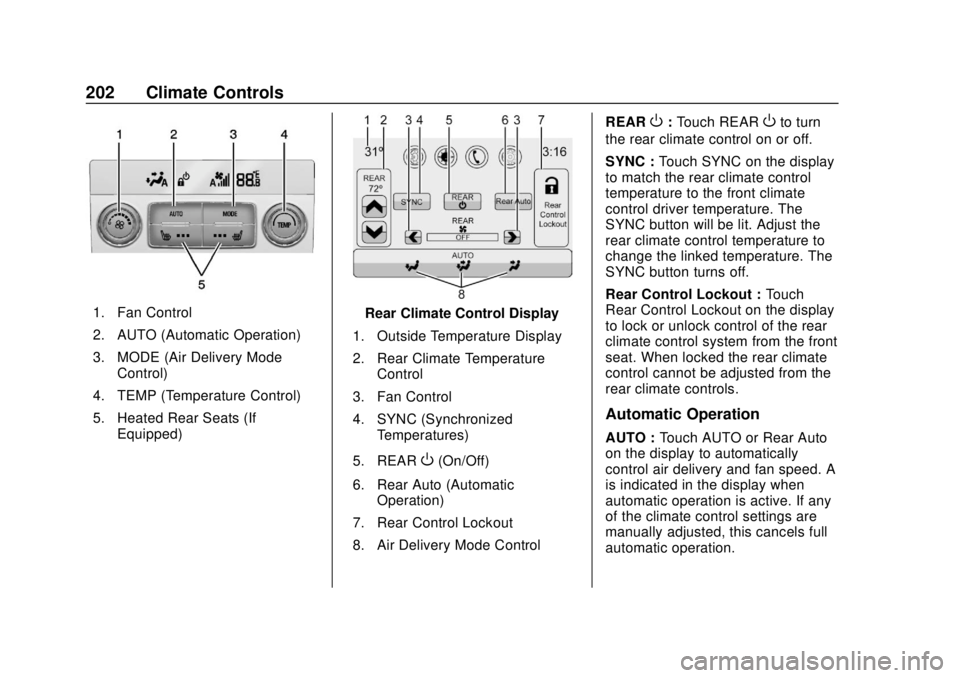
1. Fan Control
2. AUTO (Automatic Operation)
3. MODE (Air Delivery ModeControl)
4. TEMP (Temperature Control)
5. Heated Rear Seats (If Equipped)Rear Climate Control Display
1. Outside Temperature Display
2. Rear Climate Temperature Control
3. Fan Control
4. SYNC (Synchronized Temperatures)
5. REAR
O(On/Off)
6. Rear Auto (Automatic Operation)
7. Rear Control Lockout
8. Air Delivery Mode Control REAR
O:
Touch REAROto turn
the rear climate control on or off.
SYNC : Touch SYNC on the display
to match the rear climate control
temperature to the front climate
control driver temperature. The
SYNC button will be lit. Adjust the
rear climate control temperature to
change the linked temperature. The
SYNC button turns off.
Rear Control Lockout : Touch
Rear Control Lockout on the display
to lock or unlock control of the rear
climate control system from the front
seat. When locked the rear climate
control cannot be adjusted from the
rear climate controls.
Automatic Operation
AUTO : Touch AUTO or Rear Auto
on the display to automatically
control air delivery and fan speed. A
is indicated in the display when
automatic operation is active. If any
of the climate control settings are
manually adjusted, this cancels full
automatic operation.
Page 204 of 423
GMC Acadia/Acadia Denali Owner Manual (GMNA-Localizing-U.S./Canada/
Mexico-11349114) - 2018 - crc - 9/21/17
Climate Controls 203
The display only indicates climate
control functions when the system is
in rear independent mode. When
SYNC is active the display is not
shown.
Manual Operation
9:Turn the knob clockwise or
counterclockwise, or touch and hold
the fan control on the display to
increase or decrease the fan speed.
TEMP : Turn the knob clockwise or
counterclockwise, or touch and hold
the temperature controls on the
display to adjust the rear passenger
temperature. If SYNC is lit, the rear
climate temperature is linked to the
driver temperature setting.
Y/\/Yor MODE : Touch the
desired mode button on the display
or press MODE on the rear climate
controls to change the direction of
the airflow in the rear seating area.
Repeatedly touch MODE until the
desired mode appears on the
display.
MorL: If equipped, pressMorLto heat the left or right outboard
seat. See Heated Rear Seats 069.
Air Vents
To adjust the center and side air
outlets on the instrument panel, use
the slider switch in the center of the
outlet to change the direction of the
airflow and also to shut off the
airflow.
There may be outlets overhead in
the rear passenger area; adjust as
needed.
Keep all outlets open whenever
possible for best system
performance.
Operation Tips
.
Clear away any ice, snow,
or leaves from the air inlets at
the base of the windshield that
can block the flow of air into the
vehicle.
. Clear snow off the hood to
improve visibility and help
decrease moisture drawn into
the vehicle.
. Use of non-GM approved hood
deflectors can adversely affect
the performance of the system. .
Keep the path under all seats
clear of objects to help circulate
the air inside the vehicle more
effectively.
. If fogging reoccurs while in
Yor
\modes with mild temperature
throughout the vehicle, turn on
the air conditioner to reduce
windshield fogging.
Page 206 of 423
GMC Acadia/Acadia Denali Owner Manual (GMNA-Localizing-U.S./Canada/
Mexico-11349114) - 2018 - crc - 9/21/17
Driving and Operating 205
Driving and
Operating
Driving Information
Distracted Driving . . . . . . . . . . . . 206
Defensive Driving . . . . . . . . . . . . . 207
Drunk Driving . . . . . . . . . . . . . . . . . 207
Control of a Vehicle . . . . . . . . . . . 207
Braking . . . . . . . . . . . . . . . . . . . . . . . 207
Steering . . . . . . . . . . . . . . . . . . . . . . 208
Off-Road Recovery . . . . . . . . . . . 208
Loss of Control . . . . . . . . . . . . . . . 209
Off-Road Driving . . . . . . . . . . . . . 209
Driving on Wet Roads . . . . . . . . 214
Hill and Mountain Roads . . . . . 215
Winter Driving . . . . . . . . . . . . . . . . 215
If the Vehicle Is Stuck . . . . . . . . 217
Vehicle Load Limits . . . . . . . . . . . 217
Starting and Operating
New Vehicle Break-In . . . . . . . . . 221
Ignition Positions . . . . . . . . . . . . . 221
Starting the Engine . . . . . . . . . . . 223
Engine Heater . . . . . . . . . . . . . . . . 225
Retained AccessoryPower (RAP) . . . . . . . . . . . . . . . . 226
Shifting Into Park . . . . . . . . . . . . . 226
Shifting out of Park . . . . . . . . . . . 227 Parking over Things
That Burn . . . . . . . . . . . . . . . . . . . 228
Extended Parking . . . . . . . . . . . . 228
Engine Exhaust
Engine Exhaust . . . . . . . . . . . . . . 228
Running the Vehicle While Parked . . . . . . . . . . . . . . . . . . . . . . 229
Automatic Transmission
Automatic Transmission . . . . . . 229
Manual Mode . . . . . . . . . . . . . . . . . 231
Tow/Haul Mode . . . . . . . . . . . . . . . 232
Drive Systems
All-Wheel Drive . . . . . . . . . . . . . . . 232
Brakes
Antilock BrakeSystem (ABS) . . . . . . . . . . . . . . . 233
Electric Parking Brake . . . . . . . . 233
Brake Assist . . . . . . . . . . . . . . . . . . 235
Hill Start Assist (HSA) . . . . . . . . 235
Ride Control Systems
Traction Control/Electronic Stability Control . . . . . . . . . . . . . 236
Hill Descent Control (HDC) . . . 238
Driver Mode Control . . . . . . . . . . 238
Cruise Control
Cruise Control . . . . . . . . . . . . . . . . 240 Adaptive Cruise Control . . . . . . 242
Driver Assistance Systems
Driver Assistance Systems . . . 251
Assistance Systems for
Parking or Backing . . . . . . . . . . 252
Assistance Systems for Driving . . . . . . . . . . . . . . . . . . . . . . 256
Forward Collision Alert (FCA) System . . . . . . . . . . . . . . . . . . . . . . 256
Forward Automatic Braking (FAB) . . . . . . . . . . . . . . . 258
Front Pedestrian Braking (FPB) System . . . . . . . . . . . . . . . 260
Side Blind Zone Alert (SBZA) . . . . . . . . . . . . . . . . 262
Lane Change Alert (LCA) . . . . . 263
Lane Departure
Warning (LDW) . . . . . . . . . . . . . 264
Lane Keep Assist (LKA) . . . . . . 265
Fuel
Fuel . . . . . . . . . . . . . . . . . . . . . . . . . . 267
California Fuel Requirements . . . . . . . . . . . . . . . 267
Fuels in Foreign Countries . . . 268
Fuel Additives . . . . . . . . . . . . . . . . 268
Filling the Tank . . . . . . . . . . . . . . . 268
Filling a Portable Fuel Container . . . . . . . . . . . . . . . . . . . 270
Page 209 of 423
GMC Acadia/Acadia Denali Owner Manual (GMNA-Localizing-U.S./Canada/
Mexico-11349114) - 2018 - crc - 9/21/17
208 Driving and Operating
Once the power assist is used up, it
can take longer to stop and the
brake pedal will be harder to push.
Steering
Electric Power Steering
The vehicle has electric power
steering. It does not have power
steering fluid. Regular maintenance
is not required.
If power steering assist is lost due
to a system malfunction, the vehicle
can be steered, but may require
increased effort.
If the steering assist is used for an
extended period of time while the
vehicle is not moving, power assist
may be reduced.
If the steering wheel is turned until it
reaches the end of its travel and is
held against that position for an
extended period of time, power
steering assist may be reduced.
Normal use of the power steering
assist should return when the
system cools down.See your dealer if there is a
problem.
Curve Tips
.
Take curves at a reasonable
speed.
. Reduce speed before entering a
curve.
. Maintain a reasonable steady
speed through the curve.
. Wait until the vehicle is out of
the curve before accelerating
gently into the straightaway.
Steering in Emergencies
.There are some situations when
steering around a problem may
be more effective than braking.
. Holding both sides of the
steering wheel allows you to turn
180 degrees without removing
a hand.
. The Antilock Brake System
(ABS) allows steering while
braking.
Off-Road Recovery
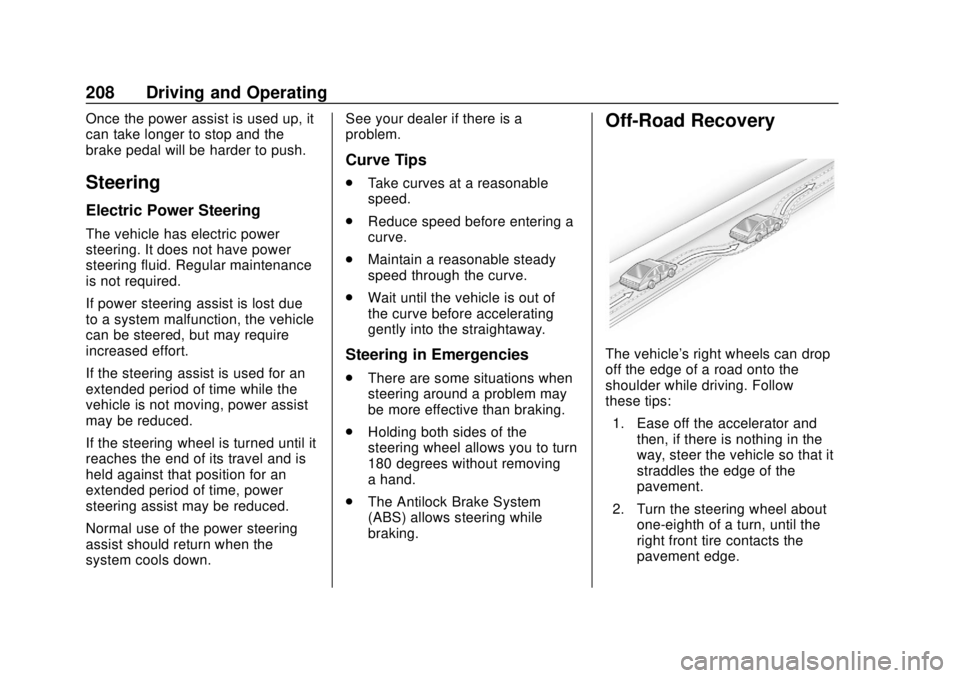
The vehicle's right wheels can drop
off the edge of a road onto the
shoulder while driving. Follow
these tips:
1. Ease off the accelerator and then, if there is nothing in the
way, steer the vehicle so that it
straddles the edge of the
pavement.
2. Turn the steering wheel about one-eighth of a turn, until the
right front tire contacts the
pavement edge.
Page 210 of 423
GMC Acadia/Acadia Denali Owner Manual (GMNA-Localizing-U.S./Canada/
Mexico-11349114) - 2018 - crc - 9/21/17
Driving and Operating 209
3. Turn the steering wheel to gostraight down the roadway.
Loss of Control
Skidding
There are three types of skids that
correspond to the vehicle's three
control systems:
.Braking Skid —wheels are not
rolling.
. Steering or Cornering Skid —
too much speed or steering in a
curve causes tires to slip and
lose cornering force.
. Acceleration Skid —too much
throttle causes the driving
wheels to spin.
Defensive drivers avoid most skids
by taking reasonable care suited to
existing conditions, and by not
overdriving those conditions. But
skids are always possible. If the vehicle starts to slide, follow
these suggestions:
.
Ease your foot off the
accelerator pedal and steer the
way you want the vehicle to go.
The vehicle may straighten out.
Be ready for a second skid if it
occurs.
. Slow down and adjust your
driving according to weather
conditions. Stopping distance
can be longer and vehicle
control can be affected when
traction is reduced by water,
snow, ice, gravel, or other
material on the road. Learn to
recognize warning clues —such
as enough water, ice, or packed
snow on the road to make a
mirrored surface —and slow
down when you have any doubt.
. Try to avoid sudden steering,
acceleration, or braking,
including reducing vehicle speed
by shifting to a lower gear. Any
sudden changes could cause
the tires to slide. Remember: Antilock brakes help
avoid only the braking skid.
Off-Road Driving
All-wheel-drive vehicles can be
used for off-road driving. Vehicles
without all-wheel drive and vehicles
not equipped with All Terrain (AT) or
On-Off Road (OOR) tires must not
be driven off-road except on a level,
solid surface. To contact the tire
manufacturer for more information
about the original equipment tires,
see the warranty manual.
Controlling the vehicle is the key to
successful off-road driving. One of
the best ways to control the vehicle
is to control the speed.
{Warning
When driving off-road, bouncing
and quick changes in direction
can easily throw you out of
position. This could cause you to
lose control and crash. You and
your passengers should always
wear seat belts.