engine cover GMC ACADIA 2021 User Guide
[x] Cancel search | Manufacturer: GMC, Model Year: 2021, Model line: ACADIA, Model: GMC ACADIA 2021Pages: 396, PDF Size: 7.87 MB
Page 207 of 396
GMC Acadia/Acadia Denali Owner Manual (GMNA-Localizing-U.S./Canada/
Mexico-14608671) - 2021 - CRC - 10/26/20
206 Driving and Operating
.Hidden obstacles can make the steepness
of the incline more severe. If a rock is
driven across with the uphill wheels, or if
the downhill wheels drop into a rut or
depression, the vehicle can tilt even more.
.If an incline must be driven across, and
the vehicle starts to slide, turn downhill.
This should help straighten out the
vehicle and prevent the side slipping.
{Warning
Getting out of the vehicle on the
downhill side when stopped across an
incline is dangerous. If the vehicle rolls
over, you could be crushed or killed.
Always get out on the uphill side of the
vehicle and stay well clear of the
rollover path.
Driving in Mud, Sand, Snow, or Ice
Use a low gear when driving in mud—the
deeper the mud, the lower the gear. Keep
the vehicle moving to avoid getting stuck.
Traction changes when driving on sand. On
loose sand, such as on beaches or sand
dunes, the tires tend to sink into the sand. This affects steering, accelerating, and
braking. Drive at a reduced speed and avoid
sharp turns or abrupt maneuvers.
Traction is reduced on hard packed snow
and ice and it is easy to lose control. Reduce
vehicle speed when driving on hard packed
snow and ice.
{Warning
Driving on frozen lakes, ponds, or rivers
can be dangerous. Ice conditions vary
greatly and the vehicle could fall through
the ice; you and your passengers could
drown. Drive your vehicle on safe
surfaces only.
Driving in Water
{Warning
Driving through rushing water can be
dangerous. Deep water can sweep your
vehicle downstream and you and your
passengers could drown. If it is only
shallow water, it can still wash away the
ground from under your tires. Traction
could be lost, and the vehicle could roll
over. Do not drive through rushing water.
Caution
Do not drive through standing water if it
is deep enough to cover the wheel hubs,
axles, or exhaust pipe. Deep water can
damage the axle and other vehicle parts.
If the standing water is not too deep, drive
through it slowly. At faster speeds, water
can get into the engine and cause it to stall.
Stalling can occur if the exhaust pipe is
under water. Do not turn off the ignition
when driving through water. If the exhaust
pipe is under water, the engine will not
start. When going through water, the brakes
get wet, and it might take longer to stop.
See Driving on Wet Roads 0207.
After Off-Road Driving
Remove any brush or debris that has
collected on the underbody or chassis,
or under the hood. These accumulations can
be a fire hazard.
After operation in mud or sand, have the
brake linings cleaned and checked. These
substances can cause glazing and uneven
braking. Check the body structure, steering,
suspension, wheels, tires, and exhaust
system for damage and check the fuel lines
and cooling system for any leakage.
Page 215 of 396
GMC Acadia/Acadia Denali Owner Manual (GMNA-Localizing-U.S./Canada/
Mexico-14608671) - 2021 - CRC - 10/26/20
214 Driving and Operating
If the vehicle cannot be pulled over, and
must be shut off while driving, press and
hold ENGINE START/STOP for longer than
two seconds, or press twice in five seconds.
ACC/ACCESSORY (Amber Indicator Light) :
This mode allows some electrical accessories
to be used when the engine is off.
With the ignition off, pressing the button
one time without the brake pedal applied
will place the ignition system in ACC/
ACCESSORY.
The ignition will switch from ACC/
ACCESSORY to off after five minutes to
prevent battery rundown.
ON/RUN/START (Green Indicator Light) :This
mode is for driving and starting. With the
ignition off, and the brake pedal applied,
pressing the button once will place the
ignition system in ON/RUN/START. Once
engine cranking begins, release the button.
Engine cranking will continue until the
engine starts. See Starting the Engine 0214.
The ignition will then remain in ON/RUN.
Service Mode
This power mode is available for service and
diagnostics, and to verify the proper
operation of the malfunction indicator lamp
as may be required for emission inspection purposes. With the vehicle off, and the
brake pedal not applied, pressing and
holding the button for more than
five seconds will place the vehicle in Service
Mode. The instruments and audio systems
will operate as they do in ON/RUN, but the
vehicle will not be able to be driven. The
engine will not start in Service Mode. Press
the button again to turn the vehicle off.
Starting the Engine
Shift the vehicle into P (Park) or N (Neutral).
To restart the engine when the vehicle is
already moving, use N (Neutral) only.
Caution
Do not try to shift to P (Park) if the
vehicle is moving. If you do, you could
damage the transmission. Shift to P (Park)
only when the vehicle is stopped.
Caution
If you add electrical parts or accessories,
you could change the way the engine
operates. Any resulting damage would
not be covered by the vehicle warranty.
See
Add-On Electrical Equipment 0266.
Starting Procedure
1. With the Keyless Access system, the RKE
transmitter must be in the vehicle. Press
ENGINE START/STOP with the brake pedal
applied. When the engine begins
cranking, let go of the button.
The idle speed will go down as the
engine gets warm. Do not race the
engine immediately after starting it.
If the RKE transmitter is not in the
vehicle, if there is interference, or if the
RKE battery is low, the Driver
Information Center (DIC) will display a
message.
Caution
Cranking the engine for long periods of
time, by trying to start the engine
immediately after cranking has ended,
can overheat and damage the cranking
motor, and drain the battery. Wait at
least 15 seconds between each try, to let
the cranking motor cool down.
2. If the engine does not start after five to 10 seconds, especially in very cold
weather (below −18 °C or 0 °F), it could
be flooded with too much gasoline. Try
pushing the accelerator pedal all the way
Page 217 of 396
GMC Acadia/Acadia Denali Owner Manual (GMNA-Localizing-U.S./Canada/
Mexico-14608671) - 2021 - CRC - 10/26/20
216 Driving and Operating
When thehindicator is illuminated, the
system is enabled.
Engine Heater
The engine heater can provide easier
starting and better fuel economy during
engine warm-up in cold weather conditions
at or below −18 °C (0 °F). Vehicles with an
engine heater should be plugged in at least
four hours before starting. An internal
thermostat in the plug-end of the cord may
exist, which will prevent engine heater
operation at temperatures above
−18 °C (0 °F).
{Warning
Do not plug in the engine block heater
while the vehicle is parked in a garage or
under a carport. Property damage or
personal injury may result. Always park
the vehicle in a clear open area away
from buildings or structures.
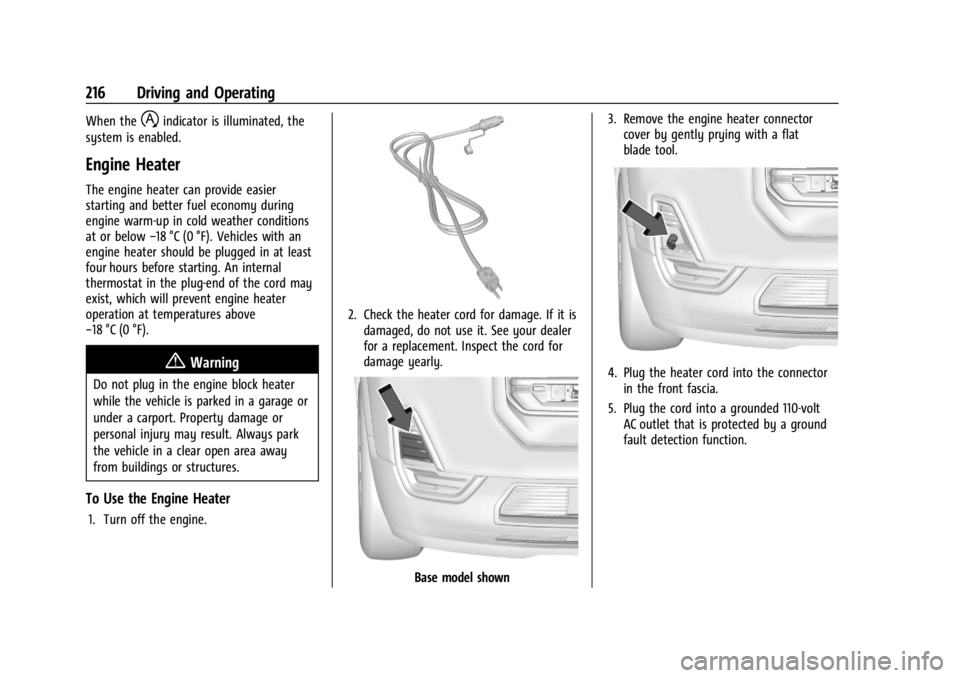
To Use the Engine Heater
1. Turn off the engine.
2. Check the heater cord for damage. If it is damaged, do not use it. See your dealer
for a replacement. Inspect the cord for
damage yearly.
Base model shown 3. Remove the engine heater connector
cover by gently prying with a flat
blade tool.
4. Plug the heater cord into the connectorin the front fascia.
5. Plug the cord into a grounded 110-volt AC outlet that is protected by a ground
fault detection function.
Page 218 of 396
GMC Acadia/Acadia Denali Owner Manual (GMNA-Localizing-U.S./Canada/
Mexico-14608671) - 2021 - CRC - 10/26/20
Driving and Operating 217
{Warning
Improper use of the heater cord or an
extension cord can damage the cord and
may result in overheating and fire.
.Plug the cord into a three-prong
electrical utility receptacle that is
protected by a ground fault detection
function. An ungrounded outlet could
cause an electric shock.
.Use a weatherproof, heavy-duty,
15 amp-rated extension cord if needed.
Failure to use the recommended
extension cord in good operating
condition, or using a damaged heater
or extension cord, could make it
overheat and cause a fire, property
damage, electric shock, and injury.
.Do not operate the vehicle with the
heater cord permanently attached to
the vehicle. Possible heater cord and
thermostat damage could occur.
.While in use, do not let the heater
cord touch vehicle parts or sharp
edges.
.Before starting the vehicle, unplug the
cord. Keep the cord away from any
moving parts.6. Before starting the engine, be sure to
unplug and store the cord.
7. Install the engine heater connector cover.
The length of time the heater should remain
plugged in depends on several factors. Ask a
dealer in the area where you will be parking
the vehicle for the best advice on this.
Retained Accessory Power (RAP)
When the ignition is turned from on to off,
the following features (if equipped) will
continue to function for up to 10 minutes,
or until the driver door is opened. These
features will also work when the ignition is
in RUN or ACC/ACCESSORY:
.Infotainment System
.Power Windows (during RAP this
functionality will be lost when any door
is opened)
.Sunroof (during RAP this functionality will
be lost when any door is opened)
.Auxiliary Power Outlet
.Audio System
.OnStar System
Shifting Into Park
{Warning
It can be dangerous to get out of the
vehicle if the vehicle is not in P (Park)
with the parking brake set. The vehicle
can roll. If you have left the engine
running, the vehicle can move suddenly.
You or others could be injured. To be
sure the vehicle will not move, even
when you are on fairly level ground, use
the steps that follow. If you are pulling a
trailer, see Driving Characteristics and
Towing Tips 0256.
To shift into P (Park): 1. Hold the brake pedal down and set the parking brake. See Electric Parking Brake
0 224.
2. Press the P (Park) switch on the center console.
3. Press ENGINE START/STOP to turn the engine off.
If the vehicle is shifted into P (Park) on a
hill, the electric parking brake (EPB) may
apply automatically. The driver may not be
Page 222 of 396
GMC Acadia/Acadia Denali Owner Manual (GMNA-Localizing-U.S./Canada/
Mexico-14608671) - 2021 - CRC - 10/26/20
Driving and Operating 221
This vehicle is equipped with an
electronically controlled transmission. The
R (Reverse) and D (Drive) shift switches are
designed to prevent inadvertent shifting out
of P (Park) unless the ignition is on, and the
brake pedal is applied.
When the vehicle is stopped, press ENGINE
START/STOP to turn off the vehicle. The
transmission will shift to P (Park)
automatically.
The vehicle will not shift into P (Park) if it is
moving too fast. Stop the vehicle and shift
into P (Park).
To shift in and out of P (Park), seeShifting
Into Park 0217 and
Shifting out of Park 0218.
R : Use this gear to back up.
If the vehicle is shifted from either
R (Reverse) to D (Drive), or D (Drive) to
R (Reverse) while the speed is too high, the
vehicle will shift to N (Neutral). Reduce the
vehicle speed and try the shift again.
To shift into R (Reverse): 1. Bring the vehicle to a complete stop.
2. Pull the R (Reverse) switch on the center stack. To shift out of R (Reverse):
1. Bring the vehicle to a complete stop.
2. Shift to the desired gear.
At low vehicle speeds, R (Reverse) can be
used to rock the vehicle back and forth to
get out of snow, ice, or sand without
damaging the transmission. See If the
Vehicle Is Stuck 0209.
N : In this position, the engine does not
connect with the wheels. To restart the
engine when the vehicle is already moving,
use N (Neutral) only.
{Warning
Shifting into a drive gear while the
engine is running at high speed is
dangerous. Unless your foot is firmly on
the brake pedal, the vehicle could move
very rapidly. You could lose control and
hit people or objects. Do not shift into a
drive gear while the engine is running at
high speed.
Caution
Shifting out of P (Park) or N (Neutral) with
the engine running at high speed may
damage the transmission. The repairs
would not be covered by the vehicle
warranty. Be sure the engine is not
running at high speed when shifting the
vehicle.
Caution
The vehicle is not designed to stay in
N (Neutral) for extended periods of time.
It will automatically shift into P (Park).
To shift into N (Neutral), press the
N (Neutral) switch until the N indicator
displays.
To shift out of N (Neutral): 1. Bring the vehicle to a complete stop.
2. Shift to the desired gear.
Car Wash Mode
This vehicle includes a Car Wash Mode that
allows the vehicle to remain in N (Neutral)
for use in automatic car washes.
Page 224 of 396
GMC Acadia/Acadia Denali Owner Manual (GMNA-Localizing-U.S./Canada/
Mexico-14608671) - 2021 - CRC - 10/26/20
Driving and Operating 223
D :This position is for normal driving.
If more power is needed for passing, press
the accelerator pedal down.
To shift into D (Drive):
1. Bring the vehicle to a complete stop.
2. Pull the D (Drive) switch on the center stack.
To shift out of D (Drive): 1. Bring the vehicle to a complete stop.
2. Shift to the desired gear.
Downshifting the transmission in slippery
road conditions could result in skidding. See
“Skidding” underLoss of Control 0203.
Caution
Spinning the tires or holding the vehicle
in one place on a hill using only the
accelerator pedal may damage the
transmission. The repair will not be
covered by the vehicle warranty. If the
vehicle is stuck, do not spin the tires.
When stopping on a hill, use the brakes
to hold the vehicle in place. If equipped with the 2.0L L4 engine, engine
speeds may be increased while driving at
highway speeds while the engine is still
warming up.
L :
This position gives you access to gear
ranges. This provides more engine braking
but lower fuel economy than D (Drive). You
can use it on very steep hills, or in deep
snow or mud. See Manual Mode0223.
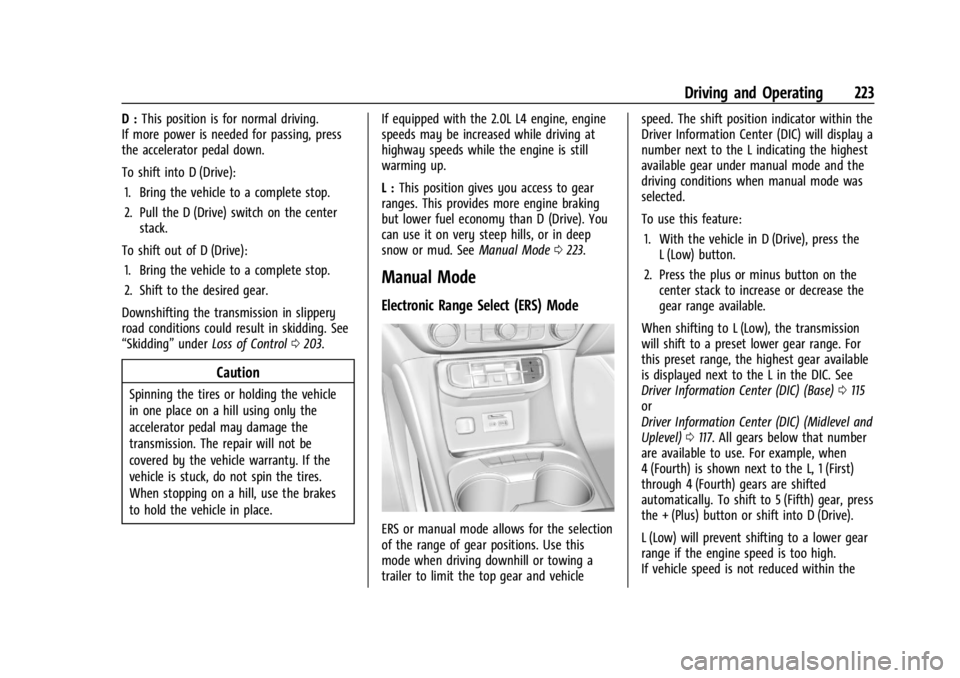
Manual Mode
Electronic Range Select (ERS) Mode
ERS or manual mode allows for the selection
of the range of gear positions. Use this
mode when driving downhill or towing a
trailer to limit the top gear and vehicle speed. The shift position indicator within the
Driver Information Center (DIC) will display a
number next to the L indicating the highest
available gear under manual mode and the
driving conditions when manual mode was
selected.
To use this feature:
1. With the vehicle in D (Drive), press the L (Low) button.
2. Press the plus or minus button on the center stack to increase or decrease the
gear range available.
When shifting to L (Low), the transmission
will shift to a preset lower gear range. For
this preset range, the highest gear available
is displayed next to the L in the DIC. See
Driver Information Center (DIC) (Base) 0115
or
Driver Information Center (DIC) (Midlevel and
Uplevel) 0117. All gears below that number
are available to use. For example, when
4 (Fourth) is shown next to the L, 1 (First)
through 4 (Fourth) gears are shifted
automatically. To shift to 5 (Fifth) gear, press
the + (Plus) button or shift into D (Drive).
L (Low) will prevent shifting to a lower gear
range if the engine speed is too high.
If vehicle speed is not reduced within the
Page 230 of 396
GMC Acadia/Acadia Denali Owner Manual (GMNA-Localizing-U.S./Canada/
Mexico-14608671) - 2021 - CRC - 10/26/20
Driving and Operating 229
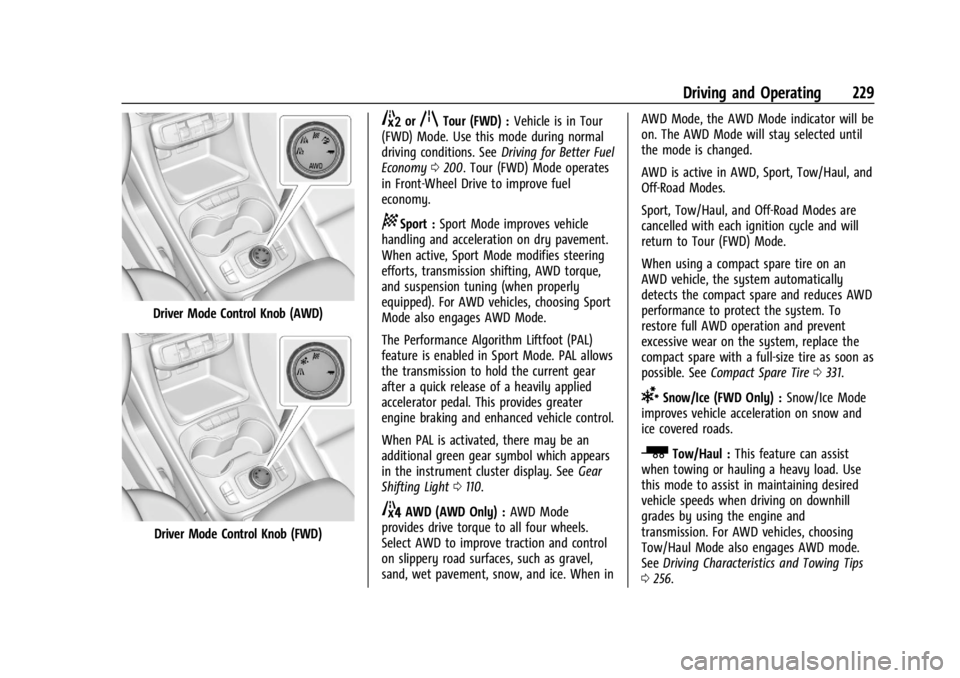
Driver Mode Control Knob (AWD)
Driver Mode Control Knob (FWD)
5orqTour (FWD) :Vehicle is in Tour
(FWD) Mode. Use this mode during normal
driving conditions. See Driving for Better Fuel
Economy 0200. Tour (FWD) Mode operates
in Front-Wheel Drive to improve fuel
economy.
8Sport : Sport Mode improves vehicle
handling and acceleration on dry pavement.
When active, Sport Mode modifies steering
efforts, transmission shifting, AWD torque,
and suspension tuning (when properly
equipped). For AWD vehicles, choosing Sport
Mode also engages AWD Mode.
The Performance Algorithm Liftfoot (PAL)
feature is enabled in Sport Mode. PAL allows
the transmission to hold the current gear
after a quick release of a heavily applied
accelerator pedal. This provides greater
engine braking and enhanced vehicle control.
When PAL is activated, there may be an
additional green gear symbol which appears
in the instrument cluster display. See Gear
Shifting Light 0110.
4AWD (AWD Only) : AWD Mode
provides drive torque to all four wheels.
Select AWD to improve traction and control
on slippery road surfaces, such as gravel,
sand, wet pavement, snow, and ice. When in AWD Mode, the AWD Mode indicator will be
on. The AWD Mode will stay selected until
the mode is changed.
AWD is active in AWD, Sport, Tow/Haul, and
Off-Road Modes.
Sport, Tow/Haul, and Off-Road Modes are
cancelled with each ignition cycle and will
return to Tour (FWD) Mode.
When using a compact spare tire on an
AWD vehicle, the system automatically
detects the compact spare and reduces AWD
performance to protect the system. To
restore full AWD operation and prevent
excessive wear on the system, replace the
compact spare with a full-size tire as soon as
possible. See
Compact Spare Tire 0331.
6Snow/Ice (FWD Only) : Snow/Ice Mode
improves vehicle acceleration on snow and
ice covered roads.
_Tow/Haul : This feature can assist
when towing or hauling a heavy load. Use
this mode to assist in maintaining desired
vehicle speeds when driving on downhill
grades by using the engine and
transmission. For AWD vehicles, choosing
Tow/Haul Mode also engages AWD mode.
See Driving Characteristics and Towing Tips
0 256.
Page 260 of 396
GMC Acadia/Acadia Denali Owner Manual (GMNA-Localizing-U.S./Canada/
Mexico-14608671) - 2021 - CRC - 10/26/20
Driving and Operating 259
Viewing Systems
If equipped, the viewing systems on the
vehicle can improve visibility while hitching,
backing, and driving with a trailer. See
Driver Assistance Systems0239 and
Assistance Systems for Parking or Backing
0 241.
Parking on Hills
{Warning
To prevent serious injury or death,
always park your vehicle and trailer on a
level surface when possible.
When parking your vehicle and your trailer
on a hill: 1. Press the brake pedal, but do not shift into P (Park) yet. Turn the wheels into
the curb if facing downhill or into traffic
if facing uphill.
2. Have someone place chocks under the trailer wheels.
3. When the wheel chocks are in place, gradually release the brake pedal to
allow the chocks to absorb the load of
the trailer. 4. Reapply the brake pedal. Then apply the
parking brake and shift into P (Park).
5. Release the brake pedal.
Leaving After Parking on a Hill
1. Apply and hold the brake pedal:
.Start the engine.
.Shift into a gear.
.Release the parking brake.
2. Let up on the brake pedal.
3. Drive slowly until the trailer is clear of the chocks.
4. Stop and have someone pick up and store the chocks.
Maintenance When Trailer Towing
The vehicle needs service more often when
used to tow trailers. See Maintenance
Schedule 0346. It is especially important to
check the engine oil, axle lubricant, belts,
cooling system, and brake system before
and during each trip.
Check periodically that all nuts and bolts on
the trailer hitch are tight.
Engine Cooling When Trailer Towing
The cooling system may temporarily
overheat during severe operating conditions.
See Engine Overheating 0285.
Trailer Towing
Caution
Towing a trailer improperly can damage
the vehicle and result in costly repairs
not covered by the vehicle warranty. To
tow a trailer correctly, follow the
directions in this section and see your
dealer for important information about
towing a trailer with the vehicle.
Trailer Weight
{Warning
Never exceed the towing capacity for
your vehicle.
Safe trailering requires monitoring the
weight, speed, altitude, road grades, outside
temperature, dimensions of the front of the
trailer, and how frequently the vehicle is
used to tow a trailer.
Page 263 of 396
GMC Acadia/Acadia Denali Owner Manual (GMNA-Localizing-U.S./Canada/
Mexico-14608671) - 2021 - CRC - 10/26/20
262 Driving and Operating
recommended trailer tongue weight for each
trailer. Never exceed the maximum loads for
your vehicle, hitch and trailer.
After loading the trailer, separately weigh
the trailer and then the tongue to see if the
weights are proper. If the trailer tongue
weight is too high or too low, adjustments
might be made by moving some items
around in the trailer.
If a cargo carrier is used in the trailer hitch
receiver, choose a carrier that positions the
load as close to the vehicle as possible.
Make sure the total weight, including the
carrier, is no more than half of the
maximum allowable tongue weight for the
vehicle or 181 kg (400 lb), whichever is less.
Ask your dealer for trailering information or
assistance.
Towing Equipment
Hitches
Always use the correct hitch equipment for
your vehicle. Crosswinds, large trucks going
by, and rough roads can affect the trailer
and the hitch.Proper hitch equipment for your vehicle
helps maintain combination control. Many
trailers can be towed using a
weight-carrying hitch which has a coupler
latched to the hitch ball, or a tow eye
latched to a pintle hook. Other trailers may
require a weight-distributing hitch that uses
spring bars to distribute the trailer tongue
weight between your vehicle and trailer
axles. See
“Trailer Tongue Weight” under
Trailer Towing 0259 or weight limits with
various hitch types.
Never attach rental hitches or other
bumper-type hitches. Only use
frame-mounted hitches that do not attach to
the bumper.
Always seal any holes in your vehicle if the
trailer hitch removed. If not sealed, dirt,
water, and carbon monoxide (CO) from the
exhaust may enter your vehicle. See Engine
Exhaust 0219.
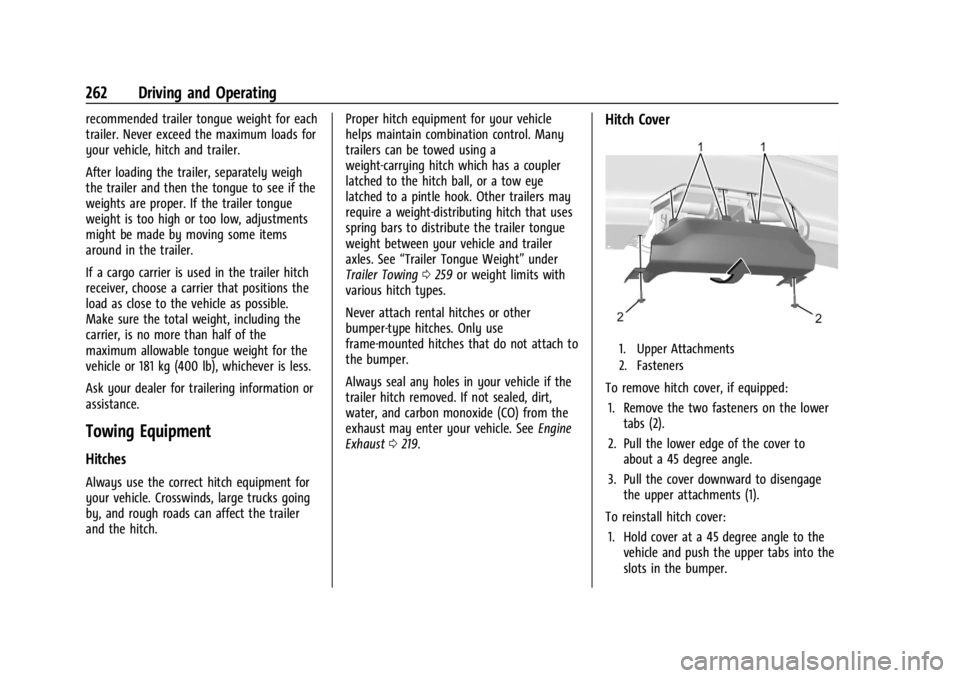
Hitch Cover
1. Upper Attachments
2. Fasteners
To remove hitch cover, if equipped:
1. Remove the two fasteners on the lower tabs (2).
2. Pull the lower edge of the cover to about a 45 degree angle.
3. Pull the cover downward to disengage the upper attachments (1).
To reinstall hitch cover: 1. Hold cover at a 45 degree angle to the vehicle and push the upper tabs into the
slots in the bumper.
Page 267 of 396
GMC Acadia/Acadia Denali Owner Manual (GMNA-Localizing-U.S./Canada/
Mexico-14608671) - 2021 - CRC - 10/26/20
266 Driving and Operating
Trailer Tires
Special Trailer (ST) tires differ from vehicle
tires. Trailer tires are designed with stiff
sidewalls to help prevent sway and to
support heavy loads. These features can
make it difficult to determine if the trailer
tire pressures are low only based on a visual
inspection.
Always check all trailer tire pressures before
each trip when the tires are cool. Low trailer
tire pressure is a leading cause of trailer tire
blow-outs.
Trailer tires deteriorate over time. The trailer
tire sidewall will show the week and year
the tire was manufactured. Many trailer tire
manufacturers recommend replacing tires
more than six years old.
Overloading is another leading cause of
trailer tire blow-outs. Never load your trailer
with more weight than the tires are
designed to support. The load rating is
located on the trailer tire sidewall.
Always know the maximum speed rating for
the trailer tires before driving. This may be
significantly lower than the vehicle tire
speed rating. The speed rating may be onthe trailer tire sidewall. If the speed rating is
not shown, the default trailer tire speed
rating is 105 km/h (65 mph).
Conversions and Add-Ons
Add-On Electrical Equipment
{Warning
The Data Link Connector (DLC) is used for
vehicle service and Emission Inspection/
Maintenance testing. See
Malfunction
Indicator Lamp (Check Engine Light) 0107
. A device connected to the DLC —such
as an aftermarket fleet or driver-behavior
tracking device —may interfere with
vehicle systems. This could affect vehicle
operation and cause a crash. Such devices
may also access information stored in the
vehicle’s systems.
Caution
Some electrical equipment can damage
the vehicle or cause components to not
work and would not be covered by the
vehicle warranty. Always check with your
dealer before adding electrical equipment.
Add-on equipment can drain the vehicle's
12-volt battery, even if the vehicle is not
operating.
The vehicle has an airbag system. Before
attempting to add anything electrical to the
vehicle, see Servicing the Airbag-Equipped
Vehicle 063 and
Adding Equipment to the Airbag-Equipped
Vehicle 063.