key battery GMC ACADIA 2022 User Guide
[x] Cancel search | Manufacturer: GMC, Model Year: 2022, Model line: ACADIA, Model: GMC ACADIA 2022Pages: 397, PDF Size: 6.98 MB
Page 138 of 397
GMC Acadia/Acadia Denali Owner Manual (GMNA-Localizing-U.S./Canada/
Mexico-15170041) - 2022 - CRC - 10/6/21
Lighting 137
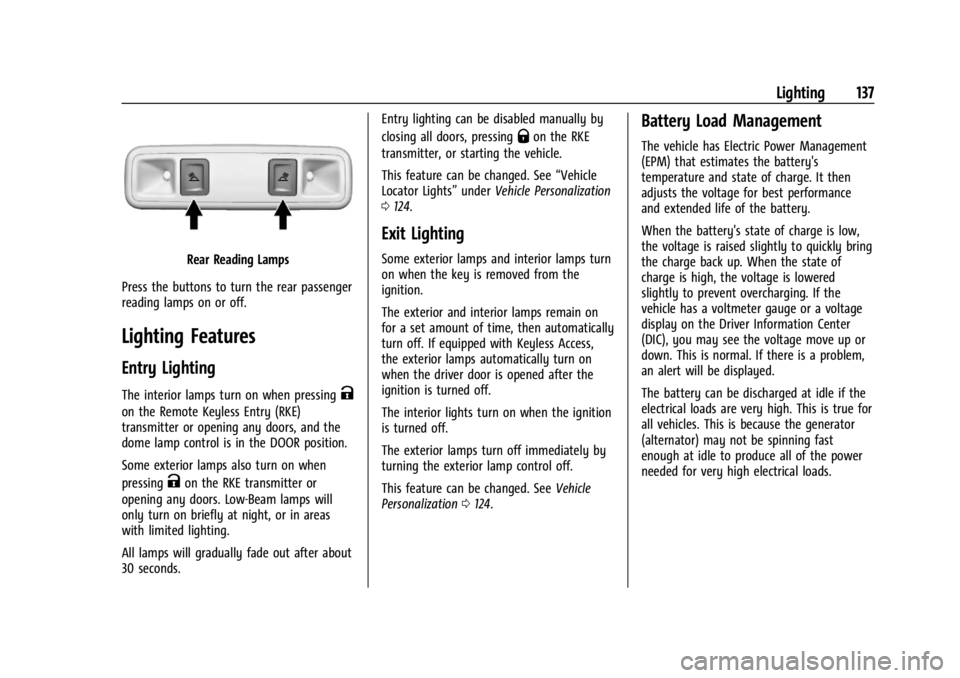
Rear Reading Lamps
Press the buttons to turn the rear passenger
reading lamps on or off.
Lighting Features
Entry Lighting
The interior lamps turn on when pressingK
on the Remote Keyless Entry (RKE)
transmitter or opening any doors, and the
dome lamp control is in the DOOR position.
Some exterior lamps also turn on when
pressing
Kon the RKE transmitter or
opening any doors. Low-Beam lamps will
only turn on briefly at night, or in areas
with limited lighting.
All lamps will gradually fade out after about
30 seconds. Entry lighting can be disabled manually by
closing all doors, pressing
Qon the RKE
transmitter, or starting the vehicle.
This feature can be changed. See “Vehicle
Locator Lights” underVehicle Personalization
0 124.
Exit Lighting
Some exterior lamps and interior lamps turn
on when the key is removed from the
ignition.
The exterior and interior lamps remain on
for a set amount of time, then automatically
turn off. If equipped with Keyless Access,
the exterior lamps automatically turn on
when the driver door is opened after the
ignition is turned off.
The interior lights turn on when the ignition
is turned off.
The exterior lamps turn off immediately by
turning the exterior lamp control off.
This feature can be changed. See Vehicle
Personalization 0124.
Battery Load Management
The vehicle has Electric Power Management
(EPM) that estimates the battery's
temperature and state of charge. It then
adjusts the voltage for best performance
and extended life of the battery.
When the battery's state of charge is low,
the voltage is raised slightly to quickly bring
the charge back up. When the state of
charge is high, the voltage is lowered
slightly to prevent overcharging. If the
vehicle has a voltmeter gauge or a voltage
display on the Driver Information Center
(DIC), you may see the voltage move up or
down. This is normal. If there is a problem,
an alert will be displayed.
The battery can be discharged at idle if the
electrical loads are very high. This is true for
all vehicles. This is because the generator
(alternator) may not be spinning fast
enough at idle to produce all of the power
needed for very high electrical loads.
Page 214 of 397
GMC Acadia/Acadia Denali Owner Manual (GMNA-Localizing-U.S./Canada/
Mexico-15170041) - 2022 - CRC - 10/6/21
Driving and Operating 213
Caution (Continued)
.Avoid making hard stops for the first
300 km (200 mi) or so. During this
time the new brake linings are not yet
broken in. Hard stops with new linings
can mean premature wear and earlier
replacement. Follow this breaking-in
guideline every time you get new
brake linings.
.Do not tow a trailer during break-in.
SeeTrailer Towing 0261 for the trailer
towing capabilities of the vehicle and
more information.
Following break-in, engine speed and load
can be gradually increased.
On new vehicles, the various mechanical and
electrical systems experience a “break-in”
period during the first 6 400 km (4,000 mi)
of routine driving. As the vehicle is driven,
the mechanical systems adjust to provide
optimal fuel economy and transmission shift
performance.
Electrical systems will adapt and calibrate
during the break-in period. A one-time
occurrence of clicks and similar vehicle
noises is normal during this process. Normal driving charges the vehicle’s battery
to achieve the best operation of the vehicle,
including fuel economy and the Stop/Start
System. See
Stop/Start System 0215.
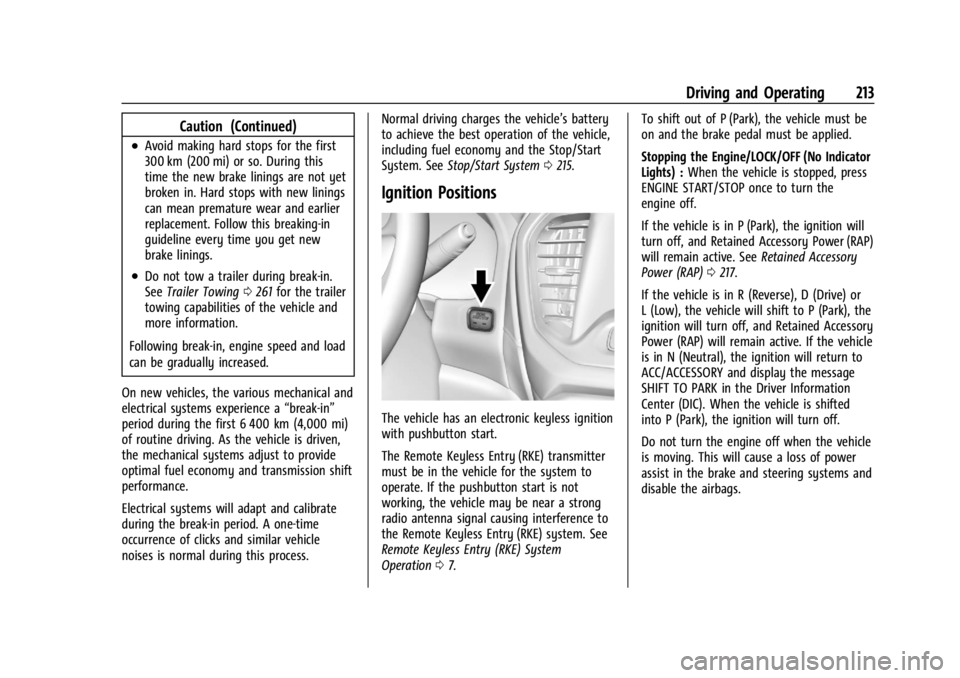
Ignition Positions
The vehicle has an electronic keyless ignition
with pushbutton start.
The Remote Keyless Entry (RKE) transmitter
must be in the vehicle for the system to
operate. If the pushbutton start is not
working, the vehicle may be near a strong
radio antenna signal causing interference to
the Remote Keyless Entry (RKE) system. See
Remote Keyless Entry (RKE) System
Operation 07. To shift out of P (Park), the vehicle must be
on and the brake pedal must be applied.
Stopping the Engine/LOCK/OFF (No Indicator
Lights) :
When the vehicle is stopped, press
ENGINE START/STOP once to turn the
engine off.
If the vehicle is in P (Park), the ignition will
turn off, and Retained Accessory Power (RAP)
will remain active. See Retained Accessory
Power (RAP) 0217.
If the vehicle is in R (Reverse), D (Drive) or
L (Low), the vehicle will shift to P (Park), the
ignition will turn off, and Retained Accessory
Power (RAP) will remain active. If the vehicle
is in N (Neutral), the ignition will return to
ACC/ACCESSORY and display the message
SHIFT TO PARK in the Driver Information
Center (DIC). When the vehicle is shifted
into P (Park), the ignition will turn off.
Do not turn the engine off when the vehicle
is moving. This will cause a loss of power
assist in the brake and steering systems and
disable the airbags.
Page 216 of 397
GMC Acadia/Acadia Denali Owner Manual (GMNA-Localizing-U.S./Canada/
Mexico-15170041) - 2022 - CRC - 10/6/21
Driving and Operating 215
Starting Procedure
1. With the Keyless Access system, the RKEtransmitter must be in the vehicle. Press
ENGINE START/STOP with the brake pedal
applied. When the engine begins
cranking, let go of the button.
The idle speed will go down as the
engine gets warm. Do not race the
engine immediately after starting it.
If the RKE transmitter is not in the
vehicle, if there is interference, or if the
RKE battery is low, the Driver
Information Center (DIC) will display a
message.
Caution
Cranking the engine for long periods of
time, by trying to start the engine
immediately after cranking has ended,
can overheat and damage the cranking
motor, and drain the battery. Wait at
least 15 seconds between each try, to let
the cranking motor cool down.
2. If the engine does not start after five to 10 seconds, especially in very cold
weather (below −18 °C or 0 °F), it could
be flooded with too much gasoline. Try
pushing the accelerator pedal all the way to the floor and holding it there as you
press ENGINE START/STOP, for up to a
maximum of 15 seconds. Wait at least
15 seconds between each try, to allow
the cranking motor to cool down. When
the engine starts, let go of the button
and the accelerator. If the vehicle starts
briefly but then stops again, do the
same thing. This clears the extra gasoline
from the engine. Do not race the engine
immediately after starting it. Operate
the engine and transmission gently until
the oil warms up and lubricates all
moving parts.
Stop/Start System
The Stop/Start system will shut off the
engine to help conserve fuel. It has
components designed for the increased
number of starts.
{Warning
The automatic engine Stop/Start feature
causes the engine to shut off while the
vehicle is still on. Do not exit the vehicle
before shifting to P (Park). The vehicle
may restart and move unexpectedly.
Always shift to P (Park), and then turn
the ignition off before exiting the vehicle.
Auto Engine Stop/Start
When the brakes are applied and the vehicle
is at a complete stop, the engine may turn
off. When stopped, the tachometer displays
AUTO STOP. See
Tachometer0103. When
the brake pedal is released or the
accelerator pedal is pressed, the engine will
restart.
To maintain vehicle performance, other
conditions may cause the engine to
automatically restart before the brake pedal
is released.
Auto Stops may not occur and/or auto
restarts may occur because:
.The climate control settings require the
engine to be running to cool or heat the
vehicle interior.
.The vehicle battery needs to charge.
.The vehicle battery has recently been
disconnected.
.Minimum vehicle speed has not been
reached since the last Auto Stop
.The accelerator pedal is pressed.
.The engine or transmission is not at the
required operating temperature.
.The outside temperature is not in the
required operating range.
Page 379 of 397
GMC Acadia/Acadia Denali Owner Manual (GMNA-Localizing-U.S./Canada/
Mexico-15170041) - 2022 - CRC - 10/6/21
378 OnStar
Or
.Give OnStar Turn-by-Turn Navigation voice
commands.
.Obtain and customize the Wi-Fi hotspot
name or SSID and password, if equipped.
Press
Qto connect to an Advisor to:
.Verify account information or update
contact information.
.Get driving directions.
.Receive a Diagnostic check of the vehicle's
key operating systems.
.Receive Roadside Assistance.
.Manage Wi-Fi Settings, if equipped.
Press
>to get a priority connection to an
OnStar Advisor available 24/7 to:
.Get help for an emergency.
.Be a Good Samaritan or respond to an
AMBER Alert.
.Get assistance in severe weather or other
crisis situations and find evacuation
routes.
OnStar Services
Emergency
Emergency Services require an active safety
and security plan. With Automatic Crash
Response, built-in sensors can automatically
alert a specially trained OnStar Advisor who
is immediately connected in to the vehicle
to help.
Press
>for a priority connection to an
OnStar Advisor who can contact emergency
service providers, direct them to your exact
location, and relay important information.
With OnStar Crisis Assist, specially trained
Advisors are available 24 hours a day, 7 days
a week, to provide a central point of
contact, assistance, and information during a
crisis.
With Roadside Assistance, Advisors can
locate a nearby service provider to help with
a flat tire, a battery jump, or an empty
gas tank.
Security
If equipped, OnStar provides these services:
.With Stolen Vehicle Assistance, OnStar
Advisors can use GPS to pinpoint the
vehicle and help authorities quickly
recover it.
.With Remote Ignition Block, if equipped,
OnStar can block the vehicle from being
restarted.
.With Stolen Vehicle Slowdown,
if equipped, OnStar can work with law
enforcement to gradually slow the
vehicle down.
Theft Alarm Notification
If equipped, if the doors are locked and the
vehicle alarm sounds, a notification by text,
e-mail, or phone call will be sent. If the
vehicle is stolen, an OnStar Advisor can work
with authorities to recover the vehicle.
Page 391 of 397

GMC Acadia/Acadia Denali Owner Manual (GMNA-Localizing-U.S./Canada/-
Mexico-15170041) - 2022 - CRC - 10/6/21
390 Index
Infants and Young Children, Restraints . . . . 67
InformationPublication Ordering . . . . . . . . . . . . . . . . . . . 372
Infotainment System . . . . . . . . . . . . . . . . . . . . 376
Instrument Cluster . . . . . . . . . . . . . . . . . . . . 98, 101
Instrument Panel Overview . . . . . . . . . . . . . . . . 4
Interior Rearview Mirrors . . . . . . . . . . . . . . . . . 28
Introduction . . . . . . . . . . . . . . . . . . . . . . . . . . . 1, 139
J
Jump Starting - North America . . . . . . . . . . . 332
K
Keyless Entry Remote (RKE) System . . . . . . . . . . . . . . . . . . . . 7
Keys . . . . . . . . . . . . . . . . . . . . . . . . . . . . . . . . . . . . . . . 6
L
Labeling, Tire Sidewall . . . . . . . . . . . . . . . . . . . 302
Lamps Courtesy . . . . . . . . . . . . . . . . . . . . . . . . . . . . . . . 136
Daytime Running (DRL) . . . . . . . . . . . . . . . . 134
Dome . . . . . . . . . . . . . . . . . . . . . . . . . . . . . . . . . . 136
Exterior Controls . . . . . . . . . . . . . . . . . . . . . . . 132
Exterior Lamps Off Reminder . . . . . . . . . . 133
Exterior Lighting Battery Saver . . . . . . . . 138
Malfunction Indicator (CheckEngine) . . . . . . . . . . . . . . . . . . . . . . . . . . . . . . 108
On Reminder . . . . . . . . . . . . . . . . . . . . . . . . . . . 115 Lamps (cont'd)
Reading . . . . . . . . . . . . . . . . . . . . . . . . . . . . . . . . 136
Lane Change Alert (LCA) . . . . . . . . . . . . . . . . . . 251
Lane Keep Assist (LKA) . . . . . . . . . . . . . . . . . . . 253
Lane Keep Assist Light . . . . . . . . . . . . . . . . . . . . 111
Lap-Shoulder Belt . . . . . . . . . . . . . . . . . . . . . . . . . . 51
LATCH System Replacing Parts after a Crash . . . . . . . . . . . 79
LATCH, Lower Anchors and Tethers for Children . . . . . . . . . . . . . . . . . . . . . . . . . . . . . . . . . .72
LED Lighting . . . . . . . . . . . . . . . . . . . . . . . . . . . . . 291
Liftgate . . . . . . . . . . . . . . . . . . . . . . . . . . . . . . . . . . . .18
Lighting Entry . . . . . . . . . . . . . . . . . . . . . . . . . . . . . . . . . . . 137
Exit . . . . . . . . . . . . . . . . . . . . . . . . . . . . . . . . . . . . . 137
Illumination Control . . . . . . . . . . . . . . . . . . . 136
LED . . . . . . . . . . . . . . . . . . . . . . . . . . . . . . . . . . . . 291
Lights Airbag Readiness . . . . . . . . . . . . . . . . . . . . . . 106
Antilock Brake System (ABS)Warning . . . . . . . . . . . . . . . . . . . . . . . . . . . . . . 111
Brake System Warning . . . . . . . . . . . . . . . . 109
Charging System . . . . . . . . . . . . . . . . . . . . . . 108
Check Engine (Malfunction Indicator) . . . . . . . . . . . . . . . . . . . . . . . . . . . . 108
Cruise Control . . . . . . . . . . . . . . . . . . . . . . . . . . 116
Door Ajar . . . . . . . . . . . . . . . . . . . . . . . . . . . . . . . 116
Driver Mode Control . . . . . . . . . . . . . . . . . . . . 113 Lights (cont'd)
Electric Parking Brake . . . . . . . . . . . . . . . . . . 110
Engine Coolant Temperature
Warning . . . . . . . . . . . . . . . . . . . . . . . . . . . . . . 113
Engine Oil Pressure . . . . . . . . . . . . . . . . . . . . . 114
Flash-to-Pass . . . . . . . . . . . . . . . . . . . . . . . . . . . 133
Front Fog Lamp . . . . . . . . . . . . . . . . . . . . . . . . . 115
Gear Shifting . . . . . . . . . . . . . . . . . . . . . . . . . . . 111
High-Beam On . . . . . . . . . . . . . . . . . . . . . . . . . . 115
High/Low Beam Changer . . . . . . . . . . . . . . 133
Hill Descent Control . . . . . . . . . . . . . . . . . . . . 111
Lane Keep Assist . . . . . . . . . . . . . . . . . . . . . . . . 111
Low Fuel Warning . . . . . . . . . . . . . . . . . . . . . . 115
Seat Belt Reminders . . . . . . . . . . . . . . . . . . . 106
Security . . . . . . . . . . . . . . . . . . . . . . . . . . . . . . . . . 115
Service Electric Parking Brake . . . . . . . . . . 110
StabiliTrak OFF . . . . . . . . . . . . . . . . . . . . . . . . . . 112
Tire Pressure . . . . . . . . . . . . . . . . . . . . . . . . . . . . 114
Traction Control System (TCS)/StabiliTrak . . . . . . . . . . . . . . . . . . . . . . 113
Traction Off . . . . . . . . . . . . . . . . . . . . . . . . . . . . . 112
Locks Automatic Door . . . . . . . . . . . . . . . . . . . . . . . . . . 17
Delayed Locking . . . . . . . . . . . . . . . . . . . . . . . . . 17
Door . . . . . . . . . . . . . . . . . . . . . . . . . . . . . . . . . . . . . 15
Lockout Protection . . . . . . . . . . . . . . . . . . . . . . . 17
Power Door . . . . . . . . . . . . . . . . . . . . . . . . . . . . . . 17
Safety . . . . . . . . . . . . . . . . . . . . . . . . . . . . . . . . . . 18
Page 393 of 397

GMC Acadia/Acadia Denali Owner Manual (GMNA-Localizing-U.S./Canada/-
Mexico-15170041) - 2022 - CRC - 10/6/21
392 Index
Parking (cont'd)Over Things That Burn . . . . . . . . . . . . . . . . . 219
Parking or Backing Assistance Systems . . . . . . . . . . . . . . . . . . . . 241
Passenger Airbag Status Indicator . . . . . . . . 107
Passenger Compartment Air Filter . . . . . . . 197
Passenger Sensing System . . . . . . . . . . . . . . . . 60
Pedestrian Ahead Indicator . . . . . . . . . . . . . . . 112
Perchlorate Materials Requirements, California . . . . . . . . . . . . . . . . . . . . . . . . . . . . . . 270
Personalization Vehicle . . . . . . . . . . . . . . . . . . . . . . . . . . . . . . . . 124
Phone Apple CarPlay and Android Auto . . . . . . . . 172
Bluetooth . . . . . . . . . . . . . . . . . . . . . . . . . 168, 169
Port
USB . . . . . . . . . . . . . . . . . . . . . . . . . . . . . . . . . . . . 148
Positioning Vehicle . . . . . . . . . . . . . . . . . . . . . . . . . . . . . . . . 162
Power Door Locks . . . . . . . . . . . . . . . . . . . . . . . . . . . . . . . 17
Mirrors . . . . . . . . . . . . . . . . . . . . . . . . . . . . . . . . . 27
Outlets . . . . . . . . . . . . . . . . . . . . . . . . . . . . . . . . . 94
Protection, Battery . . . . . . . . . . . . . . . . . . . . . 138
Retained Accessory (RAP) . . . . . . . . . . . . . . . 217
Seat Adjustment . . . . . . . . . . . . . . . . . . . . . . . . 37
Windows . . . . . . . . . . . . . . . . . . . . . . . . . . . . . . . . 31
Pregnancy, Using Seat Belts . . . . . . . . . . . . . . .53 Privacy
Vehicle Data Recording . . . . . . . . . . . . . . . . 374
Problems with Route Guidance . . . . . . . . . . 162
Program Courtesy Transportation . . . . . . . . . . . . . . . 370
Prohibited Fuels . . . . . . . . . . . . . . . . . . . . . . . . . 255
Proposition 65 Warning, California . . . . . . . . . . . . . . . . . . . . . . . . . .287, 332, Back Cover
Publication Ordering Information . . . . . . . . 372
R
Radio HD Radio Technology . . . . . . . . . . . . . . . . . . 146
Radio Data System (RDS) . . . . . . . . . . . . . . . . .147
Radio Frequency Statement . . . . . . . . . . . . . . 373
Radio Reception . . . . . . . . . . . . . . . . . . . . . . . . . 148
Radios AM-FM Radio . . . . . . . . . . . . . . . . . . . . . . . . . . 145
Satellite . . . . . . . . . . . . . . . . . . . . . . . . . . . . . . . . 147
Reading Lamps . . . . . . . . . . . . . . . . . . . . . . . . . . 136
Rear Camera Mirror . . . . . . . . . . . . . . . . . . . . . . . 29
Rear Climate Control System . . . . . . . . . . . . 196
Rear Cross Traffic Alert System . . . . . . . . . . 245
Rear Seats . . . . . . . . . . . . . . . . . . . . . . . . . . . . . . . . 43 Heated . . . . . . . . . . . . . . . . . . . . . . . . . . . . . . . . . 46
Rear Storage . . . . . . . . . . . . . . . . . . . . . . . . . . . . . . 85
Rear Vision Camera (RVC) . . . . . . . . . . . . . . . . .241 Rear Window Washer/Wiper . . . . . . . . . . . . . 93
Rearview Mirrors . . . . . . . . . . . . . . . . . . . . . . . . . 29
Automatic Dimming . . . . . . . . . . . . . . . . . . . . 29
Reclining Seatbacks . . . . . . . . . . . . . . . . . . . . . . . 38
Recognition Voice . . . . . . . . . . . . . . . . . . . . . . . . . . . . . . . . . . 163
Recommended
Fuel . . . . . . . . . . . . . . . . . . . . . . . . . . . . . . . . . . . . 255
Recommended Fluids and Lubricants . . . . . 356
Records Maintenance . . . . . . . . . . . . . . . . . . . . . . . . . . . 359
Recreational Vehicle Towing . . . . . . . . . . . . . 336
Reimbursement Program, GM Mobility . . . . . . . . . . . . . . . . . . . . . . . . . . . . . . . 368
Remote Keyless Entry (RKE) System . . . . . . . .7
Remote Vehicle Start . . . . . . . . . . . . . . . . . . . . . .14
Replacement Parts Airbags . . . . . . . . . . . . . . . . . . . . . . . . . . . . . . . . . 65
Maintenance . . . . . . . . . . . . . . . . . . . . . . . . . . . 357
Replacing Airbag System . . . . . . . . . . . . . . . . . . 65
Replacing LATCH System Parts after a Crash . . . . . . . . . . . . . . . . . . . . . . . . . . . . . . . . . . . 79
Replacing Seat Belt System Parts after a Crash . . . . . . . . . . . . . . . . . . . . . . . . . . . . . . . . . 54
Reporting Safety Defects
Canadian Government . . . . . . . . . . . . . . . . . 374
General Motors . . . . . . . . . . . . . . . . . . . . . . . . 374
U.S. Government . . . . . . . . . . . . . . . . . . . . . . . 373