radio antenna GMC ACADIA 2022 Owners Manual
[x] Cancel search | Manufacturer: GMC, Model Year: 2022, Model line: ACADIA, Model: GMC ACADIA 2022Pages: 397, PDF Size: 6.98 MB
Page 140 of 397
GMC Acadia/Acadia Denali Owner Manual (GMNA-Localizing-U.S./Canada/
Mexico-15170041) - 2022 - CRC - 10/6/21
Infotainment System 139
Infotainment System
Introduction
Introduction . . . . . . . . . . . . . . . . . . . . . . . . . . . 139
Overview . . . . . . . . . . . . . . . . . . . . . . . . . . . . . . 140
Steering Wheel Controls . . . . . . . . . . . . . . . 141
Using the System . . . . . . . . . . . . . . . . . . . . . 142
Software Updates . . . . . . . . . . . . . . . . . . . . . . 145
Radio
AM-FM Radio . . . . . . . . . . . . . . . . . . . . . . . . . . 145
HD Radio Technology . . . . . . . . . . . . . . . . . . 146
Radio Data System (RDS) . . . . . . . . . . . . . . 147
Satellite Radio . . . . . . . . . . . . . . . . . . . . . . . . . 147
Radio Reception . . . . . . . . . . . . . . . . . . . . . . . 148
Multi-Band Antenna . . . . . . . . . . . . . . . . . . . 148
Audio Players
Avoiding Untrusted Media Devices . . . . 148
USB Port . . . . . . . . . . . . . . . . . . . . . . . . . . . . . . 148
Bluetooth Audio . . . . . . . . . . . . . . . . . . . . . . . 151
Navigation
Using the Navigation System . . . . . . . . . . 152
Maps . . . . . . . . . . . . . . . . . . . . . . . . . . . . . . . . . . 155
Navigation Symbols . . . . . . . . . . . . . . . . . . . . 155
Destination . . . . . . . . . . . . . . . . . . . . . . . . . . . . 156
Global Positioning System (GPS) . . . . . . . 161
Vehicle Positioning . . . . . . . . . . . . . . . . . . . . 162
Problems with Route Guidance . . . . . . . . 162
If the System Needs Service . . . . . . . . . . . 162Map Data Updates . . . . . . . . . . . . . . . . . . . . 163
Database Coverage Explanations . . . . . . . 163
Voice Recognition
Voice Recognition . . . . . . . . . . . . . . . . . . . . . . 163
Phone
Bluetooth (Overview) . . . . . . . . . . . . . . . . . . 168
Bluetooth (Pairing and Using a
Phone) . . . . . . . . . . . . . . . . . . . . . . . . . . . . . . . 169
Apple CarPlay and Android Auto . . . . . . . 172
Settings
Settings . . . . . . . . . . . . . . . . . . . . . . . . . . . . . . . 174
Teen Driver . . . . . . . . . . . . . . . . . . . . . . . . . . . . 180
Trademarks and License Agreements
Trademarks and License Agreements . . . . . . . . . . . . . . . . . . . . . . . . . . 183
Introduction
Read the following pages to become familiar
with the features.
{Warning
Taking your eyes off the road for too
long or too often while using any
infotainment feature can cause a crash.
You or others could be injured or killed.
Do not give extended attention to
infotainment tasks while driving. Limit
your glances at the vehicle displays and
focus your attention on driving. Use voice
commands whenever possible.
The infotainment system has built-in
features intended to help avoid distraction
by disabling some features when driving.
These features may gray out when they are
unavailable. Many infotainment features are
also available through the instrument cluster
and steering wheel controls.
Page 149 of 397
GMC Acadia/Acadia Denali Owner Manual (GMNA-Localizing-U.S./Canada/
Mexico-15170041) - 2022 - CRC - 10/6/21
148 Infotainment System
by model and require a complete working
electrical system, cell reception, and GPS
signal. An active connected plan is required.
Reference the SiriusXM user guide for use
and subscription information.
Radio Reception
Unplug electronic devices from the accessory
power outlets if there is interference or
static in the radio.
FM
FM signals only reach about 16 to 65 km (10
to 40 mi). Although the radio has a built-in
electronic circuit that automatically works to
reduce interference, some static can occur,
especially around tall buildings or hills,
causing the sound to fade in and out.
AM
The range for most AM stations is greater
than for FM, especially at night. The longer
range can cause station frequencies to
interfere with each other. Static can also
occur when things like storms and power
lines interfere with radio reception. When
this happens, try reducing the treble on the
radio.
SiriusXM Satellite Radio Service
If equipped, SiriusXM Satellite Radio Service
provides digital radio reception. Tall
buildings or hills can interfere with satellite
radio signals, causing the sound to fade in
and out. In addition, traveling or standing
under heavy foliage, bridges, garages,
or tunnels may cause loss of the SiriusXM
signal for a period of time. Some cellular
services may interfere with SXM reception
causing loss of signal.
Mobile Device Usage
Mobile device usage, such as making or
receiving calls, charging, or just having the
mobile device on may cause static
interference in the radio. Unplug the mobile
device or turn it off if this happens.
Multi-Band Antenna
The roof antenna may be used for radio,
navigation, and OnStar, depending on the
equipped options. Keep clear of obstructions
for clear reception. If the vehicle has a
sunroof, and it is open, reception can also
be affected.
Audio Players
Avoiding Untrusted Media Devices
When using media devices such as SD cards,
USB devices, and mobile devices, consider
the source. Untrusted media devices could
contain files that affect system operation or
performance. Avoid use if the content or
origin cannot be trusted.
USB Port
Audio stored on a USB device may be
listened to.
The vehicle may be equipped with two USB
ports on the center stack. These ports are
for data and charging. There may also be
two USB ports for charging only at the rear
of the center console.
Caution
To avoid vehicle damage, unplug all
accessories and disconnect all accessory
cables from the vehicle when not in use.
Accessory cables left plugged into the
vehicle, unconnected to a device, could be
damaged or cause an electrical short if
(Continued)
Page 214 of 397
GMC Acadia/Acadia Denali Owner Manual (GMNA-Localizing-U.S./Canada/
Mexico-15170041) - 2022 - CRC - 10/6/21
Driving and Operating 213
Caution (Continued)
.Avoid making hard stops for the first
300 km (200 mi) or so. During this
time the new brake linings are not yet
broken in. Hard stops with new linings
can mean premature wear and earlier
replacement. Follow this breaking-in
guideline every time you get new
brake linings.
.Do not tow a trailer during break-in.
SeeTrailer Towing 0261 for the trailer
towing capabilities of the vehicle and
more information.
Following break-in, engine speed and load
can be gradually increased.
On new vehicles, the various mechanical and
electrical systems experience a “break-in”
period during the first 6 400 km (4,000 mi)
of routine driving. As the vehicle is driven,
the mechanical systems adjust to provide
optimal fuel economy and transmission shift
performance.
Electrical systems will adapt and calibrate
during the break-in period. A one-time
occurrence of clicks and similar vehicle
noises is normal during this process. Normal driving charges the vehicle’s battery
to achieve the best operation of the vehicle,
including fuel economy and the Stop/Start
System. See
Stop/Start System 0215.
Ignition Positions
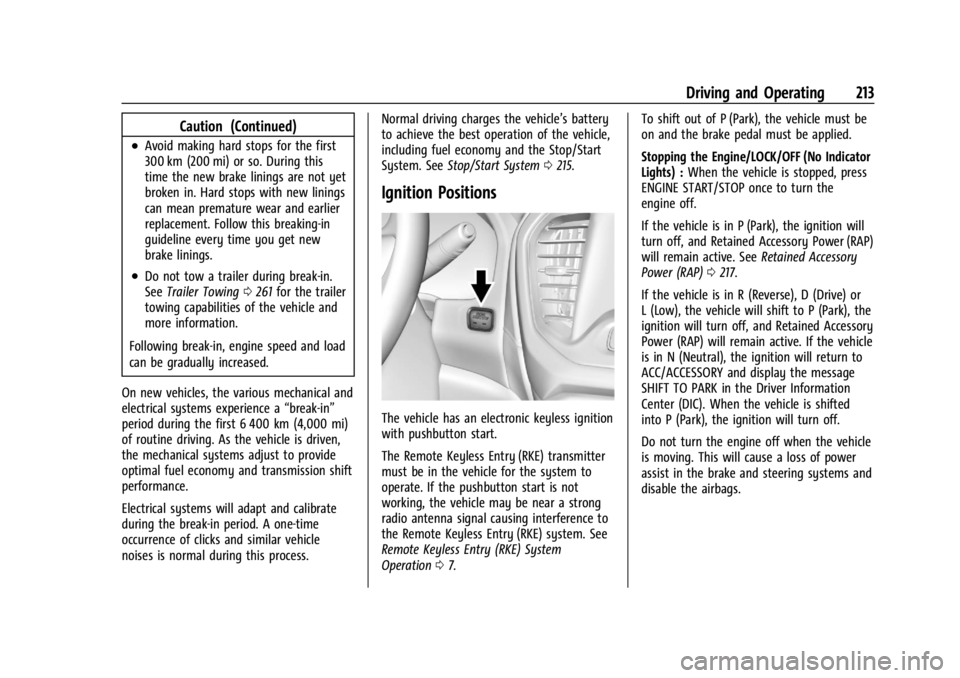
The vehicle has an electronic keyless ignition
with pushbutton start.
The Remote Keyless Entry (RKE) transmitter
must be in the vehicle for the system to
operate. If the pushbutton start is not
working, the vehicle may be near a strong
radio antenna signal causing interference to
the Remote Keyless Entry (RKE) system. See
Remote Keyless Entry (RKE) System
Operation 07. To shift out of P (Park), the vehicle must be
on and the brake pedal must be applied.
Stopping the Engine/LOCK/OFF (No Indicator
Lights) :
When the vehicle is stopped, press
ENGINE START/STOP once to turn the
engine off.
If the vehicle is in P (Park), the ignition will
turn off, and Retained Accessory Power (RAP)
will remain active. See Retained Accessory
Power (RAP) 0217.
If the vehicle is in R (Reverse), D (Drive) or
L (Low), the vehicle will shift to P (Park), the
ignition will turn off, and Retained Accessory
Power (RAP) will remain active. If the vehicle
is in N (Neutral), the ignition will return to
ACC/ACCESSORY and display the message
SHIFT TO PARK in the Driver Information
Center (DIC). When the vehicle is shifted
into P (Park), the ignition will turn off.
Do not turn the engine off when the vehicle
is moving. This will cause a loss of power
assist in the brake and steering systems and
disable the airbags.
Page 386 of 397

GMC Acadia/Acadia Denali Owner Manual (GMNA-Localizing-U.S./Canada/-
Mexico-15170041) - 2022 - CRC - 10/6/21
Index 385
IndexA
Accessories and Modifications . . . . . . . . . . . 270
Accessory Power . . . . . . . . . . . . . . . . . . . . . . . . . . 217
Active Fuel Management . . . . . . . . . . . . . . . . 219
Adaptive Cruise Control . . . . . . . . . . . . . . . . . . 232
Add-On Electrical Equipment . . . . . . . . . . . . . 268
Additional InformationOnStar . . . . . . . . . . . . . . . . . . . . . . . . . . . . . . . . . 379
Additional Maintenance and Care . . . . . . . . 353
Adjustments Lumbar, Front Seats . . . . . . . . . . . . . . . . . . . . 39
Agreements Trademarks and License . . . . . . . . . . . . . . . 183
Air Cleaner/Filter, Engine . . . . . . . . . . . . . . . . 278
Air Conditioning . . . . . . . . . . . . . . . . . . . . .192, 196
Air Filter
Life System . . . . . . . . . . . . . . . . . . . . . . . . . . . . 278
Air Filter, Passenger Compartment . . . . . . . 197
Air Vents . . . . . . . . . . . . . . . . . . . . . . . . . . . . . . . . 197
Airbag System Check . . . . . . . . . . . . . . . . . . . . . . . . . . . . . . . . . . . 65
How Does an Airbag Restrain? . . . . . . . . . . 59
Passenger Sensing System . . . . . . . . . . . . . . 60
What Makes an Airbag Inflate? . . . . . . . . . 59
What Will You See after an AirbagInflates? . . . . . . . . . . . . . . . . . . . . . . . . . . . . . . 59
When Should an Airbag Inflate? . . . . . . . . 58
Where Are the Airbags? . . . . . . . . . . . . . . . . 56 Airbags
Adding Equipment to the Vehicle . . . . . . . 64
Passenger Status Indicator . . . . . . . . . . . . . 107
Readiness Light . . . . . . . . . . . . . . . . . . . . . . . . 106
Servicing Airbag-Equipped Vehicles . . . . . . 64
System Check . . . . . . . . . . . . . . . . . . . . . . . . . . . 55
Alarm
Vehicle Security . . . . . . . . . . . . . . . . . . . . . . . . 25
Alert Lane Change . . . . . . . . . . . . . . . . . . . . . . . . . . . 251
Rear Cross Traffic . . . . . . . . . . . . . . . . . . . . . . 245
Side Blind Zone (SBZA) . . . . . . . . . . . . . . . . . 251
All-Season Tires . . . . . . . . . . . . . . . . . . . . . . . . . . 301
All-Terrain Tires . . . . . . . . . . . . . . . . . . . . . . . . . . 302
All-Wheel Drive System . . . . . . . . . . . . . . . . . . . . . . . . . . 224
All-Wheel Drive . . . . . . . . . . . . . . . . . . . . . . . . . . 287
AM-FM Radio . . . . . . . . . . . . . . . . . . . . . . . . . . . . .145
Antenna Multi-band . . . . . . . . . . . . . . . . . . . . . . . . . . . . . 148
Antilock Brake System (ABS) . . . . . . . . . . . . . 224
Warning Light . . . . . . . . . . . . . . . . . . . . . . . . . . 111
Appearance Care Exterior . . . . . . . . . . . . . . . . . . . . . . . . . . . . . . . . 338
Interior . . . . . . . . . . . . . . . . . . . . . . . . . . . . . . . . 342
Apple CarPlay and Android Auto . . . . . . . . . . 172
Armrest Storage . . . . . . . . . . . . . . . . . . . . . . . . . . 84
Assistance Program, Roadside . . . . . . . . . . . . 368