fuel GMC CANYON 2008 User Guide
[x] Cancel search | Manufacturer: GMC, Model Year: 2008, Model line: CANYON, Model: GMC CANYON 2008Pages: 428, PDF Size: 5.82 MB
Page 170 of 428
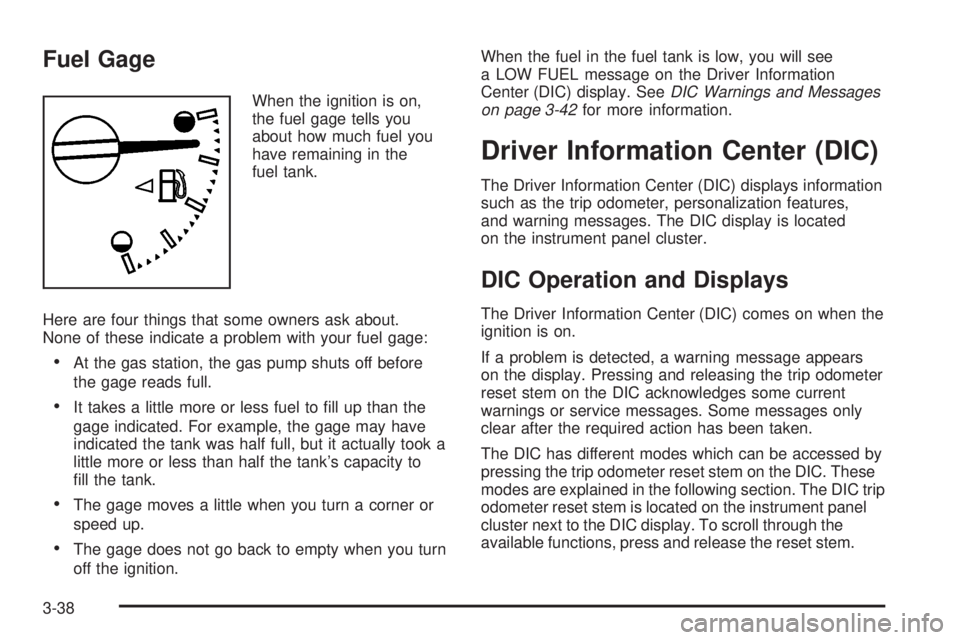
Fuel Gage
When the ignition is on,
the fuel gage tells you
about how much fuel you
have remaining in the
fuel tank.
Here are four things that some owners ask about.
None of these indicate a problem with your fuel gage:
At the gas station, the gas pump shuts off before
the gage reads full.
It takes a little more or less fuel to ll up than the
gage indicated. For example, the gage may have
indicated the tank was half full, but it actually took a
little more or less than half the tank’s capacity to
ll the tank.
The gage moves a little when you turn a corner or
speed up.
The gage does not go back to empty when you turn
off the ignition.When the fuel in the fuel tank is low, you will see
a LOW FUEL message on the Driver Information
Center (DIC) display. SeeDIC Warnings and Messages
on page 3-42for more information.
Driver Information Center (DIC)
The Driver Information Center (DIC) displays information
such as the trip odometer, personalization features,
and warning messages. The DIC display is located
on the instrument panel cluster.
DIC Operation and Displays
The Driver Information Center (DIC) comes on when the
ignition is on.
If a problem is detected, a warning message appears
on the display. Pressing and releasing the trip odometer
reset stem on the DIC acknowledges some current
warnings or service messages. Some messages only
clear after the required action has been taken.
The DIC has different modes which can be accessed by
pressing the trip odometer reset stem on the DIC. These
modes are explained in the following section. The DIC trip
odometer reset stem is located on the instrument panel
cluster next to the DIC display. To scroll through the
available functions, press and release the reset stem.
3-38
Page 175 of 428
DOORS
This message displays when one or more of the doors
is ajar. Check all the doors on your vehicle to make
sure they are closed. The message clears from
the display after all of the doors are closed.
ENG (Engine) HOT
This message displays when the engine coolant
temperature is hot. Check the engine coolant
temperature gage. SeeEngine Coolant Temperature
Gage on page 3-33. Have your vehicle serviced by your
dealer/retailer as soon as possible if you suspect the
engine is overheating. SeeEngine Overheating on
page 5-29for more information.
FLUID
This message displays if the brake uid is low. Check
the brake uid as soon as possible and have your
vehicle serviced by your dealer/retailer. SeeBrakes on
page 5-38for more information. Press and release the
reset stem to acknowledge the message and clear it
from the display.
FUEL CAP
This message displays if the vehicle’s fuel cap is either off
or loose. Pull over as soon as possible and check to see
if the fuel cap is secure. You may also see the check
engine light on the instrument panel cluster. If the check
engine light does come on when the fuel cap was loose,
it may take a few driving trips before the light turns off.
SeeMalfunction Indicator Lamp on page 3-34for more
information if the light still remains on. Press and release
the reset stem to acknowledge the message and clear it
from the display.
LOW FUEL
This message displays if the level of fuel in the vehicle
is low. Also check the fuel gage. SeeFuel Gage on
page 3-38for more information. Rell the fuel tank
as soon as possible.
LOW TIRE
This message displays if a low tire pressure is detected in
any of the vehicle’s tires. Press and release the reset
stem to acknowledge the message and clear it from the
display. The message appears at each ignition cycle until
the tires are inated to the correct ination pressure.
SeeTires on page 5-56andInflation - Tire Pressure on
page 5-62for more information on tires and the correct
ination pressures.
3-43
Page 177 of 428
SERV (Service) VEH (Vehicle)
This message displays if your vehicle needs service.
Have your vehicle serviced by your dealer/retailer
as soon as possible.
SERVICE CHARG (Charge) SYS
(System)
This message displays if there is a problem with the
battery charging system. Under certain conditions, the
battery warning light may also turn on in the instrument
panel cluster. SeeCharging System Light on page 3-30.
The battery will not be charging at an optimal rate and
the vehicle will lose the ability to enter the fuel economy
mode. The vehicle is safe to drive, however have the
electrical system checked by your dealer/retailer. Press
and release the reset stem to acknowledge the message
and clear it from the display.
TRAC (Traction) OFF
If your vehicle has the Traction Control System (TCS),
this message displays when the Traction Control
System (TCS) is turned off by pressing the TCS button.
SeeTraction Control System (TCS) on page 4-5for
more information.
TRACTION FAULT
If your vehicle has the Traction Control System (TCS),
this message may display if there is a problem with the
TCS. Check the TCS as soon as possible and have your
vehicle serviced by your dealer/retailer. SeeTraction
Control System (TCS) on page 4-5for more information.
Press and release the reset stem to acknowledge the
message and clear it from the display.
TURN SIGNAL
This message displays when the turn signal is on for
about 0.75 miles (1.2 km) of travel. Press and release
the reset stem to acknowledge the message and clear it
from the display.
3-45
Page 213 of 428
Off-Road Driving
This off-road guide is for vehicles that have four-wheel
drive. Also, seeBraking on page 4-3andAntilock Brake
System (ABS) on page 4-4. If your vehicle does not have
four-wheel drive, you should not drive off-road unless you
are on a level, solid surface.
The airbag system is designed to work properly under a
wide range of conditions, including off-road usage.
Observe safe driving speeds, especially on rough terrain.
As always, wear your safety belt.
Off-road driving can be great fun. But it does have some
denite hazards. The greatest of these is the terrain itself.
“Off-roading” means you have left the great North
American road system behind. Traffic lanes are not
marked. Curves are not banked. There are no road
signs. Surfaces can be slippery, rough, uphill, or downhill.
In short, you have gone right back to nature.
Off-road driving involves some new skills. And that is
why it is very important that you read this guide. You will
nd many driving tips and suggestions. These will help
make your off-road driving safer and more enjoyable.
Before You Go Off-Roading
There are some things to do before you go out. For
example, be sure to have all necessary maintenance
and service work done. Check to make sure all
underbody shields, if the vehicle has them, are properly
attached. Be sure you read all the information about
your four-wheel-drive vehicle in this manual. Is there
enough fuel? Is the spare tire fully inated? Are the uid
levels up where they should be? What are the local laws
that apply to off-roading where you will be driving? If you
do not know, you should check with law enforcement
people in the area. Will you be on someone’s private
land? If so, be sure to get the necessary permission.
4-11
Page 225 of 428
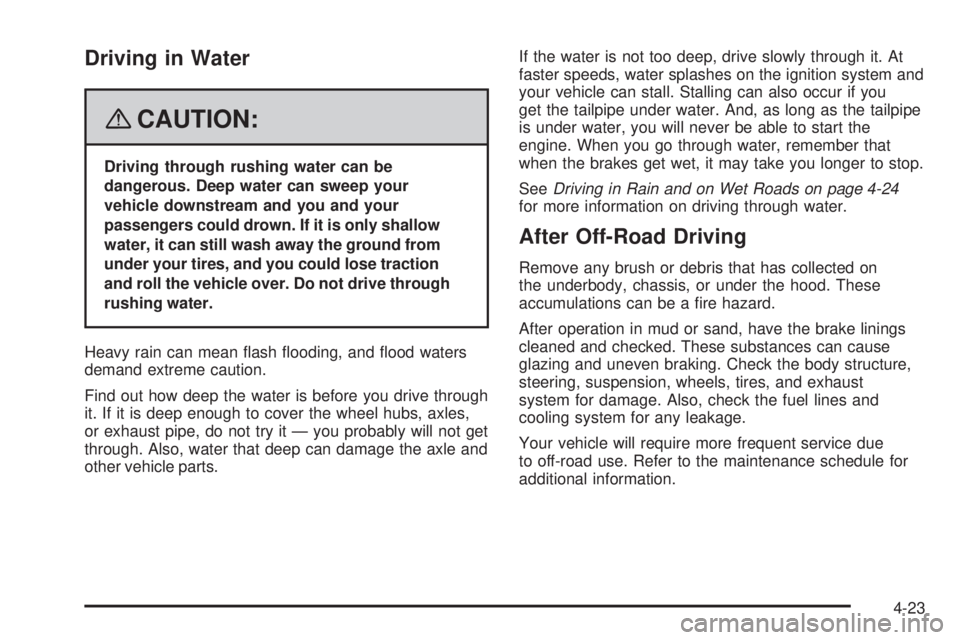
Driving in Water
{CAUTION:
Driving through rushing water can be
dangerous. Deep water can sweep your
vehicle downstream and you and your
passengers could drown. If it is only shallow
water, it can still wash away the ground from
under your tires, and you could lose traction
and roll the vehicle over. Do not drive through
rushing water.
Heavy rain can mean ash ooding, and ood waters
demand extreme caution.
Find out how deep the water is before you drive through
it. If it is deep enough to cover the wheel hubs, axles,
or exhaust pipe, do not try it — you probably will not get
through. Also, water that deep can damage the axle and
other vehicle parts.If the water is not too deep, drive slowly through it. At
faster speeds, water splashes on the ignition system and
your vehicle can stall. Stalling can also occur if you
get the tailpipe under water. And, as long as the tailpipe
is under water, you will never be able to start the
engine. When you go through water, remember that
when the brakes get wet, it may take you longer to stop.
SeeDriving in Rain and on Wet Roads on page 4-24
for more information on driving through water.
After Off-Road Driving
Remove any brush or debris that has collected on
the underbody, chassis, or under the hood. These
accumulations can be a re hazard.
After operation in mud or sand, have the brake linings
cleaned and checked. These substances can cause
glazing and uneven braking. Check the body structure,
steering, suspension, wheels, tires, and exhaust
system for damage. Also, check the fuel lines and
cooling system for any leakage.
Your vehicle will require more frequent service due
to off-road use. Refer to the maintenance schedule for
additional information.
4-23
Page 227 of 428
Hydroplaning
Hydroplaning is dangerous. Water can build up under
your vehicle’s tires so they actually ride on the water.
This can happen if the road is wet enough and you are
going fast enough. When your vehicle is hydroplaning,
it has little or no contact with the road.
There is no hard and fast rule about hydroplaning.
The best advice is to slow down when the road is wet.
Other Rainy Weather Tips
Besides slowing down, other wet weather driving tips
include:
Allow extra following distance.
Pass with caution.
Keep windshield wiping equipment in good shape.
Keep the windshield washer uid reservoir lled.
Have good tires with proper tread depth. SeeTires
on page 5-56.
Before Leaving on a Long Trip
To prepare your vehicle for a long trip, consider having
it serviced by your dealer/retailer before departing.
Things to check on your own include:
Windshield Washer Fluid:Reservoir full? Windows
clean — inside and outside?
Wiper Blades:In good shape?
Fuel, Engine Oil, Other Fluids:All levels checked?
Lamps:Do they all work and are lenses clean?
Tires:Are treads good? Are tires inated to
recommended pressure?
Weather and Maps:Safe to travel? Have
up-to-date maps?
Highway Hypnosis
Always be alert and pay attention to your surroundings
while driving. If you become tired or sleepy, nd a safe
place to park your vehicle and rest.
Other driving tips include:
Keep the vehicle well ventilated.
Keep interior temperature cool.
Keep your eyes moving — scan the road ahead
and to the sides.
Check the rearview mirror and vehicle
instruments often.
4-25
Page 231 of 428
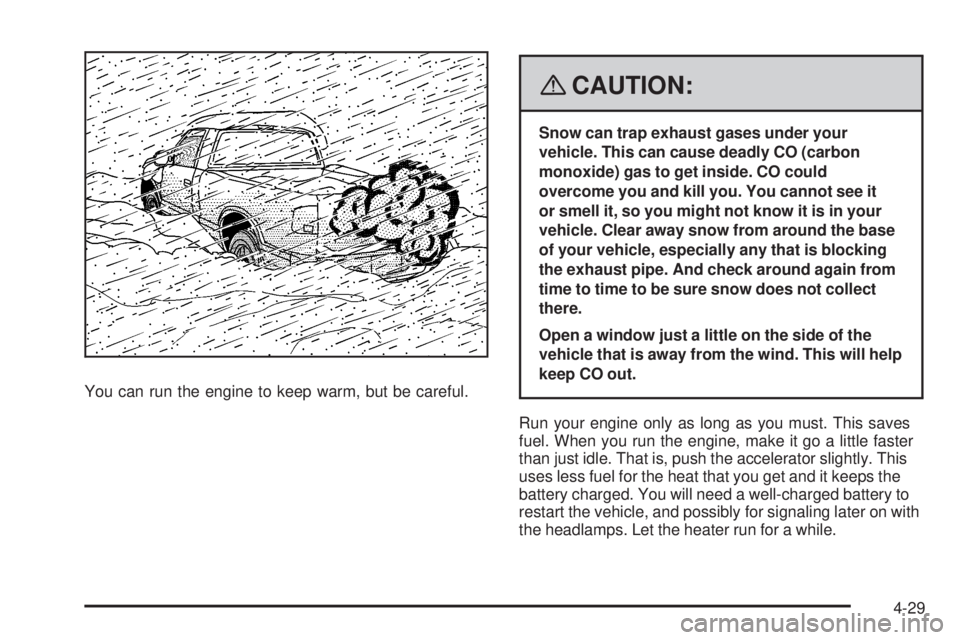
You can run the engine to keep warm, but be careful.
{CAUTION:
Snow can trap exhaust gases under your
vehicle. This can cause deadly CO (carbon
monoxide) gas to get inside. CO could
overcome you and kill you. You cannot see it
or smell it, so you might not know it is in your
vehicle. Clear away snow from around the base
of your vehicle, especially any that is blocking
the exhaust pipe. And check around again from
time to time to be sure snow does not collect
there.
Open a window just a little on the side of the
vehicle that is away from the wind. This will help
keep CO out.
Run your engine only as long as you must. This saves
fuel. When you run the engine, make it go a little faster
than just idle. That is, push the accelerator slightly. This
uses less fuel for the heat that you get and it keeps the
battery charged. You will need a well-charged battery to
restart the vehicle, and possibly for signaling later on with
the headlamps. Let the heater run for a while.
4-29
Page 232 of 428
Then, shut the engine off and close the window
almost all the way to preserve the heat. Start the
engine again and repeat this only when you feel
really uncomfortable from the cold. But do it as little
as possible. Preserve the fuel as long as you can.
To help keep warm, you can get out of the vehicle
and do some fairly vigorous exercises every half hour
or so until help comes.
If Your Vehicle is Stuck in Sand,
Mud, Ice, or Snow
Slowly and cautiously spin the wheels to free your
vehicle when stuck in sand, mud, ice, or snow. See
Rocking Your Vehicle to Get It Out on page 4-30.
If your vehicle has a traction system, it can often help to
free a stuck vehicle. Refer to your vehicle’s traction
system in the Index. If the stuck condition is too severe
for the traction system to free the vehicle, turn the
traction system off and use the rocking method.
{CAUTION:
If you let your vehicle’s tires spin at high
speed, they can explode, and you or others
could be injured. The vehicle can overheat,
causing an engine compartment re or other
damage. Spin the wheels as little as possible
and avoid going above 35 mph (55 km/h) as
shown on the speedometer.
For information about using tire chains on your vehicle,
seeTire Chains on page 5-78.
Rocking Your Vehicle to Get It Out
First, turn the steering wheel left and right to clear the
area around the front wheels. For four-wheel drive
vehicles, shift into 4HI. For vehicles with traction control,
turn the system off. SeeTraction Control System (TCS)
on page 4-5. Then shift back and forth between
REVERSE (R) and a forward gear, or with a manual
transmission, between FIRST (1) or SECOND (2) and
REVERSE (R), spinning the wheels as little as possible.
4-30
Page 237 of 428
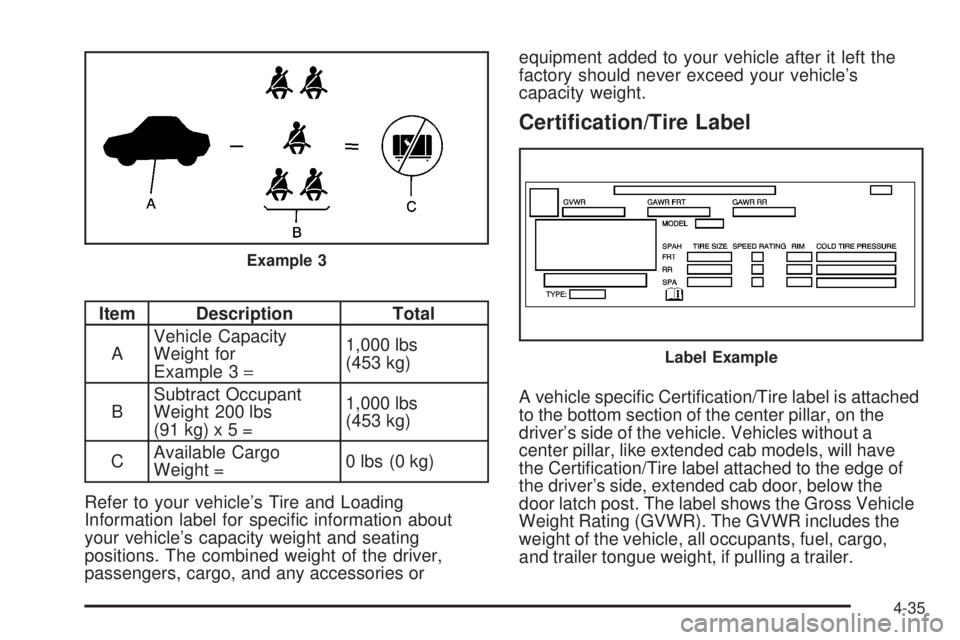
Item Description Total
AVehicle Capacity
Weight for
Example 3=1,000 lbs
(453 kg)
BSubtract Occupant
Weight 200 lbs
(91kg)x5=1,000 lbs
(453 kg)
CAvailable Cargo
Weight =0 lbs (0 kg)
Refer to your vehicle’s Tire and Loading
Information label for specic information about
your vehicle’s capacity weight and seating
positions. The combined weight of the driver,
passengers, cargo, and any accessories orequipment added to your vehicle after it left the
factory should never exceed your vehicle’s
capacity weight.
Certication/Tire Label
A vehicle specic Certication/Tire label is attached
to the bottom section of the center pillar, on the
driver’s side of the vehicle. Vehicles without a
center pillar, like extended cab models, will have
the Certication/Tire label attached to the edge of
the driver’s side, extended cab door, below the
door latch post. The label shows the Gross Vehicle
Weight Rating (GVWR). The GVWR includes the
weight of the vehicle, all occupants, fuel, cargo,
and trailer tongue weight, if pulling a trailer.
Example 3
Label Example
4-35
Page 246 of 428
Towing a Trailer
{CAUTION:
If you do not use the correct equipment and
drive properly, you can lose control when you
pull a trailer. For example, if the trailer is too
heavy, the brakes may not work well — or even
at all. You and your passengers could be
seriously injured. You may also damage your
vehicle; the resulting repairs would not be
covered by your warranty. Pull a trailer only if
you have followed all the steps in this section.
Ask your dealer/retailer for advice and
information about towing a trailer with
your vehicle.Notice:Pulling a trailer improperly can damage
your vehicle and result in costly repairs that would
not be covered by your warranty. Always follow
the instructions in this section and check with your
dealer/retailer for more information about towing
a trailer with your vehicle.
To identify the trailering capacity of your vehicle, you
should read the information in “Weight of the Trailer” that
appears later in this section.
Trailering is different than just driving your vehicle
by itself. Trailering means changes in handling,
acceleration, braking, durability and fuel economy.
Successful, safe trailering takes correct equipment,
and it has to be used properly.
That’s the reason for this part. In it are many time-tested,
important trailering tips and safety rules. Many of
these are important for your safety and that of your
passengers. So please read this section carefully before
you pull a trailer.
4-44