seats GMC CANYON 2008 Owner's Guide
[x] Cancel search | Manufacturer: GMC, Model Year: 2008, Model line: CANYON, Model: GMC CANYON 2008Pages: 428, PDF Size: 5.82 MB
Page 56 of 428
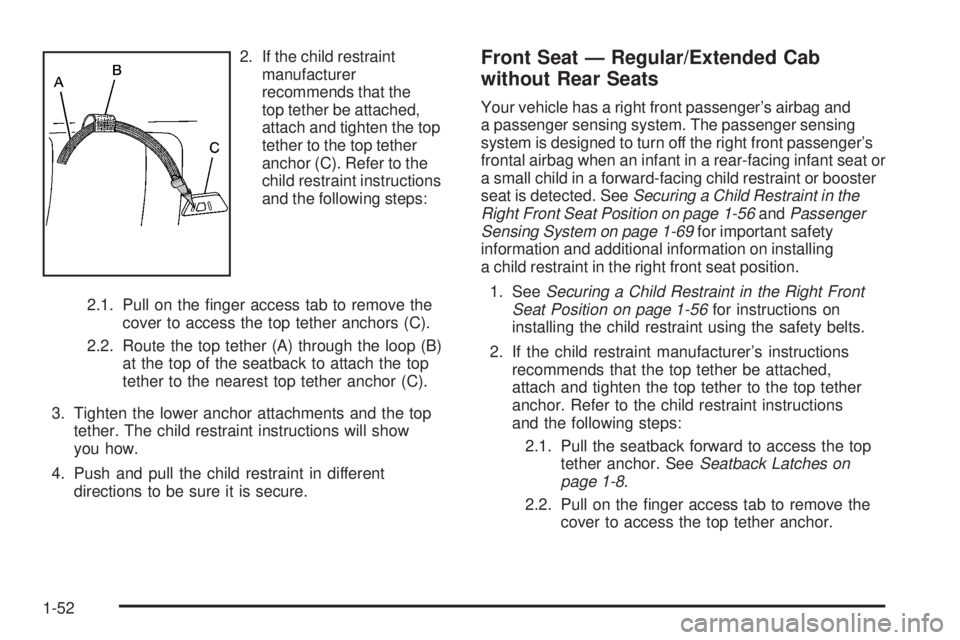
2. If the child restraint
manufacturer
recommends that the
top tether be attached,
attach and tighten the top
tether to the top tether
anchor (C). Refer to the
child restraint instructions
and the following steps:
2.1. Pull on the nger access tab to remove the
cover to access the top tether anchors (C).
2.2. Route the top tether (A) through the loop (B)
at the top of the seatback to attach the top
tether to the nearest top tether anchor (C).
3. Tighten the lower anchor attachments and the top
tether. The child restraint instructions will show
you how.
4. Push and pull the child restraint in different
directions to be sure it is secure.Front Seat — Regular/Extended Cab
without Rear Seats
Your vehicle has a right front passenger’s airbag and
a passenger sensing system. The passenger sensing
system is designed to turn off the right front passenger’s
frontal airbag when an infant in a rear-facing infant seat or
a small child in a forward-facing child restraint or booster
seat is detected. SeeSecuring a Child Restraint in the
Right Front Seat Position on page 1-56andPassenger
Sensing System on page 1-69for important safety
information and additional information on installing
a child restraint in the right front seat position.
1. SeeSecuring a Child Restraint in the Right Front
Seat Position on page 1-56for instructions on
installing the child restraint using the safety belts.
2. If the child restraint manufacturer’s instructions
recommends that the top tether be attached,
attach and tighten the top tether to the top tether
anchor. Refer to the child restraint instructions
and the following steps:
2.1. Pull the seatback forward to access the top
tether anchor. SeeSeatback Latches on
page 1-8.
2.2. Pull on the nger access tab to remove the
cover to access the top tether anchor.
1-52
Page 78 of 428
Servicing Your Airbag-Equipped
Vehicle
Airbags affect how your vehicle should be serviced.
There are parts of the airbag system in several places
around your vehicle. Your dealer/retailer and the service
manual have information about servicing your vehicle
and the airbag system. To purchase a service manual,
seeService Publications Ordering Information on
page 7-15.
{CAUTION:
For up to 10 seconds after the ignition is turned
off and the battery is disconnected, an airbag
can still inate during improper service. You
can be injured if you are close to an airbag when
it inates. Avoid yellow connectors. They are
probably part of the airbag system. Be sure to
follow proper service procedures, and make
sure the person performing work for you is
qualied to do so.
Adding Equipment to Your
Airbag-Equipped Vehicle
Q:Is there anything I might add to or change
about the vehicle that could keep the airbags
from working properly?
A:Yes. If you add things that change your vehicle’s
frame, bumper system, height, front end or side
sheet metal, they may keep the airbag system from
working properly. Changing or moving any parts
of the front seats, safety belts, the airbag sensing
and diagnostic module, steering wheel, instrument
panel, roof-rail airbag modules, ceiling headliner
or pillar garnish trim, front sensors, or airbag wiring
can affect the operation of the airbag system.
In addition, your vehicle has a passenger sensing
system for the right front passenger’s position,
which includes sensors that are part of the
passenger’s seat. The passenger sensing
system may not operate properly if the original
seat trim is replaced with non-GM covers,
upholstery or trim, or with GM covers, upholstery
or trim designed for a different vehicle.
1-74
Page 130 of 428
Your Responsibility
You may need to increase the volume of your radio
to hear the OnStar advisor. If the light next to the
OnStar buttons is red, this means that your system is
not functioning properly and should be checked by a
dealer/retailer. If the light appears clear (no light is
appearing), your OnStar subscription has expired. You
can always press the blue OnStar button to conrm that
your OnStar equipment is active.
Storage Areas
Glove Box
To open the glove box, lift up on the lever.
Cupholder(s)
Your vehicle may have two cupholders located on the
lower part of the front doors as well as two cupholders
located at the front end of the console. Vehicles with
bench seats may have cupholders attached to the front of
the center seat.If your vehicle is an extended cab or crew cab model,
your vehicle also has two rear cupholders. On crew cab
models, the cupholders are located at the front end
of the rear center seat cushion. On extended cab
models, the rear seat cupholders are located on top of
the rear center console.
If you have an ashtray, it will use one of the cupholders.
Center Console Storage
For vehicles with bench seats, you may have a center
armrest storage area. Lift up on the upper tab located at
the front of the armrest to release the latch. Lift the lid
to open the storage area.
For vehicles with bucket seats or uplevel packages,
your vehicle may have a two-tiered center armrest
storage area. Lift up on the upper tab located at the front
of the armrest to release the latch. Lift the lid to the top
storage area. A second tab is located below the top one
and allows you to access the bottom storage area. Lift up
on the lower tab to release the latch. Then, raise the lid of
the lower storage area. The upper storage area will lift up
with the lid of the lower storage area.
To close the storage area(s), lower the lid(s) until you
feel the latch close.
2-50
Page 131 of 428
Assist Handles
Your vehicle may have assist handles to be used when
getting out of your vehicle. If your vehicle has assist
handles, they are located above the doors.
If your vehicle has roof-mounted side impact air bags,
there are assist handles located above both the driver’s
and front passenger’s doors.
Rear Storage Area
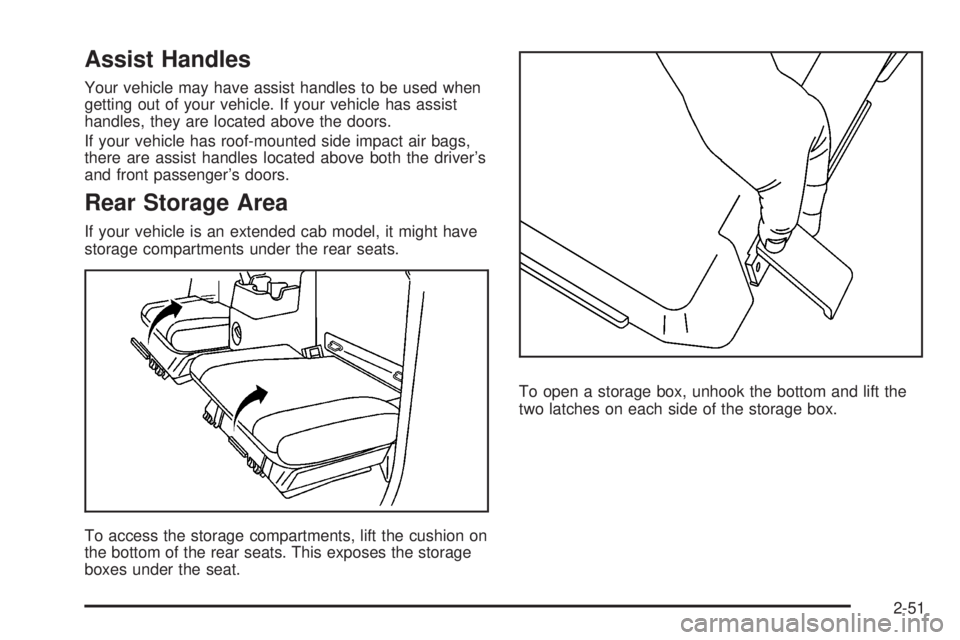
If your vehicle is an extended cab model, it might have
storage compartments under the rear seats.
To access the storage compartments, lift the cushion on
the bottom of the rear seats. This exposes the storage
boxes under the seat.To open a storage box, unhook the bottom and lift the
two latches on each side of the storage box.
2-51
Page 150 of 428
Electric Power Management
The vehicle has Electric Power Management (EPM)
that estimates the battery’s temperature and state
of charge. It then adjusts the voltage for best
performance and extended life of the battery.
When the battery’s state of charge is low, the voltage is
raised slightly to quickly put the charge back in. When
the state of charge is high, the voltage is lowered slightly
to prevent overcharging. If the vehicle has a voltmeter
gage, you may see the voltage move up or down. This is
normal. If there is a problem, an alert will be displayed.
The battery can be discharged at idle if the electrical
loads are very high. This is true for all vehicles.
This is because the generator (alternator) may not
be spinning fast enough at idle to produce all the
power that is needed for very high electrical loads.
A high electrical load occurs when several of the
following loads are on: headlamps, high beams, fog
lamps, rear window defogger, climate control fan at
high speed, heated seats, engine cooling fans, trailer
loads, and loads plugged into accessory power outlets.
Battery Run-Down Protection
This feature shuts off the dome lamp if it is left on for
more than 20 minutes when the ignition is in LOCK.
This will help prevent your battery from running down.
Accessory Power Outlet(s)
The accessory power outlets can be used to connect
electrical equipment such as a cellular phone or
CB radio.
Your vehicle may have two accessory power outlets
located on the lower part of the instrument panel below
the climate control system and there may be one located
on the rear of the center console. A small cap must be
pulled down to access an accessory power outlet.
When not using an outlet be sure to cover it with the
protective cap.
Notice:Leaving electrical equipment on for
extended periods will drain the battery. Always
unplug electrical equipment when not in use and do
not plug in equipment that exceeds the maximum
amperage rating of 20 amperes.
3-18
Page 154 of 428
Defogging and Defrosting
Fog on the inside of windows is a result of high humidity
(moisture) condensing on the cool window glass. This
can be minimized if the climate control system is used
properly. There are two modes to clear fog or frost from
the windshield and side windows. Use the defog mode
to clear the windows of fog or moisture and warm the
passengers. Use the defrost mode to remove fog or frost
from the windshield more quickly. For best results, clear
all snow and ice from the windshield before defrosting.
Turn the mode knob on the climate control panel
clockwise to select the defog or defrost modes.
/(Floor/Defog):This mode directs the air to
the windshield, the side window outlets, and to the
oor outlets. When this mode is selected, the system
runs the air conditioning compressor unless the outside
temperature is near freezing or below. Recirculation
is not available in this mode.
0(Defrost):This mode directs most of the air to
the windshield, and the side window outlets. When this
mode is selected, the system runs the air conditioning
compressor unless the outside temperature is near,
or below freezing. Recirculation is not available in
this mode.
Do not drive the vehicle until all the windows are clear.
Outlet Adjustment
Use the thumbwheel on the outlets to change the
direction of the air ow.
Lift up or push down on the thumbwheel located in
the center of the outlet to direct the air up or down,
or slide the thumbwheel to the left or right to direct
the airow from side-to-side.
Operation Tips
Clear away any ice, snow or leaves from the air
inlets at the base of the windshield that may
block the ow of air into your vehicle.
Use of non-GM approved hood deectors may
adversely affect the performance of the system.
Keep the path under the front seats clear of objects
to help circulate the air inside of your vehicle more
effectively.
3-22
Page 239 of 428
If you put things inside your vehicle — like
suitcases, tools, packages, or anything
else — they will go as fast as the vehicle goes.
If you have to stop or turn quickly, or if there is a
crash, they will keep going.
{CAUTION:
Things you put inside your vehicle can
strike and injure people in a sudden stop
or turn, or in a crash.
Put things in the cargo area of your
vehicle. Try to spread the weight
evenly.
Never stack heavier things, like
suitcases, inside the vehicle so that
some of them are above the tops of
the seats.
Do not leave an unsecured child
restraint in your vehicle.
When you carry something inside the
vehicle, secure it whenever you can.
Do not leave a seat folded down
unless you need to.There is also important loading information for
off-road driving in this manual.
See“Loading Your
Vehicle for Off-Road Driving”underOff-Road
Driving on page 4-11.
Remember not to exceed the Gross Axle Weight
rating (GAWR) of the front or rear axle.
Two-Tiered Loading
By positioning four 2” X 6” wooden planks across
the width of the pickup box, you can create an
upper load platform. The planks must be inserted
in the pickup box depressions. The length of the
planks must allow for at least a 3/4 inch (2 cm)
bearing surface on each end of the plank.
When using this upper load platform, be sure
the load is securely tied down to prevent it from
shifting. The load’s center of gravity should
be positioned in a zone over the rear axle.
Any load that extends beyond the vehicle’s
taillamp area must be properly marked according
to local laws and regulations.
Remember not to exceed the Gross Axle Weight
Rating (GAWR) of the rear axle.
4-37
Page 319 of 428
Tire Size
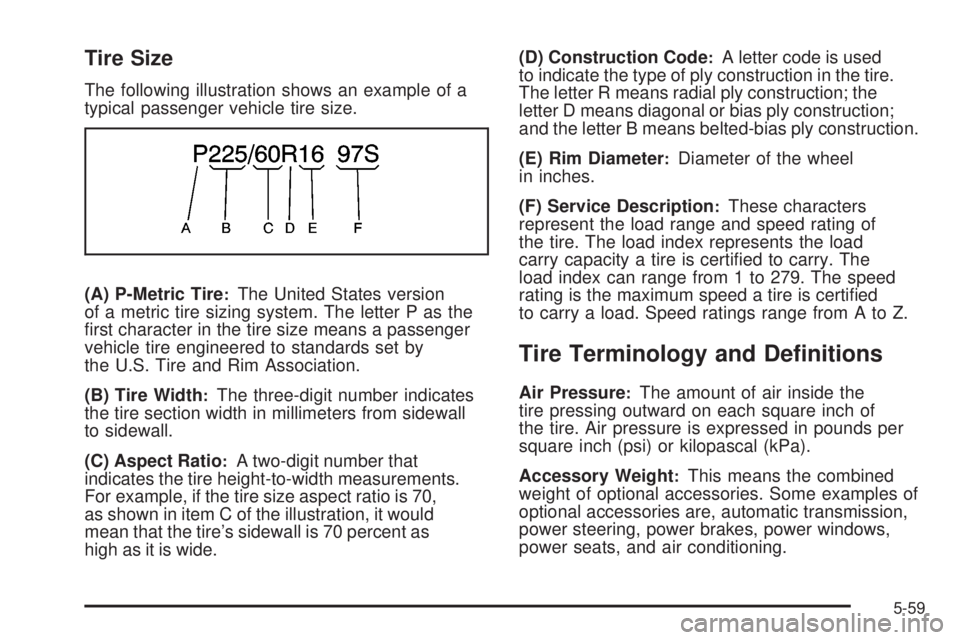
The following illustration shows an example of a
typical passenger vehicle tire size.
(A) P-Metric Tire
:The United States version
of a metric tire sizing system. The letter P as the
rst character in the tire size means a passenger
vehicle tire engineered to standards set by
the U.S. Tire and Rim Association.
(B) Tire Width
:The three-digit number indicates
the tire section width in millimeters from sidewall
to sidewall.
(C) Aspect Ratio
:A two-digit number that
indicates the tire height-to-width measurements.
For example, if the tire size aspect ratio is 70,
as shown in item C of the illustration, it would
mean that the tire’s sidewall is 70 percent as
high as it is wide.(D) Construction Code
:A letter code is used
to indicate the type of ply construction in the tire.
The letter R means radial ply construction; the
letter D means diagonal or bias ply construction;
and the letter B means belted-bias ply construction.
(E) Rim Diameter
:Diameter of the wheel
in inches.
(F) Service Description
:These characters
represent the load range and speed rating of
the tire. The load index represents the load
carry capacity a tire is certied to carry. The
load index can range from 1 to 279. The speed
rating is the maximum speed a tire is certied
to carry a load. Speed ratings range from A to Z.
Tire Terminology and Denitions
Air Pressure:The amount of air inside the
tire pressing outward on each square inch of
the tire. Air pressure is expressed in pounds per
square inch (psi) or kilopascal (kPa).
Accessory Weight
:This means the combined
weight of optional accessories. Some examples of
optional accessories are, automatic transmission,
power steering, power brakes, power windows,
power seats, and air conditioning.
5-59
Page 342 of 428
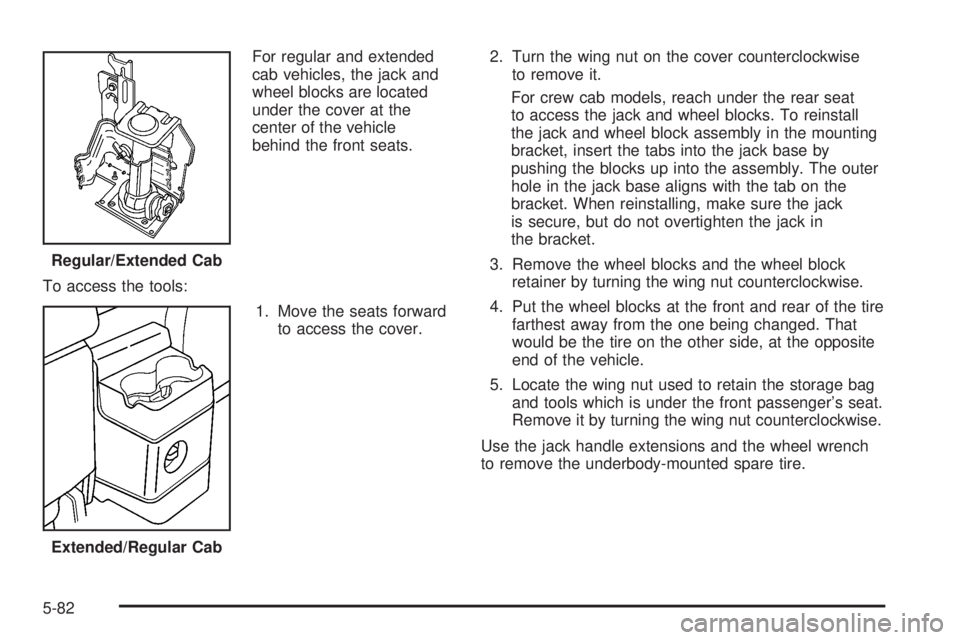
For regular and extended
cab vehicles, the jack and
wheel blocks are located
under the cover at the
center of the vehicle
behind the front seats.
To access the tools:
1. Move the seats forward
to access the cover.2. Turn the wing nut on the cover counterclockwise
to remove it.
For crew cab models, reach under the rear seat
to access the jack and wheel blocks. To reinstall
the jack and wheel block assembly in the mounting
bracket, insert the tabs into the jack base by
pushing the blocks up into the assembly. The outer
hole in the jack base aligns with the tab on the
bracket. When reinstalling, make sure the jack
is secure, but do not overtighten the jack in
the bracket.
3. Remove the wheel blocks and the wheel block
retainer by turning the wing nut counterclockwise.
4. Put the wheel blocks at the front and rear of the tire
farthest away from the one being changed. That
would be the tire on the other side, at the opposite
end of the vehicle.
5. Locate the wing nut used to retain the storage bag
and tools which is under the front passenger’s seat.
Remove it by turning the wing nut counterclockwise.
Use the jack handle extensions and the wheel wrench
to remove the underbody-mounted spare tire. Regular/Extended Cab
Extended/Regular Cab
5-82
Page 351 of 428
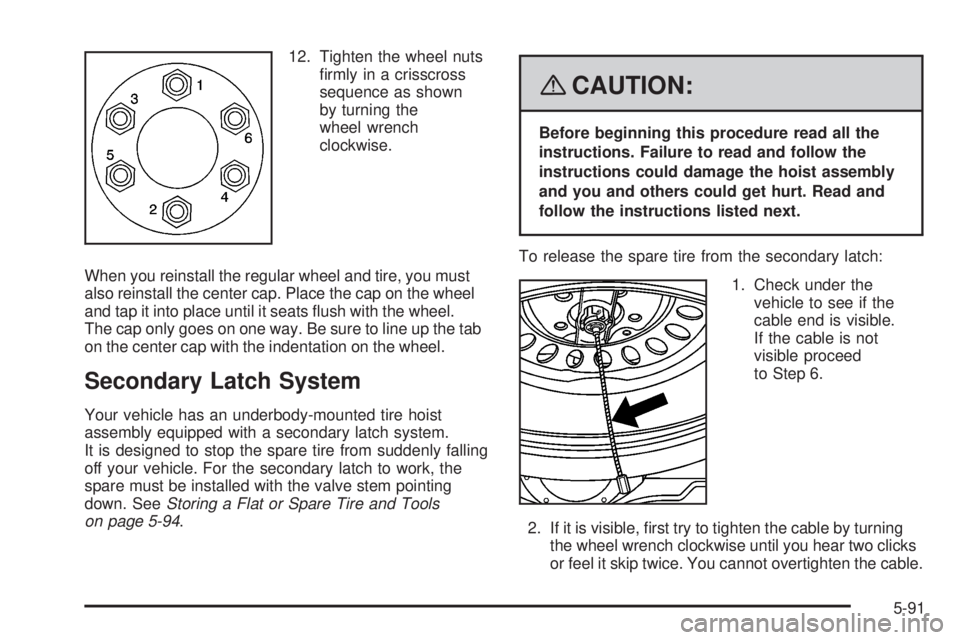
12. Tighten the wheel nuts
rmly in a crisscross
sequence as shown
by turning the
wheel wrench
clockwise.
When you reinstall the regular wheel and tire, you must
also reinstall the center cap. Place the cap on the wheel
and tap it into place until it seats ush with the wheel.
The cap only goes on one way. Be sure to line up the tab
on the center cap with the indentation on the wheel.
Secondary Latch System
Your vehicle has an underbody-mounted tire hoist
assembly equipped with a secondary latch system.
It is designed to stop the spare tire from suddenly falling
off your vehicle. For the secondary latch to work, the
spare must be installed with the valve stem pointing
down. SeeStoring a Flat or Spare Tire and Tools
on page 5-94.
{CAUTION:
Before beginning this procedure read all the
instructions. Failure to read and follow the
instructions could damage the hoist assembly
and you and others could get hurt. Read and
follow the instructions listed next.
To release the spare tire from the secondary latch:
1. Check under the
vehicle to see if the
cable end is visible.
If the cable is not
visible proceed
to Step 6.
2. If it is visible, rst try to tighten the cable by turning
the wheel wrench clockwise until you hear two clicks
or feel it skip twice. You cannot overtighten the cable.
5-91