stop start GMC CANYON 2008 Owner's Guide
[x] Cancel search | Manufacturer: GMC, Model Year: 2008, Model line: CANYON, Model: GMC CANYON 2008Pages: 428, PDF Size: 5.82 MB
Page 206 of 428
And, of course, actual stopping distances vary greatly
with the surface of the road, whether it is pavement
or gravel; the condition of the road, whether it is wet,
dry, or icy; tire tread; the condition of the brakes; the
weight of the vehicle; and the amount of brake
force applied.
Avoid needless heavy braking. Some people drive in
spurts — heavy acceleration followed by heavy
braking — rather than keeping pace with traffic. This is
a mistake. The brakes might not have time to cool
between hard stops. The brakes will wear out much
faster if you do a lot of heavy braking. If you keep pace
with the traffic and allow realistic following distances,
you will eliminate a lot of unnecessary braking.
That means better braking and longer brake life.
If your vehicle’s engine ever stops while you are driving,
brake normally but do not pump the brakes. If you do,
the pedal could get harder to push down. If the
engine stops, you will still have some power brake
assist. But you will use it when you brake. Once the
power assist is used up, it can take longer to stop and
the brake pedal will be harder to push.
Adding non-dealer/non-retailer accessories can affect
your vehicle’s performance. SeeAccessoriesand
Modifications on page 5-3.Antilock Brake System (ABS)
Your vehicle has the Antilock Brake System (ABS), an
advanced electronic braking system that will help
prevent a braking skid.
When you start the engine and begin to drive away,
ABS will check itself. You might hear a momentary
motor or clicking noise while this test is going on.
This is normal.
If there is a problem with
the ABS, this warning light
will stay on. SeeAntilock
Brake System Warning
Light on page 3-32.
Let us say the road is wet and you are driving safely.
Suddenly, an animal jumps out in front of you. You slam
on the brakes and continue braking. Here is what
happens with ABS:
A computer senses that wheels are slowing down.
If one of the wheels is about to stop rolling, the computer
will separately work the brakes at each front wheel and at
both rear wheels.
4-4
Page 212 of 428
Skidding
In a skid, a driver can lose control of the vehicle.
Defensive drivers avoid most skids by taking reasonable
care suited to existing conditions, and by not overdriving
those conditions. But skids are always possible.
The three types of skids correspond to your vehicle’s
three control systems. In the braking skid, the wheels
are not rolling. In the steering or cornering skid, too
much speed or steering in a curve causes tires to slip
and lose cornering force. And in the acceleration skid,
too much throttle causes the driving wheels to spin.
A cornering skid is best handled by easing your foot off
the accelerator pedal.
If your vehicle starts to slide, ease your foot off the
accelerator pedal and quickly steer the way you want
the vehicle to go. If you start steering quickly enough,
your vehicle may straighten out. Always be ready for a
second skid if it occurs.Of course, traction is reduced when water, snow, ice,
gravel, or other material is on the road. For safety, you
want to slow down and adjust your driving to these
conditions. It is important to slow down on slippery
surfaces because stopping distance is longer and
vehicle control more limited.
While driving on a surface with reduced traction, try
your best to avoid sudden steering, acceleration, or
braking, including reducing vehicle speed by shifting to a
lower gear. Any sudden changes could cause the tires to
slide. You might not realize the surface is slippery until
your vehicle is skidding. Learn to recognize warning
clues — such as enough water, ice, or packed snow on
the road to make a mirrored surface — and slow down
when you have any doubt.
Remember: Any Antilock Brake System (ABS) helps
avoid only the braking skid.
4-10
Page 216 of 428
Controlling your vehicle is the key to successful off-road
driving. One of the best ways to control your vehicle
is to control your speed. Here are some things to keep
in mind. At higher speeds:
You approach things faster and you have less time
to scan the terrain for obstacles.
You have less time to react.
You have more vehicle bounce when you drive over
obstacles.
You will need more distance for braking, especially
since you are on an unpaved surface.
{CAUTION:
When you are driving off-road, bouncing and
quick changes in direction can easily throw
you out of position. This could cause you to
lose control and crash. So, whether you are
driving on or off the road, you and your
passengers should wear safety belts.
Scanning the Terrain
Off-road driving can take you over many different kinds
of terrain. You need to be familiar with the terrain
and its many different features. Here are some things
to consider.
Surface Conditions:Off-roading can take you over
hard-packed dirt, gravel, rocks, grass, sand, mud, snow,
or ice. Each of these surfaces affects the steering,
acceleration, and braking of your vehicle in different
ways. Depending upon the kind of surface you are on,
you may experience slipping, sliding, wheel spinning,
delayed acceleration, poor traction, and longer braking
distances.
Surface Obstacles:Unseen or hidden obstacles can
be hazardous. A rock, log, hole, rut, or bump can startle
you if you are not prepared for them. Often these
obstacles are hidden by grass, bushes, snow, or even the
rise and fall of the terrain itself. Here are some things to
consider:
Is the path ahead clear?
Will the surface texture change abruptly up ahead?
Does the travel take you uphill or downhill? There is
more discussion of these subjects later.
Will you have to stop suddenly or change direction
quickly?
4-14
Page 219 of 428
Attach a ag to the vehicle to make you more visible
to approaching traffic on trails or hills.
Sound the horn as you approach the top of the hill to
let opposing traffic know you are there.
Use your headlamps even during the day. They
make your vehicle more visible to oncoming traffic.
{CAUTION:
Driving to the top (crest) of a hill at full speed
can cause an accident. There could be a
drop-off, embankment, cliff, or even another
vehicle. You could be seriously injured or killed.
As you near the top of a hill, slow down and
stay alert.There are some things you should do if the vehicle
stalls, or is about to stall, and you cannot make it up
the hill:
Push the brake pedal to stop the vehicle and
keep it from rolling backwards. Also, apply the
parking brake.
If your engine is still running, shift the transmission to
REVERSE (R), release the parking brake, and slowly
back down the hill in REVERSE (R).
If your engine has stopped running, you will need to
restart it. With the brake pedal pressed and the
parking brake still applied, shift the transmission to
PARK (P), or shift to NEUTRAL if your vehicle has a
manual transmission, and restart the engine. Then,
shift to REVERSE (R), release the parking brake,
and slowly back down the hill as straight as possible
in REVERSE (R).
As you are backing down the hill, put your left hand
on the steering wheel at the 12 o’clock position. This
way, you will be able to tell if the wheels are straight
and maneuver as you back down. It is best that you
back down the hill with the wheels straight rather
than in the left or right direction. Turning the wheel
too far to the left or right will increase the possibility
of a rollover.
4-17
Page 221 of 428
{CAUTION:
Heavy braking when going down a hill can
cause your brakes to overheat and fade. This
could cause loss of control and a serious
accident. Apply the brakes lightly when
descending a hill and use a low gear to keep
vehicle speed under control.
There some things not to do when driving down a hill.
These are important because, if you ignore them, you
could lose control and have a serious accident:
When driving downhill, avoid turns that take you
across the incline of the hill. A hill that is not too steep
to drive down may be too steep to drive across. You
could roll over if you do not drive straight down.
Never go downhill with the transmission in
NEUTRAL (N), or with the clutch pedal pressed
down with a manual transmission. This is called
“free-wheeling.” The brakes will have to do all the
work and could overheat and fade.Your vehicle is much more likely to stall when going
uphill. But if it happens when going downhill:
1. Stop your vehicle by applying the regular brakes.
Apply the parking brake.
2. Shift to PARK (P), or to NEUTRAL with the manual
transmission, and, while still braking, restart the
engine.
3. Shift back to a low gear, release the parking brake,
and drive straight down.
4. If the engine will not start, get out and get help.
4-19
Page 223 of 428
Stalling on an Incline
{CAUTION:
Getting out on the downhill (low) side
of a vehicle stopped across an incline is
dangerous. If the vehicle rolls over, you could
be crushed or killed. Always get out on the
uphill (high) side of the vehicle and stay well
clear of the rollover path.
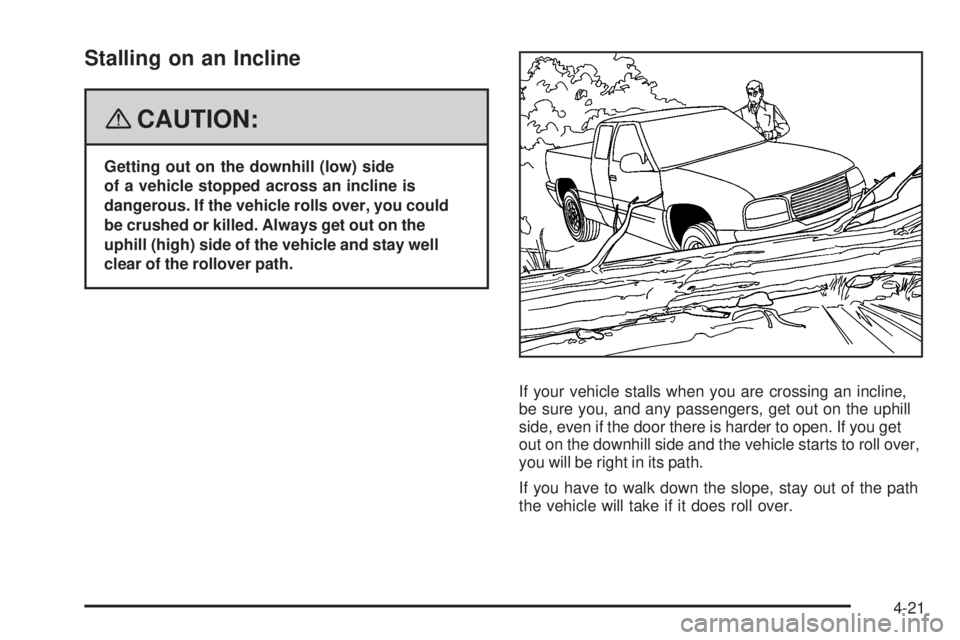
If your vehicle stalls when you are crossing an incline,
be sure you, and any passengers, get out on the uphill
side, even if the door there is harder to open. If you get
out on the downhill side and the vehicle starts to roll over,
you will be right in its path.
If you have to walk down the slope, stay out of the path
the vehicle will take if it does roll over.
4-21
Page 225 of 428
Driving in Water
{CAUTION:
Driving through rushing water can be
dangerous. Deep water can sweep your
vehicle downstream and you and your
passengers could drown. If it is only shallow
water, it can still wash away the ground from
under your tires, and you could lose traction
and roll the vehicle over. Do not drive through
rushing water.
Heavy rain can mean ash ooding, and ood waters
demand extreme caution.
Find out how deep the water is before you drive through
it. If it is deep enough to cover the wheel hubs, axles,
or exhaust pipe, do not try it — you probably will not get
through. Also, water that deep can damage the axle and
other vehicle parts.If the water is not too deep, drive slowly through it. At
faster speeds, water splashes on the ignition system and
your vehicle can stall. Stalling can also occur if you
get the tailpipe under water. And, as long as the tailpipe
is under water, you will never be able to start the
engine. When you go through water, remember that
when the brakes get wet, it may take you longer to stop.
SeeDriving in Rain and on Wet Roads on page 4-24
for more information on driving through water.
After Off-Road Driving
Remove any brush or debris that has collected on
the underbody, chassis, or under the hood. These
accumulations can be a re hazard.
After operation in mud or sand, have the brake linings
cleaned and checked. These substances can cause
glazing and uneven braking. Check the body structure,
steering, suspension, wheels, tires, and exhaust
system for damage. Also, check the fuel lines and
cooling system for any leakage.
Your vehicle will require more frequent service due
to off-road use. Refer to the maintenance schedule for
additional information.
4-23
Page 256 of 428
Passing
You’ll need more passing distance up ahead when
you’re towing a trailer. And, because you’re a good deal
longer, you’ll need to go much farther beyond the
passed vehicle before you can return to your lane.
Backing Up
Hold the bottom of the steering wheel with one hand.
Then, to move the trailer to the left, just move that hand
to the left. To move the trailer to the right, move your
hand to the right. Always back up slowly and, if possible,
have someone guide you.
Making Turns
Notice:Making very sharp turns while trailering
could cause the trailer to come in contact with the
vehicle. Your vehicle could be damaged. Avoid
making very sharp turns while trailering.
When you’re turning with a trailer, make wider turns
than normal. Do this so your trailer won’t strike soft
shoulders, curbs, road signs, trees or other objects.
Avoid jerky or sudden maneuvers. Signal well in advance.
Turn Signals When Towing a Trailer
When you tow a trailer, your vehicle has to have extra
wiring and a heavy-duty turn signal asher.
The arrows on your instrument panel will ash whenever
you signal a turn or lane change. Properly hooked up,
the trailer lamps will also ash, telling other drivers
you’re about to turn, change lanes or stop.
When towing a trailer, the arrows on your instrument
panel will ash for turns even if the bulbs on the trailer
are burned out. Thus, you may think drivers behind
you are seeing your signal when they are not. It’s
important to check occasionally to be sure the trailer
bulbs are still working.
Driving On Grades
Reduce speed and shift to a lower gear before you start
down a long or steep downgrade. If you don’t shift
down, you might have to use your brakes so much
that they would get hot and no longer work well.
4-54
Page 258 of 428
When You Are Ready to Leave After
Parking on a Hill
1. Apply your regular brakes and hold the pedal down
while you:
start your engine,
shift into a gear, and
release the parking brake.
2. Let up on the brake pedal.
3. Drive slowly until the trailer is clear of the chocks.
4. Stop and have someone pick up and store the
chocks.
Maintenance When Trailer Towing
Your vehicle will need service more often when you’re
pulling a trailer. SeeScheduled Maintenance on page 6-4
for more on this. Things that are especially important in
trailer operation are automatic transmission uid (don’t
overll), engine oil, axle lubricant, belt, cooling system
and brake system. Each of these is covered in this
manual, and the Index will help you nd them quickly.
If you’re trailering, it’s a good idea to review these
sections before you start your trip.
Check periodically to see that all hitch nuts and bolts
are tight.
Trailer Wiring Harness
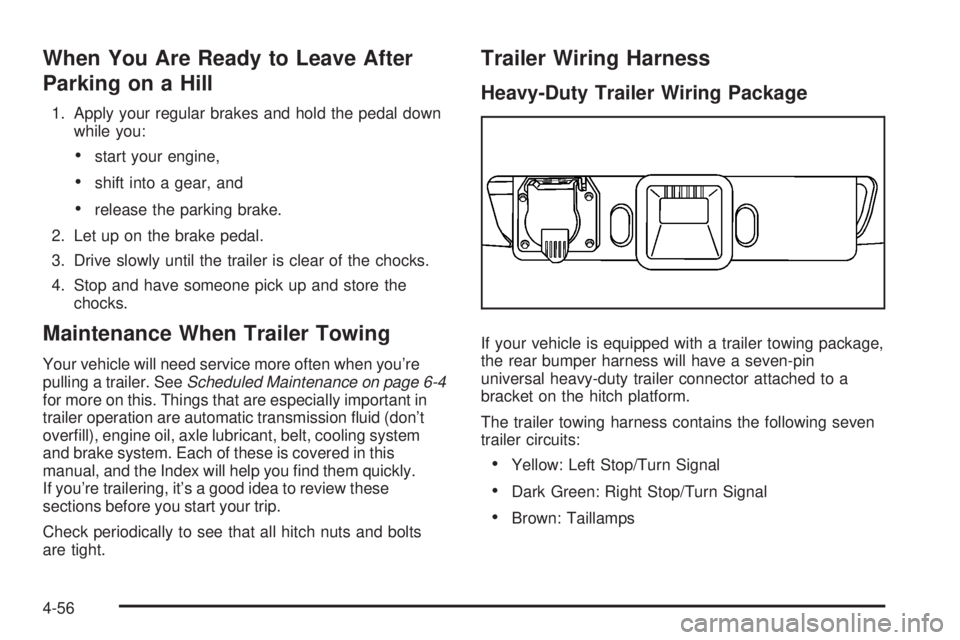
Heavy-Duty Trailer Wiring Package
If your vehicle is equipped with a trailer towing package,
the rear bumper harness will have a seven-pin
universal heavy-duty trailer connector attached to a
bracket on the hitch platform.
The trailer towing harness contains the following seven
trailer circuits:
Yellow: Left Stop/Turn Signal
Dark Green: Right Stop/Turn Signal
Brown: Taillamps
4-56
Page 261 of 428
Service............................................................5-3
Accessories and Modications..........................5-3
California Proposition 65 Warning.....................5-3
California Perchlorate Materials Requirements.....5-4
Doing Your Own Service Work.........................5-4
Adding Equipment to the Outside
of Your Vehicle...........................................5-5
Fuel................................................................5-5
Gasoline Octane............................................5-5
Gasoline Specications....................................5-5
California Fuel...............................................5-6
Additives.......................................................5-6
Fuels in Foreign Countries...............................5-7
Filling the Tank..............................................5-8
Filling a Portable Fuel Container.....................5-10
Checking Things Under the Hood....................5-10
Hood Release..............................................5-11
Engine Compartment Overview.......................5-12
Engine Oil...................................................5-15
Engine Oil Life System..................................5-18
Engine Air Cleaner/Filter................................5-19
Automatic Transmission Fluid.........................5-21
Manual Transmission Fluid.............................5-23
Hydraulic Clutch...........................................5-24
Engine Coolant.............................................5-26Radiator Pressure Cap..................................5-29
Engine Overheating.......................................5-29
Cooling System............................................5-31
Engine Fan Noise.........................................5-36
Power Steering Fluid.....................................5-36
Windshield Washer Fluid................................5-37
Brakes........................................................5-38
Battery........................................................5-41
Jump Starting...............................................5-42
Rear Axle
.......................................................5-46
Four-Wheel Drive............................................5-47
Front Axle......................................................5-48
Headlamp Aiming...........................................5-49
Bulb Replacement..........................................5-49
Halogen Bulbs..............................................5-49
Headlamps..................................................5-50
Front Turn Signal, Parking and Daytime
Running Lamps (DRL)................................5-51
Center High-Mounted Stoplamp (CHMSL).........5-51
Taillamps, Turn Signal, Stoplamps
and Back-up Lamps...................................5-52
License Plate Lamp......................................5-53
Replacement Bulbs.......................................5-53
Windshield Wiper Blade Replacement..............5-54
Section 5 Service and Appearance Care
5-1