key GMC CANYON 2008 Owner's Guide
[x] Cancel search | Manufacturer: GMC, Model Year: 2008, Model line: CANYON, Model: GMC CANYON 2008Pages: 428, PDF Size: 5.82 MB
Page 171 of 428
Trip Information
Odometer
The odometer is automatically displayed on the DIC
when you start the vehicle. The odometer shows
the total distance the vehicle has been driven in either
miles for the United States or kilometers for Canada.
Trip Odometer
Press and release the reset stem until TRIP appears on
the DIC display. The trip odometer shows the current
distance traveled since the last reset of the trip odometer
in either miles for the United States or kilometers for
Canada.
To reset the trip odometer, press and hold the reset
stem until the display returns to zero.
Engine Oil Life System
With the engine off, turn the key to ON/RUN and
then press the reset stem until OIL LIFE RESET
appears — alternating between OIL LIFE and
RESET — on the DIC display. The CHANGE OIL
message alerts you to change the oil on a schedule
consistent with your driving conditions. Always reset
the OIL LIFE message after an oil change. To reset the
message, seeEngine Oil Life System on page 5-18.In addition to the engine oil life system monitoring the
oil life, additional maintenance is recommended in
the Maintenance Schedule in this manual. SeeEngine
Oil on page 5-15andScheduled Maintenance on
page 6-4for more information.
Language
This feature allows you to choose the language in which
the DIC display shows information.
To set your choice for this feature:
1. With the engine off, turn the key to ON/RUN, but do
not start the engine.
2. Close all doors so the DOORS message does not
display in the DIC.
3. Momentarily press and release the reset stem until
the current language is displayed: English (default),
Spanish, or French.
4. To select a different language, press and hold the
reset stem until the next language appears.
5. Repeat Step 4 until the desired language is
displayed. Once the desired language is shown
on the DIC display, the language is set.
6. To exit the language selection, momentarily press
and release the reset stem. All DIC messages will
now display in the language selected.
3-39
Page 172 of 428
Automatic Door Locks
This feature allows you to program the door locks to a
preferred setting.
To set your choice for this feature:
1. With the engine off, turn the key to LOCK/OFF.
Do not remove the key from the ignition.
2. Press and hold the power door lock button until the
DIC display shows the current door lock mode.
3. To view the next available mode, press and hold
the reset stem until the mode appears. Release
the reset stem and press and hold again to view
the next mode.
4. Once the desired mode is shown on the
DIC display, briey press the reset stem to
set your choice. The DIC display then clears.
The following are the available modes:
Lock 1 (default):On vehicles with an automatic
transmission, this mode locks all of the doors when the
vehicle is shifted out of PARK (P) and unlocks all of
the doors when the vehicle is shifted into PARK (P).On vehicles with a manual transmission, this mode
locks all of the doors when the vehicle speed is greater
than 15 mph (24 km/h) and unlocks all of the doors
when the key is removed from the ignition.
Lock 2:On vehicles with an automatic transmission,
this mode locks all of the doors when the vehicle
is shifted out of PARK (P) and unlocks the driver’s
door when the vehicle is shifted into PARK (P).
On vehicles with a manual transmission, this mode
locks all of the doors when the vehicle speed is greater
than 15 mph (24 km/h) and unlocks the driver’s door
when the key is removed from the ignition.
Lock 3:On vehicles with an automatic transmission,
this mode locks all of the doors when the vehicle
is shifted out of PARK (P). The doors will not
automatically unlock.
On vehicles with a manual transmission, this mode
locks all of the doors when the vehicle speed is greater
than 15 mph (24 km/h). The doors will not automatically
unlock.
3-40
Page 173 of 428
Remote Keyless Entry (RKE) Feedback
This feature allows you to program the Remote
Keyless Entry (RKE) feedback to a preferred setting.
To set your choice for this feature:
1. With the engine off, turn the key to LOCK/OFF.
Do not remove the key from the ignition.
2. Press and hold the lock and unlock buttons on
the RKE transmitter at the same time. Hold both
buttons until the DIC display shows the current RKE
feedback mode.
3. To view the next available mode, press and hold
the reset stem until the mode appears. Release
the reset stem and press and hold again to view
the next mode.
4. Once the desired mode is shown on the DIC
display, briey press the reset stem to set your
choice. The DIC display then clears.The following are the available modes:
RFA 1 (default):This mode ashes the parking lamps
when you press the lock or unlock buttons on the
RKE transmitter.
RFA 2:This mode ashes the parking lamps and
sounds the horn when you press the lock button on the
RKE transmitter. This mode also ashes the parking
lamps when you press the unlock button on the
RKE transmitter.
RFA 3:This mode ashes the parking lamps and
sounds the horn when you press the lock or unlock
buttons on the RKE transmitter.
RFA 4:This mode disables RKE feedback. There will
be no feedback when you press the lock or unlock
buttons on the RKE transmitter.
3-41
Page 216 of 428
Controlling your vehicle is the key to successful off-road
driving. One of the best ways to control your vehicle
is to control your speed. Here are some things to keep
in mind. At higher speeds:
You approach things faster and you have less time
to scan the terrain for obstacles.
You have less time to react.
You have more vehicle bounce when you drive over
obstacles.
You will need more distance for braking, especially
since you are on an unpaved surface.
{CAUTION:
When you are driving off-road, bouncing and
quick changes in direction can easily throw
you out of position. This could cause you to
lose control and crash. So, whether you are
driving on or off the road, you and your
passengers should wear safety belts.
Scanning the Terrain
Off-road driving can take you over many different kinds
of terrain. You need to be familiar with the terrain
and its many different features. Here are some things
to consider.
Surface Conditions:Off-roading can take you over
hard-packed dirt, gravel, rocks, grass, sand, mud, snow,
or ice. Each of these surfaces affects the steering,
acceleration, and braking of your vehicle in different
ways. Depending upon the kind of surface you are on,
you may experience slipping, sliding, wheel spinning,
delayed acceleration, poor traction, and longer braking
distances.
Surface Obstacles:Unseen or hidden obstacles can
be hazardous. A rock, log, hole, rut, or bump can startle
you if you are not prepared for them. Often these
obstacles are hidden by grass, bushes, snow, or even the
rise and fall of the terrain itself. Here are some things to
consider:
Is the path ahead clear?
Will the surface texture change abruptly up ahead?
Does the travel take you uphill or downhill? There is
more discussion of these subjects later.
Will you have to stop suddenly or change direction
quickly?
4-14
Page 264 of 428
California Perchlorate Materials
Requirements
Certain types of automotive applications, such as
airbag initiators, seat belt pretensioners, and lithium
batteries contained in remote keyless entry transmitters,
may contain perchlorate materials. Special handling
may be necessary. For additional information, see
www.dtsc.ca.gov/hazardouswaste/perchlorate.
Doing Your Own Service Work
{CAUTION:
You can be injured and your vehicle could be
damaged if you try to do service work on a
vehicle without knowing enough about it.
Be sure you have sufficient knowledge,
experience, the proper replacement parts,
and tools before you attempt any vehicle
maintenance task.
Be sure to use the proper nuts, bolts,
and other fasteners. English and metric
fasteners can be easily confused. If you
use the wrong fasteners, parts can later
break or fall off. You could be hurt.
If you want to do some of your own service work,
you should use the proper service manual. It tells you
much more about how to service your vehicle than this
manual can. To order the proper service manual, see
Service Publications Ordering Information on page 7-15.
Your vehicle has an airbag system. Before attempting
to do your own service work, seeServicing Your
Airbag-Equipped Vehicle on page 1-74.
5-4
Page 278 of 428
Engine Oil Additives
Do not add anything to the oil. The recommended
oils with the starburst symbol that meet GM Standard
GM6094M are all you need for good performance
and engine protection.
Engine Oil Life System
When to Change Engine Oil
Your vehicle has a computer system that lets you know
when to change the engine oil and lter. This is based
on engine revolutions and engine temperature, and
not on mileage. Based on driving conditions, the mileage
at which an oil change will be indicated can vary
considerably. For the oil life system to work properly,
you must reset the system every time the oil is changed.
When the system has calculated that oil life has been
diminished, it will indicate that an oil change is necessary.
A CHANGE OIL message will come on. SeeDIC
Warnings and Messages on page 3-42. Change the oil
as soon as possible within the next 600 miles (1 000 km).
It is possible that, if you are driving under the best
conditions, the oil life system might not indicate that
an oil change is necessary for over a year. However,
the engine oil and lter must be changed at least once
a year and at this time the system must be reset.Your dealer/retailer has trained people who will perform
this work using genuine parts and reset the system.
It is also important to check the oil regularly and keep
it at the proper level.
If the system is ever reset accidentally, you must
change the oil at 3,000 miles (5 000 km) since your
last oil change. Remember to reset the oil life system
whenever the oil is changed.
How to Reset the Engine Oil Life
System
The Engine Oil Life System calculates when to change
the engine oil and lter based on vehicle use. Whenever
the oil is changed, reset the system so it can calculate
when the next oil change is required. If a situation occurs
where you change the oil prior to a CHANGE OIL
message being turned on, reset the system.
To reset the Engine Oil Life system:
1. With the engine off, turn the ignition to ON/RUN.
2. Press and release the stem in the lower center
of the instrument cluster until the OIL LIFE
message is displayed.
3. Once the alternating OIL LIFE and RESET
messages appear, press and hold the stem
until several beeps sound. This conrms that
the oil life system has been reset.
4. Turn the key to LOCK/OFF.
5-18
Page 296 of 428
Engine Fan Noise
This vehicle has a clutched engine cooling fan.
When the clutch is engaged, the fan spins faster
to provide more air to cool the engine. In most
everyday driving conditions, the clutch is not engaged.
This improves fuel economy and reduces fan noise.
Under heavy vehicle loading, trailer towing and/or high
outside temperatures, the fan speed increases when
the clutch engages. So you may hear an increase in
fan noise. This is normal and should not be mistaken
as the transmission slipping or making extra shifts.
It is merely the cooling system functioning properly.
The fan will slow down when additional cooling is
not required and the clutch disengages.
You may also hear this fan noise when you start the
engine. It will go away as the fan clutch disengages.
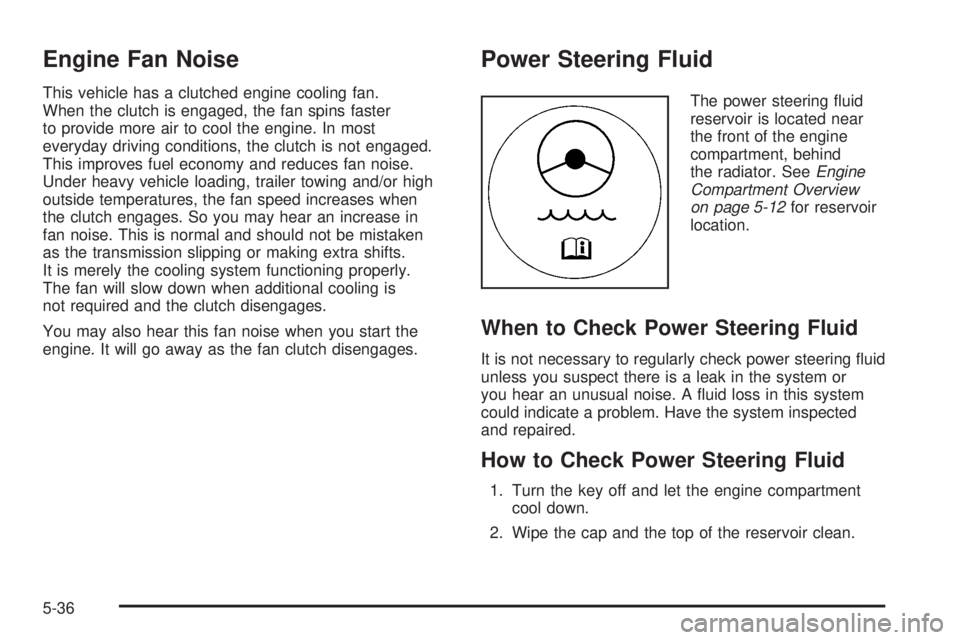
Power Steering Fluid
The power steering uid
reservoir is located near
the front of the engine
compartment, behind
the radiator. SeeEngine
Compartment Overview
on page 5-12for reservoir
location.
When to Check Power Steering Fluid
It is not necessary to regularly check power steering uid
unless you suspect there is a leak in the system or
you hear an unusual noise. A uid loss in this system
could indicate a problem. Have the system inspected
and repaired.
How to Check Power Steering Fluid
1. Turn the key off and let the engine compartment
cool down.
2. Wipe the cap and the top of the reservoir clean.
5-36
Page 328 of 428
One or more TPMS sensors are missing or
damaged. The DIC message and the TPMS
malfunction light should go off when the TPMS
sensors are installed and the sensor matching
process is performed successfully. See your
dealer/retailer for service.
Replacement tires or wheels do not match your
vehicle’s original equipment tires or wheels.
Tires and wheels other than those recommended
for your vehicle could prevent the TPMS from
functioning properly. SeeBuying New Tires
on page 5-72.
Operating electronic devices or being near facilities
using radio wave frequencies similar to the TPMS
could cause the TPMS sensors to malfunction.
If the TPMS is not functioning it cannot detect or
signal a low tire condition. See your dealer/retailer for
service if the TPMS malfunction light and DIC message
comes on and stays on.
TPMS Sensor Matching Process
Each TPMS sensor has a unique identication code.
Any time you replace one or more of the TPMS sensors
or rotate your vehicle’s tires, the identication codes
need to be matched to the new tire/wheel position.
The sensors are matched to the tire/wheel positions in
the following order: driver side front tire, passenger
side front tire, passenger side rear tire, and driver side
rear tire using a TPMS diagnostic tool. See your
dealer/retailer for service.
The TPMS sensors can also be matched to each
tire/wheel position by increasing or decreasing the tire’s
air pressure. If increasing the tire’s air pressure, do
not exceed the maximum ination pressure indicated on
the tire’s sidewall. To let air-pressure out of a tire you
can use the pointed end of the valve cap, a pencil-style
air pressure gage, or a key.
You have one minute to match the rst tire/wheel
position, and ve minutes overall, to match all four
tire/wheel positions. If it takes longer than one minute,
to match the rst tire and wheel, or more than
ve minutes to match all four tire and wheel positions,
the matching process stops and you need to start over.
5-68
Page 385 of 428
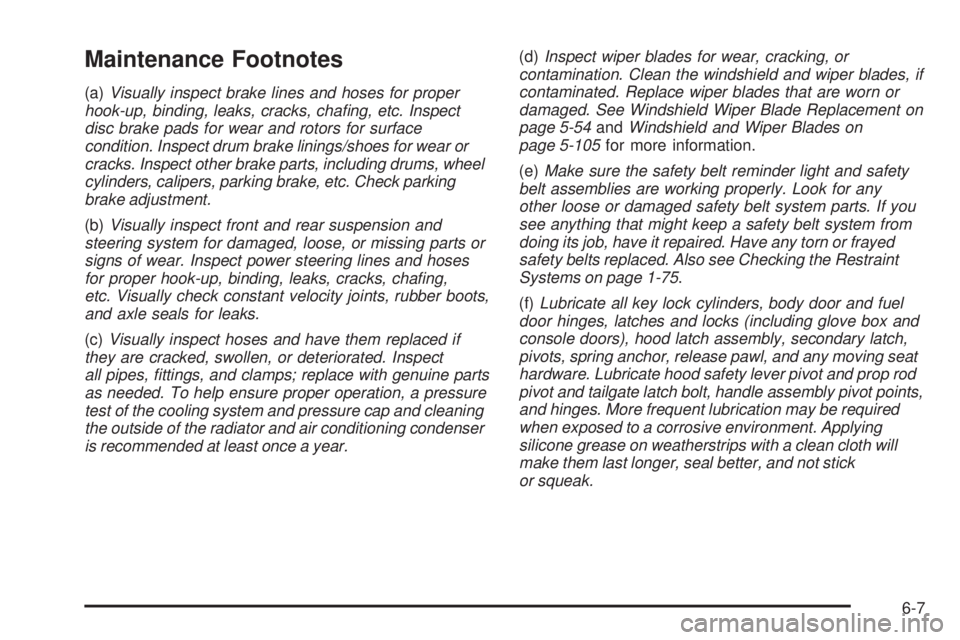
Maintenance Footnotes
(a)Visually inspect brake lines and hoses for proper
hook-up, binding, leaks, cracks, chafing, etc. Inspect
disc brake pads for wear and rotors for surface
condition. Inspect drum brake linings/shoes for wear or
cracks. Inspect other brake parts, including drums, wheel
cylinders, calipers, parking brake, etc. Check parking
brake adjustment.
(b)Visually inspect front and rear suspension and
steering system for damaged, loose, or missing parts or
signs of wear. Inspect power steering lines and hoses
for proper hook-up, binding, leaks, cracks, chafing,
etc. Visually check constant velocity joints, rubber boots,
and axle seals for leaks.
(c)Visually inspect hoses and have them replaced if
they are cracked, swollen, or deteriorated. Inspect
all pipes, fittings, and clamps; replace with genuine parts
as needed. To help ensure proper operation, a pressure
test of the cooling system and pressure cap and cleaning
the outside of the radiator and air conditioning condenser
is recommended at least once a year.(d)Inspect wiper blades for wear, cracking, or
contamination. Clean the windshield and wiper blades, if
contaminated. Replace wiper blades that are worn or
damaged. See Windshield Wiper Blade Replacement on
page 5-54andWindshield and Wiper Blades on
page 5-105for more information.
(e)Make sure the safety belt reminder light and safety
belt assemblies are working properly. Look for any
other loose or damaged safety belt system parts. If you
see anything that might keep a safety belt system from
doing its job, have it repaired. Have any torn or frayed
safety belts replaced. Also see Checking the Restraint
Systems on page 1-75.
(f)Lubricate all key lock cylinders, body door and fuel
door hinges, latches and locks (including glove box and
console doors), hood latch assembly, secondary latch,
pivots, spring anchor, release pawl, and any moving seat
hardware. Lubricate hood safety lever pivot and prop rod
pivot and tailgate latch bolt, handle assembly pivot points,
and hinges. More frequent lubrication may be required
when exposed to a corrosive environment. Applying
silicone grease on weatherstrips with a clean cloth will
make them last longer, seal better, and not stick
or squeak.
6-7
Page 389 of 428
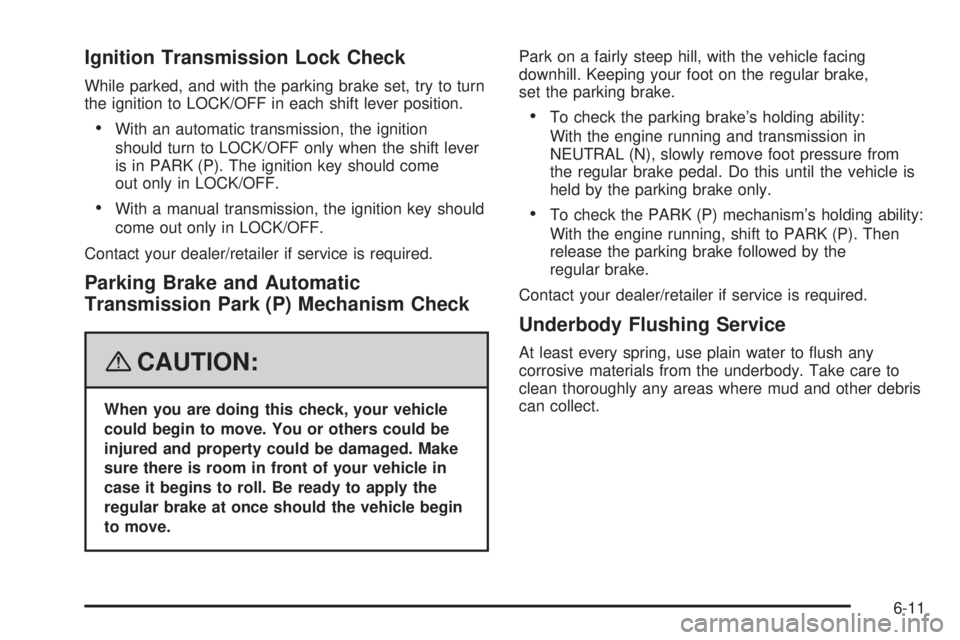
Ignition Transmission Lock Check
While parked, and with the parking brake set, try to turn
the ignition to LOCK/OFF in each shift lever position.
With an automatic transmission, the ignition
should turn to LOCK/OFF only when the shift lever
is in PARK (P). The ignition key should come
out only in LOCK/OFF.
With a manual transmission, the ignition key should
come out only in LOCK/OFF.
Contact your dealer/retailer if service is required.
Parking Brake and Automatic
Transmission Park (P) Mechanism Check
{CAUTION:
When you are doing this check, your vehicle
could begin to move. You or others could be
injured and property could be damaged. Make
sure there is room in front of your vehicle in
case it begins to roll. Be ready to apply the
regular brake at once should the vehicle begin
to move.Park on a fairly steep hill, with the vehicle facing
downhill. Keeping your foot on the regular brake,
set the parking brake.
To check the parking brake’s holding ability:
With the engine running and transmission in
NEUTRAL (N), slowly remove foot pressure from
the regular brake pedal. Do this until the vehicle is
held by the parking brake only.
To check the PARK (P) mechanism’s holding ability:
With the engine running, shift to PARK (P). Then
release the parking brake followed by the
regular brake.
Contact your dealer/retailer if service is required.
Underbody Flushing Service
At least every spring, use plain water to ush any
corrosive materials from the underbody. Take care to
clean thoroughly any areas where mud and other debris
can collect.
6-11