lock GMC CANYON 2008 Workshop Manual
[x] Cancel search | Manufacturer: GMC, Model Year: 2008, Model line: CANYON, Model: GMC CANYON 2008Pages: 428, PDF Size: 5.82 MB
Page 150 of 428
Electric Power Management
The vehicle has Electric Power Management (EPM)
that estimates the battery’s temperature and state
of charge. It then adjusts the voltage for best
performance and extended life of the battery.
When the battery’s state of charge is low, the voltage is
raised slightly to quickly put the charge back in. When
the state of charge is high, the voltage is lowered slightly
to prevent overcharging. If the vehicle has a voltmeter
gage, you may see the voltage move up or down. This is
normal. If there is a problem, an alert will be displayed.
The battery can be discharged at idle if the electrical
loads are very high. This is true for all vehicles.
This is because the generator (alternator) may not
be spinning fast enough at idle to produce all the
power that is needed for very high electrical loads.
A high electrical load occurs when several of the
following loads are on: headlamps, high beams, fog
lamps, rear window defogger, climate control fan at
high speed, heated seats, engine cooling fans, trailer
loads, and loads plugged into accessory power outlets.
Battery Run-Down Protection
This feature shuts off the dome lamp if it is left on for
more than 20 minutes when the ignition is in LOCK.
This will help prevent your battery from running down.
Accessory Power Outlet(s)
The accessory power outlets can be used to connect
electrical equipment such as a cellular phone or
CB radio.
Your vehicle may have two accessory power outlets
located on the lower part of the instrument panel below
the climate control system and there may be one located
on the rear of the center console. A small cap must be
pulled down to access an accessory power outlet.
When not using an outlet be sure to cover it with the
protective cap.
Notice:Leaving electrical equipment on for
extended periods will drain the battery. Always
unplug electrical equipment when not in use and do
not plug in equipment that exceeds the maximum
amperage rating of 20 amperes.
3-18
Page 152 of 428
Climate Controls
Climate Control System
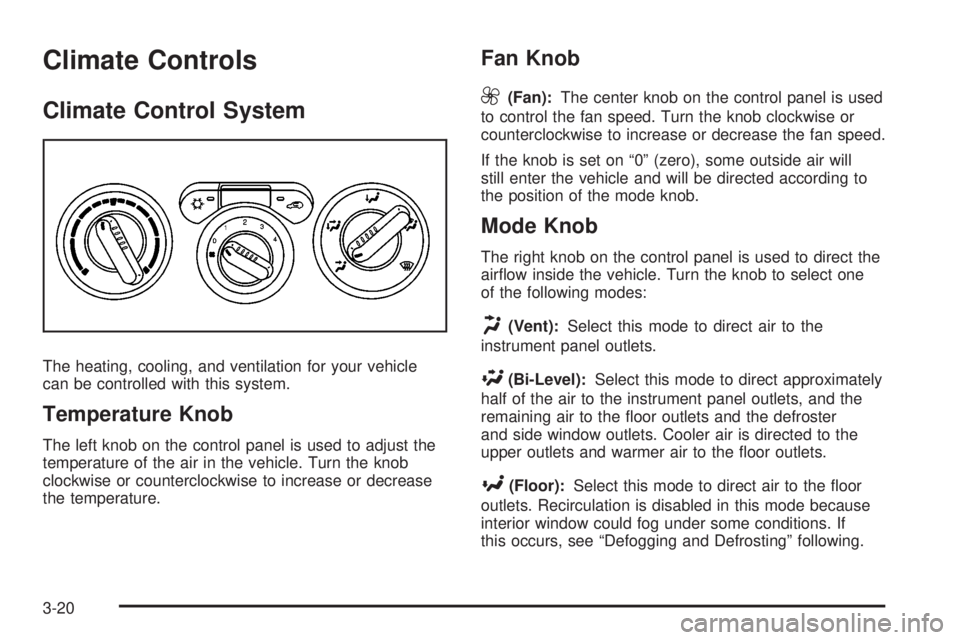
The heating, cooling, and ventilation for your vehicle
can be controlled with this system.
Temperature Knob
The left knob on the control panel is used to adjust the
temperature of the air in the vehicle. Turn the knob
clockwise or counterclockwise to increase or decrease
the temperature.
Fan Knob
9
(Fan):The center knob on the control panel is used
to control the fan speed. Turn the knob clockwise or
counterclockwise to increase or decrease the fan speed.
If the knob is set on “0” (zero), some outside air will
still enter the vehicle and will be directed according to
the position of the mode knob.
Mode Knob
The right knob on the control panel is used to direct the
airow inside the vehicle. Turn the knob to select one
of the following modes:
H(Vent):Select this mode to direct air to the
instrument panel outlets.
\(Bi-Level):Select this mode to direct approximately
half of the air to the instrument panel outlets, and the
remaining air to the oor outlets and the defroster
and side window outlets. Cooler air is directed to the
upper outlets and warmer air to the oor outlets.
[(Floor):Select this mode to direct air to the oor
outlets. Recirculation is disabled in this mode because
interior window could fog under some conditions. If
this occurs, see “Defogging and Defrosting” following.
3-20
Page 154 of 428
Defogging and Defrosting
Fog on the inside of windows is a result of high humidity
(moisture) condensing on the cool window glass. This
can be minimized if the climate control system is used
properly. There are two modes to clear fog or frost from
the windshield and side windows. Use the defog mode
to clear the windows of fog or moisture and warm the
passengers. Use the defrost mode to remove fog or frost
from the windshield more quickly. For best results, clear
all snow and ice from the windshield before defrosting.
Turn the mode knob on the climate control panel
clockwise to select the defog or defrost modes.
/(Floor/Defog):This mode directs the air to
the windshield, the side window outlets, and to the
oor outlets. When this mode is selected, the system
runs the air conditioning compressor unless the outside
temperature is near freezing or below. Recirculation
is not available in this mode.
0(Defrost):This mode directs most of the air to
the windshield, and the side window outlets. When this
mode is selected, the system runs the air conditioning
compressor unless the outside temperature is near,
or below freezing. Recirculation is not available in
this mode.
Do not drive the vehicle until all the windows are clear.
Outlet Adjustment
Use the thumbwheel on the outlets to change the
direction of the air ow.
Lift up or push down on the thumbwheel located in
the center of the outlet to direct the air up or down,
or slide the thumbwheel to the left or right to direct
the airow from side-to-side.
Operation Tips
Clear away any ice, snow or leaves from the air
inlets at the base of the windshield that may
block the ow of air into your vehicle.
Use of non-GM approved hood deectors may
adversely affect the performance of the system.
Keep the path under the front seats clear of objects
to help circulate the air inside of your vehicle more
effectively.
3-22
Page 164 of 428
Antilock Brake System Warning
Light
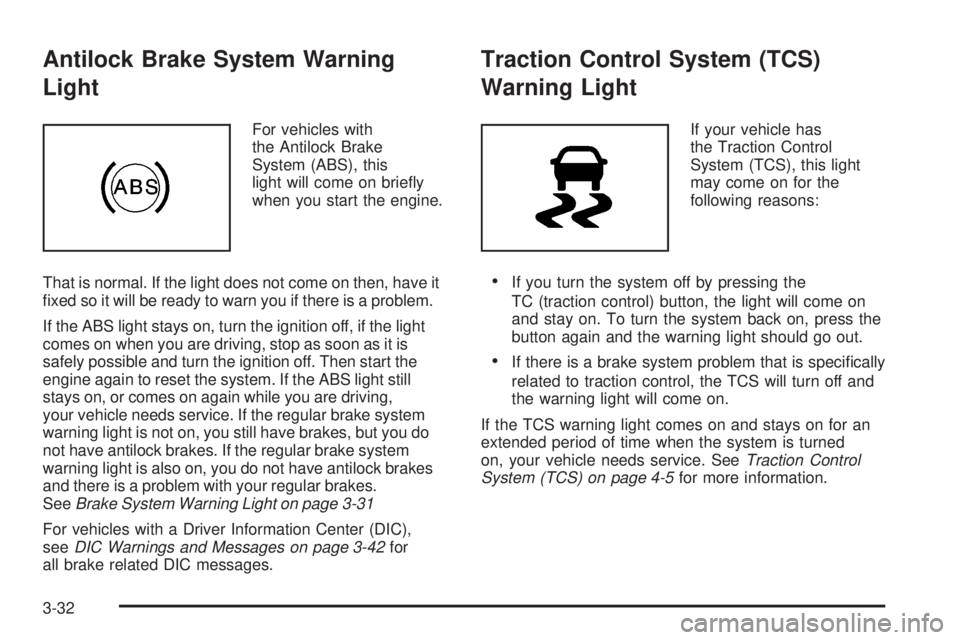
For vehicles with
the Antilock Brake
System (ABS), this
light will come on briey
when you start the engine.
That is normal. If the light does not come on then, have it
xed so it will be ready to warn you if there is a problem.
If the ABS light stays on, turn the ignition off, if the light
comes on when you are driving, stop as soon as it is
safely possible and turn the ignition off. Then start the
engine again to reset the system. If the ABS light still
stays on, or comes on again while you are driving,
your vehicle needs service. If the regular brake system
warning light is not on, you still have brakes, but you do
not have antilock brakes. If the regular brake system
warning light is also on, you do not have antilock brakes
and there is a problem with your regular brakes.
SeeBrake System Warning Light on page 3-31
For vehicles with a Driver Information Center (DIC),
seeDIC Warnings and Messages on page 3-42for
all brake related DIC messages.
Traction Control System (TCS)
Warning Light
If your vehicle has
the Traction Control
System (TCS), this light
may come on for the
following reasons:
If you turn the system off by pressing the
TC (traction control) button, the light will come on
and stay on. To turn the system back on, press the
button again and the warning light should go out.
If there is a brake system problem that is specically
related to traction control, the TCS will turn off and
the warning light will come on.
If the TCS warning light comes on and stays on for an
extended period of time when the system is turned
on, your vehicle needs service. SeeTraction Control
System (TCS) on page 4-5for more information.
3-32
Page 172 of 428
Automatic Door Locks
This feature allows you to program the door locks to a
preferred setting.
To set your choice for this feature:
1. With the engine off, turn the key to LOCK/OFF.
Do not remove the key from the ignition.
2. Press and hold the power door lock button until the
DIC display shows the current door lock mode.
3. To view the next available mode, press and hold
the reset stem until the mode appears. Release
the reset stem and press and hold again to view
the next mode.
4. Once the desired mode is shown on the
DIC display, briey press the reset stem to
set your choice. The DIC display then clears.
The following are the available modes:
Lock 1 (default):On vehicles with an automatic
transmission, this mode locks all of the doors when the
vehicle is shifted out of PARK (P) and unlocks all of
the doors when the vehicle is shifted into PARK (P).On vehicles with a manual transmission, this mode
locks all of the doors when the vehicle speed is greater
than 15 mph (24 km/h) and unlocks all of the doors
when the key is removed from the ignition.
Lock 2:On vehicles with an automatic transmission,
this mode locks all of the doors when the vehicle
is shifted out of PARK (P) and unlocks the driver’s
door when the vehicle is shifted into PARK (P).
On vehicles with a manual transmission, this mode
locks all of the doors when the vehicle speed is greater
than 15 mph (24 km/h) and unlocks the driver’s door
when the key is removed from the ignition.
Lock 3:On vehicles with an automatic transmission,
this mode locks all of the doors when the vehicle
is shifted out of PARK (P). The doors will not
automatically unlock.
On vehicles with a manual transmission, this mode
locks all of the doors when the vehicle speed is greater
than 15 mph (24 km/h). The doors will not automatically
unlock.
3-40
Page 173 of 428
Remote Keyless Entry (RKE) Feedback
This feature allows you to program the Remote
Keyless Entry (RKE) feedback to a preferred setting.
To set your choice for this feature:
1. With the engine off, turn the key to LOCK/OFF.
Do not remove the key from the ignition.
2. Press and hold the lock and unlock buttons on
the RKE transmitter at the same time. Hold both
buttons until the DIC display shows the current RKE
feedback mode.
3. To view the next available mode, press and hold
the reset stem until the mode appears. Release
the reset stem and press and hold again to view
the next mode.
4. Once the desired mode is shown on the DIC
display, briey press the reset stem to set your
choice. The DIC display then clears.The following are the available modes:
RFA 1 (default):This mode ashes the parking lamps
when you press the lock or unlock buttons on the
RKE transmitter.
RFA 2:This mode ashes the parking lamps and
sounds the horn when you press the lock button on the
RKE transmitter. This mode also ashes the parking
lamps when you press the unlock button on the
RKE transmitter.
RFA 3:This mode ashes the parking lamps and
sounds the horn when you press the lock or unlock
buttons on the RKE transmitter.
RFA 4:This mode disables RKE feedback. There will
be no feedback when you press the lock or unlock
buttons on the RKE transmitter.
3-41
Page 174 of 428
DIC Warnings and Messages
Messages are displayed on the DIC to notify the
driver that the status of the vehicle has changed
and that some action may be needed by the driver
to correct the condition. Multiple messages may appear
one after another. The messages are displayed for
several seconds each.
Some messages may not require immediate action, but
you should press and release the trip odometer reset
stem to acknowledge that you received the messages
and to clear them from the display. Each message must
be acknowledged individually.
Some messages cannot be cleared from the DIC
display because they are more urgent. These messages
require action before they can be cleared. You should
take any messages that appear on the display seriously
and remember that clearing the messages only makes
the messages disappear, not correct the problem.
The following are the possible messages that can be
displayed and some information about them.
AC (Air Conditioning) OFF
This message displays when the engine coolant
temperature is too high and the air conditioning in your
vehicle needs to be turned off. SeeEngine Overheating
on page 5-29andClimate Control System on page 3-20
for more information. This message displays along with
the ENG HOT message.
ABS (Antilock Brake System) FAULT
This message displays if there is a problem with the
Antilock Brake System (ABS). Check the ABS as soon as
possible and have your vehicle serviced by your dealer/
retailer. SeeBrakes on page 5-38andAntilock Brake
System Warning Light on page 3-32for more information.
Press and release the reset stem to acknowledge the
message and clear it from the display.
BRAKES
This message displays if there is a problem with the
brakes. Check the brakes as soon as possible and have
your vehicle serviced by your dealer/retailer. SeeBrakes
on page 5-38andBrake System Warning Light on
page 3-31for more information. Press and release the
reset stem to acknowledge the message and clear it from
the display.
CHANGE OIL
This message displays when the oil needs to be
changed. Check the oil in your vehicle as soon as
possible and have your vehicle serviced by your dealer/
retailer. SeeEngine Oil on page 5-15andScheduled
Maintenance on page 6-4for more information. Press
and release the reset stem to acknowledge the message
and clear it from the display.
3-42
Page 179 of 428
Notice:The chime signals related to safety belts,
parking brake, and other functions of your vehicle
operate through the radio/entertainment system.
If that equipment is replaced or additional equipment
is added to your vehicle, the chimes may not
work. Make sure that replacement or additional
equipment is compatible with your vehicle before
installing it. SeeAccessories and Modifications
on page 5-3.
Setting the Time
Radios without Radio Data
Systems (RDS)
Press and hold HR (hour) until the correct hour displays.
Press and hold MIN (minute) until the correct minute
displays. There is an initial two-second delay before the
clock goes into time-set mode. Display the time with
the ignition off, by pressing RCL (recall), HR, or MIN.
Radios with Radio Data Systems (RDS)
The radio could have a button marked with an H or
HR to represent hours and an M or MN to represent
minutes.
Press and hold the hour button until the correct
hour displays. Press and hold the minute button until
the correct minute displays. The time can be set with
the ignition on or off.
To synchronize the time with an FM station broadcasting
Radio Data System (RDS) information, press and hold
the hour and minute buttons at the same time until RDS
TIME displays. To accept this time, press and hold the
hour and minute buttons, at the same time, for another
two seconds. If the time is not available from the station,
NO UPDAT (update) displays.
RDS time is broadcast once a minute. After tuning to
an RDS broadcast station, it could take a few minutes
for the time to update.
3-47
Page 188 of 428
Once the complete message has displayed, the
information symbol or INFO disappears from the display
until another new message is received. The last message
can be displayed by pressing the INFO button. The last
message stays on the display until a new message is
received or the radio is tuned to a different station.
When a message is not available from a station,
NO INFO displays.
TRAF (Traffic):For the Radio with CD, if TRAF displays,
the tuned station broadcasts traffic announcements.
When a traffic announcement is broadcast on this
station you will hear it.
If the station does not broadcast traffic announcements,
press the TRAF button and the radio seeks to a station
that does. When a station that broadcasts traffic
announcements is found, the radio stops seeking and
TRAF displays. If no station is found that broadcasts
traffic announcements, NO TRAF displays.
If TRAF displays, press the TRAF button to turn off the
traffic announcements.
The radio plays the traffic announcement if the volume is
low. The radio interrupts the play of a CD if the last tuned
station broadcasts traffic announcements.
This function does not apply to XM™ Satellite Radio
Service.Radio Messages
CAL ERR or CAL (Calibration Error):The audio
system has been calibrated for your vehicle from the
factory. If CAL or CAL ERR displays it means that
the radio has not been congured properly for your
vehicle and it must be returned to your dealer/retailer
for service.
LOC or LOCKED:This message displays when the
THEFTLOCK
®system has locked up. Take your vehicle
to your dealer/retailer for service.
If any error occurs repeatedly or if an error cannot be
corrected, contact your dealer/retailer.
XM™ Satellite Radio Service
XM™ is a satellite radio service that is based in the
48 contiguous United States and 10 Canadian provinces.
XM™ Satellite Radio has a wide variety of programming
and commercial-free music, coast-to-coast, and in
digital-quality sound. During your trial or when you
subscribe, you will get unlimited access to XM™ Radio
Online for when you are not in your vehicle. A service
fee is required to receive the XM™ service. For more
information, contact XM™ at www.xmradio.com or call
1-800-929-2100 in the U.S. and www.xmradio.ca or call
1-877-438-9677 in Canada.
3-56
Page 200 of 428
CD AUX (Auxiliary):Press this button to play a CD
when listening to the radio. The CD symbol illuminates
on the display when a CD is loaded.
Z(Eject):Press this button to eject a CD. Eject
can activate while either the ignition or radio is off.
CDs can be loaded with the ignition and radio off if
this button is pressed rst.
XM Radio Messages
XL (Explicit Language Channels):These channels,
or any others, can be blocked at a customer’s request,
by calling 1-800-852-XMXM (9696).
Updating:The encryption code in the receiver is
being updated, and no action is required. This process
should take no longer than 30 seconds.
No Signl:The system is functioning correctly, but
the vehicle is in a location that is blocking the XM™
signal. When the vehicle is moved into an open area,
the signal should return.
Loading:The radio system is acquiring and processing
audio and text data. No action is needed. This message
should disappear shortly.
Off Air:This channel is not currently in service.
Tune to another channel.CH Unavl:This previously assigned channel is no
longer assigned. Tune to another station. If this station
was one of the presets, choose another station for
that preset button.
No Info:No artist, song title, category, or text
information is available at this time on this channel.
The system is working properly.
No Info:No text or informational messages are
available at this time on this channel. The system
is working properly.
NotFound:There are no channels available for the
selected category. The system is working properly.
XM Lock:The XM™ receiver in your vehicle could
have previously been in another vehicle. For security
purposes, XM™ receivers cannot be swapped between
vehicles. If this message is received after having
your vehicle serviced, check with your dealer/retailer.
Radio ID:If this message is received when tuned
to channel 0, there could be a receiver fault. Consult
with your dealer/retailer.
Check XM:If this message does not clear within
a short period of time, the receiver could have a fault.
Consult with your dealer/retailer.
3-68