CD player GMC CANYON 2008 Owner's Manual
[x] Cancel search | Manufacturer: GMC, Model Year: 2008, Model line: CANYON, Model: GMC CANYON 2008Pages: 428, PDF Size: 5.82 MB
Page 178 of 428
Audio System(s)
Determine which radio your vehicle has and then read
the pages following to familiarize yourself with its
features.
{CAUTION:
This system provides you with far greater
access to audio stations and song listings.
Giving extended attention to entertainment
tasks while driving can cause a crash and you
or others can be injured or killed. Always keep
your eyes on the road and your mind on the
drive — avoid engaging in extended searching
while driving.
Keeping your mind on the drive is important for
safe driving. SeeDefensive Driving on page 4-2.
Here are some ways in which you can help avoid
distraction while driving.While your vehicle is parked:
Familiarize yourself with all of its controls.
Familiarize yourself with its operation.
Set up your audio system by presetting your
favorite radio stations, setting the tone, and
adjusting the speakers. Then, when driving
conditions permit, you can tune to your favorite
radio stations using the presets and steering
wheel controls if the vehicle has them.
Notice:Before adding any sound equipment to
your vehicle, such as an audio system, CD player,
CB radio, mobile telephone, or two-way radio, make
sure that it can be added by checking with your
dealer/retailer. Also, check federal rules covering
mobile radio and telephone units. If sound equipment
can be added, it is very important to do it properly.
Added sound equipment may interfere with the
operation of your vehicle’s engine, radio, or other
systems, and even damage them. Your vehicle’s
systems may interfere with the operation of sound
equipment that has been added.
3-46
Page 181 of 428
Radio Data System (RDS)
The audio system has a Radio Data System (RDS).
RDS features are available for use only on FM stations
that broadcast RDS information.With RDS, the radio can do the following:
Seek to stations broadcasting the selected type of
programming.
Receive announcements concerning local and
national emergencies.
Display messages from radio stations.
Seek to stations with traffic announcements.
This system relies upon receiving specic information
from these stations and only works when the information
is available. In rare cases, a radio station could broadcast
incorrect information that causes the radio features to
work improperly. If this happens, contact the radio station.
While the radio is tuned to an RDS station, the station
name or call letters display instead of the frequency.
RDS stations can also provide the time of day, a
program type (PTY) for current programming, and
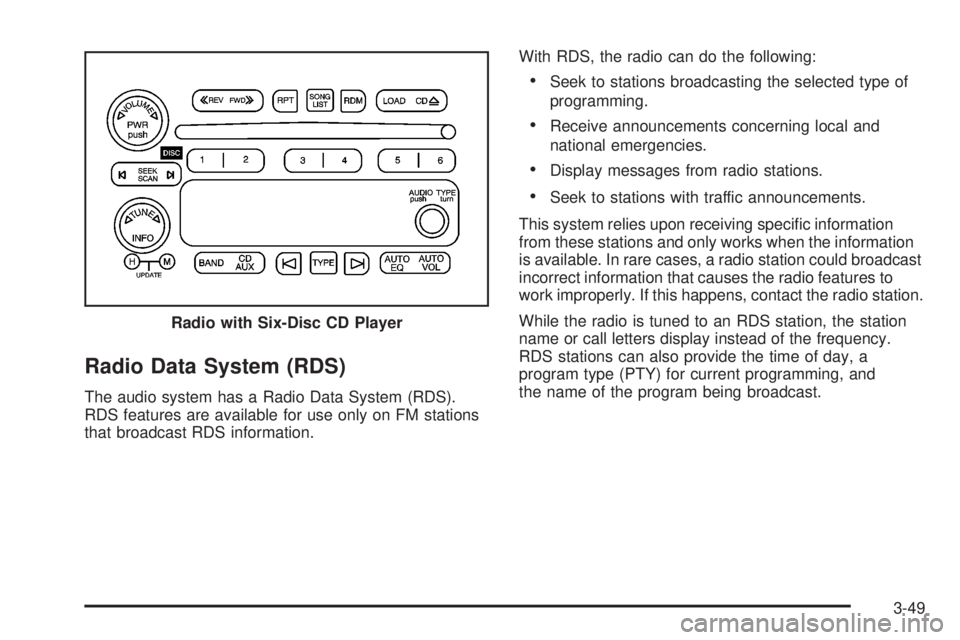
the name of the program being broadcast. Radio with Six-Disc CD Player
3-49
Page 183 of 428
Finding a Station
AM FM (AM-FM Radio):Press to switch between FM1,
FM2, or AM. The selection displays.
BAND:Press to switch between FM1, FM2, AM, or
XM1 or XM2 (if equipped). The selection displays.
opTUNE:Turn to select radio stations.
oSEEKp:Press the arrows to go to the previous
or to the next station and stay there.
To scan stations, press and hold either arrow for
two seconds until a beep sounds. The radio goes to
a station, plays for a few seconds, then goes to the
next station. Press either arrow again to stop scanning.
To scan preset stations, press and hold either arrow
for more than four seconds until two beeps sound.
The radio goes to the rst preset station stored on the
pushbuttons, plays for a few seconds, then goes to
the next preset station. Press either arrow again to
stop scanning presets.
qr/©¨SEEK:Press the SEEK or SEEK/TYPE
arrows to go to the previous or to the next station
and stay there.
qr/©¨SCAN:Press and hold either SCAN
arrow or SCAN/TYPE arrows for more than two seconds.
SCAN or SCN displays and the radio produces one beep.
The radio goes to a station, plays for a few seconds,
then goes to the next station. Press either SCAN arrow
or SCAN/TYPE arrows again, or for the Radio with
Six-Disc CD player, one of the pushbuttons to stop
scanning presets.
To scan preset stations, press and hold either SCAN
arrow or SCAN/TYPE arrows for more than four seconds.
PSCN or PSC displays and the radio produces one beep
or depending on the radio, two beeps. The radio goes to
a preset station, plays for a few seconds, then goes to the
next preset station. Press either SCAN arrow or SCAN/
TYPE arrows again, or for the Radio with CD, one of the
pushbuttons to stop scanning presets.
The radio only scans stations with a strong signal that are
in the selected band.
3-51
Page 186 of 428
Finding a Program Type (PTY)
Station (RDS and XM™)
To select and nd a desired PTY perform the following:
1. Press the P-TYPE or depending on the radio,
TYPE knob to activate program type select
mode. P-TYPE or TYPE and a PTY displays.
2. Turn the P-TYPE or TYPE knob again, to select
a PTY.
3. Once the desired PTY displays, press the SEEK
TYPE button or the SEEK/TYPE arrows to select
and to take you to the PTY’s rst station.
4. For the Radio with CD, go to another station within
that PTY by pressing the SEEK TYPE button twice
to display the PTY and then go to another station.
SCAN:For the Radio with Six-Disc CD player, scan the
stations within a PTY by performing the following:
1. Press the TYPE button to activate program type
select mode. P-TYPE and the last selected PTY
displays.
2. Turn the TYPE knob or press and release the
TYPE button to select a PTY.3. Once the desired PTY is displayed, press and hold
either the SEEK or TYPE arrows for two seconds,
and the radio begins scanning the stations in
the PTY.
4. Press either the SEEK or TYPE arrows to stop
scanning.
To cancel the seek, press the SEEK/TYPE button or
any of the SEEK or TYPE arrows. This also exits
the program type seek mode and returns to the last
tuned station.
For the Radio with CD, if both PTY and TRAF (traffic)
are on, the radio searches for stations with the selected
PTY and traffic announcements.
If the radio cannot nd the desired program type, NONE
displays and the radio returns to the last tuned station.
BAND (Alternate Frequency):Alternate frequency
lets the radio switch to a stronger station with the same
program type. To turn alternate frequency on, press and
hold BAND for two seconds. AF ON displays. The radio
could switch to stations with a stronger frequency.
To turn alternate frequency off, press and hold BAND
again for two seconds. AF OFF displays. The radio
does not switch to other stations.
This function does not apply for XM™ Satellite Radio
Service.
3-54
Page 187 of 428
Setting Preset PTYs (RDS Only)
For the Radio with Six-Disc CD player, the
six pushbuttons have factory PTY presets.
Up to 12 PTYs (six FM1 and six FM2), can be
programmed on the numbered pushbuttons, by
performing the following steps:
1. Press BAND to select FM1 or FM2.
2. Press the TYPE button to activate program type
select mode. P-TYPE and the last selected PTY
displays.
3. Turn the TYPE knob or press and release the
TYPE button to select a PTY.
4. Press and hold one of the six numbered
pushbuttons until a beep sounds. When that
numbered pushbutton is pressed, the PTY
that was set, returns.
5. Repeat the steps for each pushbutton.
RDS Messages
ALERT!:For the Radio with CD, the Alert feature
warns of local or national emergencies. When an alert
announcement comes on the current radio station,
ALERT! displays. You will hear the announcement,
even if the volume is low or a CD is playing. If a CD
is playing, play stops during the announcement.
Alert announcements cannot be turned off.
ALERT! is not affected by tests of the emergency
broadcast system. This feature is not supported by
all RDS stations.
INFO (Information):If the current station has a
message, the information symbol or INFO displays.
Press this button to see the message. The message
can display the artist, song title, call in phone
numbers, etc.
If the entire message is not displayed, parts of the
message displays every three seconds. To scroll through
the message, press and release the INFO button. A new
group of words display after every press of this button.
3-55
Page 189 of 428
Radio Messages for XM™ Only
SeeXM Radio Messages on page 3-68later in this
section for further detail.
Playing a CD (Radio with
Single CD Player)
Insert a CD partway into the slot, label side up.
The player pulls it in, and READING displays. The CD
should begin playing. If you want to insert a CD with
the ignition off, rst press the
Z(eject) button or the
DISPL knob.
If the ignition or radio is turned off with a CD in the
player it stays in the player. When the ignition or radio
is turned on, the CD starts to play where it stopped,
if it was the last selected audio source.
When the CD is inserted, the CD symbol displays. As
each new track starts to play, the track number displays.
The CD player can play the smaller 3 inch (8 cm)
single CDs with an adapter ring. Full-size CDs and
the smaller CDs are loaded in the same manner.
Care of Your CDs
If playing a CD-R, the sound quality can be reduced due
to CD-R quality, the method of recording, the quality of
the music that has been recorded, and the way the CD-R
has been handled. Handle them carefully. Store CD-R(s)
in their original cases or other protective cases and away
from direct sunlight and dust. The CD player scans the
bottom surface of the disc. If the surface of a CD is
damaged, such as cracked, broken, or scratched, the
CD does not play properly or not at all. Do not touch the
bottom side of a CD while handling it; this could damage
the surface. Pick up CDs by grasping the outer edges or
the edge of the hole and the outer edge.
If the surface of a CD is soiled, take a soft, lint free
cloth or dampen a clean, soft cloth in a mild, neutral
detergent solution mixed with water, and clean it.
Make sure the wiping process starts from the center
to the edge.
3-57
Page 190 of 428
Care of Your CD Player
Do not add any label to a CD, it could get caught in the
CD player. If a CD is recorded on a personal computer
and a description label is needed, try labeling the top
of the recorded CD with a marking pen.
The use of CD lens cleaners for CDs is not advised,
due to the risk of contaminating the lens of the CD optics
with lubricants internal to the CD player mechanism.
Notice:If a label is added to a CD, or more than one
CD is inserted into the slot at a time, or an attempt
is made to play scratched or damaged CDs, the CD
player could be damaged. While using the CD player,
use only CDs in good condition without any label,
load one CD at a time, and keep the CD player and
the loading slot free of foreign materials, liquids,
and debris.
If an error displays, see “CD Messages” later in
this section.
1 FLD
x(Previous):This button is inactive when
playing a CD.2 FLD
w(Next):This button is inactive when
playing a CD.
3 REV (Fast Reverse):Press and hold to reverse
quickly within a track. Press and hold for less than
two seconds to reverse at 10 times the normal playing
speed. Press and hold for more than two seconds
to reverse at 20 times the normal playing speed.
Release to play the passage. ET (elapsed time)
and the elapsed time of the track displays.
4 FWD (Fast Forward):Press and hold to advance
quickly within a track. Press and hold for less than
two seconds to advance at six times the normal playing
speed. Press and hold for more than two seconds to
advance at 17 times the normal playing speed. Release
to play the passage. ET and the elapsed time of the track
displays.
6 RDM (Random):Press to hear the tracks in random,
rather than sequential, order. RDM ON displays. RDM
and the track number displays when each track starts
to play. Press again to turn off random play. RDM OFF
displays.
3-58
Page 191 of 428
qSEEKr:Press the left arrow to go to the start of
the current or the previous track. Press the right arrow to
go to the start of the next track. Pressing either arrow for
more than two seconds scans the next tracks, playing
the rst eight seconds of each track until all of the tracks
have been previewed. Press either arrow again to stop
scanning and to play the track.
oTUNEp:Turning this knob fast tracks reverse or
advances through tracks. The track number displays
for each track.
DISPL (Display):Press to see how long the current
track has been playing. ET and the elapsed time of the
track displays. To change the default on the display (track
or elapsed time), press until you see the desired display,
then press and hold for two seconds. The radio produces
one beep. The selected display is now the default.
BAND:Press to listen to the radio when a CD is
playing. The inactive CD remains inside the radio for
future listening.
CD AUX (Auxiliary):Press to play a CD when listening
to the radio. The CD symbol displays when a CD is
loaded.
Z(Eject):Press to eject a CD. Eject can be activated
with either the ignition or radio off. CDs can be loaded
with the ignition and radio off if this button is pressed rst.
Playing a CD(s) (Radio with
Six-Disc CD Player)
LOAD:Press to load CDs into the CD player. This CD
player holds up to six CDs.
To insert one CD, do the following:
1. Turn the ignition on.
2. Press and release the LOAD button.
3. Wait for the indicator light, located to the right of the
slot, to turn green.
4. Load a CD. Insert the CD partway into the slot,
label side up. The player pulls the CD in.
To insert multiple CDs, do the following:
1. Turn the ignition on.
2. Press and hold the LOAD button for two seconds.
A beep sound and the indicator light, located to the
right of the slot, begins to ash and MULTI LOAD #
displays.
3. Once the light stops ashing and turns green,
INSERT CD # displays, load a CD. Insert
the CD partway into the slot, label side up.
The player pulls the CD in.
Once the CD is loaded, the indicator light begins
ashing again. Once the light stops ashing and
turns green, you can load another CD. The CD player
takes up to six CDs. Do not try to load more than six.
3-59
Page 192 of 428
To load more than one CD but less than six, complete
Steps 1 through 3. When nished loading CDs, press the
LOAD button to cancel the loading function. The radio
begins to play the last CD loaded.
If more than one CD has been loaded, a number for
each CD displays.
Playing a Specic Loaded CD
For every CD loaded, a number displays. To play a
specic CD, rst press the CD AUX button (if not already
in CD mode), then press the numbered pushbutton that
corresponds to the CD. A small bar appears under the
CD number that is playing and the track number displays.
CD
Z(Eject):Press to eject CD(s).
To eject the CD that is currently playing, press and
release this button.
To eject multiple CDs, do the following:
1. Press and hold the
Zbutton for ve seconds.
A beep sounds and the indicator light, located to
the right of the slot, begins to ash and EJECT ALL
displays.
2. Once the light stops ashing, REMOVE CD #
displays. The CD ejects and can be removed.
Once the CD is removed, the indicator light begins
ashing again and another CD ejects.
To stop ejecting the CDs, press the LOAD or the
eject button.If the CD is not removed, after 25 seconds, the CD
automatically pulls back into the player. If CD is pushed
back into the player, before the 25 second time period
is complete, the player senses an error and tries to eject
the CD several times before stopping.
Do not repeatedly press the CD eject button to eject a
CD after you have tried to push it in manually. The
player’s 25-second eject timer resets at each press of
eject, causing the player to not eject the CD until the
25-second time period has elapsed.
{REV (Fast Reverse):Press and hold to reverse
quickly within a track. You will hear sound at a reduced
volume. The elapsed time of the track displays.
Release to play the passage.
FWD
|(Fast Forward):Press and hold to advance
quickly within a track. You will hear sound at a reduced
volume. The elapsed time of the track displays.
Release to play the passage.
RPT (Repeat):With repeat, one track or an entire CD
can be repeated.
3-60
Page 193 of 428
To use repeat, do the following:
To repeat the track you are listening to, press
and release the RPT button. RPT displays.
Press again to turn off repeat play.
To repeat the CD you are listening to, press
and hold the RPT button for two seconds.
RPT displays. Press again to turn off repeat play.
RDM (Random):With the random setting, tracks
can be listened to in random, rather than sequential,
order, on one CD or on all of the CDs. To use random,
do one of the following:
To play the tracks on the CD you are listening to in
random order, press and release the RDM button.
RANDOM ONE displays. Press again to turn
off random play.
To play the tracks on all of the CDs that are loaded
in random order, press and hold RDM for more
than two seconds. A beep sounds and RANDOM
ALL displays. Press again to turn off random play.
AUTO EQ (Automatic Equalization):Press to
select the equalization setting while playing a CD.
The equalization is stored when a CD is played.
For more information on AUTO EQ, see “AUTO EQ”
listed previously in this section.
©SEEK¨:Press the left arrow to go to the start of
the current track (if more than 10 seconds have played),
or to go to the previous track (if less than 10 seconds
have played). Press the right arrow to go to the next
track. If either arrow is held or pressed more than once,
the player continues moving backward or forward through
the CD.
©SCAN¨:To scan one CD, press and hold either
arrow for more than two seconds until SCAN displays and
a beep sounds. The radio goes to the next track, plays for
10 seconds, then goes to the next track. Press either
arrow again, to stop scanning.
To scan all loaded CDs, press and hold either arrow for
more than four seconds until CD SCAN displays and a
beep sounds. Use this feature to listen to 10 seconds of
the rst track of each loaded CD. Press either arrow
again, to stop scanning.
INFO (Information):Press to see how long the current
track has been playing. To change the default on the
display, track or elapsed time, press until you see the
desired display, then press and hold until the radio beeps.
The selected display becomes the default.
BAND:Press to listen to the radio while a CD is
playing. The inactive CD(s) remains inside the radio
for future listening.
3-61