tire pressure reset GMC CANYON 2008 Owner's Manual
[x] Cancel search | Manufacturer: GMC, Model Year: 2008, Model line: CANYON, Model: GMC CANYON 2008Pages: 428, PDF Size: 5.82 MB
Page 175 of 428
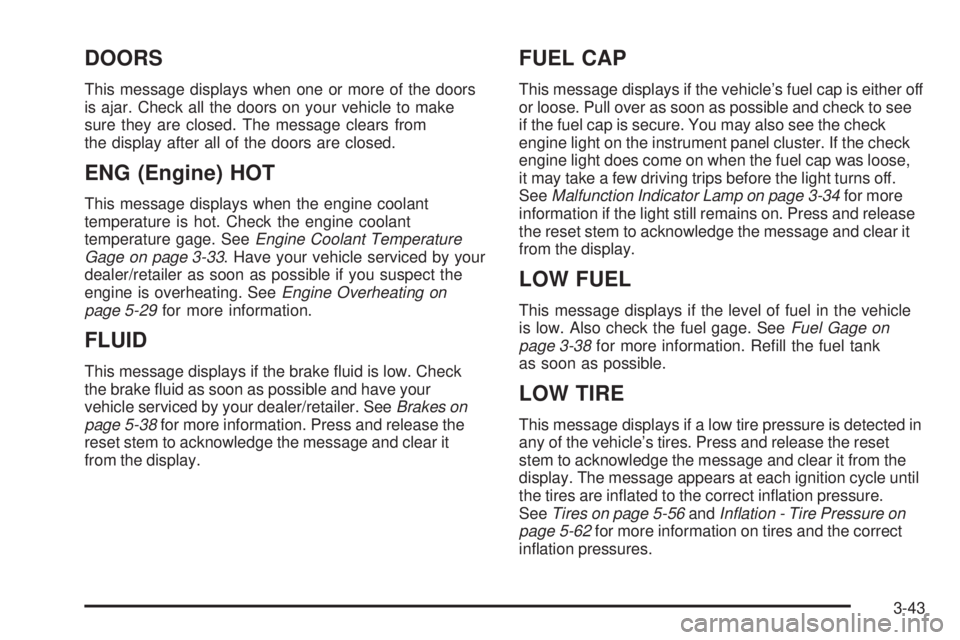
DOORS
This message displays when one or more of the doors
is ajar. Check all the doors on your vehicle to make
sure they are closed. The message clears from
the display after all of the doors are closed.
ENG (Engine) HOT
This message displays when the engine coolant
temperature is hot. Check the engine coolant
temperature gage. SeeEngine Coolant Temperature
Gage on page 3-33. Have your vehicle serviced by your
dealer/retailer as soon as possible if you suspect the
engine is overheating. SeeEngine Overheating on
page 5-29for more information.
FLUID
This message displays if the brake uid is low. Check
the brake uid as soon as possible and have your
vehicle serviced by your dealer/retailer. SeeBrakes on
page 5-38for more information. Press and release the
reset stem to acknowledge the message and clear it
from the display.
FUEL CAP
This message displays if the vehicle’s fuel cap is either off
or loose. Pull over as soon as possible and check to see
if the fuel cap is secure. You may also see the check
engine light on the instrument panel cluster. If the check
engine light does come on when the fuel cap was loose,
it may take a few driving trips before the light turns off.
SeeMalfunction Indicator Lamp on page 3-34for more
information if the light still remains on. Press and release
the reset stem to acknowledge the message and clear it
from the display.
LOW FUEL
This message displays if the level of fuel in the vehicle
is low. Also check the fuel gage. SeeFuel Gage on
page 3-38for more information. Rell the fuel tank
as soon as possible.
LOW TIRE
This message displays if a low tire pressure is detected in
any of the vehicle’s tires. Press and release the reset
stem to acknowledge the message and clear it from the
display. The message appears at each ignition cycle until
the tires are inated to the correct ination pressure.
SeeTires on page 5-56andInflation - Tire Pressure on
page 5-62for more information on tires and the correct
ination pressures.
3-43
Page 176 of 428
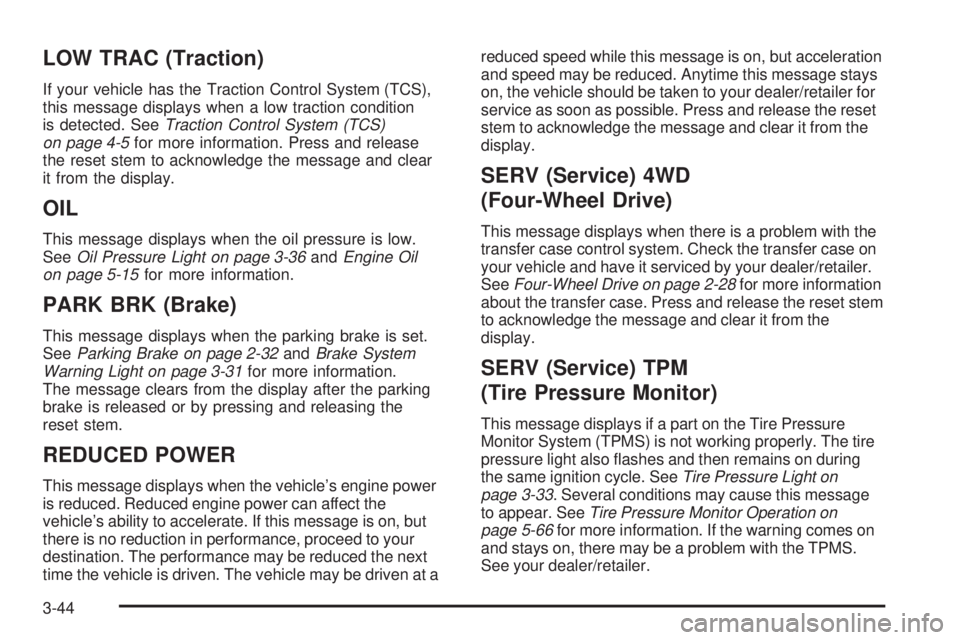
LOW TRAC (Traction)
If your vehicle has the Traction Control System (TCS),
this message displays when a low traction condition
is detected. SeeTraction Control System (TCS)
on page 4-5for more information. Press and release
the reset stem to acknowledge the message and clear
it from the display.
OIL
This message displays when the oil pressure is low.
SeeOil Pressure Light on page 3-36andEngine Oil
on page 5-15for more information.
PARK BRK (Brake)
This message displays when the parking brake is set.
SeeParking Brake on page 2-32andBrake System
Warning Light on page 3-31for more information.
The message clears from the display after the parking
brake is released or by pressing and releasing the
reset stem.
REDUCED POWER
This message displays when the vehicle’s engine power
is reduced. Reduced engine power can affect the
vehicle’s ability to accelerate. If this message is on, but
there is no reduction in performance, proceed to your
destination. The performance may be reduced the next
time the vehicle is driven. The vehicle may be driven at areduced speed while this message is on, but acceleration
and speed may be reduced. Anytime this message stays
on, the vehicle should be taken to your dealer/retailer for
service as soon as possible. Press and release the reset
stem to acknowledge the message and clear it from the
display.
SERV (Service) 4WD
(Four-Wheel Drive)
This message displays when there is a problem with the
transfer case control system. Check the transfer case on
your vehicle and have it serviced by your dealer/retailer.
SeeFour-Wheel Drive on page 2-28for more information
about the transfer case. Press and release the reset stem
to acknowledge the message and clear it from the
display.
SERV (Service) TPM
(Tire Pressure Monitor)
This message displays if a part on the Tire Pressure
Monitor System (TPMS) is not working properly. The tire
pressure light also ashes and then remains on during
the same ignition cycle. SeeTire Pressure Light on
page 3-33. Several conditions may cause this message
to appear. SeeTire Pressure Monitor Operation on
page 5-66for more information. If the warning comes on
and stays on, there may be a problem with the TPMS.
See your dealer/retailer.
3-44
Page 330 of 428
Tire Inspection and Rotation
We recommend that you regularly inspect your
vehicle’s tires, including the spare tire, for signs
of wear or damage. SeeWhen It Is Time for
New Tires on page 5-71for more information.
Tires should be rotated every 5,000 to 8,000 miles
(8 000 to 13 000 km). SeeScheduled Maintenance
on page 6-4.
The purpose of a regular tire rotation is to achieve
a uniform wear for all tires on the vehicle. This
will ensure that your vehicle continues to perform
most like it did when the tires were new.
Any time you notice unusual wear, rotate your
tires as soon as possible and check wheel
alignment. Also check for damaged tires or wheels.
SeeWhen It Is Time for New Tires on page 5-71
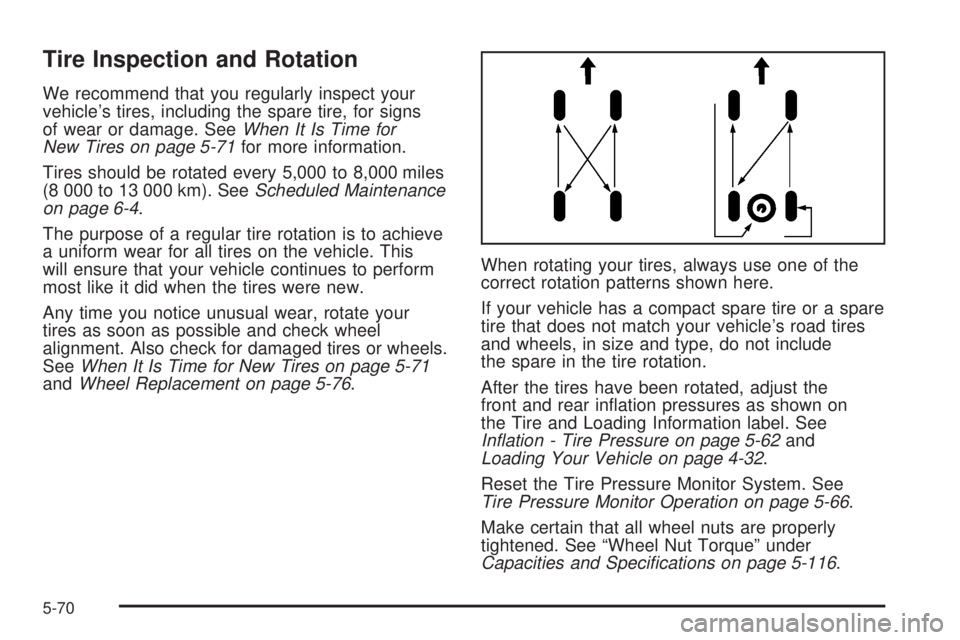
andWheel Replacement on page 5-76.When rotating your tires, always use one of the
correct rotation patterns shown here.
If your vehicle has a compact spare tire or a spare
tire that does not match your vehicle’s road tires
and wheels, in size and type, do not include
the spare in the tire rotation.
After the tires have been rotated, adjust the
front and rear ination pressures as shown on
the Tire and Loading Information label. See
Inflation - Tire Pressure on page 5-62and
Loading Your Vehicle on page 4-32.
Reset the Tire Pressure Monitor System. See
Tire Pressure Monitor Operation on page 5-66.
Make certain that all wheel nuts are properly
tightened. See “Wheel Nut Torque” under
Capacities and Specifications on page 5-116.
5-70
Page 383 of 428
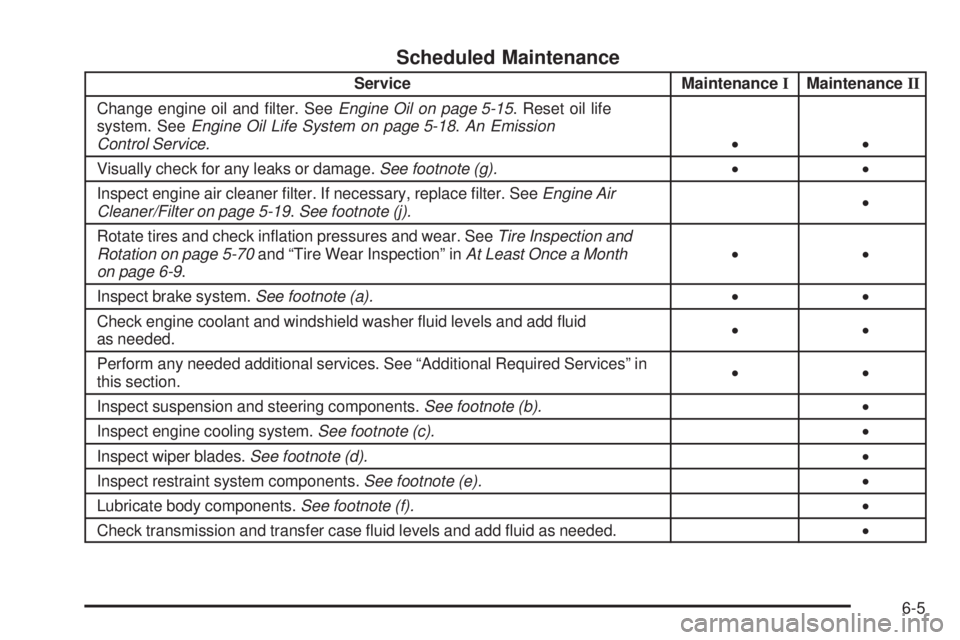
Scheduled Maintenance
Service MaintenanceIMaintenanceII
Change engine oil and lter. SeeEngine Oil on page 5-15. Reset oil life
system. SeeEngine Oil Life System on page 5-18.An Emission
Control Service.••
Visually check for any leaks or damage.See footnote (g).••
Inspect engine air cleaner lter. If necessary, replace lter. SeeEngine Air
Cleaner/Filter on page 5-19.See footnote (j).•
Rotate tires and check ination pressures and wear. SeeTire Inspection and
Rotation on page 5-70and “Tire Wear Inspection” inAt Least Once a Month
on page 6-9.••
Inspect brake system.See footnote (a).••
Check engine coolant and windshield washer uid levels and add uid
as needed.••
Perform any needed additional services. See “Additional Required Services” in
this section.••
Inspect suspension and steering components.See footnote (b).•
Inspect engine cooling system.See footnote (c).•
Inspect wiper blades.See footnote (d).•
Inspect restraint system components.See footnote (e).•
Lubricate body components.See footnote (f).•
Check transmission and transfer case uid levels and add uid as needed.•
6-5